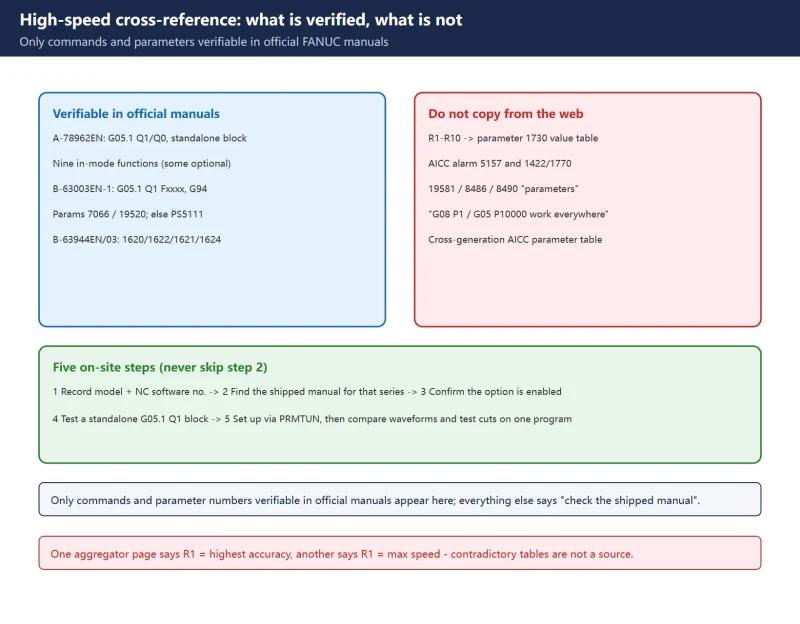



🚨 The most important note first: the “complete AICC parameter list”, the “
G05.1 Q1 R1-R10writes 8400…3756 into parameter 1730″ table, and “alarm 5157” circulating online come almost entirely from AI content farms and contradict each other (one page on the same site says R1 = highest accuracy, another says R1 = maximum speed). This page lists only commands and parameter numbers verifiable in official FANUC manuals; everything else is marked “check the machine’s own parameter manual”.
30-second check
1. Function names and commands
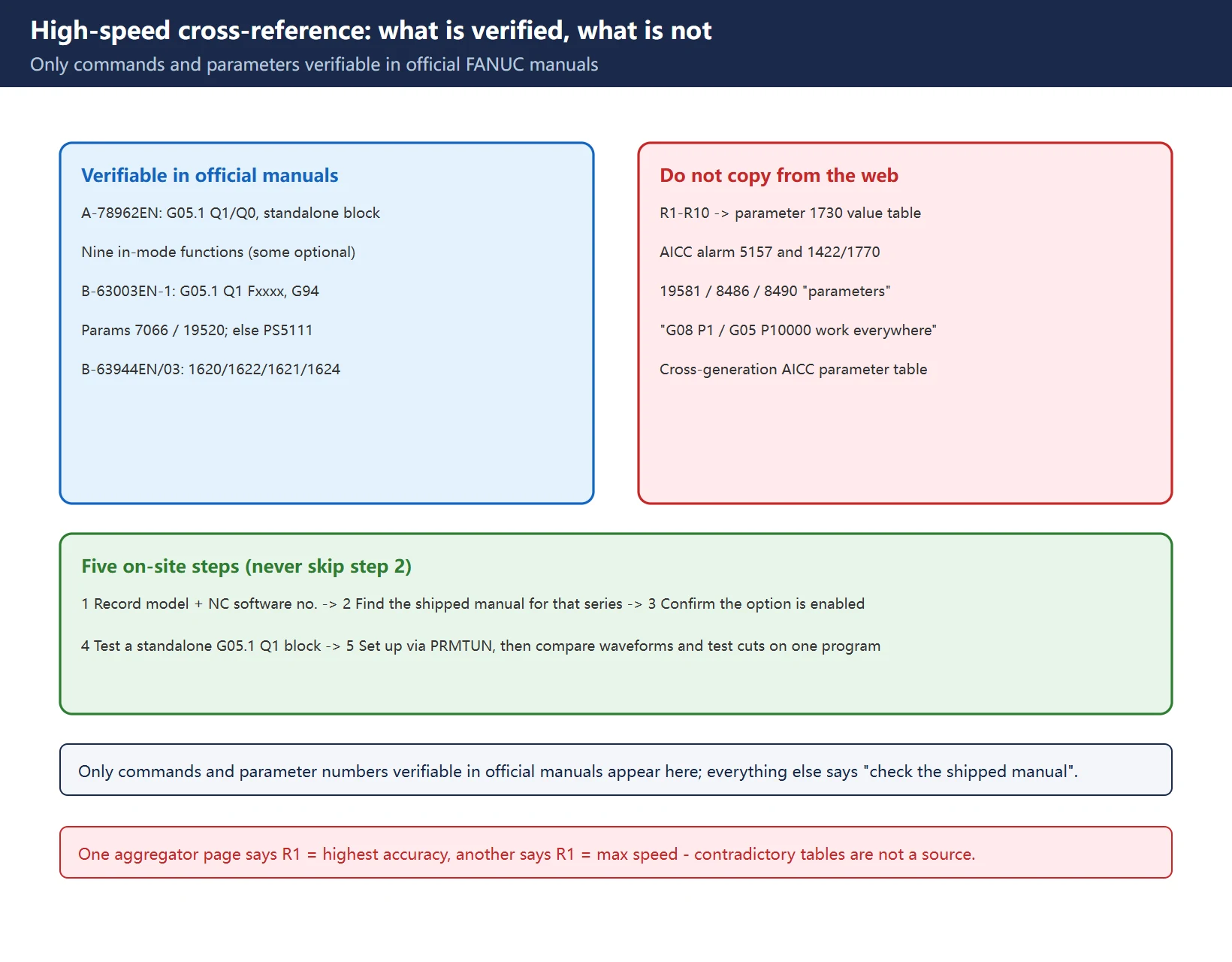
Table 1 Function names, commands and enable paths
| Function / name | Program syntax | Parameter / system side | Status |
|---|---|---|---|
| AICC (AI Contour Control) | G05.1 Q1 … G05.1 Q0 | SYSTEM -> right softkey x5 -> [PRMTUN] -> high-precision settings -> execute | Option |
| AI nanoCC (AI nano contour control) | G05.1 Q_ (Q1 on / Q0 off, standalone block) | Accel/decel reference speed parameter 7066 | Option, older 16i/18i/21i generation |
| AI-HPCC / AI-nanoHPCC | G05 P10000 / G05 P0 (older syntax) | Accel/decel reference speed parameter 19520 | Option, per manual series |
| General smoothing / look-ahead tuning | No dedicated G-code | 1620 / 1621 / 1622 / 1624 / 1610 / 1660 | Base parameters, not a function switch |
A shared label does not mean a shared function: AICC, AI nanoCC and AI-HPCC are different option packages in different manual generations, with different syntax and parameter numbers. Do not copy parameters between controls just because both are called “high-speed machining”.
2. Commands and enable bits: what the manuals actually confirm
Table 2 Command format and constraints stated in official manuals
| Item | Verifiable content | Source |
|---|---|---|
| On/off format | G05.1 Q_, Q1 enters AI nano contour control mode, Q0 exits; specify in a standalone block; mode is also cancelled by reset | A-78962EN |
| Functions inside the mode | Nano interpolation; look-ahead linear accel/decel before interpolation; look-ahead bell-shaped accel/decel (option); automatic corner deceleration; feedrate clamping by acceleration; feedrate clamping by arc radius; 1-block overlap; advanced preview feed forward; jerk control (option) | A-78962EN |
| Reference speed from the program | G05.1 Q1 F5000 / G05 P10000 Fxxxx sets the accel/decel reference speed with F; must be in G94, otherwise alarm PS5111 | B-63003EN-1 |
| Reference speed from a parameter | When the block has no F, parameter 7066 (AICC / AI nanoCC) or 19520 (AI-HPCC / AI-nanoHPCC) is used; the value must change if the input unit changes | B-63003EN-1 |
| Practical effect of reference speed | Changing F during machining does not change the reference speed set in the G05.1 block; a large mismatch lengthens cycle time -> keep the reference speed close to the real cutting feed | B-63003EN-1 |
| Base accel/decel parameters | 1620 / 1621 / 1622 / 1624 / 1610 #0 #1 / 1660, unit msec (1660 is acceleration), definitions per parameter manual | B-63944EN/03 |
Third-party “AI advanced preview control standard setting” tables commonly list
1604#0,1602#6/#3,1730/1735/1737/1769/1783with numeric defaults. This site could not verify those against a FANUC manual page, so no values are listed. Consult the machine’s own parameter manual before touching them.
3. Generation differences: how to check yours
Table 3 Manual series -> verifiable scope -> on-site confirmation
| Control family | Officially verifiable here | Not provided here |
|---|---|---|
| 16i / 18i / 21i / 20i / 160i / 180i / 210i-MODEL A | G05.1 Q_, G05 P10000 Fxxxx, 7066 / 19520, PS5111 (A-78962EN, B-63003EN-1) | Option-enable matrix per sub-model |
| 30i / 31i / 32i family (B-63944EN/03) | Definitions and units of the accel/decel time constants 1620/1621/1622/1624/1610/1660 | Specific high-speed option parameter numbers |
| 0i-D / 0i-F / 0i-MF Plus etc. | Generic G05.1 Q1/Q0 syntax and the PRMTUN entry | Do not assume the numbers match the two families above; no unverified model-specific numbers are listed |
On-site sequence:
- Record the control model and NC software number from the About / version screen;
- Locate the matching series parameter manual shipped with the machine (not a web summary) and read the “accel/decel before interpolation / high-precision contour control” chapter;
- Confirm in the option list or system screen that the function is actually enabled – if not, do not write it into the program;
- Test with a standalone
G05.1 Q1block and watch for an illegal-G-code alarm; - Set the parameter side via
PRMTUN, then compare waveforms and test cuts on the same right-angle / freeform program.
Read with the main guides *FANUC AICC / Nano Smoothing Setup* and *FANUC 1620 / 1622 Accel-Decel Tuning*: this page answers “what can I look up”, the guides answer “in what order do I tune”.
4. Why the circulating parameter lists cannot be copied
Table 4 Common claims and how this page handles them
| Claim | Problem | Handling |
|---|---|---|
“G05.1 Q1 R1-R10 writes 8400…3756 into parameter 1730“ | AI content farm; another page on the same site says R1 = highest accuracy while a third says R1 = max speed; the R word means different things across option packages | No mapping values |
“AICC alarm 5157 = parameters 1422/1432, 1770/1771, 1730 are zero” | Same source, no matching entry in official manuals | No alarm number |
“19581 / 8486 / 8490 are AICC parameters” | Fabricated by aggregators, no manual correspondence | Not listed |
“G08 P1 / G05 P10000 work on every control” | Syntax of older / specific option packages, spread as universal | Listed only as older-generation syntax per B-63003EN-1 |
| “One table covering AICC parameters of 0i-D / 0i-F / 31i” | No public official cross-generation compilation exists; manual series differ | Replaced with a “how to check” procedure |
If you cite this table, cite this caveat with it: its value is precisely in marking what is officially verifiable and what is not, instead of offering a complete-looking list that must not be copied.
Frequently Asked Questions
Are AICC parameter numbers the same on 0i-D and 0i-F?
Do not assume so. FANUC numbers parameters separately per manual series; verified here are only 7066 / 19520 for the 16i/18i/21i family (B-63003EN-1) and 1620/1621/1622/1624/1610/1660 for the 30i/31i/32i family (B-63944EN/03). For any 0i sub-series, use the shipped manual matching that machine’s NC software number. Cross-generation “complete AICC parameter tables” online contradict each other and should not be used as a reference.
Does G05.1 Q1 need enabling on the parameter side?
G05.1 Q1 is a mode switch, not a licence: the function itself is usually an option, so first confirm it in the option list, then complete the parameter-side setup via SYSTEM -> right softkey x5 -> [PRMTUN] -> high-precision settings -> execute. Without the option you cannot bypass it by editing parameters. The command must also be in a standalone block after the tool change, and RESET cancels the mode, so it must be written again before a second run.
How do I confirm whether an option-marked function is on my machine?
Four steps: record the control model and NC software number from the About screen; check the option/function list in the shipped manual; see whether the high-precision settings (PRMTUN) appear on the system screen; finally test a standalone G05.1 Q1 block and watch for an illegal-G-code alarm. Only after all four pass should you tune parameters. Never judge option presence by “change a few parameters and see what happens” – that is unreliable and can damage the existing parameter set.
Last updated: 2026-11-07
FANUC AICC / Nano Smoothing Setup
FANUC 1620 / 1622 Accel-Decel Tuning
FANUC Parameter Write Protect (PWE)
Where to go next
- FANUC Troubleshooting — the full guide library: alarms, diagnosis numbers, servo, spindle, PMC and electrical faults, organised by symptom.
- CNC Repair Tools — which instrument measures what: multimeters, clamp meters, insulation testers and oscilloscopes, with the specification that actually matters.
- Remote Technical Support — have the readings reviewed with you: alarm reverse lookup, PMC ladder analysis and servo tuning advice by call. Repair companies and integrators welcome.
Read the guide, get the right instrument, or walk the diagnosis through with someone — pick whichever you need.
The original Chinese version — same procedure, with the full field notes.





















暂无评论内容