


Short answer: nine times out of ten, PARAMETER WRITE (PWE) on the SETTING screen is 0, or you are not in MDI mode. And the widely repeated claim that 3210/3211 and 3202#4 NE9 are “parameter write protection” is wrong — they protect programs O9000–O9999.
Applies to common FANUC 0i / 30i / 31i operation. Softkey labels, alarm text (SW0100 vs P/S 0100) and parameter ranges vary by control generation, software version and builder customisation — always confirm against the machine’s own manuals. Never attempt to bypass builder-set passwords.
30-second check: which lock is stopping you
| Symptom | What is actually locked | Where to fix it |
|---|---|---|
| “WRITE PROTECT” when editing a parameter | PWE parameter write switch | MDI -> OFS/SET -> SETTING -> PARAMETER WRITE = 1 |
| SW0100 / P/S 0100 appears after enabling PWE | Status message, not a fault | Ignore it; set PWE back to 0 and press RESET |
| Cannot edit programs, offsets or settings | Memory protect key signals KEY1–KEY4 | Keyswitch / builder soft panel; PMCDGN -> STATUS |
| O9000–O9999 hidden and uneditable | 3202#4 NE9 plus 3210/3211 password | Enter the 3210 value into 3211, then clear NE9 |
| Every data edit refused on 0i-F / 30i | 8-level data protection (levels 0–7) | SYSTEM -> [+] -> [PROTECT], log in at the right level |
| Program transfer via RS232 / card refused | Data-input side protection | SETTING TVC / ISO, I/O channel, NE8/NE9 program range |
1. Four kinds of write blocked
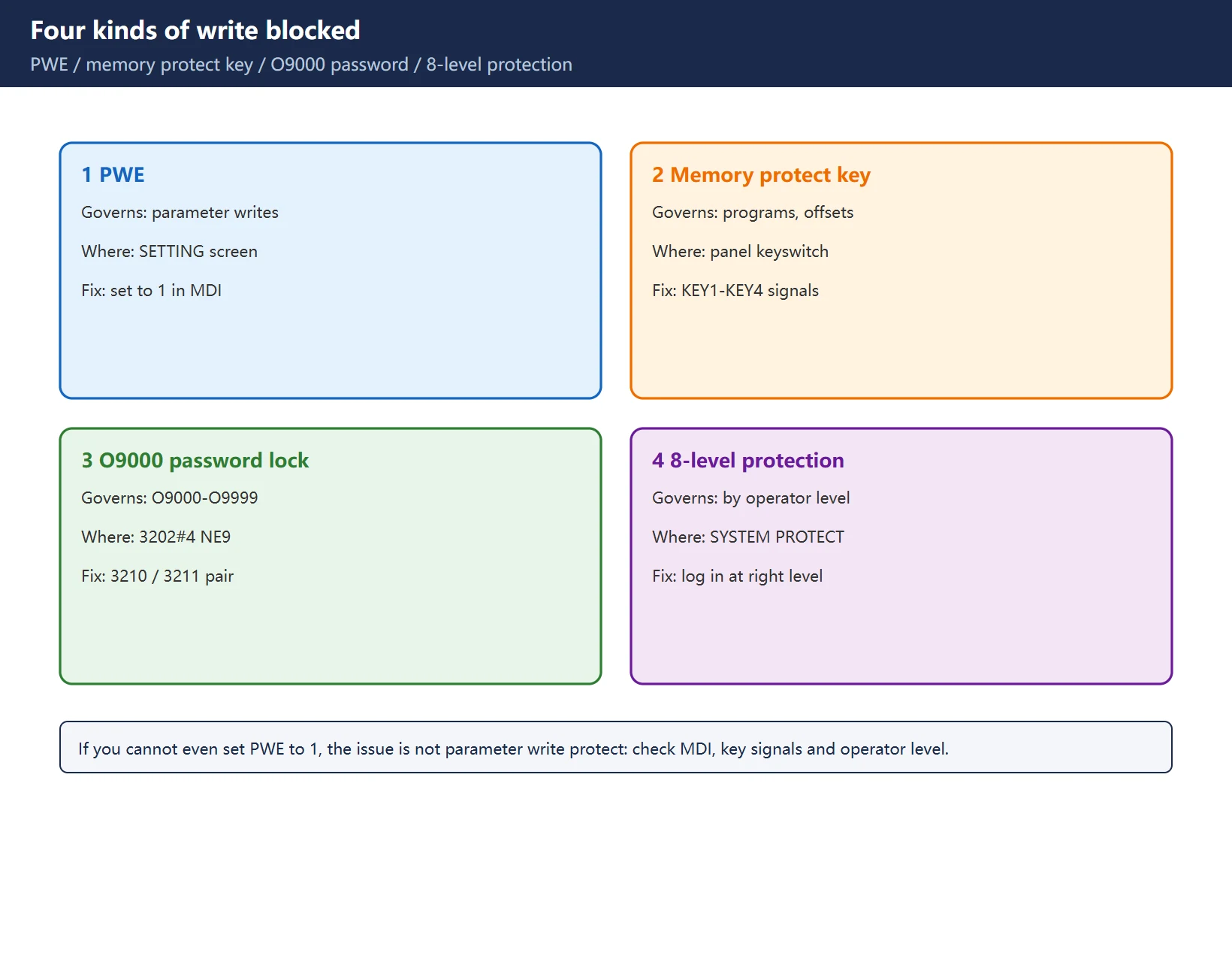
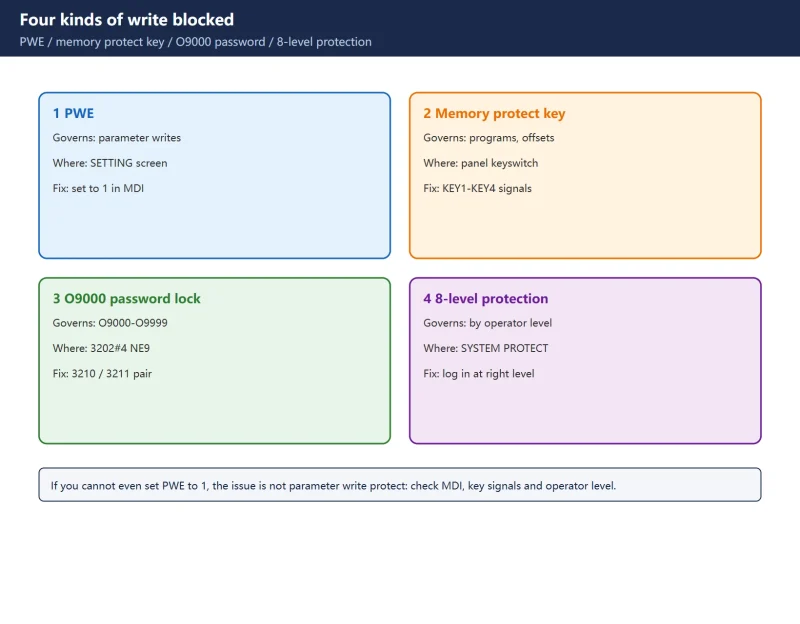
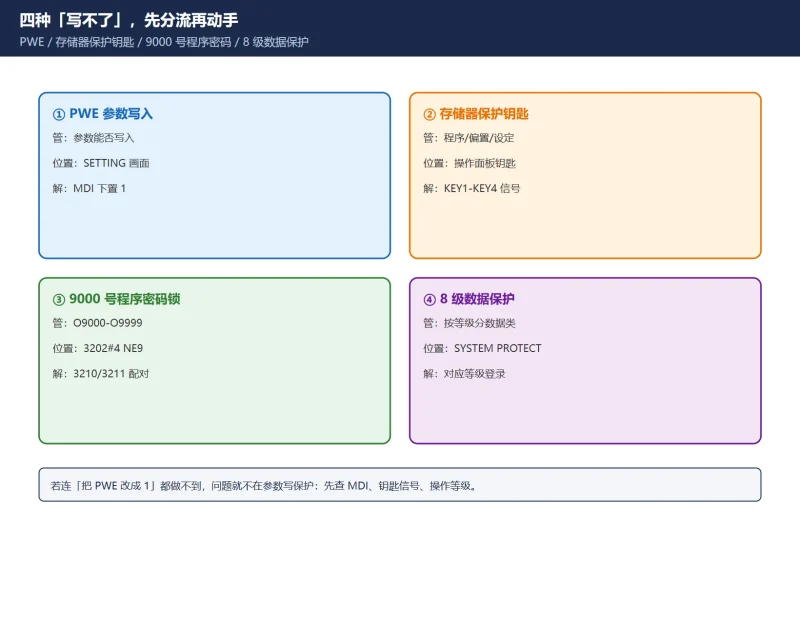
Use the table above to branch first. The four mechanisms protect completely different objects:
- PWE governs only whether parameters can be written — a switch on the SETTING screen.
- Memory protect key (KEY1–KEY4) is a builder-wired keyswitch or soft key covering programs, offsets, settings and macro variables.
- Program protection bits in 3202 plus the 3210/3211 password cover only specific program number ranges:
3202#0 NE8for O8000–O8999,3202#4 NE9for O9000–O9999. - 8-level data protection on newer 0i-F / 30i controls protects parameters, programs and offsets by operator level, and stacks on top of PWE.
A useful test: if you cannot even set PWE to 1, the problem is not parameter write protection. Check the mode selector (MDI), the memory protect keyswitch, and whether an operator level restriction is active.
2. Enabling PWE, and why MDI is required
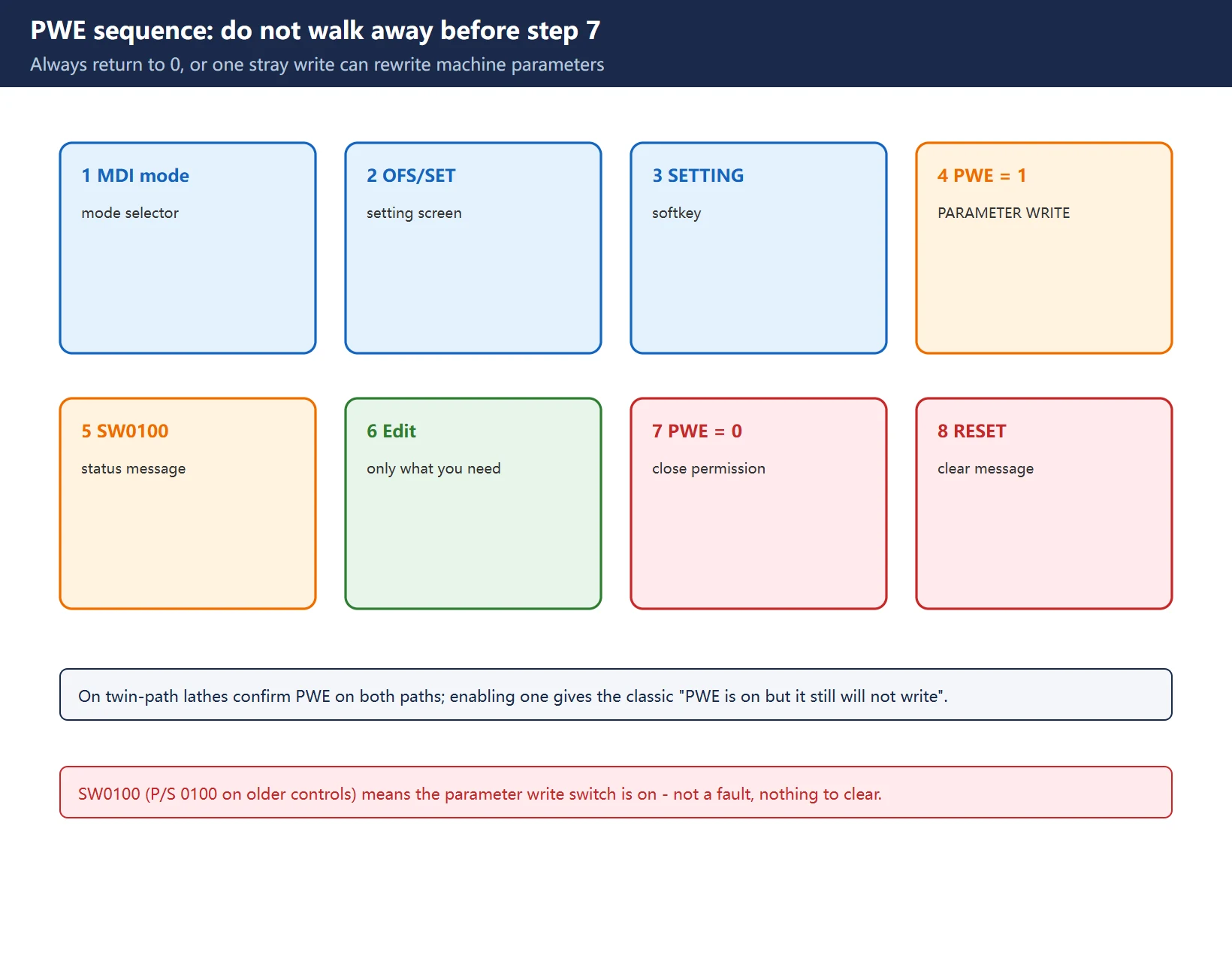
Standard sequence:
- Select MDI mode.
- Press
OFS/SET-> softkey[SETTING]. - Move the cursor to PARAMETER WRITE (sometimes shown as PWE) and set it to 1.
- The CNC raises SW0100 “Parameter write enable” (older controls show
P/S 0100/PS100). This is normal. - Edit the parameter you need.
- Set PARAMETER WRITE back to 0 and press
RESETto clear the message.
Two points that are easy to miss:
- PWE is a temporary write permission, not a permanent switch. Always return it to 0. Leaving PWE at 1 means one stray MDI entry, one parameter-bearing upload or one corrupted transfer can rewrite machine parameters — a far worse day than being unable to edit one.
- On twin-path (two-channel) lathes, confirm PWE on both paths. Enabling only one produces the classic “PWE is on but it still won’t write”.
If write protect persists after this, go back to the first table: suspect the memory protect key signal, an operator-level restriction, or a parameter that is genuinely read-only / belongs to an option that is not licensed. Do not keep retrying a forced write — confirm the specification first.
3. SW0100 is a status message, not a fault
SW0100 (FANUC 30i/31i manuals; the 0i-PC manual calls it P/S alarm No.100) means “PARAMETER WRITE ENABLE” — the parameter write switch is on. It is not a hardware failure, not corrupted memory, and requires no “fault clearing”. Set PWE back to 0 and press RESET, and it disappears.
The real risk is the opposite: PWE left on with nobody knowing. If you find SW0100 on the screen at shift handover, ask who changed which parameter, whether PWE was returned to 0, and whether a parameter backup exists — before reaching for RESET.
4. The correction: 3210/3211 and NE9 lock programs, not parameters
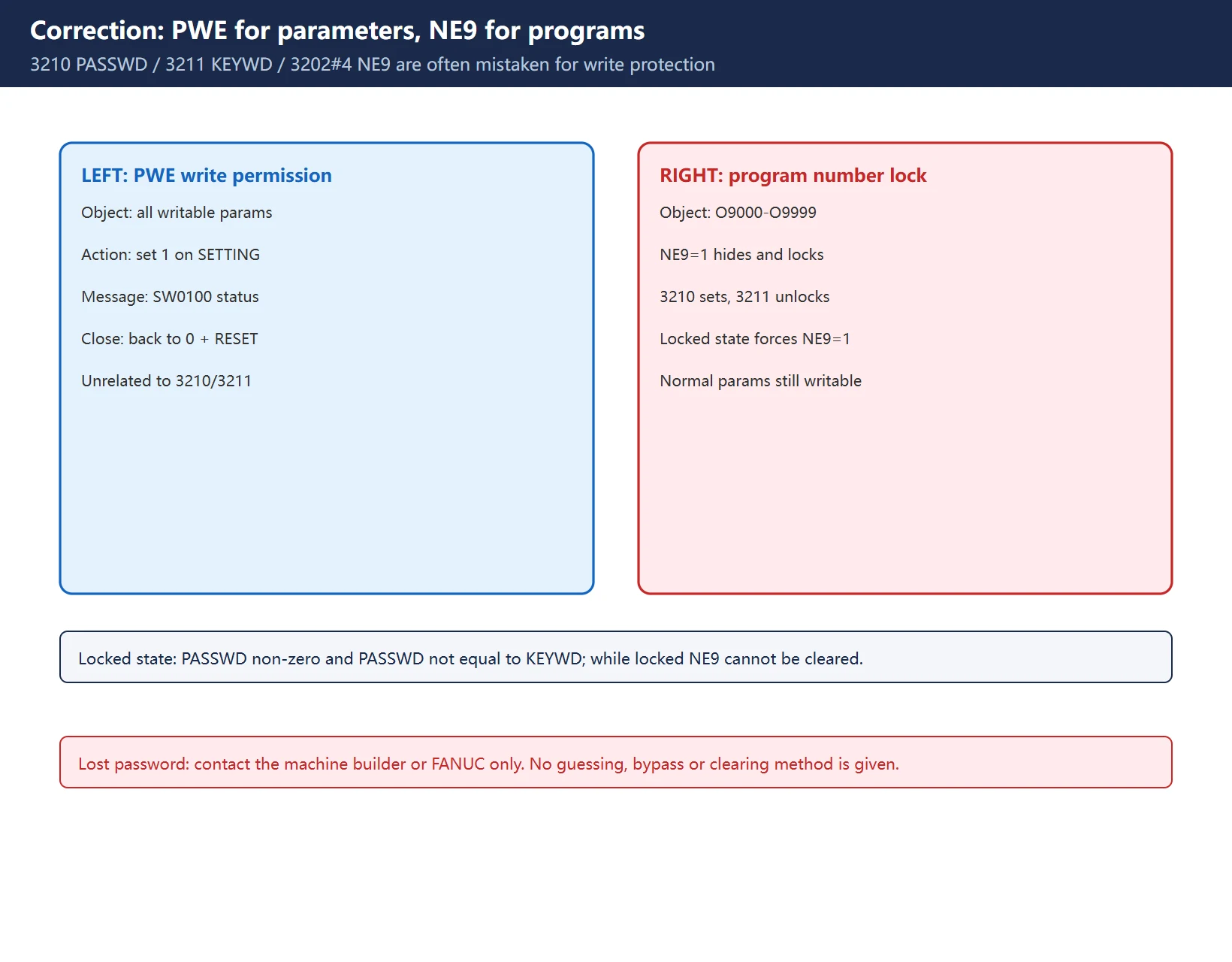
This is the single most common error in Chinese-language write-ups. The FANUC operator’s manual, section “PASSWORD FUNCTION”, states it plainly: the password function locks bit 4 (NE9) of parameter 3202 to protect programs O9000–O9999, implemented through 3210 (PASSWD) and 3211 (KEYWD).
| Item | What it does |
|---|---|
3202#4 NE9 = 1 | Programs O9000–O9999 cannot be edited, displayed or deleted (usually builder tool-change / probing macros) |
3202#0 NE8 = 1 | Same protection for O8000–O8999 |
3210 PASSWD | Sets the password (value is not displayed). A non-zero value different from 3211 automatically sets NE9 to 1 — the locked state |
3211 KEYWD | Entering the same value as 3211 releases the lock, after which 3210 and NE9 can be changed |
Consequences:
- The locked state is
PASSWD != 0andPASSWD != KEYWD— not “parameters are locked”. - While locked, NE9 cannot be set back to 0, and the password in 3210 is not displayed.
- Official unlock: MDI -> enable parameter writing (SW0100 appears) -> enter the 3210 value into
3211-> set3202#4 NE9to 0 -> disable parameter writing ->RESET. 3210 = 0means the password function is off; power cycling clears KEYWD and returns the control to the locked state.
So adjusting NE9 or 3210/3211 to “unlock parameters” is simply the wrong direction. They do not stop you editing parameters such as 1620 or 1825, and they do not explain “parameters won’t write”.
Compliance line:
3210/3211is a legitimate builder mechanism for protecting macro programs. If a password is lost, go through the machine builder or FANUC support only. No password guessing, bypass, clearing or decryption method is given here — and never touch someone else’s3210just to make a parameter editable.
5. Other things that block the edit
- Memory protect key signals: builders wire a physical keyswitch (or a custom soft panel) to the CNC’s
KEY1–KEY4inputs, locking program editing, offsets, settings and macro variables. If the key appears ON but editing is still refused, suspect a contact or input circuit fault; check the signal state inPMCDGN -> STATUSat the address given in the builder’s ladder documentation. - 8-level data protection: 0i-F / 30i offer operator levels 0–7;
SYSTEM -> [+] -> [PROTECT]sets the change-permission level separately for parameters, programs and offsets. Default passwords are set by the builder. - Data input: a transfer refused over RS232 / memory card points to SETTING items
TVC/ISO, the I/O channel, and whether the target program number falls in an NE8/NE9 protected range. - Read-only or unlicensed parameters: some ranges are read-only on a given software version, and option-dependent parameters may not appear or may reject writes when the option is not licensed. PWE will not help.
- Edits accepted but lost after power-off: that is not write protection — suspect a flat CMOS battery or memory board fault.
6. Three verifications after any change
- When it takes effect: some parameters apply immediately, some need
RESET, some require a full power cycle. Check the “effective” note in the parameter description before concluding “it did nothing”. - No new alarms: review the alarm screen and servo/spindle diagnostic bits. Any alarm other than SW0100 means go back to the original value.
- Keep a record: export the parameter table before and after (or at minimum photograph original values, changed items, time and operator). It is the only fast rollback when something goes wrong.
7. Five pitfalls
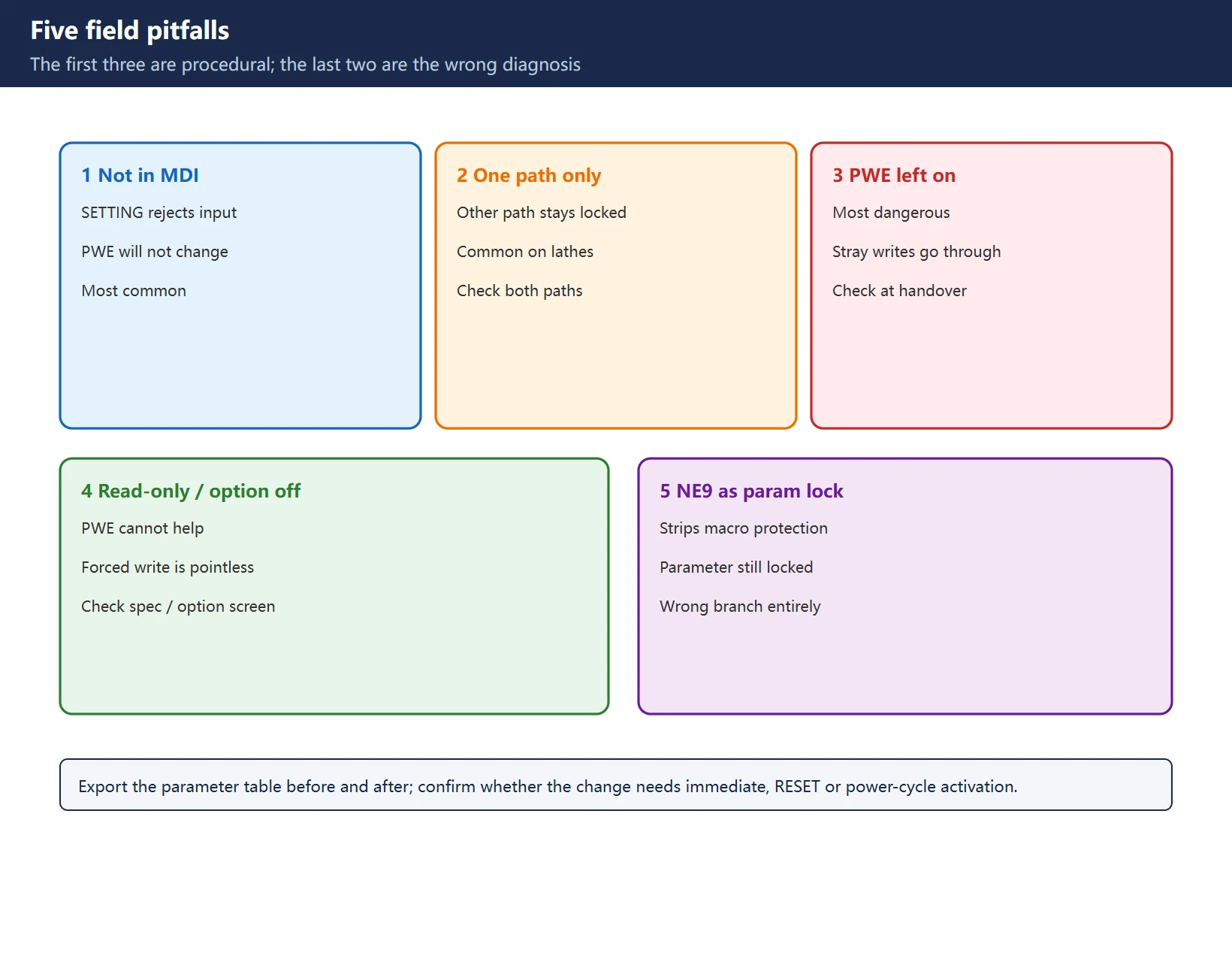
- Not in MDI — the SETTING screen will not accept the PWE change.
- Only one path enabled on a twin-path lathe; the other path’s parameters stay locked.
- PWE left at 1 after the edit — the most dangerous one, because any later stray write goes straight through.
- Treating a read-only or unlicensed option parameter as “locked”, force-writing it repeatedly and then blaming the main board.
- Treating
3202#4 NE9or3210/3211as parameter protection, which strips the builder’s macro program protection while the parameter still refuses to write.
Frequently Asked Questions
PWE is already 1, so why do parameters still refuse to write?
Confirm three things first: MDI mode, both paths on a twin-path lathe, and whether that parameter number is read-only or belongs to an unlicensed option on this software version. If all are fine, check the memory protect key signals (KEY1–KEY4) and the 8-level data protection on 0i-F / 30i — these stack on top of PWE, so writes can still be refused with PWE enabled.
Is SW0100 an alarm, and should I clear it?
It is a status message meaning the parameter write switch is on, not a fault. Do not hunt for an alarm-clearing procedure: set PWE back to 0 and press RESET. Conversely, SW0100 that stays on the screen means write permission has been left open — find out what was changed and make sure a backup exists.
Is 3202#4 NE9 the same switch as parameter write protection?
No. PWE governs whether parameters can be written; 3202#4 NE9 governs whether programs O9000–O9999 can be edited or displayed, and 3210/3211 is the password lock for that program protection. Per the official manual, the locked state forces NE9 to 1 and prevents clearing it, but ordinary parameters remain writable. Changing NE9 to “unlock parameters” both fails to fix the write problem and removes the builder’s macro protection.
Last updated: 2026-11-07
How to Clear All Parameters on a Fanuc Control
How to Export / Print FANUC Parameter Tables and Ladder
FANUC Program Transfer: RS-232, Memory Card, USB, Ethernet
FANUC AICC / Nano Smoothing Setup
Where to go next
- FANUC Troubleshooting — the full guide library: alarms, diagnosis numbers, servo, spindle, PMC and electrical faults, organised by symptom.
- CNC Repair Tools — which instrument measures what: multimeters, clamp meters, insulation testers and oscilloscopes, with the specification that actually matters.
- Remote Technical Support — have the readings reviewed with you: alarm reverse lookup, PMC ladder analysis and servo tuning advice by call. Repair companies and integrators welcome.
Read the guide, get the right instrument, or walk the diagnosis through with someone — pick whichever you need.
The original Chinese version — same procedure, with the full field notes.

















暂无评论内容