


A good half of the “Fanuc restore factory settings” tutorials circulating online are wrong. The most common version says “open the system menu, find Restore Factory Settings, confirm” – in reality there is no menu item by that name on a 0i-MD or 0i-MF. The real entry point is a hardware-level key combination: power down, hold RESET + DELETE, then power up.
Getting the path right is not enough, though. What actually costs people days in the field are two other things: treating “all-clear” as the same thing as “restore factory settings”, and not knowing what the clear wipes and what it leaves behind. This article covers both, with a screen-by-screen key sequence.
The short version: after an all-clear the parameters return to Fanuc’s factory defaults, not to the set the machine tool builder commissioned for your machine. Axis count, axis names, motor model codes, travel limits, pitch error compensation, PMC parameters and the tool-change macro all go to zero. An all-clear does not return the machine to a working state – it turns it into a bare control that needs recommissioning.
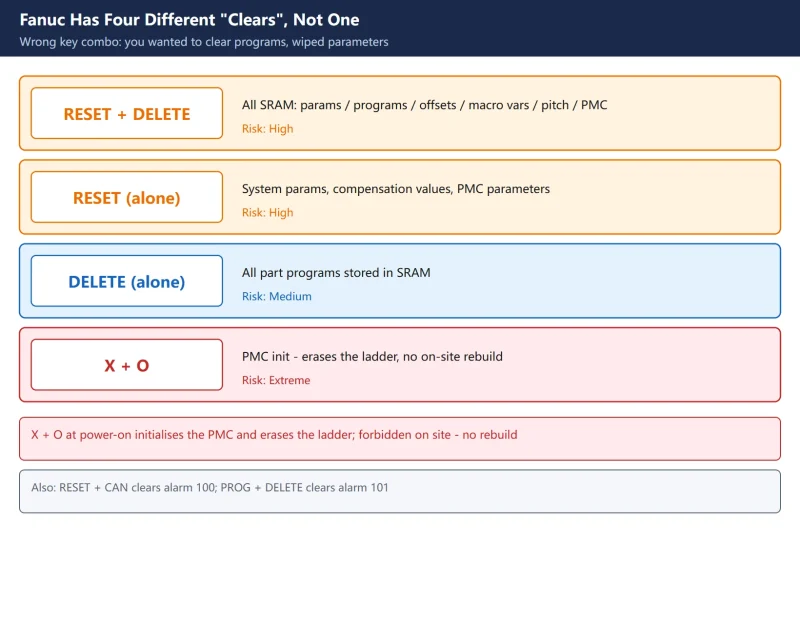
1. First Correction: Fanuc Has Four Different “Clears”, Not One
This is the point that has to come first, because wanting to clear programs and accidentally clearing parameters is a classic field mistake.
Table 1: Four clear operations and what each one wipes
| Keys held at power-on | What it wipes | Risk |
|---|---|---|
RESET + DELETE | All of SRAM (parameters / programs / offsets / macro variables / pitch comp / PMC parameters) | High |
RESET alone | System parameters, compensation values, PMC parameters | High |
DELETE alone | All part programs in SRAM | Medium |
X + O | PMC initialisation (erases the ladder) | Extreme |
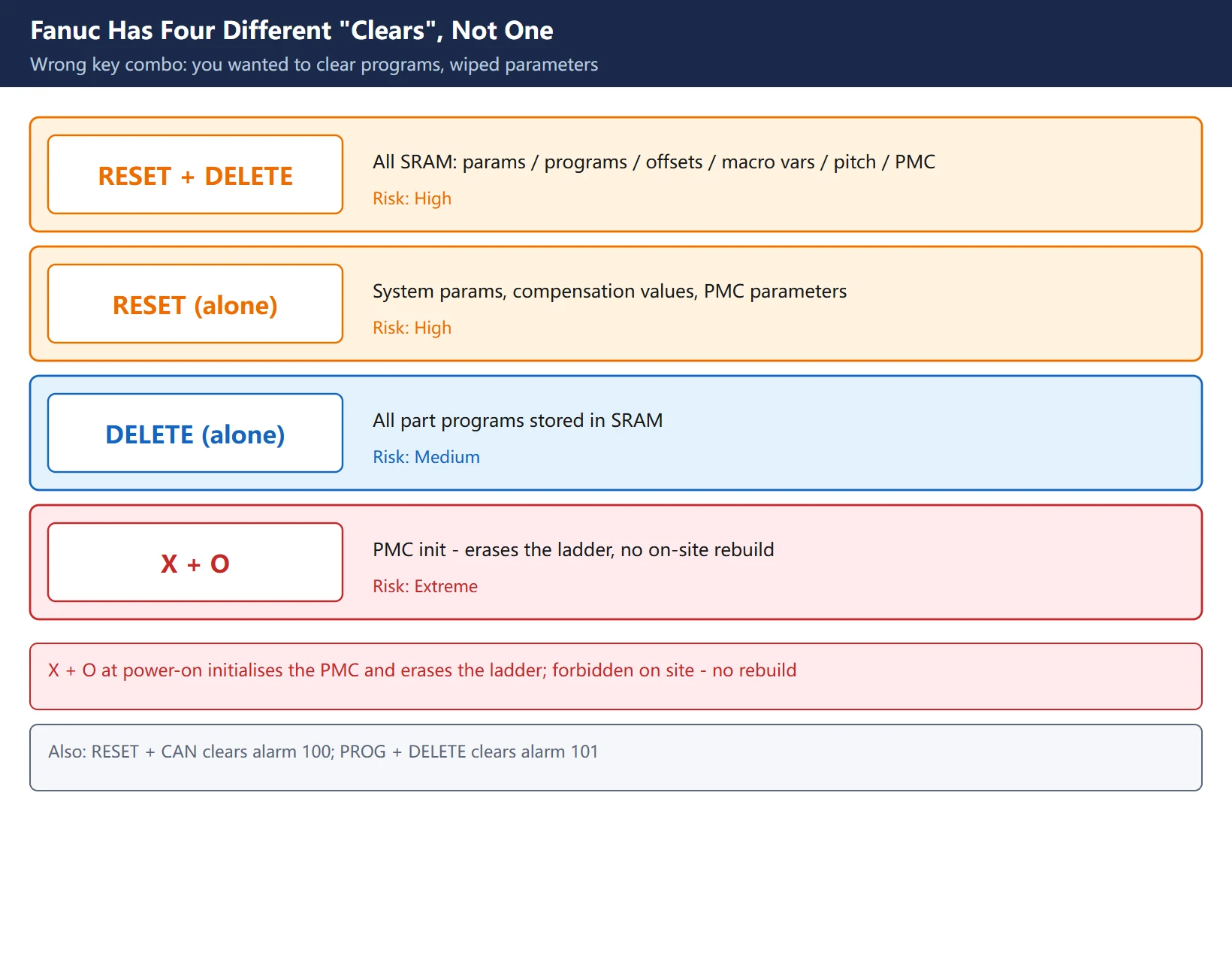
🚨 The last row deserves its own warning: X + O at power-on initialises the PMC and erases the ladder. The ladder lives in FROM and does not depend on the battery, so once it is gone there is no way to rebuild it on site – you need the builder or a backup from an identical machine. Treat this combination as forbidden during commissioning.
Two more combinations worth knowing:
RESET+CAN: temporarily clears alarm 100 (parameter write enable is on)PROG+DELETEat power-on: clears alarm 101 (caused by power loss while editing a program)
The combination list is not identical across every model – your own maintenance manual is authoritative, and what is listed here is the common 0i-series convention.
2. Four Categories to Back Up Before Any Clear
An all-clear is irreversible. All four categories below must be on disk before you start – if one is missing, do not proceed.
Table 2: Backup list, and where each item lives
| Data | Stored in | What happens if lost | How to back it up |
|---|---|---|---|
| CNC parameters | SRAM | Machine will not move | Parameter screen output / BOOT SRAM BACKUP |
| PMC parameters (timers, counters, KEEP values, data tables) | SRAM | All machine logic goes wrong | Covered by SRAM BACKUP; can also be output from the PMC screen |
| Pitch error compensation | SRAM | Accuracy degrades with no alarm | Compensation screen output / SRAM BACKUP |
| PMC ladder program | FROM (flash) | No motion at all, cannot be rebuilt on site | Must be exported separately – SRAM backup does not include it |
🚨 Row four is the trap most people fall into: the ladder lives in FROM, not in SRAM, so an SRAM backup does not carry it out. That is exactly why a machine still does not move after a BOOT backup and restore – the parameters came back, the ladder did not. See the Fanuc data backup and restore walkthrough.
Recommended order: run the BOOT SRAM BACKUP first (packages all of SRAM in one go), then export the ladder separately. Keep the two files in two different places; never keep only one copy.
BOOT backup path (start from power off):
- Hold the two rightmost soft keys below the screen, then power on (on models without soft keys, use MDI numeric keys
6and7) - Release once
SYSTEM MONITOR MAIN MENUappears - Select
SRAM DATA BACKUP(the number varies by model – see section 4) - Select
1. SRAM BACKUP (CNC -> MEMORY CARD) - Wait for COMPLETE, power down and remove the card
3. Full Key Sequence: RESET + DELETE Power-On All-Clear
Follow the screens in order, and read each one before pressing anything.
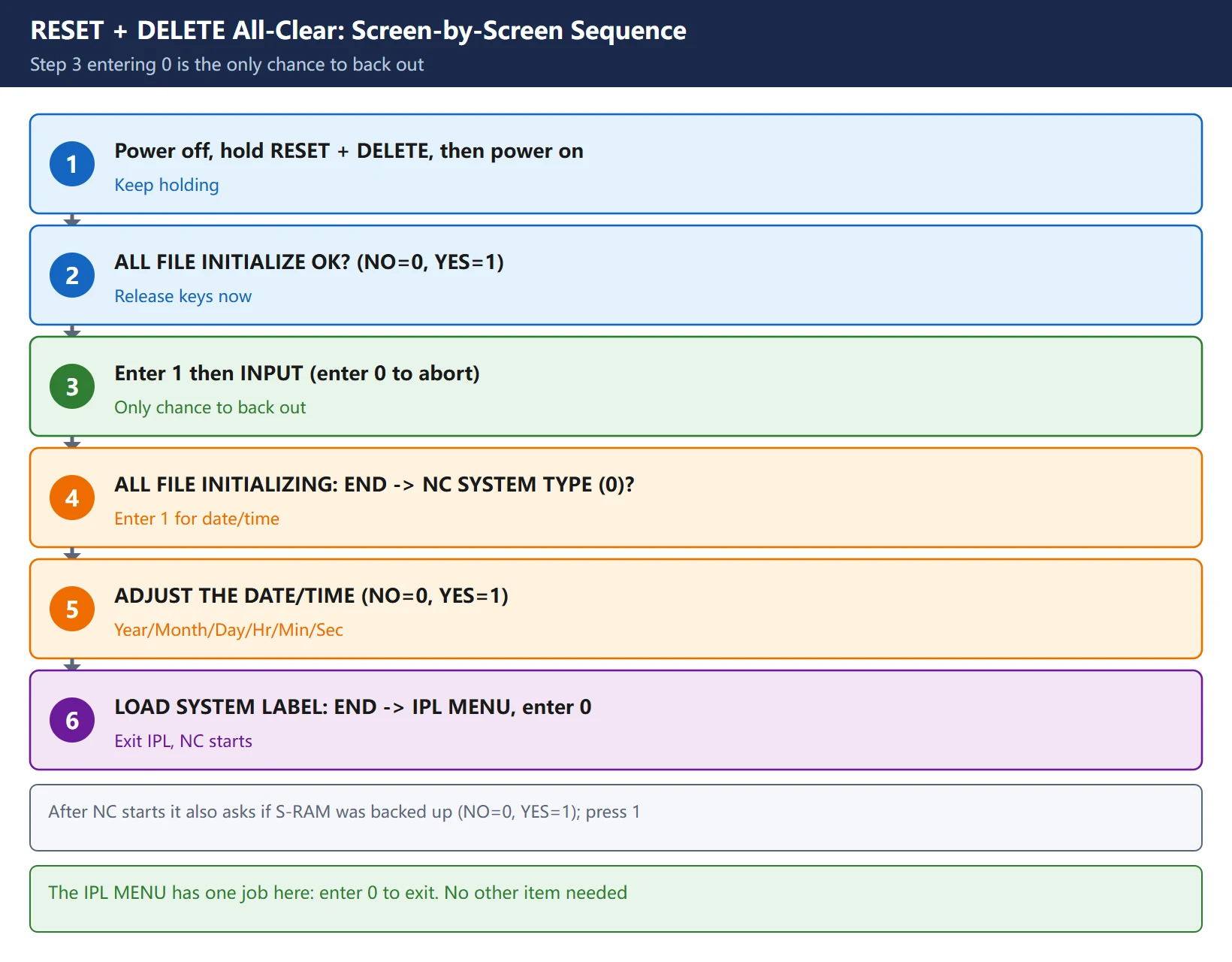
- Power down (not emergency stop – the CNC supply must be off)
- Hold
RESETandDELETEtogether, then power on, and keep holding - The screen shows
ALL FILE INITIALIZE OK? (NO=0, YES=1)– only now release the keys
– Enter 0 = do not execute; you can abandon the operation here (this is your only chance to back out)
– Enter 1 = execute the all-clear
- Enter
1and pressINPUT→ the screen showsALL FILE INITIALIZING : END, followed byNC SYSTEM TYPE (0) ? - Entering
1here leads to the date/time setting:ADJUST THE DATE/TIME (**// ::) ? (NO=0, YES=1)
– Enter 1: type the date in the order year, month, day, hour, minute, second
– Enter 0: skip (setting it is recommended – alarm history timestamps depend on it)
- The screen shows
LOAD SYSTEM LABEL : END, then the IPL MENU appears - In the IPL MENU enter
0(END IPL) and pressINPUT - The NC starts and shows
DATA FILES RELATED TO CHANGED OPTION MIGHT BE CLEARED. DO YOU COMPLETE TO BACK UP S-RAM ? (NO=0, YES=1)→ press1
⚠️ Step 3 is the only chance to back out. After step 4 there is no way back.
4. IPL Menu vs BOOT Menu: Two Screens That Get Confused
Both show an English menu, but they appear at different moments and do different jobs, and confusing them leads directly to a misoperation.
- IPL MENU: appears automatically at the end of the all-clear sequence. It has exactly one job here – enter
0to exit and let the NC start normally. No other selection is needed for the clear itself. - SYSTEM MONITOR MAIN MENU (BOOT screen): appears only when you power on holding the two rightmost soft keys. This is the maintenance menu, containing
SYSTEM DATA LOADING / CHECK / DELETE / SAVE,SRAM DATA BACKUP,MEMORY CARD FORMATand others.
Table 3: Common BOOT main-menu entries (numbering varies by model)
| Function | Purpose | Note |
|---|---|---|
| SYSTEM DATA LOADING | Write a file from the card into flash ROM | Used after board replacement or software upgrade |
| SYSTEM DATA CHECK | Check the series and edition of a file in ROM | Read-only and safe |
| SYSTEM DATA DELETE | Delete a file from flash ROM | 🚨 Do not press it if you are unsure |
| SYSTEM DATA SAVE | Copy a file from flash ROM to the memory card | Backs up FROM contents |
| SRAM DATA BACKUP | Whole-SRAM backup and restore | The one to run before any clear |
| MEMORY CARD FILE DELETE | Delete files on the memory card | – |
| MEMORY CARD FORMAT | Format the memory card | – |
| END | Leave BOOT and start the CNC | – |
🚨 Numbering varies by model and boot version: in the 16i manual (B-63665EN/01) SRAM DATA BACKUP is item 5 and END is item 10, while other versions list END as item 1. Read the list actually on your screen; do not copy numbers from a guide.
The SRAM DATA BACKUP sub-menu is always three entries: 1. SRAM BACKUP (CNC -> MEMORY CARD), 2. RESTORE SRAM (MEMORY CARD -> CNC), END. The backup file name is model-specific (for example SRAMBAK.001), and a card holds only one SRAM backup – a second backup prompts whether to overwrite.
5. What Survives and What Does Not
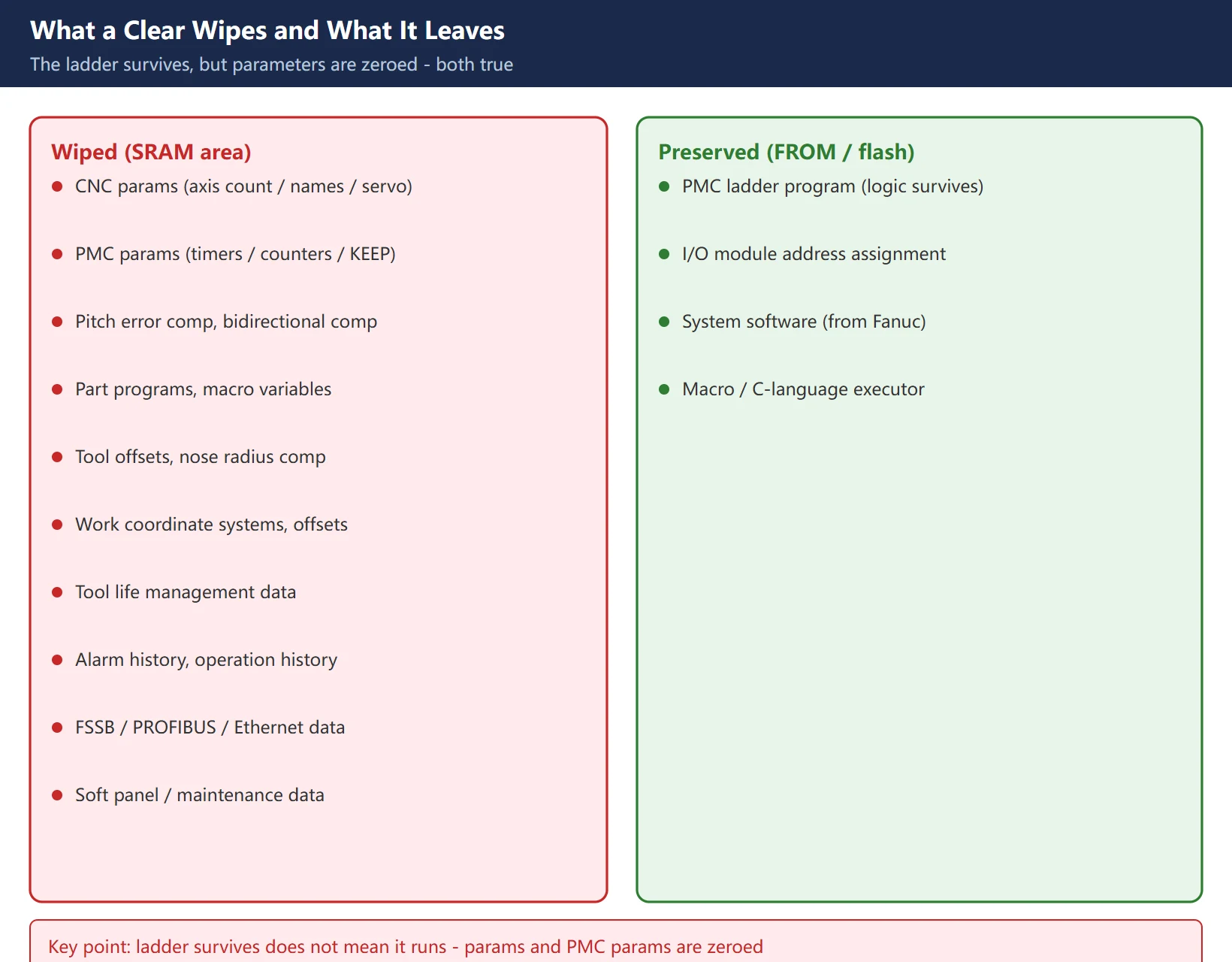
This is where “all-clear equals restore factory settings” falls apart.
Table 4: What the clear wipes and what it leaves
| Wiped (SRAM area) | Preserved (FROM / flash area) |
|---|---|
| CNC parameters (axis count, axis names, servo parameters) | PMC ladder program |
| PMC parameters (timers, counters, KEEP relay values, data tables) | I/O module address assignment |
| Pitch error compensation, bidirectional compensation | System software (supplied by Fanuc) |
| Part programs, macro variable values and names | Macro executor / C-language executor programs |
| Tool offsets, tool nose / cutter radius compensation | – |
| Work coordinate systems, work offsets | – |
| Tool life management data | – |
| Alarm history, operation history | – |
| FSSB data, PROFIBUS master/slave data, embedded Ethernet data | – |
| Soft operator panel data, periodic maintenance data, touch panel data | – |
The key inference: the ladder survives, so the skeleton of the PMC logic is still there; but the parameters are gone, so axis configuration, servo parameters and PMC parameters are all zeroed, and the machine still cannot move. These are not contradictory – “the ladder was not wiped” does not mean “the machine will run after the clear.”
One more easily missed point: the 9000-series option parameters (tied to licensed software functions) live in SRAM on some models and are wiped, while on others they live in FROM and survive. Check your own parameter manual for this, and photograph the 9000 range separately before any clear.
6. No Backup Available: Rebuilding by Hand, and What It Costs
If a backup genuinely cannot be produced – second-hand machine, builder out of business, card failed – the only route left is rebuilding by hand.
Basic flow:
OFFSET/SETTING→SETTING→ set PARAMETER WRITE (PWE) to 1 (alarm SW0100 appears; that is normal)- Open the parameter screen and enter values one by one
- When finished, set PWE back to 0 and press
RESETto clear the alarm - Power down and restart once to confirm the parameters survived – this step is really testing the battery
Parameters that must be set (grouped by function; the values come from the builder’s parameter sheet and must not be guessed):
- Axis configuration: 8130 (total axes), 1010 (controlled axes), 1020 (axis names), 1022 (axis attribute, linear or rotary), 1023 (servo axis number)
- Command and feedback: 1820 (command multiplier, CMR), 1821 (reference counter capacity)
- Servo: set 3111#0 (SVS) to 1 to display the servo setting screen, then in
SV-PRMenter the motor code from the motor nameplate and run initialisation - Absolute position: 1815#4 (APZ)
Time estimate (field experience, for planning only):
- Complete parameter sheet available, keyboard entry only: half a day to a day
- Servo initialisation plus pitch error compensation re-measurement needed: 1-3 days
- Ladder also lost and the builder has to be involved: a week or more, and it usually costs money
So: an all-clear without a backup costs far more than the 20 minutes it takes to make an SRAM backup.
7. Five Things You Must Do Afterwards
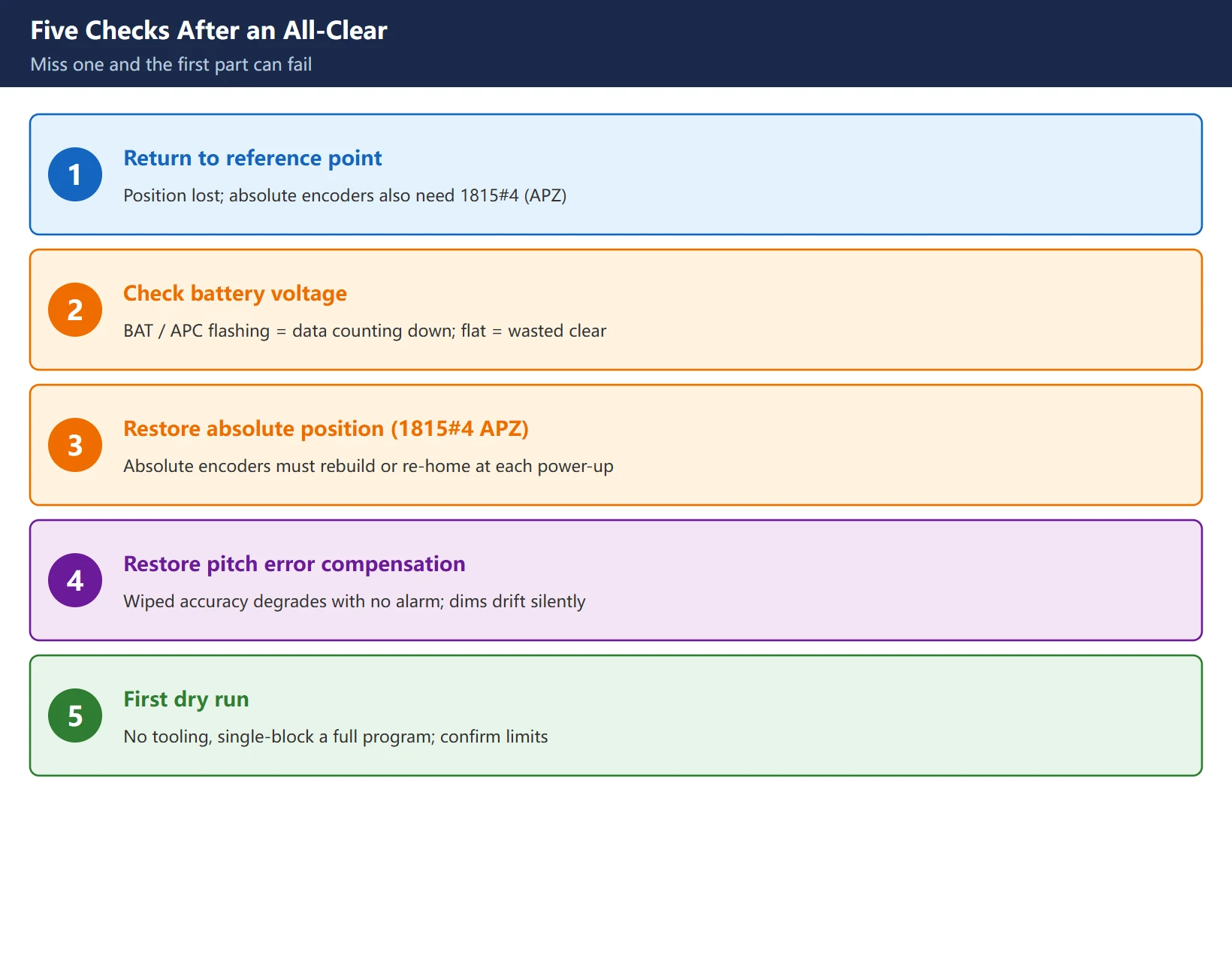
Entering parameters is not the end. Miss any one of these five and the machine can fail on its first part.
- Return to the reference point. The reference position is lost after a clear, so home first. Absolute encoder models also need 1815#4 (APZ) handled.
- Check the battery. Everything you just typed is retained by the battery. If
APC(amplifier battery low) orBAT(CNC system battery low) is flashing, the data is on a countdown. Clearing with a flat battery is a wasted effort. - Restore absolute position (1815#4 APZ). Absolute encoder models must have the absolute position rebuilt, or the machine has to be re-homed at every power-up.
- Restore pitch error compensation. It was wiped, accuracy degrades, and no alarm is raised – the machine runs and cuts while dimensions quietly drift. This is the most insidious item on the list.
- First dry run. No workpiece, no new tooling, single-block through a complete program to confirm limits, tool change and coordinate systems. Do not skip this and go straight to production.
8. Three Decision Points
Point one: what exactly do you need to clear? Only the programs are a mess → DELETE alone at power-on is enough; parameters need not be touched. Only parameters are wrong → consider whether a backup file can simply be loaded over them instead of clearing. An all-clear is the last resort, not routine maintenance.
Point two: can you confirm the battery is healthy first? With a flat battery, everything you enter after the clear is lost at the next power-down. Look for BAT / APC flashing before you start.
Point three: can you rebuild afterwards? Parameter sheet, ladder, pitch compensation data – missing any one of the three means do not clear. The ladder especially: it lives in FROM and survives power loss precisely because of that, but for the same reason there is nothing to rebuild it from on site once it is gone.
In one line: Fanuc has no “restore factory settings” button. The real entry is
RESET+DELETEat power-on, and what it wipes is the entire set of commissioning parameters the builder put in SRAM, leaving only the ladder in FROM. Afterwards the machine is not “back to normal” – it is a bare control that needs recommissioning. Twenty minutes of backup before the clear always beats three days of rebuilding after it.
Frequently Asked Questions
Does a Fanuc control have a “restore factory settings” menu?
No. There is no menu item called “restore factory settings” on a 0i-MD or 0i-MF, and the widely circulated “system menu → restore factory settings” path is simply wrong. The real entry point is a hardware-level key combination: power down, hold RESET + DELETE, power up, and when ALL FILE INITIALIZE OK? (NO=0, YES=1) appears, enter 1. The more important distinction is conceptual: after the clear, parameters return to Fanuc’s factory defaults, not to the set the machine tool builder commissioned. Axis count, axis names, motor model codes, travel limits, pitch compensation and PMC parameters are all zeroed, and the machine has to be recommissioned before it can work. So even with the correct path, the phrase “restore factory settings” is misleading.
Will clearing all parameters wipe the PMC ladder too?
No – but do not take that as reassurance. The PMC ladder program lives in FROM (flash), is not battery-backed, and an SRAM all-clear cannot reach it. What the clear does wipe is the PMC parameters: timer presets, counter presets, KEEP relay values and data tables, all of which live in SRAM and are zeroed. So the real post-clear state is: the skeleton of the ladder logic survives, but every parameter value it depends on is gone, and the machine still will not move. Separately, if you used the X + O power-on combination, that one initialises the PMC and erases the ladder – it cannot be rebuilt on site and needs the builder or a backup from an identical machine. Treat it as forbidden.
How long does it take to rebuild a machine with no backup file?
It depends what is missing. With a complete parameter sheet and only keyboard entry required: about half a day to a day. If servo initialisation has to be redone from motor nameplate codes and pitch error compensation re-measured: one to three days. If the ladder is gone as well: a week or more, and it usually involves paying the machine tool builder or finding an identical machine to copy from. The comparison makes the point better than any warning: a BOOT SRAM backup takes ten minutes and a ladder export under half an hour, while rebuilding after a clear costs tens of times more. The right question is not “how long does a rebuild take” but “why clear anything without a backup”.
Last updated: 2026-10-28
Where to go next
- FANUC Troubleshooting — the full guide library: alarms, diagnosis numbers, servo, spindle, PMC and electrical faults, organised by symptom.
- CNC Repair Tools — which instrument measures what: multimeters, clamp meters, insulation testers and oscilloscopes, with the specification that actually matters.
- Remote Technical Support — have the readings reviewed with you: alarm reverse lookup, PMC ladder analysis and servo tuning advice by call. Repair companies and integrators welcome.
Read the guide, get the right instrument, or walk the diagnosis through with someone — pick whichever you need.
The original Chinese version — same procedure, with the full field notes.


















暂无评论内容