


A stuck tool changer is one of the most expensive ways to lose a shift: the alarm is on, the ATC arm is hanging between the spindle and the magazine, and the job is waiting. The usual shop-floor reaction — “press RESET, then hand-crank the motor, then call service” — does get the tool out, but in the wrong order it damages the machine and can hurt someone.
This article covers exactly one thing: the tool change is already jammed, and you need to release it safely. Finding out *why* it jammed is a diagnostic job covered by the six-stage M06 signal walkthrough; everything below is recovery action, not diagnosis.
One thing must be said up front: every X/Y address in this article (X8.2, Y5.1 and the like) is illustrative only. Pocket-home switches, the unclamp valve and the arm solenoids are all assigned by the machine tool builder (MTB) in its own ladder, and they can differ between models from the same builder. Forcing an address you copied from someone else’s machine is the single failure mode this article exists to prevent.
1. Locate the Jam First – It Decides Which Method You Use
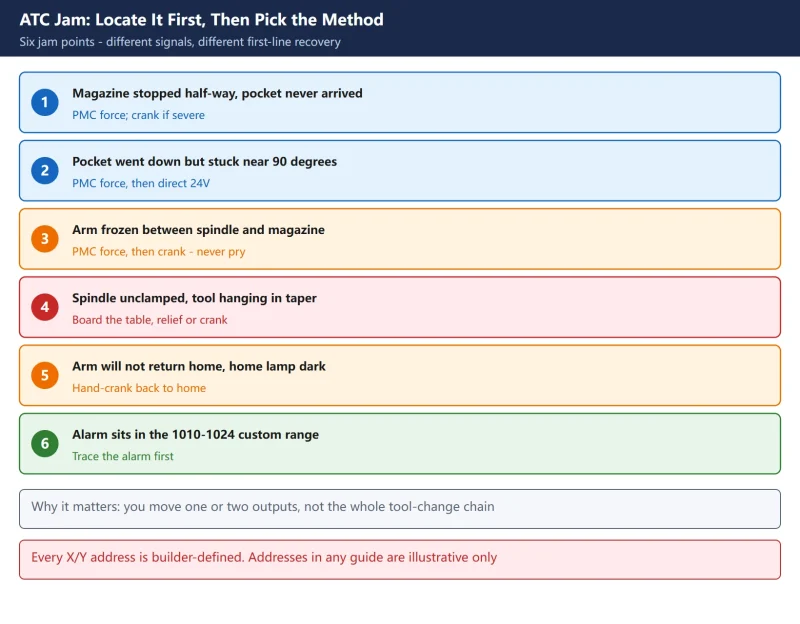
“Jammed” covers very different situations. A magazine stopped mid-rotation and an arm frozen while gripping a tool need completely different handling. Spend two minutes reading the mechanical position before you touch anything.
Table 1: Six jam points and the first-line recovery for each
2. Read This Before You Touch Anything
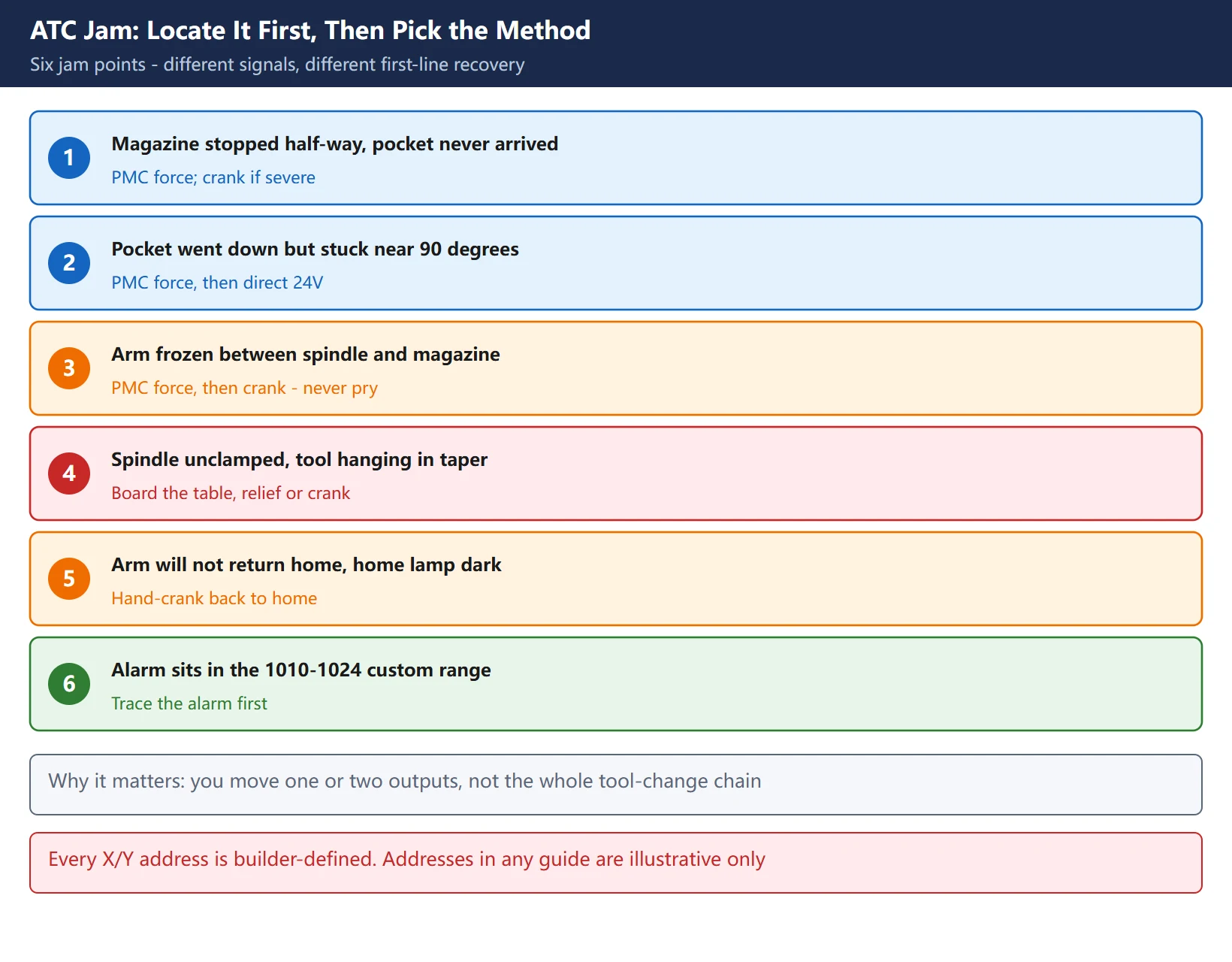
Forcing an output means bypassing every check the ladder makes and energising an actuator directly. It solves “the program never asked for the move” and costs you all the safety interlocks. Confirm all six before continuing.
- Where are the people? Forcing a solenoid or the unclamp circuit moves the arm, the pocket or the drawbar immediately. Make sure nobody has hands or body in the space between magazine and spindle; close guards where possible.
- Catch the tool. Once the spindle is unclamped (you hear air escaping at the taper) the tool can drop at any moment. Put a board or rubber mat on the table first, and have one person support the toolholder by hand.
- DC 24V, not AC. ATC directional valve coils are almost always 24 VDC, typically 20-40 Ω. 110 VAC or 220 VAC destroys the coil instantly – this is the largest single risk in the whole procedure. Measure supply voltage and coil resistance before you apply power.
- Record the starting state. Photograph or write down the alarm number, the mechanical coordinates of every axis, the current spindle tool number and the current pocket number. You will check all of them afterwards.
- Forced values must be cleared. A PMC force does not expire because you forgot about it. If it survives, the next power-up shows “alarm immediately on start” or “the machine moved by itself”. Section 8 covers clearing it.
- Stopping the PMC is a last resort and must be undone. Forcing an output the ladder is actively driving requires the PMC stopped, and a stopped PMC means the machine has no motion capability at all – emergency stop, lubrication and coolant all become uncontrolled. Restore run mode and revert the setting as soon as you are done.
3. Method 1: Force the Output Through the PMC (Two Different Routes)
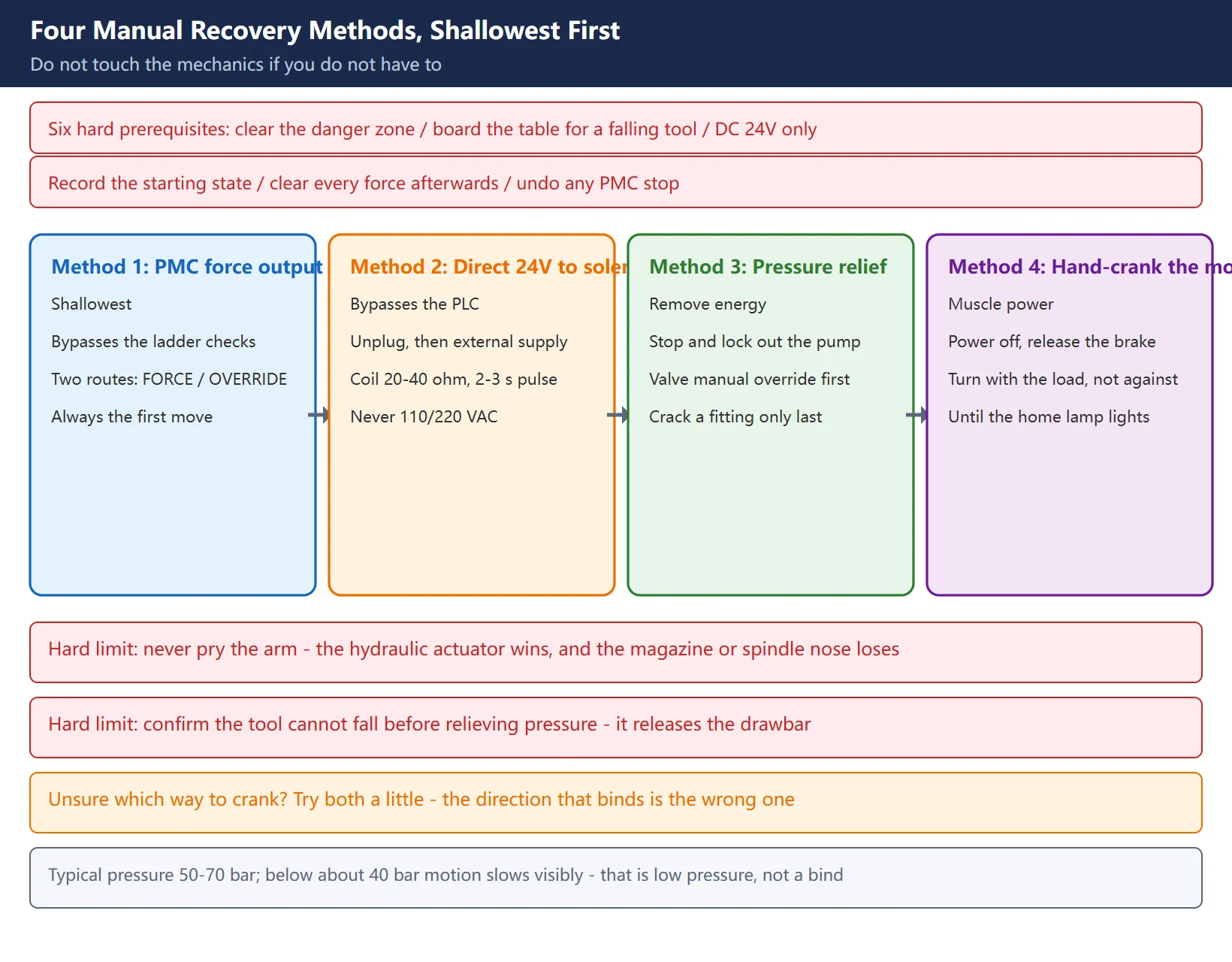
This is the shallowest intervention and the right first move. Most write-ups only say “go to PMCDGN and press FORCE” and omit the critical limitation: Fanuc has two forcing mechanisms with different scope and different preconditions.
3.1 Route A: Standard FORCE (G / R / C / A / T / E / D / Y)
Procedure:
SYSTEM→PMC→PMCMNT→Signal- Enter the address (e.g.
Y5), pressSEARCH Operation→Force→►→ON/OFF- Watch the actuator; set it back
OFFas soon as it reaches position
Prerequisites (both required): the built-in programmer function must be enabled, and the PMC must be stopped. If you are forcing an output the ladder is currently driving – the unclamp valve coil, for example – it will not take while the PMC runs.
Ways to stop the PMC (revert both afterwards):
- Route 1:
PMC config→PMC status→Operation→PMC switch→Stop - Route 2:
PMC config→Setting→PMC program start→ set to “Manual”; after a restart the PMC no longer auto-starts
🚨 Both require “PMC stop permission” in the PMC setting screen to be changed from “No” to “Yes” first – it is masked by default. Set it back to “No” and restart the PMC when you finish.
3.2 Route B: Latching force / OVERRIDE (X and Y only, no PMC stop)
More practical in the field, because the PMC keeps running – the rest of the machine behaves normally and only this one point ignores its real state.
Procedure:
- Enable it:
PMC→PMCPAM→SETING→PREV, find OVERRIDE ENABLE, change0:NOto1:YES - Power off, then power on – mandatory; the setting does not take effect otherwise
PMCDGN→STATUS→FORCE, move the cursor to the target address- Press
OVRSET(a>appears before the address) →ON/OFF - Clear it:
OVRSTfor one address,INITfor all; a power cycle also clears it
⚠️ Two limits to remember: SA1-type PMC has no such function, and it works on X/Y only – not on G, R or D addresses.
Table 2: The two PMC forcing routes compared
| Item | Route A: standard FORCE | Route B: latching OVERRIDE |
|---|---|---|
| Addresses that can be forced | G, R, C, A, T, E, D, Y | X and Y only |
| PMC must be stopped? | Yes, for outputs the ladder drives | No |
| PMC setting to change | “PMC stop permission” = Yes | OVERRIDE ENABLE = 1 |
| Power cycle needed? | No | Yes, after the setting |
| How to clear | Turn the bit off / restart PMC | OVRST, INIT, or power cycle |
| Model limits | None | Absent on SA1-type PMC |
| Typical use | Probing outputs, finding unknown addresses | Forcing one position signal or output in the field |
4. Method 2: Energise the Solenoid Directly, Bypassing the PLC
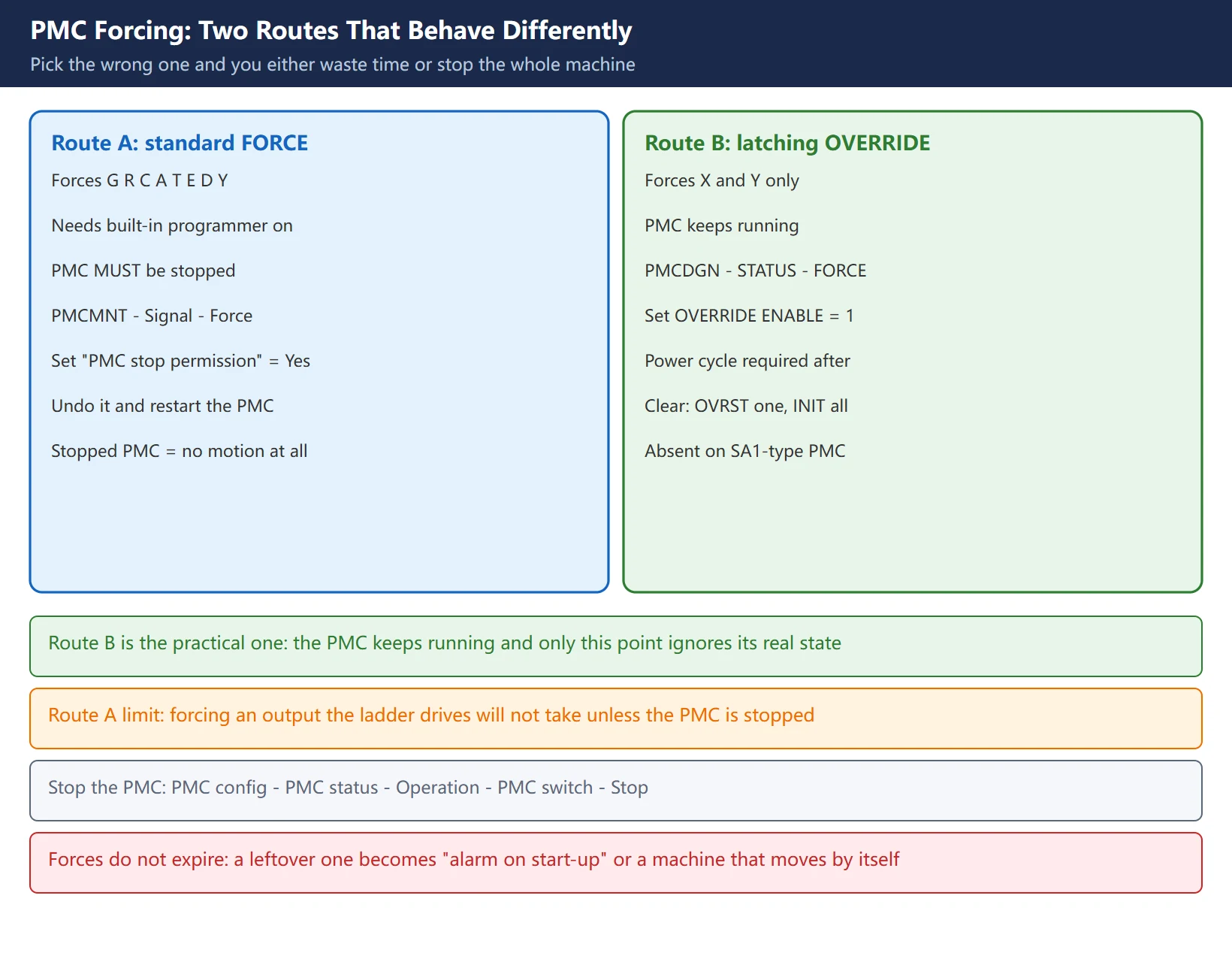
When the PMC route is unavailable – alarm-locked PMC, failed output module, or you simply do not know the Y address – you can bypass the PLC entirely and drive the valve by hand.
Procedure:
- Locate the hydraulic or pneumatic valve manifold for the magazine / arm (usually on the magazine side or inside the cabinet; valves are labelled SOL1 / SOL2 / SOL3 or similar)
- Disconnect the electrical plug from the target solenoid
- Apply an external 24 VDC supply across the coil for 2-3 seconds
- Watch whether the arm or pocket moves; cut power the moment it reaches position
- Pulse repeatedly until it is back in a safe position
Reference values:
- Coil resistance: standard ATC directional valves are typically 20-40 Ω – measure before applying power
- Voltage: 24 VDC only. 110/220 VAC burns the coil immediately
- Pulse length: 2-3 seconds is enough; holding it on heats the coil
- Hydraulic pressure: typically 50-70 bar; below roughly 40 bar the motion becomes visibly sluggish. That kind of “jam” is really low pressure, not a mechanical bind
⚠️ This method bypasses every PMC interlock. Confirm the move cannot drive a tool into the workpiece or fixture before you energise anything.
5. Method 3: Mechanical Release After Pressure Relief
The next step when electrical methods fail. The principle: remove the stored energy first, then let the mechanism return under gravity or by hand.
Follow the order; do not skip steps:
- Stop the hydraulic pump / air supply and lock it out – switching off is not enough, verify the pump has actually stopped
- Look for the manual override on the directional valve: most have a push pin or a small recessed button (often marked
MANUAL) - Push the spool slowly with a small screwdriver while watching the arm – mechanical bind sometimes frees itself at the moment pressure shifts
- Only if there is no manual override: crack the fitting on the extend side of the cylinder to bleed pressure. Put a catch pan underneath – residual pressure sprays oil, keep face and hands clear
- Let the cylinder retract slowly, then re-tighten the fitting immediately
- Restore hydraulic / air power, then go back to Method 1 and finish the move through the PMC
🚨 Two hard limits:
- Never pry the ATC arm with a crowbar or cheater bar. The hydraulic actuator produces far more force than a person can; the usual result is a damaged magazine, pull stud or spindle nose – not a freed arm.
- Confirm the tool cannot fall before relieving pressure. With the spindle unclamped, relieving pressure releases the drawbar completely.
6. Method 4: Hand-Crank the Arm Motor
The most widely used method on real shop floors and the least documented. With power off, you turn the arm motor by hand back to home.
Procedure:
- Power the machine down completely (not just emergency stop) and open the arm motor cover
- Release the brake lock nut / brake lever at the rear of the motor
- One person supports the arm from below – once the brake releases, the arm can drop
- Fit a wrench on the motor hex and turn slowly in the direction the arm is already loaded, so the arm disengages from the spindle
- If the spindle is unclamped (audible air leak), the tool can drop – the table must be padded first
- Keep turning until the arm completes one full change cycle and returns to mechanical home – the magazine panel has three lamps, usually the middle one lit means the arm is home
- Return the brake lever to lock the motor and refit the cover
- Power up, switch to MDI and single-block a
M06as a no-load test
⚠️ If you cannot tell which way to turn, try a little in both directions and see which feels “with” the load – the direction that binds is the wrong one. Forcing it backwards damages the cam or the gripper.
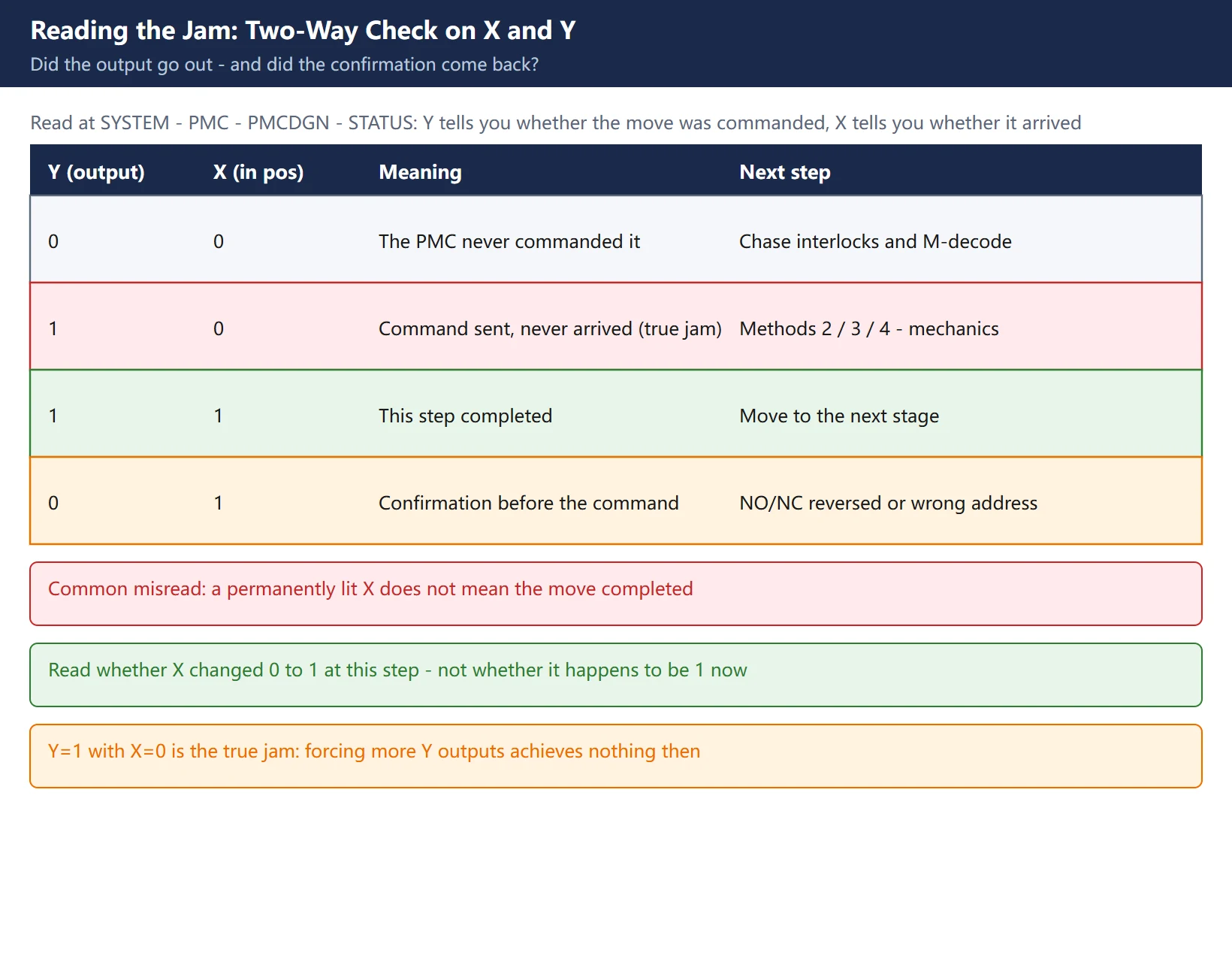
7. Reading the Jam: Two-Way Signal Check on X and Y
All six methods depend on one thing: knowing which point to move. Determine it with a two-way read in the diagnostic screen – did the output go out, and did the confirmation come back?
How to read it:
SYSTEM→PMC→PMCDGN→STATUS, enter the address (e.g.X8) and pressSEARCH- Read the Y (output): during the move, the corresponding Y should show 1. Stuck at 0 → the PMC never asked for the move; the problem is in the ladder or an unmet interlock
- Read the X (input): after the move, the corresponding X should return 1. Y is already 1 but X stays 0 → the output went out but the mechanism never arrived. That is a real jam
- When the two disagree this way, the fault is mechanical or at the sensor – forcing more Y outputs achieves nothing
Table 3: Two-way read decision table
| Y (output) | X (in position) | Meaning | Next step |
|---|---|---|---|
| 0 | 0 | The PMC never commanded the move | Chase interlocks and M-decode – diagnosis, not recovery |
| 1 | 0 | Command sent, mechanism never arrived (true jam) | Methods 2 / 3 / 4 – work on the mechanics |
| 1 | 1 | This step completed | Move to the next stage |
| 0 | 1 | Confirmation present before the command | Sensor NO/NC reversed, or wrong address |
🚨 A frequent misread: a permanently lit X does not mean the move completed. A switch stuck on, a shorted signal wire or a sensor packed with swarf all hold X at 1, so the ladder believes the step finished and moves on – which is exactly how an arm starts rotating before it has actually arrived. Read whether X changed from 0 to 1 at this step, not whether it happens to be 1 right now.
8. Four Checks You Must Do After Recovery
Getting the tool out is not the end. Skipping verification is how a second stoppage starts.
- Clear the force.
OVRSTfor one address,INITfor all; on Route A also confirm the PMC is running again and “PMC stop permission” is back to “No”. Then cycle power once and confirm nothing comes back forced. - Confirm home. Arm at home (origin lamp lit on the magazine panel), spindle back at the tool-change position / second reference point. Verify with
G30 P2or a reference-point return, and confirm parameters 1240 / 1241 were not altered. - One no-load tool change. In MDI, single-block
M06 T01and watch the whole cycle: magazine rotates → pocket down → arm grips → rotates → clamps → returns home. Stop at the first hesitation. - Verify tool numbers and offsets. Check the pocket number and length offset of every tool in the magazine. The pocket numbering can be disturbed while you free the arm; machining without this check risks running the wrong tool.
9. Three Traps to Avoid
Trap 1: reading a permanently lit X as “in position”. See section 7. Swarf on the sensor, a shorted wire or a loose bracket all hold X at 1. Judge “in position” by the transition at that step, not the static value.
Trap 2: editing the ladder while the machine is producing. Forcing is first aid only. The real fix is mechanical (pull stud, cam, seals, cylinder), sensor-related (gap, cleaning, wiring) or parametric (pressure, timers). Changing timers or interlock conditions before you know the root cause just masks the alarm, and it returns in a worse form.
Trap 3: skipping the tool-number check in section 8. The easiest step to skip and the easiest way to scrap a batch – hand-cranking frequently leaves the pocket numbering out of step with the system’s tool table.
In one line: locate the jam, use the shallowest method first (PMC force), escalate only as needed (direct 24V → pressure relief → hand-crank), then do all four post-recovery checks. Addresses are machine-specific; any X/Y in any tutorial is illustrative, and the only place to learn which point you can actually move is your own machine’s ladder address table.
Frequently Asked Questions
Can I just press RESET to recover from a stuck tool change?
It depends. RESET clears the CNC-side alarm state and the executing block; it does not move an arm that is physically hanging. If the cause was a momentary signal glitch and the alarm was spurious, re-issuing the tool change after RESET sometimes works. But whenever the mechanism is genuinely stuck – the arm is gripping a tool between spindle and magazine, or the home lamp is dark – RESET will do nothing no matter how many times you press it, and the mechanism has to be brought back to a safe position by hand first. Simple test: after RESET, is the arm home lamp lit and is there a tool in the spindle? If the lamp is dark or a tool is still hanging, stop pressing RESET.
Will applying 24V to the solenoid burn the coil?
Not if the voltage and duration are right. Three things to confirm: ① measure the coil – standard ATC directional valves are typically 20-40 Ω; an open circuit or a few ohms means the coil is already dead, so do not energise it; ② DC 24V only – 110/220 VAC destroys it instantly; ③ 2-3 seconds per pulse is enough, disconnect as soon as it reaches position rather than holding it on. Also unplug the original connector first, so your external supply cannot feed back into the PLC output module.
Why does the first tool change still alarm after I forced the Y output and recovered?
Three causes cover most cases. First, the force was not cleared: a PMC force does not expire on its own, so on the OVERRIDE route use OVRST or INIT, or cycle power; a leftover force keeps the next interlock permanently unsatisfied. Second, the mechanism is not actually home: the pocket was pushed back but not fully, or the arm home lamp is still dark, so the cycle times out again. Third, the root cause is still there: the sensor is still dirty, the pressure is still low, the pull stud is still deformed – the first change simply re-triggers the alarm. Walk through the four checks in section 8 and you will normally identify which it is.
Last updated: 2026-10-28
Related (EN): Fanuc PMC R9000 reserved relays — forcing PMC outputs (covered here) happens inside the address space explained there; read it to understand which R bits the system owns.
Where to go next
- FANUC Troubleshooting — the full guide library: alarms, diagnosis numbers, servo, spindle, PMC and electrical faults, organised by symptom.
- CNC Repair Tools — which instrument measures what: multimeters, clamp meters, insulation testers and oscilloscopes, with the specification that actually matters.
- Remote Technical Support — have the readings reviewed with you: alarm reverse lookup, PMC ladder analysis and servo tuning advice by call. Repair companies and integrators welcome.
Read the guide, get the right instrument, or walk the diagnosis through with someone — pick whichever you need.
The original Chinese version — same procedure, with the full field notes.























暂无评论内容