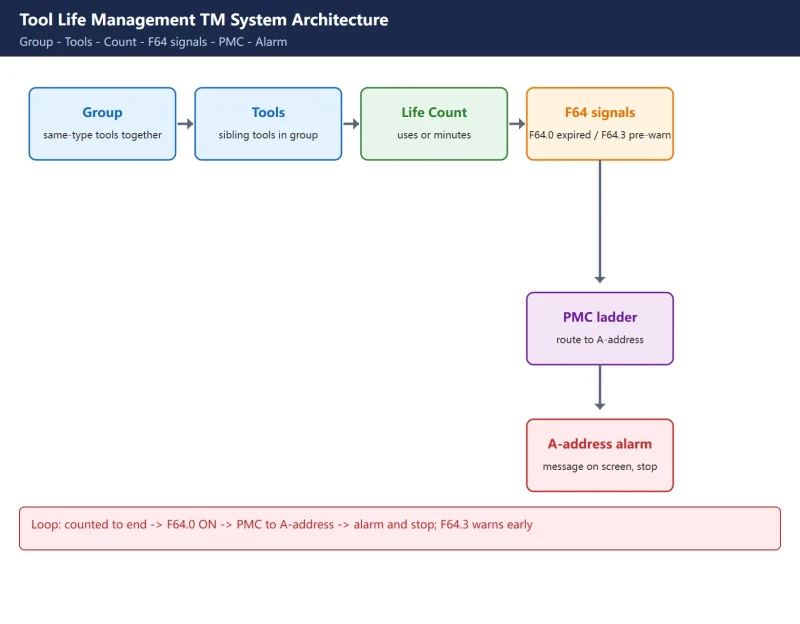



Fanuc’s Tool Life Management (TM) is a built-in function that groups interchangeable tools into “groups”, assigns each group a life limit (a number of uses or cutting minutes), and counts down automatically during machining. When a tool nears its limit it pre-warns you; when the whole group is used up it either switches to a sibling tool or raises an alarm and stops. It is especially valuable on high-mix lines and automated cells.
This article walks the whole chain – enable parameters, group configuration, count trigger, G10 L3 programming, and the PMC alarm signals – with every parameter number checked against the Fanuc 0i-D / 0i-F series.
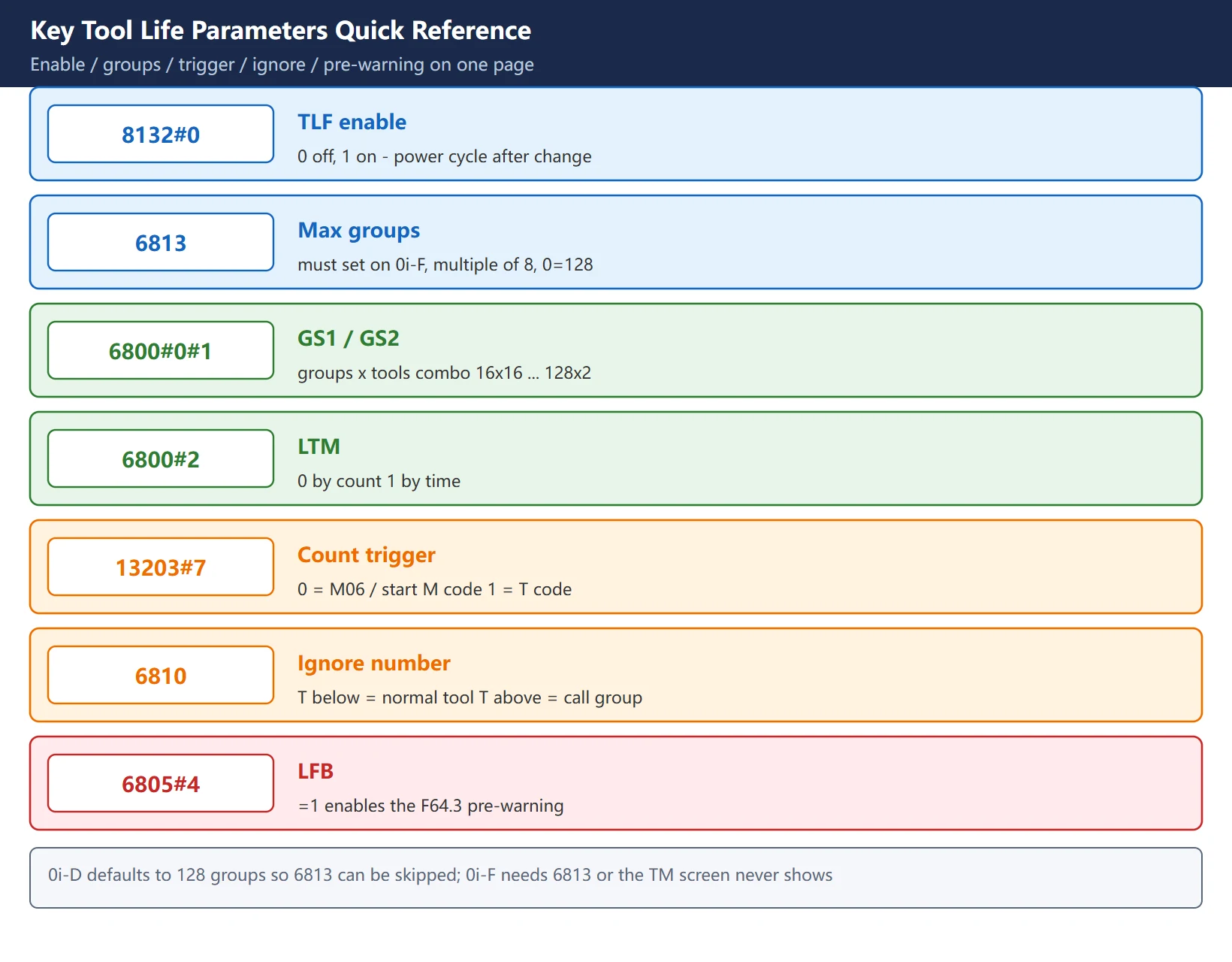
Bottom line: turn it on with 8132#0 = 1; on 0i-F also set 6813 (max groups, 0 means default 128); 6800 GS1/GS2 bits set “how many groups x how many tools”, and 6800#2 chooses count vs time; 13203#7 chooses whether counting is triggered by M06 or by the T code; 6810 is the ignore number that separates a normal T code from a “call group” T code; then write groups, life and offsets with G10 L3 … G11; finally route the life signals F64.0 (expired) and F64.3 (pre-warning, needs 6805#4=1) into the PMC and onto an A-address alarm.
1. What Tool Life Management (TM) Actually Does
In one sentence: it tracks “how much longer this tool can be used”, not “what the tool offset is”.
The system places several identical or interchangeable tools into a group. Each group has a total life (uses or minutes). Every time the group is called, the counter increments by one (count mode) or accumulates actual cutting time (time mode). As a tool approaches its limit, the system automatically picks the next standby tool in the same group; only when the entire group is exhausted does it truly alarm and stop.
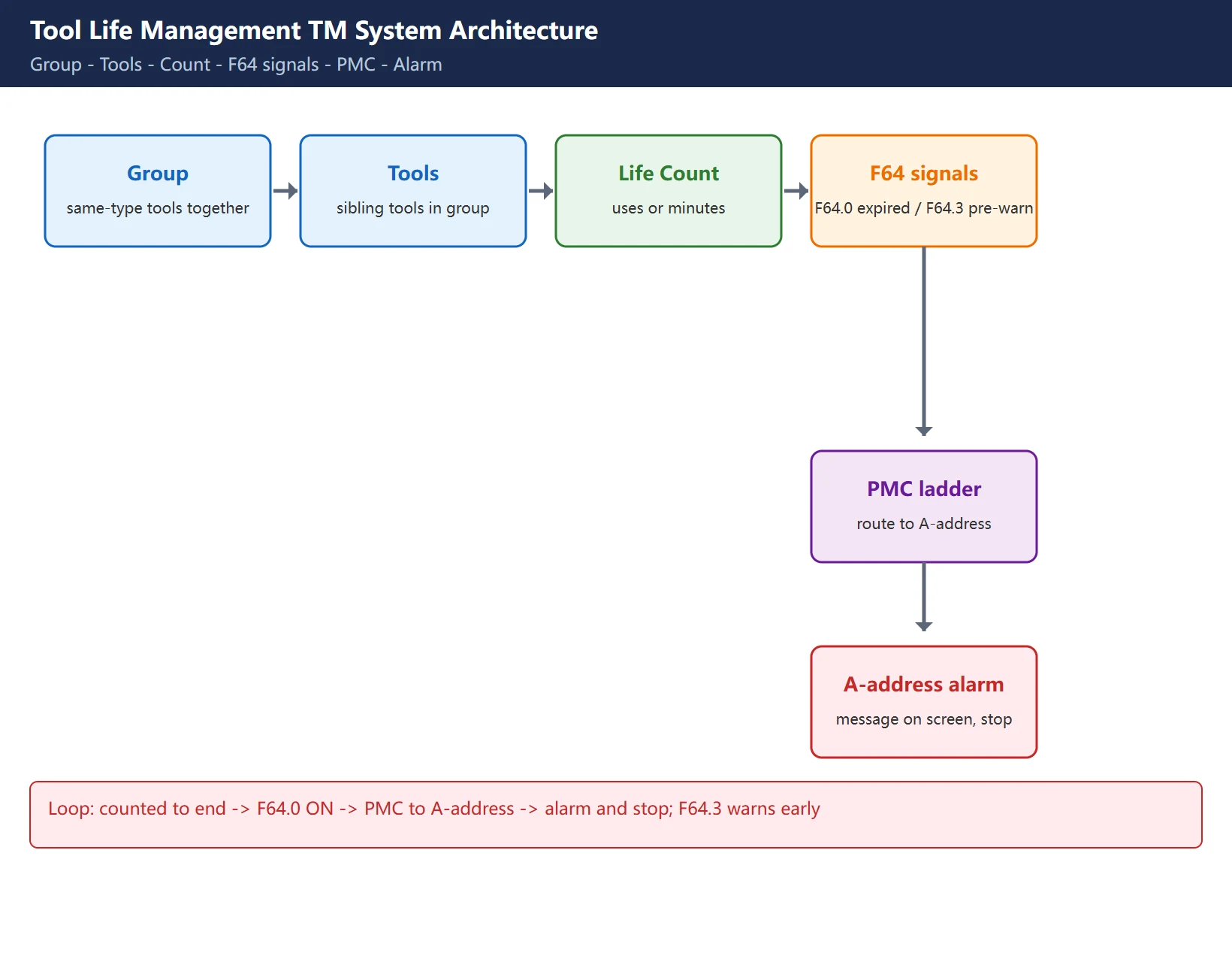
The pain point it solves: stop a worn-out tool from cutting until it scraps a batch of parts. Counting tool uses by hand is easy to forget; TM lets the system do it.
2. Step One: 8132#0 and 6813 (0i-D vs 0i-F difference)
The master switch is parameter 8132#0 (TLF):
8132#0 = 0: tool life management off8132#0 = 1: tool life management on
After changing it you must power cycle; only then does the “TL life (TOOLLF)” soft key appear under OFFSET/SETTING.
Table 1: 8132#0 enable and the two-series difference
| Series | 8132#0 | 6813 (max groups) | Note |
|---|---|---|---|
| 0i-D | set 1 | default 128, may skip | 6813=0 means 128 groups by default |
| 0i-F | set 1 | must set, 0-256, multiple of 8 (0=default 128) | Without 6813 (or 6813=0) the TM screen may not show on 0i-F |
Warning: the most common trap on 0i-F is setting only 8132#0 and forgetting 6813 – the “TL life” screen never appears. Add 6813 (for example 128) and power cycle again.
3. Groups x Tools: 6800 GS1/GS2 and the LTM bit
Once enabled, what really decides “how many groups, how many tools per group” is parameter 6800’s GS1 (#0) and GS2 (#1) bits, plus the LTM (#2) bit that picks the life type.
Table 2: 6800#0/#1 (GS1/GS2) combinations
| GS2 (#1) | GS1 (#0) | Groups | Tools per group |
|---|---|---|---|
| 0 | 0 | 16 | 16 |
| 0 | 1 | 32 | 8 |
| 1 | 0 | 64 | 4 |
| 1 | 1 | 128 | 2 |
- 6800#2 (LTM) = 0: count by number of uses (one increment per call)
- 6800#2 (LTM) = 1: count by time (actual cutting minutes)
Time mode counts only G01/G02/G03 real cutting; G00 rapid moves, spindle stop and the M30 tail are not timed – far more accurate than “counting M30s”, and the standard for FMS mixed-flow machining.
6813 is the “maximum group count” ceiling, a multiple of 8 (0i-D default 128, 0i-F must be set explicitly). The relationship: 6800 sets the ratio of groups to tools, 6813 sets the total ceiling.
4. Count Trigger and Ignore Number: 13203#7 and 6810
Parameter 13203#7 decides when the life counter increments by one:
13203#7 = 0: triggered by M06 / the started M code (common on machining centers – count at tool change)13203#7 = 1: triggered by the T code (count as soon as a tool is called)
Machining centers usually leave it at 0 (count with M06); lathes, or cases where you want to count every call, set it to 1.
Parameter 6810 is the “ignore number”, used to separate a normal T code from a “call group” T code:
- If
6810 = 100, then writing T101 in the program means “call group 1” (= ignore number 100 + group 1), and the system manages and counts it as a group; - Writing T1 (below the ignore number) is treated as a normal T code, not entering life management;
- Which physical tool and which offsets a group uses are fixed by the T/H/D inside the group definition.
One-line memory: a T code below 6810 is a normal tool; a T code above 6810 is a call-group tool. Changing 6810 also needs a power cycle to take effect.
5. G10 L3 Programming: groups, life and offsets in one shot
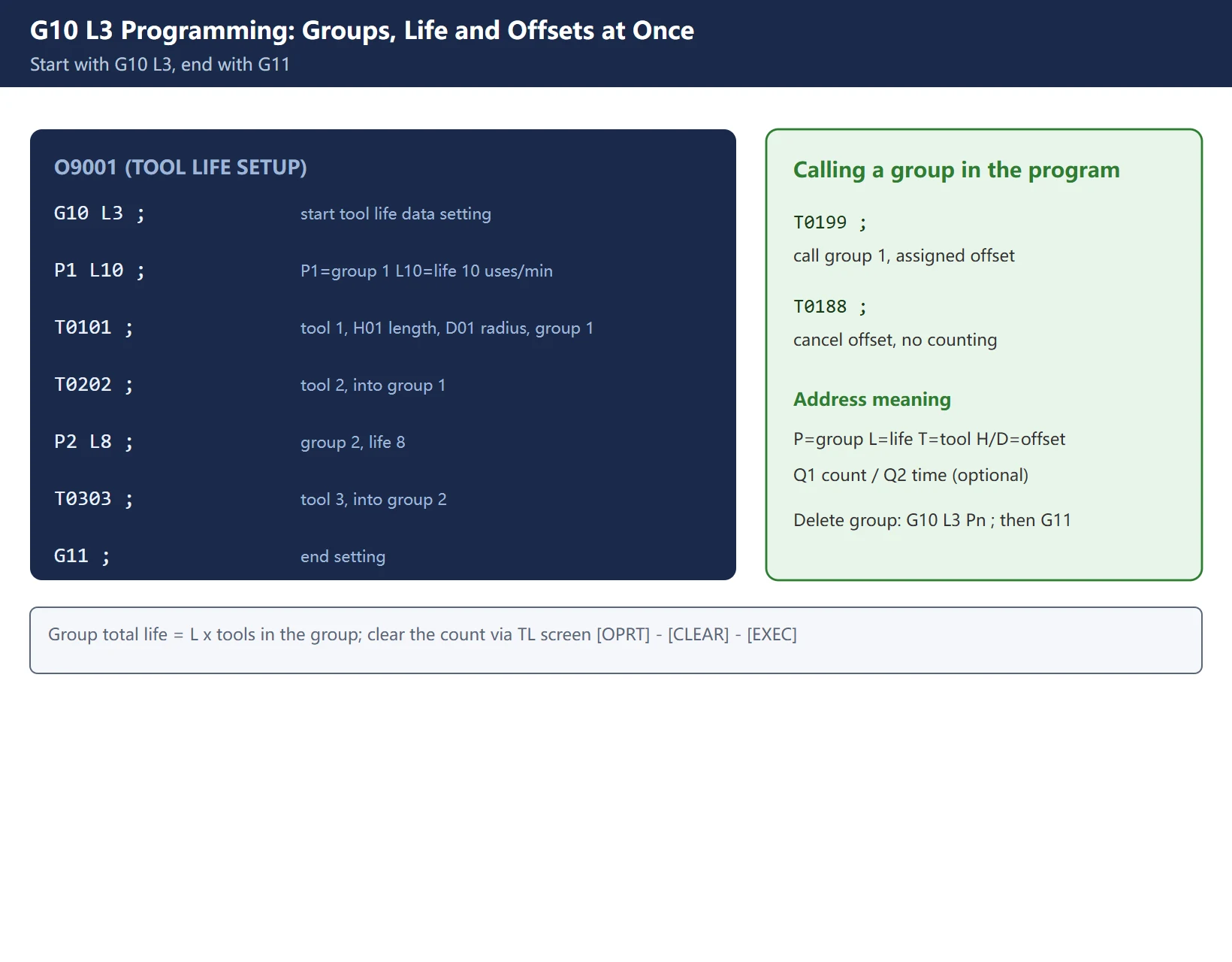
The cleanest way to register groups and life is a short program using G10 L3, ended with G11:
O9001 (TOOL LIFE SETUP)
G10 L3 ;          start tool life data setting
P1 L10 ;          P1=group 1, L10=group life 10 uses (or 10 min, per 6800#2)
T0101 ;           tool 1, H01 length offset, D01 radius offset, into group 1
T0202 ;           tool 2, H02/D02, into group 1
P2 L8 ;           group 2, life 8
T0303 ;           tool 3, H03/D03, into group 2
G11 ;             end setting
M30 ;
Key points:
- P = group number, L = group life value (uses or minutes; group total life = L x tools in that group);
- T H D = tool number / length offset / radius offset, fixing each physical tool and its offsets in the group;
- to pick count vs time per group, add Q after
P_L_: Q omitted or =1 is by count, =2 is by time (overrides the global 6800#2 setting); - in the machining program call the group with a “call-group T code”, for example T0199 means call group 1 using the assigned offset; to cancel the offset without counting, write T0188 (00 offset).
Table 3: G10 L3 key addresses
| Address | Meaning |
|---|---|
| G10 L3 … G11 | tool life data setting block |
| Pn | group n |
| Ln | group life value (uses or minutes) |
| Tn Hn Dn | tool number / length offset / radius offset |
| Q1 / Q2 | this group by count / by time (optional) |
Delete a group: run G10 L3 Pn ; (group number only, no L and no T) then G11 to remove group n. To zero the count after life expires, move the cursor to that group’s count field on the “TL management” screen and use [OPRT] then [CLEAR] then [EXEC].
6. Life Signals into PMC: F64.0 Alarm and F64.3 Pre-warning (6805#4)
TM puts the life status on the F64 signal group; to get it on screen you must go through the PMC:
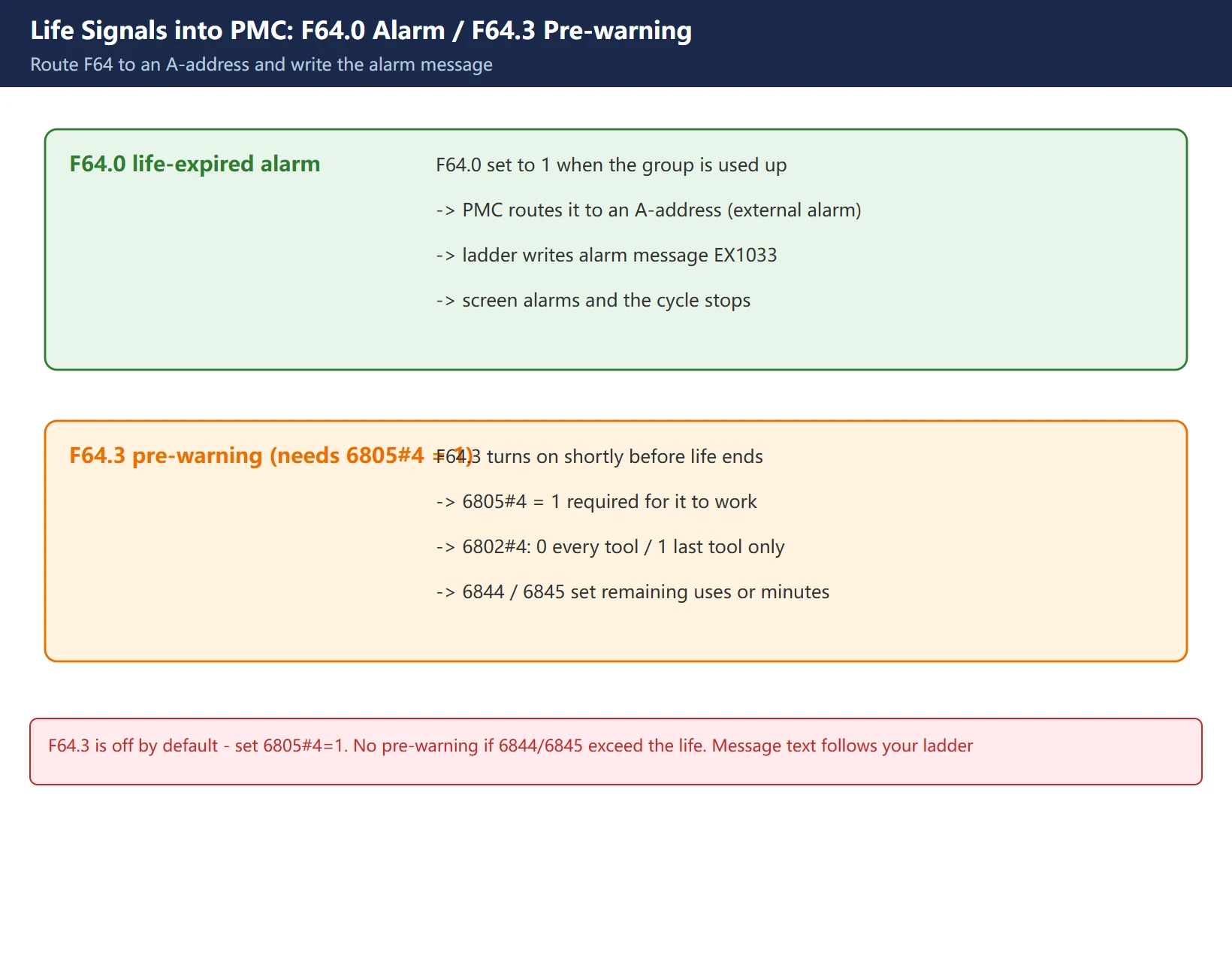
- F64.0 (tool life reached / change signal): turns ON when the whole group is used up. Route it to an A-address (external alarm) and write an alarm message in the PMC (for example “EX1033 TOOL LIFE HAS BEEN REACHED CHECK TOOL”) – the system then alarms and stops.
- F64.3 (tool life pre-warning signal THCHB): turns ON shortly before life ends, used for a “few tools left, get ready to change” prompt.
Warning: F64.3 is not available by default – you must first set parameter 6805#4 (LFB) = 1. Also 6802#4 controls the pre-warning scope:
6802#4 = 0: F64.3 is output for every tool in the group;6802#4 = 1: F64.3 is output only for the last tool in the group.
How early the pre-warning fires is set by 6844 (remaining uses) and 6845 (remaining minutes) – if either is larger than the life value, no pre-warning is output.
7. Time Mode vs Count Mode, and Field Pitfalls
Count mode vs time mode – which to choose?
- Count mode: one increment per completed call (M30/M06 or T trigger); simple and intuitive, good for repeating cycles where every part is identical (drilling, tapping).
- Time mode: counts only real cutting time, immune to dry runs and test cuts; good for steady batch cutting and the default choice for FMS mixed-flow.
Field pitfalls (hard-won):
- Enabled 8132#0 but skipped 6813: the TM screen stays hidden on 0i-F; add 6813 and reboot.
- Counter never increments: first check the 13203#7 trigger (M06 or T); then check whether the program used a “normal T code” (below 6810) that the system never treated as a group tool; in count mode also confirm M30/M06 actually executed.
- F64.3 pre-warning stays silent: usually 6805#4 is not set, or 6844/6845 were set larger than the life.
- Time lost on reset: count mode is usually recorded immediately; time mode’s actual cutting time is committed at M30 or tool change, so a mid-job Reset or power loss can drop a segment – on critical lines catch the reset signal in the PMC and force a write-back.
- Life ceiling: a single group’s life is capped at 9999 uses or 4300 minutes; anything beyond that is not accepted.
One line: TM is not hard; the difficulty is that the parameters are scattered across 6800, 6810, 6813, 13203 and 6805, and the enable conditions differ between 0i-D and 0i-F. Set them in the order above, then run a short program through the count, pre-warn, alarm and clear loop before trusting it on the line.
Frequently Asked Questions
I set 8132#0 to 1 but there is still no TL life screen – why?
The most common reason is that on the 0i-F series you must also set parameter 6813 (maximum group count, range 0-256, a multiple of 8, 0 equals the default 128). On 0i-D, 6813 already defaults to 128 and can be skipped; but on 0i-F, if you only changed 8132#0 without setting 6813, the “TL life” soft key under OFFSET/SETTING will not appear. After changing 8132#0 and, on 0i-F, 6813, you must power cycle for them to take effect. Also confirm write protection is off and the parameter actually saved instead of flipping back to 0 again.
The tool life counter never increments – how do I troubleshoot it?
First tell count mode from time mode. In count mode the increment is normally triggered by M30/M06 or the T code, and the trigger is set by 13203#7 (0 = M06 / the started M code, 1 = the T code) – confirm your trigger matches how you programmed it. Then check whether the program calls the tool with a “call-group T code” (it must be greater than the 6810 ignore number); if you wrote a normal T code below 6810, the system treats it as an ordinary tool change and never enters life management, so it never counts. In time mode, confirm you are in real G01/G02/G03 cutting – dry runs and test cuts are not timed. Finally check whether the group was cleared or its life value was set to 0.
How do I get the F64.0 life alarm to show on the screen?
F64.0 is the “tool life reached / change signal”, set to 1 by the system when the whole group is used up. On its own it does not raise an alarm; you must bring it into the PMC ladder, route it to an A-address (external alarm address), and then drive an alarm message from that A-address in the ladder (for example “EX1033 TOOL LIFE HAS BEEN REACHED CHECK TOOL”). Only then will the system alarm and stop with the message on screen. Likewise, for a “nearing end of life” prompt use F64.3 after setting 6805#4 = 1, routed to an A-address in the same way. The alarm text is edited in the PMC alarm table or the message number in the ladder, and depends on the specific machine builder’s alarm assignment – check the ladder on your own machine.
Last updated: 2026-10-28
Where to go next
- FANUC Troubleshooting — the full guide library: alarms, diagnosis numbers, servo, spindle, PMC and electrical faults, organised by symptom.
- CNC Repair Tools — which instrument measures what: multimeters, clamp meters, insulation testers and oscilloscopes, with the specification that actually matters.
- Remote Technical Support — have the readings reviewed with you: alarm reverse lookup, PMC ladder analysis and servo tuning advice by call. Repair companies and integrators welcome.
Read the guide, get the right instrument, or walk the diagnosis through with someone — pick whichever you need.
The original Chinese version — same procedure, with the full field notes.























暂无评论内容