



A FANUC battery alarm looks harmless — the machine may still run. That is exactly why it catches people out: by the time the machine stops, the data is already gone. This guide covers what each indicator and alarm number actually means, the two completely different replacement procedures (they are not interchangeable), what is genuinely at risk, and what you must redo afterwards.
Back up before you touch anything: FANUC Data Backup and Restore: ALL I/O, BOOT SRAM Compared.
1. Quick Reference: What BAT, APC, ALM and 305–308 Actually Mean
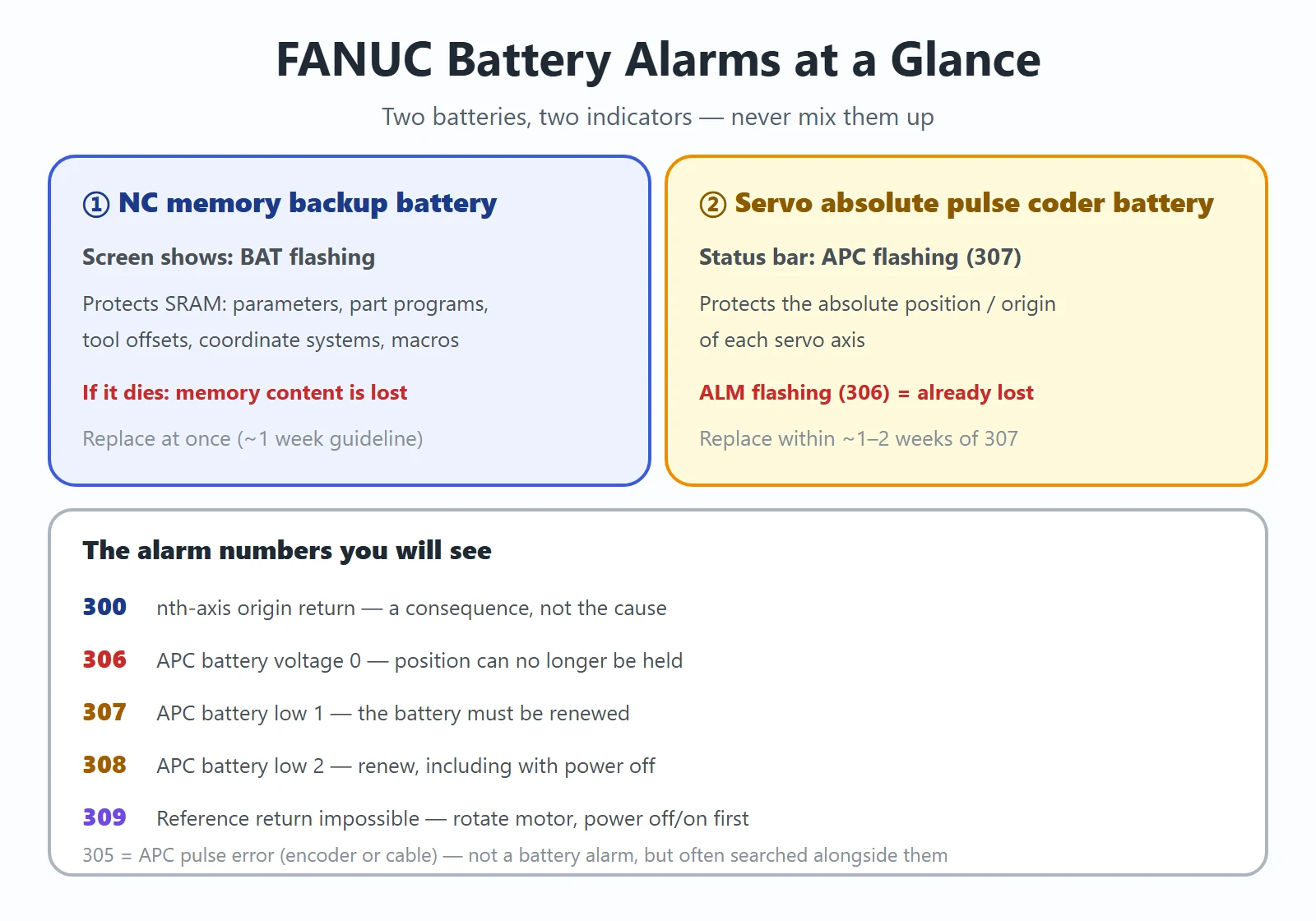
There are two independent batteries on a FANUC machine, and confusing them is the root of most bad advice online:
Table 1 — What each indicator and alarm number means
| Indicator | Where you see it | Which battery | What it protects | Urgency |
|---|---|---|---|---|
| BAT (flashing) | CNC screen | NC memory backup battery (SRAM) | Parameters, programs, tool offsets, coordinate systems | Replace at once (~1 week guideline) |
| APC (reverse-video flashing) | CNC status bar | Absolute pulse coder (servo) battery | Absolute position / origin of each axis | Replace at once (~1–2 weeks) |
| ALM (reverse-video flashing) | CNC status bar | Absolute pulse coder battery | — | Too late: absolute position already lost |
And the numbers you will see:
- 300 — “nth-axis origin return”: manual reference position return is required. It is the *consequence*, not the cause.
- 305 — APC pulse error (encoder or cable fault, not a battery alarm, though it is often searched alongside them).
- 306 — APC battery voltage 0: the voltage has dropped so far that the data cannot be held.
- 307 — APC battery low 1: voltage has reached the level where the battery must be renewed.
- 308 — APC battery low 2: must be renewed, including while power is off.
- 309 — reference return impossible: the motor was never rotated after battery loss. Rotate the motor one or more turns, power off/on, then return to origin.
2. The Four Voltage States and What the Screen Shows
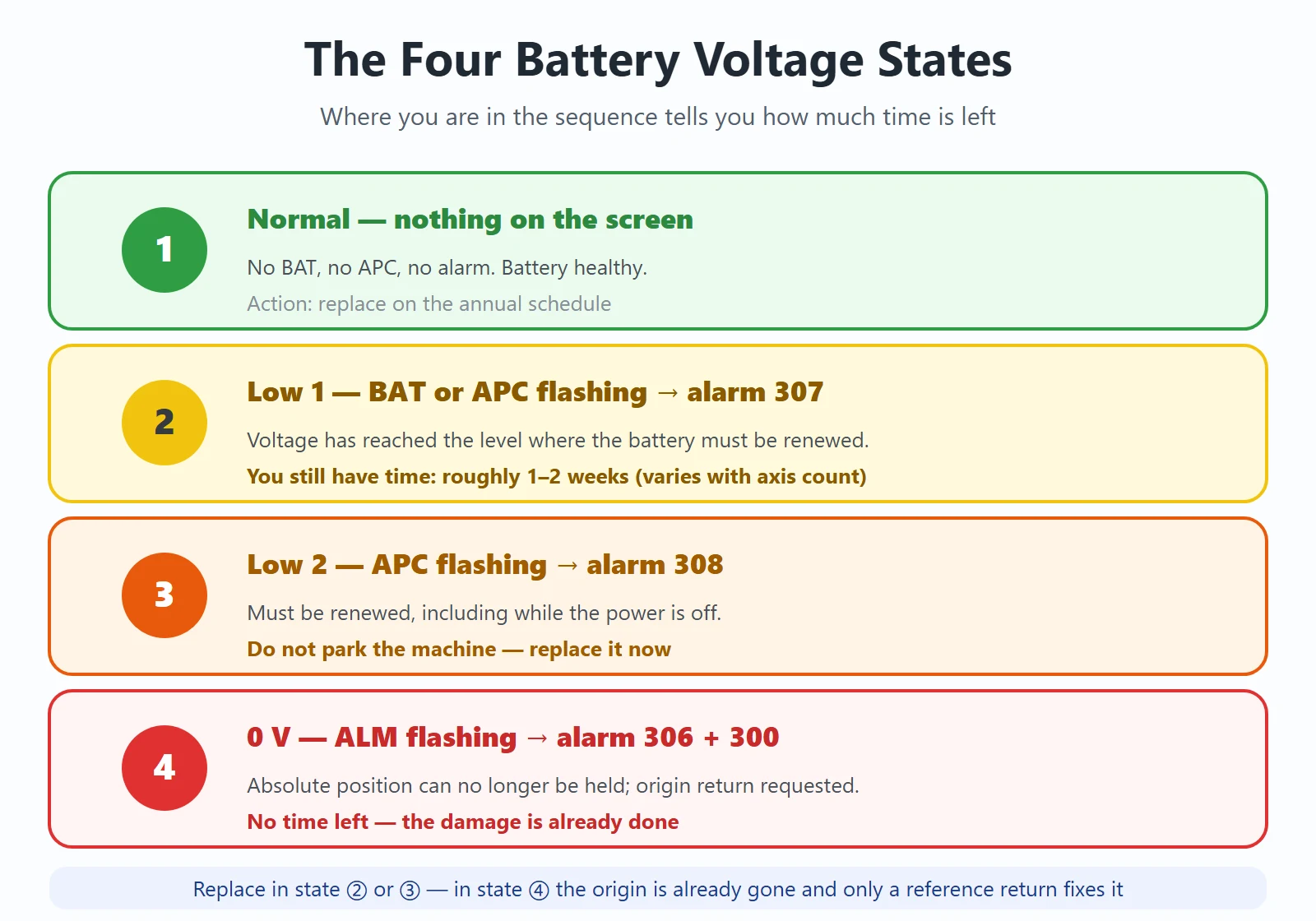
The progression is fixed, and knowing which state you are in tells you how much time you have left:
Table 2 — The four voltage states and how much time each leaves you
| State | Screen / status bar | Alarm | What it means | How long you have |
|---|---|---|---|---|
| ① Normal | nothing | — | Battery healthy | — |
| ② Low 1 | BAT or APC flashing | 307 (and/or 308) | Replace the battery | Roughly 1–2 weeks depending on the number of pulse coders |
| ③ Low 2 | APC flashing | 308 | Must be renewed, including with power off | Same — do not park the machine |
| ④ 0 V | ALM flashing | 306 + 300 | Absolute position can no longer be held → origin lost | No time left — damage already done |
Alarm 307 — battery low 1: replace now, you still have time
307 tells you the voltage has reached the level where the battery must be renewed. Nothing is lost yet. The practical window quoted in FANUC maintenance material is about one to two weeks, and it varies with how many pulse coders are connected — more axes drain the battery faster. Replace it in this state and the job is routine.
Alarm 306 — battery voltage 0: the absolute position is already gone
306 means the voltage has dropped to the point where the pulse coder can no longer hold the absolute position. It returns to the initial (non-holding) state, and alarm 300 (return to reference position required) appears at the same time. On the status bar you see ALM flashing instead of APC. Replacing the battery now does *not* bring the origin back — you must perform a reference return afterwards.
3. Replacing the NC (SRAM) Memory Backup Battery
This battery keeps the CNC’s SRAM alive: bias/offset data and system parameters. When it fails and the unit is then switched on, the memory contents are lost and a system alarm occurs — after which the memory must be cleared and the data re-entered.
Back up the SRAM first. A backup makes recovery trivial even if the data is lost — see the backup methods here.
Battery specifications by control type:
Table 3 — Battery and holder part numbers by control type
| Control type | Battery / holder |
|---|---|
| LCD-integrated control unit | Lithium battery A02B-0323-K102 (also A02B-0309-K102 on some units) |
| LCD-separate control unit | Lithium battery A02B-0200-K102 |
| External battery case | Case A02B-0236-C282 + cable A02B-0323-K103, using 4 × D-size (LR20 / UM-1) alkaline cells |
Procedure (integrated type):
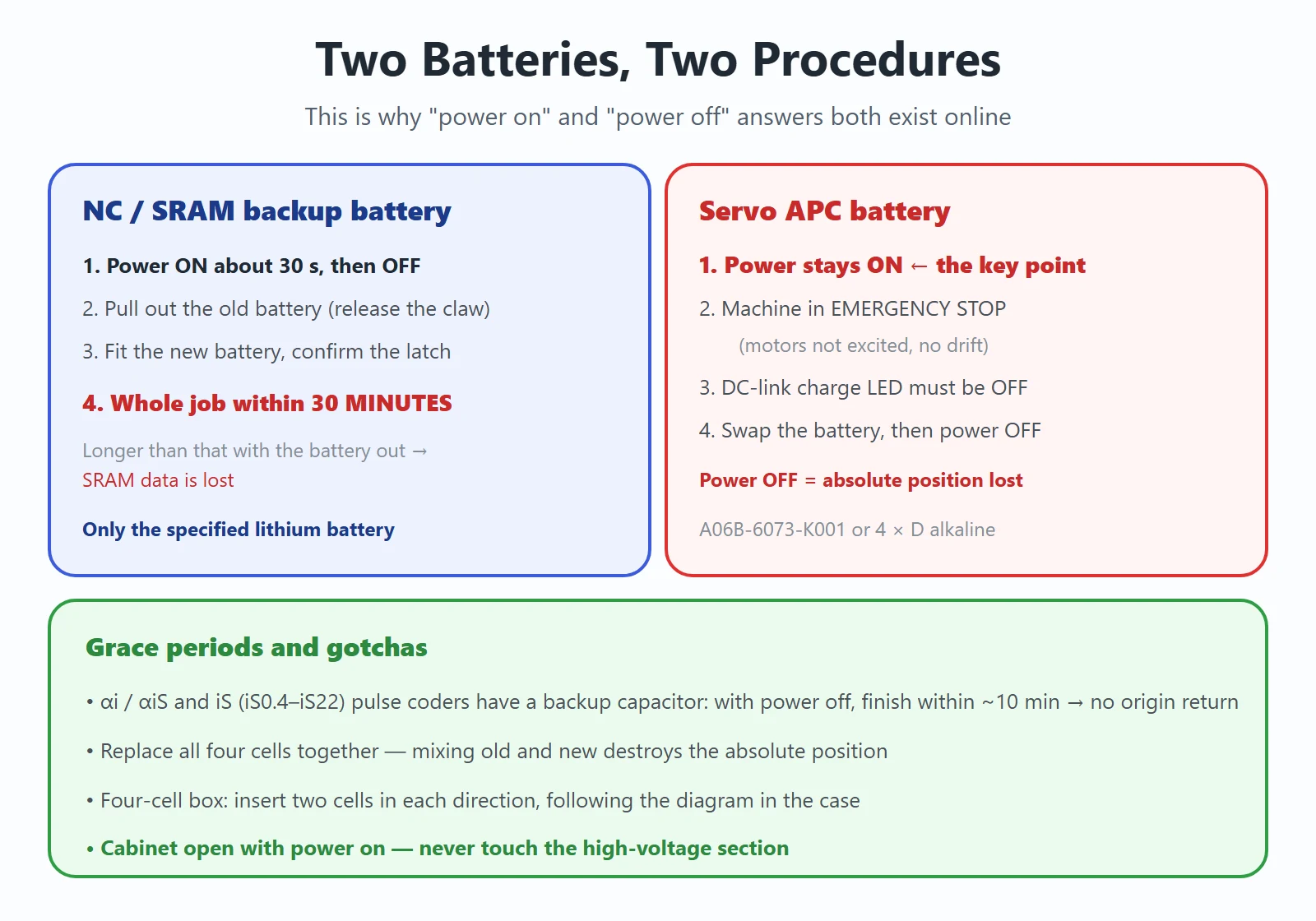
- Switch the machine (control unit) power ON for about 30 seconds, then switch it OFF.
- Pull out the lithium battery on the back of the control unit — grip the latch, release the retaining claw, and draw it towards you.
- Fit the new lithium battery and push until the claw engages; confirm the latch is securely locked.
- (Separate type: unplug the battery cable connector first, then remove the battery from the holder.)
⚠️ Two hard limits for the NC battery
- Steps 1–3 must be completed within 30 minutes. If the battery is out too long, the SRAM data is lost.
- Use only the specified lithium battery. An incorrectly replaced lithium battery can explode, and substitutes are not acceptable. Tape the terminals of the old battery before disposal.
FANUC recommends replacing this battery once a year regardless of whether an alarm appears — planned replacement is far cheaper than re-entering parameters.
4. Replacing the Servo APC Battery (Absolute Pulse Coder)
This is the one that people get wrong, and the rule is unambiguous:
Replace the absolute pulse coder battery with the NC power ON. Replacing it with the power OFF causes the absolute position stored in the pulse coder to be lost.
Procedure:
- Prepare the battery in advance: A06B-6073-K001 lithium battery (for the α-series servo amplifier module, CX5X connector), or 4 × D-size alkaline cells (LR20 / UM-1) for a separate battery box.
- Switch the machine (CNC) power ON.
- Put the machine in emergency stop so the motors are not excited — this prevents the axes from drifting while you work.
- Confirm the DC link charge LED on the servo amplifier is extinguished.
- Remove the old battery, fit the new one, reconnect, refit the battery case / cover.
- Then switch the power OFF.
⚠️ Rules specific to the APC battery
- Replace all four cells together. Mixing old and new cells can destroy the absolute position data.
- In a separate battery box, mind the orientation: the four cells are inserted two in each direction — follow the diagram inside the case.
- Do not touch the high-voltage section while the cabinet is open. This work is done with power on and the cabinet open, so only personnel trained for it should carry it out.
- 🟢 Useful exception: on αi / αiS series servo motors and iS series (iS0.4–iS22), the absolute pulse coder contains a built-in backup capacitor. If you replace the battery with the servo amplifier power off but finish within about 10 minutes, no reference return is needed. Any longer than that and you must work with the power on.
5. After Replacement: What You Must Do Before Running Parts
- If you saw 306 / 300 (or ALM flashing): the absolute position is gone. Perform a manual reference position return on the affected axes. See FANUC Absolute Position Lost: Parameter 1815#4 (APZ) and Full Manual Reference Return Steps.
- Re-do the tool setting. Once the machine reference shifts, every tool offset measured against the old origin is wrong.
- Verify the workpiece coordinate systems (G54–G59). They are stored in SRAM and are tied to the machine zero; confirm the values before you cut.
- Clear the alarm and power-cycle to confirm it does not come back.
- If the NC (SRAM) battery had actually died, the memory content is lost: clear the memory and reload parameters, programs, offsets and macro variables from your backup.
- Write it down — log the date and battery part number in the maintenance record so the next change is planned, not panicked.
6. What You Actually Lose — Item by Item
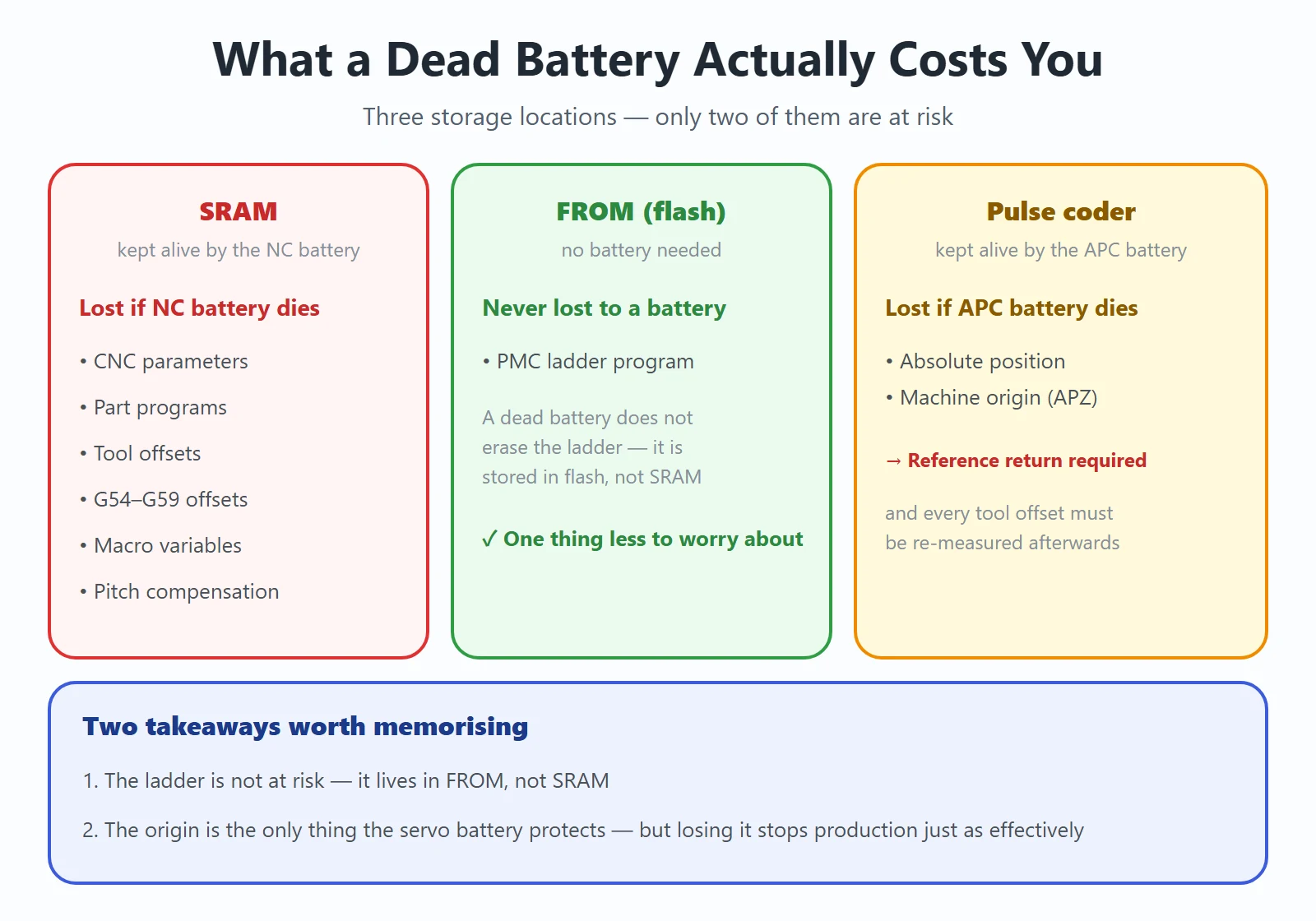
Table 4 — What is stored where, and what each dead battery costs
| Data | Stored in | Lost if NC battery dies? | Lost if APC battery dies? |
|---|---|---|---|
| CNC parameters | SRAM | ✅ Yes | ❌ No |
| Part programs | SRAM | ✅ Yes | ❌ No |
| Tool offsets / bias data | SRAM | ✅ Yes | ❌ No |
| Workpiece coordinate systems (G54–G59) | SRAM | ✅ Yes | ❌ No (but must be re-verified after re-zeroing) |
| Macro variables | SRAM | ✅ Yes | ❌ No |
| Pitch error compensation | SRAM | ✅ Yes | ❌ No |
| PMC ladder program | FROM (flash memory) | ❌ No — a dead battery does not erase the ladder | ❌ No |
| Absolute position / origin (APZ) | Pulse coder, held by APC battery | ❌ No | ✅ Yes — reference return required |
Two takeaways worth memorising: the ladder is not at risk (it lives in FROM, not SRAM), and the origin is the only thing the servo battery protects — but losing it stops production just as effectively.
7. Parameters 3105#0 (BAC) and 3190#0 (BAL): Was Battery Detection Switched Off?
When a BAT alarm is present — or, worse, when you *suspect* a battery is dying but the machine never warned you — check these two parameters:
- No.3105 #0 (BAC) — battery alarm / detection related setting for the NC backup battery
- No.3190 #0 (BAL) — battery-low related setting
If either has been set so that detection is masked, the machine will not tell you the battery is low, and you will only find out when the data is already gone. This happens more often than you would think on second-hand machines and after retrofits.
⚠️ Confirm the exact bit names and behaviour in the parameter manual for your control model before changing them — the numbers above are the ones to inspect, but bit naming varies by generation.
8. Common Ways This Job Goes Wrong
- Low temperature fools you. Battery voltage sags in the cold and can trigger a low-voltage alarm that is not real. Measure the battery terminals with a multimeter on DC volts: if the alarm clears once everything warms up, you are fine; if it persists, it is genuinely a battery or hardware problem.
- Battery holder oxidation / poor contact. Clean the contacts, unplug and re-seat the battery, and re-check. Many “dead battery” call-outs are a dirty holder.
- Wrong polarity. Especially in the four-cell box where two cells go in each direction. Follow the diagram in the case.
- Mixing old and new cells in a four-cell box — this can wipe the absolute position.
- Not returning to origin after a 306. The machine will happily run with a wrong origin, and you find out on the first crashed part or scrapped workpiece.
- Using a non-specified battery. Beyond the explosion risk, wrong chemistry gives the wrong discharge curve and you get a repeat alarm weeks later.
- Assuming “both answers” apply to one battery. They do not — see below.
FAQ
Should the FANUC battery be replaced with the power on or with the power off? Both answers exist — which is right?
Both are right, because there are two different batteries:
- NC / SRAM memory backup battery: the documented procedure is to switch the power ON for about 30 seconds, then OFF, and complete the swap within 30 minutes. The 30-second powered interval charges the backup circuit; the 30-minute limit is how long the SRAM can survive with the battery out.
- Servo absolute pulse coder (APC) battery: it must be replaced with the power ON (machine in emergency stop, motors not excited). With the power off, the pulse coder loses the absolute position and you must return to origin.
So “change it with the power off” and “never change it with the power off” are both correct — for different batteries. On αi / αiS and iS series motors there is also a built-in capacitor that gives you about 10 minutes of grace if you do have to work unpowered.
I replaced the battery but alarm 300 (or ALM) is still showing — what else do I need to do?
If you saw 306, the absolute position was already lost before you changed the battery; 300 is the CNC asking for a reference return. Replacing the battery does not restore the origin. You must: perform a manual reference position return on the affected axes (the 1815#4 / APZ procedure), re-do the tool setting, verify G54–G59, then clear the alarm and power-cycle to confirm it stays clear. If 309 appears instead, rotate the motor one or more turns, power off and on, then do the reference return.
How long does a FANUC battery last, and how often should it be changed?
FANUC recommends replacing the batteries once a year regardless of whether an alarm appears. The nominal service life by battery type is roughly: A06B-6073-K001 — about 2 years per 3 axes; A06B-6050-K061 or 4 × D-size alkaline (LR20) — about 2 years per 6 axes; A06B-6114-K504 — about 1 year per 3 axes. Once 307 appears you have roughly one to two weeks, varying with the number of pulse coders connected — treat it as “this week”, not “next month”.
Last updated: 2026-10-21





















暂无评论内容