


When a SINUMERIK 840D or 828D shows UAFEHL and the PLC drops into STOP, most people freeze — the alarm text gives almost no clue what broke. This article explains what UAFEHL actually is, the six root-cause families behind a PLC stop, a practical 5-step localization procedure, what the SF / STOP / RUN LEDs mean, and how to pin the fault to a specific DB2 alarm bit using the 700xxx number. No guesswork, no fabricated alarm codes — every number here is either a SINUMERIK mechanism or an OEM-defined address.
1. What Exactly Is UAFEHL (First, Correct a Common Misunderstanding)
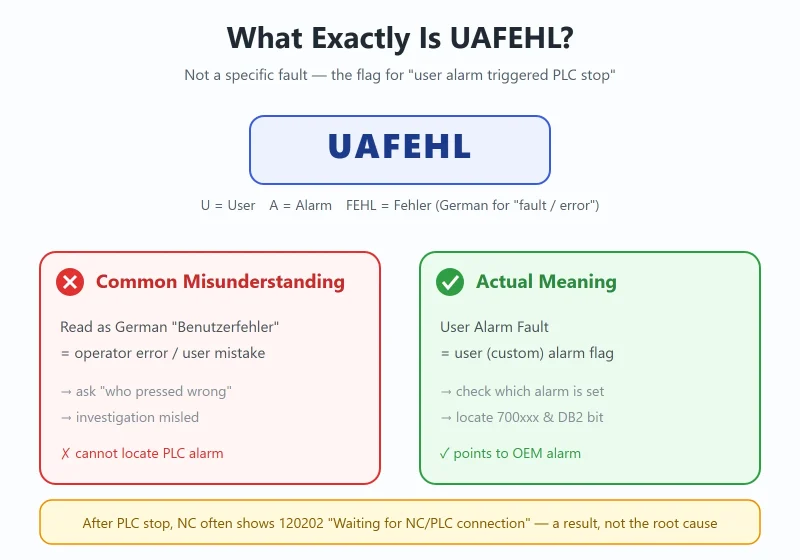
Many engineers see UAFEHL for the first time and treat it like a “fault code” to look up in a manual — but it is not a specific fault. It is a trigger flag in the SINUMERIK alarm mechanism:
- U = User
- A = Alarm
- FEHL = Fehler (German for “fault / error”)
Put together, it is User Alarm Fault — a class of alarms customized by the machine builder (OEM) through the PLC user-alarm mechanism. When a user alarm configured as “stop-level” is triggered, the PLC is forced into STOP mode, and the HMI shows the UAFEHL text together with the alarm number (typically UAFEHL 700000, UAFEHL 700001, and so on).
⚠️ A common misunderstanding must be corrected: some sources explain UAFEHL as the German abbreviation “Benutzerfehler (operator error / user mistake).” That is inaccurate. The semantics of UAFEHL is “user (custom) alarm fault” — it means one of the OEM’s alarms was triggered, not that an operator did something wrong. Reading it as “operator error” sends troubleshooting in the wrong direction: you should be asking *which user alarm in the PLC is set*, not *who mis-operated*.
The key conclusion: UAFEHL = the state “a stop-level user alarm was triggered.” The real cause lives in the 700xxx alarm that triggered it and the corresponding DB2 bit. At the same time, when the PLC enters STOP and its communication with the NC is lost, the NC side will often also raise 120202 “Waiting for connection to NC/PLC” — that is a *resulting* alarm after the PLC stopped, not the root cause.
Related reading: if you want to know how these 700xxx alarms are actually programmed, see How SINUMERIK 840D PLC User Alarms Are Programmed: 700xxx and DB2 Address Conversion.
2. Six Root Causes of PLC Stop
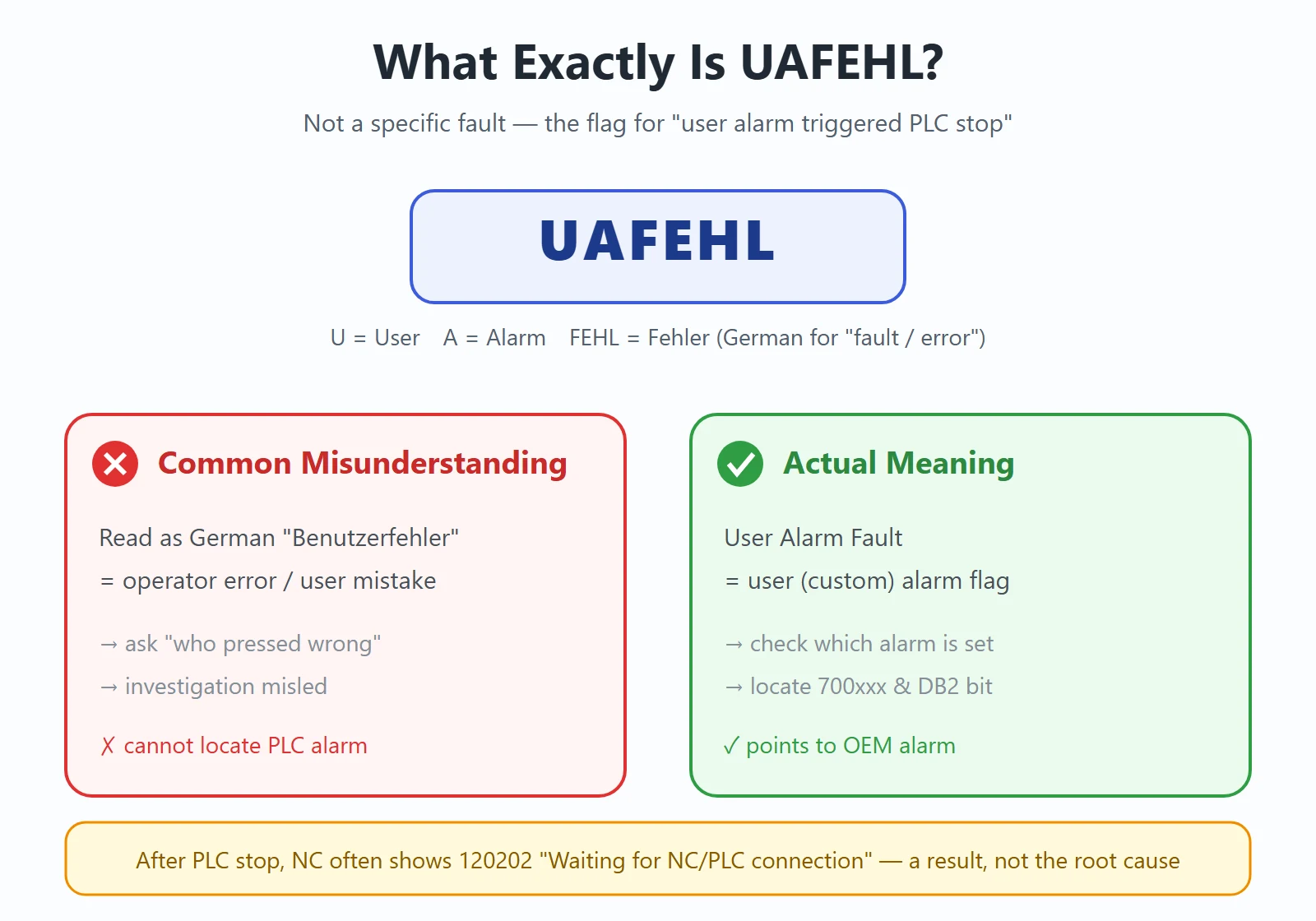
UAFEHL is only the umbrella term “an alarm was triggered.” The actual root causes fall into six families. Narrowing the scope with this table first is far faster than blindly reading the program:
| Root-cause family | Typical trigger | First on-site reaction |
|---|---|---|
| ① User alarm | OEM-defined alarm (700xxx) meets its set condition | Log the alarm no. → check the DB2 bit (Section 4) |
| ② I/O hardware | I/O module fault, loose wiring, broken sensor | Check module LEDs, run hardware diagnostics |
| ③ Safety circuit | Safety door, e-stop, light curtain not closed | Verify safety relay / safety PLC, restore the circuit |
| ④ Process interlock | Low hydraulic pressure, lube failure, insufficient coolant | Check pressure / level switches, satisfy the interlock |
| ⑤ Communication loss | PROFIBUS / PROFINET break, wrong terminator | Check bus cable, connectors, terminator resistors |
| ⑥ Storage damage | PLC program or data block corrupted, backup mismatch | Re-download the PLC program from backup |
Experience: among the six, “user alarm” and “process interlock” account for the majority on site. Safety circuit and communication loss come next; I/O hardware and storage damage are rarer but more damaging.
3. Standard 5-Step Troubleshooting Procedure
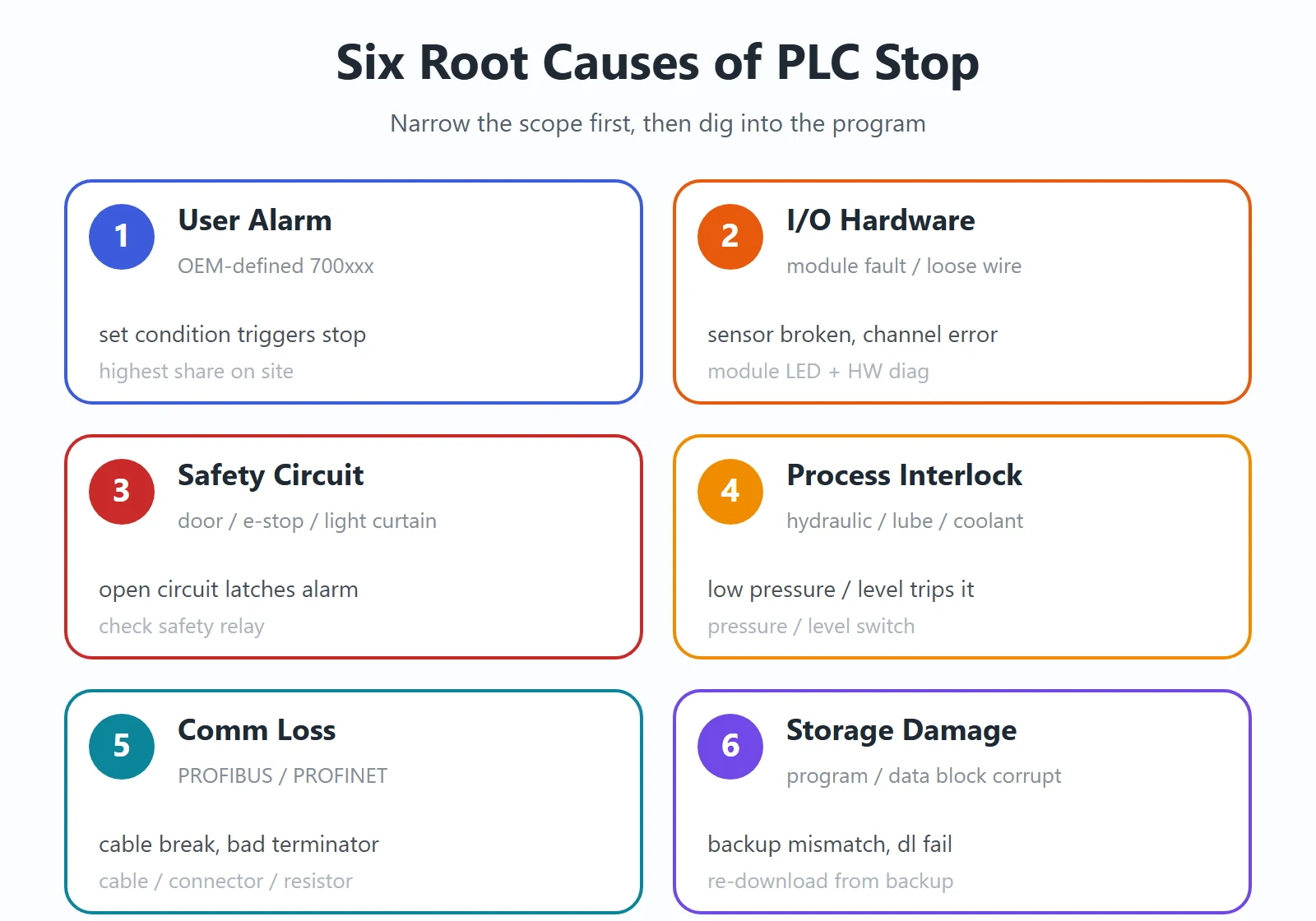
When you see UAFEHL + PLC STOP, follow these five steps — you can usually lock the alarm down to a specific bit on site:
- Log the alarm number: First write down the full alarm number shown on the HMI (e.g. UAFEHL 700806). It is the key to everything that follows.
- Open the project: Use STEP 7 (SIMATIC Manager) or TIA Portal to open that machine’s 840D PLC project (for 828D, use the SINUMERIK PLC programming tool).
- Check the DB2 alarm bit: Compute the byte / bit in DB2 from the alarm number, then monitor online whether that bit is 1 to confirm which user alarm is active.
- Read the CPU LED: Look at the SF / STOP / RUN indicators on the NCU (840D) or PPU (828D) to confirm the PLC really is in STOP and whether there is a hardware fault (SF).
- Run hardware diagnostics: Use the “Hardware Diagnostics” function in STEP 7 / TIA to scan the rack and find any missing or faulted module (I/O, communication, power).
Tip: a PLC in STOP cannot be cleared of hardware / communication faults by “reset” alone — fix the physical problem first, then set the PLC back to RUN.
4. Meaning of the Three CPU LEDs (Most Basic, Most Misread)
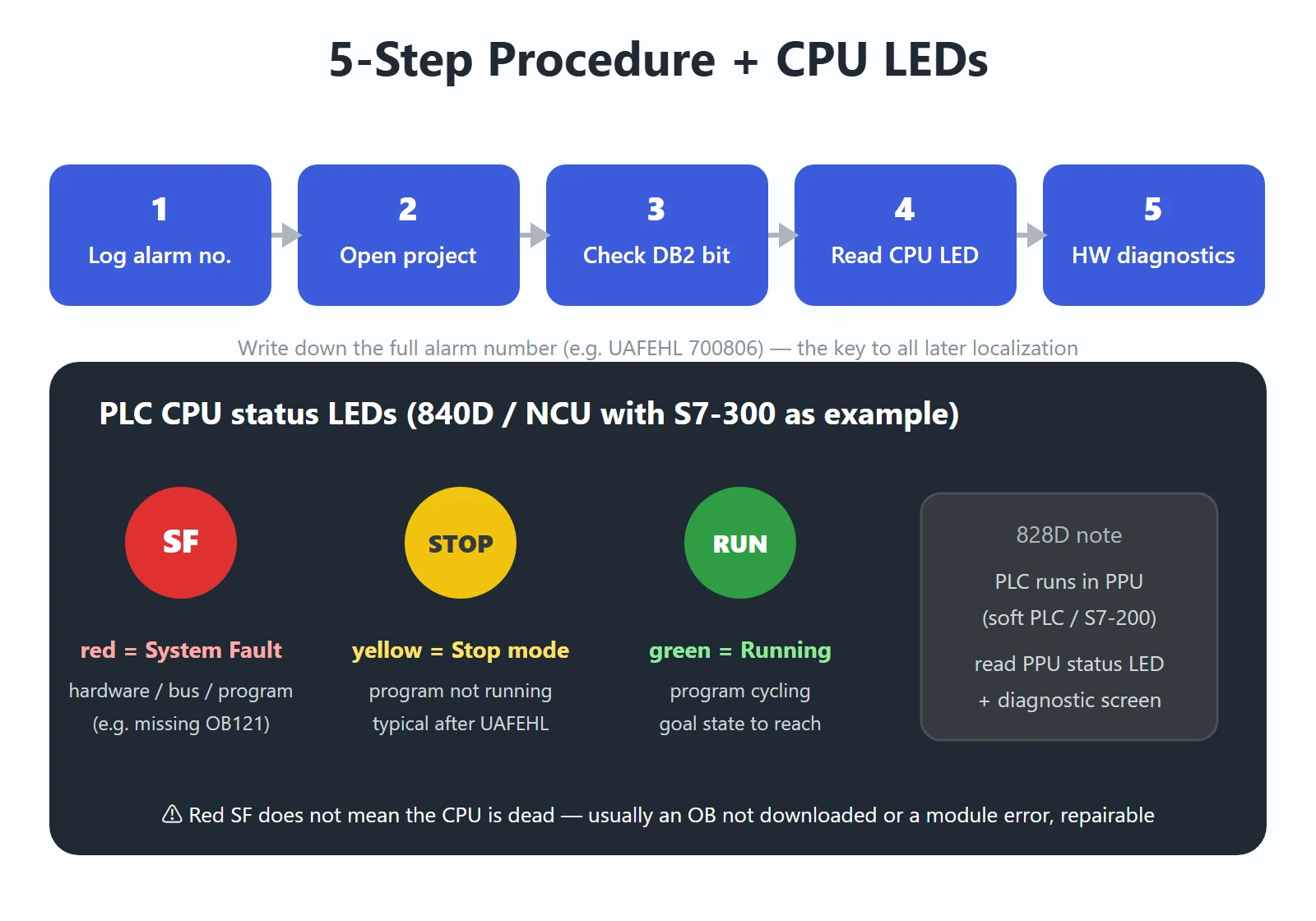
Taking 840D (PLC integrated as S7-300 inside the NCU) as the example, PLC status is read mainly from three lights:
- SF (red, System Fault): System fault. Lit = a hardware fault, bus fault, or program error (e.g. a sync error caused by a missing OB). It is the general “something is wrong” signal.
- STOP (yellow): The PLC is in stop mode. Lit = the program is not running — the typical state right after UAFEHL triggers.
- RUN (green): The PLC is running. Lit = the program is cycling normally.
⚠️ Common misreads: some see the red SF and think “the PLC is dead, replace it” — but SF is most often “an OB was not downloaded” or “a module is reporting an error,” not a dead CPU. Others read the yellow STOP as “no power” — but the yellow light actually means the PLC is powered yet not running.
On 828D the PLC runs inside the PPU (a soft PLC, S7-200 architecture) and does not have the same standalone PLC LED row as 840D. Its status is judged mainly from the PPU status LEDs and the diagnostic screen — the idea is the same: first confirm whether the PLC is stopped, then read the diagnostic info.
5. Role of the Key Organization Blocks (OBs)
The S7-300 PLC reacts to different events through Organization Blocks (OBs). For UAFEHL / PLC STOP, the three most important are:
- OB100 (cold restart / Startup): Executed once when the PLC powers up or changes mode; responsible for initialization. If FB1 (the alarm block) is not correctly called and initialized inside OB100, the alarm system may never be built properly and can halt abnormally on the first trigger.
- OB121 (synchronous error): Triggered when an error occurs during program execution (e.g. accessing a non-existent address, wrong data type). If OB121 is not downloaded, the CPU stops directly — a lot of “mysterious PLC stops” are simply a missing OB121.
- OB40 (hardware interrupt): An alarm OB driven by module hardware-interrupt requests, often used to report external events quickly as alarms. Alongside it are OB82 (diagnostic interrupt) and OB86 (rack / module fault), which you consult for communication / module root causes.
Troubleshooting rule of thumb: if the PLC stops frequently with no obvious cause, first confirm whether OB100 / OB121 are downloaded into the CPU. A missing OB121 is the most overlooked — and the easiest to fix — cause of a stop.
6. Common 700xxx Alarms and DB2 Localization Quick Reference
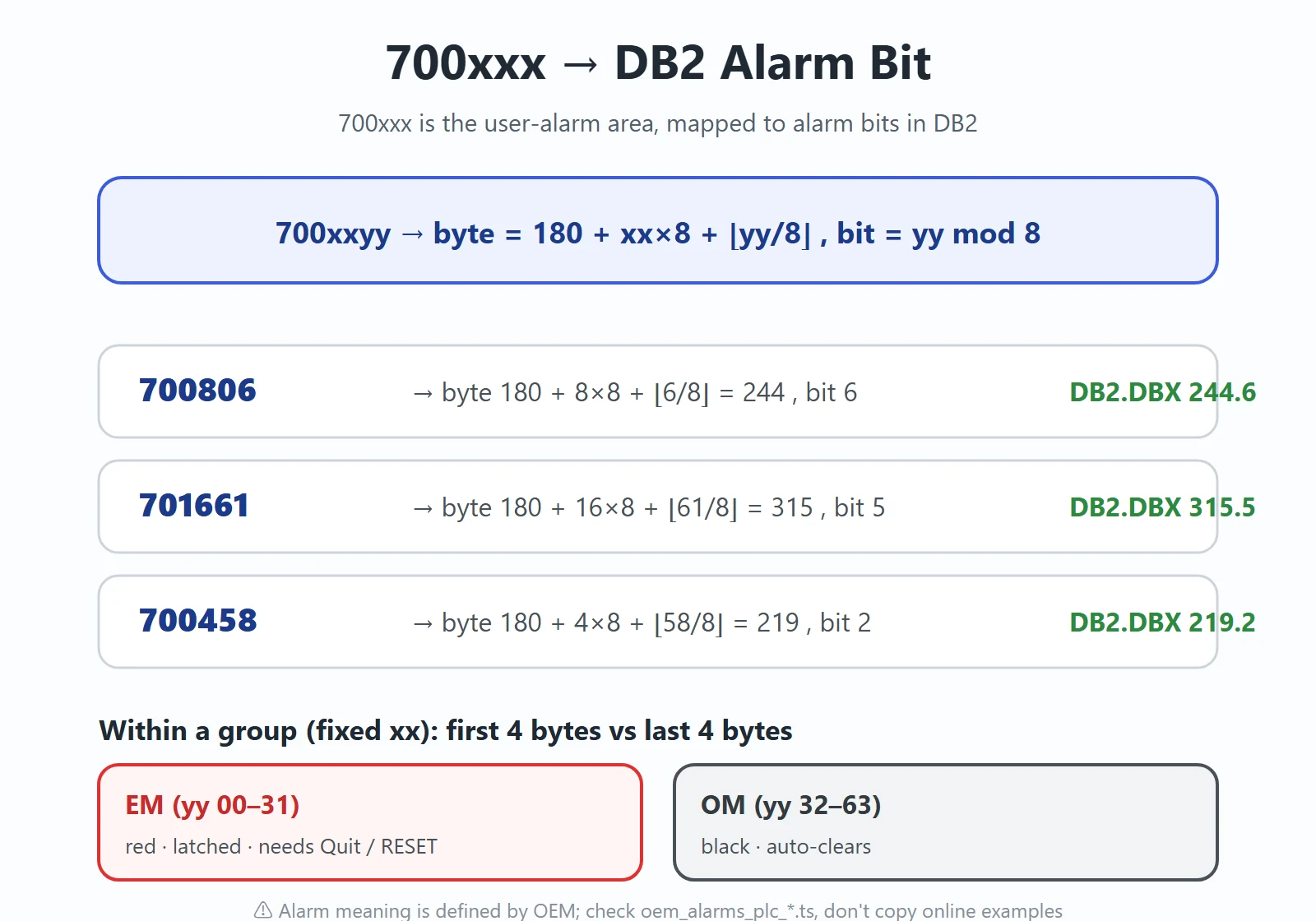
700xxx is the user-alarm area in SINUMERIK, mapped to alarm bits in DB2. The conversion (consistent with the “how alarms are programmed” article) is:
- Alarm
700xxyy→ DB2 byte =180 + xx×8 + ⌊yy/8⌋, bit =yy mod 8 - Starting
700000maps toDB2.DBX 180.0 - Within a group (fixed xx), the first 4 bytes (yy 00–31) are EM (red, latched, needs Quit / RESET to clear); the last 4 bytes (yy 32–63) are OM (black, auto-clears)
Examples:
| Alarm no. | DB2 bit | Note |
|---|---|---|
| 700000 | DB2.DBX 180.0 | User-alarm base address (EM group, bit 0) |
| 700806 | DB2.DBX 244.6 | byte = 180 + 8×8 + ⌊6/8⌋ = 244, bit = 6 |
| 701661 | DB2.DBX 315.5 | byte = 180 + 16×8 + ⌊61/8⌋ = 315, bit = 5 |
| 700458 | DB2.DBX 219.2 | byte = 180 + 4×8 + ⌊58/8⌋ = 219, bit = 2 |
⚠️ Important: the table above gives only the address localization, not “what fault each alarm means.” The meaning of each 700xxx is defined by the machine builder (OEM) and differs from machine to machine. The real meaning lives in the OEM’s alarm cross-reference document (typically the oem_alarms_plc_*.ts text under the HMI language directory, or the alarm list shipped with the machine). Online claims like “700001 = spindle not ready” are one machine’s individual case and must not be copied onto your machine. After locating the DB2 bit, the next step is to trace *who is writing this bit* (commonly SFC20 moving a whole block from a background DB; follow the writing network upward to find the trigger condition).
Related reading: for the full address conversion and EM / OM grouping, see How SINUMERIK 840D PLC User Alarms Are Programmed.
7. Why Some Alarms Cannot Be Reset
A frequent on-site question: “the alarm clears then comes back, or it won’t reset at all.” Three common reasons:
- The safety circuit is not truly restored: The safety door, e-stop, or light curtain only *looks* closed; the relay contact or safety-PLC signal has not actually arrived. With the root cause still present, the alarm obviously won’t clear.
- The DB2 alarm bit is not reset: EM-class (red, latched) alarms must be cleared by Quit / RESET on the corresponding bit; if you only pressed NC reset without going through the Quit flow, the bit stays set.
- The PLC is in STOP and must be re-downloaded / run: After a PLC stop, a plain “reset” does nothing. First remove the root cause that stopped the PLC using STEP 7 / TIA, then set the PLC back to RUN (re-download the PLC program / backup if necessary).
Order: confirm the physical condition is met → go through Quit / RESET to clear the latched bit → only then set the PLC to RUN. Skipping steps usually makes the alarm “come back the second you reset it.”
8. Preventive Maintenance
- Back up the three essentials regularly: PLC program + Machine Data (MD) + NC data. Most UAFEHL cases stem from program / data anomalies, and a backup lets you roll back fast.
- Build an alarm cross-reference document: Record each 700xxx alarm number, meaning, trigger condition, and troubleshooting step for *this* machine in one table (or maintain it in
oem_alarms_plc_*.ts). Next alarm, look it up directly instead of relying on memory. - Log every change: Before modifying the PLC program, save a version and note which section you changed; most stop-class problems come from “something I changed last time.”
- OB completeness check: Ensure OB100 / OB121 (and OB82 / OB86) are all downloaded, to avoid “stop due to missing OB.”
Frequently Asked Questions
What does a UAFEHL alarm on a SINUMERIK 840D mean? Why does it stop the PLC?
UAFEHL stands for User Alarm Fault. It is not a specific fault code — it is the flag that one of the machine builder’s (OEM) PLC user alarms, configured as stop-level, has been triggered. When that happens the PLC is forced into STOP mode and the HMI shows UAFEHL plus the alarm number. It stops the PLC because the OEM programmed that alarm to lock machine motion in an unsafe or unready state.
How do I find out which alarm number triggered the PLC stop?
First write down the full alarm number shown on the HMI (e.g. UAFEHL 700806). Then open the machine PLC project in STEP 7 / TIA Portal, convert 700xxyy to the DB2 bit with byte = 180 + xx×8 + ⌊yy/8⌋ and bit = yy mod 8, and monitor that bit online. The meaning of the alarm text is OEM-defined — check the oem_alarms_plc_*.ts document shipped with your machine.
What do the SF, STOP, and RUN LEDs on the PLC CPU mean?
On an 840D (S7-300 integrated in the NCU): SF red = system fault (hardware, bus, or program error such as a missing OB121); STOP yellow = the PLC is in stop mode and the program is not running — the typical state after UAFEHL; RUN green = the PLC is cycling normally. On an 828D the PLC runs as a soft PLC inside the PPU; judge from the PPU status LEDs and the diagnostic screen the same way.
The UAFEHL alarm will not reset — what should I do?
First confirm the safety circuit (safety door, e-stop, light curtain) is truly restored. EM-class latched alarms must be cleared with Quit / RESET on the corresponding DB2 bit — a plain NC reset does not clear them. If the PLC is in STOP, remove the root cause first, then set the PLC back to RUN, re-downloading the backup if necessary. Order: physical condition met → Quit / RESET the latched bit → PLC to RUN.






















暂无评论内容