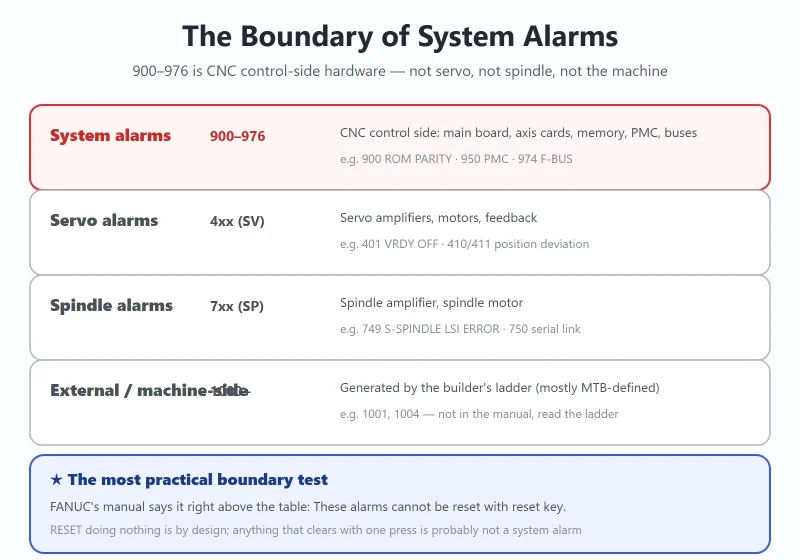



FANUC’s 900-range system alarms are the ones that make a shop floor go quiet — the screen goes red, the machine is dead, and nobody is quite sure whether to reach for a screwdriver or a purchase order. The rules here are actually very firm: this range is almost entirely CNC control-side hardware (main board / axis cards / memory / PMC / buses), and FANUC’s own manual states these alarms cannot be reset with the RESET key. Get those two facts straight and most of the wasted motion disappears.
This reference covers 900–976 in the 0i-C/D, 16i/18i and 0i Mate generation, and separately flags the places where older generations (0i-A/B class) use the same numbers with different meanings — the gap most online quick-reference tables miss, and a genuinely expensive one.
Back up before touching anything: FANUC Data Backup and Restore.
1. What “System Alarm” Means: the Boundary Against SV / SP / External Alarms
Table 1 — Alarm category boundary: system alarms are CNC control-side
| Category | Range | Whose problem it is | Typical examples |
|---|---|---|---|
| System alarms | 900–976 | CNC control-side hardware: main board, axis cards, memory (FROM/SRAM/DRAM), PMC, buses | 900 ROM PARITY, 950 PMC, 974 F-BUS |
| Servo alarms | 4xx (SV) | Servo amplifiers, motors, feedback | 401 VRDY OFF, 410/411 position deviation |
| Spindle alarms | 7xx (SP) | Spindle amplifier, spindle motor | 749 S-SPINDLE LSI ERROR |
| External / machine-side | 1000+ (mostly MTB-defined) | Alarms generated by the builder's ladder | 1001, 1004 |
The most practical boundary test: FANUC’s manual says it right above the system alarm table — *These alarms cannot be reset with reset key.* So when RESET does nothing, that is not user error; this class is designed to require a power cycle, and if it comes back, it is a hardware verdict. Conversely, anything that clears with one press of RESET is probably not a system alarm.
For the wider alarm landscape: FANUC Alarm Code Master List.
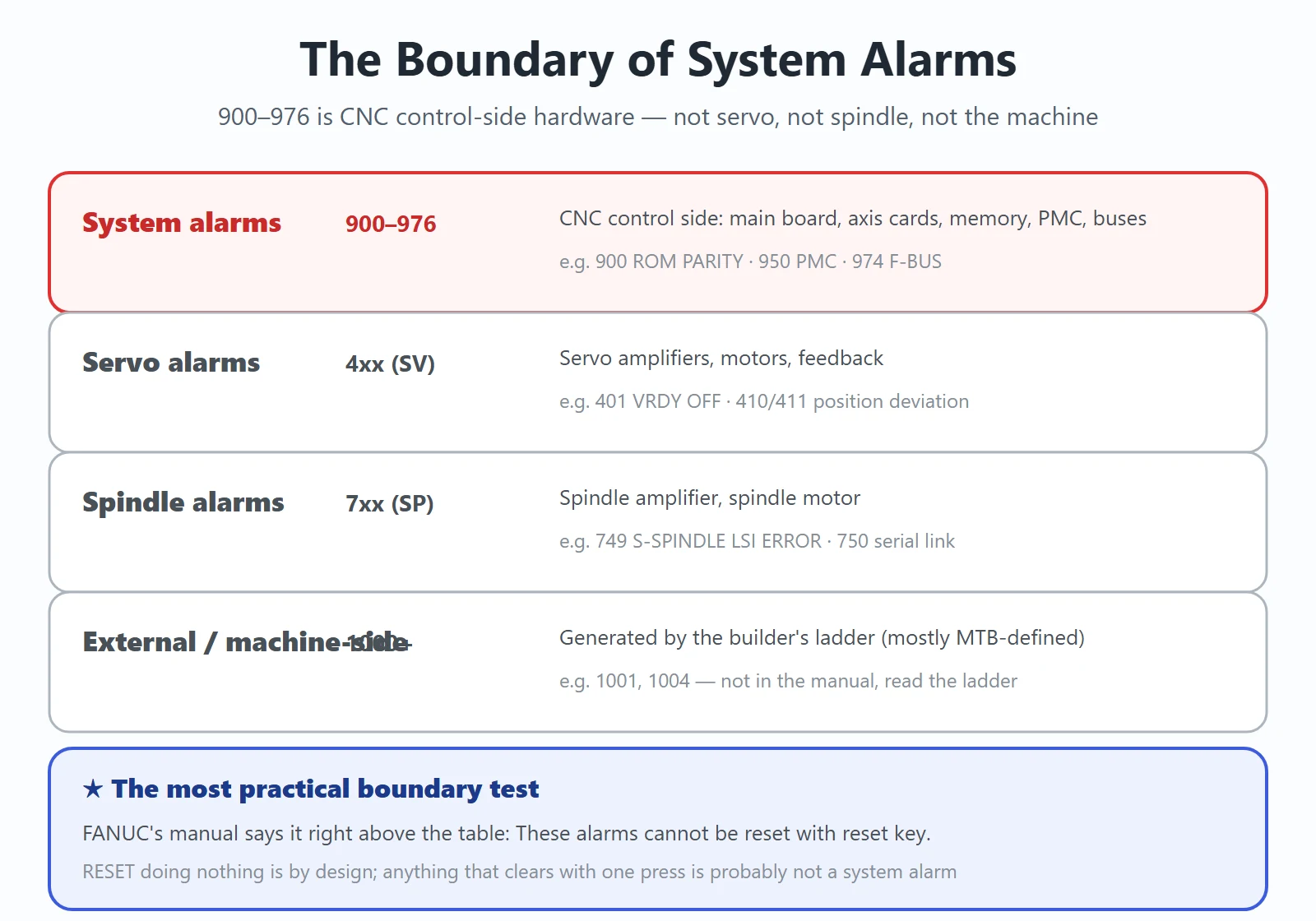
2. The 900–976 Quick Reference Table
The table below follows the 0i-C/D, 16i/18i, 0i Mate generation (per the alarm lists in the corresponding operator manuals). The “resettable” column is uniformly no — the reason is in Section 5.
Table 2 — Fanuc system alarms 900–976 quick reference (0i-C/D, 16i/18i generation)
| No. | Message | Meaning | First checks | Suspect part | Resettable? |
|---|---|---|---|---|---|
| 900 | ROM PARITY | Parity error in CNC / macro / servo ROM (software is copied from FROM to DRAM at power-up and sum-checked) | Rewrite the flash ROM with the displayed ROM number | FROM/SRAM module, DRAM | No |
| 910 / 911 | SRAM PARITY (BYTE 0/1) | RAM parity error in the part program storage RAM | All-clear the memory; if it recurs, replace the module | SRAM module / main board | No |
| 912–919 | DRAM PARITY (BYTE 0–7) | Parity error in the DRAM module | Power cycle and watch for recurrence | DRAM module | No |
| 920 | SERVO ALARM (1–4 AXIS) | 1st–4th axis: watchdog alarm or RAM parity error in the axis control card | Optical cable → axis card → CPU card → main board | Axis control card | No |
| 921 | SERVO ALARM (5–8 AXIS) | 5th–8th axis, same as 920 | Same as 920 | Axis control card | No |
| 924 | SERVO MODULE SETTING ERROR | The digital servo module is not installed | Check the servo control / interface module is seated firmly | Unseated axis card | No |
| 926 | FSSB ALARM | Communication error in the FSSB serial loop | Read the amplifier LEDs; check for momentary 24 V drops and encoder feedback lines shorted to ground | Axis card / optical cable / servo amp | No |
| 930 | CPU INTERRUPT | CPU abnormal interrupt | Power cycle; if it disappears it was likely interference, if it recurs all-clear SRAM then replace the CPU card | Main board / CPU card | No |
| 935 | SRAM ECC ERROR | ECC error in the RAM for part program storage | Replace the main board (SRAM module), then all-clear and re-enter all data | Main board / SRAM module | No |
| 940 | PCB ERROR | PCB ID error | Verify board type against configuration | Main board / memory module | No |
| 950 | PMC SYSTEM ALARM (PCxxx) | PMC fault — includes I/O Link communication errors and PMC control circuit faults | Decode the PCxxx detail code on screen (Section 4) | PMC control circuit on main board / option board | No |
| 951 | PMC WATCH DOG ALARM | PMC watchdog alarm | Power cycle; if it recurs check main board / option board | Main board / option board | No |
| 960 | DC24V POWER OFF | Abnormal 24 VDC input power | Measure the 24 V supply and wiring | External 24 V power supply | No |
| 970 | NMI OCCURRED IN PMCLSI | With PMC-SA1: error in the PMC control LSI on the main board (I/O RAM parity) | Replace the main board | Main board | No |
| 971 | NMI OCCURRED IN SLC | With PMC-SA1: an I/O Link disconnection was detected | Check I/O Link cabling and the I/O unit's 24 V | I/O Link circuit / main-board side | No |
| 972 | NMI OCCURRED IN OTHER MODULE | An NMI occurred on a board other than the main board | The screen shows the slot number of the faulty board — try replacing it | Option board | No |
| 973 | NON MASK INTERRUPT | NMI for an unknown reason | Check the power board / main board; also hunt for interference | Power board / main board / noise | No |
| 974 | F-BUS ERROR | Bus error on the FANUC bus | Replace in turn: CPU card → main board → option board | Main board / option board | No |
| 975 | BUS ERROR (MAIN) | Bus error on the main board | CPU card → graphics card → FROM/SRAM → main board | Main board | No |
| 976 | L-BUS ERROR | Bus error on the local bus | Same as 975 | Main board | No |
⚠️ Two same-number-different-meaning traps on older machines
- On the older 0i (0i-A/B class) the 910–913 definitions are effectively swapped: that generation uses 910/911 = DRAM PARITY (Low/High) and 912/913 = SRAM PARITY (Low/High), while the table above (0i-C/D, 16i/18i) uses 910/911 = SRAM PARITY and 912–919 = DRAM PARITY. Confirm the generation before ordering parts.
- 970/971 carry a PMC-SA1 premise: those wordings belong to the PMC-SA1 specification; on other PMC specifications (such as SB7) I/O Link-type faults usually surface directly on 950 with its PC detail code instead.
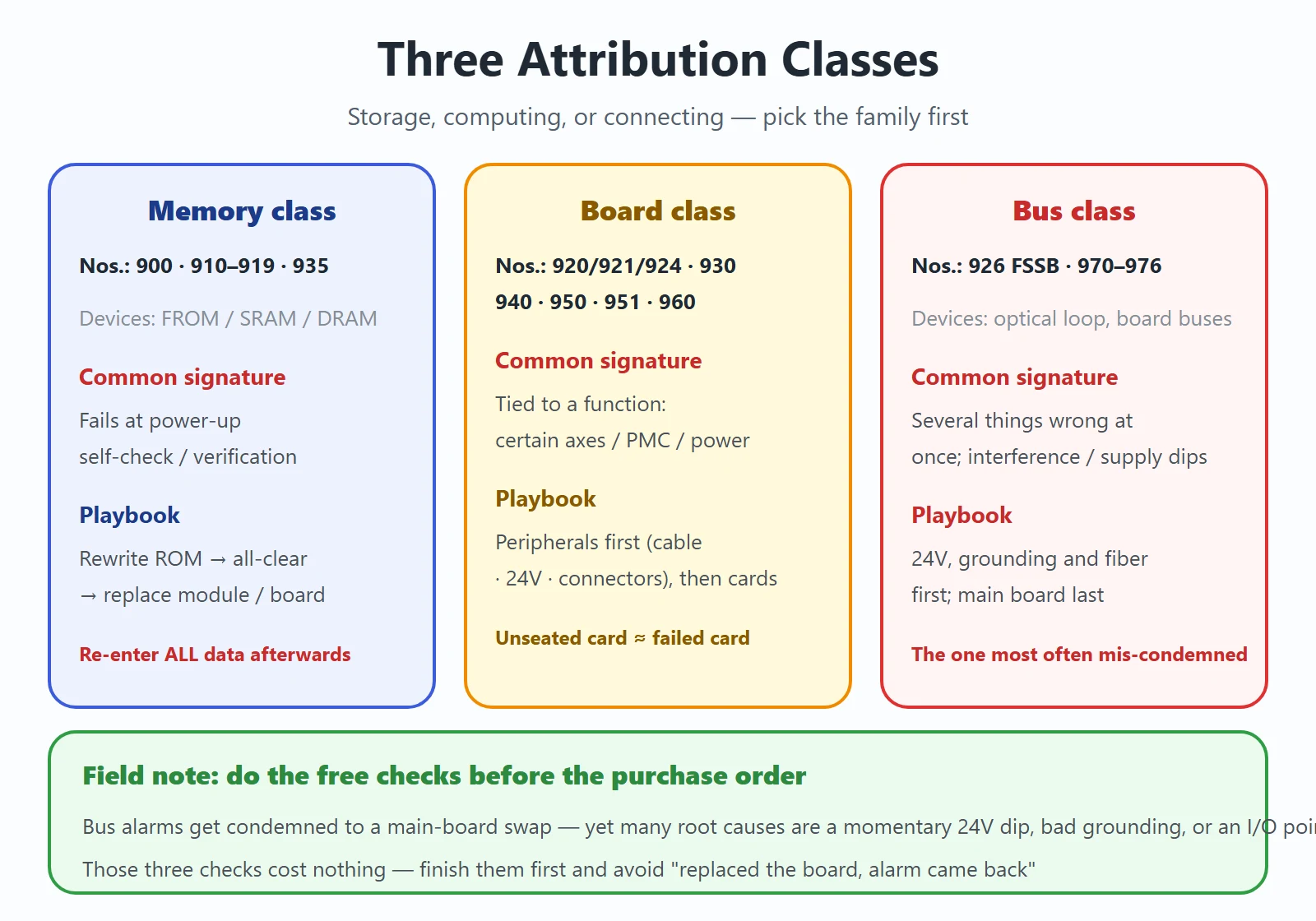
3. Three Attribution Classes: Memory, Boards, Buses
Group the twenty numbers into three families and the direction of travel becomes obvious:
- Memory class (900 / 910–919 / 935): the “storage” devices — FROM, SRAM, DRAM. Common signature: failure at power-up self-check / verification, before anything moves. Playbook: rewrite ROM → all-clear memory → replace the memory module or main board — and re-enter all parameters and data afterwards.
- Board class (920/921/924 / 930 / 940 / 950 / 951 / 960): axis cards, the CPU card, the PMC circuit on the main board, the external 24 V. Common signature: tied to a specific function (certain axes, PMC, power). Playbook: peripherals first — optical cables, 24 V, connectors — then swap cards.
- Bus class (926 FSSB / 970–976): the FSSB optical loop and the main board’s buses. Common signature: multiple things wrong at once, often with interference or a supply dip. Playbook: check 24 V, grounding and optical cables before ordering a main board.
Field note: the bus class is the one most often condemned to a main-board swap — while a large share of the real root causes are a momentary 24 V dip, poor grounding, or an external I/O point shorted to ground. Those checks are free. Do them before the purchase order.
4. How to Read the PCxxx Detail Code on Alarm 950
Alarm 950 is worth its own section because the screen hands you a detail code that points at the exact I/O Link stage.
On-screen format (wording varies slightly by version):
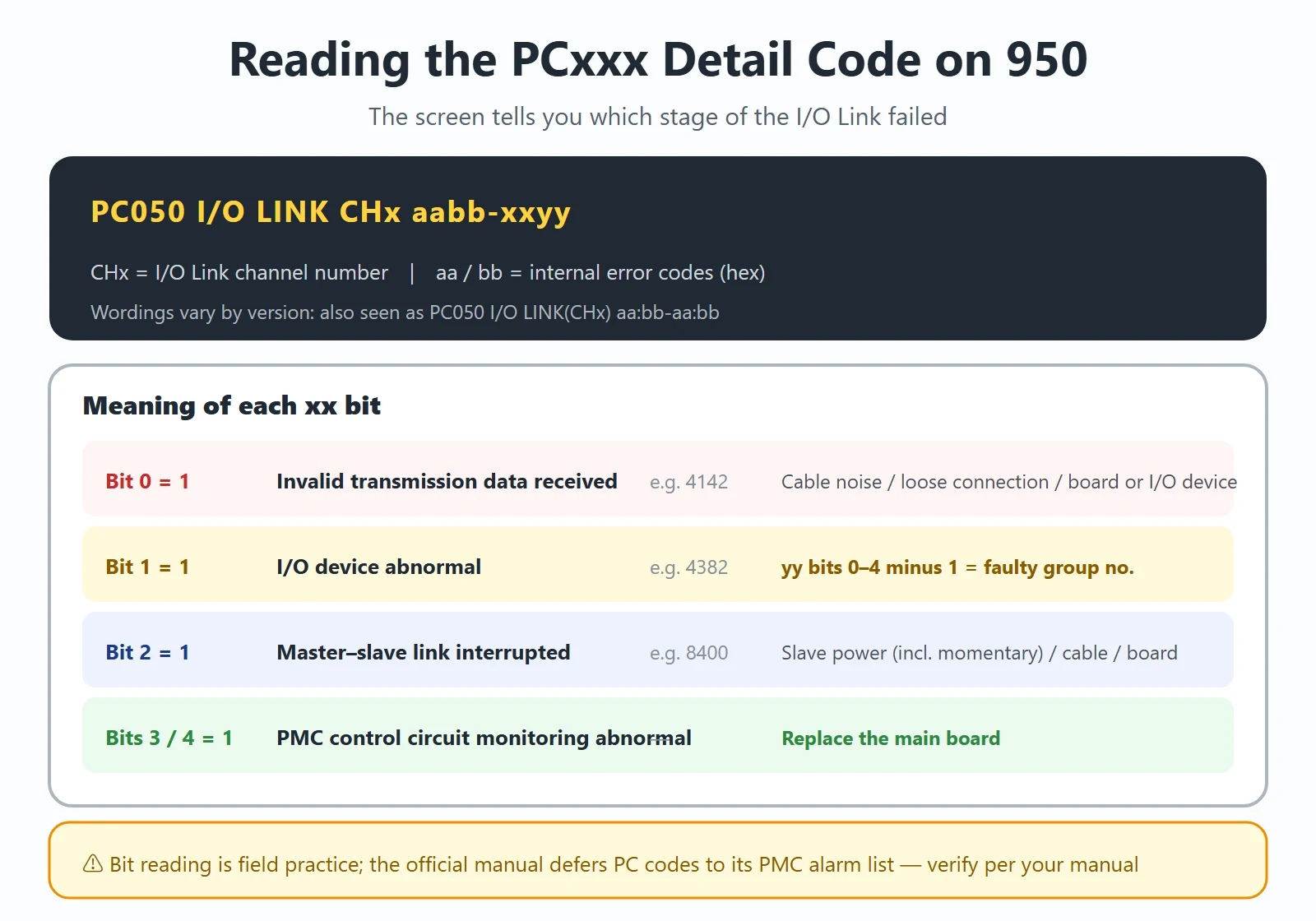
PC050  I/O LINK (CHx)  aa:bb-aa:bb
PC050 I/O LINK CHx aabb-aabb:aabb- CHx = the I/O Link channel number
- aa / bb = internal error codes (hex)
The bit-level reading below comes from field maintenance references (in the aabb-xxyy form):
Table 3 — Meaning of each xx bit in the 950 detail code
| xx bit | Meaning | Typical value | Points to |
|---|---|---|---|
| Bit 0 = 1 | The master received invalid transmission data | 4142 | External interference on the I/O Link cable / cable not firmly connected / main board or I/O device abnormal |
| Bit 1 = 1 | I/O device abnormal | 4382 | The value of yy bits 0–4 minus 1 = the faulty group number |
| Bit 2 = 1 | Connection between master and slave station interrupted | 8400 | Slave station power (including momentary loss) / cable not connected / main board or I/O device abnormal |
| Bits 3 / 4 = 1 | PMC control circuit monitoring abnormal | — | Replace the main board |
Common root causes of 950, ranked by hit rate in the field:
- An I/O unit’s address was assigned, but the unit is not actually connected
- The I/O Link cable is loose or broken
- The I/O device itself has failed (I/O unit, Power Mate, etc.)
- The I/O board’s 24 V supply on the I/O Link is missing or momentarily drops
- An external I/O point shorted to ground pulls the I/O board’s 24 V down
- Main board (motherboard) fault
⚠️ The bit-level interpretation above is field-practice consolidation; the official manual defers PC detail codes to its “List of Alarms (PMC)” section. Verify the exact bit definitions against your machine’s manual — but the order “24 V and cables first, boards last” is universal.
5. Resettable vs Not: Why RESET Does Nothing on a 950
Table 4 — Resettable vs not
| Class | Cleared by RESET? | Correct action |
|---|---|---|
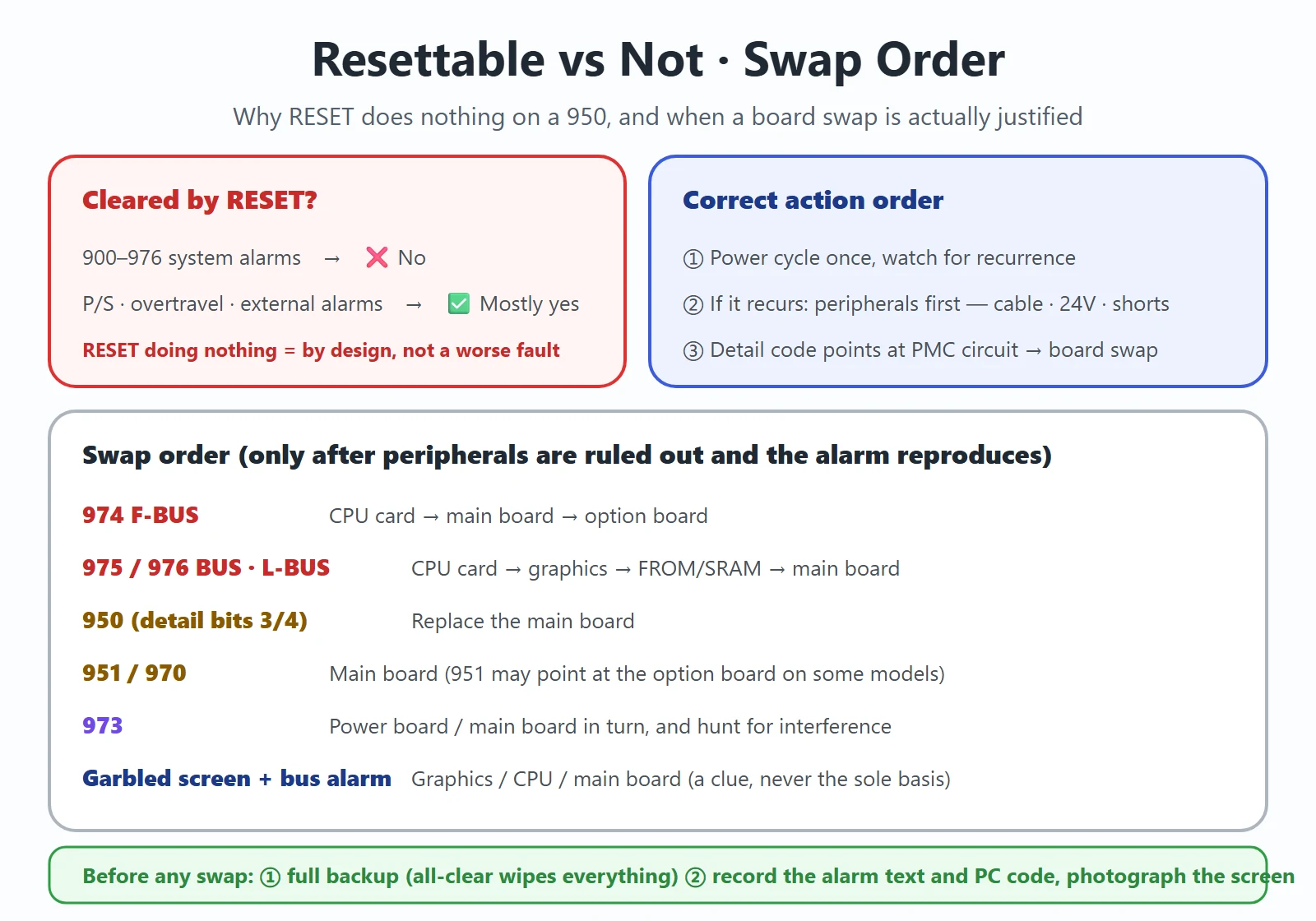
| All 900–976 system alarms | ❌ No | Power off → rule out peripherals (24 V / grounding / optical cables / connectors) → power on again; if it recurs, follow the part verdict for that number |
| Ordinary P/S, overtravel, external alarms | ✅ Mostly yes | Remove the cause, then press RESET |
So “950 does not respond to RESET” is by design, not a sign the fault got worse. The right sequence:
- Power cycle once and watch for recurrence — if it stays away, the likely cause was transient interference or a momentary 24 V dip;
- If it recurs, work the peripheral checklist from Section 4: I/O Link cabling, the I/O boards’ 24 V, any external point shorted to ground;
- Only when peripherals are clean and the detail code points at the PMC control circuit (bits 3/4) consider replacing the main board.
6. The Field Checklist: 24 V, Grounding, Optical Cables, Motherboard — in That Order
Table 5 — Check these four first, swap parts last
| Check first | How | Applies to | Why it is first |
|---|---|---|---|
| 24 V DC | Measure control power at the CNC / I/O boards / amplifiers; watch for momentary dips (do not share the brake's 24 V with the amplifier's) | 960, 971, 950, 926, 973 | 24 V dips are the most common shared root cause of bus-class and I/O Link alarms |
| Grounding & shorts to ground | Check external I/O points and encoder feedback lines for shorts to ground; single-point ground the shields | 926, 950, 973 | A shorted external point drags 24 V down and injects noise into the bus |
| FSSB optical cables / I/O Link cabling | Look for loose connectors and damaged fiber; read the servo amplifier LEDs | 926, 920/921, 950, 971 | Loose or damaged links are the number-one cause of “intermittent” alarms |
| Motherboard & card seating | Are the axis cards, FROM/SRAM module and option boards fully seated? | 924, 940, 920/921 | An unseated board produces exactly the alarm of a failed board |
Cross-checking at the diagnosis-number level: FANUC Diagnosis Numbers (DGN) Quick Reference.
7. When You Really Must Replace the Main Board: 974 / 975 / 976 and the Swap Order
This section assumes peripherals are ruled out and the alarm reproduces reliably — only now does swapping parts make sense.
- 974 F-BUS ERROR: replace in turn CPU card → main board → option board.
- 975 BUS ERROR (MAIN) / 976 L-BUS ERROR: CPU card → graphics card → FROM/SRAM module → main board.
- 950 with detail-code bits 3/4 set (PMC control circuit monitoring abnormal): replace the main board.
- 951 / 970: PMC watchdog / PMC control LSI abnormal — points at the main board (951 may point at the option board on some models).
- 973: unknown cause — replace the power board / main board in turn, and hunt for interference at the same time.
Garbled or distorted screen text: this is a field-experience indicator — when screen corruption appears alongside bus-class alarms (974/975/976) or 930, it usually points at the graphics / CPU card / main board side rather than memory. But it is not the definition of any official alarm number, so treat it as a supporting clue, never as the sole basis for a board swap.
⚠️ Two things before any swap: ① a complete backup (methods here) — after an all-clear, parameters, programs, offsets and macro variables are gone; ② record the full alarm text and PC detail code, photograph the screen — that is how you will know whether the swap actually fixed it.
FAQ
FANUC alarm 950 does not respond to the RESET key — what should I do?
That is normal. FANUC’s manual states above the system alarm table that 900-range alarms cannot be reset with the reset key. The right sequence: power cycle once and watch for recurrence. If it recurs, work the peripheral checklist — I/O Link cabling, the I/O boards’ 24 V supply, external I/O points shorted to ground, and any I/O unit whose address was assigned but which is not connected. Finally decode the PC detail code on screen: bits 3/4 set points at the PMC control circuit and a main-board replacement; bit 0 means invalid transmission data, bit 1 means an I/O device fault (yy bits 0–4 minus 1 gives the faulty group number), bit 2 means the master–slave connection is interrupted.
Is FANUC alarm 900 (ROM PARITY) a software problem or a hardware problem?
In the vast majority of cases it is a problem with the hardware that carries the software — not something a “reinstall” fixes by itself. At power-up the system, servo and macro software are copied from FROM into DRAM and verified; failing that check raises 900. The official action is to rewrite the flash ROM with the displayed ROM number. If it still alarms after rewriting, the FROM/SRAM module or DRAM itself is damaged and the module (or main board) must be replaced. Order: rewrite first, replace only if it recurs.
How do FANUC alarms 971 and 432 differ?
They live in different domains, but can share a root cause:
- 971 (NMI OCCURRED IN SLC): with PMC-SA1, an I/O Link disconnection was detected — a PMC / I/O Link (control-side) alarm. Check the I/O Link cabling and the I/O unit’s 24 V.
- 432 (CONVERTER LOW VOLTAGE CONTROL): the converter control voltage is low — an amplifier / power-module-side (power-side) alarm. Check the inter-module wiring and the 24 V control supply.
Real case: a 0i-MC with an integrated amplifier intermittently threw 971, 432 and 9012 together during tool-change air blow. The root cause was the machine’s external regulated 24 V power supply — one dip, expressed as 971 on the control side and 432 on the amplifier side. When these two appear together or alternating, check the 24 V supply first instead of swapping boards in parallel.
Last updated: 2026-10-21






















暂无评论内容