


When the handwheel (MPG, Manual Pulse Generator) on a FANUC machine stops working, it looks scary — but the root causes are highly concentrated, and the checking order is remarkably fixed: first confirm the servo is energized, then confirm the pulses reach the CNC, then the I/O Link assignment, and only then the parameters. Follow this order and most cases are solved on site without pulling boards.
This article turns that 4-step skeleton into concrete actions, and adds three points almost nobody explains online: which physical path the handwheel pulses actually take into the CNC, why an I/O module assigned one byte short kills the handwheel, and why “the wheel turns” is not the same as “it moves correctly” after a replacement.
Related reading: several steps below use the PMC signal screen — if you are new to it, see FANUC PMC Ladder for Beginners.
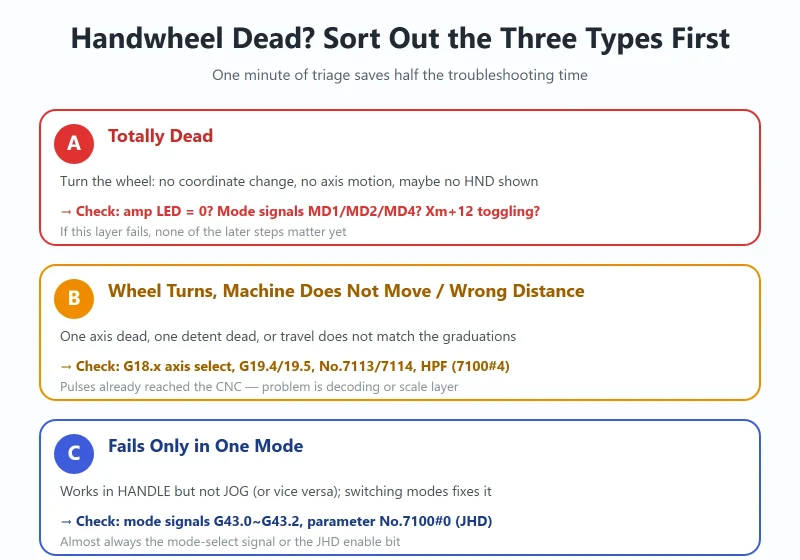
1. First, Sort Out Which of the Three “Handwheel Failures” You Have
Different symptoms point to completely different layers. Spend one minute classifying before touching anything:
| Symptom | Most likely layer | Check first |
|---|---|---|
| A. Totally dead: no axis motion, no coordinate change on screen | Servo not ready / not in HANDLE mode / pulses not reaching CNC | Amplifier LED showing 0? HND shown bottom-left? Xm+12 toggling in PMC? |
| B. Wheel turns but machine does not move (one axis / one multiplier / distance wrong) | Axis-select & multiplier signals, scaling parameters, rapid clamp | G18.x axis select, G19.4/19.5 multiplier, No.7113/7114, HPF (7100#4) |
| C. Only fails in one mode: works in HANDLE but not JOG (or vice versa) | Mode selection & enabling parameters | MD1/MD2/MD4 (G43.0~G43.2), parameter No.7100#0 (JHD) |
Experience: in group A, “servo not ready” and “I/O Link not assigned” together account for the majority; in group B it is mostly multiplier parameters or axis-select decoding; group C is almost always the mode-select signal or the JHD bit.
2. Step 1: Is the Servo Ready? (Amplifier LED First)
The precondition for the handwheel to move the machine is the same as for JOG and automatic operation: the servo must be energized (ready). If this layer fails, do not check anything else.
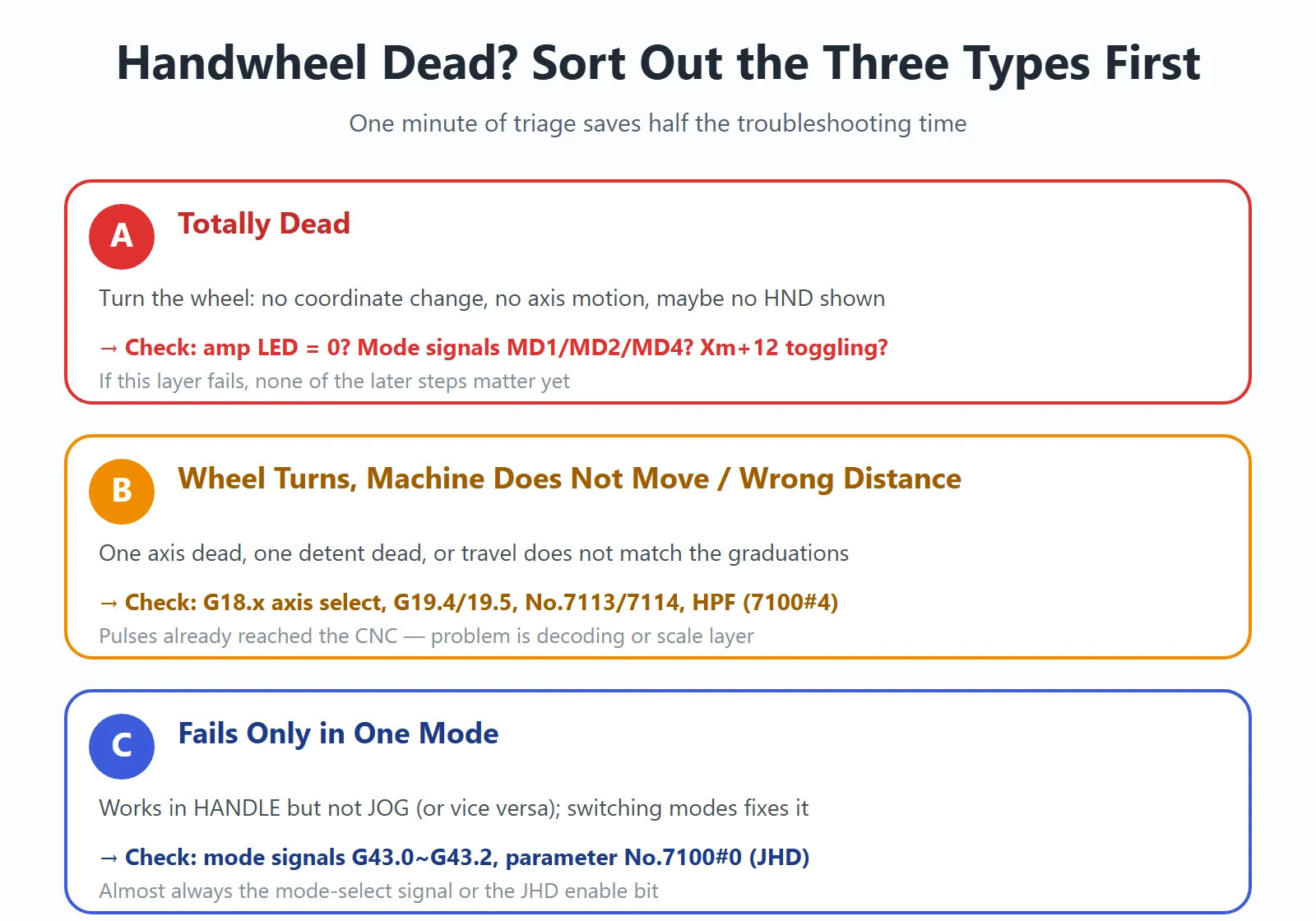
How to judge: look at the one-digit 7-segment LED on the αi-series servo amplifier (SVM) and power supply module (PSM).
-: PSM not ready (main power MCC off, emergency stop); on the SVM it means waiting for the ready signal0: Ready — the only “OK” display- Any other character: an alarm code for that module (red ALM LED lit = alarm; the same code with a decimal point = warning — the module keeps running for now but will trip)
Per the αi-series maintenance documentation: only LED “0” counts as servo ready. Any other display means JOG and automatic operation will not move either — the handwheel naturally included. At that point check servo-related parameters and wiring, not the handwheel.
⚠️ Do not make this mistake: this “read the digit” method only applies to modules with a 7-segment display (αi / αi-B). On a βi SV (integrated unit) there is no 7-segment LED — just a POWER LED, a LINK LED and a yellow ALM LED. There you must judge from the CNC alarm number, and not panic because “there is no digit display”.
Three things worth checking in the same pass (CNC diagnosis data No.0000 / No.1010 — items showing “1” on the right):
- In-position check: diagnostic No.0300 position deviation > parameter No.1826 (in-position width) — the axis has not finished moving
- Interlock: whether a movement-inhibit interlock is active — all-axis
*IT(G8.0), per-axis*IT1~*IT4(G130.0~G130.3) - CNC in reset state: neither manual nor automatic operation works
More diagnostic numbers: FANUC Diagnosis Numbers (DGN) Quick Reference.
3. Step 2: MPG Body, Cable and Connectors
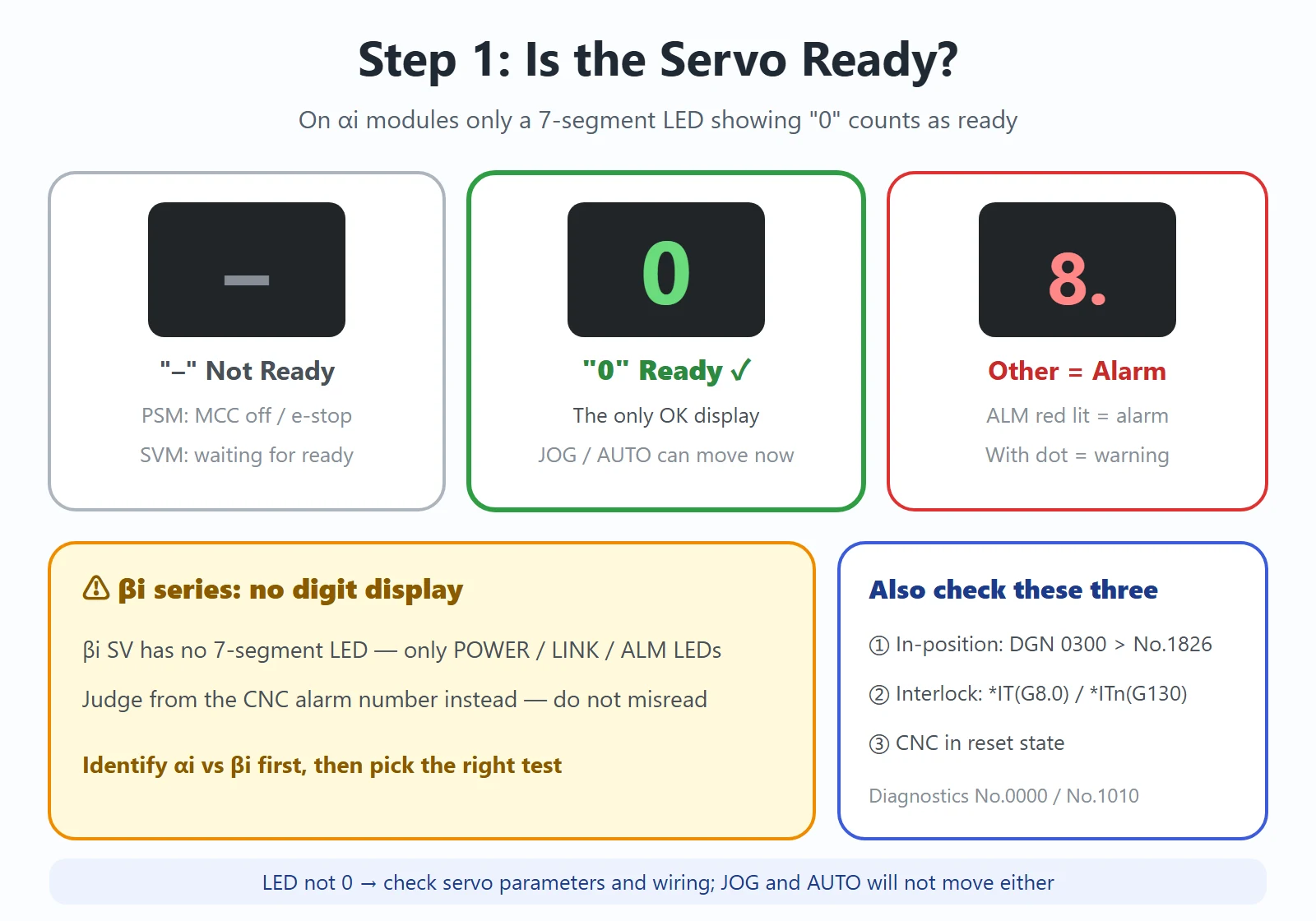
Before touching parameters, make sure the pulse actually exists. The handwheel is just an incremental quadrature encoder outputting two square waves HA (phase A) and HB (phase B) 90° apart, powered from +5 V DC.
Checking order (per the official troubleshooting flow):
- Measure +5 V first: at the screw terminals on the back of the MPG. No 5 V → check the supply wiring before blaming the encoder.
- Then measure the waveform: rotate the wheel and probe HA/HB with an oscilloscope at the same terminals. You should see two square waves. Read the direction from the phase relationship: when phase A rises, B low = forward; when phase A rises, B high = reverse. Also confirm the duty ratio and the HA/HB phase difference. No output at all → MPG body or cable open.
- Check cable faults: broken wires, shorts, damaged shield.
- Reversed phases and noise: swapping A/B reverses the counting direction or loses pulses. The shield should be single-point grounded at the controller end — grounding it at both ends creates a ground loop that injects noise, typically seen as “the axis drifts by itself when idle”. Keep the cable away from power lines and VFD wiring.
Tip: keep the wheel below 5 revolutions per second. Spin it too fast and you may get “it does not stop when I let go” or “the distance does not match the graduations” — not necessarily lost steps; it may be the pulse-accumulation mechanism explained in Step 4.
4. Step 3: I/O Link Assignment (★ the Most Overlooked Step)
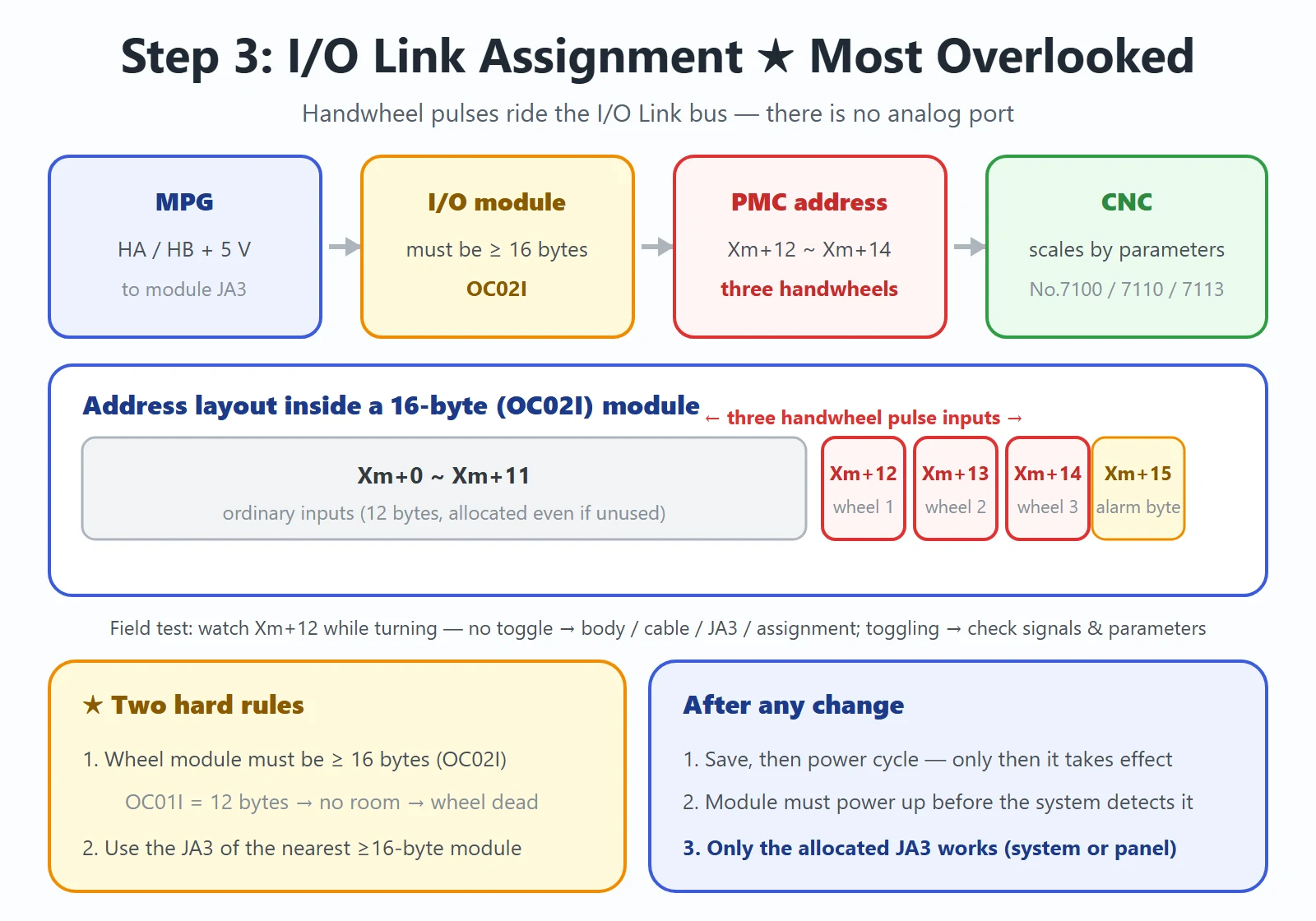
Here is the point this article most wants to make: the handwheel pulse is not wired to some analog port — it rides on the I/O Link bus. That is exactly why “nothing on the machine side is broken, yet the handwheel does nothing.”
4.1 The physical path of the pulse
On typical 0i-series configurations the handwheel HA/HB lines connect to the JA3 connector of an I/O module (not the CNC main board), with +5 V/GND from the same connector. And there is a critical fork:
- Some machines wire the handwheel to the JA3 on the system-side I/O board
- Others wire it to the JA3 behind the standard machine operator panel
Only the JA3 that has been allocated a PMC address is active — the other one is dead. Allocate the system-side one and the panel connector does nothing; allocate the panel one and the system-side connector does nothing. If you swap in a new handwheel and land it on the unallocated connector, you get a beautifully misleading symptom: the wiring measures fine end to end, 5 V is present, and you can even see the waveform — yet the signal never reaches the CNC.
4.2 The handwheel module must be assigned 16 bytes
How much address space an I/O module gets in the PMC is decided by its module name. The rule is hard:
OC02I= 16 bytes;OC01I= 12 bytes; outputs use/8(8 bytes),/6,/4- The module carrying the handwheel must be at least 16 bytes (OC02I) — even if it only actually uses a few points. Otherwise the handwheel pulses are not recognized.
- The handwheel must be on the JA3 of the nearest ≥16-byte module to the system.
Why is OC01I not enough? Its 12 bytes (96 points) are consumed by ordinary I/O, leaving no address space for the handwheel. So “handwheel module assigned as OC01I” is the classic assignment error — right hardware, wrong byte count.
4.3 Where the handwheel signals actually live
On a module starting at address Xm and assigned 16 bytes:
| Address range | Purpose |
|---|---|
| Xm+0 ~ Xm+11 | Ordinary inputs (12 bytes = 96 points, allocated even if unused) |
| Xm+12 ~ Xm+14 | Pulse inputs of the three handwheels |
| Xm+15 | Output-side alarm/status byte |
Example: a configuration with the handwheel module starting at X0 — turn the wheel and X12 should toggle; the second and third handwheels show on X13 and X14.
This is the single most useful field test in this article:
PMC → PMCDGN → STATUS, slowly turn the wheel and watch Xm+12 (X12).
Not toggling → pulses not reaching the CNC: ① body/cable ② 5 V ③ JA3 on the unallocated connector ④ module not assigned 16 bytes.
Toggling but no motion → the CNC already has the pulses; the problem is mode selection, PMC output signals or parameters — jump to Step 4.
After changing the assignment you must save, and power cycle for it to take effect; and the module must power up before the system, otherwise the system cannot detect it and the assignment is wasted.
Hands-on PMC signal screening: FANUC PMC Troubleshooting: 5 Real Cases.
5. Step 4: Parameters, Priority and the Handwheel Select Switches
By now the pulses are confirmed to reach the CNC. What remains is whether the CNC accepts them, and at what scale.
5.1 Parameter quick reference
The table below follows the 0i-series (0i-B/C/D/F included) connection/operator manuals — always verify applicability against your machine’s parameter manual:
| Parameter | Name / bit | Function |
|---|---|---|
| No.7100 #0 | JHD | Whether handle feed is available in JOG mode. Set 1 to enable both handle feed and incremental feed in JOG |
| No.7100 #1 | THD | Whether the handwheel is available in TEACH IN JOG mode |
| No.7100 #4 | HPF | Pulses exceeding rapid traverse rate. 0 = excess pulses discarded (travel will not match the graduations); 1 = excess pulses accumulated (the axis keeps moving after you stop the wheel) |
| No.7100 #5 | MPX | Whether each handwheel uses its own multiplier signals (see 5.2) |
| No.7102 #0 | HNGx | Axis movement direction relative to MPG rotation, per axis. 0 = same direction, 1 = reverse |
| No.7110 | Number of MPGs | How many handwheels are in use. Valid range 1–3 (usually 1–2 on T series, 1–3 on M series) |
| No.7113 | Magnification m | Range 1–127. Scale applied when MP2=1, MP1=0 (the ×100 position on most panels; commonly 100) |
| No.7114 | Magnification n | Range 1–1000. Scale applied when MP1=1 and MP2=1 (the ×1000 position on most panels; commonly 1000) |
| No.7117 | Accumulated-pulse limit | When HPF=0, the maximum number of excess pulses that may be accumulated instead of discarded (0–99999999) |
These are the parameters for current mainstream 0i series. Different generations differ a lot — older machines use a separate enable bit to activate handle feed at all (published comparisons mention No.8131 #0 on 0i-D/30i class, a different bit in the 9920 range on 18/18i/0i-A/B/C class, and yet another on 0C/0D). Always identify the system model first, then look up the manual — copying across generations is the most common reason a handwheel “will not switch on” after a control swap or retrofit.
5.2 The priority trap when several handwheels coexist
Many machines have both a panel-mounted handwheel and an independent hanging/pendant MPG. Three traps dominate:
Trap 1 — the count is not opened up. The CNC only recognizes the number of MPGs set in No.7110. Wire up 2 handwheels but leave it at 1 and the second one is simply invalid — it never even gets recognized.
Trap 2 — all handwheels share one multiplier signal pair (MPX=0). This is the default: the 1st–5th handwheels all share MP1/MP2, and the scale is set by No.7113 / No.7114. Consequence: the multiplier you select affects every handwheel at once. And if someone wired a dedicated multiplier switch for the second wheel (as MP21/MP22), those signals are ignored when MPX=0 — that wheel’s multiplier stays pinned at ×1. The symptom: “the wheel turns, but it barely moves.”
Trap 3 — flip MPX to 1 and the addresses move. Setting No.7100 #5 (MPX) = 1 switches to “one multiplier pair per handwheel”:
| MPX | Handwheel | Multiplier signals | Scale parameters |
|---|---|---|---|
| 0 | 1st–5th (shared) | MP1, MP2 | No.7113 (m) / No.7114 (n) |
| 1 | 1st | MP1, MP2 | No.7113 / No.7114 |
| 1 | 2nd | MP21, MP22 | No.7131 / No.7132 |
| 1 | 3rd | MP31, MP32 | No.7133 / No.7134 |
In other words, changing MPX shifts the whole parameter block for the second and third handwheels. Flip MPX without filling in No.7131 onward, and those wheels lose their scale source. Before touching this bit, be clear about how many handwheels the machine actually has.
One sentence to remember: with multiple handwheels the priority chain is No.7110 decides “how many wheels count”, MPX decides “shared or individual multipliers”, and only then do the individual scale parameters matter. Skipping the first two levels and jumping straight to scale parameters is why these problems drag on for weeks.
5.3 The PMC signals to watch
Parameters tell the CNC how to interpret the pulses; which axis and which scale is told to the CNC by the PMC (ladder). Wrong signals make correct parameters useless:
| Signal | Address | Meaning |
|---|---|---|
| MD1 / MD2 / MD4 | G43.0 / G43.1 / G43.2 | Mode select signals (HANDLE is one combination) |
| HS1A~HS1D | G18.0~G18.3 | 1st handwheel feed-axis select (4-bit code) |
| HS2A~HS2D | G18.4~G18.7 | 2nd handwheel axis select |
| HS3A~HS3D | G19.0~G19.3 | 3rd handwheel axis select |
| MP1 / MP2 | G19.4 / G19.5 | Handle (and incremental) feed multiplier select |
| RT | G19.7 | Manual rapid traverse select |
| *IT / *ITn | G8.0 / G130.0~G130.3 | All-axis / per-axis interlock (0 = motion inhibited) |
Axis-select code (1st handwheel, HS1E~HS1A): 0000 = none selected; 0001 = 1st axis; 0010 = 2nd; 0011 = 3rd; up to 0100 = 4th axis (mapping of axis numbers to addresses depends on that machine’s PMC).
Multiplier code: MP2/MP1 = 00 → minimum command unit ×1; 01 → ×10; 10 → ×m (No.7113); 11 → ×n (No.7114). Note that in incremental feed mode the same two bits mean ×1 / ×10 / ×100 / ×1000.
Field test: wheel turns but one axis does not move → open the PMC signal screen and watch G18.0~G18.3 while flipping the axis-select switch. No change means the X input is not reaching the ladder, or the decoding stage is not driving the G address — that is a PMC problem, not a handwheel problem.
Reading the ladder yourself: The Six-Stage PMC Project Flow.
6. HANDLE, JOG and INC — Differences and Switching Conditions
Three modes matter for the handwheel. Know their boundaries:
- HANDLE (handwheel mode, shown as
HNDbottom-left of the screen): dedicated to handle feed. If HND appears, the mode-select signal is in correctly; if not, check MD1/MD2/MD4 (G43.0~G43.2) in the PMC signal screen. - JOG (manual continuous feed): by default the handwheel is NOT available in JOG. To make the handwheel work in JOG, set parameter No.7100 #0 (JHD) to 1 — then handle feed and incremental feed are both enabled in JOG. This is exactly the parameter behind “works in one mode, not the other”.
- INC (incremental feed): it uses the same multiplier signals (MP1/MP2), so the m/n values in No.7113/7114 affect both operations (
10→×m,11→×n, corresponding to ×100/×1000 in incremental feed).
If switching does not take effect, check in order: ① is HND displayed (mode-select signal) ② is the handle-feed axis-select signal HS1A~HS1D input ③ is the multiplier selection correct ④ is the CNC in reset / interlocked.
One easy-to-miss restriction: on machining centers, an axis configured as an indexing-table index axis (such as B) cannot do JOG feed, incremental feed or handle feed at all. If exactly that one axis will not handwheel, it is by design, not a fault.
For the broader “no alarm but nothing moves” family, see FANUC No-Alarm Fault Diagnosis: Start with DGN000/003/005.
7. Verification After Replacing the MPG (“it turns” is not “it moves right”)
A new wheel that turns only proves the pulses arrive. How far each click moves, which direction, and whether pulses accumulate are all still unknown. After replacement, write back every item:
- Confirm the new MPG’s pulses per revolution (commonly 100 p/rev, but brands and models vary a lot). Read the nameplate or datasheet — never copy someone else’s number. Everything downstream depends on it.
- Write back the scale parameters: No.7113 (m) and No.7114 (n). 100 and 1000 are the common values, but verify against the actual panel detents — do not assume.
- Check direction: No.7102 #0 (HNGx) sets each axis’s movement direction relative to wheel rotation (0 = same, 1 = reverse); some generations additionally provide the HDN direction-inversion signal. Turn one click, watch which way the coordinate moves, correct it.
- Check the rapid clamp: confirm No.7100 #4 (HPF) matches the intent and understand its side effects — HPF=0 discards excess pulses (machine moves less than the graduations), HPF=1 accumulates them (the axis keeps moving after you stop). If accumulating, watch No.7117 (accumulation limit).
- Walk-test: start from the smallest detent. Movement per click = that detent’s scale × the minimum command unit. At ×1, turn slowly and compare screen machine coordinates against “pulses per detent × pulse count × minimum unit”; then verify ×10, ×m, ×n one by one.
- Speed reminder: tell operators to keep the wheel below 5 revolutions per second, or it may not stop promptly or may not match the graduations.
One sentence to remember: after swapping a handwheel, “it turns” is a magnifying glass with a broken lens — until pulses per revolution, scale parameters, direction and the rapid clamp are written back, the machine merely “moves”, it does not “move right”.
A ready-to-follow order: amplifier LED showing “0”? → “HND” bottom-left? → Xm+12 (X12) toggling as you turn? → G43.2 in HANDLE mode? → G18.x (axis select) and G19.4/19.5 (multiplier) correct? → only then parameters No.7100/7102/7110/7113/7114. The first two steps pin down the hardware layer, the middle three the signal chain, the last one the software layer — follow it and most handwheel faults are closed on site.
Frequently Asked Questions
Why does the FANUC handwheel not respond at all?
Check four layers in order. ① Servo not energized — on αi amplifiers the 7-segment LED must show 0; any other display (including -) is not ready, and JOG and automatic operation will not move either. ② Not in handle mode — the status bar should show HND; if not, the mode-select signals MD1/MD2/MD4 (G43.0~G43.2) are missing. ③ Pulses not reaching the CNC — watch Xm+12 (often X12) of the handwheel module in the PMC status screen while turning the wheel. ④ I/O Link assignment — the module carrying the handwheel must be assigned at least 16 bytes (OC02I); OC01I (12 bytes) leaves no room for the wheel.
The handwheel turns but the machine does not move — what should I check?
The pulses already reached the CNC, so the problem is signals or parameters: ① in the PMC signal screen check the axis-select signals HS1A~HS1D (G18.0~G18.3) while flipping the axis switch — no change means the X input is not reaching the ladder or the decoding is not driving the G address; ② check the multiplier signals MP1/MP2 (G19.4/G19.5): 00=×1, 01=×10, 10=×m (No.7113), 11=×n (No.7114); ③ if exactly one axis will not move, confirm whether it is an indexing-table index axis — index axes cannot do JOG, incremental or handle feed; ④ if travel does not match the graduations, check No.7100#4 (HPF): 0 discards excess pulses, 1 accumulates them (the axis keeps moving after you stop; limit in No.7117).
Can a missing I/O Link assignment make the handwheel dead?
Yes — and it is the most overlooked step. The handwheel pulse rides the I/O Link bus (on the JA3 of an I/O module), and the module carrying it must be assigned at least 16 bytes in the PMC address assignment (module name OC02I), even if only a few points are actually used; otherwise the pulses are not recognized. OC01I is only 12 bytes — the classic assignment error. The wheel must be on the JA3 of the nearest ≥16-byte module to the system. After any change you must save and power cycle, and the module must power up before the system.
I replaced the handwheel and the travel is wrong — which parameters?
Turning only proves the pulses arrive; write back four items: ① scale parameters No.7113 (m, range 1–127) and No.7114 (n, range 1–1000) according to the new MPG’s pulses per revolution (read the nameplate; commonly 100 p/rev) — 100/1000 are the usual values; ② direction No.7102#0 (HNGx): 0 = same, 1 = reverse; ③ the rapid clamp No.7100#4 (HPF) and accumulation limit No.7117, otherwise it may not stop or may not match the graduations; ④ with several handwheels, confirm No.7110 (number of MPGs) and No.7100#5 (MPX — shared vs individual multiplier signals). Verify from the ×1 detent with the wheel below 5 rev/s.























暂无评论内容