


Mitsubishi M80 / M70 servo adjustment comes down to a handful of parameter numbers. This page puts the whole chain in one place: the #2201–#2210 block (gear ratio, position loop, speed loop, current loop), the #2233 / #2238 / #2246 resonance-suppression trio, and the #2235 → #2237 load inertia identification routine — plus the traps that cost people the most time: SHG and OMR-FF are mutually exclusive, and servo alarm 37 is a gear-ratio problem, not a gain problem.
Scope: parameter numbers, abbreviations, setting ranges and standard values are taken from Mitsubishi Electric official documentation (M800/M80/E80/C80 Series Alarm/Parameter Manual, M800V/M80V Series Parameter Manual, MDS-E/EH Series Instruction Manual, M800S/M80 Series Connection and Setup Manual). Only numbers, names and ranges are referenced — no manual text is reproduced. Ranges differ slightly between drive-unit generations; where that matters it is flagged as *verify on your machine*.
1. Parameter Map: Four Families and the # ↔ SV Conversion
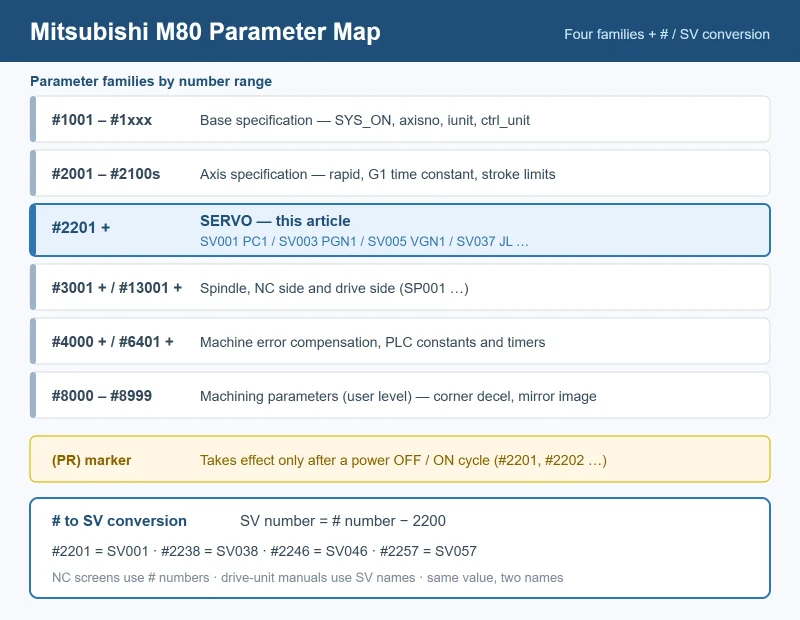
Mitsubishi CNC parameters are all # numbers grouped by function, and the group boundaries match the screens you set them on. Two naming systems describe the same value: the NC side uses # numbers (Maintenance → Param → Servo param), while drive-unit documentation uses SVxxx. The conversion is simple: SV number = # number − 2200. So #2201 = SV001, #2238 = SV038, #2246 = SV046, #2257 = SV057.
Mitsubishi parameter families and where each one lives
| Family | Number range | Typical members |
|---|---|---|
| Base specification | #1001 – #1xxx | #1001 SYS_ON, #1002 axisno, #1003 iunit, #1004 ctrl_unit |
| Axis specification (per axis) | #2001 – #2100s | #2001 rapid, #2007 G1 time constant, #2011/#2012 stroke limits, #2021 drive-unit I/F channel |
| Servo (this article) | #2201+ | SV001 PC1 … SV0xx |
| Spindle (NC side) | #3001+ | #3001 slimt1 … |
| Spindle drive | #13001+ | SP001 … |
| Machine error compensation | #4000+ | pitch error, backlash compensation |
| PLC constants / timers | #6401–#6496, #16000–#17455 | bit selection, T/C devices |
| Machining (user level) | #8000–#8999 | #8008 corner decel angle, #8211 mirror image |
Two conventions to internalise before you touch anything:
(PR)in the manual means the setting only takes effect after a power cycle.#2201and#2202are both(PR).- Some parameters are bit-select types written in hexadecimal.
#2233 SV033is the classic example — writing a decimal number there does something completely different from what you intended.
2. #2201–#2210: The Complete Block
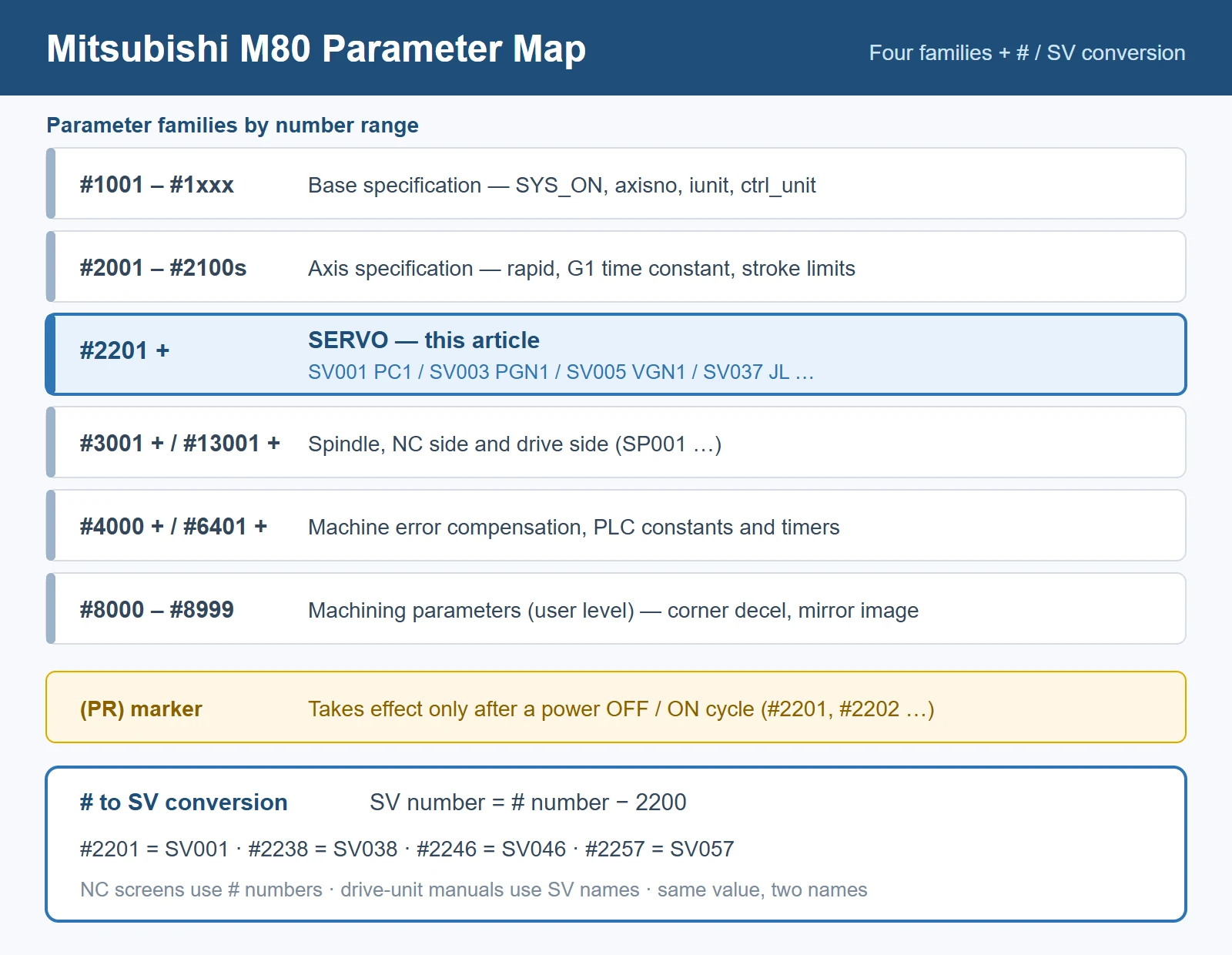
Ten parameters, and only three of them are tuning parameters you should actually be moving.
Servo parameters #2201–#2210 (SV001–SV010)
| # | SV | Abbrev | Name | Standard / note | Range |
|---|---|---|---|---|---|
#2201 | SV001 | PC1 | Motor side gear ratio | Set to 1 when no gearing; (PR) | 1 – 32767 |
#2202 | SV002 | PC2 | Machine side gear ratio | Set to 1 when no gearing; (PR) | 1 – 32767 |
#2203 | SV003 | PGN1 | Position loop gain 1 | Standard 33 | 1 – 200 (rad/s) |
#2204 | SV004 | PGN2 | Position loop gain 2 | PGN1 × 8/3 with SHG; 0 without SHG; 0 with OMR-FF | 0 – 999 (rad/s) |
#2205 | SV005 | VGN1 | Speed loop gain 1 | Motor-dependent; target the standard value for motor type + inertia ratio | 1 – 30000 |
#2206 | SV006 | VGN2 | Speed loop gain 2 | Used with #2229 for high-speed vibration | — |
#2207 | SV007 | VIL | Speed loop delay compensation | Motor standard value | — |
#2208 | SV008 | VIA | Speed loop advance compensation | Standard 1364; 1900 with SHG | — |
#2209 | SV009 | IQA | Current loop q-axis advance compensation | Motor standard value | — |
#2210 | SV010 | IDA | Current loop d-axis advance compensation | Motor standard value | — |
🚨 The most common mislabelling online: many “Mitsubishi servo parameter guides” call #2201 the position loop gain and #2202 the speed loop gain. They are not — #2201/#2202 are the electronic gear ratio (PC1/PC2). The official Alarm/Parameter Manual lists #2203 as PGN1 (position loop gain 1) and #2205 as VGN1 (speed loop gain 1). Mistaking PC1 for PGN1 means you retune the wrong number *and* you will hit servo alarm 37 (section 7).
2.1 The gain trio and what raising / lowering each one does
PGN1 / PGN2 / VGN1 — adjustment direction and symptoms
| Parameter | Raise it when… | Too high looks like… | Too low looks like… |
|---|---|---|---|
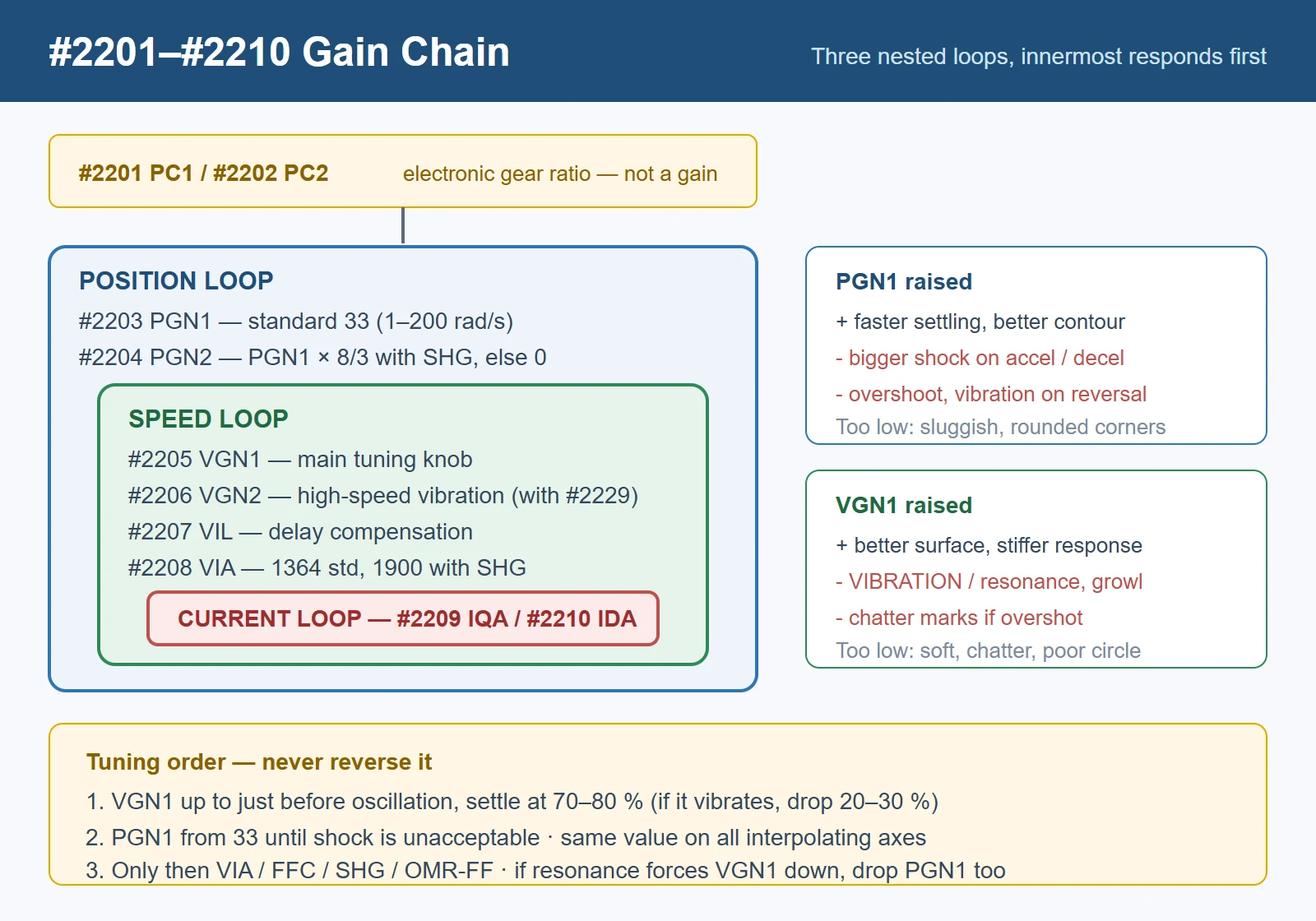
#2203 PGN1 | Positioning takes too long, contour error at corners | Bigger shock on the machine during accel/decel; overshoot; vibration on reversal | Sluggish positioning, large following error, rounded corners |
#2204 PGN2 | Enabling SHG (must be PGN1 × 8/3) | — | 0 disables SHG |
#2205 VGN1 | Rough surface, poor circle shape, low rigidity | Vibration / resonance; audible growl during rapid traverse | Soft response, chatter marks |
The manual’s own guidance for VGN1 is worth quoting in spirit: if vibration occurs, lower it by 20–30 %, and settle at 70–80 % of the value at which the vibration stops. Do not chase the highest possible number.
3. Tuning Order: Speed Loop First, Always
The servo loop is nested — current loop inside, speed loop in the middle, position loop outside. The inner loop must respond faster than the outer one. Breaking that order is the single most common reason a machine “never settles down”.
- Speed loop first. Raise
#2205 VGN1until the axis just starts to vibrate, then drop back to 70–80 % of that value. If vibration appears at any point, lower by 20–30 % and re-test. - Then position loop. Raise
#2203 PGN1from the standard 33 until the shock on accel/decel becomes unacceptable, then back off. On interpolating axes, set PGN1 to the same value on every axis — mismatched position loop gains distort circles and contours. - Only then add the advanced functions —
#2208 VIA,#2215 FFC, SHG or OMR-FF. All of them assume the base loops are already stable. - If resonance forces VGN1 down, reduce PGN1 to match. A high position loop gain on top of a low speed loop gain guarantees vibration and overshoot during accel/decel.
Rule of thumb from the field: 80 % of “servo tuning” complaints are actually mechanical — backlash, coupling preload, worn guides, insufficient clamping. Filter out mechanical problems before you start trading gain numbers, or you will spend a day tuning around a loose coupling.
4. Resonance Suppression: #2233 / #2238 / #2246
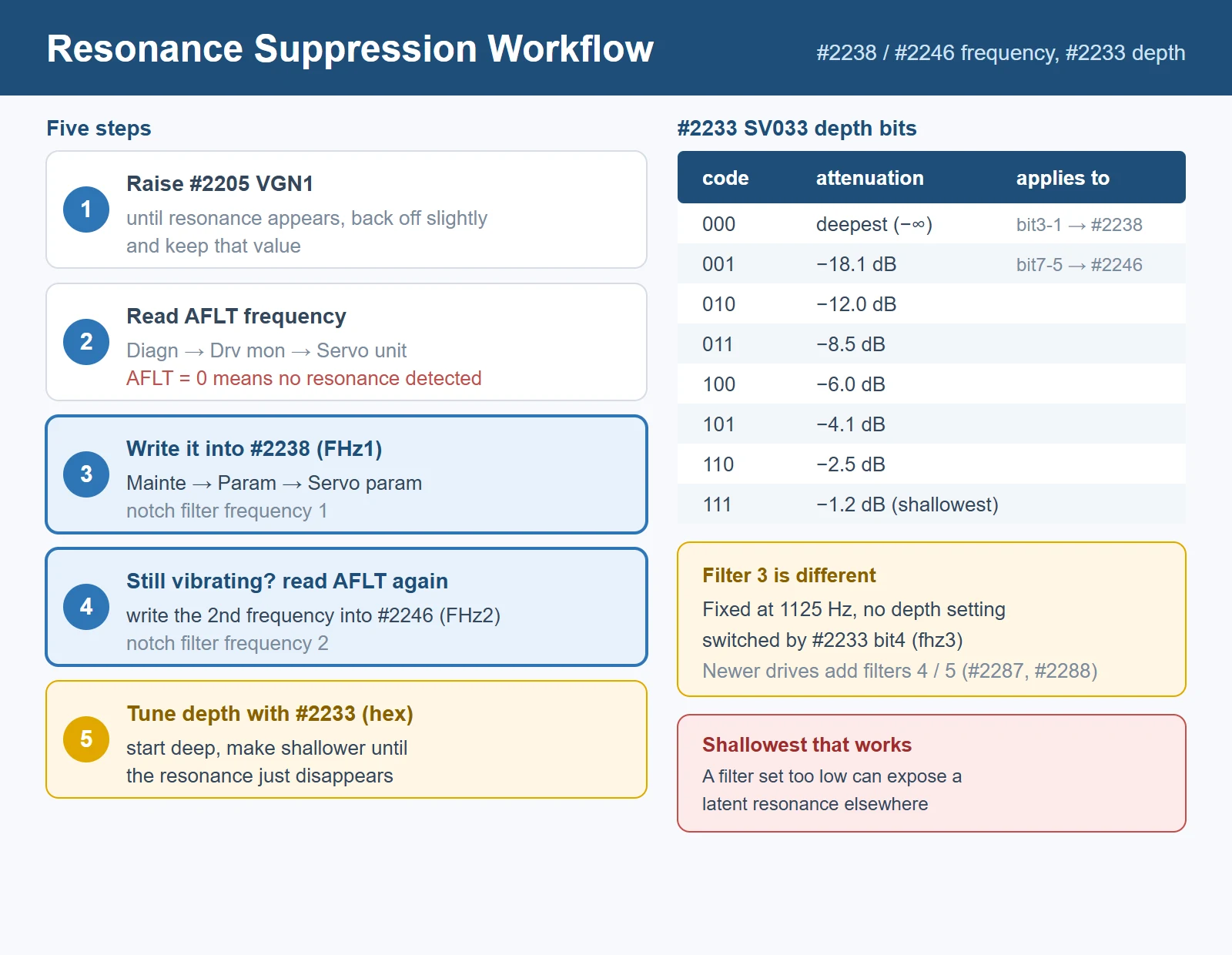
Mitsubishi drive units carry multiple notch filters. The workflow for the first two is officially documented and takes about five minutes:
- Raise
#2205 VGN1until resonance appears; back it off slightly and keep that value. - Diagn → Drv mon → Servo unit — read the “AFLT frequency” display. This is the drive unit’s own measurement of the resonance frequency. (*AFLT = 0 means no resonance is detected.*)
- Mainte → Param → Servo param — write the AFLT value into
#2238 SV038 FHz1(notch filter frequency 1). - Move the axis again. If it still vibrates, read AFLT again and write the second frequency into
#2246 SV046 FHz2(notch filter frequency 2). - Tune the depth with
#2233 SV033 SSF2— start deep and make it shallower until the resonance just disappears.
#2233 SV033 — notch filter depth bits and resulting attenuation
| Code (3 bits) | Attenuation | Applies to |
|---|---|---|
000 | −∞ (deepest) | bit3-1 nfd1 → depth of filter 1 (#2238) |
001 | −18.1 dB | bit7-5 nfd2 → depth of filter 2 (#2246) |
010 | −12.0 dB | (same bit pattern for both filters) |
011 | −8.5 dB | |
100 | −6.0 dB | |
101 | −4.1 dB | |
110 | −2.5 dB | |
111 | −1.2 dB (shallowest) |
Four details that save repeat visits:
- 🚨 Set the depth as shallow as works. The manual is explicit: setting a notch filter to a very low frequency can make a *latent* resonance appear, and an unnecessarily deep filter degrades servo stability. Deeper is not better.
- Notch filter 3 is fixed at 1125 Hz and has no depth compensation — it is switched on/off by
#2233bit 4 (fhz3), not tuned. - Setting range is generation-dependent. M800/M80/E80/C80 documentation lists 0–5000 Hz for
#2238/#2246; some drive-unit manuals list 0–2250 Hz or 0–4500 Hz, and state the filter is only valid at 36 Hz or above. Check your drive unit’s manual. - AFLT readings must be rounded to the drive unit’s settable resolution. A widely circulated field example converts a measured 235 Hz to a setting of 225 Hz and 396 Hz to 391 Hz — treat that as an illustration only, *verify against your drive unit*.
Newer drive units add notch filters 4 and 5; the M80V PLC manual lists #2287 and #2288 alongside #2233/#2238/#2246 as resonance-filter related parameters. Their exact names should be confirmed in your drive-unit manual.
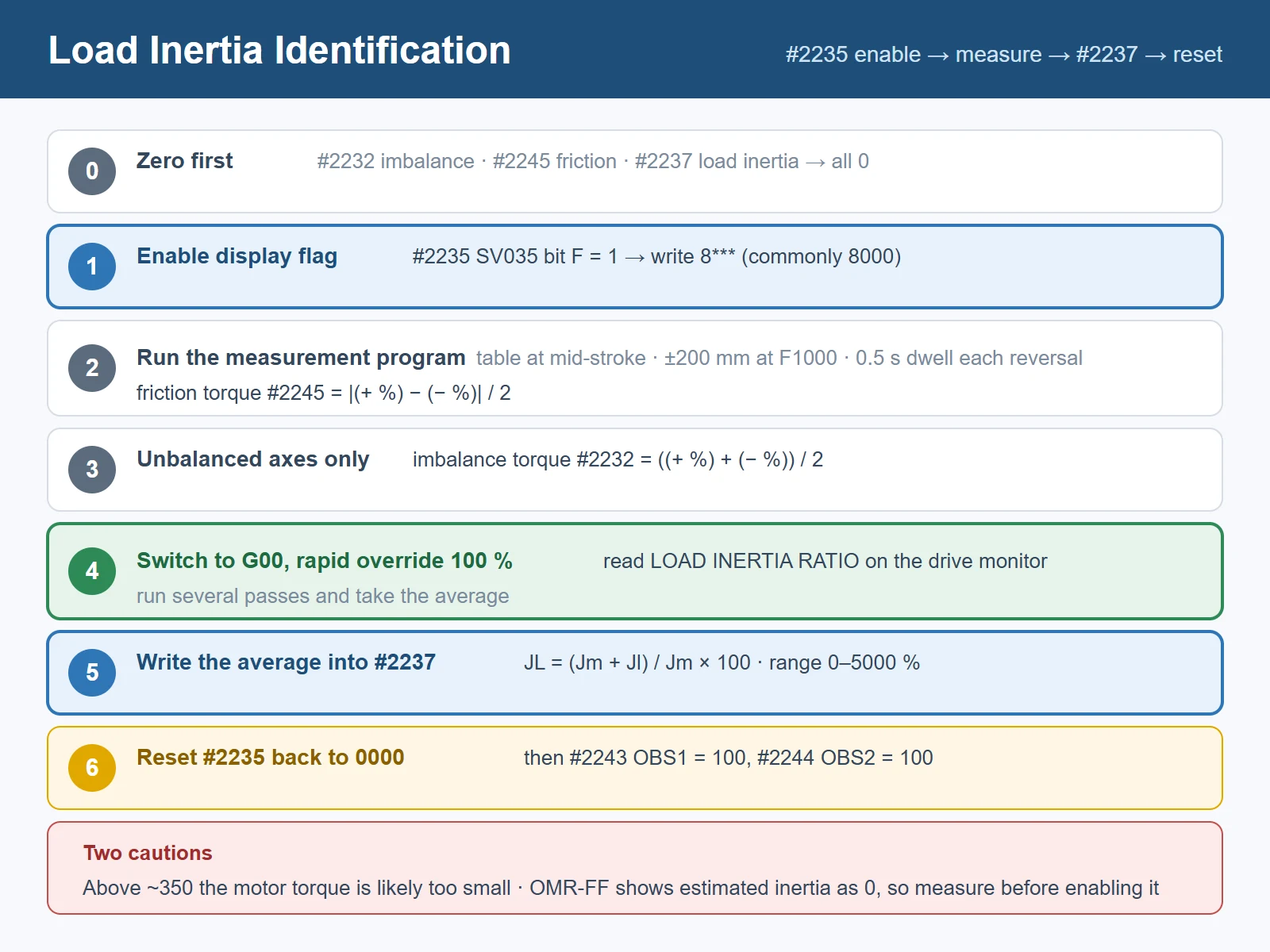
5. Load Inertia Identification: #2235 → #2237
#2237 SV037 JL is the load inertia scale, and it is not optional — the disturbance observer, real-time tuning and OMR-FF all read it. The definition is:
SV037 (JL) = (Jm + Jl) / Jm × 100 where Jm = motor inertia and Jl = load inertia converted to the motor shaft. For a linear motor, set the gross moving mass in kg. Range: 0–5000 (%) (0–5000 kg for linear).
The measurement routine
- Zero first. Confirm
#2232(SV032, imbalance torque),#2245(SV045, friction torque) and#2237are all0. - Enable the display flag. Set
#2235 SV035 bit F = 1— i.e. write8*(commonly written as 8000**) into#2235. - Measure friction torque
#2245. Park the table at mid-stroke, then run each axis back and forth 200 mm at F1000 with a 0.5 s dwell at each reversal. On Diagn → Drv mon, read the servo load current in both directions: friction torque = |(+ direction %) − (− direction %)| / 2. Example: +20 % and −20 % →|20 − (−20)| / 2 = 20→ set#2245 = 20. - Measure imbalance torque
#2232— only for unbalanced (typically vertical) axes, using the same program: imbalance torque = ((+ %) + (− %)) / 2. Example: +30 % and −20 % →(30 + (−20)) / 2 = 5→ set#2232 = 5. The sign of#2232also decides the pull-up direction for the vertical axis function. - Read the inertia ratio. Change the
G01toG00in the same program, ramp the rapid override up to 100 %, and read the load inertia ratio on the drive monitor. Take the average of several passes. - Write it into
#2237, then set#2235back to0000. - Recommended follow-up:
#2243 SV043 OBS1 = 100and#2244 SV044 OBS2 = 100for the disturbance observer. Changing observer parameters requires re-adjusting lost-motion compensation.
A field rule of thumb: if the measured load inertia ratio exceeds roughly 350, the selected motor’s torque is too small for the machine and a larger motor should be considered. Treat this as a selection guideline, not a hard limit — *verify on your machine*.
If you use real-time tuning, also set #2399 RTGM (non-zero) and #2400 RTJX (larger than #2237); the speed gain switches with the estimated inertia between those two bounds.
6. SHG vs OMR-FF vs NC Analyzer2
These three are constantly confused. They are different layers.
SHG / OMR-FF / NC Analyzer2 — what each one actually is
| SHG control | OMR-FF control | NC Analyzer2 | |
|---|---|---|---|
| What it is | A control mode inside the drive | A control mode inside the drive | A PC software tool (Ethernet) |
| Purpose | Higher position loop gain with smooth accel/decel | Better arc inner-rounding, corner error and path vibration | Measure machine characteristics and set parameters |
| Key parameters | #2203 PGN1, #2204 PGN2, #2257 SHGC | #2306 SV106 PGM, #2312 SV112 IFF, #2313 SV113 bit0 | — (writes the parameters for you) |
| Requirement | PGN1 : PGN2 : SHGC = 1 : 8/3 : 6 | NC-side OMR-FF option; #2237 must be set first | Windows 10/11; M800/M80/E80/C70… series |
SHG (Smooth High-Gain). Compensates the position-loop delay more stably, so the same PGN1 setting yields roughly double the effective position loop gain. Parameter ratio is mandatory: PGN1 : PGN2 : SHGC = 1 : 8/3 : 6. Companion values: #2208 VIA 1364 → 1900, #2215 FFC 0 → 100.
OMR-FF. Builds separate feed-forward commands for position, speed and current from a scale model, letting you set command tracking (PGM) and servo rigidity (PGN) independently. Enable it with #2313 SV113 bit0 (omrffon) = 1; then #2306 SV106 PGM = same value as #2203 PGN1, and #2312 SV112 IFF standard 10000 (0.01 % units).
🚨🚨 SHG and OMR-FF are mutually exclusive. The MDS-E manual states plainly: disable SHG control when using OMR-FF — and #2204 PGN2 must be set to 0 in OMR-FF mode. Two more cautions from the same manual: always set the load inertia scale (#2237) before adjusting OMR-FF, and while OMR-FF is enabled the estimated inertia value displays as 0 (so you cannot measure inertia with OMR-FF on).
NC Analyzer2 is the official PC tool that automates the measuring: adjustment wizard, speed loop gain adjustment, notch filter setting, circularity adjustment, Bode diagram measurement and servo waveform capture, over Ethernet, on Windows 10/11, with a Simplified Chinese interface. It supports M800V/M80V/M800/M80/E80/C80 and the M700/M70/C70 generation. Use it when you do not have a vibration analyser — it replaces the guesswork in sections 4 and 5 with an actual frequency response plot.
7. Servo Alarm 37 and #2201 / #2202
Servo alarm 37 is an initial parameter error caused by electronic gear overflow — and the official manual warns about it in the description of both #2201 and #2202:
“Even if the gear ratio is within the setting range, the electronic gears may overflow and an initial parameter error (servo alarm 37) may occur.”
What that means in practice:
- It is not a gain problem and not a drive fault. Raising or lowering PGN1/VGN1 will not clear it.
- It fires at power-on, when the NC computes the electronic gear ratio from
#2201/#2202together with the detector resolution. - Reduce
#2201/#2202to the simplest integer ratio before anything else. A gear ratio entered as a large non-reduced pair overflows even though each individual number is inside 1–32767. - If it still trips, check the mechanical reduction ratio and detector resolution against your drive unit’s manual. The exact overflow threshold is generation-specific — *verify on your machine*.
- Remember both parameters are
(PR): power OFF/ON after changing them.
8. Backup and Rollback Discipline
Servo parameters are the easiest thing on the machine to destroy and the hardest to reconstruct from memory.
- Back up before every tuning session, not after. The current state is the only known-good fallback you have.
- Change one parameter at a time, and record the old value, the new value and the symptom you were chasing.
- Power-cycle discipline:
(PR)parameters (#2201,#2202, …) do nothing until you cycle power. If “nothing changed”, check that first. - Re-mechanical-check before re-tuning. If a machine that used to be quiet starts vibrating, suspect the mechanics before you start moving gains — you will otherwise tune the machine into a state nobody can reproduce.
- Keep the motor-standard block (
#2206–#2213) sacred. These come from the motor parameter list for your specific motor type; they are not tuning knobs.
9. FANUC ↔ Mitsubishi Cross-Reference
If you came from FANUC, this is the translation table you want — and the caveat that matters more than the table.
FANUC ↔ Mitsubishi servo parameter analogy
| Function | FANUC | Mitsubishi M80 | Note |
|---|---|---|---|
| Position loop gain | 1825 (0.01 s⁻¹, tuning start 5000) | #2203 PGN1 (rad/s, standard 33) | Same role, different unit and scale |
| Load inertia ratio / velocity gain | 2021 (tuning start 128) | #2237 JL (%) + #2205 VGN1 | Different definitions — see below |
| Backlash acceleration | 2048 (100) | #2227 bit4/bit5 jitter comp., #2240 LMCT | Not a 1:1 equivalent |
| Feed-forward | 2005/2092 (AI contour / FF) | #2215 FFC, #2208 VIA | Different decomposition |
| Servo tuning software | SERVO GUIDE / Servo Viewer | NC Analyzer2 | Both measure + plot |
🚨 Do not copy numbers across. The definitions genuinely differ:
- FANUC
2021is a load inertia ratio whose relation to velocity loop gain is: velocity loop gain (%) = (1 + load inertia ratio / 256) × 100 — so2021 = 128gives 150 %. - Mitsubishi
#2237is(Jm + Jl) / Jm × 100, i.e. a percentage of *total* inertia including the motor. A value of 100 means “no external load”.
They are conceptually related but numerically incompatible. Use the table to find *which parameter to open*, then set it by measurement on your own machine.
For the FANUC side worked out in detail, see FANUC servo gain tuning: 2021, 1825, 2020 and the correct order; for diagnosing what the vibration itself is telling you before you touch any gain, see servo vibration, overshoot and abnormal noise: symptom-based diagnosis.
Which Mitsubishi parameter is the position loop gain and which is the speed loop gain?
#2203 (SV003, PGN1) is the position loop gain 1 and #2205 (SV005, VGN1) is the speed loop gain 1. #2204 (SV004, PGN2) is position loop gain 2, used only with SHG control and set to PGN1 × 8/3 (or 0 when SHG is not used). Beware the widespread online error that labels #2201/#2202 as gains — those two are the electronic gear ratio (PC1 motor side, PC2 machine side) and have nothing to do with gain.
How do I stop resonance on a Mitsubishi machine, and what goes into #2238?
Raise #2205 VGN1 until resonance appears and back it off slightly. Then read the AFLT frequency on Diagn → Drv mon → Servo unit, and write that frequency into #2238 (SV038, notch filter frequency 1). Move the axis again; if it still vibrates, read AFLT a second time and put that frequency into #2246 (SV046, notch filter frequency 2). Finally tune the filter depth with #2233 (SV033): bits 3-1 set the depth of filter 1 and bits 7-5 the depth of filter 2, from 000 (−∞, deepest) through 100 (−6.0 dB) to 111 (−1.2 dB, shallowest). Set #2233 in hexadecimal. Aim for the shallowest depth that removes the resonance — an unnecessarily deep filter hurts stability, and a filter set too low can expose a latent resonance at another frequency.
How do I measure the load inertia ratio on a Mitsubishi M80?
Set #2232, #2245 and #2237 to 0, then set #2235 bit F = 1 (SV035 written as 8*, commonly 8000). Run each axis back and forth 200 mm at F1000 from mid-stroke and read the servo load current on the drive monitor: friction torque #2245 = |(+ %) − (− %)| / 2, and for unbalanced axes imbalance torque #2232 = ((+ %) + (− %)) / 2. Then switch the move to G00, ramp the rapid override to 100 %, take the average of the displayed load inertia ratio, write it into #2237 (SV037 JL), and set #2235 back to 0000**. Afterwards set #2243 = 100 and #2244 = 100 and re-adjust lost-motion compensation.
*Last updated: 2026-10-23*























暂无评论内容