


External (peripheral) alarms are the ones that stop a shop with no obvious way forward: the screen shows EX1118 or AL2022, the builder’s manual is long gone, and nobody answers the phone. There is a fixed reverse path though — alarm number → A address → ladder → I/O point — that takes you from “no idea what this means” to “which terminal do I measure”.
This guide walks that path down to the level of which soft key to press, and adds the two traps that actually cost people days: a ladder missing the DISPB function instruction (A address is on, but nothing is displayed) and what to do when the message only carries a number, with no I/O point.
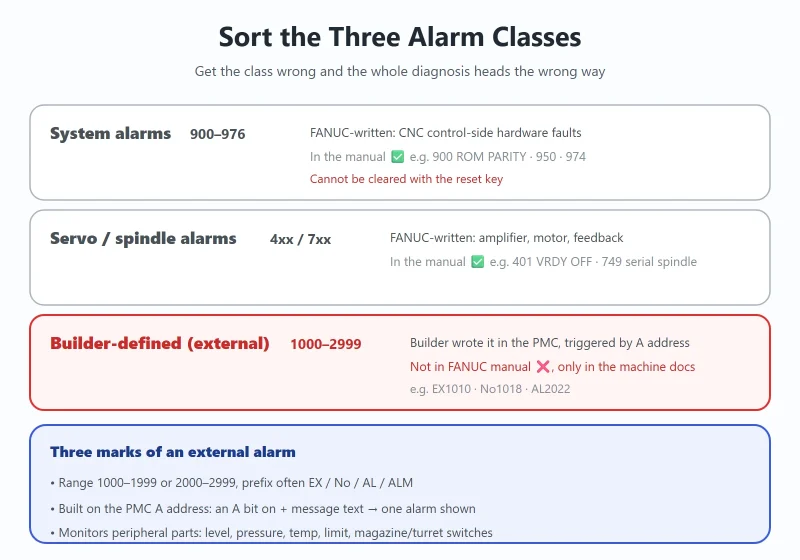
1. First, Sort the Three Alarm Classes: System / Servo / Builder-Defined
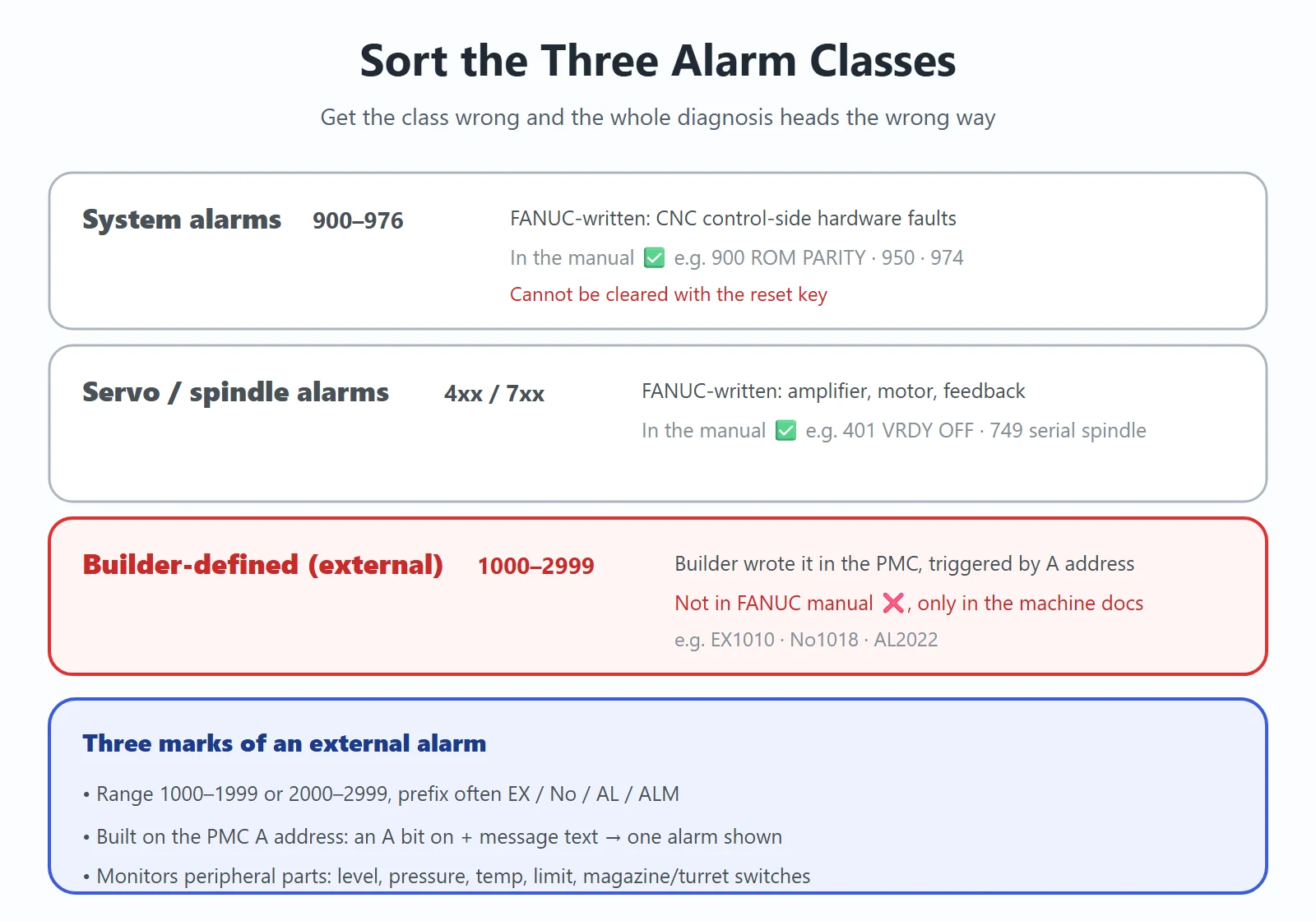
Table 1 — Boundaries of the three alarm classes
| Class | Range | Who wrote it | In the FANUC manual? | Typical examples |
|---|---|---|---|---|
| System alarms | 900–976 | FANUC (CNC control-side hardware) | ✅ Yes | 900 ROM PARITY, 950 PMC, 974 F-BUS |
| Servo / spindle alarms | 4xx / 7xx | FANUC | ✅ Yes | 401 VRDY OFF, 749 serial spindle |
| Builder-defined (external) | 1000–2999 | The machine tool builder, written into the PMC | ❌ No — only in the machine's own documentation | EX1010, No1018, AL2022 |
What distinguishes external alarms:
- Numbered 1000–1999 or 2000–2999, usually prefixed
EX,No,ALorALM - Mechanically they are alarms the builder built on the PMC’s A address: set an A bit, match it with a message in the message screen, and it appears on the display
- What they monitor is always peripheral hardware: level switches, pressure switches, temperature switches, limit switches, magazine/turret position switches
One-line test: if you can look it up in a FANUC manual it is a system or servo alarm; if you cannot and it only exists in the machine’s documentation, it is a builder-defined external alarm. The distinction matters because the two take completely different routes — hardware diagnosis for the former, ladder reverse-lookup for the latter. System alarms (900–976) are covered in Fanuc System Alarm 900–976: Meaning and Board-Level Diagnosis.
2. Alarm Number ↔ A Address ↔ Message Text: Reading the Message Screen
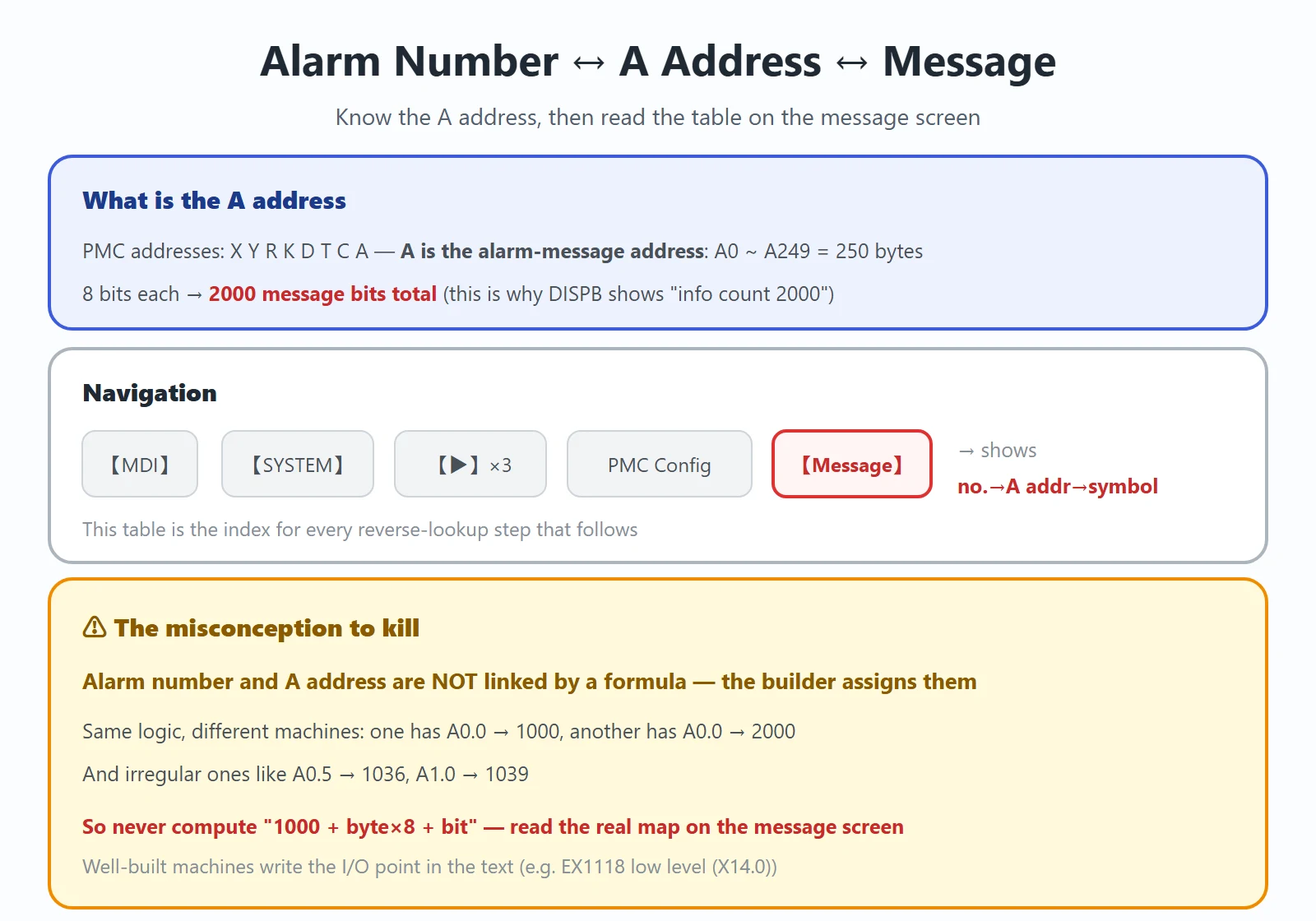
Start with what the A address actually is. FANUC PMC addresses are X Y R K D T C A, and A is the alarm message address:
- A0 to A249 — 250 bytes, 8 bits each — 2000 message bits in total (which is where the “2000” in DISPB comes from, see Section 7)
- Each bit corresponds to one message. The builder sets an A bit in the ladder, and the system looks up the text registered for that address and displays it
⚠️ One common misconception has to be corrected here: the alarm number and the A address are not related by a fixed formula — the builder assigns them in the message screen. Seen in the field on identical logic: one machine has A0.0 → alarm 1000, another has A0.0 → alarm 2000; and there are assignments as irregular as A0.5 → 1036 and A1.0 → 1039. So do not try to compute “1000 + byte×8 + bit” — go to the message screen and read the actual correspondence.
Navigation:
- Put the machine in 【MDI】
- Press 【SYSTEM】
- Press the 【▶】 extension key 3 times
- Select 【PMC 配置】 → 【信息】(PMC configuration → Message)
Here you get the full alarm number → A address → symbol table, which is the index for everything that follows. A well-built machine writes the I/O point straight into the text (for example “EX1118 coolant tank low level (X14.0)”), so you can locate the fault at a glance. A poorly built one only carries the number — that is when you go to the four steps in Section 3.
3. Step 1 — PMC Maintenance → Signal Status: Which A Bit Is On?
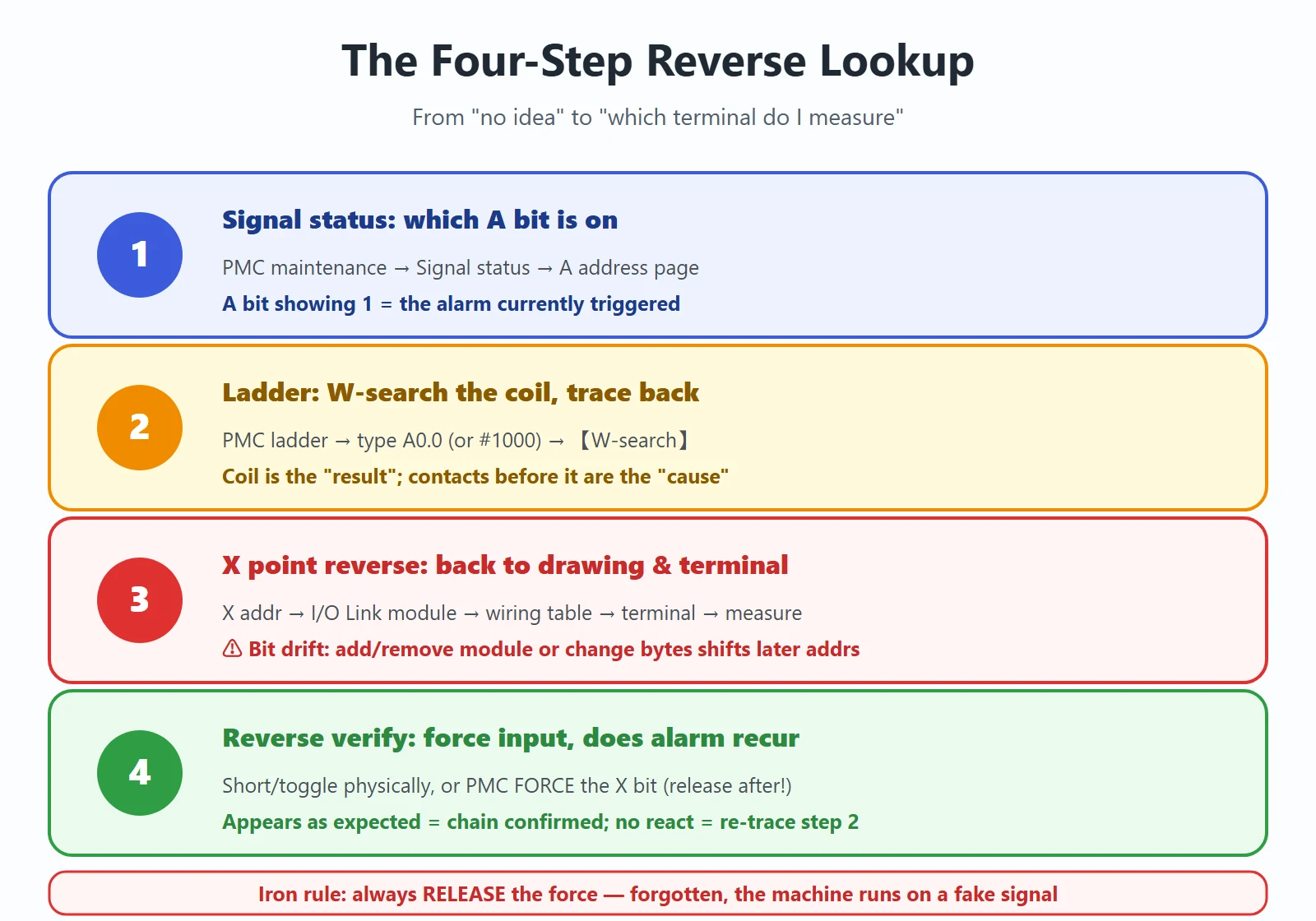
First establish *which bit* is alarming.
Path: 【MDI】→【SYSTEM】→ 【▶】 ×3 →【PMC 维护】(PMC maintenance)→【信号状态】(Signal status)→ A address page
- The page lists the A addresses (e.g. A0.0) together with the symbol number in blue
- A bit showing 1 is the alarm currently being triggered (A0.0 = 1 is typically the emergency stop alarm)
- Several bits may be on at once — cross-check against the alarm number on screen and the message-screen table to find the primary cause, and do not get dragged along by consequential alarms
Tip: if the alarm flashes and clears before you can read it, sit on the signal-status page and trigger the action again. Very often this bit is only the *result* — the real condition is further back in the ladder.
4. Step 2 — Find the Coil in the Ladder and Work Backwards Through the Contacts
Once you have the A address (or the alarm number), go to the ladder and locate its coil.
Path: 【SYSTEM】→ 【▶】 ×3 →【PMC 梯图】(PMC ladder)
- Enter the search term: you can type the A address (e.g.
A0.0), or the alarm number (e.g.#1000) - Press the 【W-搜索】(W-search) soft key — the cursor jumps straight to the coil for that alarm
- Work backwards: look at the contacts in series *before* the coil — usually an input-signal contact (e.g. the normally-closed contact of X8.4)
The emergency-stop example is the classic one: normally the external E-stop switch is a normally-closed contact; once powered, PMC contact X8.4 (normally closed) opens and the A0.0 coil stays off. When you press E-stop or a wire breaks, X8.4 (normally closed) closes, A0.0 turns on → alarm. So for this one you check two things specifically: is the E-stop switch stuck, and is the wire broken or poorly connected.
Core rule for reverse lookup: the coil is the *result*; the contacts in series before it are the *cause*. Walk upward step by step until you reach the outermost physical input (an X point) or internal condition (R relay, timer, counter).
For ladder basics and live monitoring, see FANUC PMC Ladder: From Signal Addresses to Live Monitoring.
5. Step 3 — Map the X Bit Back to the Electrical Drawing and Terminal Strip
Finding the X point only gives you a *logical address*; you still have to land it on physical wiring.
- X point → I/O module: first see which I/O Link module that X address belongs to (open the PMC I/O module allocation screen to confirm group/rack/slot and the start address)
- Module → terminal strip: using the module’s wiring/address table, map Xm.n to the actual terminal number
- On-site measurement: at the terminal strip, measure continuity / voltage on that point — decide whether the switch is bad, the wire is broken, or the contact is oxidized
⚠️ The bit-drift trap: the X point written in the alarm text was hard-coded against the I/O Link allocation at the time. Once that allocation changes — add/remove a module, change the byte count (e.g. OC01I → OC02I), or reorder groups — every X address on the later modules shifts as a block. You then get the mismatch “the alarm says X14.0, but the real signal is at X20.0”. So always trust the current I/O allocation plus the ladder, not the point number frozen into old text.
6. Step 4 — Reverse Verification: Force the Input Manually, Does the Alarm Reproduce?
The first three steps *infer*; step 4 *verifies*. The only purpose: confirm the chain you found is really the cause, not a parallel branch beside it.
Method: under safe mechanical conditions (stop what you can, lock the axes you can), artificially create a state change on that input:
- Physical side: short / open the corresponding terminal, or manually toggle the switch / press the button
- PMC side: use PMC’s FORCE function to force that X bit to 1 / 0 (always release the force when done!)
Reading the result:
- Alarm appears / disappears as expected → chain confirmed, the fault is in that switch or that wire
- Alarm does not react → you looked in the wrong place: go back to step 2 and re-trace, watching for parallel conditions, a self-holding loop, or a double coil (when the same A address is driven in two places, it may not actually conduct)
- Alarm comes and goes → most likely poor contact, oxidized contact or a loose terminal — chase the connector, not the spare parts
Iron rule: always release the force when you are done. Forget, and the machine runs with a “fake” signal — the most dangerous kind of man-made hazard.
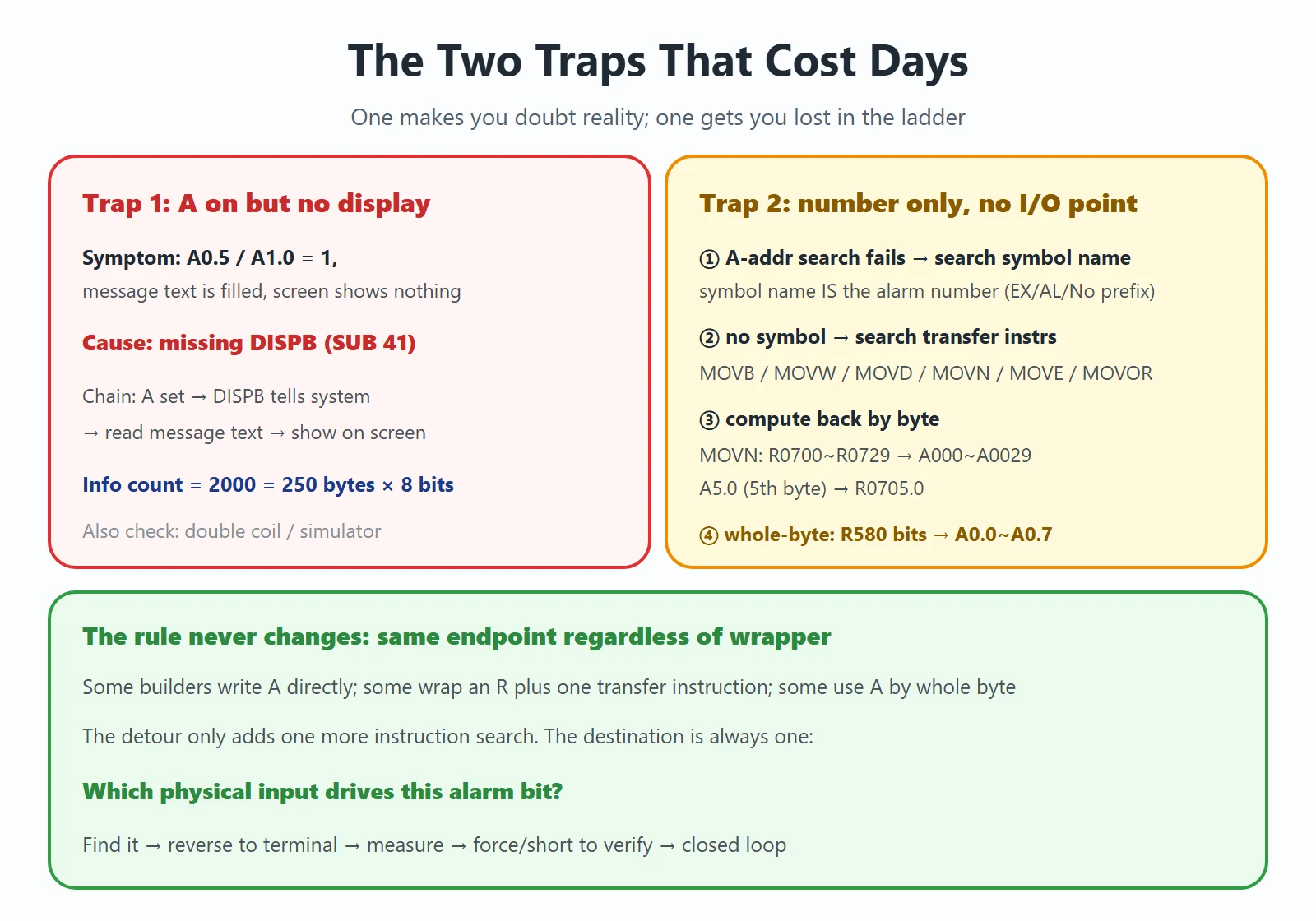
7. Trap 1 — A Address Is Already On, but Nothing Is Displayed? Probably Missing DISPB
This is the most maddening case: in PMC status monitoring you see A0.5 and A1.0 clearly triggered (=1), and their message text is filled in on the message screen (e.g. A0.5 → 1036), yet the screen shows no alarm at all.
Cause: the ladder is missing the message-display function instruction DISPB (SUB 41) — deleted or skipped by mistake while editing the program.
The full display chain is:
The ladder sets the A bit → DISPB tells the system → the system reads the message text for that A address → it is shown on the screen
Without DISPB in the chain, an on A address has nobody to notify the system, so naturally nothing is displayed.
How to set “info count” in DISPB: on a 0i-D, the A range is A0~A249 = 250 bytes × 8 bits = 2000 message bits, so you enter 2000 in the instruction. The A range differs between models — follow your machine’s PMC specification.
Two more reasons that also cause “triggered but not displayed” (check them together):
- Double coil: the same A address driven in two places, may not actually conduct
- Incomplete PMC program in a simulator / test environment (most common on a simulator)
8. Trap 2 — The Message Carries Only a Number, No I/O Point
Many machines’ messages are written bare — just a number like EX2022, no address, no symbol, no I/O point. Find it in this order:
① Search by A address first; if it is not found, search by the symbol name
Some builders do not use the A address directly, but implement it with an internal relay R plus a data-transfer instruction. Type A0.0 and you get “address/symbol not found”, because the coil is actually R0700.0 or similar, and the symbol name *is* that alarm number (maybe with a prefix: 2000 / EX2000 / AL2000 / No.2000). So type the alarm number itself (e.g. 2000) and press W-search — the cursor lands on that R coil.
② If the R coil has no symbol name either, search the data-transfer instructions
If the R coil has no symbol name, search the function instructions. Common transfer instructions:
Table 2 — Common PMC data-transfer function instructions
| Instruction | Meaning |
|---|---|
| SUB43 / MOVB | 1-byte data transfer |
| SUB44 / MOVW | 2-byte data transfer |
| SUB47 / MOVD | 4-byte data transfer |
| SUB45 / MOVN | arbitrary-byte data transfer |
| SUB8 / MOVE | logical-AND then transfer |
| SUB28 / MOVOR | logical-OR then transfer |
Search each of these in the PMC; the one whose source is R and destination is A is your target.
③ Compute back by byte correspondence
For example a SUB45/MOVN: byte count 30, source R0700~R0729, destination A000~A0029 — R and A correspond byte by byte. A5.0 is the 5th byte, so it maps to R0705.0 (R0700 is the start). Once you have the R, trace upward to its driving condition.
④ Whole-byte usage
Some builders use the A address by the whole byte: e.g. each bit of R580 turning on triggers A0.0~A0.7 respectively. Find that A byte, then find its R relationship.
The rule never changes: whether the builder writes A directly or wraps a layer of R plus transfer instruction, it ultimately lands on “which physical input drives it”. The detour only adds one more instruction search.
Frequently Asked Questions
My FANUC ladder shows the A address already energized — why no alarm?
The most common reason is the ladder is missing the message-display function instruction DISPB (SUB 41) — the display chain is “ladder sets A address → DISPB notifies the system → system reads the message text → display”; without DISPB nobody notifies the system, so an on A address still shows nothing. Add DISPB back (set “info count” to your machine’s total A-bit count; on 0i-D it is commonly 2000 = A0~A249, 250 bytes × 8 bits). Two secondary reasons: a double coil on the same A address (actually not conducting), and testing on a simulator (the PMC program itself is incomplete).
How do I tell a PMC alarm from a system alarm? Which class is number 1000?
Number 1000 is a builder-defined external (PMC) alarm, not a system alarm. System alarms are 900–976 (CNC control-side hardware faults, in the FANUC manual, and cannot be cleared with the reset key); servo/spindle are 4xx / 7xx; and the 1000–2999 range is alarms the builder wrote into the PMC, triggered via the A address — not in the FANUC manual, only in the machine’s documentation. The distinction matters for the route: system alarms go to hardware diagnosis, external alarms go to the reverse lookup “alarm number → A address → ladder → I/O point”.
How do I find the cause when the builder’s alarm manual is missing?
Run the four-step reverse lookup: ① 【MDI】→【SYSTEM】→ 【▶】 ×3 →【PMC 维护】→【信号状态】, find the A bit showing 1; ② in 【PMC 梯图】 type that A address (or alarm number) and press 【W-搜索】 to locate the coil, then trace back the contacts in series before it; ③ map the X point back to the module and terminal strip per the I/O Link allocation, watching for bit drift when the allocation has changed; ④ manually force or short that input to reverse-verify the alarm appears/disappears. If the message screen (【PMC 配置】→【信息】) shows the alarm-number → A-address → symbol table, use it as your index first.
Last updated: 2026-10-21























暂无评论内容