



A SINUMERIK 828D that boots to Alarm 2000 — “PLC sign-of-life monitoring” — is telling you one thing in plain language: the NCK stopped receiving the PLC’s heartbeat. It is a deliberate safety stop, not a glitch, and it almost always comes down to one of three things in the PLC user program. This guide explains exactly what 2000 (and its sibling 2001) means, how the NCK monitors the PLC, the parameters that govern the timeout (MD10100 / MD10120), and the field diagnosis path that ends at the right fix instead of a blind parameter change.
Note on sources: the definitions, parameter names and the “no ISTACK on a loop” behaviour below are taken from the official SINUMERIK 828D Alarms Diagnostics Manual. Parameter numbers and their reference values are quoted; the manual’s explanatory body text is not reproduced. Always confirm against the manual for your exact software version.
1. What Alarm 2000 Actually Is: A Heartbeat Counter
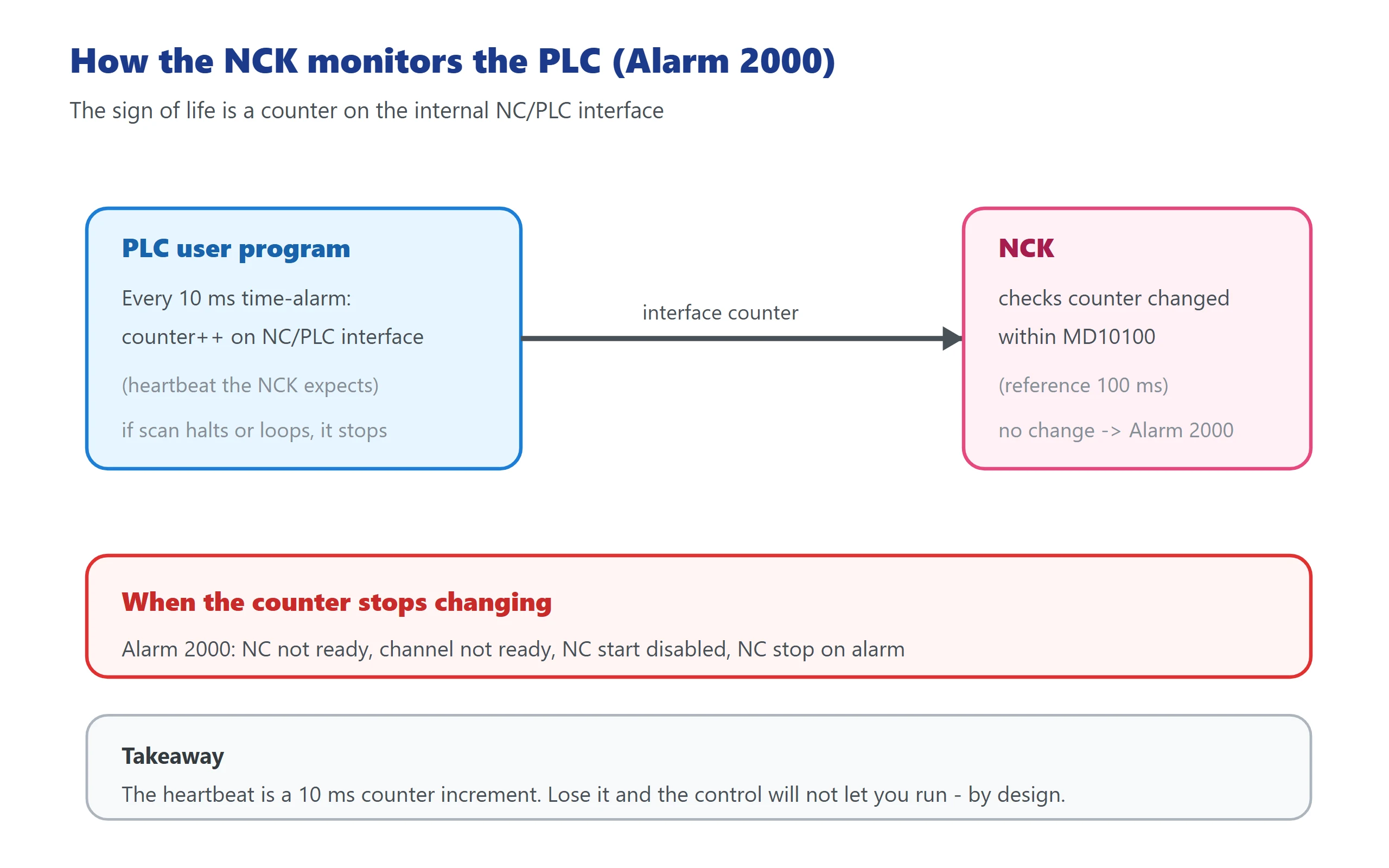
The “sign of life” is a counter reading on the internal NC/PLC interface. The PLC increments that counter every 10 ms using its time-alarm routine. The NCK, on its own cycle, checks whether the counter reading has changed. If the counter does not advance within the window defined by MD10100 $MN_PLC_CYCLIC_TIMEOUT, the NCK concludes the PLC is no longer running its cycle and raises Alarm 2000.
The reaction is intentional and safe:
- NC not ready
- Channel not ready
- NC start disabled in that channel
- NC stop on alarm
- Interface signals set, alarm displayed
In other words: the control will not let you run a part program while it cannot confirm the PLC is alive, because the PLC is what drives guards, lube, coolant, door interlocks and the rest of the safety-relevant periphery.
2. The 2000 ↔ 2001 Sequence: Which Comes First
These two alarms are siblings, and in a cold-start failure you often see them in a chain.
| Alarm | Meaning | Timeout source | When it fires |
|---|---|---|---|
| 2001 PLC has not started up | The PLC has not given even one sign of life since power-on | MD10120 $MN_PLC_RUNNINGUP_TIMEOUT (default ≈ 1 s) | During run-up, before the PLC has completed its first OB1 cycle |
| 2000 PLC sign-of-life monitoring | The PLC stopped giving sign of life during cyclic operation | MD10100 $MN_PLC_CYCLIC_TIMEOUT (reference 100 ms) | After the PLC was running, then its heartbeat stopped |
The typical cold-start chain is: power on → 2001 appears first (PLC never signalled within the run-up window) → once the PLC does start but then stalls or loops, 2000 follows. On a machine that was running and then the PLC was stopped (commissioning switch, programming tool “Stop”, or a PLC alarm), you usually get 2000 directly, with no 2001, because the PLC had already started up.
Practical read: if 2001 is present at a cold boot, suspect the first OB1 cycle taking too long or a startup-time loop. If 2000 appears on a machine that was already running, suspect a loop, STOP, or a long blocking operation during cyclic execution.
3. Three Root Causes — and How to Tell Them Apart
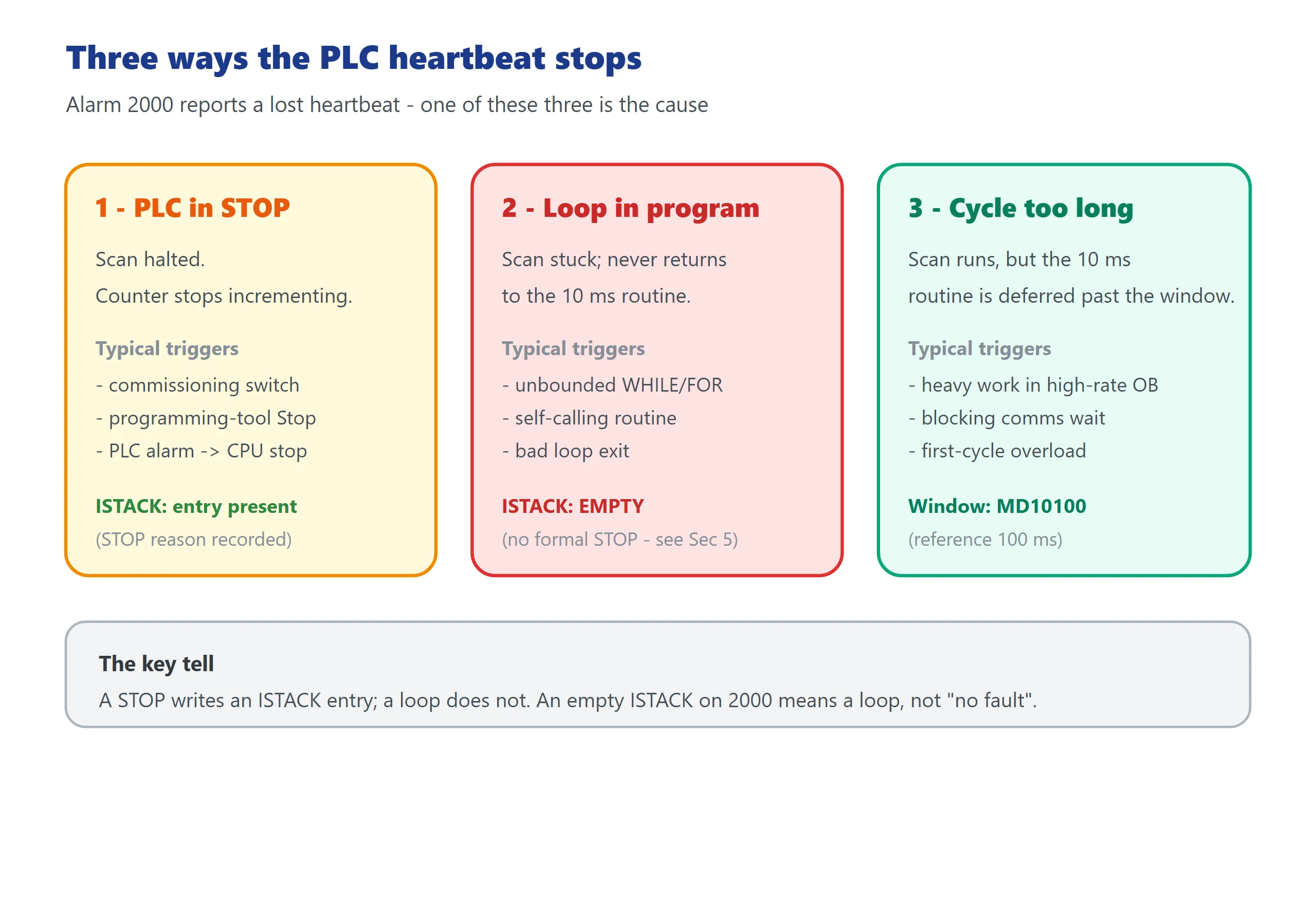
Alarm 2000 is not a single fault; it is the NCK reporting “I lost the heartbeat.” The heartbeat is lost for one of three reasons:
The three ways the PLC heartbeat stops
| # | Root cause | What happened to the scan | Typical trigger |
|---|---|---|---|
| 1 | PLC is in STOP | Scan halted, counter no longer increments | Commissioning switch in STOP, programming-tool “Stop”, or a PLC alarm that stopped the CPU |
| 2 | User program stuck in a loop | Scan never returns to the 10 ms time-alarm routine | An unbounded loop / WHILE with a bad exit, or a subroutine that calls itself |
| 3 | Cycle time exceeded the window | Scan runs but the time-alarm routine is deferred past MD10100 | Heavy work inside a high-rate OB, a long blocking communication wait, or a first-cycle overload |
Crucially, cause 2 (a loop) behaves differently from cause 1 (a STOP): with a STOP, the PLC writes an ISTACK entry describing why it stopped. With a busy-loop, the PLC never formally stops — it is just stuck — so there is no ISTACK entry at all. That is the single most common misread in the field (see Section 5).
4. The Two Parameters: MD10100 and MD10120
Both are machine data on the NCK side; both govern how long the NCK will wait for the PLC’s heartbeat.
| Parameter | Name | Governs | Reference / default |
|---|---|---|---|
| MD10100 | $MN_PLC_CYCLIC_TIMEOUT | Max time the NCK waits for the counter to change during cyclic operation (Alarm 2000) | Reference value 100 ms |
| MD10120 | $MN_PLC_RUNNINGUP_TIMEOUT | Max time after power-on for the PLC to give its first sign of life (Alarm 2001) | Default ≈ 1 s |
How to use them in diagnosis:
- MD10100: verify it is a sensible value and has not been tightened beyond what the PLC can achieve. Siemens quotes 100 ms as the reference for 828D. If someone set it to a few ms “to be safe,” normal PLC jitter will trip 2000 — that is a self-inflicted fault.
- MD10120: only matters at cold start. It must be long enough to cover the first OB1 cycle on that specific machine. If your PLC does real work on the first scan (homing sequences, long initialisations), the first cycle can exceed 1 s and you get 2001.
Important — what these parameters are NOT: they are timeouts, not fixes. Changing them only widens the window; they do not address why the heartbeat stopped. See Section 6 for the trade-off of loosening them.
5. Field Diagnosis Path: From Alarm List to Root Cause
Work top-down. The goal is to decide STOP vs loop vs overload before you touch code.
- Capture the alarm list with timestamps. Menu Select → Diagnosis → Alarm Messages. Note the time of 2000 and any neighbour (2001, power, drive, 2100–2140 battery/power alarms). The order rebuilds the event chain.
- Check PLC RUN/STOP. If the PLC is STOP, the heartbeat stopped because the scan halted — that is cause 1. Find what forced the STOP (commissioning switch, programming tool, or a PLC alarm — for builder-defined user alarms, see our 840D/828D PLC user alarm guide).
- Read the cycle time. If the PLC is RUN but cycle time is near or above MD10100, you are in cause 3 (overload) — move heavy work out of the high-rate OB.
- Open the ISTACK — and understand an empty one. If the PLC is STOP, the ISTACK shows why. But if the system is hung in a loop rather than stopped, the ISTACK is empty. An empty ISTACK on Alarm 2000 does not mean “no fault” — it means the fault is a loop, not a STOP. Then go to the time-critical code around the 10 ms time-alarm routine and the interface counter increment.
- Correlate with power/drive alarms. Undervoltage (5 V/24 V), fan or temperature alarms can intermittently stall the PLC or hit the watchdog during transients; do not fix the symptom and miss the supply.
![图片[3]-SINUMERIK 828D Alarm 2000/2001: PLC Sign-of-Life Monitoring, MD10100/MD10120 and the Field Fix-CNCShare | 数控电气技术中心](https://www.cncshare.com/wp-content/uploads/2026/10/828-en-03.webp) 6. The PLC-Side Root Cause: A Long Loop Inside a Time-Critical OB
6. The PLC-Side Root Cause: A Long Loop Inside a Time-Critical OB
The 10 ms time-alarm routine — the block that increments the heartbeat counter — must run quickly and unconditionally every cycle. Two patterns reliably break it:
- A blocking loop. A
WHILE/FORwith an exit condition that is never met, or a subroutine that calls itself, traps the scan so the time-alarm routine is never reached. - A long wait inside a high-rate OB. A blocking communication wait (polling a drive or a field device in a tight loop) or a heavy diagnostic routine placed in the time-alarm OB defers the increment past MD10100.
The fix is in the program, not the parameter: move heavy or waiting tasks out of the time-critical OB, guard any loop with a real exit and a watchdog counter, and keep the heartbeat increment as the first, unconditional step of the 10 ms routine.
Rule of thumb: the counter increment should be a few lines that always run, never behind a condition or a wait.
7. Can You Just Increase the Parameter? Yes — and Here Is the Cost
You *can* raise MD10100 above 100 ms, and that will clear 2000 if the cause was merely tight timing. But understand what you are giving up:
- MD10100 is the safety window. It is how fast the NCK notices the PLC died. Widen it to, say, several seconds and the control keeps “running” for that long after the PLC actually stopped — guards, lube interlocks and door logic are no longer being serviced, yet motion may still be permitted.
- MD10120 similarly protects the boot: too long and a PLC that never starts still lets the NCK proceed.
- Siemens’ own guidance is to set MD10100 to cover worst-case PLC jitter while keeping a tight safety window, using 100 ms as the reference, and only relax it after measuring the actual cycle and doing a safety review.
So: increasing the parameter is acceptable only after you have measured the cycle and confirmed the cause is genuine jitter, not a loop or a STOP you are hiding.
8. Correct Reset and Restart Sequence
The manual’s stated program continuation for both 2000 and 2001 is: switch control OFF – ON (a power cycle). There is no “press RESET and forget it” — and there should not be, because the underlying cause is still present.
Correct sequence:
- Identify STOP vs loop vs overload from Section 5.
- If PLC is STOP: clear the cause (commissioning switch, programming-tool STOP, or the PLC alarm), return the PLC to RUN, and confirm the heartbeat resumes.
- If loop or overload: fix the program (remove the blocking loop / move work out of the time-critical OB), download, then power-cycle.
- After restart, open Diagnosis → Alarm Messages and confirm no repeat of 2000/2001, NC becomes ready, and NC start is enabled.
- Only if you have measured the cycle and have a documented reason, adjust MD10100 / MD10120 — never as the first move.
![图片[4]-SINUMERIK 828D Alarm 2000/2001: PLC Sign-of-Life Monitoring, MD10100/MD10120 and the Field Fix-CNCShare | 数控电气技术中心](https://www.cncshare.com/wp-content/uploads/2026/10/828-en-04.webp) FAQ
FAQ
What is the difference between SINUMERIK 828D alarms 2000 and 2001?
Alarm 2001 “PLC has not started up” fires during run-up: the PLC did not give even one sign of life within MD10120 $MN_PLC_RUNNINGUP_TIMEOUT (default about 1 second) after power-on. Alarm 2000 “PLC sign-of-life monitoring” fires during cyclic operation: the PLC started, but then its 10 ms heartbeat counter stopped changing within MD10100 $MN_PLC_CYCLIC_TIMEOUT (reference 100 ms). In a cold-start failure you often see 2001 first, then 2000. On a running machine that is stopped, you usually get 2000 alone.
What value should MD10100 $MN_PLC_CYCLIC_TIMEOUT be set to?
Siemens quotes 100 ms as the reference value for 828D. Keep it there unless you have measured your PLC’s worst-case cycle jitter and have a safety-reviewed reason to widen it. A value tightened to a few milliseconds will trip Alarm 2000 on normal jitter and is a self-inflicted fault. Do not raise it to hide a loop or a STOP — that only removes the safety window.
Alarm 2000 occurred but the ISTACK is empty — does that mean there is no fault?
No. An empty ISTACK means the PLC did not formally stop, so it wrote no stop diagnosis. On Alarm 2000 that pattern points directly at a loop in the user program: the scan is stuck, the 10 ms time-alarm routine that increments the heartbeat counter is never reached, and the NCK times out. Treat an empty ISTACK as “the fault is a loop, not a STOP,” and review the time-critical code around the 10 ms routine and the interface counter increment.
Last updated: 2026-10-22






















暂无评论内容