



1. The Five Alarm Families: Who Owns the Fault
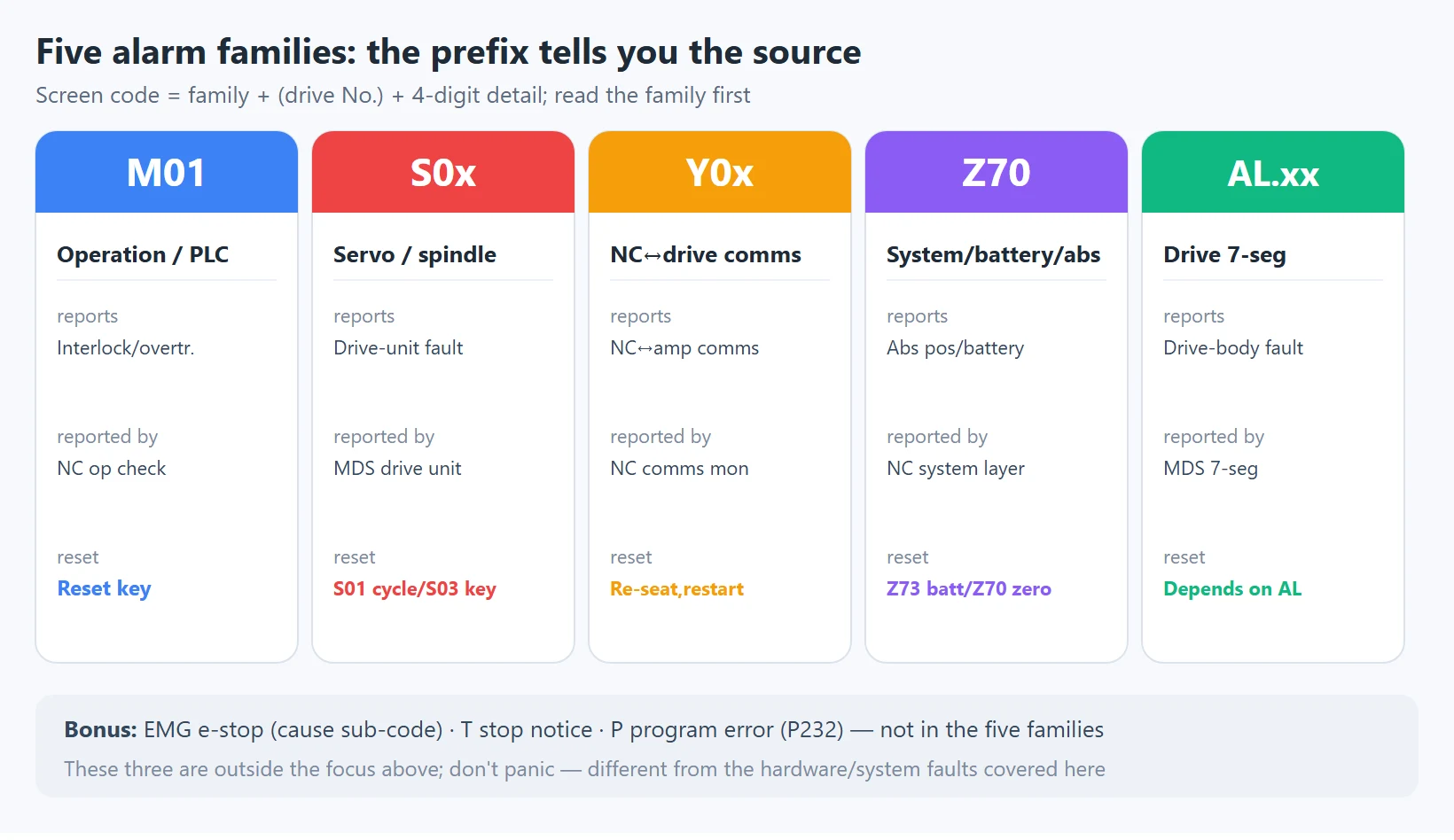
Mitsubishi M80/M70 alarms are not random numbers — they are grouped by *source*. On the screen you will see codes like S01 0032, Z70 0080, M01 0006, Y03 MCP, EMG PLC, and on the drive’s 7-segment display AL 32. Learn to read the prefix and you know which layer to investigate before you even open the cabinet.
Mitsubishi M80/M70 — five alarm families and who owns them
| Family | Screen prefix | What it reports | Reported by | Typical reset |
|---|---|---|---|---|
| Operation / PLC interlock | M01 000x | Condition not met, PLC interlock, overtravel | NC-side operation / PLC check | Reset key (clear cause first) |
| Servo / spindle drive | S01 S02 S03 S04 | Fault detected by the servo/spindle drive | The MDS drive unit | S01 power cycle; S03 reset key |
| NC↔drive comms | Y02 Y03 | Comms between NC and servo amplifier | NC comms monitor | Re-seat cable, then restart |
| System / battery / abs. pos. | Z70 Z71 Z73 | Absolute position, backup battery, system data | NC system layer | Z73 battery; Z70 needs zero return |
| Drive 7-seg display | AL.xx | Drive-body fault (on MDS amplifier) | MDS drive unit | Depends on AL code; usually power cycle |
| (bonus) E-stop | EMG xxx | E-stop chain open, with cause sub-code | PLC e-stop logic | Clear the e-stop cause |
Note: there is also a
Tfamily (stop notices) and aPfamily (program errors, e.g. P232 no program number). They are outside the five families above. Don’t panic when you see them — T is informational, P is a program syntax/call issue, not the hardware/system faults covered here.
2. The Detail Number Is the Real Fault: S01 0032 ≠ S03 0050
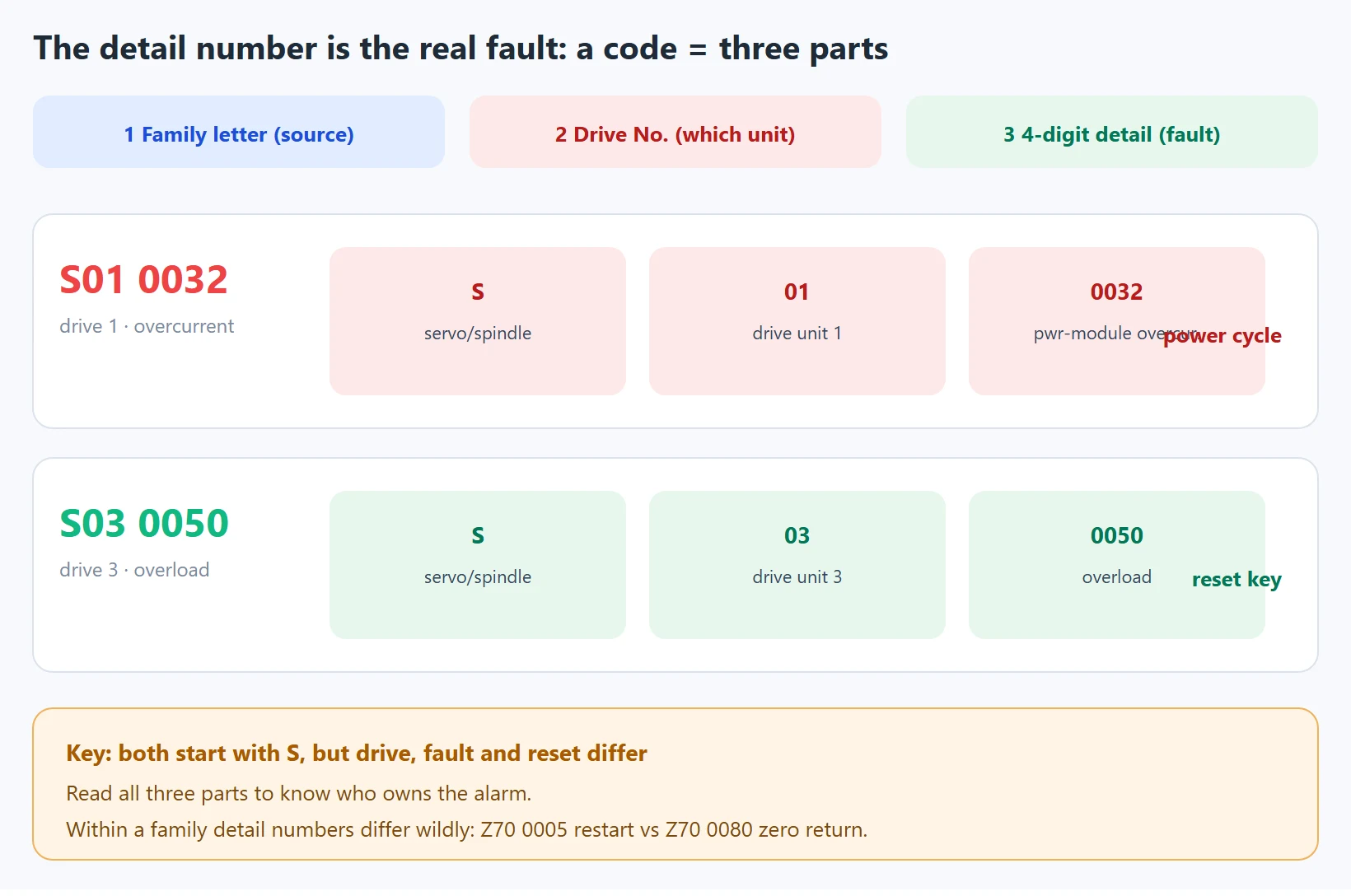
A complete servo/system alarm has three parts, all required:
- Family letter (M / S / Y / Z / AL) — tells you which layer the fault comes from;
- Drive-unit number (the 01 / 02 / 03 after S) — tells you which drive unit failed (servo and spindle share the S family, distinguished by this number);
- 4-digit detail number (0032 / 0050 / 0052…) — tells you the exact fault.
Two mistakes technicians make most often:
- Mistake A: “It’s an S alarm.” Wrong. S01 and S03 reset differently (see section 3).
- Mistake B: “It’s 0032.” Wrong. The meaning of detail 0032 is consistent only within the S family; on another family it means something else entirely.
The title of this article is the counterexample:
S01 0032= drive unit 1 · power-module overcurrent · needs a power cycle, and do not keep resetting (you can destroy a marginal power module);S03 0050= drive unit 3 · overload · clears with the reset key once the cause is gone.
Both start with S, yet the drive, the fault, and the reset method are all different — so “who owns this alarm” must be read from all three parts.
One level deeper: within the *same* family, different detail numbers mean completely different fixes. Take Z70 (next section):
Z70 0005= absolute-position parameters restored — just power-cycle;Z70 0080= absolute-position data lost — zero-point initialization is mandatory before the axis will run.
Reading only “Z70” leads to a serious misjudgment. The 4-digit detail number is the real fault ID.
How the detail number is segmented: in most Mitsubishi alarms the first two digits are the class and the last two are the sub-code (e.g. Z70’s 0005 / 0080 / 0101 / 0106), but the exact segmentation and meaning vary by control generation and drive series (MDS-A through MDS-E). Always confirm against your machine’s Alarm/Parameter Manual. This article gives M80/M70 common patterns, not an all-generation dictionary.
3. Reset Levels: S01 Needs Power Off, S03 Needs Reset, M01 You Handle
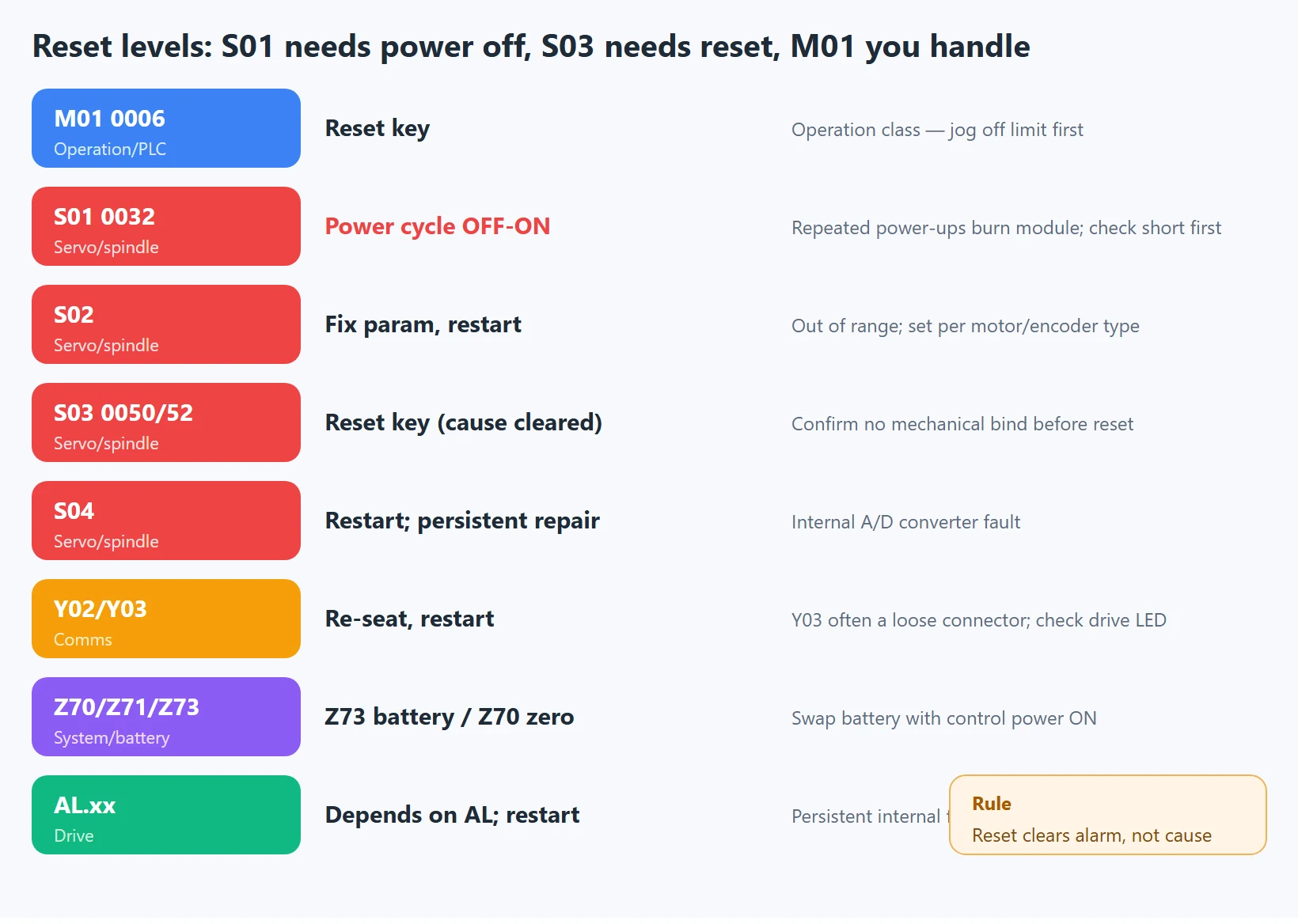
Mitsubishi M80 alarm reset-level quick reference
| Family / typical code | Reset method | Notes & cautions |
|---|---|---|
M01 0006 hard overtravel etc. | 【Reset】 key | Operation class — jog off the limit / clear interlock first |
S01 0032 overcurrent etc. | Control-power OFF→ON cycle | Repeated power-ups burn a marginal module; check short/ground first |
S02 initial parameter error | Fix parameter, then power cycle | Parameter out of range; set per motor/encoder type |
S03 0050/0052 overload / error | 【Reset】 key (after cause cleared) | Confirm no mechanical binding, normal load |
S04 A/D converter fault | Power cycle; persistent → repair/replace drive | Internal drive fault |
Y02/Y03 comms | Re-seat fibre, confirm drive control power, then restart/reset | Y03 is often a loose connector |
Z70/Z71/Z73 | Z73 clears after battery swap with power ON; Z70 needs zero return | Battery must be swapped with power ON |
AL.xx drive | Depends on AL code; usually power cycle | Persistent internal fault → repair/replace drive |
Rule of thumb: reset only clears the alarm, it does not fix the cause. Repeated S01 0032 resets gamble with the power module; repeated S03 0052 resets hide a mechanical bind. Find the cause, then reset. If your alarm is a parameter-out-of-range type (S02), go back to the Mitsubishi servo parameter guide and re-check the initial values.
4. The Five Highest-Frequency Codes, Decoded
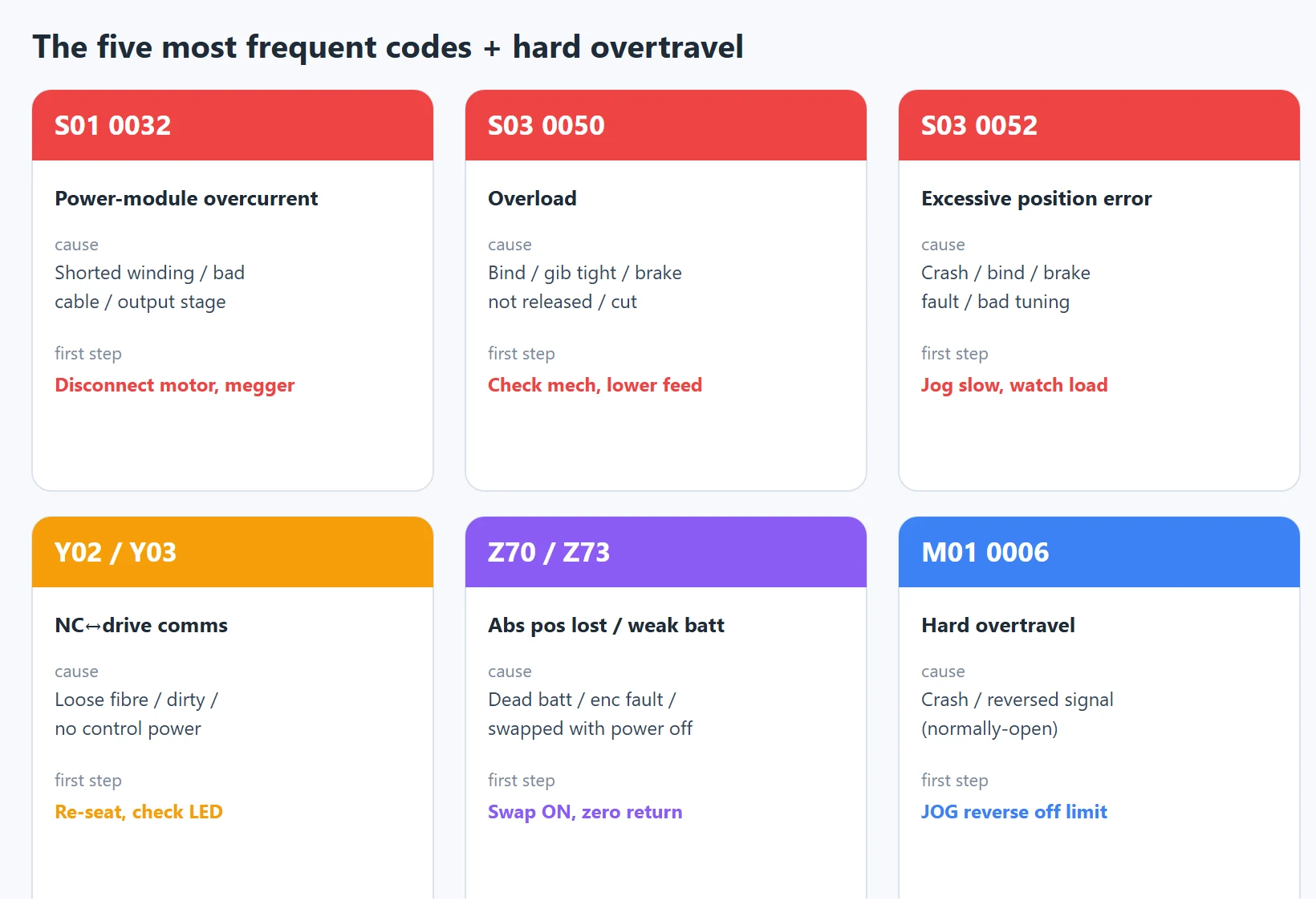
Mitsubishi M80 — five most frequent alarms decoded
| Code | Meaning | Common cause | First step |
|---|---|---|---|
S01 0032 | Power-module overcurrent | Shorted motor winding, damaged power cable, failed drive output stage | Disconnect motor, megger it; do not keep powering up |
S03 0050 | Overload (sustained over rating) | Mechanical bind, gib too tight, chips packed, vertical-axis brake not released, aggressive cut | Check mechanical/lube/brake, lower feed |
S03 0052 | Excessive position error | Crash, mechanical bind, brake fault, bad tuning | Jog slowly, watch load; confirm no bind |
Y02/Y03 | NC↔drive comms (Y03 = drive not detected) | Loose fibre, dirty connector, drive control power off, wrong axis No. | Re-seat fibre, check drive LEDs, verify power-up order |
Z70/Z73 | Abs. position lost / battery weak | Backup battery dead, encoder fault, battery swapped with power off | Swap battery with power ON; Z70 needs zero return |
For
S01 0032,Z70andY02/Y03, the full step-by-step fix and the AL-code cross-reference are in our companion article Mitsubishi M80 Common Alarms & AL Drive-Code Mapping. The two complement each other: this page teaches *how to read any code*, that page teaches *how to fix a specific one*.
5. Z70 / Z71 / Z73 and Absolute-Position Loss: Swap the Battery With Power ON
Z70/Z71/Z73 almost always trace back to the absolute encoder’s backup battery. The escalation — and the fix order — is:
Z73battery-voltage-drop warning: position data still intact, machine still runs. This is your cheap window to act.Z71absolute-position detector alarm: battery dropped too far, position data no longer trusted.Z70absolute-position data lost / illegal: the control no longer trusts stored position; it will not run production until zero is re-established.
Z70 common sub-detail numbers and handling
| Sub-code | Meaning | Zero return needed? |
|---|---|---|
Z70 0005 | Absolute-position parameters restored | No — power cycle |
Z70 0080 | Absolute-position data lost | Yes — re-establish zero point |
Z70 0101 | Abs. position error (servo alarm 25) | Yes |
Z70 0106 | Abs. position error (servo alarm E3) | Yes |
🚨 The battery rule (the easiest trap online): replace the absolute-encoder battery with control power ON. Position data is held by the battery; pulling it with power off = throwing the position data away on purpose. If Z70 appears after the swap, you must re-establish the zero point (absolute-position setup) before the machine can reference and cut. Swap on the manual’s scheduled interval, not when the warning shows up. If error 1037 (parameter corruption) already appeared, restore parameters from backup and replace the battery immediately.
A rotary axis (tilt/rotary table) Z70 cannot be cleared by “entering parameter data” alone — zero-point initialization is required. The manual states this exception explicitly; do not apply the linear-axis playbook.
6. M01 0006 Hard Overtravel: How to Reset After Jogging Off the Limit
M01 0006 = hardware stroke end (H/W stroke end): the stroke-end function is active (input signal OFF) and an axis is in the stroke-end state. Do not confuse it with M01 0007 (software stroke limit, S/W stroke end).
Reset steps:
- Switch to manual (JOG) mode;
- Move the axis slowly in the reverse direction off the hardware limit switch;
- Confirm the stroke-end signal line has no broken wire and the limit switch is not faulty;
- Press the 【Reset】 key to clear the alarm.
Field special case: sometimes no axis has moved yet 0006 appears. The usual cause is the limit-switch signal wired as normally-open (the system expects normally-closed), or the signal-address parameters (e.g.
#2073/#2074/#2075/#1226) set incorrectly. That is a wiring/parameter issue, not a real crash — do not force the axis.
7. MDS Drive AL Codes vs the NC-Side Alarm
S01 on the NC screen is usually just “a drive-side AL code is active” — the real fault code is on the MDS amplifier’s 7-segment display as AL.xx. So when you see S01, read the AL code on the drive before you act.
MDS drive AL codes vs NC-side alarm
| AL code | Meaning | Typical NC-side symptom |
|---|---|---|
AL 10 | Undervoltage (DC bus) | S alarm / will not run |
AL 20 | No feedback signal (encoder) | S alarm, position error |
AL 24 | Ground fault | S01-class overcurrent/ground |
AL 25 | Absolute position lost | Z70 (servo alarm 25) |
AL 32 | Power-module overcurrent | S01 0032 |
AL 33 | Overvoltage | S alarm |
AL 46 | Motor overheat | S03 overload class |
AL 50 | Overload (sustained) | S03 0050 |
AL 52 | Excessive position error | S03 0052 |
AL 34/36 | NC↔drive comms error | Y family |
Note: AL codes and the NC S detail numbers are not 1:1 identical (AL 32 = overcurrent, shown on the NC as an S01 0032-type code). The exact cross-reference is in the manual’s alarm list. For the per-code fix after reading the AL code, see the companion article. Cross-brand: Fanuc’s equivalent servo-readiness discipline is Fanuc alarm 401 / servo gain tuning.
8. Generation Differences: MELDAS 64/65/66 and M7/M8 Are Not Interchangeable
Mitsubishi CNC spans many generations, and while the family grouping is consistent, the detail-number meanings and sub-codes drift between them:
- Legacy MELDAS (M60/M70 era, MDS-A/B/C) and M70/M80 (MDS-D/E/EH) do not share all AL codes or S detail numbers;
- Spindle-drive and absolute-position detector alarm details change with the drive series (MDS-A through MDS-E and beyond);
- The same code in different OEM (machine-builder) PLC / user alarms (the 700000 range) is machine-builder-defined; Mitsubishi does not supply the text.
📌 So this article is an M80/M70 common-pattern quick reference, not an all-generation dictionary. When you see an unfamiliar code on power-up, the first move is to open your machine’s *M800/M80/E80 Series Alarm/Parameter Manual* or the machine-builder alarm manual and confirm, then act. Codes vary by generation and drive series — the on-site manual is the final authority.
Last updated: 2026-10-23
FAQ
What does Mitsubishi S01 0032 mean?
S01 0032 is a Mitsubishi M80/M70 servo-drive alarm: S = servo/spindle drive family, 01 = drive unit 1, 0032 = detail “power-module overcurrent” (excessive supply-unit current). Common causes are a shorted motor winding, a damaged power cable, or a failed drive output stage. Step one is to disconnect the motor and megger it / check for ground fault — do not keep powering up to reset; repeated power cycles can destroy an already-marginal power module. Clearing normally requires a control-power OFF→ON cycle.
How do I fix Mitsubishi Z70, and must the battery be swapped with power on?
Z70 means absolute-position data lost/illegal, and it almost always traces to the absolute encoder’s backup battery. Two steps: first, replace the battery with control power ON — swapping with power off throws the position data away and triggers Z70; second, if Z70 persists after the swap (sub-codes 0080 / 0101 / 0106), you must re-establish the zero point (absolute-position setup) before the machine can reference and cut. Sub-code 0005 only needs a power cycle. Z73 is just a battery-weak warning with position still intact — your cheap window; Z71 is a detector alarm needing battery swap and cable check.
How do S01 and S03 alarms reset differently?
Different reset levels: S01-class (e.g. 0032 overcurrent) needs a control-power OFF→ON cycle because it is usually a drive-side hardware fault; S03-class (e.g. 0050 overload, 0052 position error) clears with the 【Reset】 key once the cause is gone, being mostly overload/comms/safety types. But remember reset only clears the alarm, not the cause — repeated S01 0032 resets gamble with the power module, and repeated S03 0052 resets hide a mechanical bind. Find the cause first, then reset.






















暂无评论内容