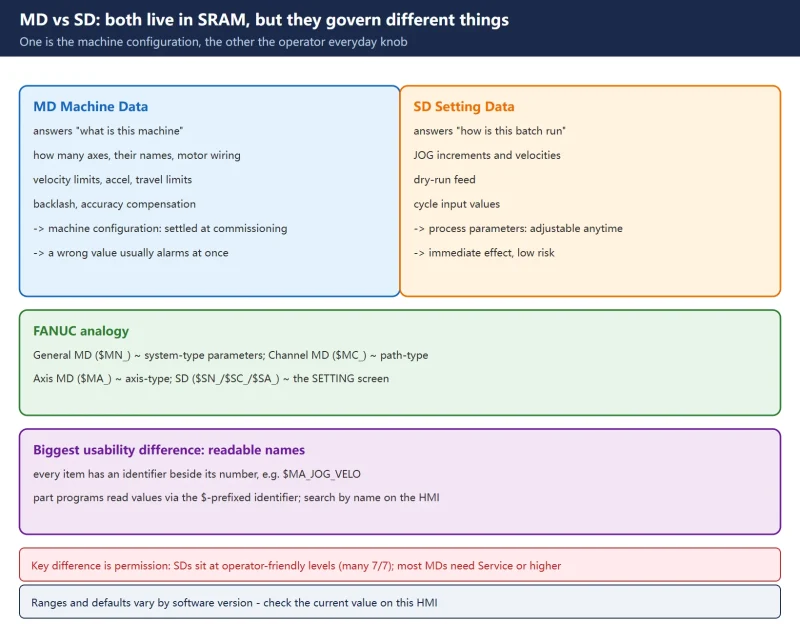



1. First: both live in SRAM, but they govern different things
The question newcomers ask most is “SD and MD are both just data, aren’t they?”. One-line answer:
- MD (machine data): defines what this machine is — how many axes, their names, how the motors are wired, speed limits, accuracy compensation. It is the machine’s configuration: settled at commissioning and not something to casually touch.
- SD (setting data): defines how this batch is run — JOG increments and speeds, dry-run feed, certain cycle input values. These are the operator’s everyday knobs: adjustable at any time, low risk.
Coming from FANUC, the analogy is:
| SINUMERIK | FANUC equivalent | Who changes it |
|---|---|---|
| General MD ($MN_) | system-type parameters | commissioning / service |
| Channel MD ($MC_) | path-type parameters | commissioning / service |
| Axis MD ($MA_) | axis-type parameters | commissioning / service |
| SD ($SN_ / $SC_ / $SA_) | SETTING screen / some retained parameters | operator |
The biggest usability difference: every SINUMERIK item has, besides its number, a readable identifier (e.g. MD10240 $MN_SCALING_SYSTEM_IS_METRIC). Part programs read values through that $-prefixed identifier, and on the HMI you can search by name instead of memorising numbers.
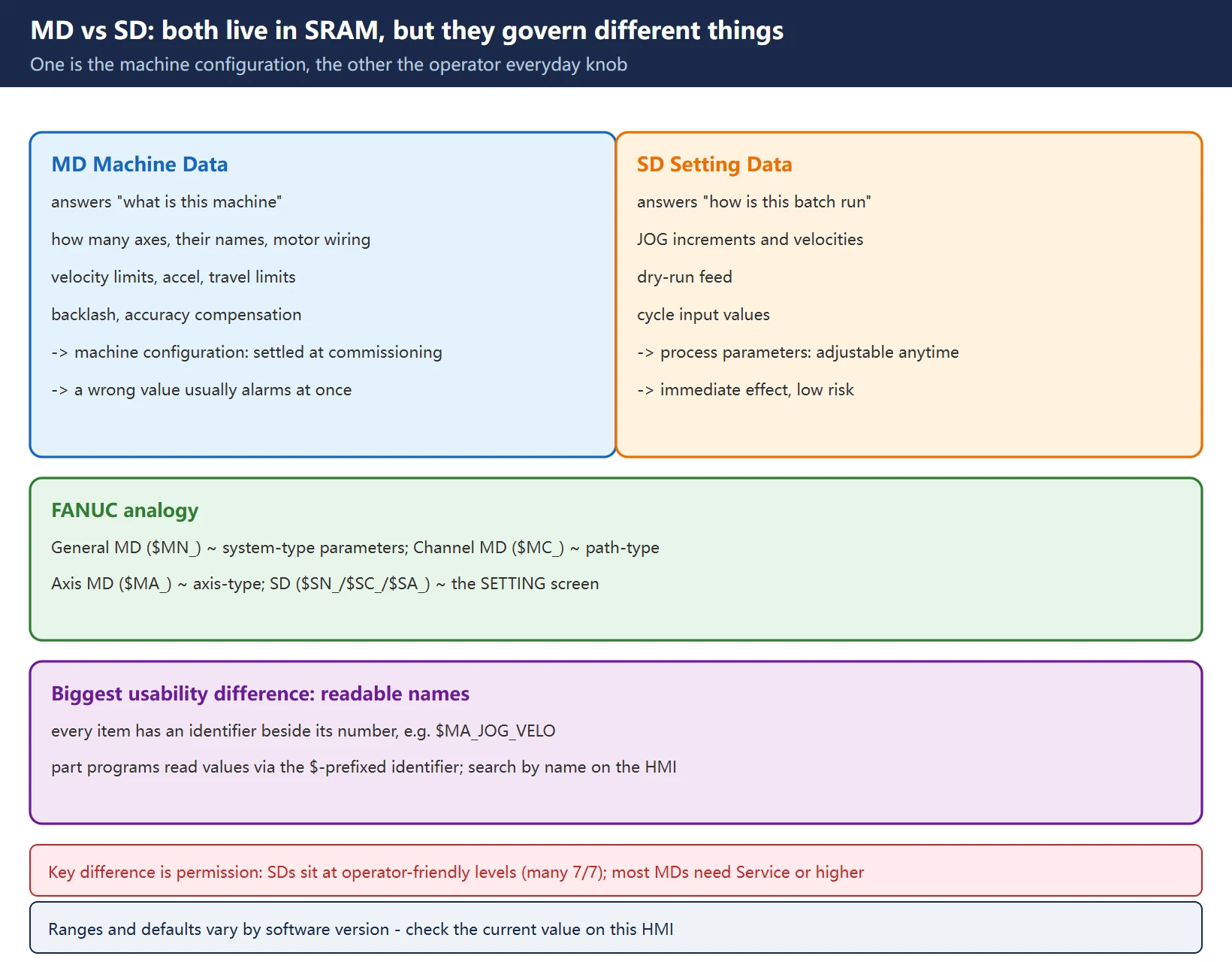
Note: the number ranges below follow the data-area overview in the official SINUMERIK function manual. The number, default value and permissible range of any individual MD/SD vary by software version — check the current value on this machine’s HMI and the supplied documentation before changing anything.
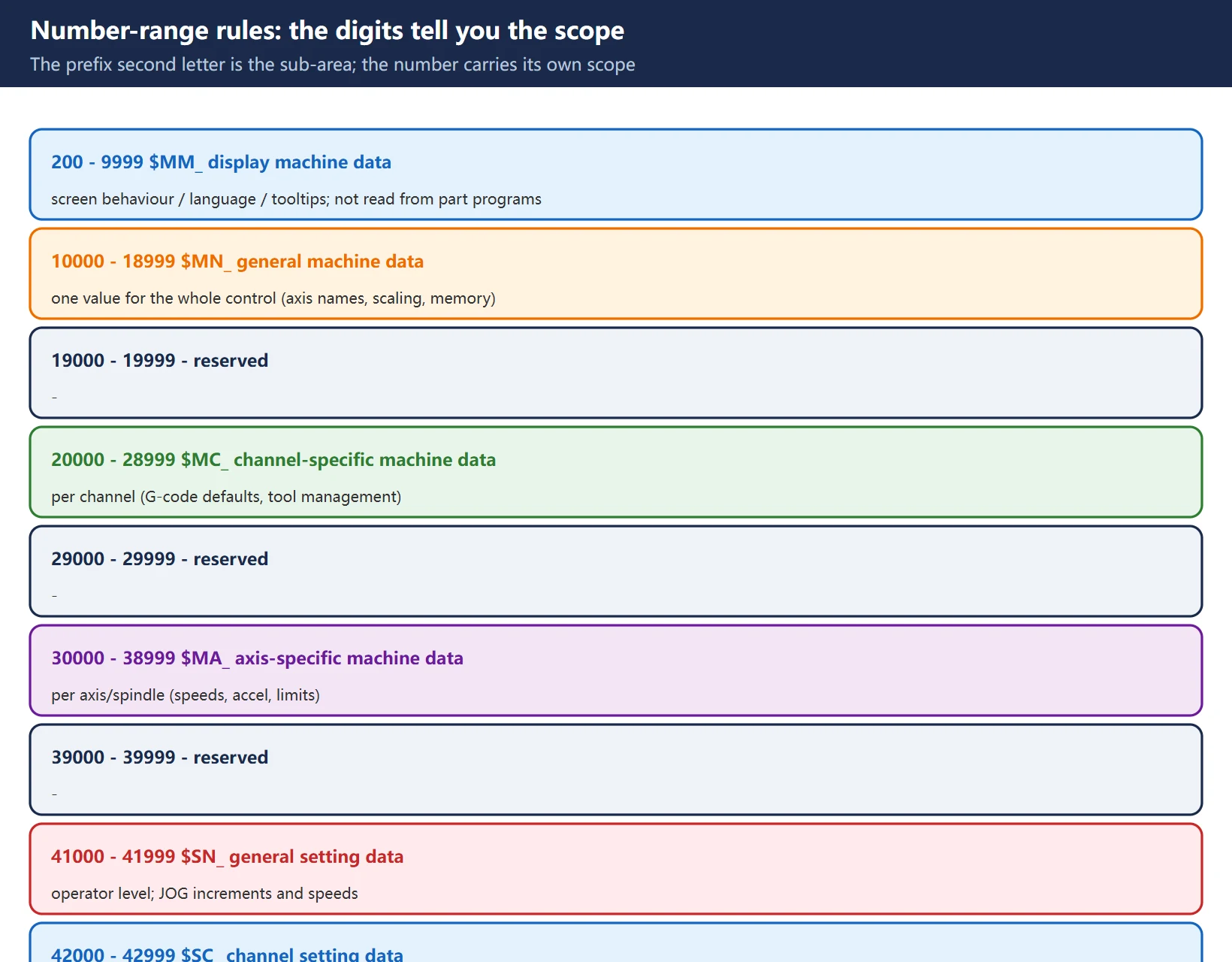
2. Number-range rules: the digits tell you the scope
SINUMERIK data numbers carry their own scope information — that is what makes them easier to work with than bare numbers. The second letter of the prefix is the sub-area:
| Range | Prefix | Meaning | Note |
|---|---|---|---|
| 200 – 9999 | $MM_ | display machine data | screen behaviour, language, tooltips; not read from part programs |
| 10000 – 18999 | $MN_ | general machine data | one value for the whole control (axis names, scaling, memory) |
| 19000 – 19999 | — | reserved | — |
| 20000 – 28999 | $MC_ | channel-specific machine data | per machining channel (G-code defaults, tool management, R-parameter count) |
| 29000 – 29999 | — | reserved | — |
| 30000 – 38999 | $MA_ | axis-specific machine data | one value per axis/spindle (speeds, accel, limits, backlash) |
| 39000 – 39999 | — | reserved | — |
| 41000 – 41999 | $SN_ | general setting data | operator level; JOG increments and speeds |
| 42000 – 42999 | $SC_ | channel setting data | operator level; per-channel behaviour |
| 43000 – 43999 | $SA_ | axis setting data | operator level; e.g. G25/G26 spindle speed limits |
How to read a prefix:
| Symbol | Meaning |
|---|---|
$ | system variable |
| 1st letter | M = machine data (MD); S = setting data (SD) |
| 2nd letter | M = display / operator panel; N = general; C = channel; A = axis/spindle |
Examples: $MA_JOG_VELO reads as “axis machine data — JOG velocity”; $SA_SPIND_S reads as “axis/spindle setting data — spindle speed”.
3. MD: the physical and functional configuration of the machine itself
MD answers “what does this machine look like and what can it do”.
| MD | Name | Meaning |
|---|---|---|
| 10000 | AXCONF_NAME_TAB | names of all physical machine axes (e.g. X1) |
| 10240 | SCALING_SYSTEM_IS_METRIC | measuring system is metric |
| 20000 | CHAN_NAME | channel name, e.g. CHAN1 |
| 20050[ n ] | AXCONF_GEOAX_ASSIGN_TAB | geometry axis numbers used by that channel |
| 20070[ n ] | AXCONF_MACHAX_USED | machine axis numbers present in that channel |
| 20080[ n ] | AXCONF_CHANAX_NAME_TAB | axis names used for programming in that channel |
| 30100 | CTRLOUT_SEGMENT_NR | setpoint output segment (=0 local bus segment, analog output) |
| 30110 | CTRLOUT_MODULE_NR | setpoint output module number |
| 30130 | CTRLOUT_TYPE | setpoint output type (1 = analog, 0 = digital) |
| 30240 | ENC_TYPE | feedback type (1 incremental / 4 absolute / 0 none) |
| 32000 | MAX_AX_VELO | maximum axis velocity in manual mode |
| 32020 | JOG_VELO | JOG velocity |
| 35035 | SPIND_FUNCTION_MASK | spindle function mask (bit 5 / bit 4, see section 4) |
| 36100 / 36110 | POS_LIMIT_MINUS / PLUS | 1st software limit switch minus / plus |
Key point: MD determines the hardware relationship, so a wrong value usually shows up immediately as an alarm (e.g. the 300007 simulated-axis alarm), an axis that will not move, reversed direction, or scrambled limits.
4. SD: the operator’s day-to-day adjustable running parameters
SD answers “what parameters is this batch running on” — process parameters rather than the machine definition.
| SD | Name | Meaning |
|---|---|---|
| 41200 | $SN_JOG_SPIND_SET_VELO | spindle set velocity in JOG mode |
| 43200 | $SA_SPIND_S | speed for starting the spindle via the PLC interface (VDI) |
| 41xxx range | $SN_ | general setting data (JOG increments, etc.) |
| 42xxx range | $SC_ | channel-specific setting data |
| 43xxx range | $SA_ | axis-specific setting data |
Why SD is a class of its own: it exists because of permissions. Many SDs sit at access level 7/7 (anyone may read and write), so the operator can change them without a Service password — that is precisely the key difference from MD.
A typical example (828D spindle speed in manual mode):
- Spindle MD35035 bit 5 is selected by default -> then the value of SD43200 is used as the setpoint speed in JOG mode, and its default value is 10 rpm.
- To run faster in manual, just change SD43200.
- The HMI machining screen has another manual-speed input box, which corresponds to MD41200: for that to take effect, SD43200 must be 0, and the speed is limited by MD32020.
- In general this input box is not recommended — changing SD43200 directly is more reliable.
- Also note SD43200 is lost on power-down or restart (it returns to its default); some documentation states that setting MD10709[0] to 0 stops it being cleared on restart — this behaviour varies by control model and version, so verify it on your own machine before relying on it.
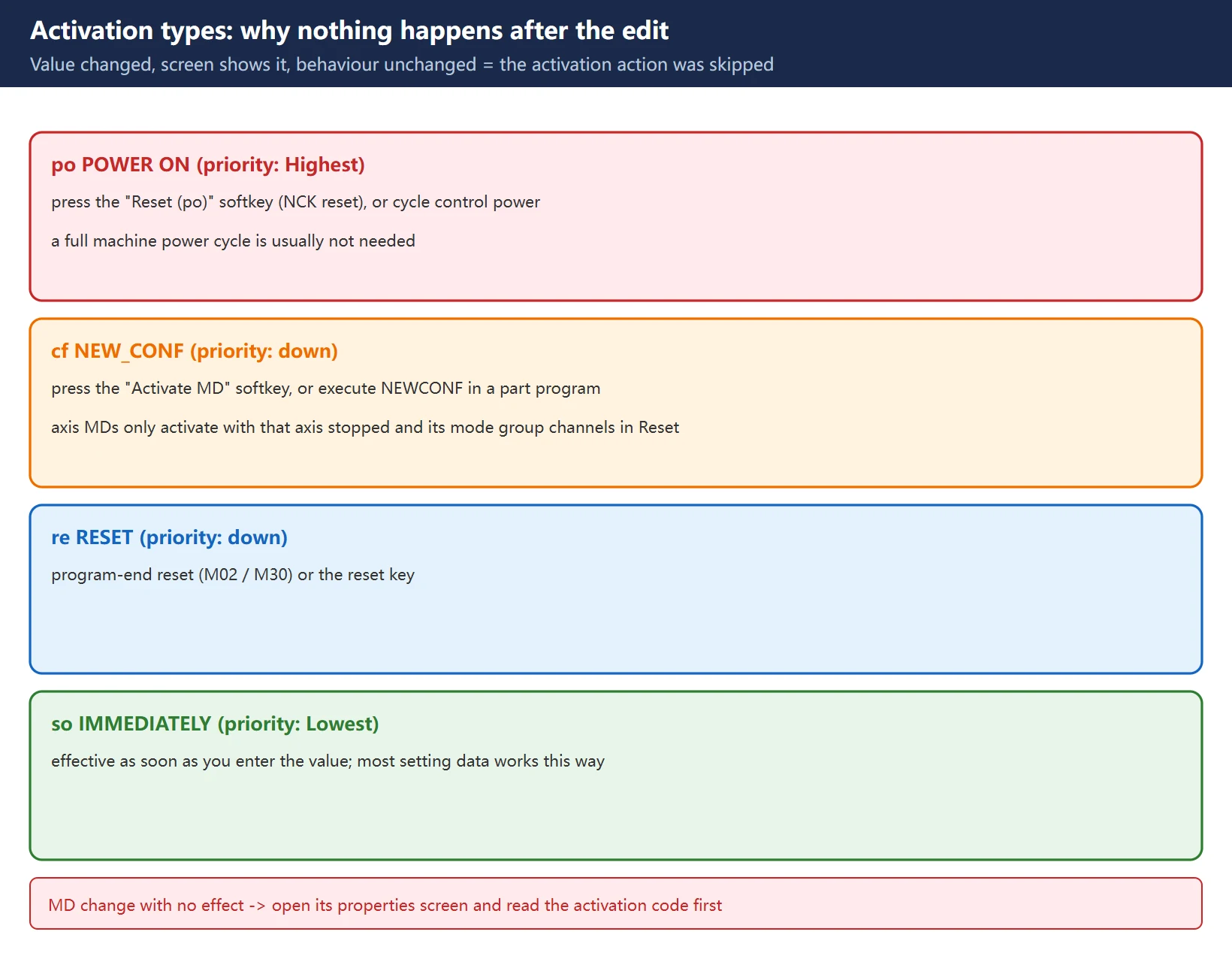
5. Activation types: why nothing happens after the edit
This is the classic trap for people arriving from FANUC: you change the value, the screen shows the new value, yet the machine behaves as before — because the activation action the data requires has not been carried out.
| Code | Name | What it takes | Priority |
|---|---|---|---|
| po | POWER ON | press the “Reset (po)” softkey (NCK reset), or cycle control power. A full machine power cycle is usually not required — the softkey restarts the NC | Highest |
| cf | NEW_CONF | press the “Activate MD” softkey, or execute NEWCONF in a part program. Axis-specific MDs only activate once the affected axis/spindle is stopped and the channels of its mode group are in Reset | down |
| re | RESET | program-end reset (M02 / M30) or the reset key | down |
| so | IMMEDIATELY | effective as soon as you enter the value. Most setting data works this way | Lowest |
Rough FANUC mapping: POWER ON ≈ parameters that demand a power cycle; IMMEDIATELY ≈ setting-type parameters that just take effect; NEW_CONF has no direct FANUC equivalent — it is an explicit “I’ve finished this batch of edits, apply them now” step.
Practical tip: if an MD change has no effect, go back to that item’s properties screen and read its activation code before deciding whether to do a po reset, a cf activation, or wait for a program-end reset. That is the first thing to do when debugging on the 828D.
6. Access levels: who may change these values
FANUC has one PWE switch; SINUMERIK uses tiered access. Each MD carries a read/write level pair, e.g. 7/2 = anyone may read, Service password or better to write. Lower number = more privileged.
| Level | Who | Unlocked by |
|---|---|---|
| 0 | Siemens (system) | System password |
| 1 | Manufacturer (OEM) | Manufacturer password |
| 2 | Service | Service password |
| 3 | User | User password (the level most shops run maintenance at) |
| 4 – 7 | Operator | keyswitch positions 3 down to 0 |
This also explains the point made above: SD is deliberately placed at operator-friendly levels precisely because it is meant for day-to-day operator adjustment.
7. How to look things up, change them and back them up
Paths:
| What you want | How to get there |
|---|---|
| view / change machine data | the “Machine data” operating area; locate by number range (general 10000+, channel 20000+, axis 30000+) or search the identifier directly |
| view / change setting data | “Parameters” operating area -> setting data / data lists; press the “select data list” softkey and pick a list containing setting data under “view” |
| find a specific item | use search in the relevant data screen and look for the identifier (e.g. MAX_AX_VELO) |
Safety prerequisites:
- Before changing axis-related MD, stop the drive, inhibit the controller enable, and confirm the machine is mechanically safe.
- After the change, carry out the action matching the activation code: po -> NCK reset / power cycle; cf -> Activate MD or
NEWCONF; re -> program end or the reset key.
Backup conventions:
- MD and SD both live in SRAM; an SRAM backup (one-click full backup or the BOOT-screen SRAM BACKUP) covers them, and on restore both return to their state on the backup date.
- Before a one-click backup, confirm 0020 / 0313#0 / 0138#0 and record the original values; it is two-staged — when the text data finishes you get the power-off prompt, and after one restart the SRAM data + user files are written out automatically during power-up.
- Per-item data goes through its own screen’s PUNCH -> EXEC, and each press outputs only the current page — page through and wait for the prompt to settle.
Restore risk: a restore replaces the whole SRAM, so offsets, programs and PMC counters entered since the backup are lost; on absolute-encoder machines, if parameters were restored, 1815#4 (APZ) must be set to 0 and the reference position re-established on every axis, otherwise the machine zero shifts and the stroke limits work wrongly.
![图片[4]-Setting Data (SD) vs Machine Data (MD) on SINUMERIK 828D: Number Ranges, Activation Types and Access Levels-CNCShare | 数控电气技术中心](https://www.cncshare.com/wp-content/uploads/2026/10/SM-en-04.webp)
8. Troubleshooting checklist
- Decide first whether this is an MD or an SD problem: machine-configuration symptoms (axis will not move, reversed direction, wrong limits, alarms) -> check MD; running-parameter symptoms (JOG speed, override, cycle input values) -> check SD.
- No reaction after the change: go back to that item’s properties screen and read its activation code, then perform the matching action.
- Activation code is po: press the “Reset (po)” softkey for an NCK reset; a full machine power cycle is usually unnecessary.
- Activation code is cf: confirm the axis is stopped and the channels of its mode group are in Reset, then press “Activate MD” or execute
NEWCONF.
4b. Changed several axis MDs and want them applied together: finish each batch before pressing cf once — don’t change-and-activate one at a time.
- Can’t edit / greyed out: check the item’s access level — the current login level is too low (most MDs need Service).
- Wrong spindle speed in manual (always 10 rpm): check SD43200 and confirm the state of MD35035 bit 5.
- Back up before touching parameters: both the one-click full backup and the BOOT-screen SRAM BACKUP.
- After a restore: verify that offsets, programs and PMC counters are as expected; on absolute-encoder machines handle 1815#4 as described above.
- Unsure what a number does: search the identifier on the HMI first, look at the current value and unit, then decide — don’t guess from the number.
FAQ
What is actually the difference between MD and SD on the 828D?
MD (machine data) defines the machine itself — how many axes, their names, how the motors are wired, speed limits, accuracy compensation. It is the machine’s configuration: settled at commissioning and not something to casually touch. SD (setting data) holds the operator’s day-to-day adjustable running parameters — JOG increments and speeds, cycle input values and the like — which take effect immediately and carry low risk. Both live in SRAM and both are covered by an SRAM backup. The practical difference is permission: SDs sit at operator-friendly access levels (many are 7/7) and need no Service password, whereas most MDs require Service or higher to write.
I changed a machine data value and nothing happened — why?
Check that item’s activation type first. po (POWER ON) needs the “Reset (po)” softkey (NCK reset) or a control power cycle — usually not a full machine power cycle. cf (NEW_CONF) needs the “Activate MD” softkey or NEWCONF, and axis-specific MDs only activate once the affected axis/spindle is stopped and the channels of its mode group are in Reset. re (RESET) needs a program end (M02/M30) or the reset key. so (IMMEDIATELY) is effective on entry, which is how most setting data behaves. Opening the item’s properties screen and reading the activation code is the first move when a change appears to do nothing.
The manual spindle speed is stuck at 10 rpm and MD32020 does nothing — why?
Because on the 828D the spindle’s MD35035 bit 5 is selected by default: the value of SD43200 is then used as the JOG setpoint speed, and its default is 10 rpm. To run faster in manual, change SD43200. The separate manual-speed input box on the HMI machining screen maps to MD41200; for that to take effect SD43200 must be 0, and the speed is limited by MD32020. That input box is generally not recommended — editing SD43200 directly is more reliable. Also note SD43200 is lost on power-down or restart, so verify the behaviour on your own machine before depending on it.
Last updated: 2026-10-28
Where to go next
- FANUC Troubleshooting — the full guide library: alarms, diagnosis numbers, servo, spindle, PMC and electrical faults, organised by symptom.
- CNC Repair Tools — which instrument measures what: multimeters, clamp meters, insulation testers and oscilloscopes, with the specification that actually matters.
- Remote Technical Support — have the readings reviewed with you: alarm reverse lookup, PMC ladder analysis and servo tuning advice by call. Repair companies and integrators welcome.
Read the guide, get the right instrument, or walk the diagnosis through with someone — pick whichever you need.
The original Chinese version — same procedure, with the full field notes.























暂无评论内容