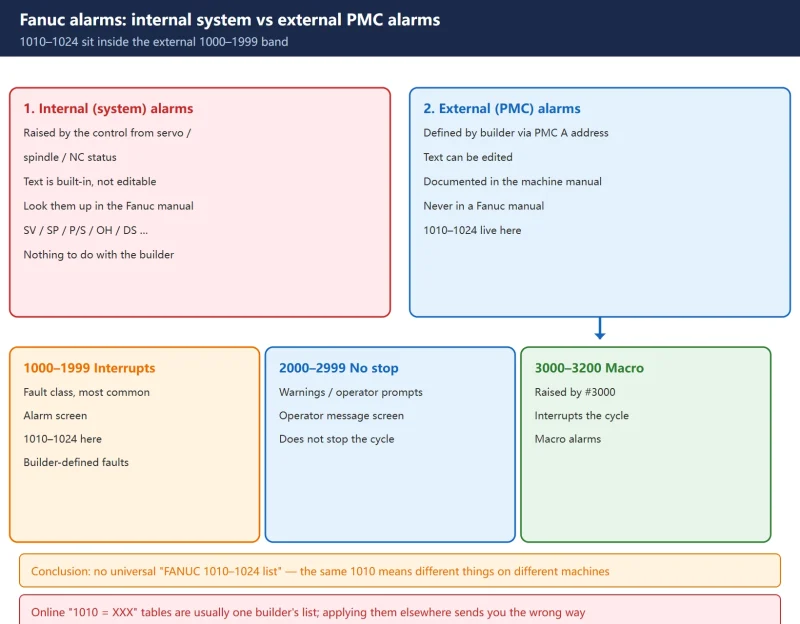



1. First, correct the assumption: 1010–1024 are not Fanuc alarm numbers
The usual field reaction to “1010” on the screen is to open the Fanuc maintenance manual. It will not be there — and the reason is simple: alarms 1010–1024 are not defined by Fanuc. They are defined by the machine tool builder.
Fanuc alarms fall into two families:
- Internal (system) alarms — generated by the control from the objects it drives (servo amplifiers, serial spindle amplifiers, the NC itself). The alarm text is built into the system and cannot be modified. These are the ones you can look up in the Fanuc maintenance manual (SV, SP, P/S, OH, DS …).
- External alarms (also called peripheral alarms / PMC alarms) — generated by the machine tool builder through the I/O unit and the PMC program to report the state of the machine’s own peripheral devices. These are defined by the builder or the end user and can be edited. They are documented in the electrical manual that ships with the machine, never in a Fanuc manual.
External alarms are further split into three bands, and the band determines what the control does:
| Alarm numbers | Control behaviour | Where it is shown | Meaning |
|---|---|---|---|
| 1000–1999 | Interrupts the current operation | Alarm screen | Fault class — the most common family |
| 2000–2999 | Does not interrupt | Operator message screen | Warnings / operator prompts |
| 3000–3200 | Interrupts the current operation | Alarm screen | Macro alarms (produced by #3000) |
1010–1024 fall inside 1000–1999, i.e. builder-defined faults that stop the cycle. So:
🚨 There is no universal “FANUC 1010–1024 alarm list.” A “1010” may mean *tool pot not in position* on one machine, *spindle unclamp switch missing* on another, and *broken tool detected* on a third. Most “Fanuc alarm 1010 = …” tables circulating online are actually one builder’s list — applying them to a different machine sends you down the wrong path.
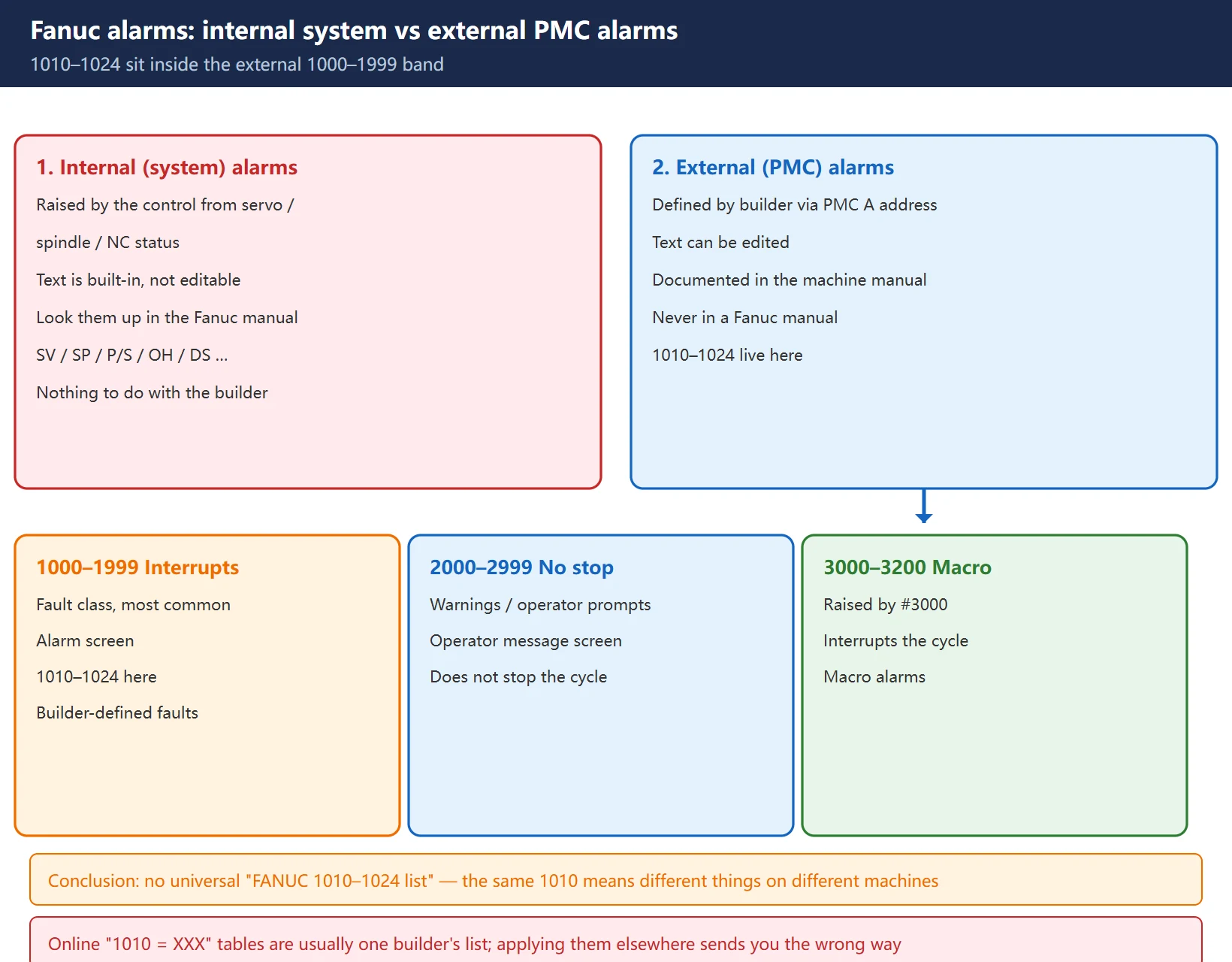
2. Mechanism: how a PMC A address becomes an alarm number
External alarms are triggered through the A address. Fanuc PMC addresses are X, Y, R, K, D, T, C and A; the A address is dedicated as the “message request address”:
- The A address is used bit by bit — each bit corresponds to one entry in the alarm message list;
- When a condition in the PMC program becomes true, it energises the matching A address; the control then looks up the alarm text and alarm number bound to that address and displays the alarm.
The alarm-number-to-A-address mapping is fixed:
alarm number = 1000 + byte number x 8 + bit numberSo A0.0 → alarm 1000, A0.7 → alarm 1007, A1.0 → alarm 1008, and so on. Expanding the 1010–1024 window:
| Alarm | A address | Alarm | A address | Alarm | A address |
|---|---|---|---|---|---|
| 1010 | A1.2 | 1015 | A1.7 | 1020 | A2.4 |
| 1011 | A1.3 | 1016 | A2.0 | 1021 | A2.5 |
| 1012 | A1.4 | 1017 | A2.1 | 1022 | A2.6 |
| 1013 | A1.5 | 1018 | A2.2 | 1023 | A2.7 |
| 1014 | A1.6 | 1019 | A2.3 | 1024 | A3.0 |
The reverse calculation is just as useful: alarm 1018 → 1018 − 1000 = 18 = 2×8 + 2 → A2.2; alarm 1024 → 24 = 3×8 + 0 → A3.0. From the alarm number you can go straight to the coil to look for in the ladder.
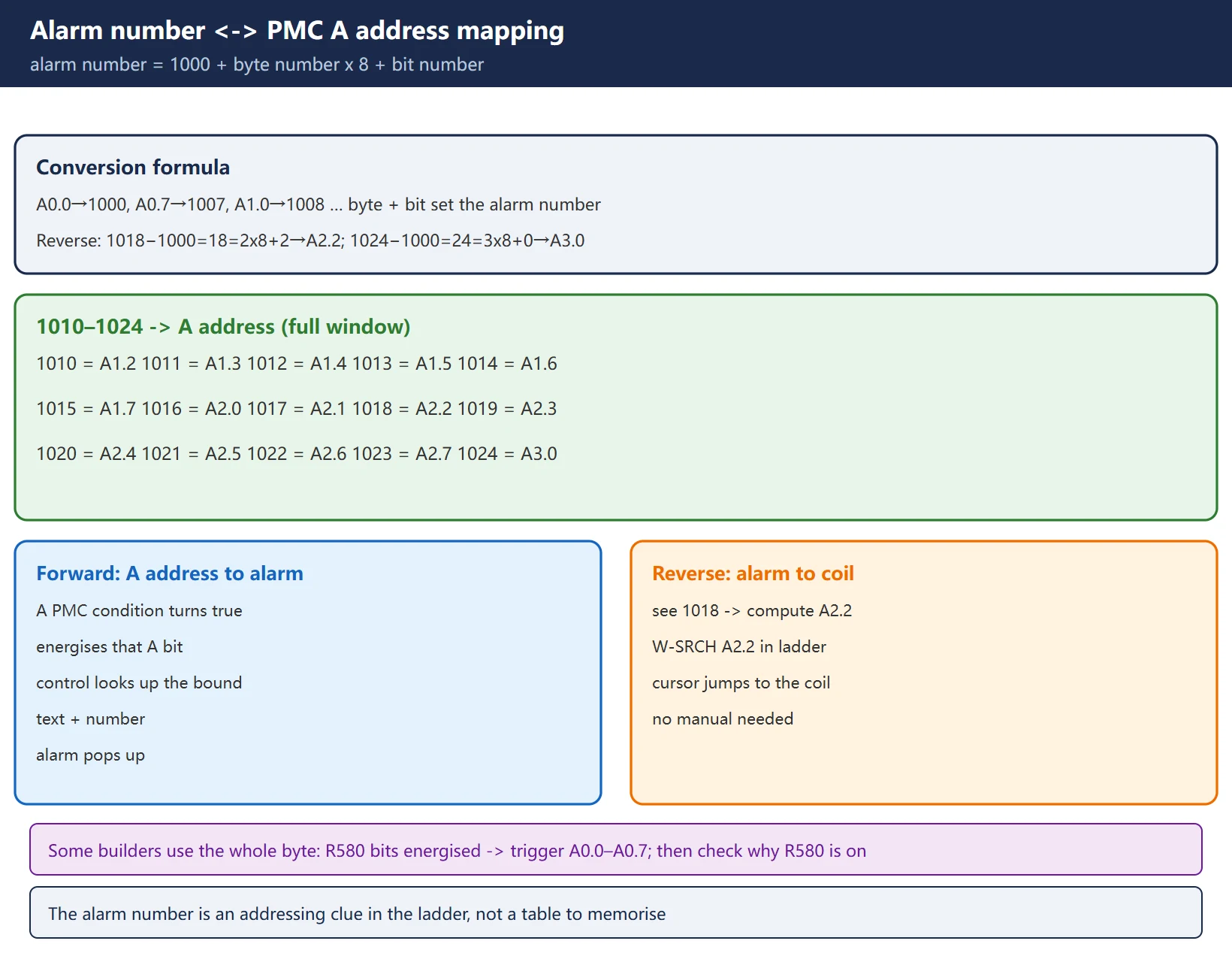
3. Four-step reverse trace: finding the cause without the manual
A missing manual is the normal case. What works is not memorising tables — it is tracing backwards through the A address in the ladder. Four steps:
Step 1 — find which A address is energised
Open the PMC maintenance (PMCMNT) screen and look for A addresses currently at 1. If you already know the alarm number, convert it with the formula above.
Step 2 — read the message screen for the mapping
MDI → SYSTEM → press the ▶ (right) soft key three times → PMC CONFIG → select MESSAGE. You get the full alarm number → A address → symbol/comment mapping. This gives you the alarm text and comments directly, far faster than guessing.
Step 3 — locate that coil in the ladder
On the ladder screen press W-SRCH and enter either the A address (e.g. A2.2) or the alarm number (e.g. #1018); the cursor jumps straight to that coil.
Step 4 — trace the conditions back to an X input
Read the contacts in series in front of the coil and work backwards level by level. You will always end up at an X input signal (proximity switch, pressure switch, contactor auxiliary contact …). Once you reach the X point, take a multimeter to the machine.
🚨 Some builders do not map one bit to one message — they use the whole byte. Look for one A byte and its relationship to an R address. A typical construct is “each bit of R580 energised → triggers the alarm mapped to A0.0–A0.7”. In that case the thing to investigate is why R580.0–R580.7 is energised, not A0.x itself.
4. Real comparison: 1010–1024 on four different machines
The four sources below are real builder / field-compiled tables. Placed side by side, “same number, different meaning” becomes obvious.
| Alarm | Builder A (Sharp VMC electrical manual) | Builder B (umbrella-type magazine, CN) | Builder C (machining centre alarm list) | Builder D (small VMC PMC table) |
|---|---|---|---|---|
| 1010 | ATC ALARM FOR POT DOWN | MAG NOT BACK (umbrella magazine not retracted) | CHECK TOOL UNCLAMP LS | Tool breakage detected |
| 1011 | ATC ALARM FOR ARM 60 | ATC MOTOR OL (magazine motor overload) | CHECK TOOL CLAMP LS | All tools in the group used up |
| 1012 | ATC ALARM FOR TOOL UNCLAMP | COOLANT MOTOR OL | CHECK ARM BRAKE SENSOR | Inside the tool change zone |
| 1013 | ATC ALARM FOR ARM 180 | CHIP CONVEYOR OL | 4TH AXIS CLAMPED | Setting value error |
| 1014 | ATC ALARM FOR TOOL CLAMP | — | CHECK ARM U/C SENSOR (arm not at origin) | APC alarm |
| 1017 | — | SPINDLE NOT ORIENTATION | — | Spindle rotation button fault |
| 1018 | — | ARM NOT IN ORIGIN | — | Contact welding (tool change zone switch) |
| 1020 | ATC STAND-BY FOR POT UP | TOOL NOT INPOSITION (no count signal) | — | Relay fault (MCC control KA16) |
| 1022 | ATC STAND-BY FOR TOOL CLAMP | TOOL POT POSITION ERROR | — | Relay fault (E-stop KA01) |
| 1023 | ATC STAND-BY FOR TOOL UNCLAMP | TOOL MAG DON'T ROTATION | — | Relay fault (run ready KA12) |
| 1024 | ATC STAND-BY FOR ARM 0 (arm at origin) | TOOL MAG RUNNING DON'T STOP | — | Relay fault (front door lock KA15) |
Three conclusions worth memorising:
- One single 1010 — four completely different meanings. The extreme case is Builder D: 1024 = relay fault (front door lock KA15), nothing to do with the tool changer at all. It simply happens to sit inside the 1010–1024 window. So the premise “1010–1024 means tool changer alarms” is itself wrong.
- Non-ATC content is routinely mixed into this band. On Builder B, 1012 and 1013 are coolant and chip conveyor overloads — unrelated to tool changing. Do not fixate on the magazine just because the number starts with 101.
- Another builder’s table cannot be reused. The correct procedure is always: compute the A address from the alarm number, then read *this machine’s* ladder.
Note: Builder A’s manual skips 1017–1019 and jumps straight to 1020, which shows that numbers inside the band need not be contiguous — gaps are normal.
5. Semantic families: what usually lives in 1010–1024
Definitions differ per builder, but when ATC alarms are placed in the 1010–1024 window they almost always fall into these families. Identify which family the alarm text belongs to and the search direction stays correct.
| Family | Typical alarm text keywords | What to check |
|---|---|---|
| Pot up / down | POT UP / POT DOWN / MAG NOT BACK | Pot cylinder, up/down proximity switches, solenoid valve |
| Arm position | ARM 0 / ARM 60 / ARM 180 / ARM −60 / ARM NOT IN ORIGIN | Arm origin switch, angle detection switch, brake |
| Spindle clamp / unclamp | TOOL UNCLAMP / TOOL CLAMP / SP. NOT CLAMP | Clamp/unclamp proximity switches, drawbar, drawbar cylinder air pressure |
| Spindle orientation | SPINDLE NOT ORIENTATION | Spindle encoder / orientation parameters / M19 |
| Magazine indexing | MAG DON'T ROTATION / RUNNING DON'T STOP / NOT INPOSITION | Magazine motor, fwd/rev contactors, magazine count switch |
| Tool number | TOOL NO. NOT SETTING / TOOL NO. > MAX / tool broken | Tool number data table, tool life management, tool setter |
| Motor overload | ATC MOTOR OL / COOLANT MOTOR OL / CHIP CONVEYOR OL | Thermal relay, breaker, mechanical jam |
6. Field troubleshooting order: follow the mechanism, do not guess from the number
A tool change is a strictly ordered sequence of actions; the alarm only tells you which step it stalled at. The efficient approach is to know the standard sequence first, then locate the stall point.
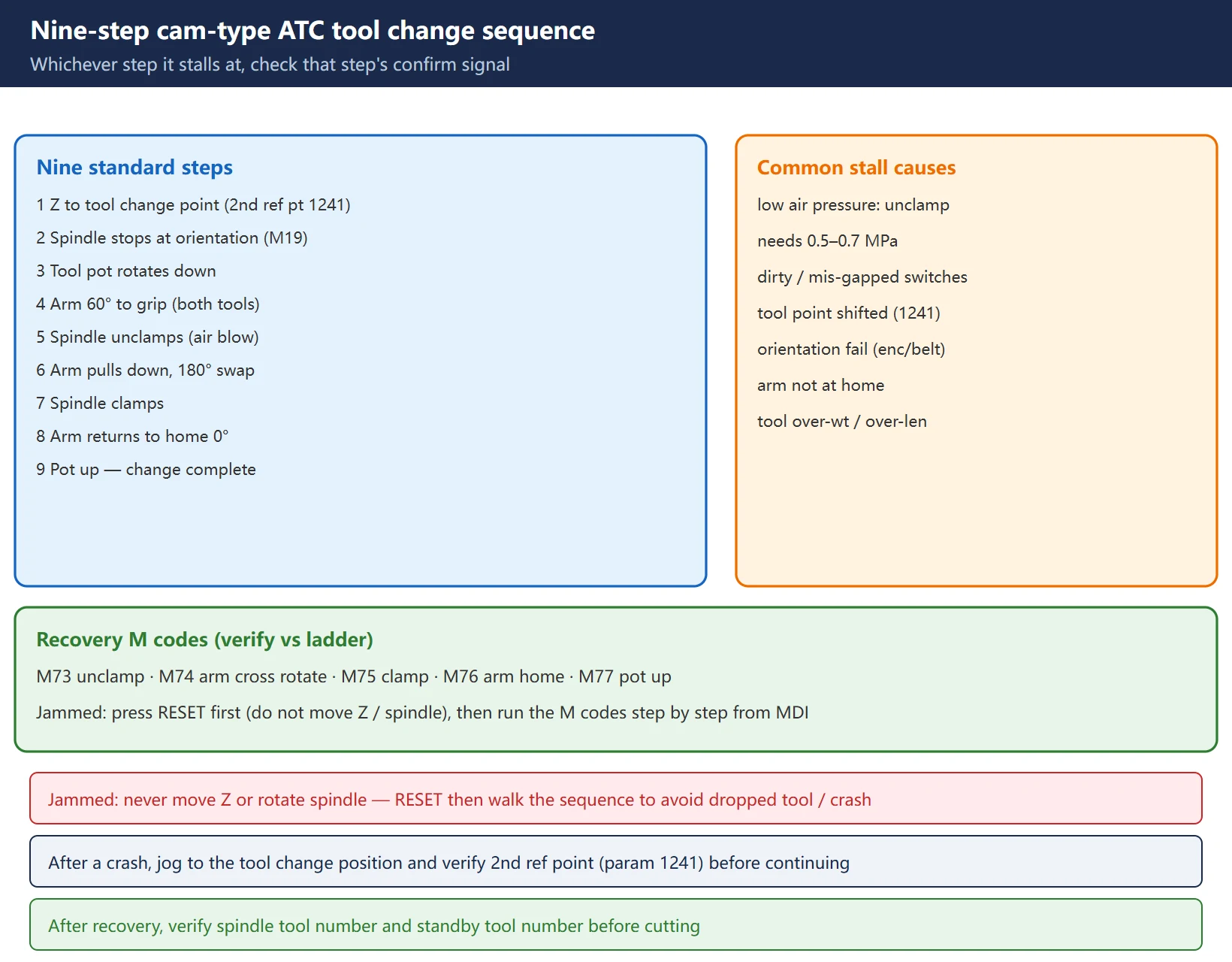
Standard tool change sequence for a cam-type (arm) machining centre:
- Z axis rises to the tool change point (commonly the second reference point, Fanuc parameter 1241)
- Spindle stops at orientation (M19)
- Tool pot rotates down
- Arm rotates 60° to grip (grabbing both the spindle tool and the magazine tool)
- Spindle unclamps (with air blow)
- Arm pulls down and rotates 180° to swap the tools
- Spindle clamps
- Arm rotates back to home (0°)
- Pot rotates back up — tool change complete
Whichever step it stalls at, check the confirmation signal for that step. Usual root causes:
- Low air pressure — unclamp / drawbar cylinders run on air, typically 0.5–0.7 MPa required. Low air pressure is the most common and most overlooked cause.
- Dirty or mis-gapped proximity / count switches — magazine count switch, arm origin switch, pot up/down switches account for the large majority of tool change alarms.
- Tool change point shifted — after a crash, always jog to the tool change position and verify it; the tool change point is commonly the second reference point (parameter 1241). If it is wrong, every later step fails.
- Spindle orientation failure — check encoder, belt, orientation parameters.
- Arm not at origin — manually return it to home before continuing.
- Tool overweight / over-length / not seated — deformed pockets or loose toolholders also jam the magazine.
Recovery M codes (verify against this machine’s ladder — definitions vary by builder):
| M code | Meaning (common convention) |
|---|---|
| M73 | Spindle unclamp |
| M74 | Arm cross rotation (swap) |
| M75 | Spindle clamp |
| M76 | Arm return to home |
| M77 | Pot up |
If the arm jams mid-cycle: with power still on and E-stop not pressed, press RESET first to release the automatic tool change state — do not move the Z axis and do not rotate the spindle. Then run the M codes above step by step from MDI to walk the sequence to completion.
7. Safety limits and backups
- Never jumper a signal or delete an A-address coil to “clear” an alarm. The alarm is the result, not the cause; suppressing it buries the fault, and the next occurrence may be a dropped tool or a crash.
- Back up the ladder before changing the PMC, and record what you changed.
- After recovery, verify the spindle tool number and the standby tool number before resuming cutting.
- With the manual missing, trust this machine’s ladder — do not apply another builder’s table (see section 4).
- The magazine and arm area contains moving parts; follow the builder’s safety procedure (LOTO). Cam-and-spring arm mechanisms can still move after power is removed.
FAQ
Why can I not find 1010–1024 in the Fanuc maintenance manual?
Because they are not Fanuc alarms. Fanuc alarms divide into internal alarms (system-inherent, unmodifiable, documented in the manual) and external alarms (defined by the machine tool builder through PMC A addresses, editable, documented in the machine’s own electrical manual). 1010–1024 sit in the 1000–1999 external band, so they are builder-defined faults and will never appear in a Fanuc manual. The correct approach: compute the A address from “alarm number = 1000 + byte x 8 + bit” and read this machine’s ladder.
The alarm text is only an English abbreviation — what do I do?
Three steps: (1) open the PMC message screen (SYSTEM → ▶ three times → PMC CONFIG → MESSAGE) for the full alarm-number-to-A-address-to-symbol mapping; (2) in the ladder press W-SRCH and enter the A address to locate the coil; (3) trace the series contacts backwards until you reach an X input, then measure it at the machine with a multimeter. This works without the alarm text, even with the manual lost.
Can I just delete the A-address coil so the alarm stops appearing?
No. The alarm is a result, not a cause — deleting the coil only switches off the warning lamp while the fault remains. ATC alarms usually trace to low air pressure, dirty or mis-gapped proximity switches, an arm that is not at home, or a shifted tool change point. Running with the alarm suppressed risks a dropped tool, a jam, or a crash. Trace the trigger condition and fix the root cause, and always back up the ladder before editing the PMC.
Last updated: 2026-10-27
Where to go next
- FANUC Troubleshooting — the full guide library: alarms, diagnosis numbers, servo, spindle, PMC and electrical faults, organised by symptom.
- CNC Repair Tools — which instrument measures what: multimeters, clamp meters, insulation testers and oscilloscopes, with the specification that actually matters.
- Remote Technical Support — have the readings reviewed with you: alarm reverse lookup, PMC ladder analysis and servo tuning advice by call. Repair companies and integrators welcome.
Read the guide, get the right instrument, or walk the diagnosis through with someone — pick whichever you need.
The original Chinese version — same procedure, with the full field notes.























暂无评论内容