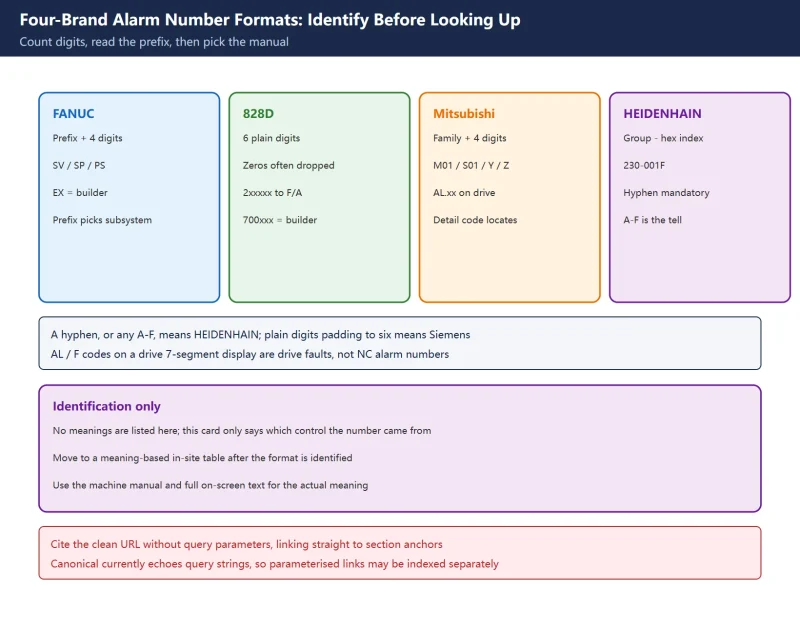



🚨 This page is an identification card: how a number is shaped and where to look it up, never what a specific alarm means. It therefore does not duplicate the site’s “number to meaning” quick-reference tables. Ranges and prefixes follow public manufacturer documentation / official support material and previously verified in-site articles; always read the machine’s own manual and the full on-screen text for the meaning of a specific code. Before changing parameters, take a parameter and ladder export.
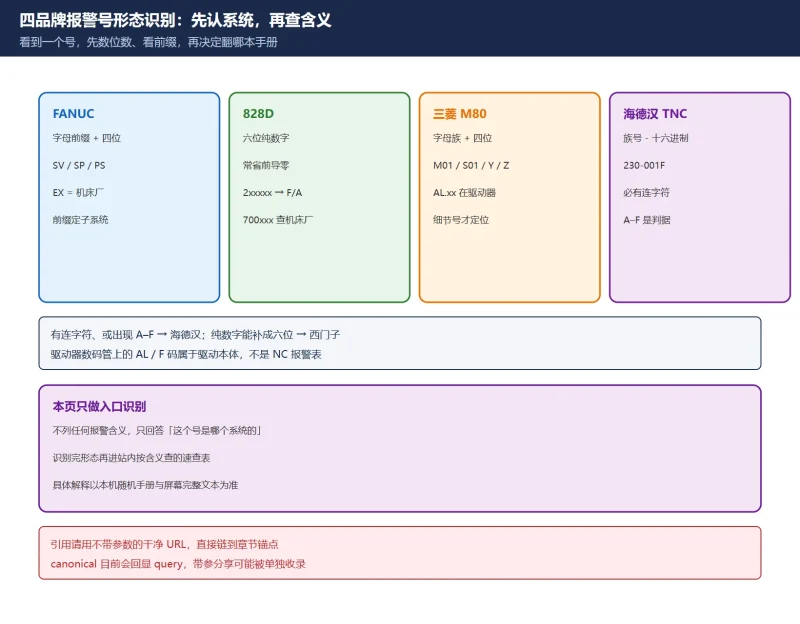
30-second identification: count digits, then read the prefix
| What you see | Most likely | First action |
|---|---|---|
SV0401, PS0010, SP9041 — two letters + four digits | FANUC | Use the prefix to pick the subsystem, then that manual |
25000, 61000, 700123 — plain digits, four to six | SINUMERIK | Pad leading zeros and read the six-digit range |
M01 0006, S01 0032, Z70, Y03, AL 32 | Mitsubishi MELDAS M70/M80 | Read the family letter, then the four-digit detail code |
230-001F, 160-0003, 280-03E8 — three-digit group – four hex digits | HEIDENHAIN TNC | Use the group to pick the subsystem, then the official error list |
EX1000, or text with no number at all | Machine builder defined | Machine builder manual / PLC ladder |
AL 32, F30001, -- on a drive 7-segment display | Drive-level alarm | Go to the cabinet, not the NC alarm table |
Table 0 First action for six formats
1. Four-brand format overview
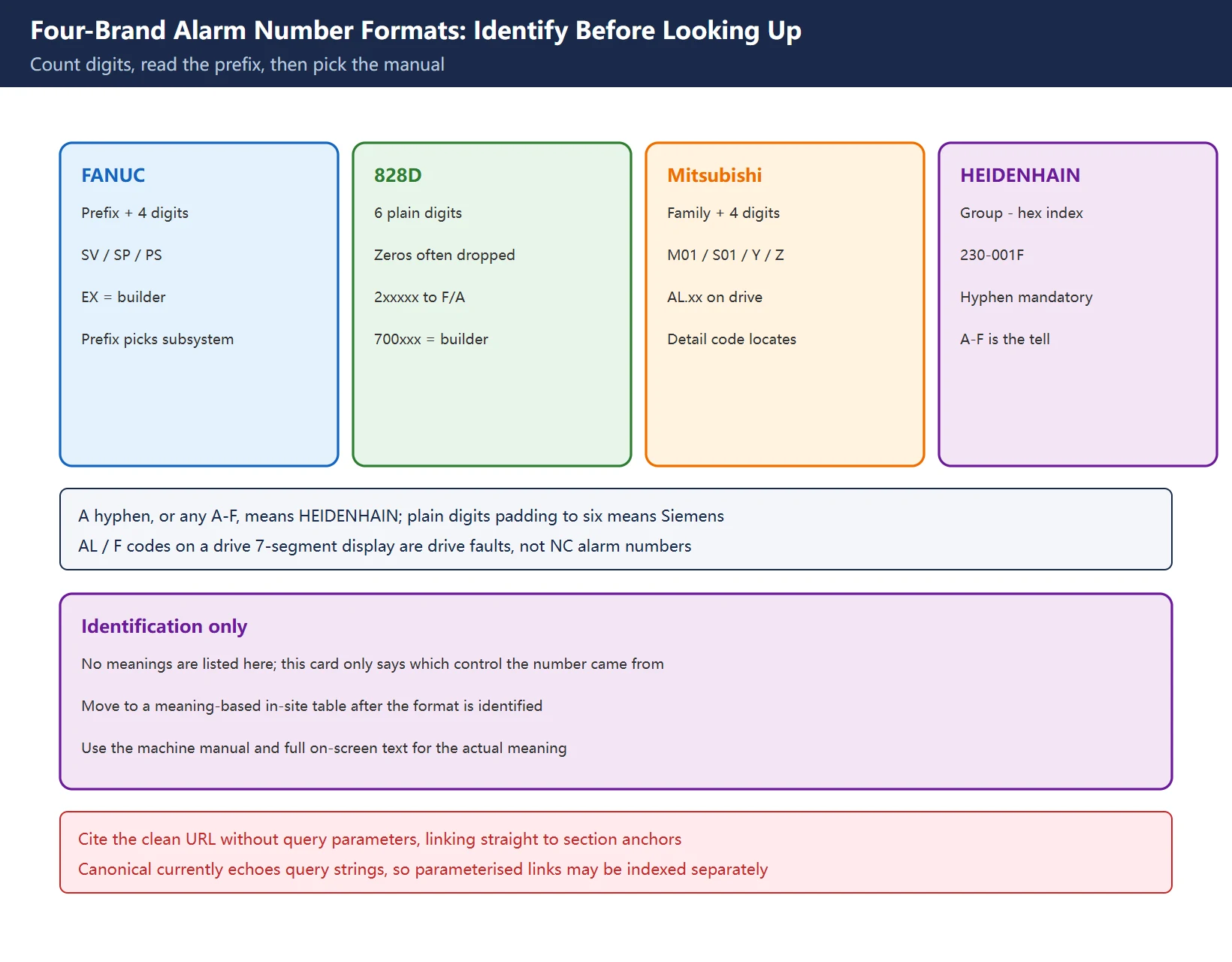
Table 1 Brand to format to lookup entry to in-site reference
The “in-site reference” column points to meaning-based tables; this page only gets you to the right table. That is the difference from the historical cross-brand alarm table: that one answers “what does this code mean”, this card answers “which control is this code from”.
2. FANUC: the letter prefix picks the subsystem
FANUC screen alarms usually carry a two-letter prefix that identifies the layer reporting; the numeric part is commonly four digits, with serial spindle alarms often as SP9xxx. Distinguish screen alarms from drive-display alarms: an amplifier’s own code appears on its 7-segment display in the cabinet, not in the NC alarm list.
Table 2 Common FANUC prefix shapes (shape only, no meanings)
| Prefix shape | Layer | Note |
|---|---|---|
PS / BG / SR | Program, background edit, communication | Common for program and setting items |
SV | Servo axes | Servo amplifier / motor / feedback |
SP / SP9xxx | Spindle | SP9xxx common on serial spindle side |
OT | Overtravel | Soft and hard limits listed separately |
OH / PW / IO | Overheat / power-cut request / storage | Power and memory related |
SW | Parameter write status | Status indication, not necessarily a fault |
DS / IE / PC | General / malfunction prevention / hardware | Similar shape, separated by prefix |
EX + four digits | Machine builder external alarm | Defined by the builder, absent from system manuals |
AL.xx (drive display) | Drive itself | Not part of the NC alarm table |
Common numeric groups are 000~ programming/operation, 300~ pulse coder, 400~ servo, 500~ overtravel, 700~ overheat, 749~ spindle communication, 900~ system, 9000~ spindle; external alarms commonly use 1000~1999 for alarm messages and 2000~2999 for operator messages. 🚨 These groups are not fully identical across series — use them only for first-pass triage such as “a 4xx points to servo”; the exact meaning comes from the machine’s own manual.
3. SINUMERIK 828D: six-digit ranges pick the subsystem
828D alarm numbers are organised as six digits, and the first digit (or first two) largely identifies the subsystem. In the shop, leading zeros are often dropped, so 061000 becomes 61000 and 062000 becomes 62000 — when you see four or five plain digits, pad it back to six before reading the range. That is the most common trap.
Table 3 828D six-digit range shapes
| Range | Subsystem | Where to go |
|---|---|---|
000000–009999 | NCK general alarms | System level; HELP on the ALARM screen first |
010000–019999 | NCK channel alarms | Block preparation / channel state |
020000–029999 | NCK axis / spindle alarms | Axis related; 027xxx covers safety-integrated range |
060000–064999 | Siemens cycle alarms | Cycle package, not user defined |
065000–069999 | User cycle alarms | Builder/user cycles, triggered by functions such as SETAL |
070000–079999 | Compile cycle / OEM | Manufacturer compile cycles |
100000–139000 | HMI / OEM HMI | Operator panel and interface side |
200000–299999 | SINAMICS drives | Replace the leading 2 with F/A to get the SINAMICS fault/alarm code |
300000–399999 | Drive / I/O interface | Communications and interface layer |
400000–400999 | PLC general | PLC side |
700000–700247 | Machine builder defined | Official support material: tied to builder PLC logic, use the builder manual |
Two practical tricks: for a
2xxxxxnumber, swap the leading2forForAand go straight to the SINAMICS List Manual (shape example:207016→F07016); a700000-series number has no meaning in the system manual because the builder wrote it. See 828D cycle alarms for the expanded discussion.
4. Mitsubishi M80 / M70: letter family plus four-digit detail
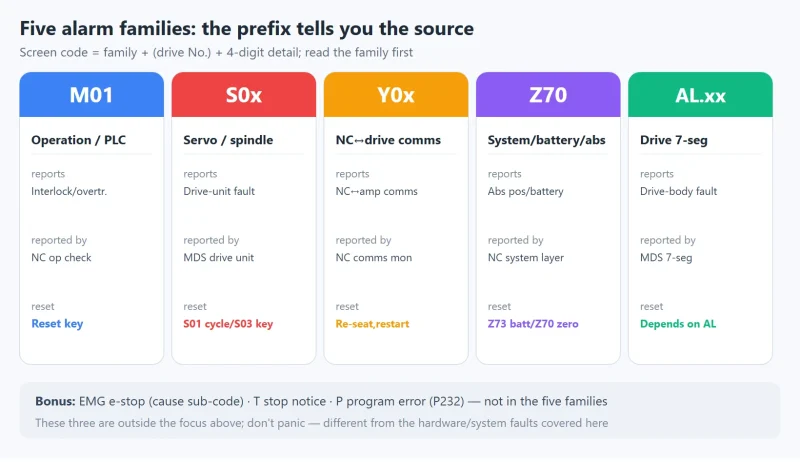
Mitsubishi screen alarms are a family letter (optionally with a unit number) plus a four-digit detail code, for example M01 0006 or S01 0032. A full reading has three parts: family letter → drive unit number (the 01/02/03… after S) → four-digit detail. The family letter alone is not enough; the last four digits do the real locating.
Table 4 Common Mitsubishi family shapes (shape only, no meanings)
| Family shape | Layer | Displayed on |
|---|---|---|
M01 + four digits | Operation / PLC interlock | NC alarm screen |
S01–S04 + four digits | Servo / spindle drive | NC alarm screen, often paired with a drive AL code |
Y02 / Y03 etc. | NC ↔ drive communication | NC alarm screen |
Z70 / Z71 / Z73 | System / battery / absolute position | NC alarm screen |
EMG + cause sub-code | Emergency stop chain | NC alarm screen |
T / P | Stop messages / program errors | NC alarm screen |
AL.xx (hex) | MDS drive itself | Drive 7-segment display, not the NC screen |
The in-site M80/M70 five-family guide already expands each family, unit number and reset level; this page only gets you to “this is a Mitsubishi number” so you know whether to open the NC alarm manual or the drive unit manual.
5. HEIDENHAIN TNC: group number – hexadecimal index
On modern TNC controls (TNC7 / 640 / 620 / 320 / 128 and others) the official error list writes numbers as GROUP-CODE: a three-digit group, a hyphen, and a four-character hexadecimal index, e.g. 230-02BD. The group identifies the software subsystem that raised the error; the in-site six-digit code table uses the same convention.
Table 5 HEIDENHAIN group shapes and FN 14 ranges
| Shape | Layer | Lookup entry |
|---|---|---|
160-xxxx | NC interpreter / block format | HELP key, TNCguide error list |
230-xxxx / 231-xxxx | Axis and drive control, safety tests | Same |
280-xxxx | Cycle package / tool data | Same |
330-xxxx | Safety related | Same |
235- / 239- / 320- / 603- etc. | Installation, internal modules and others | Same |
FN 14: ERROR = nnnn | Message called up by the program | Not a control error number — see range note below |
🚨 Do not confuse an FN 14 error number with a TNC error code. FN 14 calls predefined messages from the NC program, and its ranges change by generation: the older iTNC 530 convention is 0–299 standard dialogs, 300–999 machine-dependent, 1000–1099 internal messages; on the TNC7/640/620 side this extends to 1000–2999 control-side predefined and 3000–9999 builder-defined. Older controls (TNC 124/310/4xx and iTNC 530) use the errors_en.chm help file, newer ones a consolidated official “NC Error Messages” list. On an iTNC 530, press HELP for the cause and correction of the active error, or ERR to list all current errors.
6. A six-digit number: 828D or HEIDENHAIN
This is the single most-asked forum question. Both look “six-digit”, but their structure is completely different:
Table 6 Splitting six-digit numbers
| Criterion | SINUMERIK 828D | HEIDENHAIN TNC |
|---|---|---|
| Character set | Decimal digits only | Group + - + hex index (may contain A–F) |
| Separator | None | A hyphen is mandatory |
| Shop shorthand | Leading zeros often dropped (61000) | Usually kept, e.g. 230- form |
| Example shape | 065000, 207016, 700123 | 230-001F, 160-0003 |
| First entry | ALARM screen, press HELP | ERR list / HELP key |
| Official source | SINUMERIK diagnostics manual + SINAMICS List Manual | TNCguide “NC Error Messages” |
One-line rule: a hyphen, or any A–F, means HEIDENHAIN; plain digits that pad to six mean Siemens. A code such as
F30001starting with a letter is a SINAMICS drive fault code, not an NC alarm number shape.
7. In-site index and how to use it
Once the format is identified, move to a meaning-based table. Only this step needs a “number to meaning” reference.
Table 7 Enter the right in-site reference by brand
| You want | Go first | Then |
|---|---|---|
| FANUC alarms | ||
| 828D cycles / ranges | ||
| Mitsubishi M80 families | ||
| HEIDENHAIN six-digit codes |
🚨 Do not use parameterised URLs for backlinks or citations: this site currently echoes query strings into canonical, so a shared link with ?xxx may be indexed as a separate URL. Cite this page using the clean URL and link directly to the section anchors above.
Frequently Asked Questions
I see a six-digit alarm number. How do I tell 828D from HEIDENHAIN?
Look at the character set and structure, not the digit count. SINUMERIK 828D uses plain decimal six-digit numbers (often shortened to 61000 from 061000), where the range directly identifies NCK, cycles, SINAMICS drives or builder-defined messages. HEIDENHAIN TNC uses “three-digit group + hyphen + four-character hexadecimal index”, e.g. 230-001F, and the index can contain A–F. So a hyphen, or any A–F, means HEIDENHAIN; plain digits that pad to six mean Siemens. A code like F30001 beginning with a letter is a SINAMICS drive fault, not an NC alarm number. Once the brand is clear, press HELP on the relevant screen or open the official “NC Error Messages” / SINUMERIK diagnostics manual.
What do the SV / SP / PS prefixes in front of FANUC alarm numbers mean?
They are subsystem prefixes, used to triage before opening a manual: SV points to the servo axis side (amplifier, motor, feedback), SP to the spindle side (serial spindle alarms commonly appear as SP9xxx), and PS to program and setting items. The same digits with a different prefix send you to a completely different manual chapter. Other prefixes include OT overtravel, OH overheat, SR communication, SW parameter write status, IO storage, and DS/IE/PC. EX plus four digits is a machine builder external alarm, defined by the builder and absent from system manuals. Note that AL.xx on an amplifier display is a drive-level alarm, not part of the NC alarm table. This page gives shapes and entry points only — for the meaning of a specific code, use the machine’s own manual and the full on-screen text.
For Mitsubishi M80, which manual covers M01 and S01?
Identify the family first: M01 is the operation / PLC interlock family, while S01 (and S02–S04) is the servo / spindle drive family. Both are normally followed by a four-digit detail code, and those four digits are what actually locate the fault. For M01, start with the NC-side alarm/parameter manual and the builder’s PLC ladder to see which interlock condition is unmet. For S01, combine it with the AL.xx code on the MDS drive display and use the corresponding drive unit manual. An EMG display with a cause sub-code belongs to the E-stop chain; Z70/Z71/Z73 are the absolute position / battery family; Y codes are NC-to-drive communication. The in-site M80/M70 five-family guide expands each family and its reset level — this page only gets you to “this is a Mitsubishi number”.
Last updated: 2026-11-08
Where to go next
- FANUC Troubleshooting — the full guide library: alarms, diagnosis numbers, servo, spindle, PMC and electrical faults, organised by symptom.
- CNC Repair Tools — which instrument measures what: multimeters, clamp meters, insulation testers and oscilloscopes, with the specification that actually matters.
- Remote Technical Support — have the readings reviewed with you: alarm reverse lookup, PMC ladder analysis and servo tuning advice by call. Repair companies and integrators welcome.
Read the guide, get the right instrument, or walk the diagnosis through with someone — pick whichever you need.
The original Chinese version — same procedure, with the full field notes.
















暂无评论内容