


Bottom line: three things account for most failed fourth-axis retrofits – going straight to parameters without checking the option first, leaving 1006#0 at 0 so the axis is treated as linear, and computing the flexible feed gear 2084/2085 from the reduction ratio instead of from the detection-unit count per table revolution. None of them raises a clean alarm. They surface as an axis that moves but does not return to zero after one turn, as an overtravel the moment you reach the end, or as an index value that is off by a whole multiple.
A fourth axis is, in essence, one more complete servo channel: an amplifier on the FSSB fibre chain, an extra entry in the control’s axis table, parameters that define that entry as a rotary axis, and finally a reference position. Many parameters, but a clear structure – walk the five stages and it stays orderly.
1. First, does this control accept a fourth axis?
Check the option before touching a parameter. The same model number with a different package has very different capability.
| Control | 4th axis possible | Option to verify |
|---|---|---|
| 0i-MC | Yes | Supported directly |
| 0i Mate-MC | No | No hardware expansion |
| 0i-MD | Yes | Supported directly |
| 0i Mate-MD (C package) | Conditional | Diagnostic 1148#7 = 1 |
| 0i Mate-MD (5 package) | Conditional | Diagnostic 1148#7 = 1 and 1233#1 = 1 |
| 0i-MF | Yes | Supported directly |
| 0i-A / 0i-B / 0 series | Not worth it | Too old, no retrofit value |
Two kinds of existing occupancy that get overlooked:
- A servo tool changer may already own the fourth axis. Some machining centres use the fourth servo axis for a tool magazine or pallet changer. The axis count is then already full and adding another simply fails. Check how many servo axes are in use first.
- The 1006#0 / 1022 relationship.
1022defines which of the three basic axes this axis is, or which it is parallel to. A pure rotary axis must be 0 – neither one of the basics nor parallel to any. Set it wrong and circular interpolation plane selection goes wrong.
2. Hardware: amplifier, motor, fibre
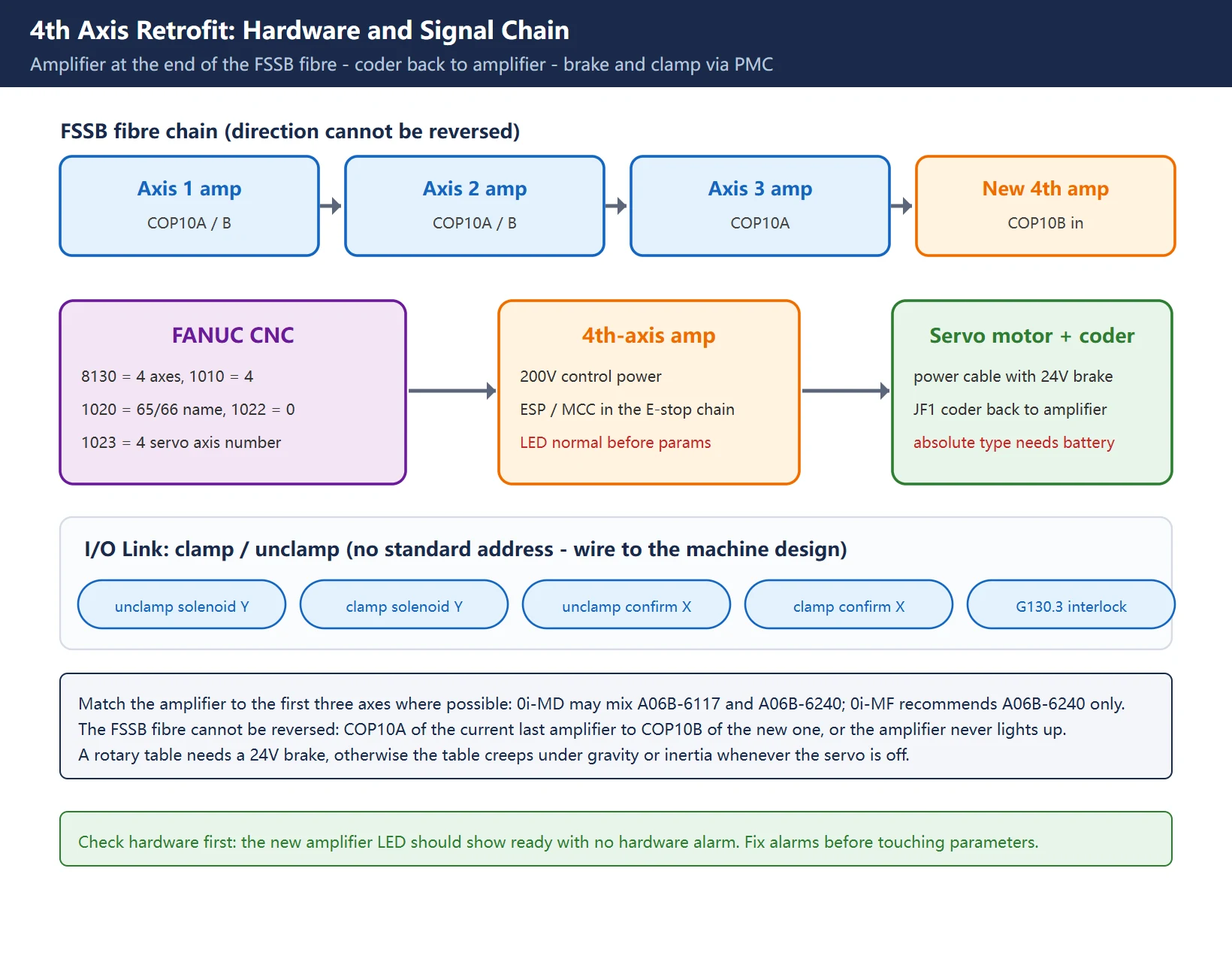
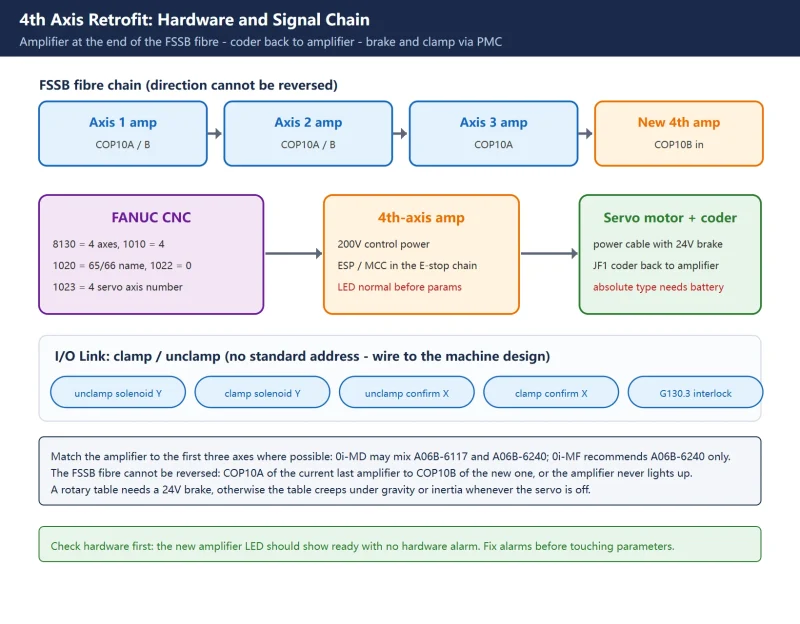
Amplifier: prefer the same series as the first three axes. Match where you can:
- If X/Y/Z use
A06B-6114-Hxxx, try to useA06B-6114-Hxxxfor the fourth - On 0i-MD,
A06B-6117-HxxxandA06B-6240-Hxxxmay be mixed - On 0i-MF, only
A06B-6240-Hxxxis recommended
Mixing is not forbidden, but mixing amplifier generations on one FSSB chain tends to produce communication subtleties that cost several times the commissioning time.
Five wiring items:
- FSSB fibre: from
COP10Aof the current last amplifier toCOP10Bof the new one. The fibre direction cannot be reversed; reversed and the amplifier never lights up. - Motor power cable: including the brake pair. A rotary table needs a 24V brake, otherwise the table creeps under gravity or inertia whenever the servo is off.
- Coder cable:
JF1to the motor side. Absolute PulseCoders also need a battery – either the amplifier battery holder or a separate battery box on the motor cable. - 200V control power and
ESP/MCCwiring: the new amplifier must be in the emergency-stop chain exactly like the existing SVM. - Clamp / unclamp: hydraulic or pneumatic solenoid plus clamp-confirm and unclamp-confirm switches, on the I/O Link.
Power up and check hardware first – do not rush into parameters. The new amplifier LED should show the normal ready state with no hardware alarm. Fix hardware alarms before anything else; parameter work will not help.
3. FSSB: tell the control how many axes it has
This step has a strict order. Skip one and the symptom is “the amplifier is detected but the axis never appears”.
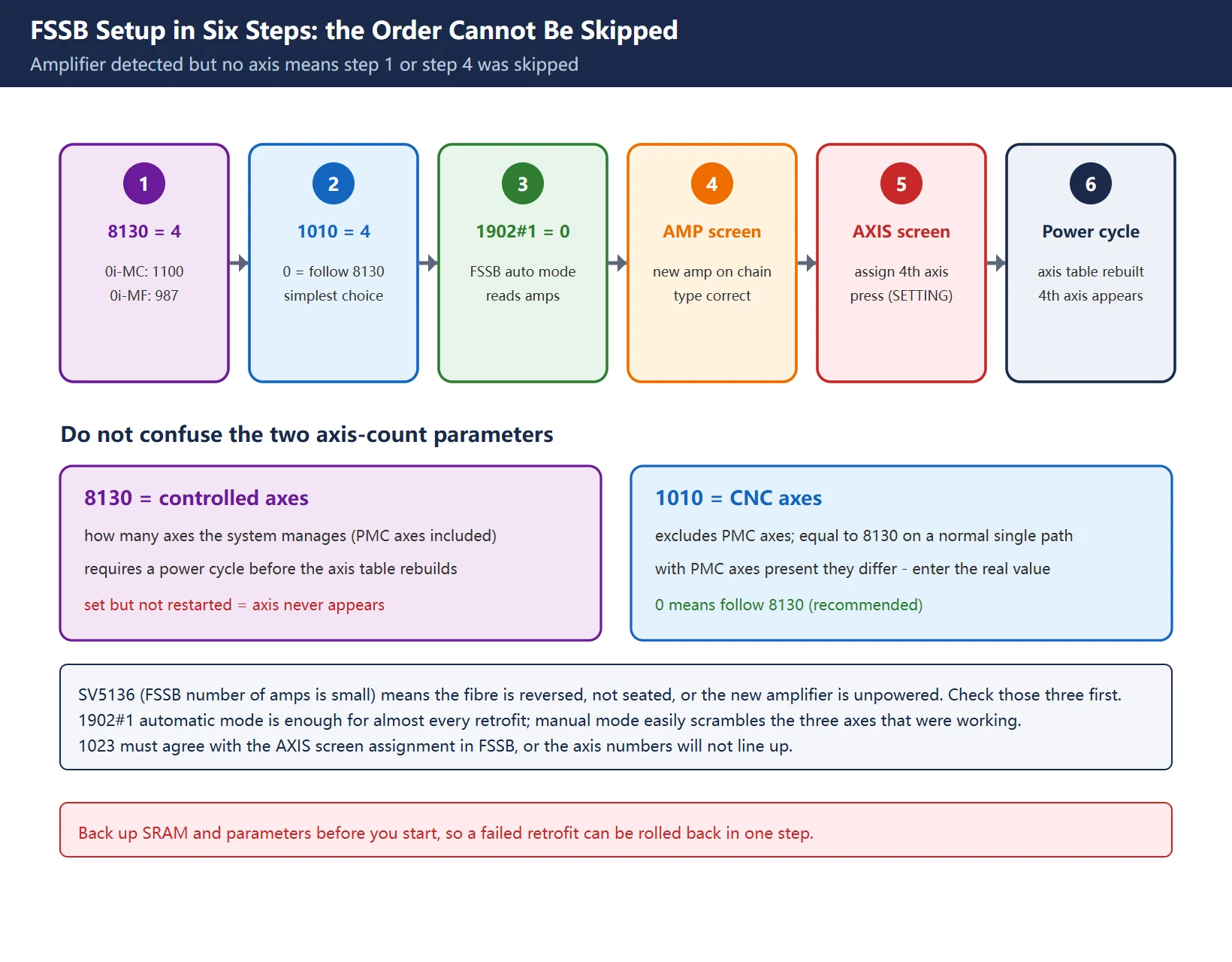
| Step | Action | Criterion |
|---|---|---|
| 1 | Set 8130 = 4 (0i-MC uses 1100 = 4, 0i-MF uses 987 = 4) | Power cycle after saving; the 4th axis appears on the position screen |
| 2 | 1010 = 4 (or 0 to follow 8130) | Consistent with 8130 |
| 3 | 1902#1 = 0 (FSSB automatic setting mode) | – |
| 4 | Open SYSTEM -> FSSB -> AMP and confirm the new amplifier is on the chain with the right type and maximum current | Absent means the fibre is reversed or not seated; the usual alarm is SV5136 (FSSB number of amps is small) |
| 5 | Open AXIS, assign the 4th axis to that amplifier slot, press (SETTING) | Assignment accepted |
| 6 | Power cycle | Axis table rebuilt |
On the 8130 vs 1010 split: 8130 is the number of controlled axes in the system, 1010 is the number of CNC-controlled axes (PMC axes excluded). On a normal single-path machine the two are equal; if the machine has PMC axes, they are not, and 1010 must reflect reality. Entering 0 means “follow 8130”, which is the simplest correct choice.
On 1902#1: this is the FSSB automatic/manual setting bit. In automatic mode the control reads the amplifiers physically present on the fibre chain and builds the configuration. Manual mode allows assigning each one explicitly – but automatic mode is sufficient for almost every retrofit, and manual mode easily scrambles the three axes that were already working.
4. Axis definition parameters: three easy mistakes
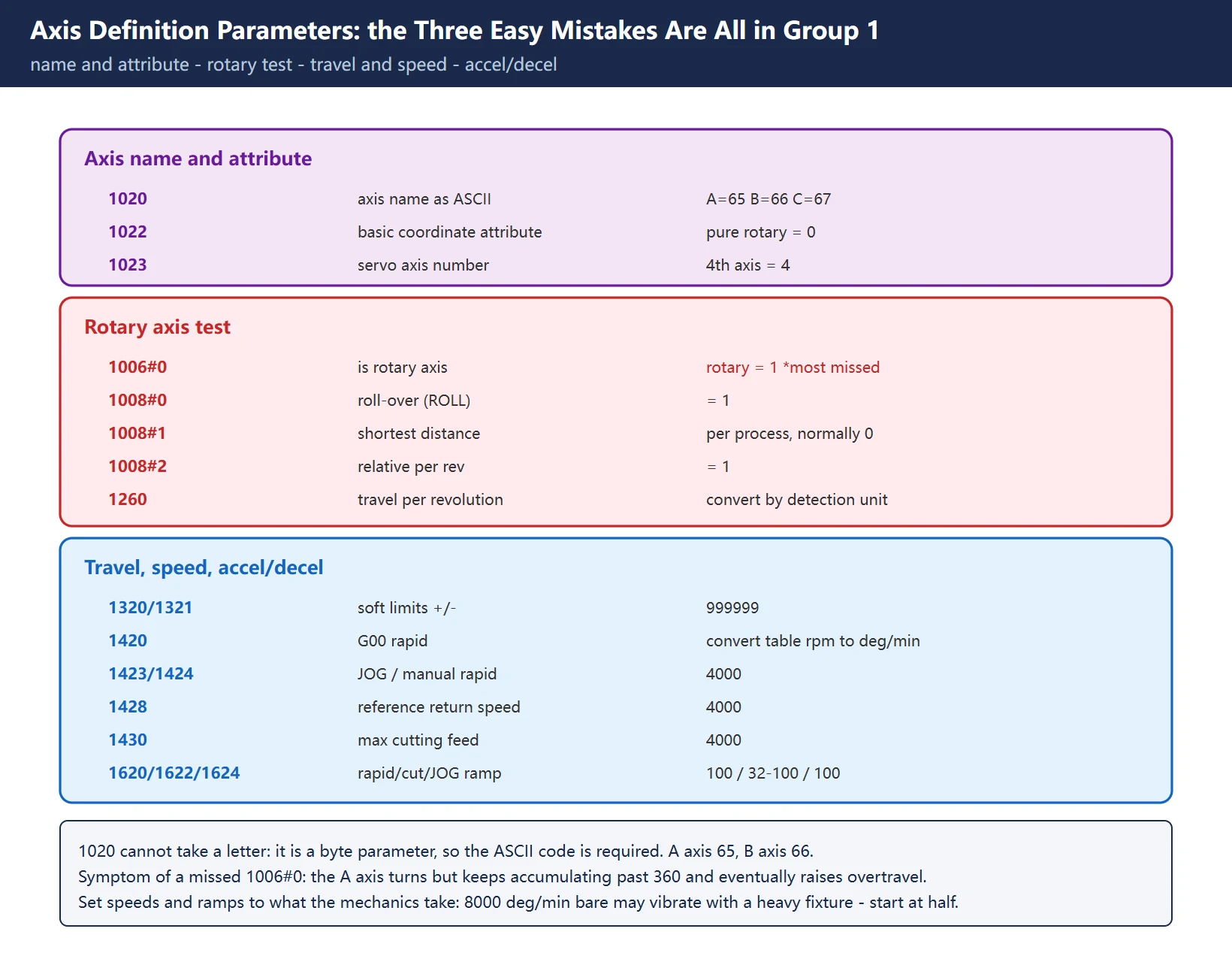
4.1 Axis name and attribute
| Parameter | Meaning | Value | Common mistake |
|---|---|---|---|
1020 | Program axis name, as an ASCII code | A = 65, B = 66, C = 67 (X=88, Y=89, Z=90, U=85, V=86, W=87) | Typing the letter A – invalid parameter |
1022 | Which basic axis this is, in the basic coordinate system | Pure rotary axis: 0 | Entering 1/2/3, making it a duplicate X/Y/Z |
1023 | Servo axis number for this control axis | Usually the same as the axis order; 4th axis = 4 | Inconsistent with the FSSB assignment |
The ASCII requirement in 1020 catches people out: letters cannot be typed into the parameter, only numbers. A axis is 65, B axis is 66. A machine with two rotary tables uses 66 for the fifth axis.
1022 decides which plane G17/G18/G19 and cutter radius compensation are computed on. A pure rotary axis does not participate in those plane decisions and must be 0. Only an additional linear axis parallel to X, Y or Z gets 5/6/7.
4.2 The three core rotary parameters
This is the root of “is one turn 360 degrees”:
| Parameter | Meaning | Typical value |
|---|---|---|
1006#0 | Is this a rotary axis: 0 = linear, 1 = rotary | 1 |
1008#0 | Rotary axis roll-over (ROLL) | 1 |
1008#1 | Shortest-distance positioning | Per process; normally 0 |
1008#2 | Relative coordinate value per revolution | 1 |
1260 | Movement per table revolution, in detection units | 360 if the unit is 0.001 deg, then 360000 |
The classic symptom of leaving 1006#0 at 0: the A axis turns, but instead of rolling over at 360 it keeps accumulating, the ±999999 soft limit becomes the real ceiling, and you get an overtravel at some arbitrary angle. This is the single most common trap.
1008#1 (shortest-distance positioning) is a process decision. An index table usually wants “go from 10 to 350 by travelling -20” and therefore 1. But winding, multi-turn indexing and anything that must keep a consistent direction need 0, otherwise the axis moves the unexpected way.
1260 is tied directly to the detection unit: at 0.001 deg one revolution is 360000; at 0.0001 deg it is 3600000. Entering 360 is only right when the detection unit is 0.001 deg and the control interprets 1260 in those units – always convert using your own detection unit setting.
4.3 Travel, speed, accel/decel
| Parameter | Meaning | Typical start value | Note |
|---|---|---|---|
1320 / 1321 | Positive / negative soft limit | 999999 / -999999 | Rotary axes are usually left open, relying on mechanical limits and process constraints |
1420 | G00 rapid traverse speed | 4000 | Convert the table's allowable rpm into deg/min |
1421 | F0 rapid override speed | 100 | – |
1423 | JOG feed speed | 4000 | – |
1424 | Manual rapid speed | 4000 | – |
1425 | Deceleration speed during reference return | 200 | Used with dog-type homing |
1428 | Reference return speed | 4000 | – |
1430 | Maximum cutting feedrate | 4000 | – |
1620 | Rapid linear accel/decel time constant | 100 | Too small and the table slams |
1622 | Cutting feed accel/decel time constant | 32-100 | Too large and short-block interpolation lags |
1624 | JOG accel/decel time constant | 100 | – |
Set speeds and ramps to what the mechanics can take, not to the table. A rotary table’s inertia changes enormously with fixture and workpiece. A configuration that runs 8000 deg/min bare may vibrate the moment a heavy fixture is bolted on. Start at half speed, confirm there is no shock, then go up.
5. Servo initialisation: the feed gear is the key
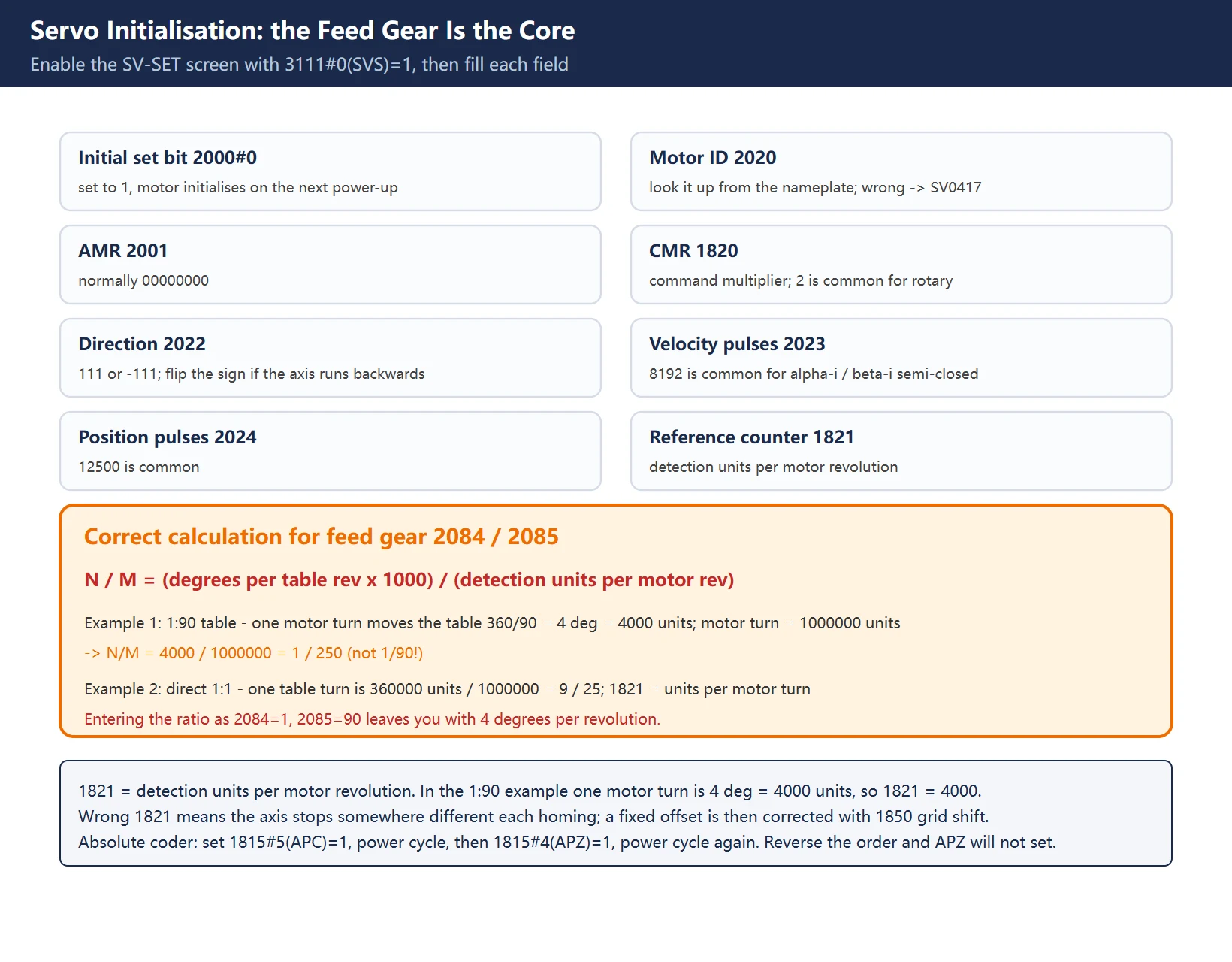
Enable the servo setting screen with 3111#0 (SVS) = 1, then SYSTEM -> SV-SET.
| Field | Parameter | Value |
|---|---|---|
| Initial set bit | 2000#0 | Set to 1, then initialise the motor on the next power-up |
| Motor ID | 2020 | Look it up from the motor nameplate. Wrong ID gives SV0417 (illegal servo parameter) |
| AMR | 2001 | Normally 00000000 |
| CMR | 1820 | Command multiplier; 2 is common for rotary axes |
| Flexible feed gear N / M | 2084 / 2085 | See below |
| Direction | 2022 | 111 or -111; change the sign if the axis runs the wrong way |
| Velocity pulses | 2023 | 8192 is common for an alpha-i / beta-i Pulsecoder on a semi-closed axis |
| Position pulses | 2024 | 12500 is common |
| Reference counter | 1821 | Detection units per motor revolution |
Computing the flexible feed gear N/M – this is the field most often filled wrongly:
N / M = (degrees per table revolution x 1000) / (detection units per motor revolution)
For a 1:90 table: one motor turn moves the table 360 / 90 = 4 degrees, which is 4000 detection units at 0.001 deg; one motor turn is 1,000,000 detection units. Therefore N/M = 4000 / 1000000 = 1 / 250.
For a direct drive (1:1): one table turn is 360 degrees = 360000 detection units, so N/M = 360000 / 1000000 = 9 / 25.
N/M is not the reduction ratio. Many people enter 2084 = 1, 2085 = 90 and end up with four degrees per revolution. The flexible feed gear is defined as the ratio of table displacement to motor displacement in detection units; the reduction ratio is only one intermediate quantity in that calculation, and the angular unit still has to be applied.
1821 is the number of detection units per motor revolution. In the example, one motor turn moves the table 4 degrees, i.e. 4000 detection units, so 1821 = 4000. This value sets the grid position at reference return; get it wrong and the axis stops somewhere different every time.
6. Reference position and absolute position setup
An absolute Pulsecoder (alpha-iA series) does not need homing at every power-up, but the absolute position must be established once:
| Parameter | Meaning | Setting |
|---|---|---|
1005#1 | Reference position without dogs (absolute method) | 1 |
1815#5 (APC) | Use an absolute position detector | 1 |
1815#4 (APZ) | Machine position corresponds to the absolute position | 1 once established |
The order cannot be reversed: set 1815#5 = 1 first, power cycle, then set 1815#4 = 1. Setting APZ first fails because APC is not yet active. After setting APZ, power cycle again before the absolute position is really established.
With an incremental coder you need dog-type homing instead: 1005#1 = 0, 1815#4/#5 = 0, plus the deceleration switch with 1425 and 1428. The grid position after homing is set by 1821; if the stop point is off by a fixed amount, compensate with the 1850 grid shift.
7. The PMC side: six signals that must be handled
| Signal | Meaning | Note |
|---|---|---|
G18.2 | 4th-axis handwheel select | Routes the handwheel to the 4th axis |
G100.3 | 4th-axis positive direction select | JOG forward |
G102.3 | 4th-axis negative direction select | JOG reverse |
G126.3 | 4th-axis servo off | Servo OFF |
G130.3 | 4th-axis interlock | Inhibits motion while clamped or not confirmed |
F102.3 | 4th axis in motion | For clamp logic and external interlocks |
Three more signals have no standard address and must be wired to the machine’s actual design:
- 4th-axis unclamp detect
- 4th-axis clamp detect
- 4th-axis solenoid output
Clamp interlock is the one most often missed. If G130.3 is not wired, or wired with inverted logic, you get “the axis still accepts commands while the clamp is moving”. At best the index is inaccurate; at worst the jaws and the table fight each other. The correct logic is: clamp confirmed before motion is allowed; unclamp command issued, wait for unclamp confirm, then motion is allowed.
8. Five failure points
| Symptom | First suspect | Remedy |
|---|---|---|
| The 4th axis does not appear on the position screen after a power cycle | 8130/1010 not set, or not restarted | Set 8130 = 4, power cycle |
| SV5136 (FSSB number of amps is small) | Fibre reversed, not seated, or new amplifier unpowered | Check the COP10A -> COP10B direction and the LED |
| The axis is there but one turn is not 360 degrees | 2084/2085 computed from the reduction ratio, or 1260 inconsistent with the detection unit | Recompute N/M as degrees x 1000 / detection units per motor turn |
| The A axis accumulates past 360 and raises overtravel | 1006#0 not set | Set 1006#0 = 1 and 1008#0/#2 = 1 |
| Reference return stops at a different place each time | 1821 wrong, or 1850 grid shift not compensated | Recompute 1821 from detection units per motor turn; use 1850 for a fixed offset |
| SV0417 (illegal servo parameter) at power-up | Wrong motor ID in 2020 | Look it up from the nameplate, re-initialise |
9. Acceptance checklist
- Position screen shows the 4th axis with the correct name (A or B)
A0thenA360returns to the same physical position (within index accuracy)A-10andA350point at the same place (with1008#1 = 0they should not)- JOG moves both directions, direction matches the operator’s expectation
- Handwheel selects the 4th axis and jogs correctly
- A motion command while clamped is inhibited by the interlock (
G130.3works) - Absolute position survives a power cycle (absolute), or homing works cleanly (incremental)
- Twenty consecutive indexes to the same angle repeat within process tolerance
Further reading: fourth-axis homing failures follow the same logic as classifying homing failures generally – split “cannot find the reference point” from “position is wrong”, then go deeper. Servo initialisation uses exactly the same screen as Fanuc one-touch setting and servo initialisation.
Frequently Asked Questions
Why can I not simply type the letter A into parameter 1020?
Because 1020 is a byte-type parameter that stores the axis name as an ASCII code: X=88, Y=89, Z=90, A=65, B=66, C=67, U=85, V=86, W=87. Typing a letter is rejected as an invalid parameter. A machine with two rotary tables uses 66 for the B axis.
Is the flexible feed gear 2084/2085 just the reduction ratio?
No. The flexible feed gear is the ratio of table displacement to motor displacement in detection units. Compute N/M = (degrees per table revolution x 1000) / (detection units per motor revolution). On a 1:90 table one motor turn moves the table 4 degrees, i.e. 4000 units, while one motor turn is 1,000,000 units, giving N/M = 1/250 rather than 1/90. Entering the reduction ratio leaves you with only a few degrees per revolution.
Why does the fourth axis fail to roll over at 360 degrees and raise an overtravel?
1006#0 was left at 0, so the control treats it as a linear axis. A rotary axis needs 1006#0 = 1 (rotary axis), 1008#0 = 1 (roll-over), 1008#2 = 1 (relative coordinate per revolution), and 1260 set to one revolution in detection units. Only then does it wrap at 360.
Last updated: 2026-10-31
Where to go next
- FANUC Troubleshooting — the full guide library: alarms, diagnosis numbers, servo, spindle, PMC and electrical faults, organised by symptom.
- CNC Repair Tools — which instrument measures what: multimeters, clamp meters, insulation testers and oscilloscopes, with the specification that actually matters.
- Remote Technical Support — have the readings reviewed with you: alarm reverse lookup, PMC ladder analysis and servo tuning advice by call. Repair companies and integrators welcome.
Read the guide, get the right instrument, or walk the diagnosis through with someone — pick whichever you need.
The original Chinese version — same procedure, with the full field notes.






























暂无评论内容