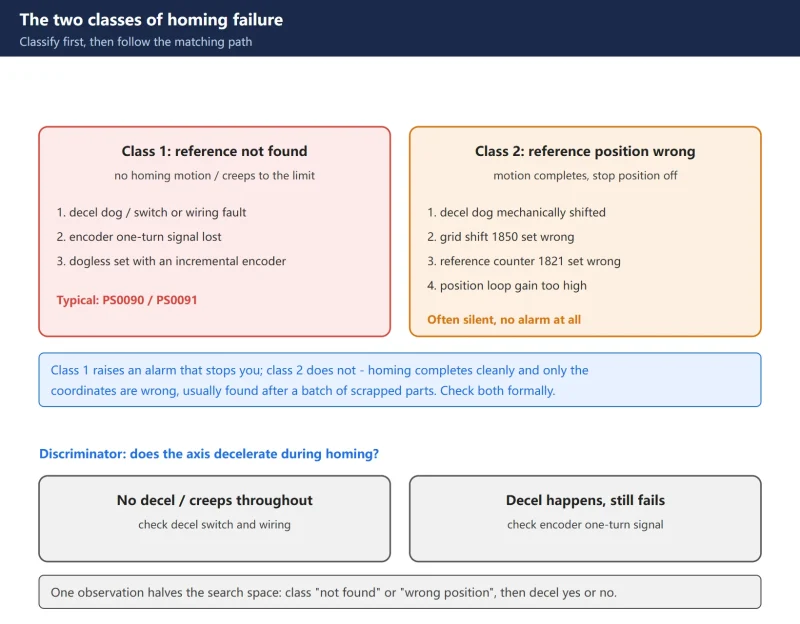



一句话答案:CNC homing failures split into two clean classes — ‘reference not found’ (no deceleration, creeping to the hard limit) and ‘reference position wrong’ (motion looks normal but coordinates are off) — so first watch whether the axis decelerates, then chase the one-turn signal, grid shift 1850/reference counter 1821, and the absolute-encoder battery.
Reference return (homing) failure is one of the highest-frequency CNC faults – and the most common field response is “clear the alarm, try again, and if that fails swap the switch, then the encoder.” No classification, pure trial and error.
It actually splits cleanly into two classes: one where the reference is never found (no motion, or creeping at decel speed until it hits the hard limit), and one where homing completes but stops in the wrong place (motion looks perfect, coordinates are wrong). The two barely overlap in how you chase them. Classifying first eliminates more than half the wasted effort.
This article walks the classification, the causes, the discriminators and the parameter check order, covering both FANUC and SINUMERIK.
One line: watch whether the axis decelerates during homing, then judge where it stops. Deceleration present → check the one-turn signal. No deceleration → check the decel dog. Position off → check 1850 / 1821.
1. Split homing failures into two classes
Every homing symptom traces back to one of these:
| Class 1: reference not found | Class 2: reference position wrong | |
|---|---|---|
| Symptom | No homing motion; or creeping at decel speed until the hard limit | Homing completes normally but the stop position is wrong |
| Typical alarm | PS0090 reference position not established; PS0091 return incomplete | No alarm, or downstream dimension / overtravel alarms |
| Consequence | Control refuses to run the program | Program runs, but every coordinate is wrong |
| Main causes | Decel switch / wiring; encoder one-turn signal; dogless misconfiguration | Dog mechanically shifted; grid shift 1850; reference counter 1821; excessive gain |
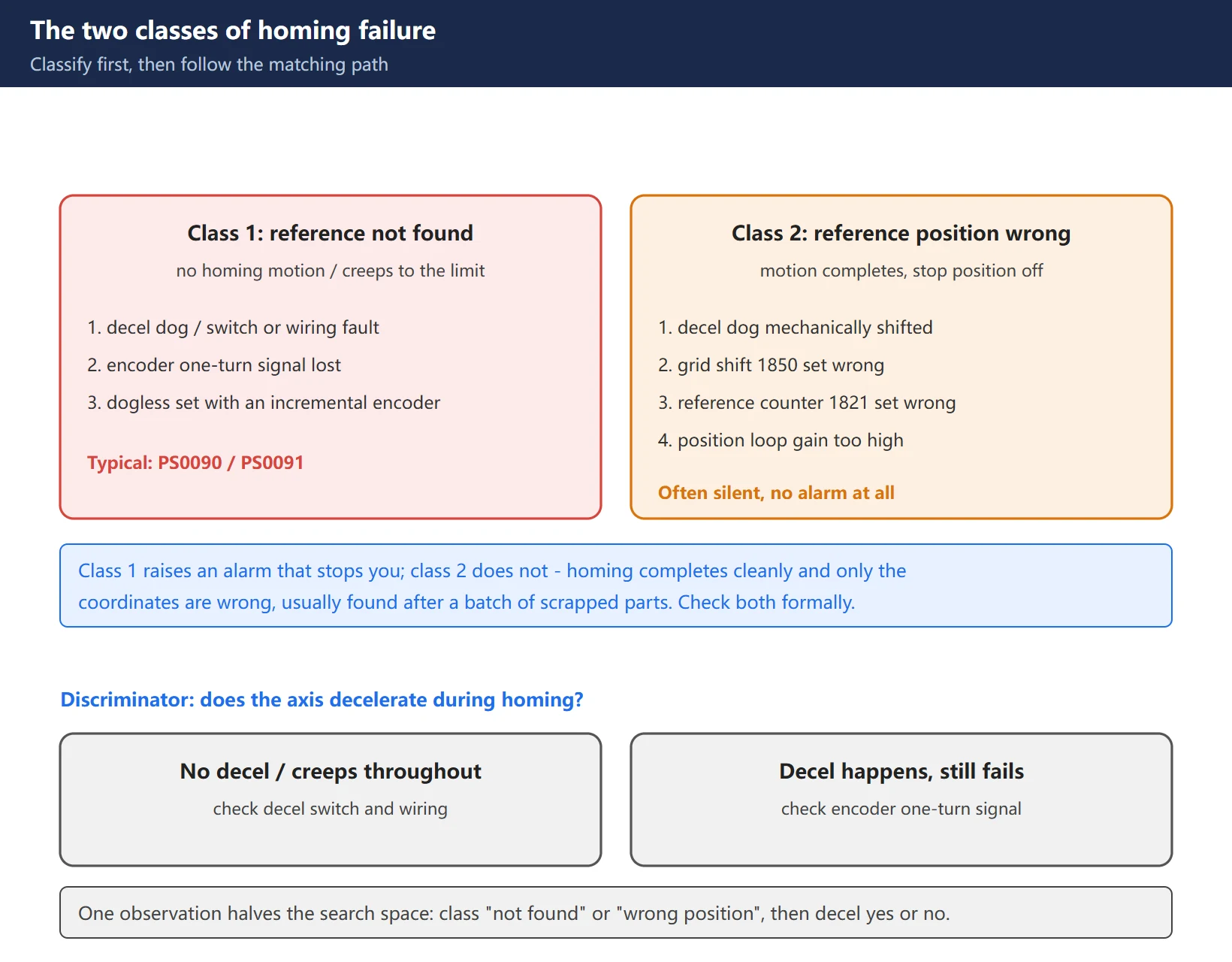
The value of this split is that class 2 is a silent fault. Class 1 raises an alarm that stops you; class 2 does not – homing completes cleanly and only the coordinates are wrong, often discovered after a batch of scrapped parts. Both need a formal check, not just “did homing raise an alarm.”
2. Class 1 “reference not found”: watch for deceleration
The first step in class 1 is simply observing whether the axis decelerates during the homing move. That one observation halves the search space.
Case A: no deceleration at all, or the axis runs the whole way at creep (decel) speed.
Most often a decel switch or wiring fault:
- the decel dog (cam) is loose or displaced and no longer reaches the switch;
- the decel switch itself is faulty or its contacts are oxidised;
- the wiring from the switch to the I/O module is open, or a terminal is loose;
- the corresponding PMC input never changes state.
The check is direct: open the PMC diagnostic screen, watch the related X address, press the decel switch by hand and see whether the bit flips. If it does not flip, the fault is on the switch / wiring / power side. If it does flip but homing still does not decelerate, look at the ladder logic or the parameter configuration.
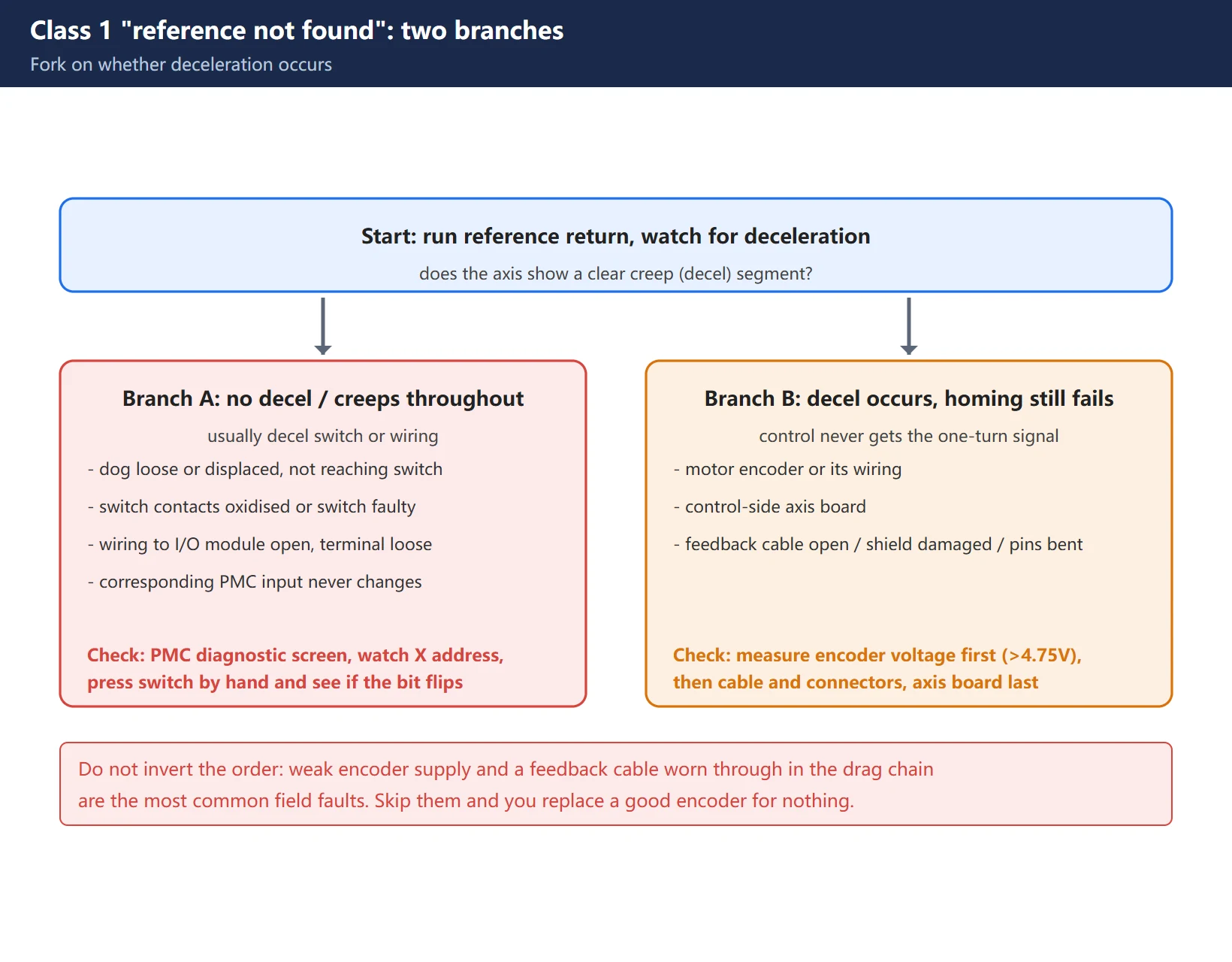
Case B: homing motion is normal (deceleration happens) but the control never gets the “one-turn signal.”
See the next section.
One more configuration error that is easy to miss: dogless homing configured with an incremental encoder. Dogless relies on the absolute position data stored in an absolute pulse coder. With an incremental encoder there is no position information after power-down – the index pulse appears once per revolution and is not unique – so the combination can never be valid. The control detects it and raises PS0090.
3. Deceleration happens but homing fails: check the one-turn signal
When the axis decelerates, runs to the end and still cannot establish the reference, the problem is usually the one-turn signal (encoder zero mark / index pulse).
Likely causes:
- Motor encoder or its wiring – feedback cable open, shield damaged, pins bent or oxidised;
- Axis board on the control side – the encoder interface circuit on the axis board is damaged.
Field check order:
- Measure the encoder supply voltage first. A common field rule of thumb: it should be above 4.75 V.
– below 4.75 V → insufficient encoder supply; fix the supply first (power module, voltage drop along the cable);
– voltage normal but still no signal → the encoder itself is faulty; replace the encoder or the motor.
- Inspect the feedback cable. Look for damage, crushing, sharp bends; reseat the connectors; confirm the shield is properly grounded.
- Only then suspect the axis board. With encoder and cable ruled out, the axis board is the last step.
Do not invert this order. The most common field faults are a weak encoder supply and a feedback cable worn through in the drag chain – skip those and you will replace a perfectly good encoder for nothing.
4. Class 2 “reference position wrong”: dog shift and grid shift
Class 2 faults share one trait: homing completes perfectly, it just stops in the wrong place. Causes by probability:
- Decel dog mechanically shifted – the dog was hit or its fixing screws came loose, so the deceleration point moved and everything downstream follows it.
- Grid shift parameter set incorrectly – 1850 on FANUC, per axis.
- Reference counter capacity set incorrectly – 1821 on FANUC.
- Position loop gain too high – won’t settle, overshoots.
- Encoder or axis board defective – last resort, only after elimination.
Hard rule for 1850: only write 1850 when the axis sits on a known mechanical reference. The reason is practical – a wrong value in 1850 raises no alarm at all, yet silently shifts every coordinate of that axis in every program. The fault reports nothing, and by the time it shows up a batch of parts is already scrap.
After changing 1850 you must run homing again for it to take effect.
The SINUMERIK counterpart is MD34090 (REFP_MOVE_DIST_CORR), whose meaning varies with the measuring system: with an incremental encoder plus zero mark it is a travel-distance correction added to MD34080; with an absolute encoder it is the absolute offset between machine zero and encoder zero. After changing an MD, always POWER ON (reset) before moving the axis – otherwise the value you just wrote can be overwritten by the internal overtravel offset.
5. Reference counter 1821 and position loop gain
When the homed position is “off by one grid” or drifts periodically, check 1821 (reference counter capacity) first.
The discriminator is the shape of the error:
- Same fixed offset every time → dog mechanically shifted, or 1850 grid shift set wrong;
- Offset varies with position, or repeats every fixed travel → 1821 reference counter capacity set wrong (classic symptom is “off by one grid”);
- Won’t settle, oscillates or overshoots → position loop gain too high; drop the gain and re-check.
Excessive gain shows up as not settling and oscillation. The difference from a wrong 1821: gain problems are “won’t settle,” 1821 problems are “settles fine but at the wrong place.”
6. Absolute encoder: APC / APZ and the battery
Absolute encoder homing problems come down to two status bits plus one battery.
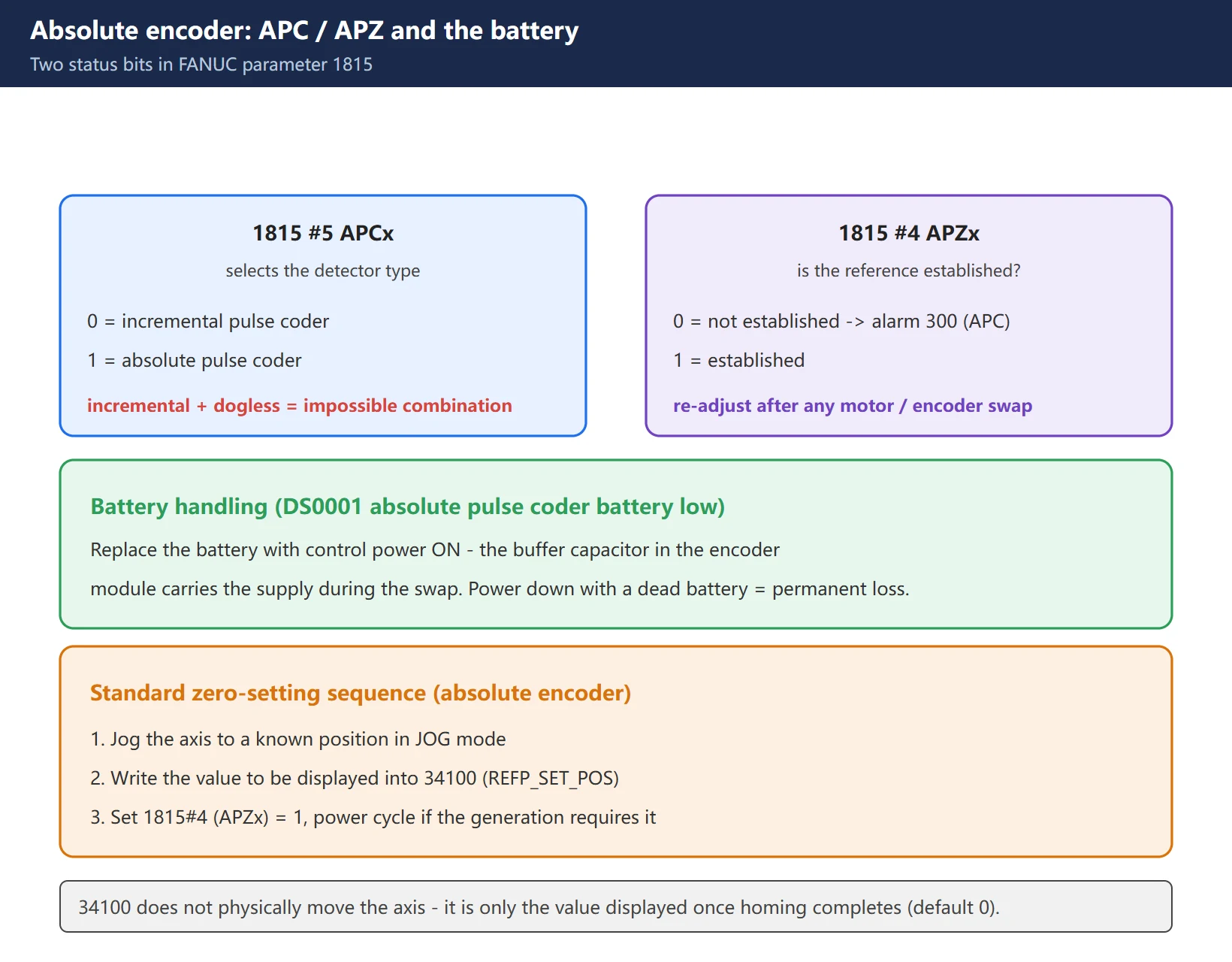
FANUC parameter 1815:
- #5 (APCx):
0= position detector is an incremental pulse coder;1= position detector is an absolute pulse coder. - #4 (APZx): whether the absolute pulse coder reference position has been established.
0= not established (triggers alarm 300, the APC alarm: absolute position lost);1= established.
Typical scenarios and handling:
- Battery voltage low → DS0001 (absolute pulse coder battery low). Replace the battery with control power ON – the buffer capacitor in the encoder module carries the supply during the swap. Power down with a dead battery and the absolute position is lost permanently, requiring a full homing run.
- APZ cleared (1815#4 = 0) → alarm 300 (APC alarm); the reference must be re-established.
- Standard zero-setting sequence: jog the axis to a known position in
JOG→ write the value to be displayed into 34100 (REFP_SET_POS) → set 1815#4 (APZx) = 1 → power cycle if required by the control generation. - After a motor or encoder swap, always re-adjust – the correspondence between encoder zero and machine zero has changed; the control still reads an absolute value, but the mechanical position it maps to is no longer correct.
Note that 34100 (REFP_SET_POS) does not physically move the axis. It is only the value displayed once homing completes (default 0), for cases where the reference point is not the machine’s mechanical zero.
7. Two hard rules before touching parameters
Run through these before changing anything:
Rule 1: never write 1850 unless the axis is on a known mechanical reference.
A wrong 1850 is a silent error with no alarm: the offset is applied to every coordinate in every program. Walk the axis to a known mechanical reference first, then write; after writing you must re-home for it to take effect, and verify with a dial indicator or laser interferometer.
Rule 2: after changing a parameter / MD, POWER ON (reset) before moving the axis.
Adjustments only take effect when the parameter is next activated (normally at power-up), and the offset only becomes permanent after the first POWER ON reset. Move the axis before resetting and the value you wrote can be overwritten by the internal offset.
8. Summary table and check order
Putting it together into one executable sequence:
- Read the alarm and the scope: PS0090/PS0091 → class 1; no alarm but coordinates off → class 2; all axes or a single axis.
- Class 1: look for deceleration.
– No deceleration / creeping throughout → decel switch and wiring (watch the X address flip on the PMC diagnostic screen).
– Deceleration present but homing fails → one-turn signal (measure encoder voltage first: must be >4.75 V; then feedback cable and connectors; only then the axis board).
– Incremental encoder configured as dogless → configuration error; go back to dog-type or fit an absolute encoder.
- Class 2: read the shape of the error.
– Fixed offset → dog mechanically shifted / 1850 grid shift;
– Varies or periodic → 1821 reference counter capacity;
– Won’t settle, oscillating → position loop gain too high.
- Absolute encoder: check the battery (DS0001, replace with power ON); is APZ established? (1815#4; if 0, alarm 300). After a motor/encoder swap, run the re-adjustment sequence (jog to a known position → write 34100 → APZ=1 → POWER ON).
- Always verify after changing: re-home → check coordinates with a dial indicator or laser → run a test program containing G28 → inspect parts for off-grid symptoms.
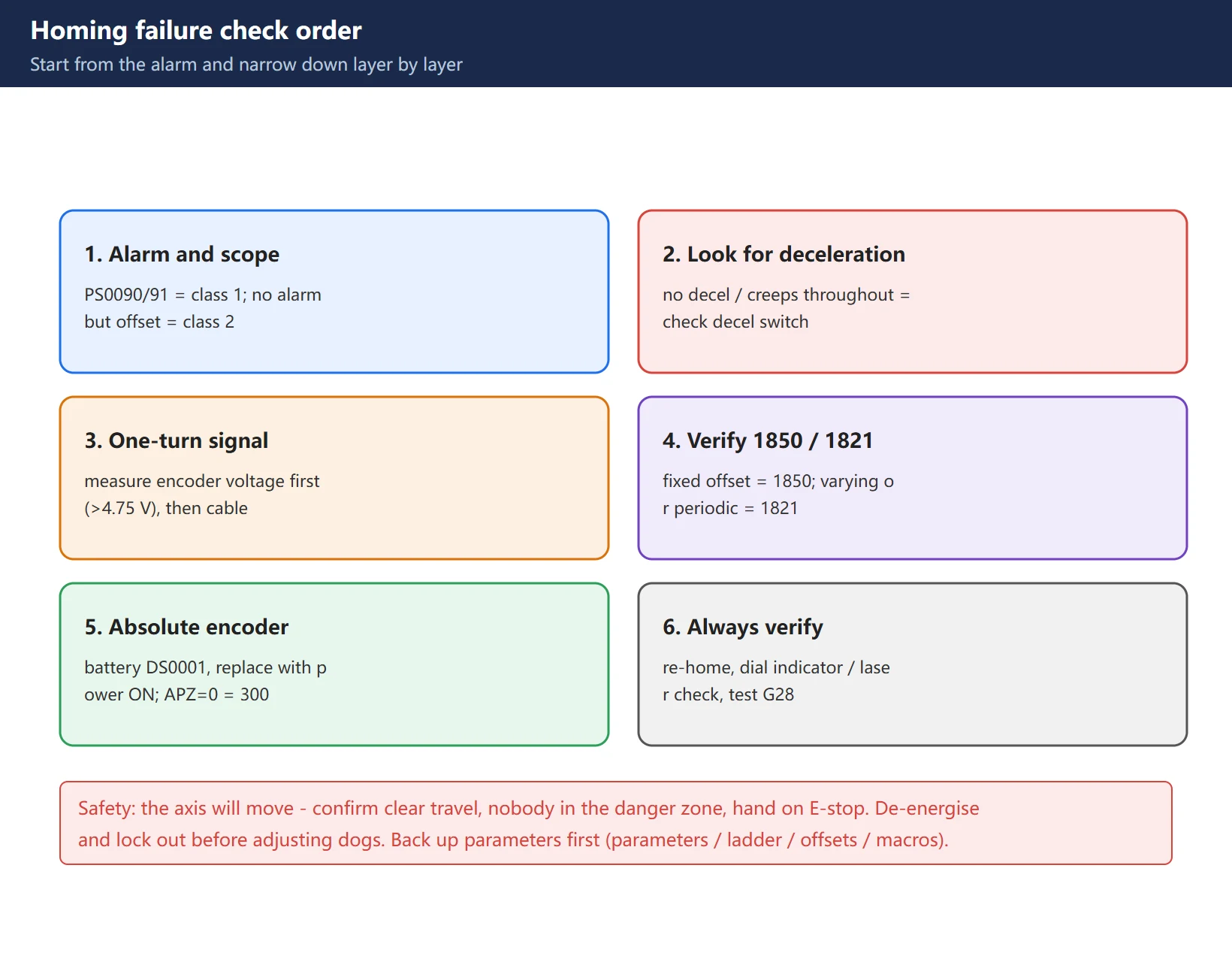
Safety: the axis will physically move during homing troubleshooting. Confirm the travel range is clear with no interference and no one in the danger zone, and keep a hand on the emergency stop. De-energise and lock out before adjusting dog positions. Back up parameters before you start (parameters, ladder, offsets, macro variables) – this matters especially for anything battery related.
FAQ
The axis never decelerates and rams the hard limit during homing – where do I start?
When homing shows no deceleration, or the axis travels the whole way at creep speed, the usual cause is a decel switch or wiring fault. Check in this order: is the decel dog loose or displaced so it no longer reaches the switch → are the switch contacts oxidised or the switch itself faulty → is the wiring from the switch to the I/O module open, or a terminal loose → go to the PMC diagnostic screen and watch the corresponding X address while pressing the switch by hand to see if the bit flips. No flip means the fault is on the switch / wiring / power side. A flip with no deceleration means go after the ladder logic and parameter configuration.
The homed position is slightly off, but by the same amount every time – what causes that?
A fixed offset points at two things: the decel dog has shifted mechanically (it was hit, or its fixing screws came loose, moving the deceleration point), or the 1850 grid shift parameter is set wrong. Neither affects the homing motion itself – only where it finally stops.
The critical handling point: only write 1850 when the axis is on a known mechanical reference, because a wrong value raises no alarm yet silently shifts every coordinate of that axis in every program. After changing 1850 you must re-home for it to take effect, and verify with a dial indicator or laser.
If the offset is not fixed – it varies, or repeats every fixed distance – check 1821 (reference counter capacity). If the axis won’t settle and oscillates, the position loop gain is too high. The shape of the error separates them.
After replacing the battery, the control powers up with alarm 300 – do I have to re-zero?
Yes. Alarm 300 is the APC alarm, meaning absolute position lost – i.e. 1815#4 (APZx) = 0, the absolute pulse coder reference position is not established. Triggers include moving the axis while the battery was dead or disconnected (position data becomes untrustworthy) and removing/refitting or replacing the encoder or a motor with an integral encoder.
The standard reset sequence: jog the axis to a known position in JOG → write the value to be displayed into 34100 (REFP_SET_POS) → set 1815#4 (APZx) = 1 → power cycle if the control generation requires it.
Prevention matters more: replace the battery with control power ON – the buffer capacitor in the encoder module holds the supply during the swap. Power down with a dead battery and the absolute position is lost for good, forcing a full homing run.
Last updated: 2026-10-31
Where to go next
- FANUC Troubleshooting — the full guide library: alarms, diagnosis numbers, servo, spindle, PMC and electrical faults, organised by symptom.
- CNC Repair Tools — which instrument measures what: multimeters, clamp meters, insulation testers and oscilloscopes, with the specification that actually matters.
- Remote Technical Support — have the readings reviewed with you: alarm reverse lookup, PMC ladder analysis and servo tuning advice by call. Repair companies and integrators welcome.
Read the guide, get the right instrument, or walk the diagnosis through with someone — pick whichever you need.
The original Chinese version — same procedure, with the full field notes.






















暂无评论内容