


一句话答案:Fieldbus station dropout shows up as a screenful of alarms or a dead remote I/O module, and on a chained bus one loose connector upstream can take the whole link down. Read ER97 on I/O Link or the PROFIBUS BF LED first, then decide whether the module is dead or the chain is broken.
Fieldbus “station dropout” is one of the most typical CNC faults: a screenful of alarms appears at once, some operator panel keys stop responding entirely, or a whole remote I/O module reads all zeros. The first reaction is usually “the module is dead” – and only after swapping several modules does it turn out that a connector one station upstream was loose.
I/O Link on FANUC and PROFIBUS-DP on Siemens / European machines are two completely different buses. Their alarm formats, diagnostic screens and troubleshooting methods differ – but because both are called “dropout”, they are often diagnosed with the wrong playbook. This article treats them separately: how to read each alarm, what to check on site for each, and one general order of attack.
One line: locate “which link broke” first, then decide “is the module dead or is the chain broken”. On a chained bus, one station down takes the whole rest of the chain with it – the single most misdiagnosed point.
1. First, identify which bus dropped
The two buses sit in completely different places and are diagnosed differently:
| FANUC I/O Link | PROFIBUS-DP | |
|---|---|---|
| Owner | FANUC proprietary serial bus | Open fieldbus (common on European / Siemens machines) |
| Master | PMC on the CNC main board | PLC / DP master (e.g. 840D) |
| Slaves | operator panel, cabinet I/O unit, distribution I/O module, I/O Unit-MODEL A | remote I/O, drives/VFDs, valve islands |
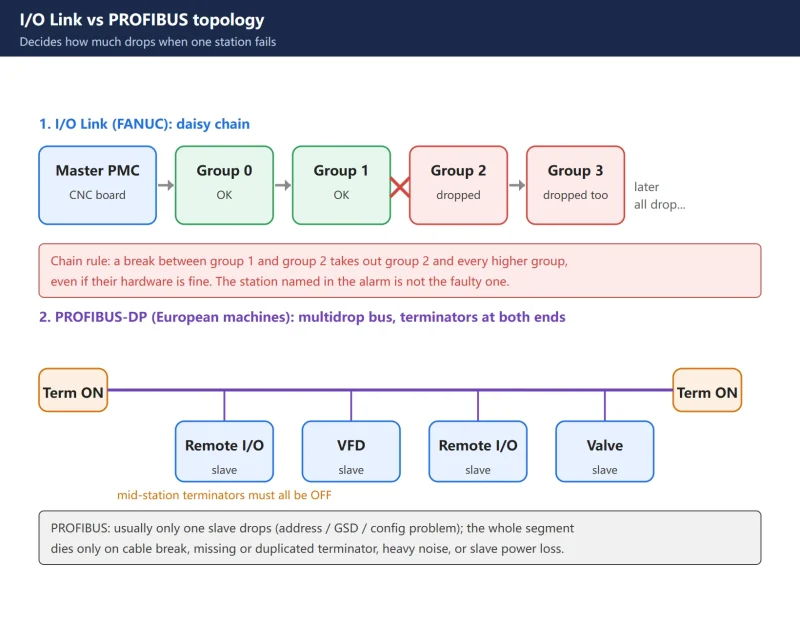
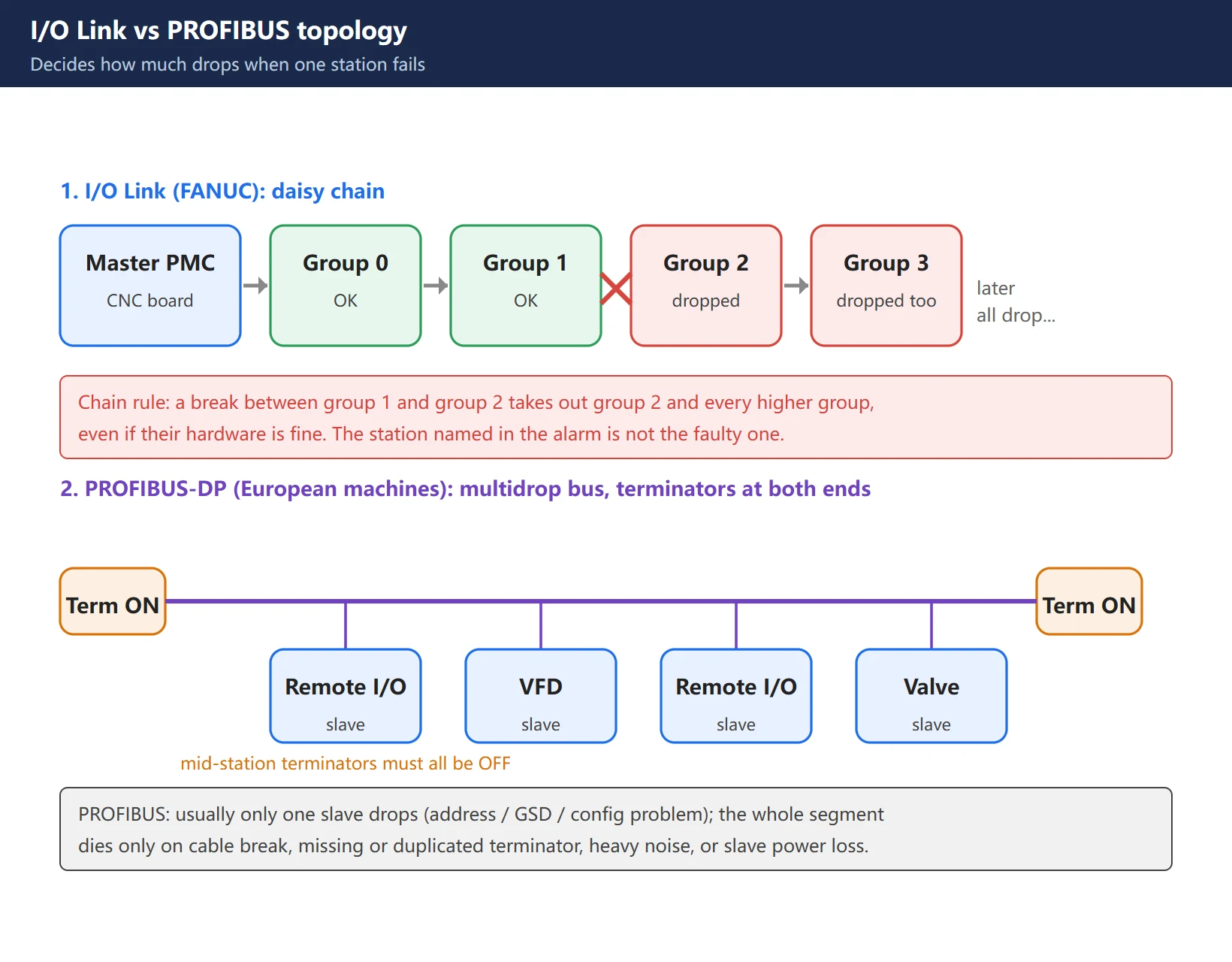
| Topology | daisy chain (A-out to B-in, station to station) | bus / multidrop (all stations in parallel on one A/B pair, terminators at both ends) |
| Alarm entry | PMC diagnostic screen + ER97 alarm | PLC diagnostic buffer + BF/SF LEDs |
| Effect of a break | everything downstream of the break drops | usually that slave drops; whole segment affected by terminator/cable |
Knowing which bus you are on decides which diagnostic screen you open. In the electrical drawings, I/O Link runs on connectors like JD51A / JD1A / JD1B; PROFIBUS runs on violet twisted pair with DB9 connectors.
2. First scene of an I/O Link dropout: reading ER97
The classic I/O Link dropout alarm on FANUC is ER97, displayed like this:
ER97 IO LINK FAILURE CH1 00GROUP
- CH1: I/O LINK channel 1 (the default channel on most systems).
- 00GROUP: the I/O module belonging to group 00 in the PMC failed to connect. A different number means that group failed.
Together: on channel CH1, the I/O unit starting at group 00 cannot communicate. Wording varies slightly between models and PMC versions, but the “channel + group” structure is consistent.
The maintenance manual lists six things to check after this alarm:
- Is the I/O module powered correctly?
- Is the I/O module wiring connected correctly?
- Is the I/O module address allocated correctly?
- Has the I/O module suffered a hardware failure?
- Is the board fuse blown or is there internal burn damage?
- Check field-side input voltage, whether there is a short circuit outside, and whether cables are connected correctly.
On a new machine being commissioned, focus on: the JD51A to JD1B wiring, whether the number of I/O modules configured in the PMC matches what is actually installed, whether each module works and its fuse is intact, and – if the run goes through a fibre converter – whether that converter is healthy. On a machine that was running fine, a sudden ER97 usually means “everything from group yy onward cannot communicate” – i.e. the back half of the chain.
3. Three on-site checks for I/O Link: 24 V, B-in/A-out, module LED states
Follow this order and you cover most field cases.
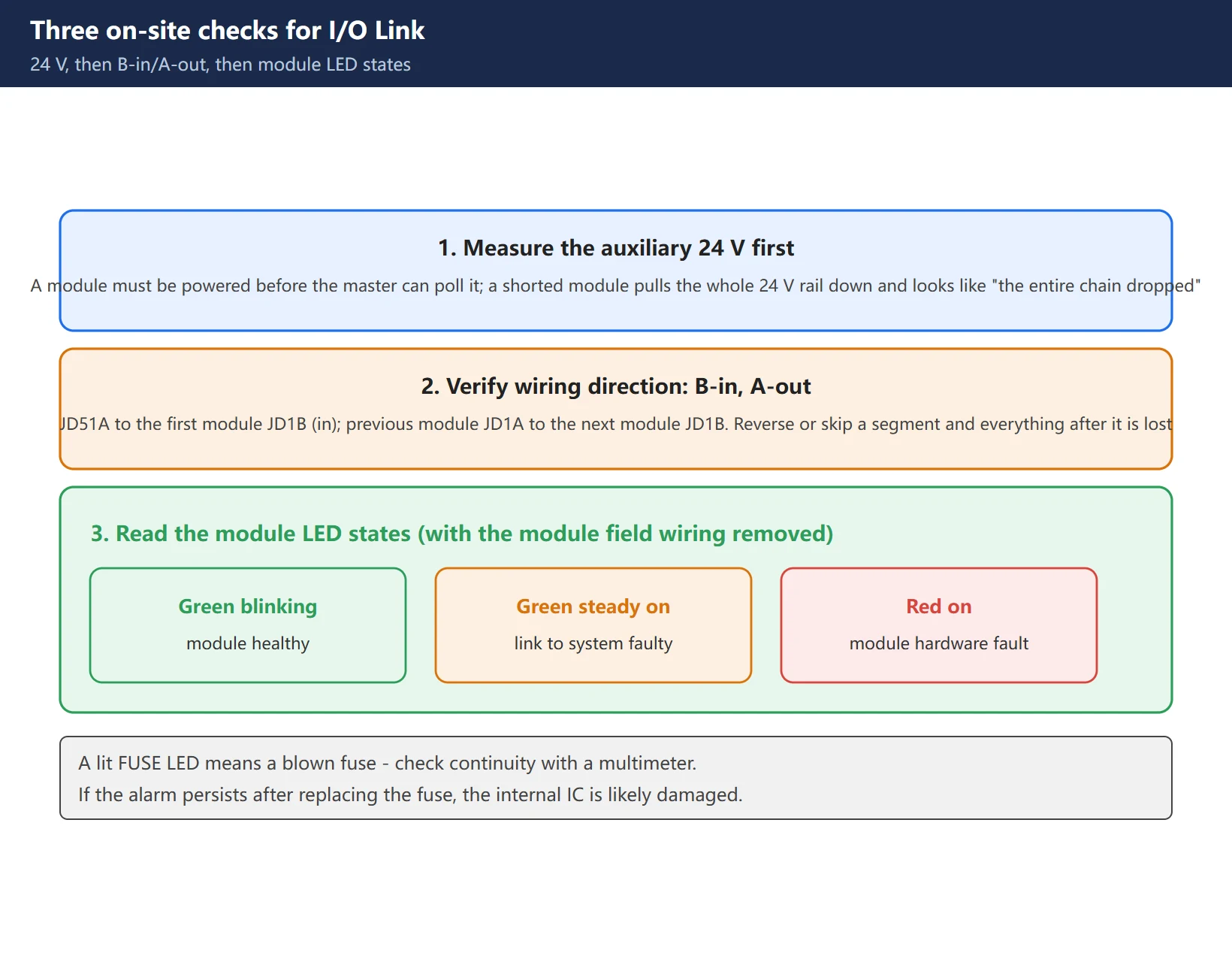
1) Measure the auxiliary 24 V first. The I/O Link field side carries 24 V DC; a module must be powered before the master can poll it. A shorted I/O module can pull the whole auxiliary 24 V rail down, which prevents the I/O Link from completing its scan – it looks like “the whole chain dropped” when the real problem is a collapsed supply. Confirm the 24 V output is healthy first.
2) Verify the wiring direction: B-in, A-out. From the system side JD51A, go to the first I/O module’s JD1B (in); then from that module’s JD1A (out) to the second module’s JD1B. Chain on from there. Reversed or missing a segment and every station after it is lost.
3) Read the module LEDs to judge hardware. With the module’s external wiring disconnected, watch the indicators:
- Green LED blinking: module is healthy;
- Green LED steady on: problem with the connection to the system;
- Red LED on: module hardware fault.
Also, a lit FUSE LED on the board means a blown fuse – check continuity with a multimeter. If the alarm persists after replacing the fuse, the module’s internal IC is likely damaged and the module needs repair or replacement.
4. The chain nature of I/O Link: one bad module takes the whole rest down
This is the most misdiagnosed aspect of I/O Link dropout and deserves its own section.
I/O Link is a daisy chain: the master polls each slave in order. When one module in the chain stops responding, that module’s group and every higher-numbered group become unavailable – even if their own hardware is perfectly fine.
What that means in practice:
- The alarm says “group 03 failed”, but the actual fault may be in the group 03 module or anywhere in the cabling before it;
- A screenful of red does not mean a screenful of dead modules – most likely just the earliest link in the chain broke;
- Replacing the module named in the alarm often changes nothing, because the real break is upstream of it.
So the method is: start at the master and walk the chain station by station, not from the station named in the alarm. On the diagnostic screen, the break lies between the last slave that still shows up and the next one.
Opening the PMC diagnostic screen (PMCDGN → IOCHK → IOLNK) lists the I/O modules currently recognised. If the screen does not display the names of all slave stations of the connected groups, the manual’s verdict is: no link is established between the last station displayed and the next one – so check the cable between those two stations and the stations themselves.
5. I/O Link address allocation: group / base / slot / name
If the physical chain is fine but the points still read wrong, the address allocation is usually the culprit. Each I/O module needs four settings in the PMC: GROUP, BASE, SLOT and NAME.
- GROUP: the first I/O module connected from the system’s
JD51Ais group 0, the second is group 1, and so on. - BASE and SLOT: fixed modules – operator panel type, cabinet type, distribution panel type – have no base/slot function; the system defaults BASE to 0 and SLOT to 1 and you normally leave them alone. Only I/O Unit-MODEL A style modules with real slots need these set properly: the first MODEL A base is 0, an expansion base is 1, and SLOT follows the physical slot position on that base.
- NAME: identifies the module type (input module, output module, etc.) and must be set from the module model.
Typical mistakes: swapping in a different module model without updating NAME; adding an expansion module without renumbering groups; setting X and Y start addresses inconsistently. The symptom is “data arrives on the wrong X address and leaves on the wrong Y address” – the manual states plainly that this is an address allocation error and you should go back to the I/O module screen and check GROUP / BASE / SLOT / NAME one by one.
6. PROFIBUS dropout: reading BF blinking vs steady
The PROFIBUS side has no ER97-style text alarm. The first scene is the LEDs on the module plus the PLC’s diagnostic buffer.
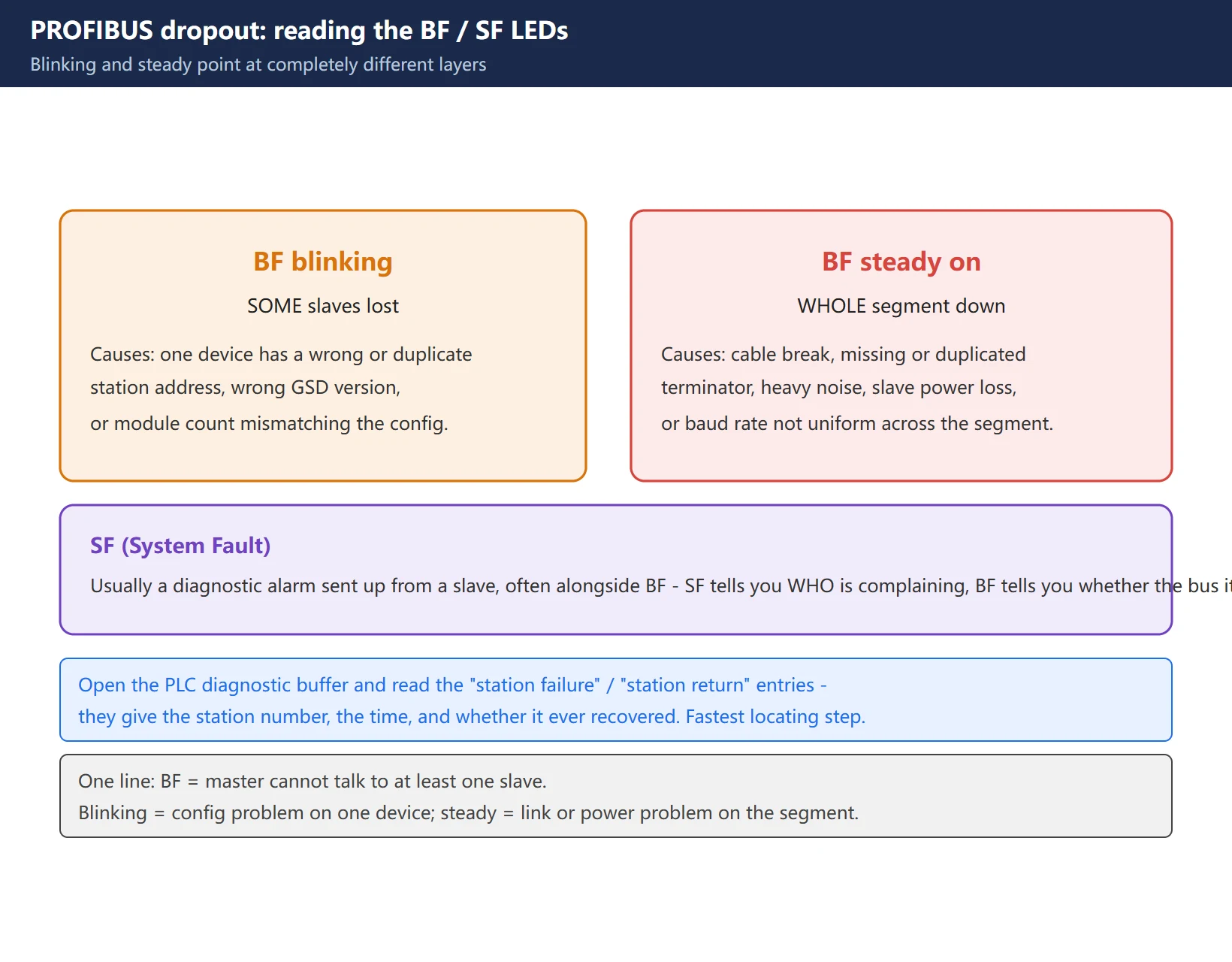
- BF (Bus Fault), red: the master cannot communicate with at least one slave.
– BF blinking: some slaves are lost – usually an address or configuration problem on one device.
– BF steady on: the whole segment is down – usually cable, terminator, noise or power.
- SF (System Fault): usually a diagnostic alarm coming from a slave, often appearing alongside BF.
At the same time, open the PLC’s diagnostic buffer and read the “station failure” and “station return” entries – they tell you directly which station dropped, when, and whether it ever recovered. This is the single most effective step on the PROFIBUS side.
7. PROFIBUS: the five checks – terminators / address / A-B / baud & GSD / shielding
Run these five in order; the first four clear the vast majority of basic faults.
- Terminators: a segment must have exactly two terminators, switched ON at the two ends, with every mid-line station set to OFF. DP connectors have a built-in ON/OFF switch. Missing one, adding an extra, or switching one on mid-line causes reflections and unstable communication. This is the number one PROFIBUS fault.
- Station address: the slave’s physical address (DIP switches or software) must match the hardware configuration, with no duplicates network-wide. A duplicate address means the master talks to one device at random while the other keeps erroring.
- A/B lines: on the DB9 connector, B goes to pin 3 and A to pin 8 – swapping them is the classic beginner error. Also confirm connectors are seated and pins are not oxidised.
- Baud rate and GSD: the whole segment must run the same baud rate (a master at 1.5 Mbps with a slave at 9.6 kbps gives you “slave not responding”); a wrong GSD version or a configured module count that does not match reality makes the master report “configuration data mismatch”.
- Shielding and grounding: ground the shield at one point; route the violet DP cable separately from VFD/motor power cables and keep distance – never in the same tray.
Intermittent dropouts are almost always physical layer: bad shield bonding, ground potential difference, or a crushed cable. One documented case had roughly 2 V AC between a slave’s enclosure and the cabinet earth bar, dropping the line periodically until the grounding was separated. When dropouts are intermittent, measure potential differences and check shielding before swapping parts.
8. A general troubleshooting order, plus safety
Whichever bus you are on, fix this order – it clears most basic faults within a couple of minutes:
- Scope of the symptom: one station dropped, or the whole segment / rest of the chain? – decides whether this is a local config problem or a link/power problem.
- Slave power: confirm the dropped station actually has power (is 24 V healthy, or pulled down by a short).
- Physical connection: connectors seated, cable undamaged, wiring direction correct (B-in/A-out on I/O Link, A/B pinout on PROFIBUS).
- Address and configuration: does the station/group number match the configuration, any duplicates, does the module model match its configured name.
- Terminators and shielding (PROFIBUS side): correct terminators at the two ends, shield grounded at one point.
- Finish with diagnostic tools: on I/O Link, walk the chain on the PMC diagnostic screen; on PROFIBUS, use the diagnostic buffer plus a bus analyser (such as ProfiTrace) to see telegrams and signal quality.
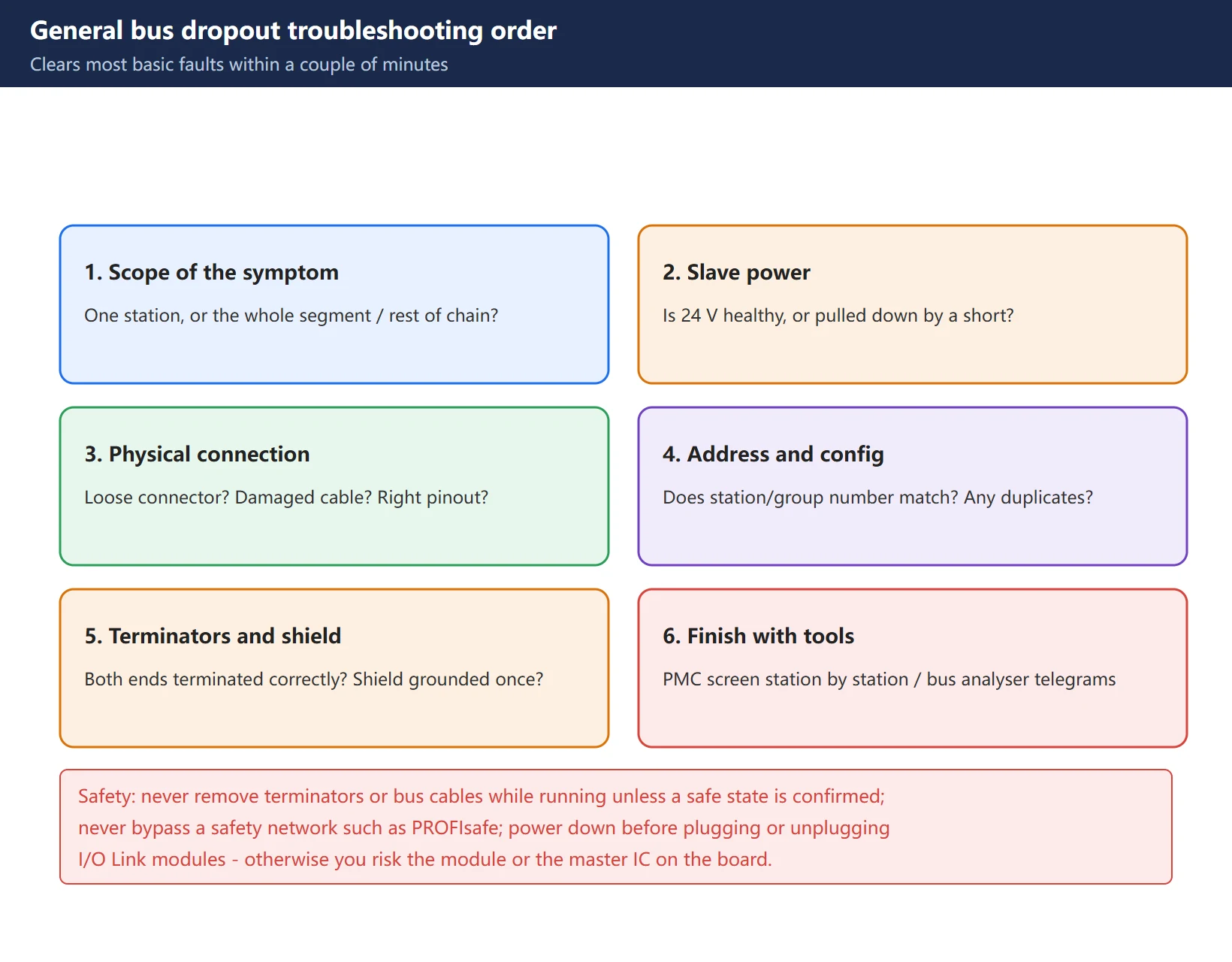
Safety: do not remove terminators or bus cables while the machine is running unless you have confirmed a safe state. On safety networks such as PROFIsafe, follow the safety procedure and never bypass a safety function. On the I/O Link side, power down before plugging or unplugging modules – hot-swapping risks damaging the module or the I/O Link master IC on the main board.
FAQ
The alarm says “group 03 failed” – does that mean the group 03 module is dead?
Not necessarily. This is the classic I/O Link misdiagnosis. I/O Link is a daisy chain: when one module stops responding, that module’s group and every higher-numbered group become unavailable – even if their own hardware is fine. So “group 03 failed” only tells you the chain broke at group 03 or earlier. The correct method is to start at the master and walk the chain station by station; the break is between the last slave that still appears on the diagnostic screen and the next one. Replacing the module named in the alarm very often changes nothing.
What is the difference between a blinking and a steady BF LED on PROFIBUS?
BF blinking means some slaves are lost – typically an address, GSD or configuration problem on one device. BF steady on means the whole segment is down – typically a cable break, a missing or duplicated terminator, heavy noise, or lost slave power. An accompanying SF is usually a diagnostic alarm from a slave. Read the PLC diagnostic buffer at the same time: the “station failure” and “station return” entries point straight at the station number and timing.
The dropout is intermittent and new connectors and cable did not help – what else can I check?
Intermittent behaviour points at the physical layer, not configuration. Check three things first: shield bonding – is it grounded, and is there a ground loop; ground potential difference – measure AC voltage between the slave enclosure and the cabinet earth bar (a documented case had about 2 V causing periodic drops, fixed by separating the grounding); and crushed cable – one case had a cable pinched against a tray edge for so long that the inner conductor had broken and only the shield was still conducting. Visually it looked fine and only a scope or bus analyser revealed it. When in doubt, put a bus analyser such as ProfiTrace on the line and look at signal quality and retry counts.
Last updated: 2026-10-30
Where to go next
- FANUC Troubleshooting — the full guide library: alarms, diagnosis numbers, servo, spindle, PMC and electrical faults, organised by symptom.
- CNC Repair Tools — which instrument measures what: multimeters, clamp meters, insulation testers and oscilloscopes, with the specification that actually matters.
- Remote Technical Support — have the readings reviewed with you: alarm reverse lookup, PMC ladder analysis and servo tuning advice by call. Repair companies and integrators welcome.
Read the guide, get the right instrument, or walk the diagnosis through with someone — pick whichever you need.
The original Chinese version — same procedure, with the full field notes.






















暂无评论内容