


Any alarm or parameter number that is builder-defined must follow that machine’s parameter list / ladder. Builders differ widely.
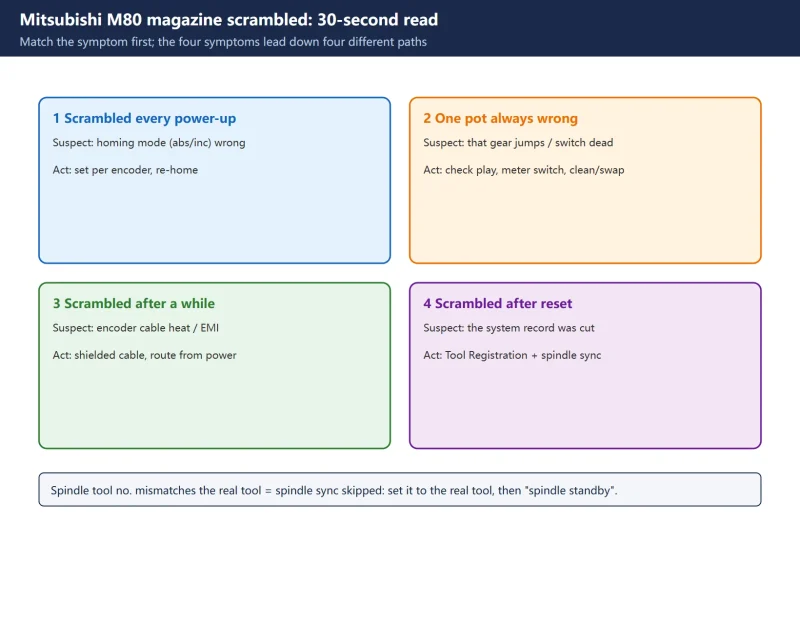
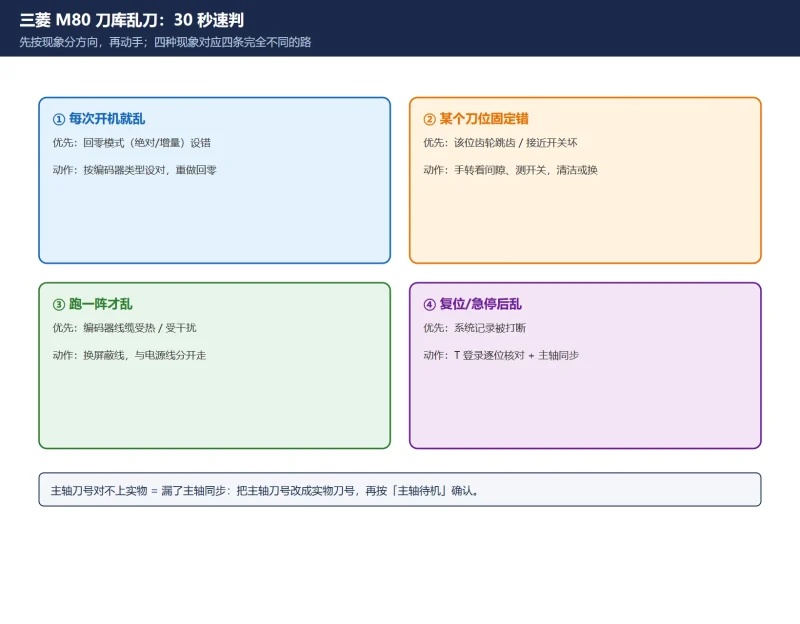
1. Symptom -> first suspect -> where to check
| Symptom | First suspect | Check | Action |
|---|---|---|---|
| Scrambled on every power-up | Magazine homing mode (absolute/incremental) wrong | Homing-mode parameter | Set per encoder type, re-home |
| One pot always wrong | That pot's drive gear jumping / switch dead | Turn by hand for play; meter the switch | Change gear or adjust mesh; clean/replace switch |
| Scrambled after running a while | Encoder cable heat or interference | Cable routing, plugs, shielding | Shielded cable, route away from power |
| Scrambled after reset mid-change | Interrupted system record | Tool Registration table | Go to Tool Registration, correct pot by pot |
| Spindle tool no. mismatches real tool | Spindle sync skipped | Spindle tool no. | Set to the real tool + spindle standby |
| Change fails with an L-type alarm | Builder-defined in the ladder | That machine's alarm manual | Follow the builder's definition, not a generic table |
![图片[1]-Mitsubishi M80 Magazine Scrambled Quick Chart: Symptom, Tool Registration Fields and R Registers-CNCShare | 数控电气技术中心](https://www.cncshare.com/wp-content/uploads/2026/11/DC-en-01.webp)
2. The four targets in Tool Registration
The main fix on the M80 is Setup -> Tool Registration, which registers a tool number to one of four targets:
| Target | Meaning | Purpose |
|---|---|---|
| Tool No. | The logical number a T command references | The change selects by it |
| Magazine pot | The physical pot position (1..N) | Where that tool normally sits |
| Spindle | The tool currently in the spindle | Must be swapped out first |
| Standby | The pre-selected parking position for the next tool | Pre-select / standby logic |
3. R-register address quick reference
The ladder/PMC reads and writes tool numbers here (official PLC interface manual):
| Address | Content |
|---|---|
R10700 onward | Magazine tool data, in pot order |
R11800~R11823 | Spare-tool data |
R11824~R11847 | Active-tool (current tool) data |
R12200 / R12201 | Spindle tool number |
Addresses follow the official manual, but on a specific machine the ladder may map or reuse them – confirm against that machine’s ladder before writing.
4. How this page and the full article divide the work
- This page: match the symptom + field/address lookup, fast.
- Full article: real-vs-false judgement, three-way split, Tool Registration steps, five-step recovery, four mechanical checks. Read it when the chart does not fix it.
Frequently Asked Questions
Can this quick chart replace a full troubleshooting pass?
No. The chart tells you where to suspect first, but real-vs-false judgement, the pot-by-pot Tool Registration steps and the mechanical checks all need the full procedure. The chart speeds up locating; it does not replace operating and verifying.
Are the R-register addresses fixed?
They follow the M80-series official PLC interface manual, but each machine’s ladder may add a mapping layer or use them differently. Confirm against that machine’s ladder before writing – do not type the manual address straight in.
What is the “standby location” in Tool Registration?
Standby is the pre-selected parking position for the next tool, used in pre-select / standby logic. Register a tool number to standby and the system can index the next tool into place before the change.
Last updated: 2026-11-01
Mitsubishi M80 tool magazine out-of-order (full)
Where to go next
- FANUC Troubleshooting — the full guide library: alarms, diagnosis numbers, servo, spindle, PMC and electrical faults, organised by symptom.
- CNC Repair Tools — which instrument measures what: multimeters, clamp meters, insulation testers and oscilloscopes, with the specification that actually matters.
- Remote Technical Support — have the readings reviewed with you: alarm reverse lookup, PMC ladder analysis and servo tuning advice by call. Repair companies and integrators welcome.
Read the guide, get the right instrument, or walk the diagnosis through with someone — pick whichever you need.
The original Chinese version — same procedure, with the full field notes.






























暂无评论内容