


🚨 Scope and compliance: The function, range and conversion of parameter 4077 are checked against public Fanuc serial-spindle data (4077 = orientation stop-position shift; 4096 counts/rev; 0–4095 = 0°–360°; with 3117#1=1 diagnosis 445 shows position data and 449 shows the one-turn-signal start angle). Count basis can differ by control generation (31i/0i/18i) and encoder resolution — confirm against your own machine’s manual. The circulated form “G10 L50 N4077 P1 R(xxx)” was not verified; the standard G10 L50 parameter-write format is
Nand that is what is used here. “30i uses L52” and the “S50M03;G04X1;M05 unlock” trick are field reports, marked unverified, not official operating advice. No manual text is reproduced and no download links are given.P
30-Second Triage: Four Entrances
| Your situation | Look here first | Section |
|---|---|---|
| Tool changer misses the keyway by a small angle | Read current 4077 + convert counts | 2 |
| Want to confirm where it stops | 3117#1=1, read 445 / 449 | 3 |
| Change angle temporarily inside a program | G10 L50 / N4077 Pvalue / G11 | 4 |
| M19 runs but the spindle never turns | Check orientation option + PMC M19 decode | 5 |
Table 0 Four entrances for M19 angle problems
Companion page: Fanuc 0i-B / 0i-C Legacy Alarms. Related on this site: Fanuc spindle gear-range change parameters, Fanuc alarm / parameter / diagnostic cross-reference.
1. What M19 Actually Does: Decelerate → Position Control → Count the Mark → Hold
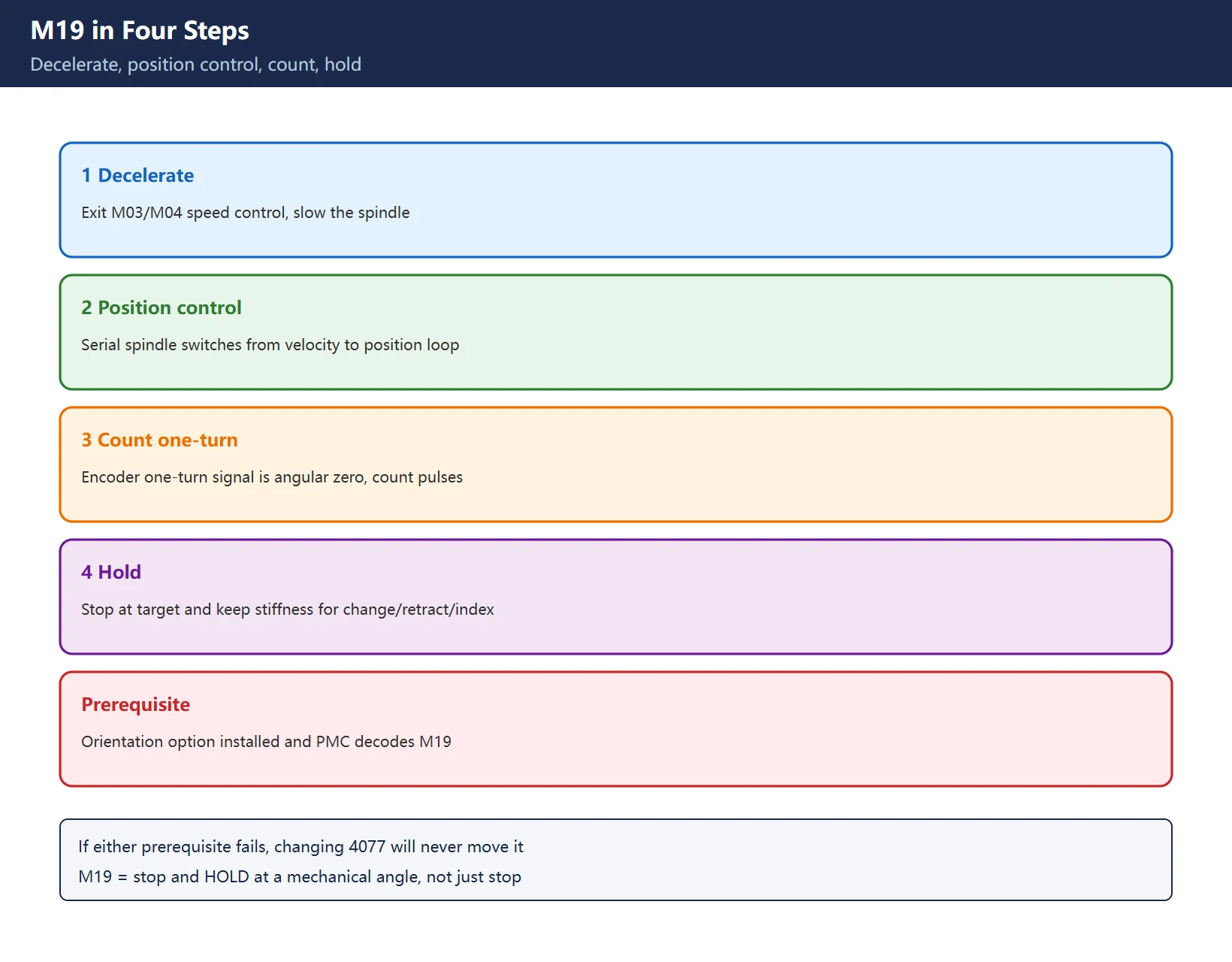
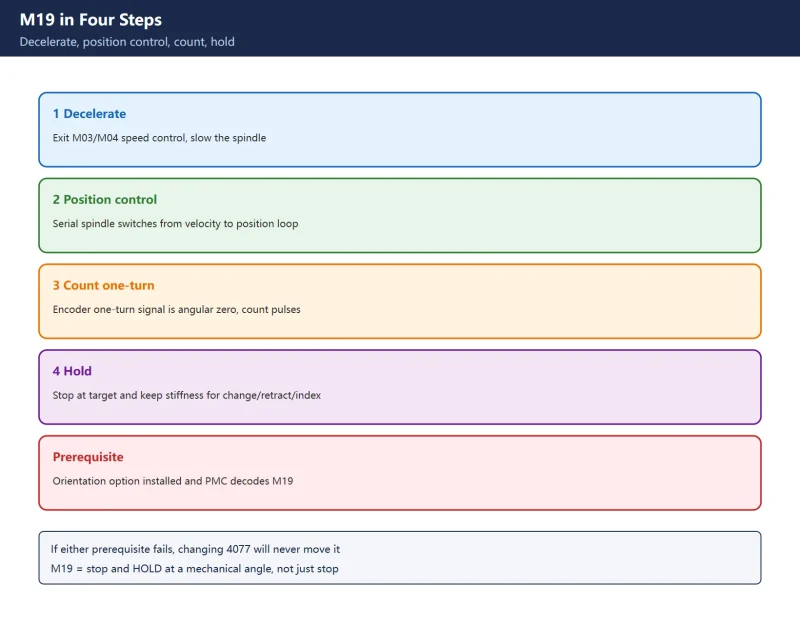
M19 is not “stop the spindle” — it is stop and hold the spindle at a specific mechanical angle:
- Decelerate: leave speed control (M03/M04), slow down;
- Switch to position control: the serial spindle moves from the velocity loop into the position loop;
- Count the one-turn signal: the encoder’s one-turn signal is the angular zero reference; the controller counts pulses to know the current mechanical angle;
- Hold: stop at the target and keep positional stiffness so tool change, retract or indexing can happen.
An often-missed prerequisite: the orientation option must be installed and the PMC must decode M19. If either is missing, changing 4077 will never move the spindle — that is not an angle problem, it is a disabled function (see Section 5).
2. Angle ↔ Parameter: 4096 Counts/Rev, 4077 Holds Counts Not Degrees
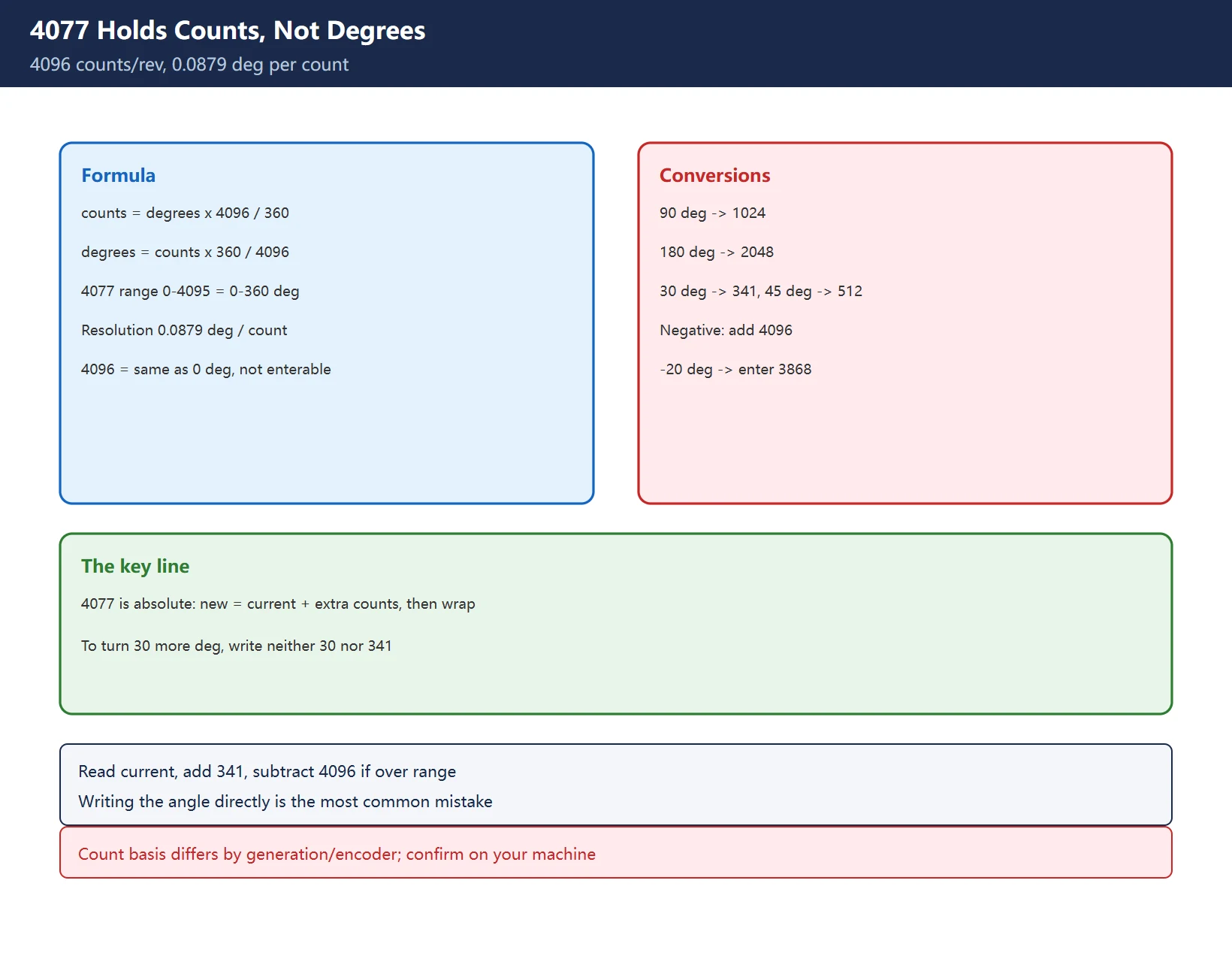
Verified relationship:
counts  = degrees x 4096 / 360
degrees = counts x 360 / 4096| Item | Value |
|---|---|
| Counts per revolution | 4096 |
| 4077 range | 0 – 4095 (= 0° – 360°) |
| Resolution | 360° / 4096 = 0.0879° per count |
| 4096 | Not enterable (same physical position as 0°); if you calculate 4096, enter 0 |
| Negative value | Add 4096 to wrap back into range, e.g. −20° → −228 → enter 3868 |
Table 1 4077 count basis and boundaries (confirm against your encoder)
| Desired shift | Value for 4077 |
|---|---|
| 0° | 0 |
| 15° | 171 |
| 30° | 341 |
| 45° | 512 |
| 90° | 1024 |
| 120° | 1365 |
| 180° | 2048 |
| 270° | 3072 |
| 359.91° | 4095 |
Table 2 Common angle ↔ 4077 count conversions
The single most important line: 4077 is an absolute offset. “New value = current value + counts for the extra angle, then wrap into 0–4095.” To turn an *additional* 30° you neither write 30 nor 341 — you read the current value, add 341, and subtract 4096 if it exceeds 4095. Writing the angle directly is the most common way to get this wrong.
3. Set 3117#1 = 1, Read Diagnostics 445 / 449, Then Adjust
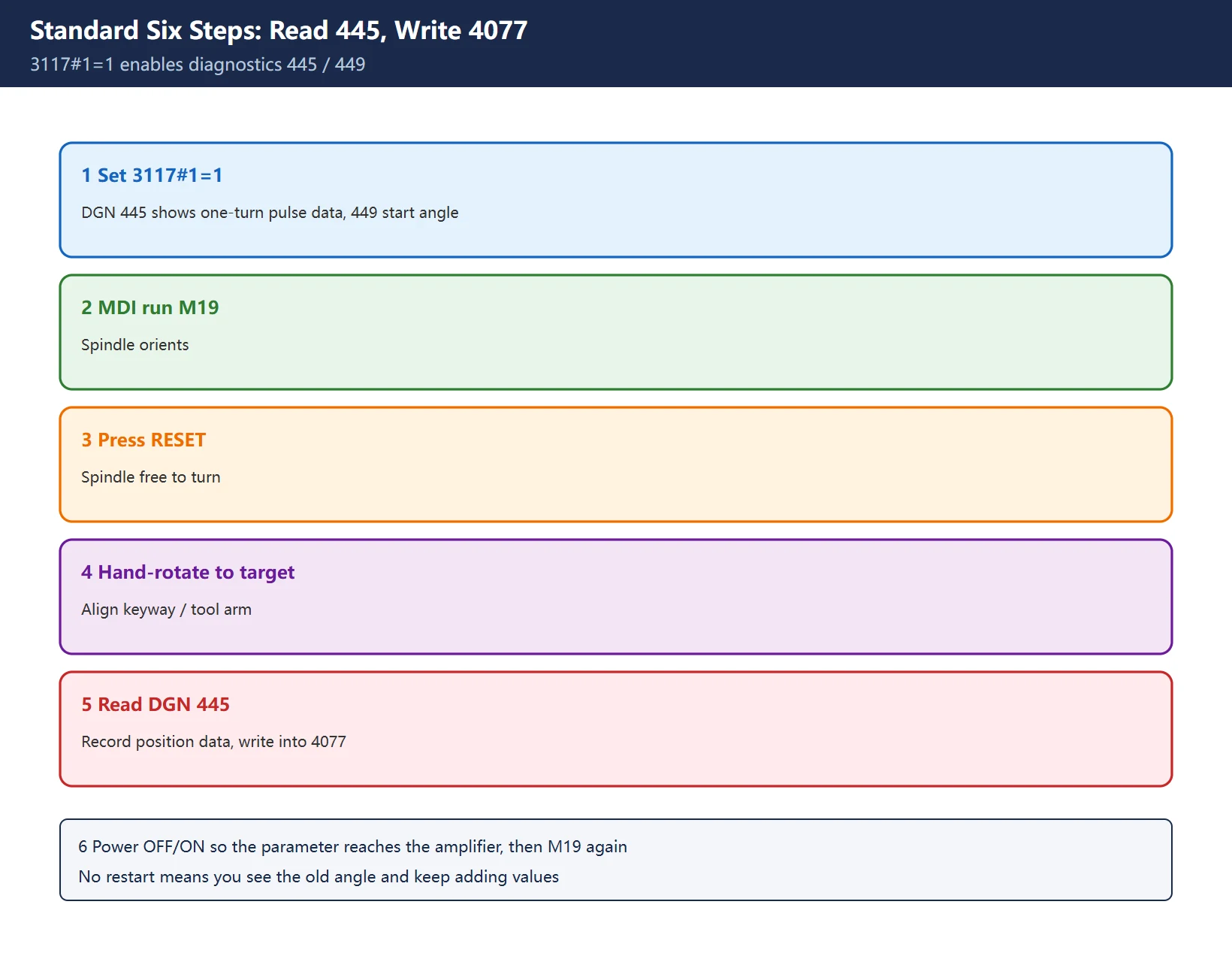
With parameter 3117#1 = 1: diagnosis 445 shows pulse data from the one-turn signal position encoder, and diagnosis 449 shows the one-turn-signal start angle. This is what turns “where it physically stopped” into a readable number.
Standard adjustment path (from the official procedure):
- Set 3117#1 = 1 (enable parameter writing if needed, then turn it back off);
- In MDI run
M19to orient the spindle; - Press RESET so the spindle is free to turn;
- Hand-rotate the spindle to the target position (align keyway / tool arm);
- Open the diagnostic screen and record the position data in 445;
- Write that value into 4077, power OFF/ON so the spindle parameter reaches the amplifier, then run M19 again to verify.
Table 3 Standard six-step adjustment
Why the power cycle: spindle-side parameters are often only transferred to the amplifier after power OFF/ON. Verifying without a restart shows the old angle and tempts you to keep adding values.
4. In-Program Orientation: G10 L50 Writes 4077 (Corrected Form)
On a machine without a C axis, use the parameter-write command to change 4077 temporarily for angle-head indexing:
G10 L50       (enter parameter write mode)
N4077 P1024   (set 4077 = 1024 = 90 deg)
G11           (cancel parameter write mode)
M19           (re-orient at the new angle)
...
G10 L50
N4077 P0      (restore original value before tool change)
G11
M19
Form correction: the circulated / brief form N4077 P1 R(xxx) was not verified. The standard G10 L50 parameter-write format is N. The claim “30i uses L52” was also not verified against an official manual; treat it as unconfirmed and check your own manual for generation-specific L numbers.
Safety red line: changing 4077 shifts the stop angle away from the ATC arm keyway. Before any M06 tool change after an orientation change, restore 4077 to its original value. The first verification on a machine with an ATC must be done with the door closed, no tool loaded, single-block — confirm no collision before returning to production.
5. Three Common Traps
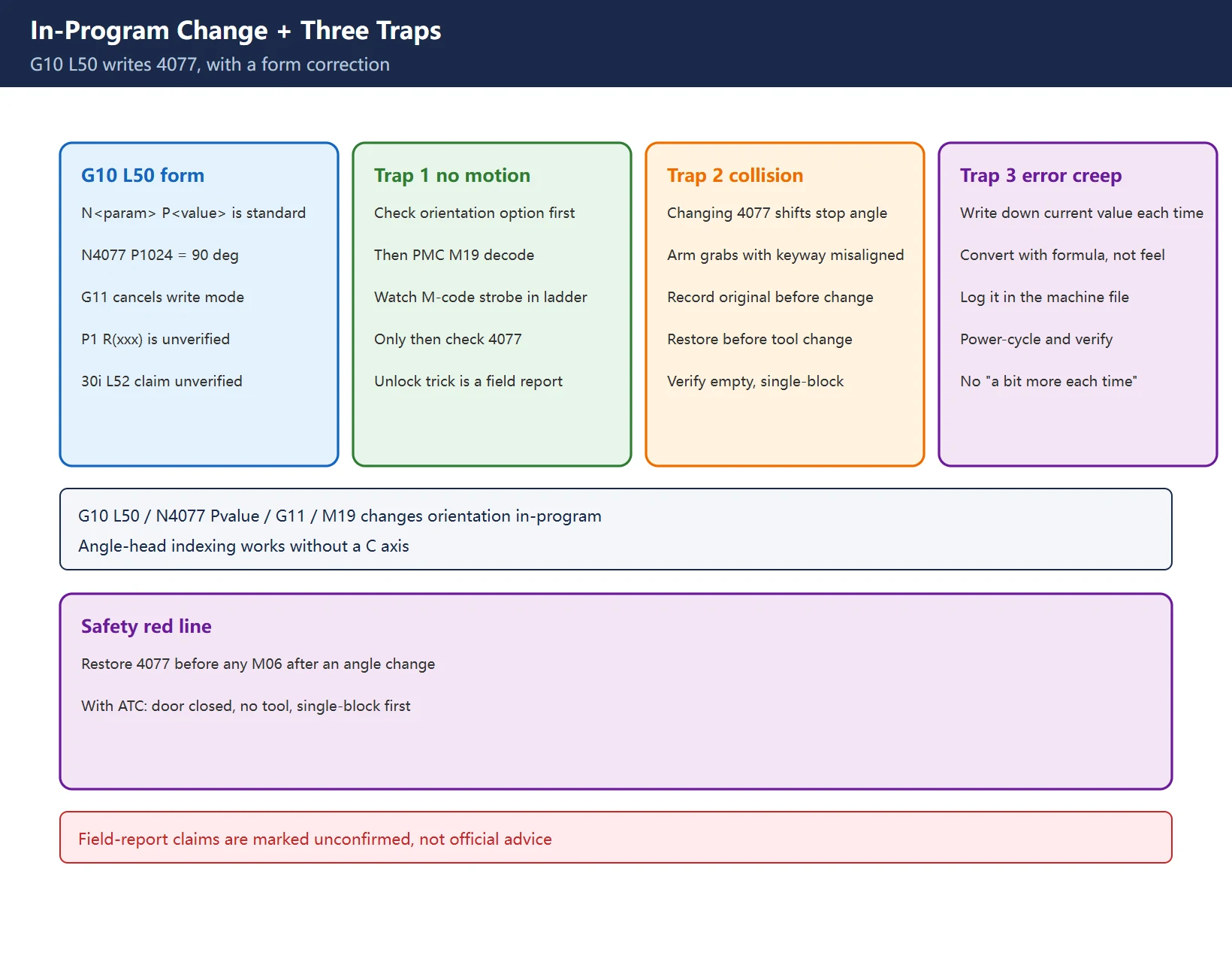
Trap 1: M19 runs but the spindle does not turn. This is almost never an angle issue. Order of checks: ① orientation option installed (option list / parameters); ② watch the ladder to see whether the PMC decoded M19 and asserted the orientation command to the spindle amplifier. Only when both are good do you return to 4077. The circulated “add S50M03;G04X1;M05 to release a latch” is a field report, marked unverified, not official advice.
Trap 2: Tool-change collision. Changing 4077 changes the stop angle; the arm grabs with the keyway misaligned and hits. Record the original value before any change, restore before the next tool change, and run the first verification empty and single-block — this is not optional.
Trap 3: Accumulated error. “A little more, then a little more” without recording the starting value leaves nobody knowing the original angle. Always copy the current 4077 into the machine log before editing, convert with the formula rather than by feel, and power-cycle + verify once after every change.
Frequently Asked Questions
How do I adjust the Fanuc spindle orientation angle, and how does 4077 convert to degrees?
4077 holds an offset count relative to the one-turn signal: 4096 counts/rev = 0°–360°, resolution 0.0879°/count. Use counts = degrees × 4096 / 360. Range is 0–4095; 4096 is the same position as 0° and is not enterable; negatives wrap by adding 4096. Change = current value + counts for the extra angle, wrapped into range — never write the angle in degrees directly.
M19 executes but the spindle does not rotate — what is wrong?
Not an angle problem first: ① is the orientation option installed? ② does the PMC decode M19 and assert the orientation command (watch the M-code strobe in the ladder)? Only when both check out do you look at 4077 and diagnostics 445/449.
How can I index with M19 on a machine without a C axis?
Use G10 L50 / N4077 P to change the orientation angle temporarily (e.g. P1024 = 90°), then restore the original value afterward. Changing 4077 misaligns the ATC keyway — restore before any tool change and verify empty, single-block. The write format is P; the circulated P1 R(xxx) is unverified.
Last updated: 2026-11-15
Where to go next
- FANUC Troubleshooting — the full guide library: alarms, diagnosis numbers, servo, spindle, PMC and electrical faults, organised by symptom.
- CNC Repair Tools — which instrument measures what: multimeters, clamp meters, insulation testers and oscilloscopes, with the specification that actually matters.
- Remote Technical Support — have the readings reviewed with you: alarm reverse lookup, PMC ladder analysis and servo tuning advice by call. Repair companies and integrators welcome.
- Buying & Ownership Decisions — refurbished vs new, used-machine checks, software licensing and manuals: spend with the field facts in hand.
Read the guide, get the right instrument, or walk the diagnosis through with someone — pick whichever you need.
The original Chinese version — same procedure, with the full field notes.


















暂无评论内容