


🚨 Scope and compliance: the two-system numbering model, the verified document IDs (cycles manual in Chinese 670388-Z4 and DIN/ISO manual in Chinese 737760-Z3, both under the 60642x-04 software family), the TNCguide download path and language sub-directories (de / en / cs / fr / it / es / pt / sv / da / fi / nl), the TNCremoNT binary-transfer extension .CHM, and the FCL rules (functions marked FCL n, not obtainable by a software update alone, all available on a new machine without surcharge, permanent use requires a purchased code) come from HEIDENHAIN official manuals and the official documentation library. Two circulating claims — a DIN/ISO manual document ID “670391-xx” and an “E-suffix export version limited to four interpolating linear axes” — were not verified against official text and are flagged as unconfirmed. Manual text is copyrighted; this page reproduces no body text, offers no third-party mirrors, no cloud-drive links and no bundled downloads.
Quick check: get the software number first
| You want | Look up first | Where | Common mistake |
|---|---|---|---|
| How a function works | Your NC software number + manual type | Official library, filtered by software number | Treating one number as one book |
| A Chinese-language manual | Software number + language | Language list in the official library | Random cloud-drive “Chinese versions” |
| On-machine help | NC software number + language | TNCguide online help (CHM) | Wrong language sub-directory |
| A function your machine lacks | FCL marking / software options | Supplied documents + machine tool builder | Self-diagnosing an “export version” |
Table 0 Four retrieval needs and their first step
Sister article: FANUC CNC Simulation Software: the Official CNC Guide Family and Free-Version Limits. For program transfer into the control see HEIDENHAIN TNCremo / TNCcmd Program Transfer.
1. Two numbering systems
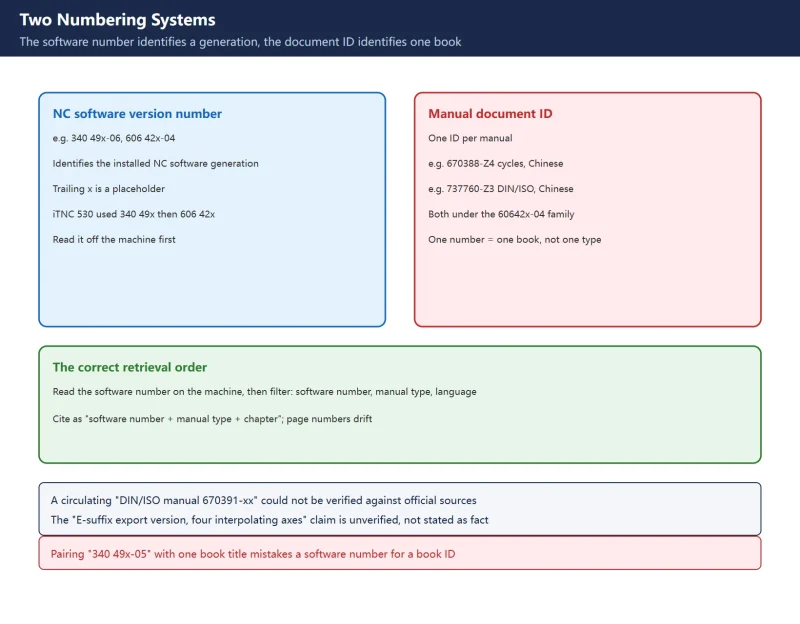
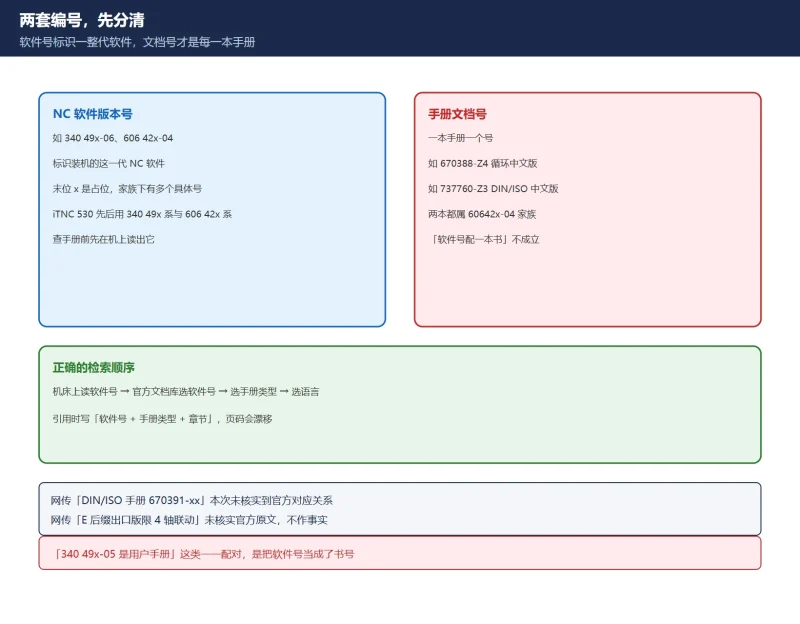
The first system is the NC software version number, for example 340 49x-06 and 606 42x-04. It identifies the NC software installed on the machine; the trailing x is a placeholder, and one family contains several concrete software numbers (606420-04, 606421-04, 606424-04 and so on). The iTNC 530 used the 340 49x series and then the 606 42x series across its life cycle — which is why files all called “iTNC 530 manual” carry two different prefixes.
The second system is the manual document ID, which is what actually identifies one book. Every software family ships a set of user’s manuals — conversational programming, DIN/ISO programming, cycles, touch probes, turning — each with its own document ID. Two verified examples from the official library: the cycles programming manual in Chinese under the 60642x-04 family carries document ID 670388-Z4, and the DIN/ISO programming manual in Chinese under the same family carries 737760-Z3. Two different books, same software family, both in Chinese — proof that “one software number = one manual type” simply does not hold.
| Circulating claim | Reality | This page |
|---|---|---|
| “User's manual 340 49x-05” | 340 49x-05 is a software family; several manuals live under it | Retrieve the whole set by software number |
| “Cycles manual 60642x-04” | Right book, wrong number: the Chinese cycles manual is 670388-Z4 | Cite the document ID |
| “DIN/ISO manual 670391-xx” | Not verified against any official source | Flagged unconfirmed |
| “Conversational (Klartext) manual 60642x-01” | 60642x-01 is a software version; the conversational manual has its own ID | Do not treat software numbers as book IDs |
Table 1 Four circulating numbering claims, verified
Step one is always to read your machine’s software number: the “TNC model, software and features” section of the user’s manual explains where it is displayed, and the machine’s nameplate and supplied documents list it too.
2. What each manual in the family covers
| Manual | Covers | When you open it |
|---|---|---|
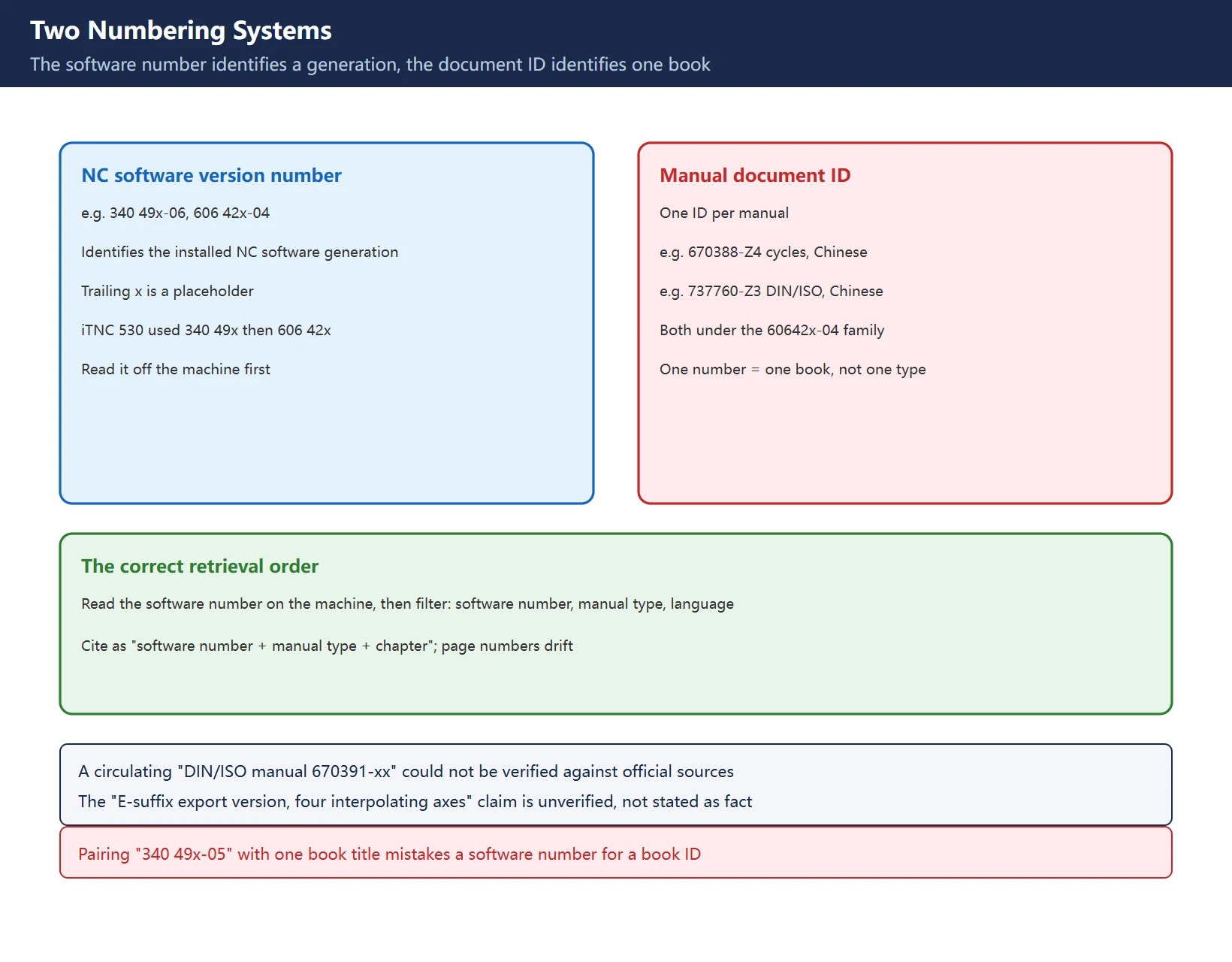
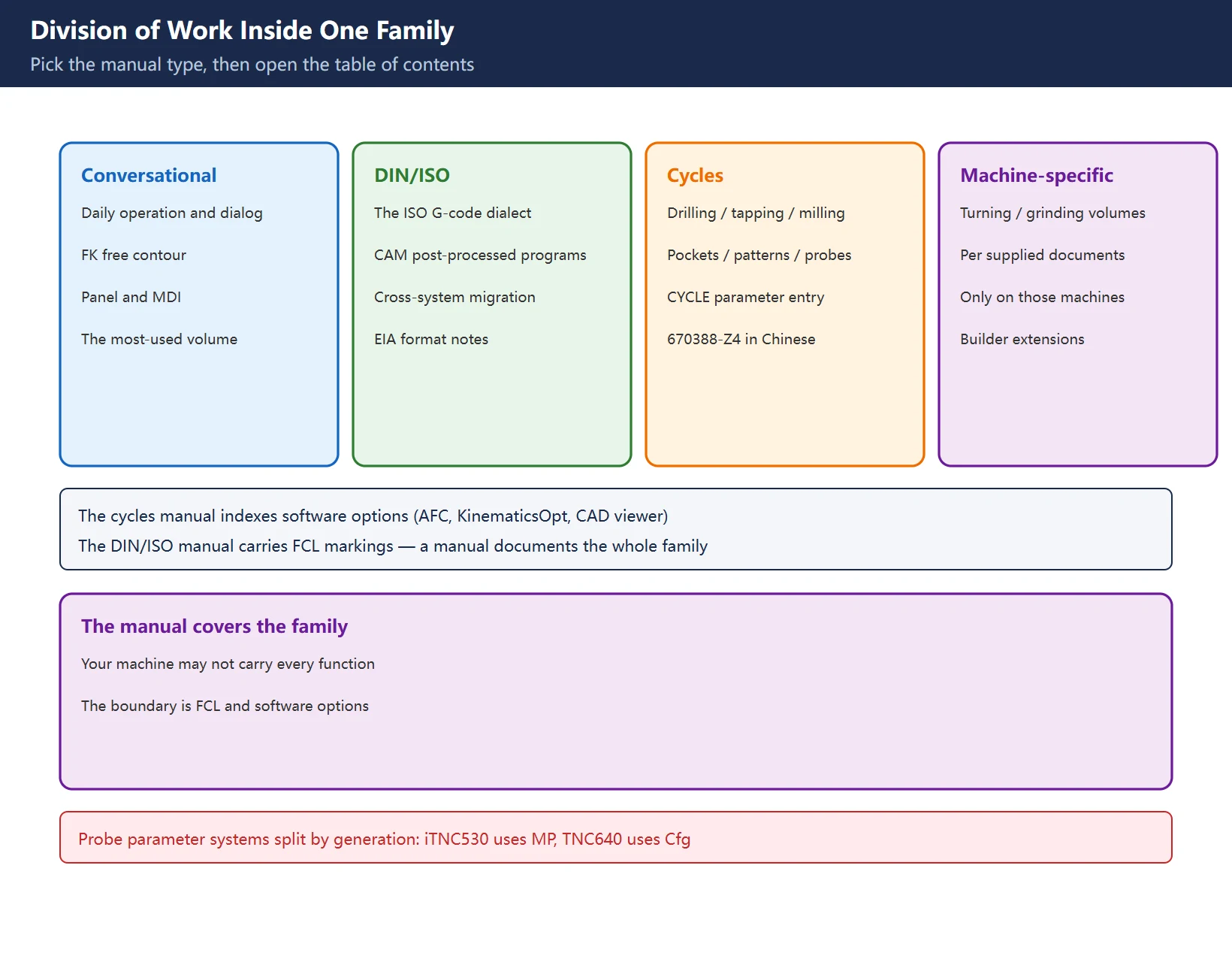
| Conversational (Klartext) | Daily operation, dialog programming, FK free contour | Panel operation, MDI, conversational programming |
| DIN/ISO programming | The ISO G-code dialect | CAM post-processed ISO programs, cross-system migration |
| Cycles | Fixed cycles: drilling, tapping, milling, pockets, patterns, touch-probe cycles | Filling cycle parameters |
| Turning / grinding volumes | Machine-specific functions | Only on those machine types |
Table 2 Division of work inside one software family
Note the cross-references: the cycles manual lists software options (AFC adaptive feed control, KinematicsOpt, the CAD viewer and others), and the DIN/ISO manual carries FCL markings. A manual documents the full functional range of the software family, not your particular machine configuration — that boundary is the subject of section 6.
3. The official retrieval path
The library lives under the “Documentation / Information” area of the HEIDENHAIN website (Documentation → technical documents → manuals) on the content.heidenhain.de domain. Retrieval is a three-level filter:
| Step | Enter | Example |
|---|---|---|
| 1 Software number | Your NC software number | iTNC 530 (60642x-04) |
| 2 Manual type | Conversational / DIN-ISO / cycles / touch probes | Cycles programming (user's manual) |
| 3 Language | Languages offered on that page | Chinese |
Table 3 Three-level retrieval in the official library
Two findings matter. First, Chinese-language manuals exist officially: 670388-Z4 and 737760-Z3 above are simplified-Chinese official PDFs, and traditional Chinese is offered as well; which languages exist for a given software family is shown on the library page itself. Second, citation discipline: page numbers drift between versions, but “software number + manual type + chapter title” is stable.
The “E-suffix export version with at most four interpolating linear axes” claim circulates widely in Chinese repair forums, but this page could not verify it against official text, and what an “export version” restricts differs between product generations. If a machine does not match expectations, check the supplied documents and nameplate and ask HEIDENHAIN or the machine tool builder directly.
4. TNCguide: installing the help system on the machine
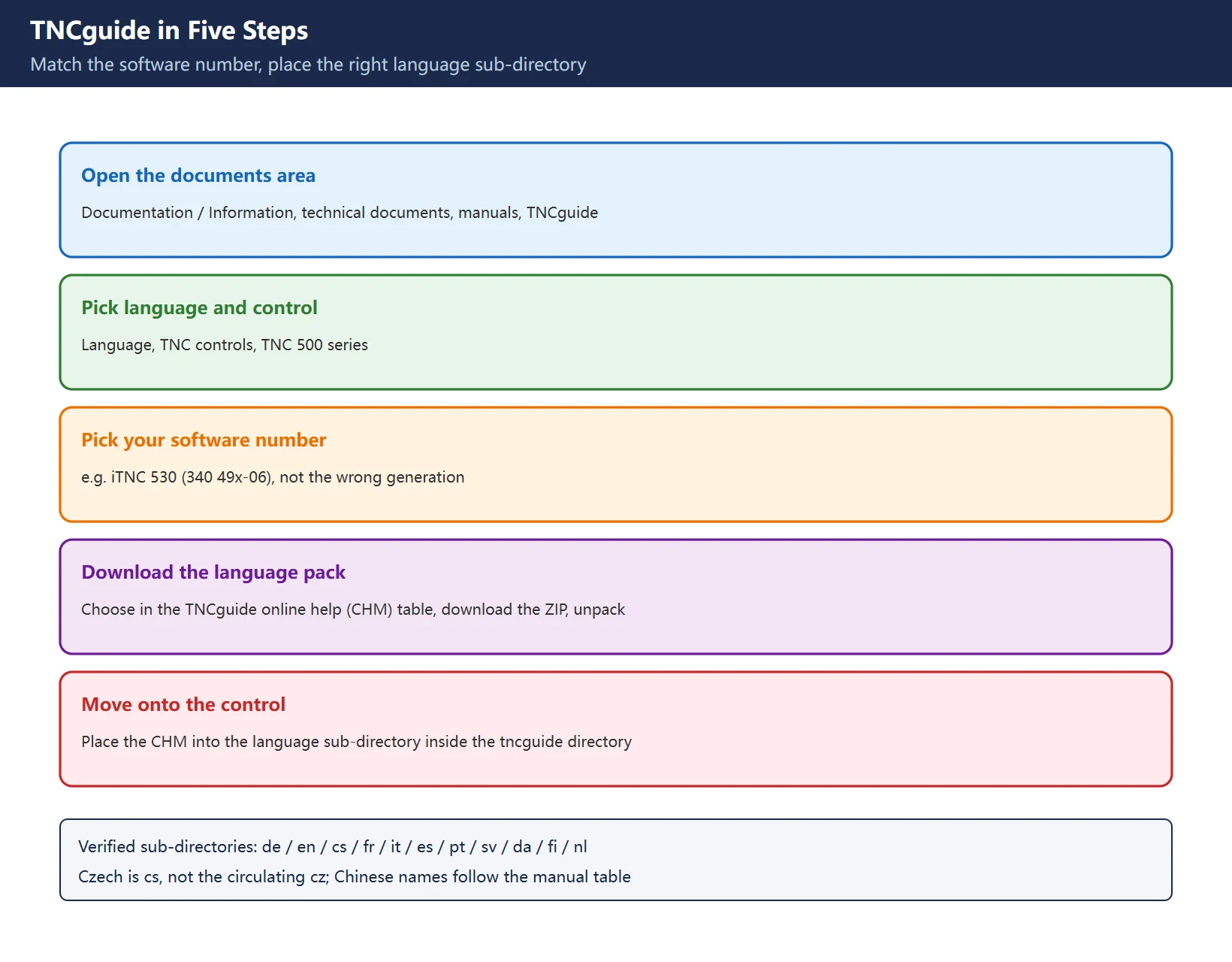
TNCguide is the on-machine context-sensitive help system: CHM files that jump straight to the explanation of the function you are using. The “download current help files” section of the user’s manual gives the path:
| Step | Action | Location |
|---|---|---|
| 1 | Open the documents area | Documentation / Information → technical documents → manuals → TNCguide |
| 2 | Choose language and control | Language → TNC controls → TNC 500 series |
| 3 | Choose your software number | e.g. iTNC 530 (340 49x-06) |
| 4 | Download the language pack | Pick the language in the TNCguide online help (CHM) table, download the ZIP, unpack |
| 5 | Move to the control | Place the CHM into the language sub-directory of the tncguide directory on the TNC |
Table 4 Official TNCguide download and install path
Two traps: the software number must match (a 340 49x-06 help file on a 606 42x-04 system will not match reality), and the language sub-directory must be right — covered next.
5. Language sub-directories and TNCremo transfer
Language sub-directories verified from the official manual:
| Language | Sub-directory | Language | Sub-directory |
|---|---|---|---|
| German | de | Portuguese | pt |
| English | en | Swedish | sv |
| Czech | cs | Danish | da |
| French | fr | Finnish | fi |
| Italian | it | Dutch | nl |
| Spanish | es | Chinese | See the table in your manual |
Table 5 TNCguide language sub-directories (excerpt; full table in the manual)
One correction worth making: some Chinese-language guides list the Czech sub-directory as cz, but the official manual writes cs. Chinese (simplified and traditional) rows do exist in the manual’s table; this page does not copy the exact sub-directory names here, because they must match the table in the manual that belongs to your software generation. A wrong sub-directory shows up as help that will not open or will not jump.
Transfer the CHM with TNCremoNT: menu Extras > Configuration > Mode > Transfer in binary format, and enter the extension .CHM. Skip this and the transfer runs in text mode, which corrupts the file. For the Ethernet connection, ports and batch transfer see HEIDENHAIN TNCremo / TNCcmd Program Transfer.
6. FCL and software options: in the manual is not on your machine
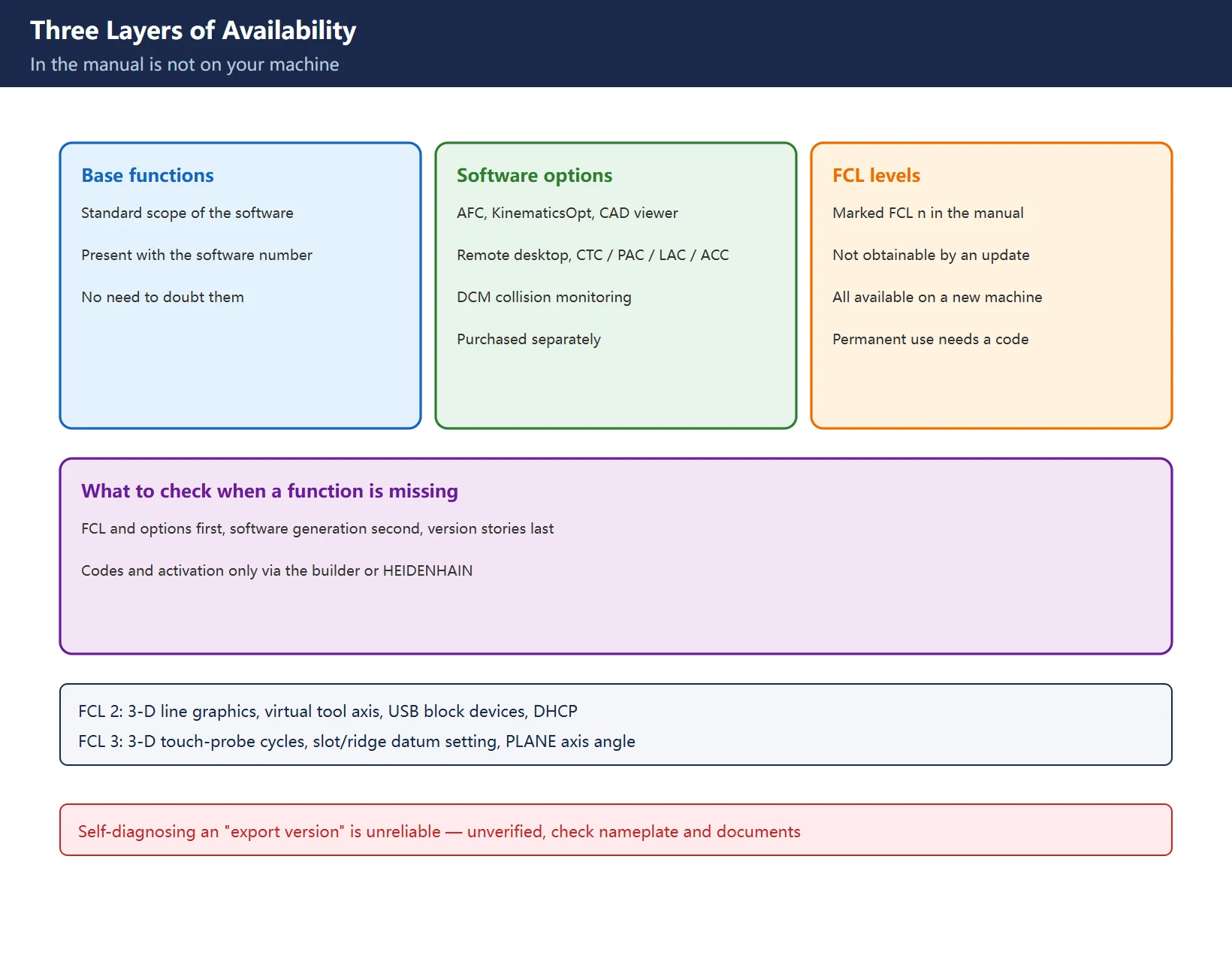
| Concept | What it is | Activation |
|---|---|---|
| Base functions | Standard scope of the software | Present with the software number |
| Software options | AFC adaptive feed control, KinematicsOpt, CAD viewer, remote desktop manager, CTC / PAC / LAC / ACC, DCM collision monitoring | Purchased separately, configured by the machine tool builder |
| FCL (Feature Content Level) | Upgrade functions marked FCL n in the manual | Not obtainable by a software update alone; all available on a new machine without surcharge; permanent use requires a purchased code |
Table 6 Base functions, software options and FCL
The FCL rule changes how you read the manual: a function printed with an FCL n marking belongs to the family’s full range, and your machine may hold it only temporarily, or need a code for permanent use. FCL 2 brought 3-D line graphics, the virtual tool axis, USB block-device support and DHCP; FCL 3 brought 3-D touch-probe cycles and PLANE axis-angle entry. All are documented in full — but printed in the manual and available on your machine are two different things. The classic “is my machine an export version?” question is, most of the time, an unactivated FCL function or a missing software option; the export-version claim remains unverified here. Codes and activation go through the machine tool builder or HEIDENHAIN, not third-party sellers.
Scope and compliance
All numbers, paths and rules on this page come from HEIDENHAIN official manuals and the official documentation library; unverified items (the 670391-xx document ID, the E-suffix export version) are flagged inline. This page reproduces no manual body text, offers no third-party mirrors, no cloud-drive links and no bundled downloads; manual PDFs are obtained only from the official HEIDENHAIN library. FCL codes are purchased only through the machine tool builder or official HEIDENHAIN channels.
Frequently Asked Questions
Where do I download HEIDENHAIN iTNC 530 manuals, and is there a Chinese version?
Use the official documentation library (Documentation → technical documents → manuals) filtered by your machine’s NC software number. Chinese versions exist: under the 60642x-04 family, the cycles manual in Chinese is document ID 670388-Z4 and the DIN/ISO manual in Chinese is 737760-Z3. Read the software number off the machine first, then filter by “software number → manual type → language”.
How do I install TNCguide on the machine, and which directory is Chinese?
Download the ZIP from the TNCguide area (Documentation → technical documents → manuals → TNCguide) for your language and software number, unpack it, and place the CHM file into the language sub-directory inside the tncguide directory on the TNC. Verified sub-directories include de, en, cs, fr, it, es, pt, sv, da, fi, nl (Czech is cs, not the circulating “cz”); Chinese sub-directory names follow the table in your machine’s manual. When transferring with TNCremoNT, set “Configuration → Mode → Transfer in binary format” with extension .CHM first.
The manual describes a function my machine does not have — did I get an export version?
Probably not. The manual covers the full range of the software family. Functions marked FCL n cannot be obtained by simply updating the software; they are all available when a new machine is delivered, and permanent use requires a purchased code. Software options are configured separately. Check FCL status and software options first, software generation second, and treat “export version” stories as unverified. Purchase codes through the machine tool builder or HEIDENHAIN.
Last updated: 2026-11-15
Where to go next
- FANUC Troubleshooting — the full guide library: alarms, diagnosis numbers, servo, spindle, PMC and electrical faults, organised by symptom.
- CNC Repair Tools — which instrument measures what: multimeters, clamp meters, insulation testers and oscilloscopes, with the specification that actually matters.
- Remote Technical Support — have the readings reviewed with you: alarm reverse lookup, PMC ladder analysis and servo tuning advice by call. Repair companies and integrators welcome.
Read the guide, get the right instrument, or walk the diagnosis through with someone — pick whichever you need.
The original Chinese version — same procedure, with the full field notes.











暂无评论内容