


On SINUMERIK 828D/840D, following error and contour error are the two quantities most often confused with each other — and the two that decide workpiece accuracy. The first is the per-axis difference between commanded and actual position; the second is what that difference turns into on the workpiece when several axes interpolate together. An out-of-round circle, spikes at the corners, chatter marks on the surface: almost all of it traces back to these two quantities. This article follows the official Siemens wording through the tuning order — first what the three monitoring alarms are actually reporting, then Kv, feedforward, friction compensation, acceleration and jerk, and finally smoothing — with the circularity test as the only judge. A parameter quick-reference table closes the article.
Related reading: how to classify and chase alarms in SINUMERIK 828D Alarm Troubleshooting: 8 High-Frequency Alarms; the mandatory parameter and program backup is in SINUMERIK 828D Parameter and Program Backup and Restore; alarm number ranges are in SINUMERIK 828D Alarm Number Range Reference.
1. Three terms first: following error, contour error, monitoring alarms
Following error is a difference the NCK computes every interpolation cycle: commanded position minus actual position. While an axis moves it is always present; while the axis holds position it should settle close to zero. It is not a fault — it is the inherent product of the position loop. Without following error, the position loop would have nothing to regulate on.
Contour error is the trajectory deviation produced when interpolated axes carry different following errors. It is the part that lands on the workpiece and stays there. Every axis being inside its tolerance band does not mean the contour is inside tolerance.
SINUMERIK’s own Basic Functions documentation states it directly: axes that interpolate together must have the same dynamic response — that is, the same following error at any given velocity. Two axes with different Kv factors on the same G1 diagonal put the actual trajectory in parallel offset from the commanded one; two axes with different dynamic response turn a circle into an ellipse. That is the official attribution for “the circle became an ellipse”.
Monitoring alarms are the floor the system draws under the tolerance band: exceed it and the axis alarms and stops along the programmed braking ramp. It is a protection mechanism, not a tuning target. Tuning makes the error itself smaller — it does not enlarge the band until the alarm disappears.
🚨 One hard rule: every machine data number in this article follows the SINUMERIK 828D / 840D sl parameter manuals and your own machine’s data list. The same number can carry different meanings in different generations (MD32620 is the classic case: 1 and 2 mean velocity and torque feedforward in classic 840D / 810D documentation, while 840D sl and 828D use 3 and 4). Check the meaning and the activation method in your own manual before changing anything.
2. 25050 / 25040 / 25080: what each monitoring alarm actually means
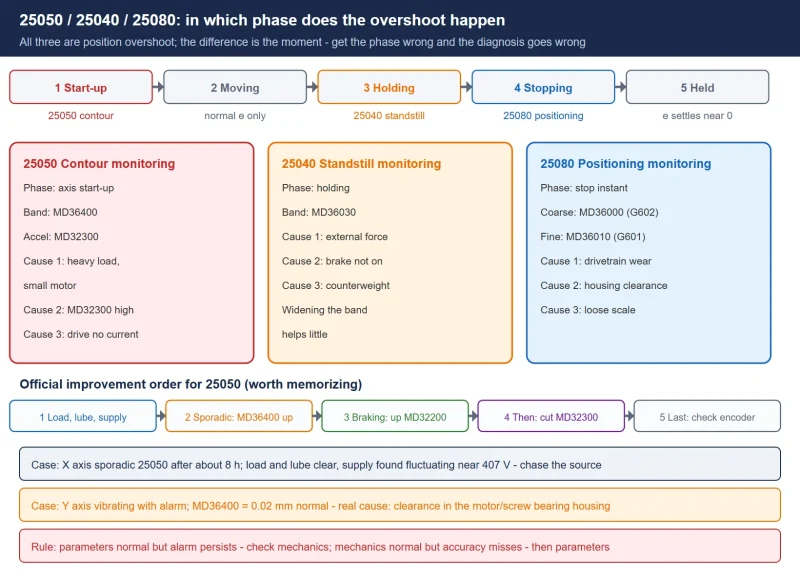
Mixing these three alarms up is the most common starting point for a wrong diagnosis. Siemens’ industrial support forum separates them cleanly by the phase in which the overshoot happens:
Table 1 Phase distinction between the three axis position monitoring alarms
| Alarm | Phase of the overshoot | Field shorthand | Key parameters | Direction |
|---|---|---|---|---|
| 25050 contour monitoring | axis start-up instant | “told to move, did not move” | MD36400, MD32300 | mechanics and servo first, parameters last |
| 25040 standstill monitoring | hold at standstill | “told to hold, it moved” | MD36030 | external force, brake or counterweight |
| 25080 positioning monitoring | stop instant | “told to stop in position, stopped outside the band” | MD36000, MD36010 | wear in the drivetrain, backlash, scale mounting |
25050 contour monitoring has three root causes, in order of frequency: ① mechanical load too large for the selected motor, so the load cannot be pulled up to speed; ② MD32300 axis acceleration set too high, overloading the motor instantaneously; ③ servo drive fault with no current output or insufficient output. The third case is usually accompanied by drive-side overcurrent alarms; check in the diagnostics screen whether actual current follows the commanded speed at the start-up instant.
The official improvement order is worth memorizing as written: check load, lubrication and supply first; for sporadic alarms a moderate increase of MD36400 is acceptable; if it only appears while braking to a stop, raise the gain MD32200; if that does not help, reduce MD32300; only then suspect the position measurement device (in a semi-closed loop this generally does not apply).
Two field records from the forum say more than any parameter:
- X axis sporadic contour monitoring after about 8 hours of running: load and lubrication were ruled out first, then the supply was monitored and found fluctuating around 407 V; replacing the power module did not help. The conclusion points at an intermittent match between supply and load — for sporadic alarms like this, enlarging the tolerance band is not the answer; chase the source of the fluctuation.
- Y axis vibrating and alarming while moving: MD36400 = 0.02 mm is a normal value, and the real cause turned out to be clearance in the bearing housing where motor and ball screw connect; after adjusting the clearance the alarm never returned. Parameters normal but the alarm persists: check the mechanics first.
3. The quantitative link: the Kv factor MD32200
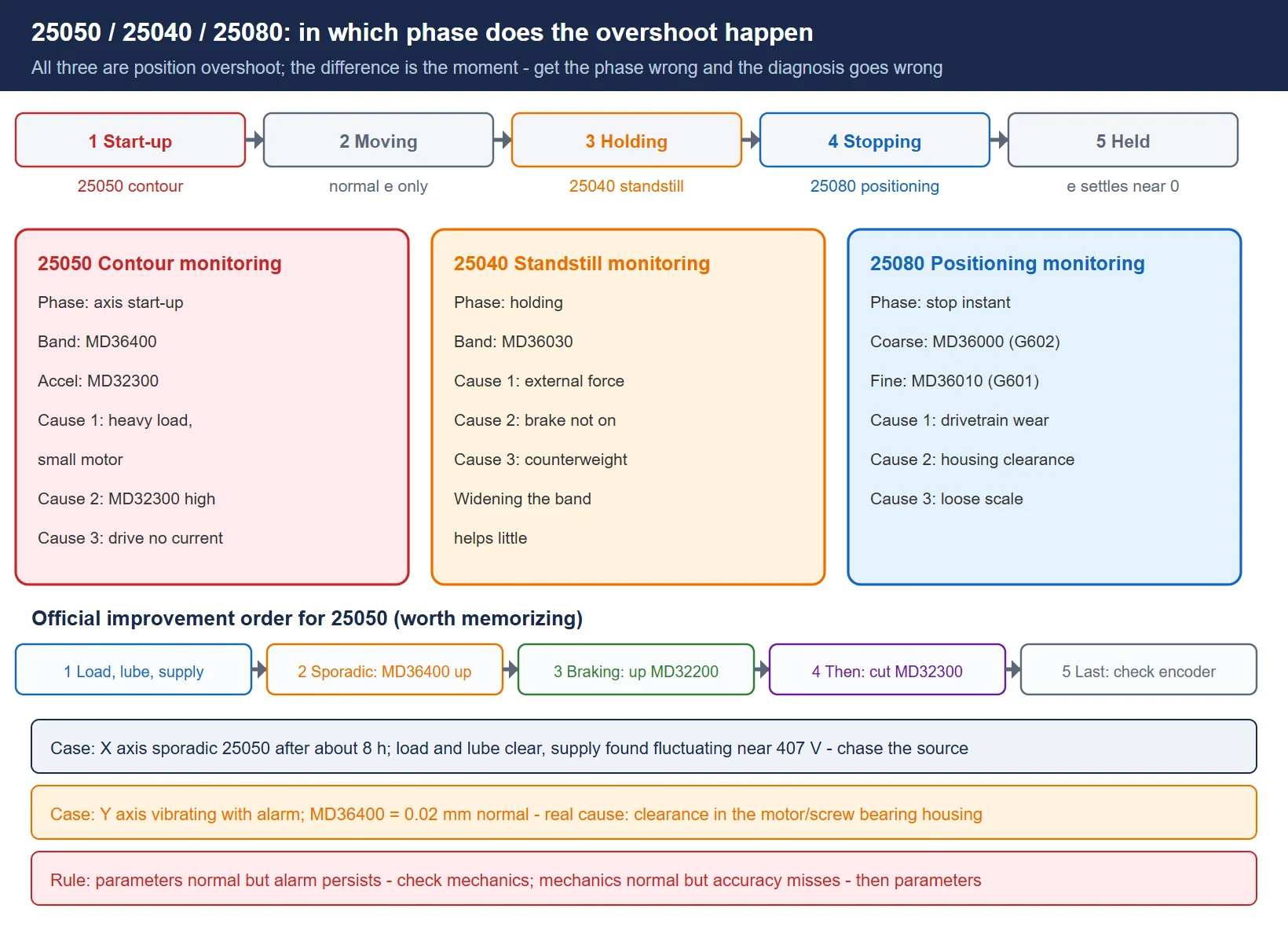
Turning following error from a concept into a number you can calculate takes the position loop gain — the Kv factor:
Following error ≈ feedrate ÷ Kv
MD32200 ($MA_POSCTRL_GAIN) carries the unit (m/min)/mm, and the official wording is: MD32200 = 1 means the axis produces 1 mm of following error at 1 m/min feedrate. With everyday numbers: at F3000 mm/min (3 m/min), Kv = 1 gives about 3 mm of following error and Kv = 2 gives about 1.5 mm.
Siemens’ official answer lists four returns for raising Kv: smaller following error, smaller circular radius error, faster block changeover, higher contour accuracy. That is why Kv is the first lever on contour accuracy.
But Kv is not “the higher the better”. Excessive Kv amplifies mechanical resonance and backlash into axis vibration, corner chatter and surface chatter marks, and in the extreme the position loop goes self-exciting. The iron rule for adjusting Kv is one axis at a time, verified with the circularity test every time (see section 9) — adjust two axes together and the source of the ellipse becomes impossible to name.
One more matching floor to remember: for AC synchronous servo motors the motor inertia to referred load inertia ratio is best around 1:1, and generally should not exceed 1:3. Beyond that range, get the drive-side inertia identification and automatic optimization solid before manual fine-tuning — that is exactly the work the 828D automatic servo optimization covers.
4. Tolerance bands and exact-stop windows: MD36400 / MD36000 / MD36010
MD36400 ($MA_CONTOUR_TOL) defines the maximum permitted difference between NC commanded and actual position; in position control, exceeding it triggers 25050 contour monitoring and the axis brakes along the currently programmed braking ramp. Note its role: it is the floor. Enlarging it only removes alarms; it does not improve accuracy.
The exact-stop windows are a different family, serving the question “when is a block finished”:
- MD36000 ($MA_STOP_LIMIT_COARSE): coarse exact-stop window, used by G602.
- MD36010 ($MA_STOP_LIMIT_FINE): fine exact-stop window, used by G601; smaller than the coarse window, slower block change but sharper boundaries.
- MD36030 ($MA_STANDSTILL_POS_TOL): standstill monitoring tolerance, used by 25040.
When 25080 positioning monitoring appears, moderately enlarging MD36000 / MD36010 can reduce the alarms — but the official guidance is equally clear: if the axis was always healthy and the alarm appears gradually, the root cause is usually wear in the drivetrain, growing clearance or a loose linear scale mounting, and enlarging the window is not the fundamental fix.
One field dividing line: parameters normal but the alarm persists — check the mechanics; mechanics normal but accuracy misses — only then touch parameters. The two investigations differ in cost by an order of magnitude.
5. Feedforward control: the real way to shrink following error, the MD32620 family
Pressing the error down with Kv alone costs dynamic performance. What actually removes following error during acceleration and on curves is feedforward control (FFW). The official Function Manual main line:
- MD32620 ($MA_FFW_MODE): feedforward mode. 0 = none; 3 = velocity feedforward; 4 = combined torque/velocity feedforward (classic 840D / 810D documentation uses 1 and 2 — check your own manual).
- MD32610 ($MA_VELO_FFW_WEIGHT): velocity feedforward weight; the official default for recommissioning is 1 (100%).
- MD32630 ($MA_FFW_ACTIVATION_MODE): whether the part program may switch feedforward with FFWON / FFWOF. Siemens requires the switchover to happen with the axis or spindle stationary, so no abrupt motion is generated.
- MD32810 ($MA_EQUIV_SPEEDCTRL_TIME): speed loop equivalent time constant; the balancing time for velocity feedforward, determined from the speed setpoint step response.
- MD32800 ($MA_EQUIV_CURRCTRL_TIME): current loop equivalent time constant, part of the model for combined feedforward.
The official recommissioning path: set MD32620 = 3 and MD32610 = 1, then adjust only the balancing time MD32810. The 828D automatic servo optimization, however, requires MD32620 = 4 (torque feedforward) first — that is the difference between the two official flows; do not mix them.
Feedforward is not a free lunch: a model that does not match measurement brings overshoot or even instability. The only judges are the circularity test and the test cut — not “it looks faster now”.
6. Friction compensation and quadrant error: the MD32490 / MD32500 family
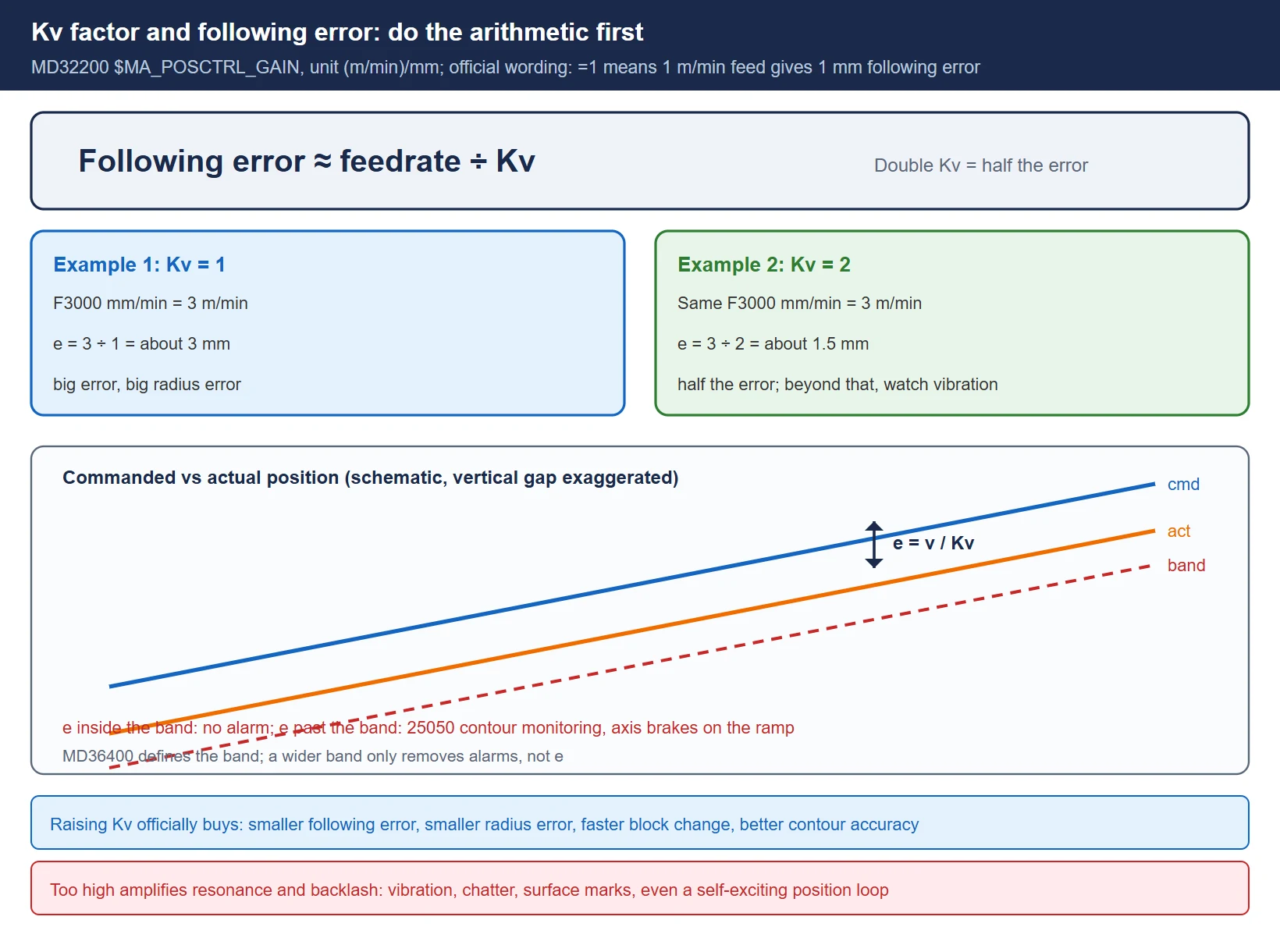
Spikes or dips at the quadrant crossings (0°, 90°, 180°, 270° of a circle) are friction and backlash concentrating at the direction reversal. SINUMERIK’s answer is friction compensation, in two flavors — conventional manual and QEC self-learning:
- MD32490 ($MA_FRICT_COMP_MODE): compensation method; 2 = self-learning quadrant error compensation (QEC).
- MD32500 ($MA_FRICT_COMP_ENABLE): master switch for friction compensation on this axis. On 828D, for “vibration and a thumping noise at the start and end of axis movement”, the official answer’s first experiment is setting MD32500 = 0 to disable friction compensation — it separates a compensation problem from a mechanical one.
- MD32510 ($MA_FRICT_COMP_ADAPT_ENABLE): adaptive compensation switch; recommended off for the initial setup.
- MD32520 ($MA_FRICT_COMP_CONST_MAX): compensation amplitude; MD32540 ($MA_FRICT_COMP_TIME): time constant.
- MD32580 ($MA_FRICT_COMP_INC_FACTOR): weighting factor for compensation on short moves (can be set to 0 during QEC learning).
- MD38010 ($MA_MM_QEC_MAX_POINTS): maximum QEC compensation points (default 400, at most 1025 per axis; more points mean better accuracy but longer learning and more memory).
- MD32450 ($MA_BACKLASH): backlash, the mechanical-side compensation item, to be handled after a dial-indicator measurement.
Compensation results are verified with the circularity test, and four typical deviations map straight onto parameters: spike not removed — amplitude MD32520 too low; reverse over-compensation (a spike the other way) — amplitude too high; deviation recovers and immediately grows again — time constant MD32540 too short; correction carries too far along the contour — time constant too long.
Feedforward and friction compensation work as a pair: in the official QEC application example the standard combination is MD32610 = 1 (velocity feedforward 100%) + MD32620 = 3 (velocity feedforward) + MD32630 = 0 (feedforward always active). Compensation without feedforward often leaves quadrant spikes not fully suppressed.
7. Acceleration and jerk: MD32300 / the MD32400 family / MD20600
Acceleration and jerk decide how softly an axis starts and stops — the main battlefield for vibration, noise and overshoot:
- MD32300 ($MA_MAX_AX_ACCEL): maximum axis acceleration, settable in segments by dynamic response mode (each of DYNNORM and the other modes has its own segment), with MD32310 the overload factor limiting velocity jumps.
- MD32400 ($MA_AX_JERK_ENABLE): master switch for axial jerk limitation.
- MD32402 ($MA_AX_JERK_MODE): position setpoint filter type. 1, 2 and 3 are axial jerk filters, of which 2 is the officially recommended new filter and 1 the compatibility default; 4 is double moving average, 5 is FIR low-pass.
- MD32410 ($MA_AX_JERK_TIME): filter time constant (seconds); type 4 adds MD32411, type 3 uses MD32412 and MD32414.
- MD32431 ($MA_MAX_AX_JERK): maximum axis jerk in path motion, segmented by dynamic mode, [0] for DYNNORM.
- MD32432 ($MA_PATH_TRANS_JERK_LIM): maximum axis jerk at block transitions in continuous-path mode.
- MD32430 ($MA_JOG_AND_POS_MAX_JERK): maximum axis jerk for positioning axis motion, with MD32420 ($MA_JOG_AND_POS_JERK_ENABLE) as its enable.
- MD20600 ($MC_MAX_PATH_JERK): maximum path jerk (channel level); MD20602 and MD20603 control how path curvature affects acceleration and jerk.
One public maintenance record makes the effect of jerk optimization concrete (a 840D gantry machining center running mold programs): a circularity test at R100 mm and F3000 mm/min showed a radius error of 0.032 mm with spikes at 0° and 180°; adjusting the friction compensation amplitude MD32520 (30 to 50) brought the radius error down to 0.017 mm and reduced the spikes; then the jerk optimization — MD32400 = 1, MD32420 = 1, MD32430 from 1000 to 30, MD32431 from 10000 to 10, MD32432 from 10000 to 10, MD32300 from 0.5 to 0.8, and changing G64 to G642 in the program — brought both roundness and surface finish inside specification. The recorder’s conclusion is worth copying: mold machining machines should make jerk optimization part of their outgoing inspection, and should carry the COMPCAD option.
Note that these values come from that one machine’s field record, not from a generic recommendation — read your own manual and current values before copying them.
8. Smoothing and corners: G60 / G62 / G64 and MD33100 / SD42465
CAM output is corner-dense and block-short, and how corners are handled decides tool-marks and corner deformation:
- G60 (modal) / G9 (non-modal) exact stop: the axis decelerates to zero at block end and must be confirmed inside the tolerance band before the block changes; used with G601 (fine, window MD36010) and G602 (coarse, window MD36000). Sharp boundaries, but constant stopping and starting is the worst thing for surface and cycle time.
- G62 continuous path with corner deceleration: decelerates automatically only at inside corners, within each axis’s acceleration capability, without dropping to zero — the compromise when you want boundaries but fear overshoot.
- G64 continuous path: no deceleration for block change, with LookAhead activated to plan velocity across blocks; the most efficient, with corners handled by the smoothing functions.
- G641 with ADIS / ADISPOS: programmable smoothing distance — you write how far before the block transition smoothing starts.
- G642 / G643 / G644 / G645: tolerance-based automatic smoothing. MD33100 ($MA_COMPRESS_POS_TOL) is the axis-specific maximum contour deviation and is effective for G642, G643, G644, G645 and the compressors COMPON, COMPCURV, COMPCAD; note that G641 does not use it (G641 uses ADIS). At channel level there are also SD42465 ($SC_SMOOTH_CONTUR_TOL) contour tolerance and SD42466 ($SC_SMOOTH_ORI_TOL) orientation tolerance.
- MD20480 ($MC_SMOOTHING_MODE): G64x smoothing behavior; MD20482 ($MC_COMPRESSOR_MODE): compressor mode; MD20550 ($MC_EXACT_POS_MODE): exact-stop condition for G0 / G1.
- COMPCAD and CYCLE832: the right home for dense CAM blocks. CYCLE832 packages compressor, smoothing and dynamic modes in one call and never leaves a bad parameter state behind in the machine — for mold programs, go through it.
The trade-off is one sentence: exact stop too strict and you get tool-marks; smoothing too aggressive and corners deform. Start tolerance parameters from conservative values and verify with a test cut — do not give everything away on the first pass.
9. The circularity test and the eight-step tuning flow
The circularity test is the built-in acceptance tool on 828D / 840D (inside the optimization test menu) and the only trustworthy judge for manual tuning. Fix the conditions first: same radius, same feedrate, same tool; measure a baseline with compensation off, then enable and re-measure one item at a time.
Table 2 Reading the circularity test plot
| What you see on the plot | Most likely cause | Direction to move first |
|---|---|---|
| Circle becomes an ellipse | mismatched Kv or dynamic response between the two axes | align MD32200 and the dynamic mode on both axes |
| Spikes or dips at 0 / 90 / 180 / 270 | friction and backlash (quadrant error) | the MD32490 / MD32500 friction compensation family, then check MD32450 |
| Parallel or one-directional offset of the whole circle | mechanical side (ball screw, spindle tilt) | check the mechanics; do not touch position loop parameters |
| Systematic radius error | Kv or feedforward model mismatch | MD32620 / MD32810 feedforward first, then revisit MD32200 |
| Surface chatter, boundary tremor | Kv too high, jerk too small, or mechanical resonance | reduce MD32200, or increase MD32410 / MD32431 |
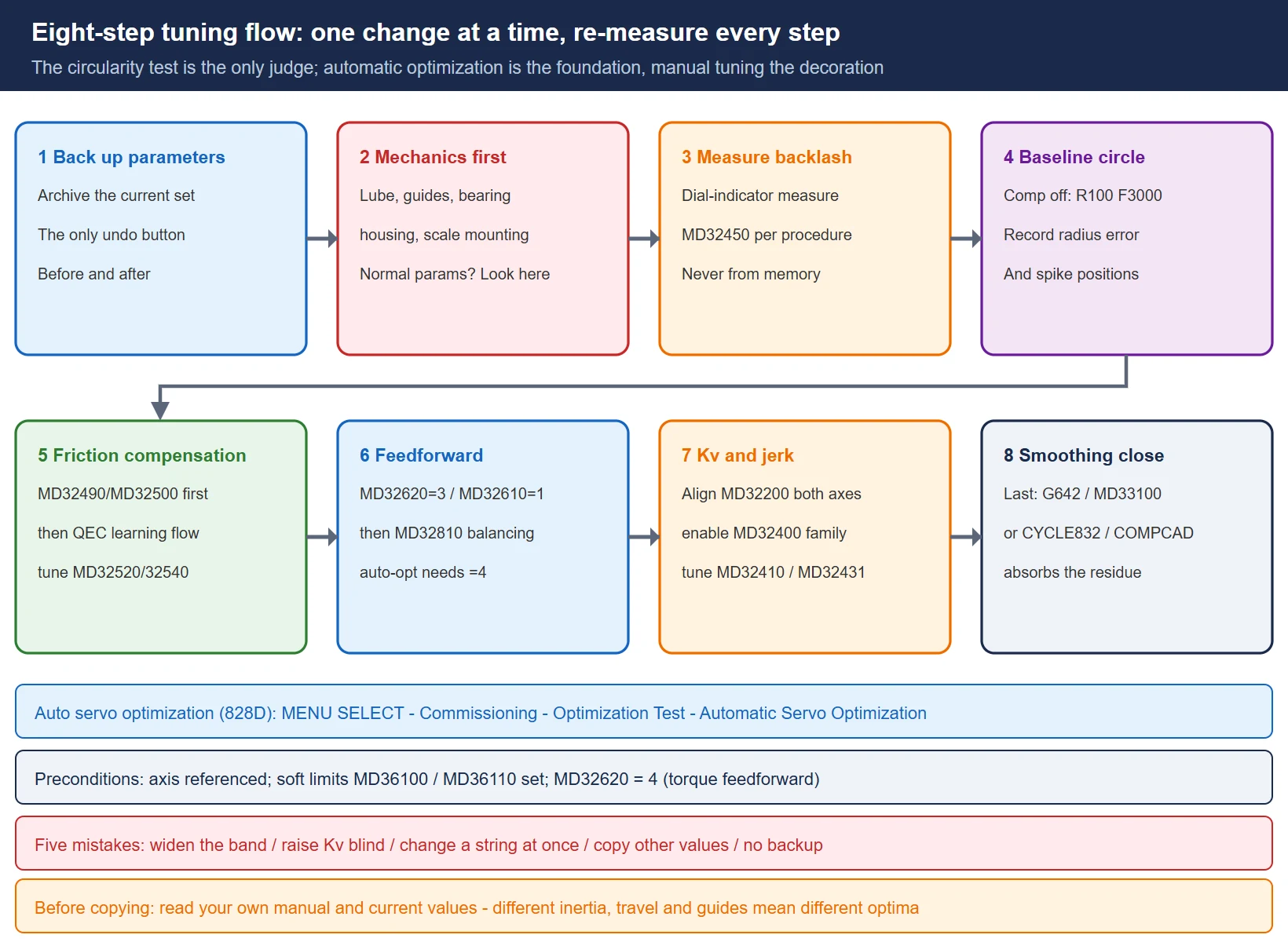
The standard flow, in order, one change at a time with a re-measure after every step:
- Back up. Archive the current parameter set per the backup procedure before tuning — it is the only undo button.
- Mechanics first. Lubrication, guides, ball screw bearing housing clearance, scale mounting — when parameters are normal but alarms or accuracy are not, the answer is usually here.
- Measure backlash. Where needed, measure with a dial indicator and handle MD32450 per the machine builder’s procedure.
- Baseline circle. With compensation off, run R100 mm at F3000 mm/min; record radius error and where the quadrant spikes sit.
- Friction compensation / QEC. Conventional first (MD32490 / MD32500 family), self-learning per the official learning flow, then re-measure.
- Feedforward. Bring in MD32620 / MD32610 / MD32810 along the official path in section 5, then re-measure.
- Kv and jerk. Align MD32200 on both axes; enable the MD32400 family as needed and tune MD32410 / MD32431, then re-measure.
- Smoothing and compression. Only then touch G642 / MD33100 / CYCLE832 — the closing moves that absorb the residue of the earlier steps, not a substitute for them.
If you do not want to walk the whole thing manually, use the built-in automatic servo optimization (828D: MENU SELECT → Commissioning → Optimization Test → Automatic Servo Optimization), which covers current loop, speed loop, position loop and the circularity test. Preconditions: the axis is referenced, soft limits MD36100 / MD36110 are set, and MD32620 = 4. Automatic optimization is the foundation; manual fine-tuning is the decoration — do not reverse the order.
10. Parameter quick-reference and common mistakes
Table 3 Parameter quick-reference for this topic
| Parameter | Name and role | Field note |
|---|---|---|
| MD36400 | contour monitoring tolerance band | the 25050 threshold; enlarging it only removes alarms |
| MD36000 | coarse exact-stop window (G602) | may be enlarged moderately for 25080 |
| MD36010 | fine exact-stop window (G601) | smaller than MD36000, slower block change |
| MD36030 | standstill monitoring tolerance | related to 25040; overshoot usually means external force |
| MD32200 | position loop gain, Kv factor, (m/min)/mm | following error is roughly feedrate ÷ Kv; too high vibrates |
| MD32620 | feedforward mode 0 / 3 / 4 | 840D sl and 828D use 3 and 4; classic 840D uses 1 and 2 |
| MD32610 | velocity feedforward weight | default 1 for recommissioning |
| MD32630 | feedforward activation mode | FFWON / FFWOF; switch while stationary |
| MD32810 | speed loop equivalent time constant | balancing time for velocity feedforward; measure it |
| MD32800 | current loop equivalent time constant | part of the combined feedforward model |
| MD32490 | friction compensation method (2 = QEC self-learning) | disable MD32500 during learning |
| MD32500 | friction compensation enable | for start/stop thumps, try 0 to isolate the problem |
| MD32510 | friction compensation adaptation | recommended off for initial setup |
| MD32520 | friction compensation amplitude | spike not removed means too low; reverse spike means too high |
| MD32540 | friction compensation time constant | deviation recurring means too short; correction trailing means too long |
| MD32580 | short-move compensation weight | can be 0 during QEC learning |
| MD32450 | backlash | handle after dial-indicator measurement |
| MD38010 | QEC maximum points | default 400, at most 1025 per axis |
| MD32300 | maximum axis acceleration | may be reduced for 25050; segmented by dynamic mode |
| MD32310 | acceleration overload factor | limits velocity jumps |
| MD32400 | axial jerk limitation enable | set 1 before any jerk optimization |
| MD32402 | position setpoint filter type | 2 is the new recommendation, 1 the compatibility default |
| MD32410 | axial jerk filter time constant | in seconds; work up from small |
| MD32431 | maximum axis jerk in path motion | segmented by dynamic mode |
| MD32432 | maximum axis jerk at block transitions | corner feel in continuous-path mode |
| MD20600 | maximum path jerk (channel) | channel-level ceiling |
| MD33100 | maximum contour deviation for compression and smoothing | effective for G642 to G645 and the compressors; not for G641 |
| MD33120 | maximum contour deviation for G645 transitions | tangential but not continuously curved transitions |
| MD20480 | G64x smoothing behavior | pairs with the G642 family |
| SD42465 | channel contour tolerance | the channel-level master |
| SD42466 | channel orientation tolerance | relevant for multi-axis orientation |
Five common mistakes, ranked by field cost:
- Enlarging the tolerance band on every alarm. Enlarging MD36400 only clears the alarm; the accuracy loss stays. For the 25050 root-cause order, see section 2.
- Raising Kv without limit. Raising it on two axes out of step only makes the ellipse more obvious, and too high introduces vibration.
- Changing a whole string at once. Friction compensation, feedforward and jerk together leave the circularity plot with nothing to attribute. One item at a time, re-measure after each.
- Copying values from another machine. The gantry values in section 7 come from that one machine; different inertia, travel and guide designs mean different optima.
- No backup. A ruined parameter set with no way back is the most expensive mistake on the floor.
The full parameter-to-alarm mapping continues in the alarm number range reference and the alarm troubleshooting flow; the backup procedure before changing parameters is in the backup and restore tutorial, and version-to-manual mapping is in the 828D manual download.
Related reading
- SINUMERIK 828D Alarm Troubleshooting: 8 High-Frequency Alarms: the main entry for alarm classification and handling
- SINUMERIK 828D Alarm Number Range Reference: locating alarm numbers
- SINUMERIK 828D Parameter and Program Backup and Restore: the backup you owe yourself before tuning
- SINUMERIK 828D/802D Data Loss Recovery: remedies for data-loss scenarios
- SINUMERIK 828D Chinese Manuals Download: version mapping and manual access
- SINUMERIK 828D NCK Battery Alarm 2100/2101/2102: another high-frequency 828D alarm family
- Also available in Chinese: SINUMERIK 轮廓误差与跟随误差调参
Frequently Asked Questions
When 25050 contour monitoring alarms, can I just enlarge MD36400 first?
As a stopgap, yes; as a method, no. MD36400 is the tolerance band, and enlarging it only keeps the same error from triggering the alarm — the accuracy loss is untouched. The official order is to check mechanical load, lubrication and supply first; for sporadic alarms consider a moderate increase of MD36400; if the alarm appears while braking to a stop, raise MD32200 first; if that does not work, reduce MD32300; only then suspect the position measurement device. If mechanics and parameters are both normal and the alarm persists, it is most likely the servo drive or the supply — continue with the alarm troubleshooting flow.
Kv is already very high, but the circle is still an ellipse — what now?
An ellipse is the result of mismatched dynamics between two axes, and a high Kv on one axis does not mean the two axes match. First confirm that MD32200 and the dynamic mode in use are identical on both axes, then check that feedforward (MD32620 / MD32810) is active and modeled identically on both; if it still fails, check the mechanics — ball screw bearing housing clearance and spindle tilt both produce one-directional or elliptical deviation, and at that point raising the position loop only amplifies the problem. Change one axis at a time on the circularity test, or you cannot tell whether the change was right.
Quadrant spikes on the circularity test: backlash or friction?
Quadrant spikes (quadrant error) are mostly friction, while backlash usually shows up as a parallel or one-directional offset of the whole circle. Order of work: measure backlash with a dial indicator first and decide whether MD32450 needs to move; then bring in the MD32490 / MD32500 friction compensation family and tune amplitude MD32520 and time constant MD32540 against the circularity plot — spike not removed means amplitude too low, a spike in the reverse direction means amplitude too high, deviation recurring right after recovery means the time constant is too short. When the mechanical side is genuinely at fault and compensation cannot clean it up, go back to the mechanics.
Last updated: 2026-10-26
The original Chinese version — same procedure, with the full field notes.





















暂无评论内容