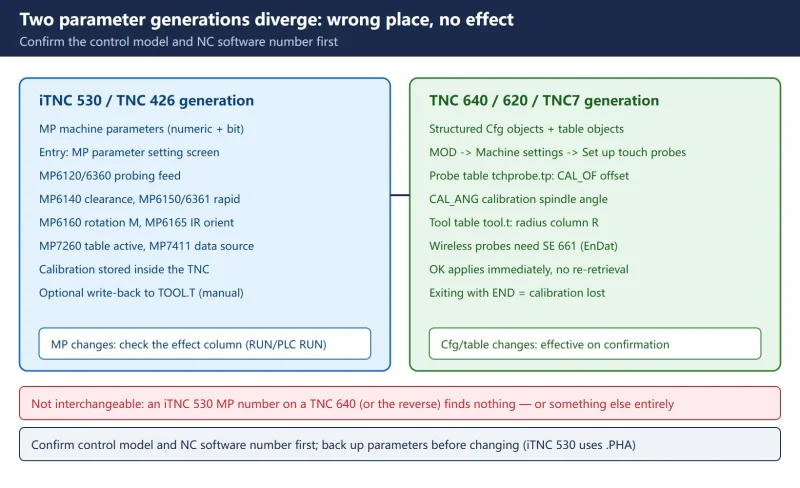



“The probe is calibrated but the measurements are still wrong” — with Heidenhain touch probes, nine times out of ten the probe is fine and the parameters were changed in the wrong place. iTNC 530 uses MP machine parameters; TNC 640/620/TNC7 uses structured configuration objects; the two generations are not interchangeable. And the most widely circulated Chinese parameter table claims MP7410 is the “calibrated ball radius” and MP6510/6520/6530 are the “tool setter X/Y/Z coordinates” — neither matches the official manuals.
This page is written from Heidenhain’s own user and technical manuals: how to tell the generations apart, how the calibration flows run, why the calibrated values must be written back to the tool table manually, and a correction table for the misquoted MP numbers.
Related on this site: looking up probe error codes in Heidenhain TNC Error Code List and measuring-system faults in Heidenhain linear encoder alarm troubleshooting (in Chinese).
1. Tell the two parameter generations apart first (the step everyone gets wrong)
Table 1 Two parameter generations side by side (wrong place = no effect)
| Item | iTNC 530 / TNC 426 generation | TNC 640 / 620 / TNC7 generation |
|---|---|---|
| Parameter form | MP machine parameters (numeric and bit type) | Structured configuration objects (Cfg) + machine parameters + table objects |
| Entry point | MP parameter setting screen | Edit parameters → machine configuration; probes also via MOD → Machine settings → Set up touch probes |
| Where calibration data lives | Inside the TNC (default); or the TOOL.T tool table (when MP7411 bit 0 = 1) | tool.t (radius column R) + tchprobe.tp probe table (center offset CAL_OF, spindle angle CAL_ANG) |
| Cycle family | Cycles 400–499 / 800–899 | Same-generation cycles plus high-precision measuring cycles |
| Wireless probes | Infrared / cable | MOD dialog setup, requires an SE 661 transceiver (EnDat) |
One rule: looking up an iTNC 530 MP number on a TNC 640, or a TNC 640 Cfg name on an iTNC 530, finds nothing — or finds a same-named thing that means something else. Confirm the control model and NC software number before touching anything.
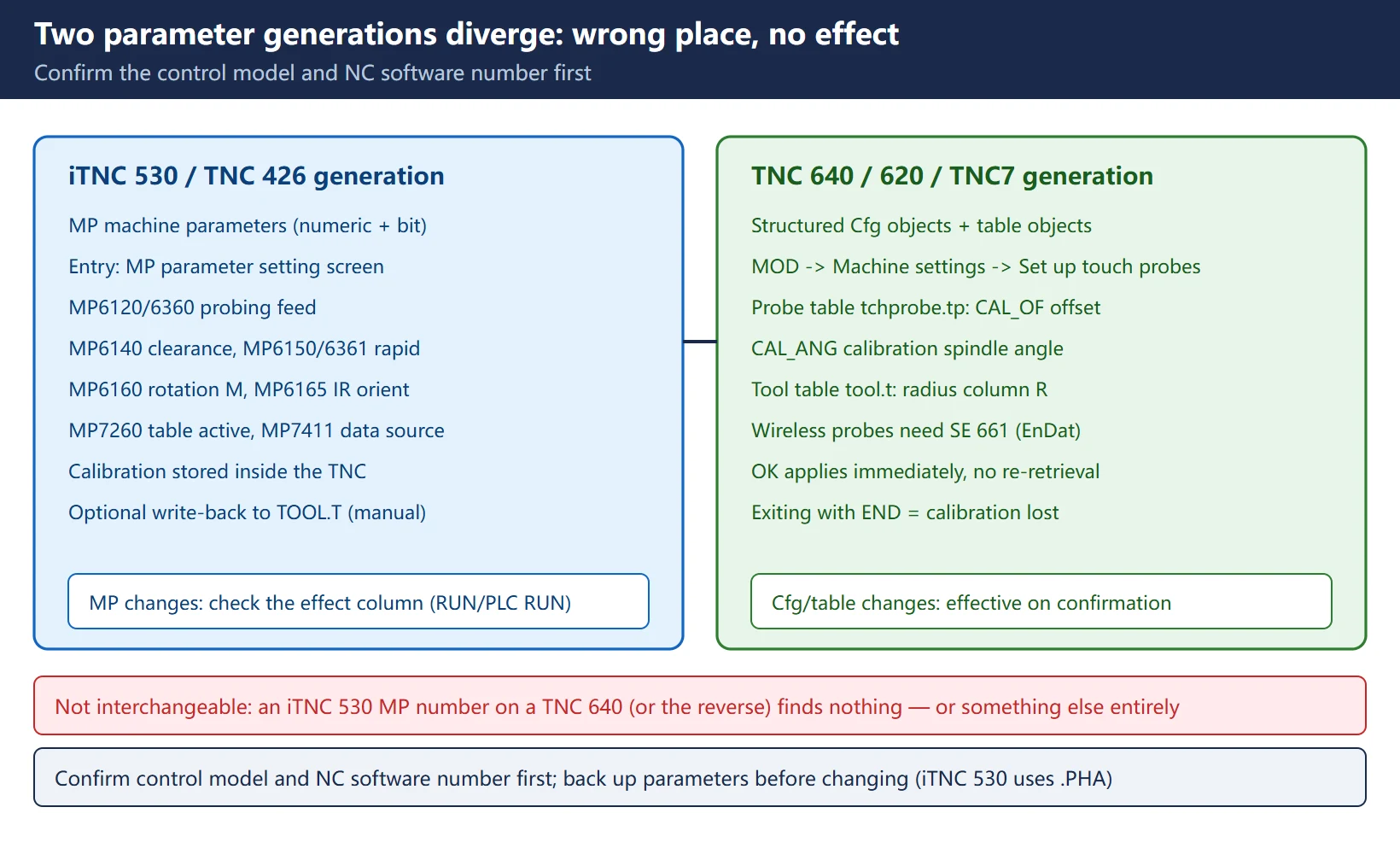
2. Calibrating a 3-D touch probe: ring gauge fixed → CAL R → enter gauge radius → rotate 180° and measure again
When recalibration is mandatory (official list): initial configuration, broken stylus, stylus exchange, change in probe feed rate, irregularities from machine heating, and — on TNC 640 — a change of the active tool axis.
The official TNC 640 flow (same origin as the iTNC 530 CAL. R, slightly different interface):
- Clamp a ring gauge of known height and radius (or a calibration stud/sphere) securely to the table;
- In Manual mode, position the ball tip inside the bore;
- Press TOUCH PROBE → CALIBRATE TS and select the calibration cycle (length / radius and center offset with a ring / with a stud or pin / with a calibration sphere / 3-D calibration (option 92));
- Enter the ring gauge diameter, safety clearance, and the new calibration spindle angle (default taken from CAL_ANG in the probe table);
- Press machine START: the probe touches all required points in an automatic routine and computes the effective ball-tip radius; if the probe can be oriented in opposite directions, it also computes the center offset (CAL_OF);
- Check the results → press OK to apply → END to finish.
The iTNC 530 equivalent is TOUCH PROBE → CAL. R: select the tool axis, enter the ring gauge radius, press machine START four times (one contact in each axis direction) for the effective radius; for center offset press the 180° soft key (the rotation is triggered by an M function the machine builder sets in MP6160) and press START four times again.
Official note: whether center offset can be measured at all depends on machine-builder preparation — “the TNC needs to be specially prepared by the machine manufacturer”. On a machine without that preparation, calibrate the radius and stop hunting for the 180° soft key.
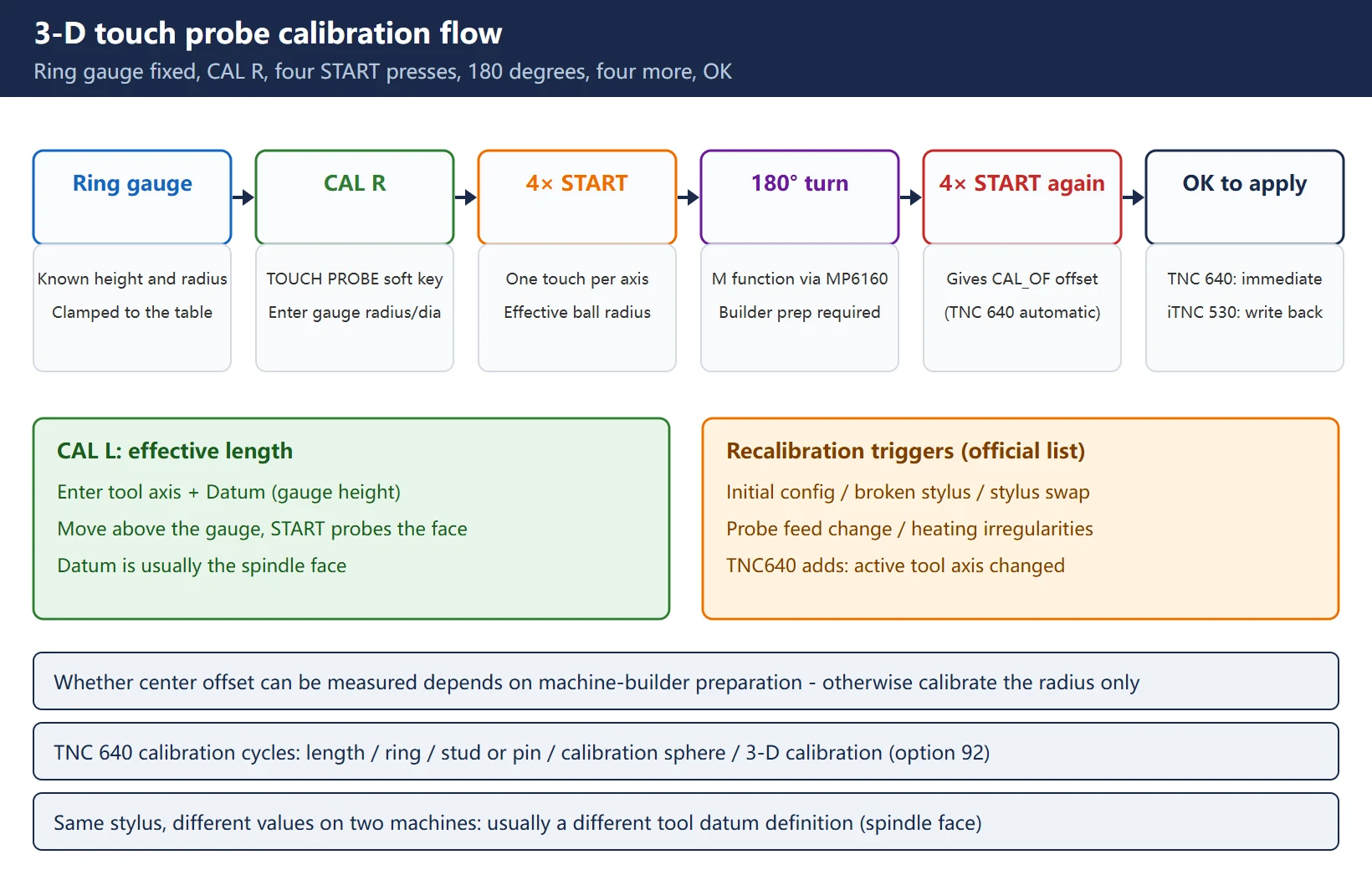
3. Calibrating a touch trigger probe: CAL L for effective length, CAL R for radius and center alignment
Table 2 CAL L versus CAL R (official iTNC 530 flow)
| Calibration | Soft key | Inputs | Action | Result |
|---|---|---|---|---|
| Effective length | CAL. L | Tool axis + Datum (ring gauge height) | Move above the gauge, press START to probe the upper face | Effective length (relative to the tool datum) |
| Effective radius | CAL. R | Tool axis + ring gauge radius | Ball in bore, press START four times | Effective ball-tip radius |
| Center offset | 180° (inside CAL. R) | — | Rotate 180°, press START four times again | Ball-tip center offset from the spindle axis |
Length reference convention: the tool datum is usually the spindle face, with the ring-gauge upper face set to Z=0 on site — which is why “the same stylus calibrates differently on two machines”: different datum definitions give different values.
4. Calibrated values must be written back to the tool table — the root of “calibrated but not effective”
This is the most important point in the whole page, and the two generations behave differently:
Table 3 Write-back comparison (official wording)
| Item | iTNC 530 | TNC 640 / 620 / TNC7 |
|---|---|---|
| Default behaviour | The TNC stores calibration data internally (MP7411 bit 0 = 0); review with CAL. L / CAL. R | Pressing OK applies the values to the active probe; the tool data take effect immediately, no tool re-retrieval needed |
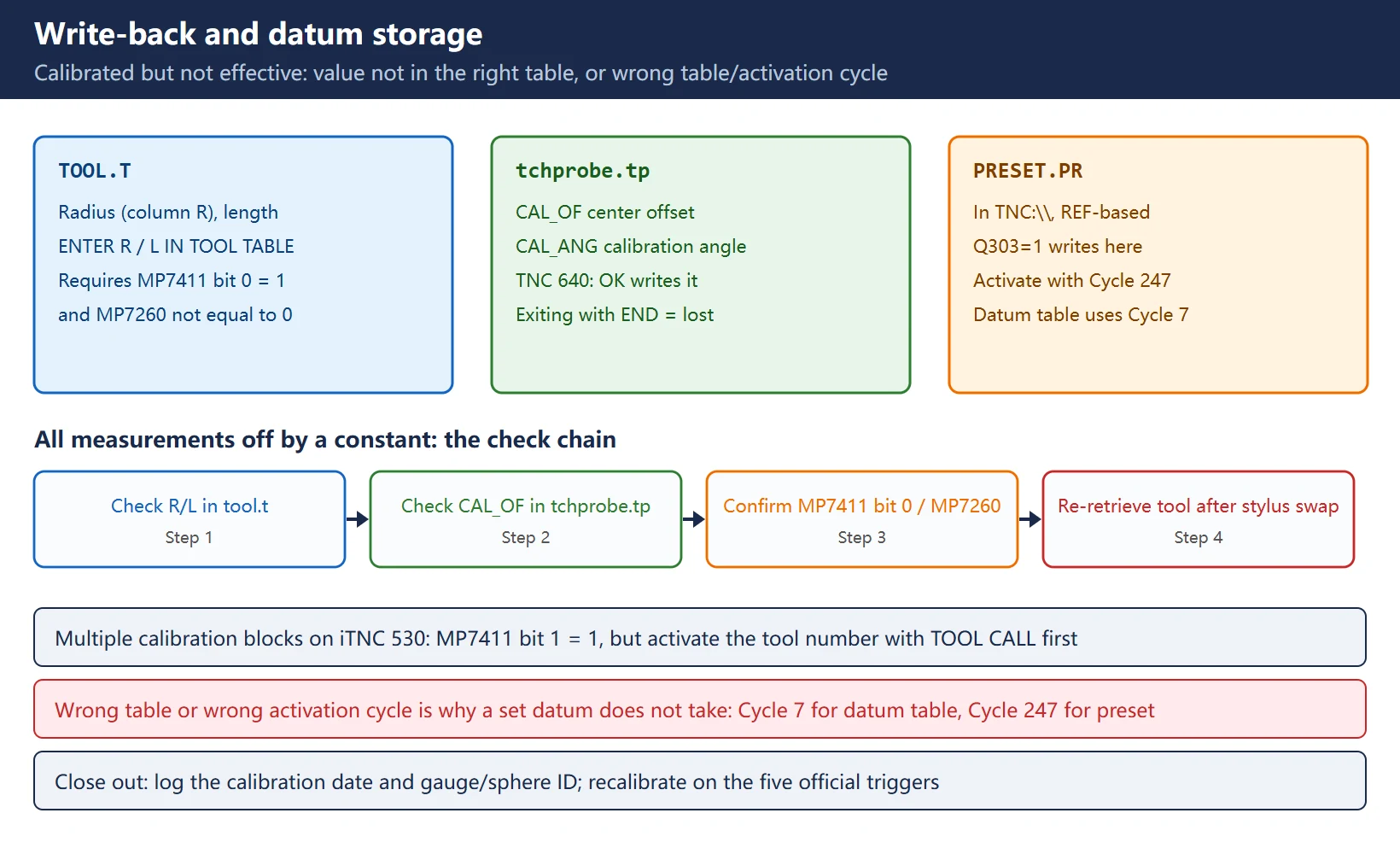
| Condition for writing to the tool table | Only when MP7411 bit 0 = 1 (activate probe data with TOOL CALL) and TOOL.T is active (MP7260 ≠ 0) | Radius goes to the R column of tool.t; center offset to CAL_OF in tchprobe.tp |
| Manual write-back action | Enter the tool number in the calibration menu (confirm with ENT), then press ENTER R IN TOOL TABLE / ENTER L IN TOOL TABLE | Pressing OK writes the tables |
| If you skip it | Values stay inside the TNC; when the program calls the probe with TOOL CALL it uses the old tool-table values → constant measurement error | Exiting with END instead of OK = the calibration never happened |
Field judgement: if a TOOL CALL in the program pulls the probe, or measurements shift by a constant after a stylus change, check whether the R/L in the tool table is stale before suspecting the probe. Managing several calibration blocks on iTNC 530: set MP7411 bit 1 = 1 to manage multiple data sets (length/radius/center offset/spindle angle) in the tool table — but whichever set you want to use, activate that tool number with a TOOL CALL first, in automatic or manual mode.
5. MP reference: the verified version plus a correction table
First, the iTNC 530 probe-related MPs that are verified against the manuals:
Table 4 iTNC 530 probe-related MPs verified against the manuals
| MP | Official meaning | Range / notes |
|---|---|---|
| MP6120 (or MP6360) | Probing feed rate | Measuring feed when contacting the workpiece |
| MP6140 | Setup clearance | The cycle's Q320 additional distance is added to it |
| MP6150 (or MP6361) | Rapid traverse in probing cycles | Used to position to the start point |
| MP6160 | M function for probe rotation | Triggers the 180° rotation in center-offset calibration |
| MP6165 | Orient the infrared probe to the programmed probe direction | Affects how the calibration routine runs |
| MP7260 | Whether tool table TOOL.T is active | ≠ 0 makes TOOL.T effective (precondition for writing back) |
| MP7411 bit 0 | Source of probe data | 0 = stored internally by the TNC; 1 = use compensation values from the tool table (activated by TOOL CALL) |
| MP7411 bit 1 | Multiple calibration blocks | 0 = one set; 1 = manage several in the tool table |
Now the most-circulated Chinese parameter table — it mixes up MP numbers with unrelated concepts:
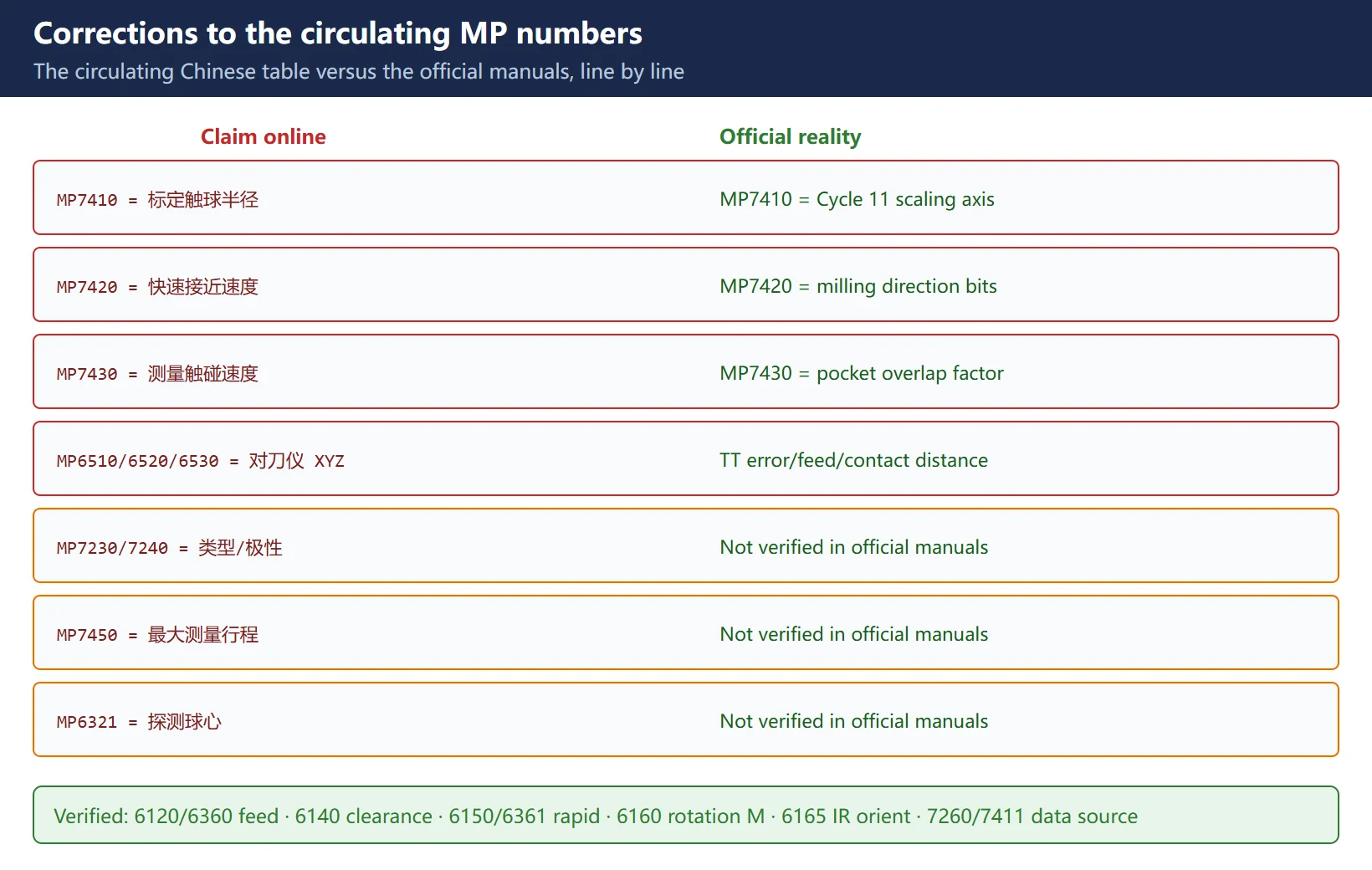
Table 5 Corrections to the circulating MP numbers
| Claim online | Official manual reality | Verdict |
|---|---|---|
| MP7410 = calibrated ball radius | MP7410 = Cycle 11 scaling factor axis scope (0 = three axes / 1 = working plane only) | ❌ Wrong, unrelated to probes |
| MP7420 = rapid approach speed | MP7420 = milling-direction bit combination | ❌ Wrong |
| MP7430 = measuring touch speed | MP7430 = pocket-milling overlap factor (0.1–1.414) | ❌ Wrong |
| MP7450 = maximum measuring travel | Could not be verified in the official iTNC 530 manuals | ⚠️ Unverified, do not copy |
| MP7230/7240 = probe type / signal polarity | Could not be verified in the official iTNC 530 manuals | ⚠️ Unverified |
| MP6510/6520/6530 = tool setter X/Y/Z coordinates | Actually TT tool-measurement parameters: MP6510 = permissible measuring error with rotating tool, MP6520 = probing feed with stationary tool, MP6530 = distance from tool end to probe contact | ❌ Wrong (measurement parameters, not position coordinates) |
| MP6321 = probe ball center | Could not be verified in the official iTNC 530 manuals | ⚠️ Unverified |
Tool setter (TT) position parameters are a different official group: MP6580 series (probe contact center relative to the machine datum), MP6540.x (safety zone around the contact), MP6550 (rapid traverse in probing cycles). For TT work, look at this group — not at the measuring-error/feed parameters in the 65xx range.
6. Cfg reference: structured configuration on TNC 640/620/TNC7
On the TNC 640 generation, probe configuration is spread across configuration objects + tables + the MOD dialog:
Table 6 Where probe configuration lives on the TNC 640 generation
| Location | What lives there | Notes |
|---|---|---|
| MOD → Machine settings → Set up touch probes | Registration and channel of wireless/infrared probes | Device configuration on the third desktop; select the channel for SE 661, then CONNECT NEW TCH PROBE |
| Probe table tchprobe.tp | Per-probe diameter, CAL_OF center offset, CAL_ANG calibration spindle angle | CAL. R writes here |
| Tool table tool.t | Radius (column R), length, etc. | What TOOL CALL reads |
| Cfg objects in machine configuration | Structured settings such as approach speed, maximum measuring travel, trigger polarity | The names circulating in Chinese (CfgTouchProbe / CfgTPCalibration / CfgToolProbe) could not be verified word-for-word against the official manuals — go by what your machine's machine-configuration screen actually shows |
Field advice: on a TNC 640, change probe settings via MOD → Set up touch probes and the calibration dialog first (the officially documented paths), export a configuration backup before touching Cfg/MP values, and verify item by item afterwards — never work from an unverified list of parameter numbers.
7. How changes take effect: MP needs a restart, Cfg/tables need confirmation
- MP (iTNC 530): every MP has an “effect behaviour” column in the manual —
RUN= takes effect on NC restart,PLC RUN= on PLC restart. Read that column first; both “all MPs need a full power cycle” and “MPs take effect immediately” are myths. Always back up the parameter file before changing (iTNC 530 parameter backup files use the .PHA extension). - Cfg / configuration objects (TNC 640 generation): structured settings mostly take effect immediately after confirmation/activation; calibration values “take effect immediately after OK, no tool re-retrieval” (official wording).
- Table values (tool.t / tchprobe.tp): written values apply at once, but if the program has already executed a TOOL CALL with the old values, re-retrieve the tool or restart the program after a stylus change or table edit — otherwise the cycle still runs the old compensation. That is the other half of “I changed the table and nothing happened”.
8. Tool setter (TT) parameters: using the MP65xx group correctly
The official parameter group for TT130-class tool setters (iTNC 530 Technical Manual):
Table 7 TT tool setter parameters (verified)
| MP | Function | Range / recommended |
|---|---|---|
| MP6505.x | Probing direction per traverse range | 0–3 (positive 0° axis / positive 90° axis / negative 0° / negative 90°) |
| MP6507 | Probing feed calculation method | 0 = constant tolerance / 1 = variable tolerance / 2 = constant probing feed |
| MP6510.0/.1 | Permissible measuring error with rotating tool (first/second) | 0.002–0.999 mm, recommended 0.005 / 0.01 |
| MP6520 | Probing feed with stationary tool | 1–3000 mm/min (example: 500) |
| MP6530.x | Distance from tool end to probe contact | 0.001–99.9999 mm (per traverse range) |
| MP6531.x | TT130 probe contact diameter / edge length | 0.001–99999.9999 mm |
| MP6540.x | Safety zone around the contact (tool axis / plane) | For pre-positioning |
| MP6550 | Rapid traverse in probing cycle | 10–20000 mm/min |
| MP6560 | M function for spindle orientation in individual tooth measurement | −1 = NC orientation / 0 = inactive / 1–999 = M number |
| MP6570 / MP6572 | Permissible cutting speed of the tooth / measuring speed | 1–120 m/min / 0–1000 rpm (0 = limited to 1000) |
| MP6580 | Probe contact center relative to the machine datum | TT position reference |
When a tool setter measures inaccurately, check in this order: probing direction (6505) → measuring error/feed (6510/6520) → contact distance and diameter (6530/6531) → safety zone (6540) → position reference (6580).
9. Workpiece alignment (basic rotation) and writing datums to the PRESET table
- Basic rotation: measure two studs/holes to compute the angle (Cycle 402 type); the result is stored in Q150 and the TNC compensates with a basic rotation. A rotary table can be rotated instead. An active basic rotation is reset at the start of the cycle, and the cycle is not allowed while the tilted-working-plane function is active.
- Where the datum goes (official Q303/Q305 rule):
Q303=1→ written to the PRESET.PR preset table (in TNC:\, based on the machine coordinate system REF);Q303=0/-1→ written to the active datum table (workpiece coordinate system). Preset-table values are activated with Cycle 247, datum-table values with Cycle 7 — storing in the wrong table or activating with the wrong cycle is the classic reason for “I set the datum and it does not take”. - In Manual mode, measured values can also be written directly to the preset table with the ENTER IN PRESET TABLE soft key (REF-based); overwriting the active datum triggers a TNC warning — ENT confirms, NO ENT cancels.
10. Common measuring-cycle errors and troubleshooting
Table 8 Common measuring-cycle errors and troubleshooting order
| Symptom | Common cause | First check |
|---|---|---|
| Probe does not trigger / no signal | TS interface not configured, signal polarity/trigger logic wrong, flat battery on a wireless/IR probe | Is the probe registered in the probe table, visible in MOD, battery replaced |
| All measurements off by a constant | Stale R/L in the tool table (calibration not written back), different stylus datum | Verify tool.t / tchprobe.tp per section 4 |
| Center offset cannot be measured | Machine-builder preparation missing, MP6160 not set, probe cannot orient | Check the machine manual; for IR probes check MP6165 |
| Rapid crashes into the part / clearance too small | MP6140/Q320 too small, MP6150/6361 too fast | Increase the additional clearance, reduce rapid |
| Datum set but not active | Stored in the wrong table (datum vs preset) or activated with the wrong cycle (7 vs 247) | Verify Q303/Q305 and the activation cycle per section 9 |
| Probing feed unsuitable | MP6120/6360 not matched to material/surface | Lower feed on rough surfaces, raise on smooth |
General troubleshooting principle: first confirm “did I change the right thing for this generation” (section 1), then “did the calibrated value land in the right table” (section 4), and only then touch speed/clearance parameters. For probe-related error codes (families 120/130/160/201/280), see the Heidenhain TNC Error Code List.
Frequently Asked Questions
Why do my Heidenhain probe parameter changes not take effect?
Three frequent causes, by probability: ① wrong generation — looking up an iTNC 530 MP number on a TNC 640 or vice versa; confirm the control model and NC software number first. ② ignoring the restart behaviour — every MP has an “effect behaviour” column (RUN / PLC RUN); if a restart was required and you did not do it, the screen shows the new value while the kernel keeps the old one. ③ the table changed but the program runs the old value — tool.t / tchprobe.tp values apply immediately, but if the program already executed a TOOL CALL with the old values, re-retrieve the tool or restart the program after a stylus change or table edit. Also: back up parameters before changing (iTNC 530 uses .PHA files) so you can roll back.
Are iTNC 530 and TNC 640 probe parameters the same set?
No, and they must not be mixed. iTNC 530 uses the MP numeric system (probing feed MP6120/6360, setup clearance MP6140, rapid MP6150/6361, rotation M function MP6160, calibration data source MP7411, etc.), with calibration data stored inside the TNC by default and optionally written back to TOOL.T. TNC 640/620/TNC7 use structured configuration objects plus table objects: probe registration via MOD → Set up touch probes, radius into the R column of tool.t, center offset and calibration spindle angle into CAL_OF/CAL_ANG of tchprobe.tp, effective immediately after OK with no tool re-retrieval. The circulating Chinese claims “MP7410 = ball radius, MP6510/6520/6530 = tool setter XYZ coordinates” mix two generations and two parameter groups: officially, MP7410 is the scaling-factor axis scope and MP6510/6520/6530 are TT measuring-error/feed/distance parameters — following that table changes the wrong thing and gets no result.
After calibrating the probe, is there anything else to do?
Yes, and it is the step most often missed: on an iTNC 530, calibrated values are stored inside the TNC by default, so if the program uses the probe via TOOL CALL you must enter the tool number in the calibration menu and press ENTER R IN TOOL TABLE / ENTER L IN TOOL TABLE to write back to TOOL.T (requires MP7411 bit 0 = 1 and MP7260 ≠ 0). Without the write-back, the program reads the old R/L from the tool table and every measurement is off by a constant. On the TNC 640 generation it is simpler: pressing OK writes tool.t / tchprobe.tp and takes effect immediately — just do not exit with END. For the record, also log the calibration date and the ring gauge/calibration sphere ID in the machine file, and recalibrate on the official five triggers: stylus breakage, stylus exchange, probe feed change, heating-related irregularities, and (TNC 640) a change of active tool axis.
Last updated: 2026-10-24






















暂无评论内容