


Heidenhain TNC alarms look nothing like FANUC’s: no four-digit numbers, but a six-digit code format like 230-001F. First-timers stall on “how many digits is this”, let alone deciding whether the fix belongs to Heidenhain, the machine builder, or the program.
This page does two things: teaches you to read the six-digit code (which segment is system-level, which is the specific fault, why there are letters in it), then delivers a family map plus a code-by-code breakdown of the high-frequency offenders. Every code meaning is taken from Heidenhain’s official NC Error Messages list (TNC7 / 640 / 620 / 320 / 128, NC software xxxxxx-18) — nothing invented.
Related on this site: Heidenhain linear encoder alarm troubleshooting (in Chinese) — many “reference mark not found” faults root in the measuring system.
1. Reading the code first: how the six digits split
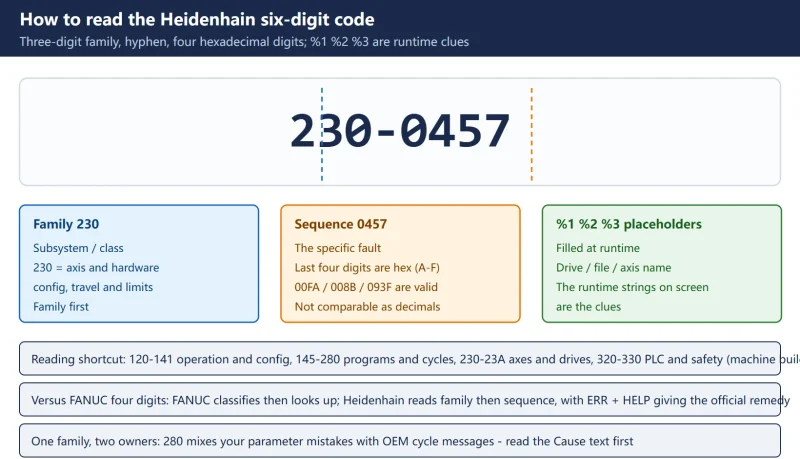
A Heidenhain error code is three-digit family + hyphen + four-digit sequence:
Table 1 Six-digit code structure and how to read it
| Segment | Example (230-0457) | Meaning |
|---|---|---|
| Family (first 3 digits) | 230 | Subsystem / class. 230 = axis and hardware configuration, travel and limits |
| Sequence (last 4 digits) | 0457 | The specific fault inside the family. These four digits are hexadecimal — A to F are valid, so 00FA, 008B, 093F are all real |
%1 %2 %3 placeholders | e.g. 120-001E “Can't connect to network: %1 %2 %3” | Filled at runtime with the actual drive name, file name, axis name — those runtime strings on screen are your clues |
Three reading rules:
- Family first: 120–141 is usually operation/config/files (partly solvable at the keyboard); 160–280 is programs and cycles (fix the program); 230–239 is axes/drives/hardware (electrical and mechanical); 320–330 is PLC and safety self-test (machine-builder territory).
- Sequences are not decimal:
00FAcomes before00FB, but you cannot compare008Band093Fas numbers — read them as hexadecimal and use the official list’s ordering. - One family, two owners: family 280 (cycles) mixes your own parameter mistakes with OEM cycle messages — read the Cause text before deciding whose problem it is.
2. Family map: which side is NC, which side is the machine builder
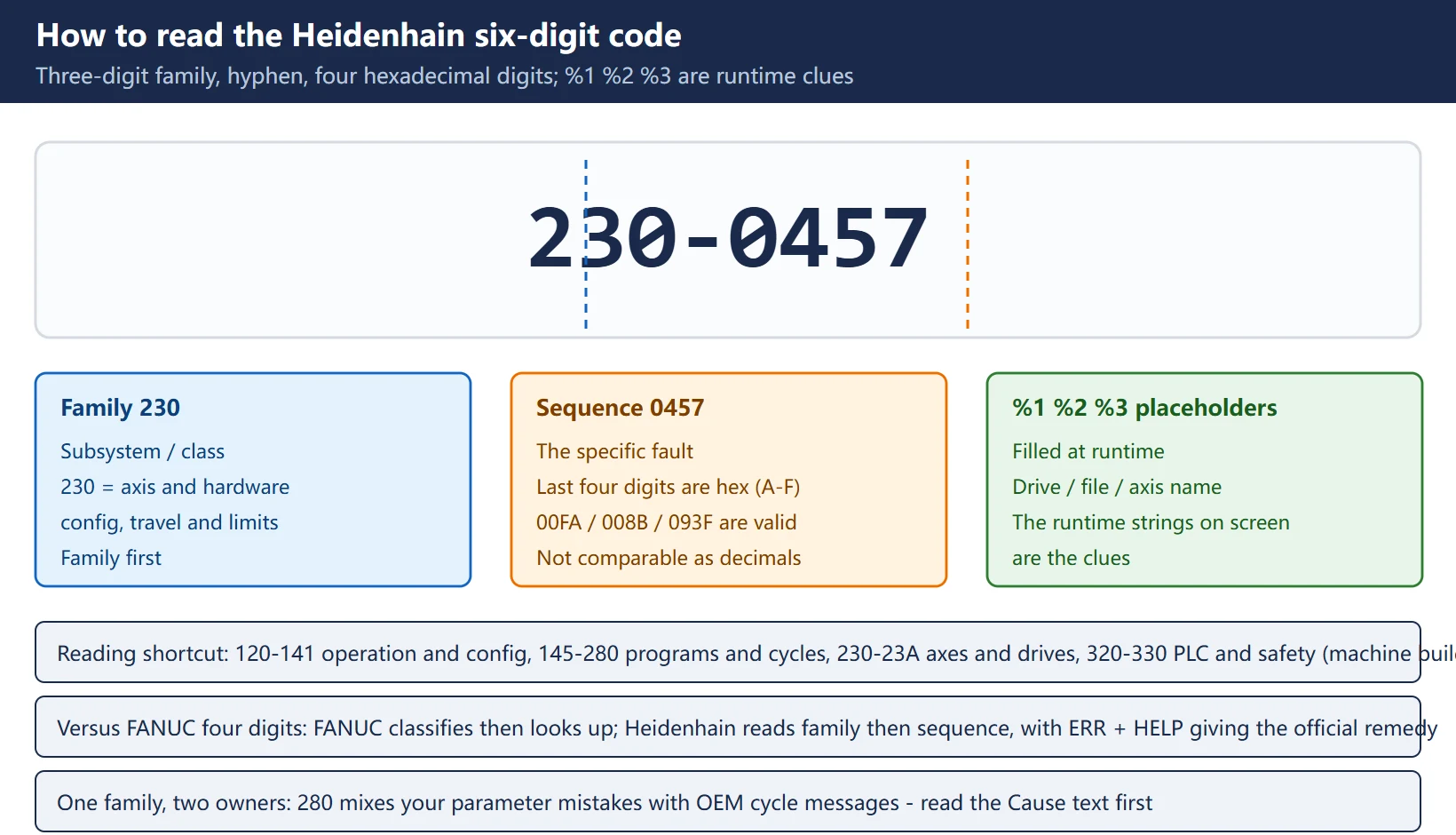
Table 2 Heidenhain TNC error code family map
| Family | Content | Owner | Typical case |
|---|---|---|---|
| 120 | Configuration / UI / files and network | NC (some config) | 120-001E network, 120-001F file not found |
| 125 | Storage, copying, software update, DNC/TeleService | NC/system | 125-006C update error, 125-011F DNC connection failed |
| 130 | Program-level errors | NC (fix program) | 130-00A7 program incomplete |
| 140 | Configuration data | NC/system | 140-0021 data object renamed |
| 145 | Geometry (arc definitions, scaling, chamfer/rounding input) | NC (fix program) | Contradictory arc end point / radius |
| 160 | NC interpreter: syntax, labels, Q parameters, nesting (~287 entries) | NC (fix program) | 160-008B block format incorrect |
| 1A0 | Path calculation: tool radius compensation, approach/departure (~413 entries) | NC (fix program) | Compensation direction / approach conflict |
| 1A1 / 1A2 | Kinematics / transformations | NC/OEM mixed | Kinematics config, PRESET command errors |
| 201 | Measuring (touch probe) cycles | NC (check setup) | 201-093F measuring length exceeds max |
| 230 | Axis/hardware configuration, travel and limits | Electrical + mechanical | 230-001F traverse limit, 230-0457 reference mark not found |
| 231 / 237 / 238 / 239 | Drive controller (CC), power supply, functional safety | Electrical | 231-8065 DC power fail |
| 234 / 235 / 236 / 23A | HSCI / hardware / PROFINET / devices | Electrical | Bus and component faults |
| 280 | Cycles (machining + touch probe + FN14 output, ~632 entries — the largest family) | Mixed | Your parameter vs an OEM cycle message |
| 320 / 330 | PLC / safety self-test | Machine builder | PLC program messages, STO and E-stop checks |
| 600–663 / 900–905 | Turning platforms (CNC PILOT 640 / MANUALplus 620) | Mixed | Turning cycles, smart.Turn |
The dividing rule: when the official Cause text says “Inform your service agency”, or the message source is the machine builder, it is OEM territory — your job is to capture evidence (section 8), not to edit the PLC.
3. High-frequency codes, one by one
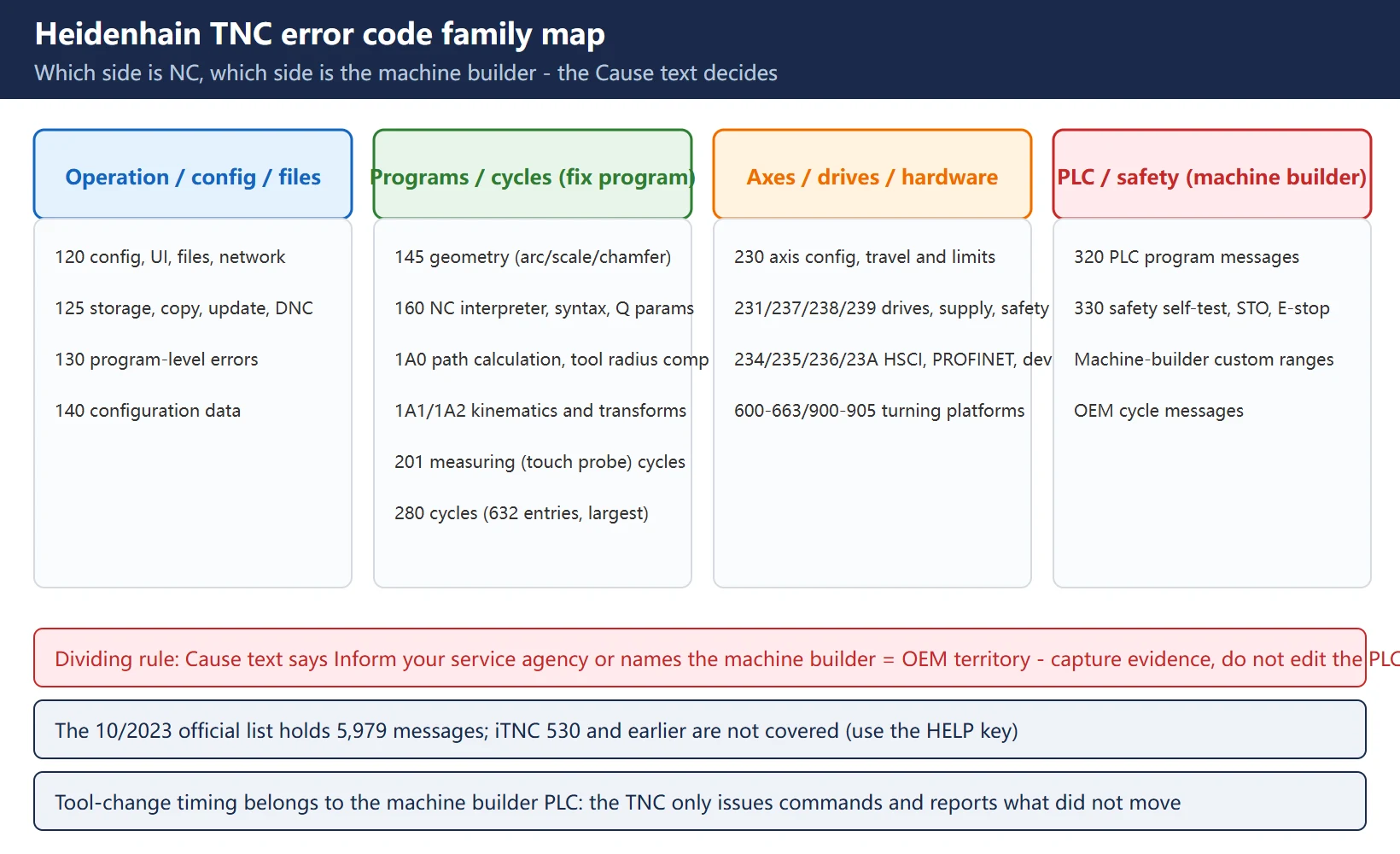
Table 3 High-frequency field codes, one by one
| Code | Official text | Field meaning | First check and fix |
|---|---|---|---|
| 120-001E | Can't connect to network: %1 %2 %3 | Cannot reach a network drive defined in network management | Five-step check in section 4 (NET123) |
| 120-001F | File '%1' not found | A required file is missing at the specified location | Check path/file name spelling; copy the file to the required directory |
| 120-002E | Path '%1' not found | Drive or directory does not exist | Check path spelling; confirm the USB/network drive is mounted |
| 130-00A7 | PROGRAM INCOMPLETE | Unexpected end of NC program (transfer interrupted, truncated file, ending blocks deleted) | Re-transfer from source (never reuse the partial file); compare file size; inspect the last blocks |
| 160-008B | BLOCK FORMAT INCORRECT | A block has invalid syntax | Jump to the flagged block and correct the syntax; if from CAM, fix the post and repost |
| 140-0021 | DATA OBJECT RENAMED | Configuration data belonged to an older level and was updated by the control | Review updated configuration values and machine behaviour; save a configuration backup after verifying |
| 201-093F | MEAS. CYCLE: LENGTH EXCEEDS MAX | A probing cycle returned a length/value beyond the permitted maximum | Check part seating and fixture, wrong surface contact, datum/expected size, probe calibration drift; recalibrate and re-run a simple reference |
| 230-001F | MAX. TRAVERSE LIMIT EXCEEDED | An axis move exceeds the machine's allowed traverse | Stop; verify work offsets and datum selection; re-reference axes; correct program coordinates or safe approach |
| 230-00FA / 230-00FB | LIMIT SWITCH EXCEEDED | Calculated path exceeds the positive or negative software limit | Confirm the active datum and offset sign/value (frequent after importing job data); only review soft limits with maintenance if they are genuinely too tight |
| 230-0457 | REFERENCE MARK NOT FOUND | No reference mark detected during referencing | Check encoder/scale signal, connectors, cable routing/shielding, scale cleanliness, mechanical obstruction; if it repeats on one axis, try a known-good cable |
| 231-8065 | DC POWERFAIL | DC link voltage dropped below the defined limit — unstable supply | Check supply, DC link, braking resistor and braking mode; with other 231-family messages, check the power side first |
4. Network family 120-xxxx: the five-step 120-001E check
The official correction for 120-001E is itself a checklist:
- Open network management in the program manager (NETWORK soft key);
- Press MOD and enter the network code number NET123;
- Enter all data required for the network connection (DEFINE NETWORK CONNECTN. soft key);
- Check the correctness and spelling of the entered data;
- Still down? Go physical: cable/switch port, IP/gateway/DNS settings, credentials and share permissions.
Field addition: “DNS vs IP” — if the share is reachable from a PC but not from the control, it is usually DNS; type the share’s IP instead. If the link LEDs are dark or half-lit, swap cable and port before touching configuration. 120-001F / 120-002E (file/path not found) usually share the same root: an unmounted network drive makes every program file “missing”.
5. Travel and limits family 230-xxxx
Family 230 is the most common “the machine will not move” source; keep three root causes apart:
- Coordinate system mismatch (most common): a changed work offset/datum, or job data imported with a flipped sign or value — the whole calculated path shifts and hits a soft limit. Verify the active datum and offsets before touching limits.
- Datum lost / not referenced: after power-up the axes were not referenced or the reference point was lost, so the position basis is wrong. Reference the axes first.
- Soft limits genuinely too tight: only after the first two are ruled out, review soft limit parameters together with maintenance — adjusting limits is the last resort, not the first move.
230-0457 reference mark not found separately: this is most likely a measuring-system fault (encoder/scale signal, connector contact, cable shielding and grounding, scale contamination, mechanical obstruction); the diagnostic method is in Heidenhain linear encoder alarm troubleshooting (in Chinese). Remember: if it repeats on one axis, try a known-good cable/connector first — an order of magnitude cheaper than replacing a scale.
6. Standstill and movement monitoring: MP1110 / MP1140 / MP1710
When an axis stalls and throws a monitoring error, understand these parameters before touching them (recommended values per Heidenhain’s commissioning manuals; confirm the number for your control):
Table 4 TNC monitoring parameters and recommended values
| Parameter | Function | Recommended value | Effect of raising it |
|---|---|---|---|
| MP1110.x | Standstill monitoring | 0.1–0.2 mm (range 0.001–30 mm) | Real faults pass unreported |
| MP1140.x | Movement monitoring | 0.5 V (range 0.03–10 V) | The axis “steals” motion without an alarm |
| MP1710.x | Position monitoring (following-error operation, erasable) | 1.2 × lag in rapid traverse | Following errors are tolerated; crash risk |
| MP1720.x | Position monitoring (EMERGENCY STOP) | 1.4 × lag in rapid traverse | Dangerous: the E-stop boundary is relaxed |
| MP1410 / MP1420 | Position monitoring (velocity-feedforward operation, erasable / E-stop) | 0.5 mm / 2–10 mm | Same, set for feedforward control |
| MP1030.x | Positioning window | 0.005–0.01 mm | In-position criterion loosens |
Discipline: fix the mechanical and electrical side first, monitoring parameters last. Widening monitoring to make an alarm “go away” hides the fault — the same direction as Heidenhain’s own note “if the drives of the machine permit narrower limits, these may be entered”: if the mechanics allow it, go tighter, not looser.
7. Why tool-change faults cannot be diagnosed here: TNC does not own the changer sequence
This is the question Chinese material never covers and the field hits daily: the tool changer sequence belongs to the machine builder’s PLC. The TNC issues commands and reports “the thing that should move did not” — nothing more.
- What ERR + HELP gives you is the NC-side error (e.g. tool undefined, tool number conflicts — the 160/280 families);
- A jammed changer, an arm that will not retract, a magazine that will not turn — those messages come from the machine builder’s PLC (often 320/330 or an OEM-reserved range), and TNC’s help text contains no sequence diagram;
- Where your diagnostic authority ends: confirm the exact error number and text, decide whether it is a PLC or NC message, save a service file, then hand it to the machine builder. Beyond that is OEM territory — do not start dismantling.
The same applies to machine-builder custom alarm texts and OEM cycles (the builder’s cycles inside family 280). Heidenhain’s own FAQ states it plainly: PLC messages are documented in the machine builder’s manual.
8. Evidence capture: ERR → HELP for cause, and how to save service files
The official evidence chain (slightly different on TNC7 vs classic UI):
Table 5 Standard Heidenhain evidence-capture actions
| Action | Operation | What you get |
|---|---|---|
| See the errors | Press ERR | All pending errors (TNC7: the message menu, with Group collapsing repeats) |
| See cause/remedy | Press HELP (TNC7: Details) | Official Cause + Error correction text plus internal information |
| Save a log | ERR → LOG FILES → LOG; or the code number LOGBOOK | Error and keystroke records (also via TNCremo: Extras → Receive log) |
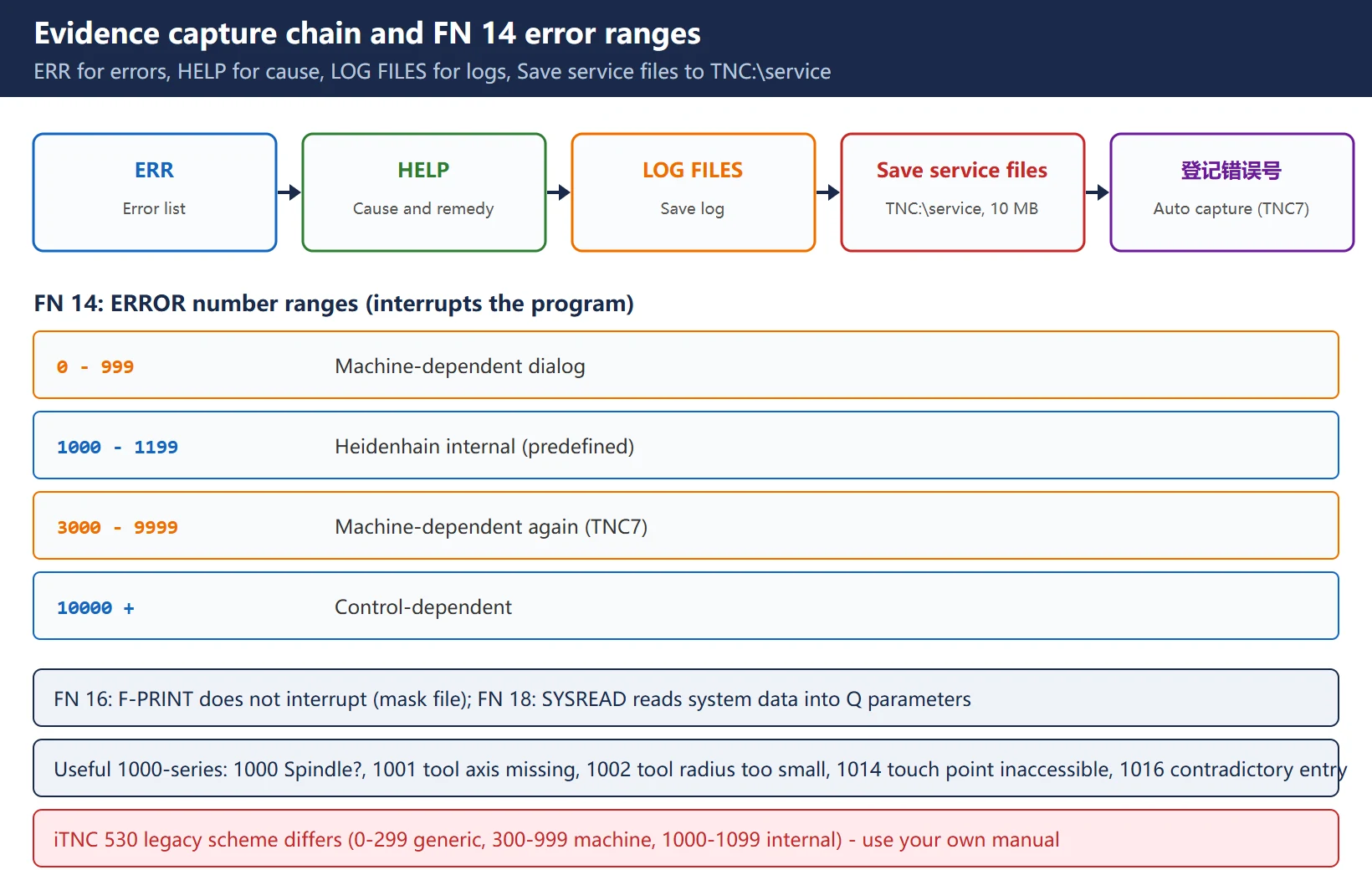
| Save service files | Message menu → Save service files | Stored under TNC:\service, up to about 10 MB including active NC programs, tool data and keystroke logs; five files per name before the oldest is overwritten |
| Automatic capture | TNC7 can register up to 5 error numbers | A service file is saved the moment the error fires — the right tool for faults that only appear at 2 a.m. |
For an email to Heidenhain service, the official list is: ticket number (if known), corporate address, contact person, precise error description, the service file created directly after the error, control model, machine manufacturer. Skip the service file and it takes three round trips; include it and it takes one.
9. Where to get the official error list PDF
- NC Error Messages (free PDF): Heidenhain’s TNCguide portal, one file covering the whole -18 control generation (TNC7 / TNC7 basic / TNC 640 / TNC 620 / TNC 320 / TNC 128 / CNC PILOT 640 / MANUALplus 620) — the 10/2023 edition contains 5,979 messages;
- Chinese edition:
Errors_zh_SW20.pdfon the same portal (same control generation, Chinese text — handy for reading straight to the operator); - ⚠️ This list does not cover iTNC 530 or earlier — for those, use the HELP key or the iTNC documentation;
- The authoritative source for the full family assignment: *Overview of Machine Parameters, Error Numbers and System Data* (ID 1445456-xx);
- Machine-builder (PLC/OEM) messages: the machine builder’s manual — Heidenhain’s FAQ points there explicitly.
Compliance note: the above are official reference entry points; this page does not reproduce manual text. Always confirm against the manual for your software version.
10. FN 14 / FN 16 / FN 18: differences and usage
Three different FN functions for “raise an error / output text / read system data” — do not mix them:
Table 6 FN 14 / FN 16 / FN 18 and the error number ranges
| Function | Purpose | Key point |
|---|---|---|
| FN 14: ERROR | Calls a message under program control, interrupts the program run; the program must be restarted | Message texts are predefined by the machine builder or Heidenhain — you cannot compose them on the fly |
| FN 16: F-PRINT | Formatted output with a mask file (FUNCTION REPORT on TNC7) | Does not interrupt — for operator prompts and logs |
| FN 18: SYSREAD | Reads system data (positions, tool data, transformations) into a Q parameter | Feeds live state into the program |
FN 14 error number ranges (TNC 640 manual): 0–999 = machine-dependent dialog; 1000–1199 = internal error messages predefined by Heidenhain (worth memorising). On TNC7/640/620/320 this extends to 1000–2999 control-defined and 3000–9999 machine-dependent again; the iTNC 530 legacy scheme was 0–299 generic / 300–999 machine-dependent / 1000–1099 internal. Useful 1000-series texts: 1000 “Spindle?”, 1001 “Tool axis is missing”, 1002 “Tool radius too small”, 1014 “Touch point inaccessible”, 1016 “Contradictory entry”, 1025 “Excessive subprogramming”, 1030 “Q202 not defined”.
Field usage: when FN 14: ERROR = 1002 lights up you know it is an insufficient tool radius — no guessing. For a prompt that does not stop the cycle, use FN 16. And on older controls the same logic maps to different number ranges — always use the range table from your machine’s own manual.
Frequently Asked Questions
How many digits is a Heidenhain TNC alarm number, and how does it differ from FANUC’s four-digit alarms?
Heidenhain uses a six-digit code: three-digit family + hyphen + four-digit sequence, e.g. 230-001F. The family identifies the subsystem (120 config/files, 160 program syntax, 230 axes and limits, 231 drive power, 280 cycles, 320/330 PLC and safety), the sequence the specific fault, and the last four digits are hexadecimal (A–F included) — so 00FA and 008B are valid and cannot be compared as decimals. FANUC uses four digits with class prefixes (PS/SV/SP/OI), where you “classify first, then look up the number”; Heidenhain is “family first, then sequence”, and every message carries its own Cause/Error correction text via ERR + HELP.
TNC reports 120-001E network connection failure — where do I start?
The official five steps: ① program manager → NETWORK soft key; ② press MOD and enter the network code number NET123; ③ enter all connection data via DEFINE NETWORK CONNECTN.; ④ check correctness and spelling; ⑤ then go physical — cable/switch port, IP/gateway/DNS, credentials and share permissions. Field addition: “ping works but the share does not” is usually DNS, so try the IP directly; dark link LEDs mean swap cable and port first. Also check 120-001F/120-002E — they appear alongside 001E whenever the network drive is not mounted.
How do I tell a “program error” from a “machine builder alarm” on Heidenhain, and which go to the machine builder?
By family and message source: 160 (syntax/Q parameters/nesting), 145 (geometry), 1A0 (tool compensation paths), the machining/probing cycle parameters inside 280, 130/140 are NC and program side — follow the ERR+HELP correction text and fix the program or configuration. 320/330 (PLC and safety self-test), machine-builder custom ranges, OEM cycle messages, and tool-change timing faults are machine-builder territory: TNC does not own the changer sequence, so your job is to confirm the exact error number and text, decide PLC vs NC, capture a service file per section 8, and hand it to the builder. Universal test: if the official Cause text says “Inform your service agency” or names the machine builder as source, it is OEM business — do not edit the PLC yourself.
Last updated: 2026-10-24
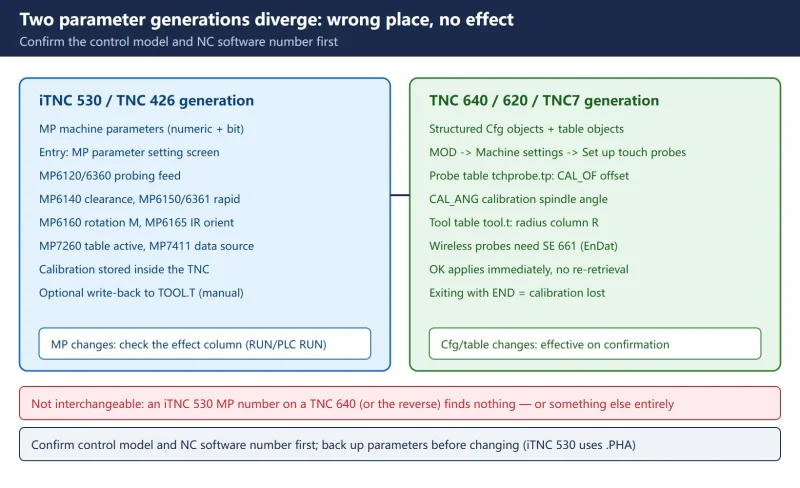
Further reading: Heidenhain Touch Probe Calibration: iTNC 530 Uses MP, TNC 640/TNC7 Uses Cfg — Calibrate in the Right Place






















暂无评论内容