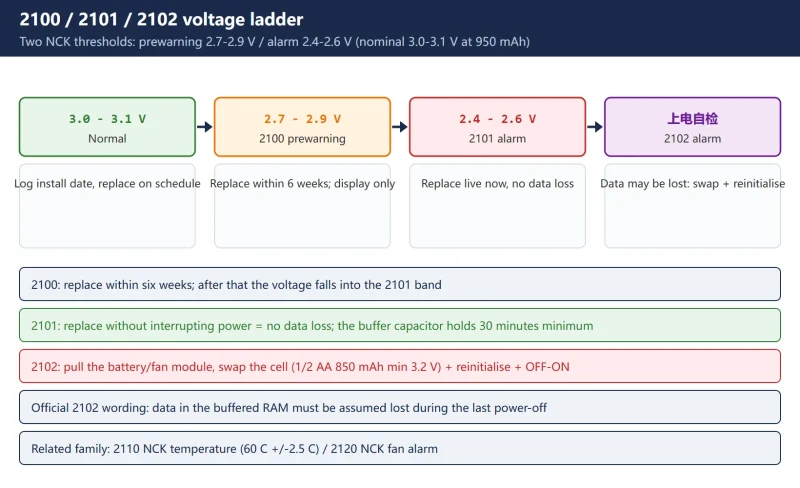



Alarms 2100 / 2101 / 2102 on a SINUMERIK 828D are three stages of one fault: the NCK battery has dropped below its monitoring thresholds. The difference matters — 2100 leaves you six weeks, 2101 can be fixed live with no data loss, and 2102 means the data may already be gone.
This page follows the official 828D Diagnostics Manual and answers the three questions that actually decide your next move: can it be replaced live (yes — a buffer capacitor holds the supply for 30 minutes), what is lost if the power stays off (itemised), and the fan and battery are one module — pulling it stops the fan (840D sl then powers the NCU down to protect it). The last sections cover alarm 120202 and the NCU 7-segment display, the combination that bites after a battery swap.
The regret-insurance for all of this: a full NC + PLC backup taken before you touch the module. Related reading on this site: SINUMERIK 828D Alarm 2000/2001: PLC Sign of Life and SINUMERIK 840D/828D UAFEHL: PLC Stops.
1. The three alarms: a voltage ladder that sets your window
The NCK battery undervoltage monitor has two thresholds: prewarning 2.7–2.9 V (nominal 3.0–3.1 V at 950 mAh) and alarm 2.4–2.6 V. The three numbers sit at different rungs:
Table 1 2100 / 2101 / 2102: trigger, reaction and remedy (official diagnostics manual)
| Alarm | Trigger | System reaction | Official remedy | Clear |
|---|---|---|---|---|
| 2100 NCK battery warning threshold reached | Voltage at 2.7–2.9 V (prewarning) | Alarm display only | Replace the battery within 6 weeks; beyond that the voltage can fall to the 2.4–2.6 V alarm limit if the buffered RAMs draw a lot of current | Delete key or NC START |
| 2101 NCK battery alarm | Undervoltage monitor (2.4–2.6 V) responded in cyclic operation | Alarm display only | Replace live, without interrupting power — no data is lost; production can continue | Delete key or NC START |
| 2102 NCK battery alarm | Undervoltage (2.4–2.6 V) detected during power-up self-test | NC not ready, follow-up mode, channel not ready, NC start disable, NC stop on alarm | Pull the battery/fan module, replace the battery, then reinitialize the system | Power OFF–ON |
One line to remember: 2100 = order the battery, 2101 = swap it now, 2102 = the data may already be gone. The 2102 text is blunt: it must be assumed that data in the buffered RAM was lost during the last power-off phase because of insufficient supply voltage.
2. Replace live or power down: the buffer capacitor holds 30 minutes
This is the single most useful line in the official manual, and almost no Chinese-language page repeats it:
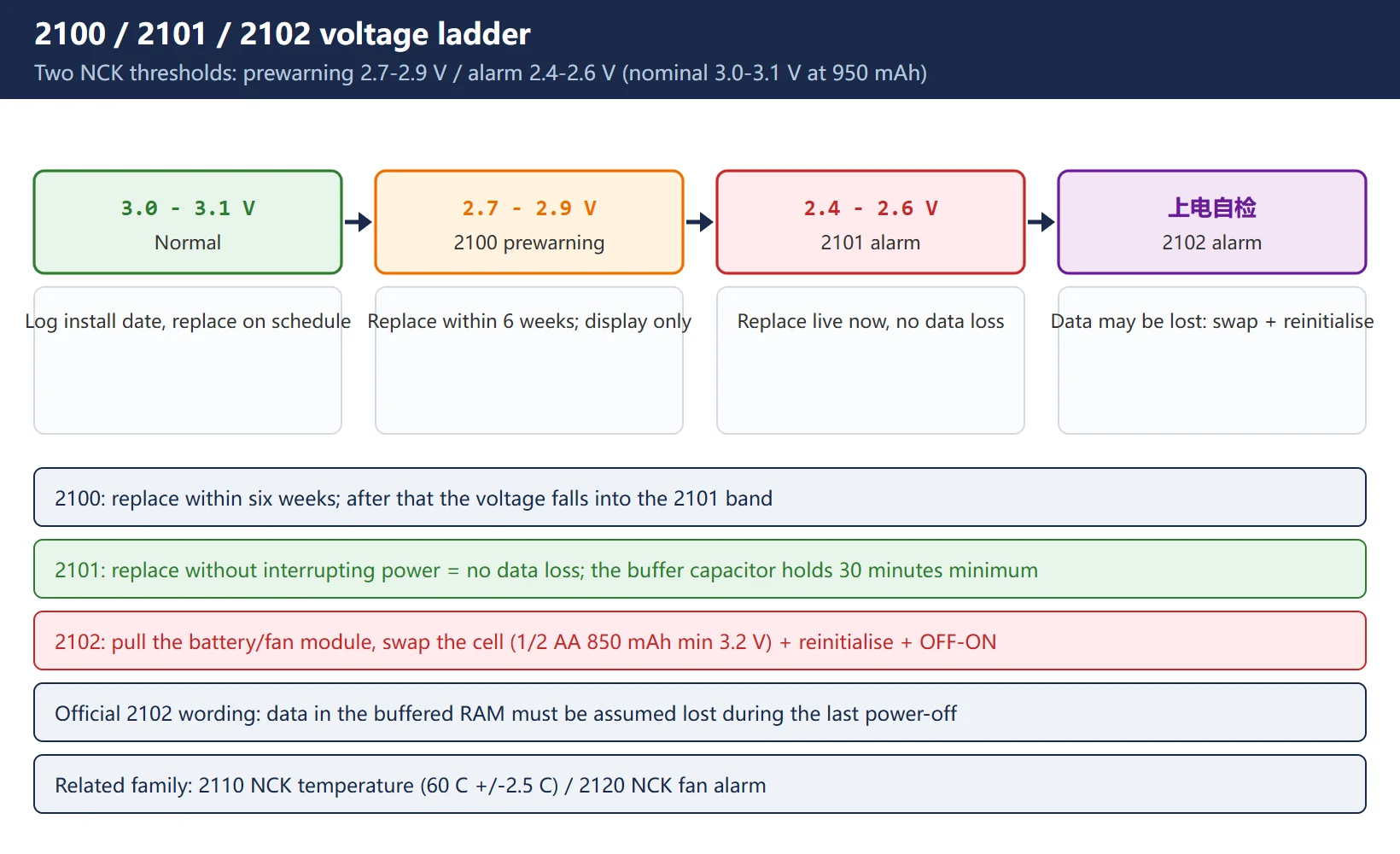
2101 remedy (official): “If the NCK battery is replaced without interrupting the power supply, no data will be lost… A buffer capacitor on the NCK holds the supply voltage for at least 30 minutes, and the battery can be replaced within this time even when the control is switched off.”
Table 2 Live replacement vs power-down replacement
| Method | Data risk | Side effect | Use when |
|---|---|---|---|
| Live (NC powered) | None — the buffer capacitor covers you for 30 minutes | Pulling the module stops the fan too (section 4) | The standard 2101 fix; preferred when production allows |
| Power down, swap within 30 min | None — still inside the capacitor window | Fan is already stopped, no added risk | Break, shift change |
| Power off beyond the capacitor window | High — data lost, you are in the 2102 flow | — | Only after the loss already happened |
Field discipline: confirm you are in the 2101 state (2.4–2.6 V), keep the module out only as long as it takes to change the cell — do not leave it dangling past the 30-minute window. And do not sit on a 2100 for weeks: six weeks is the official outer limit, and any power-down that straddles the window turns it into 2102.
3. What is lost if the power stays off: the 2102 itemised list
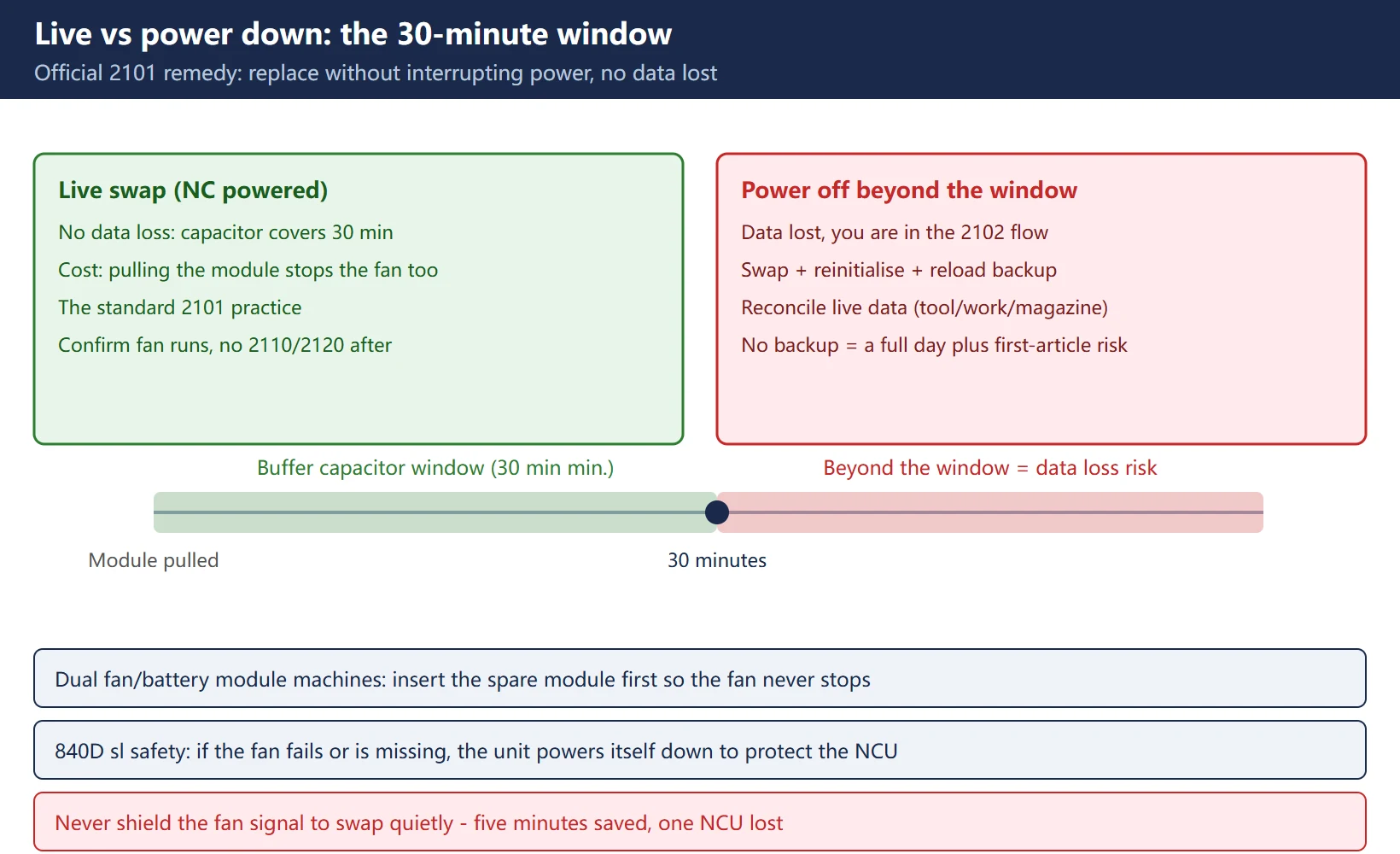
The official 2102 list (“might have been corrupted or entirely lost”):
Table 3 The 2102 data loss list and where each item comes back from
| Lost item | What it is | Restored from |
|---|---|---|
| NC machine data | Axis, speed/acceleration parameters | NC archive (.arc) after NC total reset |
| Drive machine data | SINAMICS S120 drive parameters | NC archive or a separate drive backup |
| Option data / setting data | Option licensing, setting data | NC archive |
| User variables / global subroutines / cycles and macros | R parameters, global subs, OEM cycles | Program archive |
| PLC machine data / PLC basic program | PLC system data blocks, basic program | PLC archive (.arc) |
| PLC user program and all PLC user data | User program and data blocks | PLC archive |
⚠️ The most important official note: user data changed by production since the last backup — tool data, workpiece data, magazine tables — does not snap back to “current state”. The archive holds the old values; you must manually reconcile them against the present machine status. This is the number-one source of scrap after a recovery: the data comes back, the tool offsets are three months old, and the parts are scrap.
4. The fan and battery are one module: pulling it stops the fan
The official 2101 text spells out a mechanism almost nobody discusses in the field:
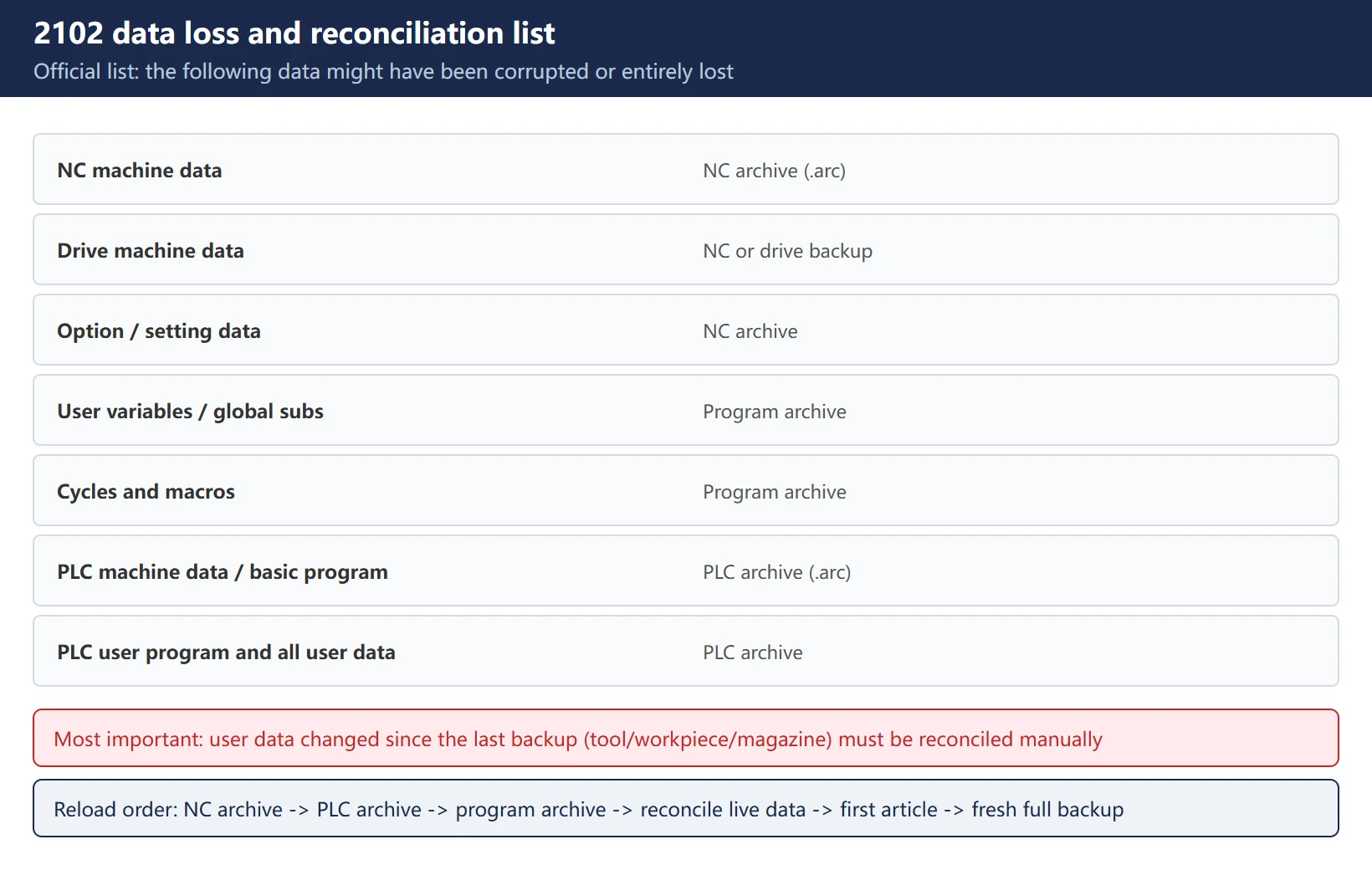
“On Sinumerik products, the two wear parts of the NCU (fan/battery) are assembled into one easy-to-replace module. If the battery module is pulled out during continuous operation, the fan also stops supplying air to the components. For this reason, replace it during continuous operation only if production requirements force you to. If the battery cannot be replaced quickly, a second fan/battery module plugged into the NCU should be used. In this case the ‘840D sl’ safety function takes effect: if the fan fails or is not inserted, this function disconnects the components automatically after a certain time to avoid NCU damage due to overheating (see ‘dual fan/battery module’ in the equipment manual).”
Three field conclusions:
- On 828D, pulling the battery module stops the fan too — that is the real price of a live swap, especially with a hot cabinet in summer;
- Dual fan/battery modules (840D sl) kept as a spare are what make a live swap safe;
- Never bypass or shield the fan signal to “swap quietly” — the automatic power-down protects the NCU from overheating; saving five minutes that way costs one NCU.
Machine-type note: 828D talks to its drives over Drive-CLiQ (RJ45, max 70 m), not Profibus DP; 840D sl uses MPI between NCU and PCU and Profibus DP to the drives. The terminating-resistor check (section 7) applies only to Profibus-equipped machines/options.
5. Field procedure: five steps
Table 4 Standard battery replacement sequence
| Step | Action | Key points |
|---|---|---|
| 1. Spare | Lithium battery 1/2 AA, with leads, 850 mAh, min. 3.2 V (the type named in the official 2102 entry) | Bring two; verify ≥3.2 V, not a three-year-old stock cell |
| 2. Backup | Take a full backup (NC + PLC) before touching the module | No backup on the machine? Fix that before the swap |
| 3. Pull module | Pull the battery/fan module from the NC module | Note the module orientation; back in within 30 minutes |
| 4. Change cell | Unplug old cell, plug new (mind polarity) | The battery has leads and a keyed connector; do not pull on the fan supply wires |
| 5. Refit and confirm | Module back in, fan running, alarm cleared | 2101: Delete key, keep cutting; 2102: reinitialise (section 6) |
Watch for ten minutes afterwards: fan running, no 2110/2120 (temperature/fan alarms) recurring, no unexpected power-down during cutting.
6. After a 2102: reinitialisation and the data reconciliation list
The official 2102 remedy is “switch the control OFF–ON” plus reinitialisation (the manual points to §2.2 of the Installation and Start-up Guide). Field order:
- Power OFF–ON; confirm whether the alarm recurs;
- No backup on file: follow the reinitialisation / NC+PLC total reset route (this wipes whatever is left — only do it when there is no backup);
- Reload in order: NC archive (machine/drive/option data) → PLC archive (basic + user program + user data) → program archive;
- Manually reconcile the “live” data: tool table, magazine table, work offsets/zero offsets, R parameters — the archive’s old values are not the current machine state;
- Verify after reload: reference point return, jog/handwheel each axis, dry-run a program, cut a first article;
- Take a fresh full backup and log the new battery date in the machine file.
The neighbouring fault family on this site: SINUMERIK 828D Alarm 2000/2001 covers PLC sign-of-life loss (same “NC/PLC not talking” symptom, different root cause); the FANUC-side equivalent is FANUC Battery Alarm 306/307.
7. Alarm 120202 and NCU 7-segment “6”: when the machine will not boot after the swap
The classic post-battery-swap no-boot combination is 120202 + the 7-segment display stuck at 6.
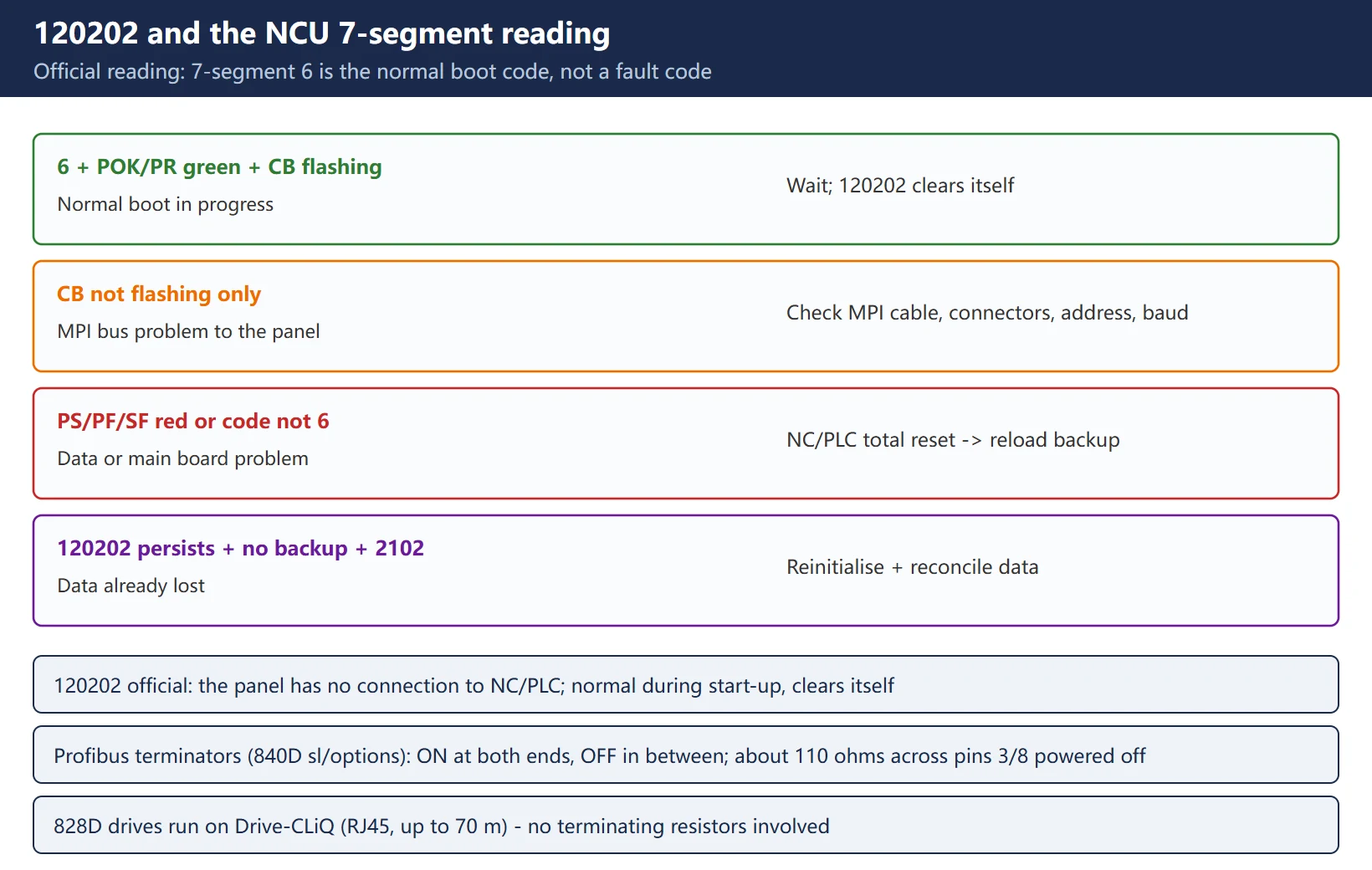
120202 = waiting for a connection to the NC/PLC (official diagnostics): the operator panel connects to NC and PLC over a serial bus; it appears when the MMC first starts and the NC/PLC boot has not finished, or when communication is disturbed; during start-up (e.g. after a reset) it is normal, and it disappears automatically once the fault clears. If it persists: broken line, NC/PLC not booting, bus node address error, baud rate misconfiguration, etc.
NCU 7-segment “6” is a normal code, not a fault code — Siemens support states the healthy state plainly: 7-segment shows “6”, POK and PR LEDs green, CB flashing. Judge the combination:
Table 5 120202 plus 7-segment / LED combination reading (official basis)
| Symptom | Reading | Action |
|---|---|---|
| 7-segment 6 + POK/PR green + CB flashing | Normal boot in progress | Wait for start-up to finish; 120202 clears itself |
| CB not flashing only | MPI bus problem to the operator panel | Check MPI cable, connectors, address, baud rate |
| PS/PF/SF red or 7-segment not 6 | Data problem or main board problem | NC/PLC total reset → if the board is then healthy, reload the backup data |
| 120202 persistent + no backup + a 2102 just occurred | Data already lost | Follow the section 6 reinitialisation flow |
⚠️ Correction: some English pages read 7-segment “6” as “MPI initialisation failure / battery backup failure confirmed” — the opposite of the official Siemens reading, where “6” is the post-boot healthy state. The real data-loss signal is the combination of persistent 120202 + red PS/PF + needing to reload a backup, not the “6” by itself.
Profibus terminating resistors (840D sl / Profibus options): ON at both ends of each segment, OFF on every intermediate node; with power off, measure across D-sub pins 3/8 — 220 Ω at each end, total about 110 Ω. Open, shorted, or an extra mid-segment resistor means a physical bus fault. 828D’s Drive-CLiQ bus does not use terminating resistors.
8. Battery life and preventive replacement: do not wait for 2102
Table 6 Preventive battery replacement cadence
| Stage | Voltage | Action |
|---|---|---|
| Normal | ≥3.0 V | Log the install date; replace on schedule |
| 2100 prewarning | 2.7–2.9 V | Replace within 6 weeks; shorten to 2–3 weeks in hot cabinets |
| 2101 alarm | 2.4–2.6 V | Replace live immediately |
| 2102 | Undervoltage at power-up | Swap + reinitialise + reconcile data |
Preventive replacement should be scheduled by age + cabinet temperature together: the official 6-week window after 2100 is the outer limit, not the target. Put “NCK battery replacement date” in the machine file on the same PM sheet as lubricant and filters — it is the only thing that prevents 2102 from ever happening.
9. Manuals and official diagnostics sources
All official channels (entry points only, no content reproduced):
- SINUMERIK 828D Diagnostics Manual (the source for 2100/2101/2102/2110/2120) — search “828D Diagnostics Manual” on Siemens Industry Support;
- 828D PPU and Components Manual (Drive-CLiQ interfaces, fan/battery module, topology rules);
- Installation and Start-up Guide (§2.2 reinitialisation after 2102);
- Siemens Industry Online Support / Q&A (official answers on 120202 and the 7-segment reading);
- 1847 industrial learning platform (free SINUMERIK Operate operation and diagnostics videos).
Compliance note: the above are reference entry points; this page does not reproduce manual text, only mechanisms and remedies. Always confirm against the manual version shipped with your machine.
Frequently Asked Questions
Will replacing the NCK battery on an 828D lose machine data?
Not if it is done correctly. The official rule: replacing the NCK battery without interrupting the power loses no data; and the buffer capacitor on the NCK holds the supply for at least 30 minutes — so even with the control switched off, a swap inside that window is safe. The loss scenarios are: power off and left beyond the capacitor window, or a battery already so flat that undervoltage is only found at power-up (2102) — where the manual already assumes data loss and requires reinitialisation. So take a full NC + PLC backup before the swap (the FANUC-side equivalent of this fault is covered in FANUC Battery Alarm 306/307): it turns “it will not be lost” into “even if it is, we can restore it”.
What is the difference between 828D alarms 2100 and 2101? Can I leave them?
2100 is a prewarning (2.7–2.9 V): alarm display only, machining continues, but the official window is replace within six weeks. 2101 is an alarm (2.4–2.6 V in cyclic operation): replace live now — no data loss. “Leaving it” buys you at most those six weeks from 2100; after that the voltage drops into 2101 territory, and any single power-down outside the capacitor window makes it a 2102. The cost difference is an order of magnitude: 2100/2101 is a ten-minute cell swap; 2102 is a total reset, reload, live-data reconciliation and a first-article cut — a whole day when there is no backup.
If the fan stops while the battery is out, can the NCU burn out?
A few minutes without the fan usually will not destroy anything immediately, but the risk is real — and you must never shield or bypass the fan signal to “swap quietly”. The official mechanism: on 828D/840D sl the fan and battery are one module, so pulling it stops the fan; on 840D sl an automatic power-down disconnects the components after a set time precisely to keep the NCU from overheating. The correct approach: ① keep a second fan/battery module as a hot spare and insert it first for live swaps; ② make the swap one clean motion — never leave the module out past the 30-minute capacitor window; ③ in hot summer cabinets, swap during a break, not mid-cut. Before you leave, confirm the fan runs and no 2110/2120 recurs.
Last updated: 2026-10-24






















暂无评论内容