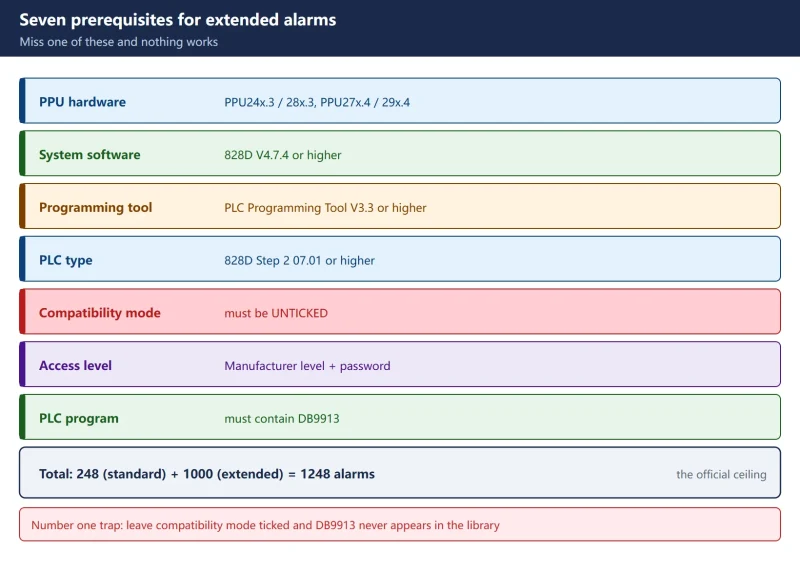



A machine tool broken into a dozen stations, each needing its own message — what happens when the 248 user alarms run out? The 828D ships with a capacity of 248 alarms (700000–700247), and beyond that Siemens provides a second path: extended PLC alarms, an extra 1000 (701000–701999). The catch is that extended alarms are not enabled by changing a machine data: the PLC program has to carry an extra block, DB9913, and by default that block does not even appear in the library — because the PLC project has “Activate compatibility mode” ticked.
This article follows the Siemens application notes (CNC4YOU 3204 / 2786) and section B031 of the 828D manual through the whole procedure: when extended alarms are actually justified, the hard PPU and software thresholds, the “compatibility mode” trap, how alarm numbers map onto the high DB1600 bits and onto DB9913, bit 5 for the alarm log, red alarms versus black messages, and why variable substitution stops working at 701248.
Related reading: how to compute the address from the alarm number is covered in SINUMERIK 828D user alarm bit addresses: the DB1600 sequential mapping (that article covers the arithmetic, this one covers configuration). The 840D uses a different DB2 grouped algorithm entirely, see SINUMERIK 840D PLC user alarms explained.
1. When extended alarms are justified: deciding whether 248 really is not enough
Confirm that you have genuinely run out before adding a second range — very often the problem is wasteful numbering rather than lack of capacity.
Table 1 — Judging whether 248 alarms are enough
| Situation | Verdict | Recommendation |
|---|---|---|
| Only up to about 7001xx is in use and plenty of numbers are free | Not exhausted, just badly planned | Re-plan the numbering in blocks (by station, by assembly); extended alarms are unnecessary |
| 700000–700247 is filled up past roughly 700240 | Genuinely running out | Move to extended alarms early rather than waiting to hit 700247 |
| One alarm number must show different texts in different situations | Not a capacity problem | Check first whether the standard range variable interface DBD1000 series solves it |
| The machine builder's standard program already occupies all 248 | The classic extended scenario | Start at 701000 and leave the original range untouched |
| More than 1248 alarms are needed | Beyond what the 828D offers | Split the information across custom HMI screens or message texts |
Total user alarm capacity on the 828D = 248 (standard) + 1000 (extended) = 1248 alarms. That is the officially documented combination; there is no third tier.
One-line rule: tidy up the numbering in the 248 range first, and only move to extended alarms once it is genuinely full. Extended alarms mean PLC changes, a download and an NCK restart — far more maintenance overhead than renumbering.
2. Hard prerequisites: PPU model, software version, and the compatibility-mode trap
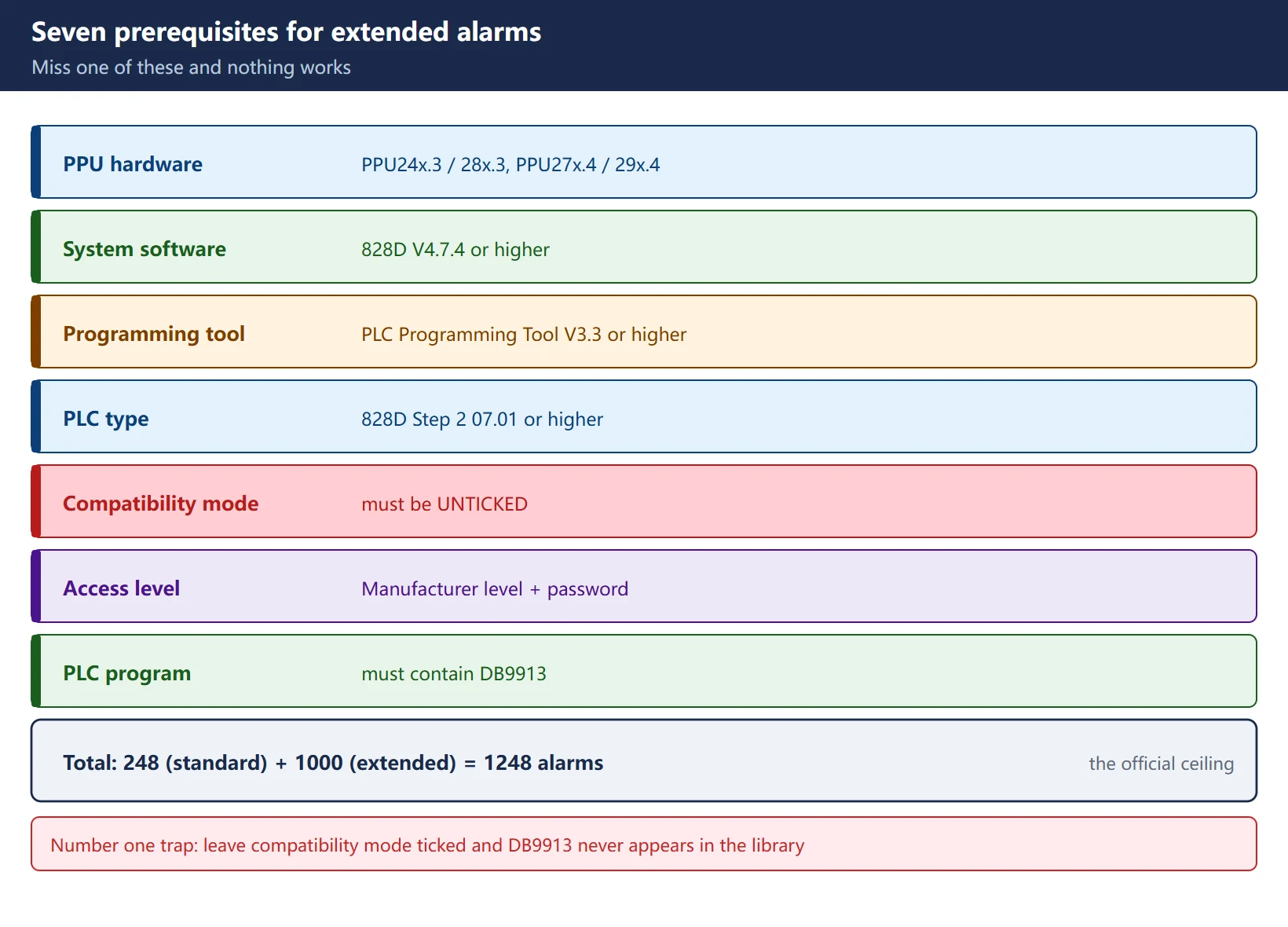
Without this section nothing else happens — the last row in particular is the number one reason DB9913 is missing from the library.
Table 2 — Hard prerequisites for enabling extended alarms
| Category | Requirement | Note |
|---|---|---|
| Hardware (official list) | PPU24x.3 / PPU28x.3, PPU27x.4 / PPU29x.4 | Turning, milling and grinding all covered |
| System software | 828D V4.7.4 or higher | Earlier versions have no extended alarm capability |
| Programming tool | PLC Programming Tool V3.3 or higher | Older tools cannot generate DB9913 |
| PLC project type | 828D Step 2 07.01 or higher | Selected in the project “Type…” dialog |
| 🚨 Compatibility mode | “Activate compatibility mode” must be unticked | Leave it ticked and DB9913 never appears in the special data block library |
| Access level | Manufacturer level with password | Also required to edit alarm texts |
| PLC program | must additionally contain DB9913 | Mandatory once more than 248 alarms are used |
3. The high DB1600 band: extended alarms start at DBX4000.0
Extended alarm trigger bits also live in DB1600, but they are not contiguous with the 248 — they start again at DBX4000.0, leaving everything between DBX31 and DBX3999 unused.
Table 3 — How the standard and extended bands divide DB1600
| Item | Standard user alarms | Extended user alarms |
|---|---|---|
| Alarm numbers | 700000 – 700247 | 701000 – 701999 |
| Count | 248 | 1000 |
| Trigger bits | DB1600.DBX0.0 – DBX30.7 | DB1600.DBX4000.0 – DBX4124.7 |
| Bytes occupied | 31 | 125 |
| Variable interface | from DB1600.DBD1000, +4 per alarm | from DB1600.DBD5000, +4 per alarm |
| What defines the response | MD14516[xx] (or DB4500.DBB3000–3247) | DB9913 (one block per alarm number) |
| PLC change required | No | Yes — DB9913 must be added and downloaded |
The extended band uses the same arithmetic, only with a different starting point:
index M = alarm number - 701000
byte    = 4000 + M / 8      (integer)
bit     = M % 8             (remainder)
address = DB1600.DBX<byte>.<bit>
Examples: 701000 → DB1600.DBX4000.0; 701001 → DBX4000.1; 701008 → DBX4001.0; 701999 → 4000 + 999/8 = 4124 with a remainder of 7 → DB1600.DBX4124.7.
Compute the variable interface the same way: (alarm number − 701000) × 4 + 5000. So 701000 = DB1600.DBD5000, 701001 = DBD5004 and 701247 = DBD5988. Those three values line up with the official table, which makes them a handy self-check.
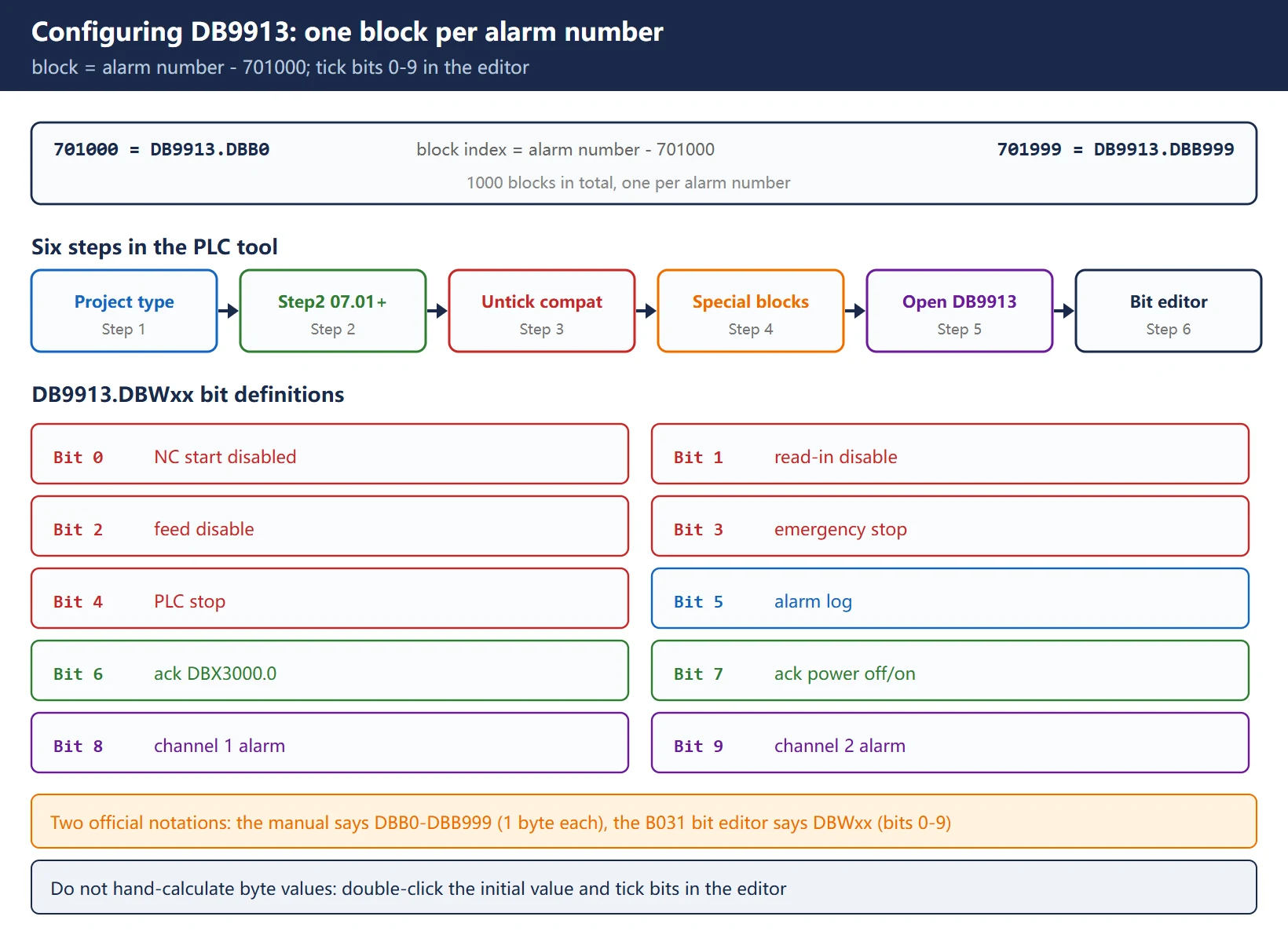
4. Writing DB9913 block by block: one block per alarm number
This is the biggest difference from standard alarms: there is no MD14516 for extended alarms — everything the alarm does to the machine is written into DB9913.
Table 4 — DB9913.DBWxx bit definitions (828D manual, section B031)
| Bit | Meaning | Note |
|---|---|---|
| Bit 0 | NC start disabled | blocks NC start while active |
| Bit 1 | read-in disable | blocks program read-in |
| Bit 2 | feed disable | feed hold for all axes |
| Bit 3 | EMERGENCY STOP | triggers the emergency stop reaction |
| Bit 4 | PLC stop | puts the PLC into stop |
| Bit 5 | alarm log | = 1 puts the alarm into the alarm log |
| Bit 6 | acknowledge via DB1600.DBX3000.0 | the PLC must drive this bit to acknowledge |
| Bit 7 | acknowledge via power off / on | only cleared by a power cycle |
| Bit 8 | PLC user alarm for channel 1 | for multi-channel controls |
| Bit 9 | PLC user alarm for channel 2 | for multi-channel controls |
How alarm numbers map onto DB9913 blocks:
block index S = alarm number - 701000
701000 -> DB9913.DBB0 (DBW0)
701001 -> DB9913.DBB1
...
701999 -> DB9913.DBB999
Two official notations exist: the lookup table in the 828D manual says DB9913.DBB0 – DBB999 (one byte per number), while the “bit editor” description in section B031 says DB9913.DBWxx (one word per number, holding 10 bits). Both come from Siemens. Do not hand-calculate byte values — open the PLC tool, double-click the alarm’s “initial value” and tick the bits in the bit editor; the tool writes whatever structure actually applies.
Full configuration procedure (PLC Programming Tool side):
- Open the PLC software, right-click the PLC project name (for example 828_milling1) and choose “Type…”;
- Select a PLC type of “828D Step 2 07.01” or higher;
- Untick “Activate compatibility mode” (leave it ticked and DB9913 never shows up);
- Press Confirm; if the change was accepted a confirmation window appears — press OK;
- Go to “Library” → “Special data block” → DB9913 should now be visible;
- Double-click ALARM_INI(DB9913) and confirm — DB9913 is added to the user data blocks automatically;
- Double-click the “initial value” of the alarm number you want → tick Bits 0–9 in the bit editor → confirm;
- Save and download to the PLC.
5. Getting extended alarms into the alarm log: DB9913 bit 5 = 1
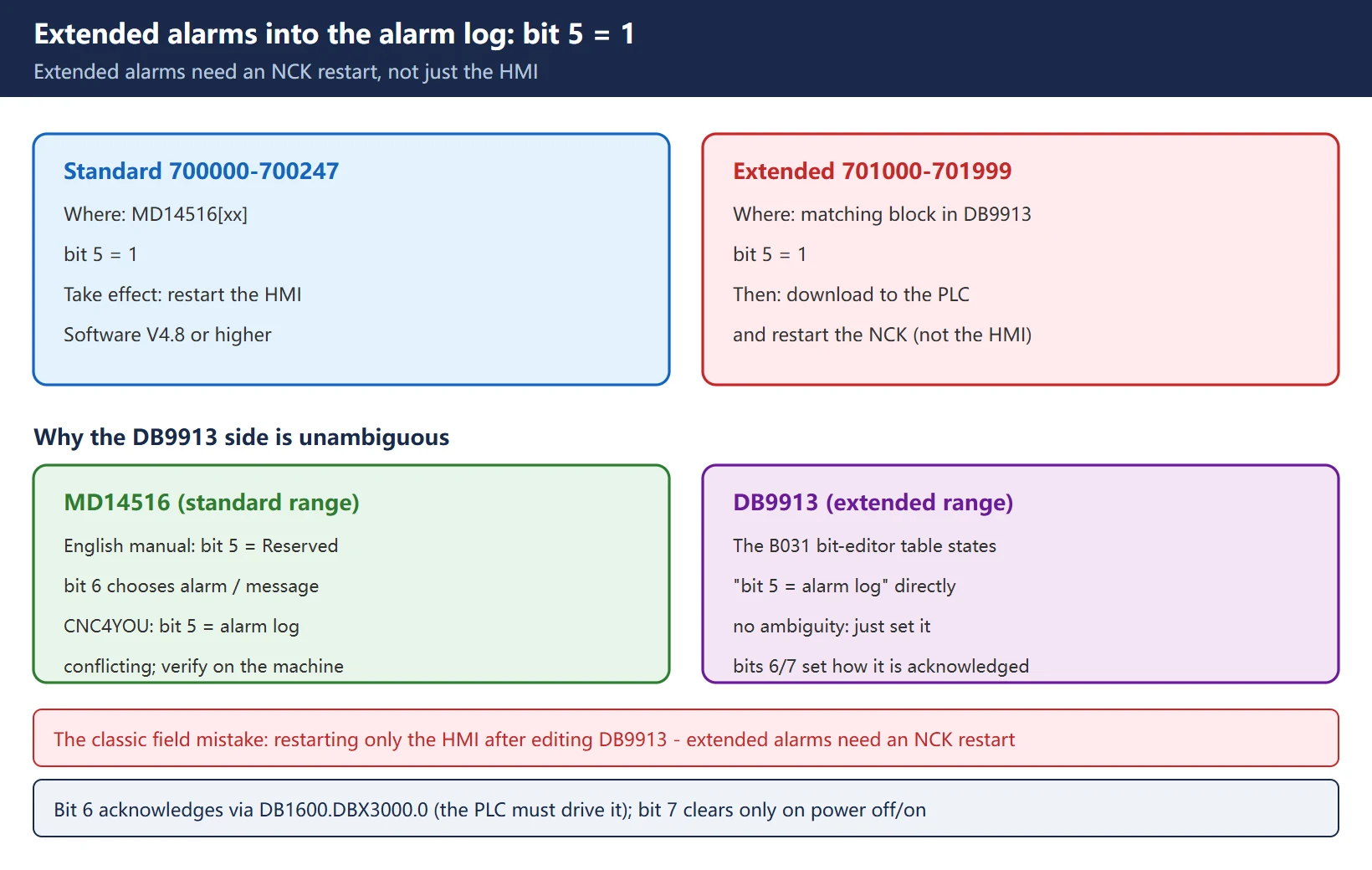
Extended alarms are not recorded in the alarm log by default either. Getting them logged means setting bit 5 of the block inside DB9913.
Table 5 — Standard versus extended: two entirely different procedures for the alarm log
| Alarm type | Where to set it | How it takes effect |
|---|---|---|
| Standard (700000–700247) | MD14516[xx] bit 5 = 1 | restart the HMI |
| Extended (701000–701999) | bit 5 = 1 in the matching alarm block of DB9913 | download to the PLC → restart the NCK |
Note the third row: extended alarms need an NCK restart; restarting only the HMI is not enough. This differs from standard alarms, which is why people restart the HMI, wait, and see nothing happen.
The application note (CNC4YOU 2786) and the English 828D manual disagree about bit 5 of MD14516 (the manual marks it Reserved and uses bit 6 for alarm/message). But on the DB9913 side, bit 5 = alarm log is unambiguous — the B031 bit-editor table states it directly. So for extended alarms, set bit 5 = 1 without hesitation.
6. Red alarms versus black messages: bits 6 and 7 decide whether acknowledgement is needed
Red versus black is not cosmetic — it decides which window the information lands in and whether somebody has to acknowledge it.
Table 6 — Alarm (red) versus message (black)
| Item | Alarm (red) | Message (black) |
|---|---|---|
| Where it shows | alarm list | Messages page |
| Meaning | serious, requires stopping or action | informational |
| Acknowledgement | required (via bit 6 or bit 7) | not required |
| With neither bit 6 nor bit 7 set | — | cleared immediately when the trigger bit goes to 0, shown on the Messages page |
| Typical use | motor overload, guard door open | hydraulics not started, coolant level low |
The two acknowledgement options (bits 6 and 7 of DB9913):
- Bit 6: acknowledge via DB1600.DBX3000.0 — either the operator or the PLC program must drive this bit before the alarm clears. The PLC must contain this reset logic; without it the alarm never goes away.
- Bit 7: acknowledge via power off / on — cleared only by cycling power, reserved for the most serious faults.
On a multi-channel machine there are also Bit 8 / Bit 9 (PLC user alarm for channel 1 / channel 2), which decide which channel owns the alarm; the same assignment can be made through MD14518 $MN_USER_DATA_PLC_ALARM_ASSIGN.
7. Variable substitution in the text: using %d, and why it stops at 701248
Extended alarms include one genuinely powerful feature — one alarm number showing different text depending on a variable. But only 248 of the numbers have it.
Table 7 — Where variable substitution is available
| Alarm number range | Numeric variable | Variable interface | Note |
|---|---|---|---|
| 701000 – 701247 | available | DB1600.DBD5000 – DBD5988 | +4 bytes per alarm |
| 701248 – 701999 | not available | — | officially stated: no numeric variable in this range |
Permitted placeholders (as documented for the alarm texts):
| Placeholder | Meaning |
|---|---|
| %d | decimal value |
| %x | hexadecimal |
| %b | binary |
| %o | octal |
| %u | unsigned integer |
| %f | floating point |
The official example, which explains it best:
- I0.0 switched on → alarm 701000 shows
Axis 1 error test - I0.1 switched on → alarm 701000 shows
Axis 2 error test
The trick: both inputs trigger the same alarm bit, DB1600.DBX4000.0, and each writes a different value into the variable interface DB1600.DBD5000. With %d in the alarm text, the number changes accordingly.
How to edit the texts (HMI route): Start-up → HMI → Alarm texts → pick “Manufacturer PLC alarms (oem_alarms_plc)” in the Select file dialog → confirm → the editor opens. Each alarm text may be up to 255 characters long.
🚨 A restart is mandatory after editing texts: alarm text files are loaded only during system startup, so without a restart you keep seeing the old text. Keep the file name lower case; it is stored at
oem/sinumerik/hmi/lngon the CF card (the/oem/cfg/path quoted in third-party notes does not match the manual — follow the directory that exists on your machine).
8. Download and verification steps, plus the fault list
Do not walk away after editing DB9913 — work through these six steps first.
- Save → download to the PLC (DB9913 is a user data block and must be downloaded);
- Restart the NCK (not just the HMI);
- On the HMI open the NC/PLC variables screen and enter addresses such as
DB1600.DBX4000.0to confirm they can be monitored; - Force the trigger condition (for example by switching the corresponding input) and check that the alarm window shows the number with the right text;
- Open the alarm log and confirm the alarms flagged with bit 5 are recorded;
- Write different values into the variable interface (change 1 to 2, say) and confirm the
%din the text follows the value.
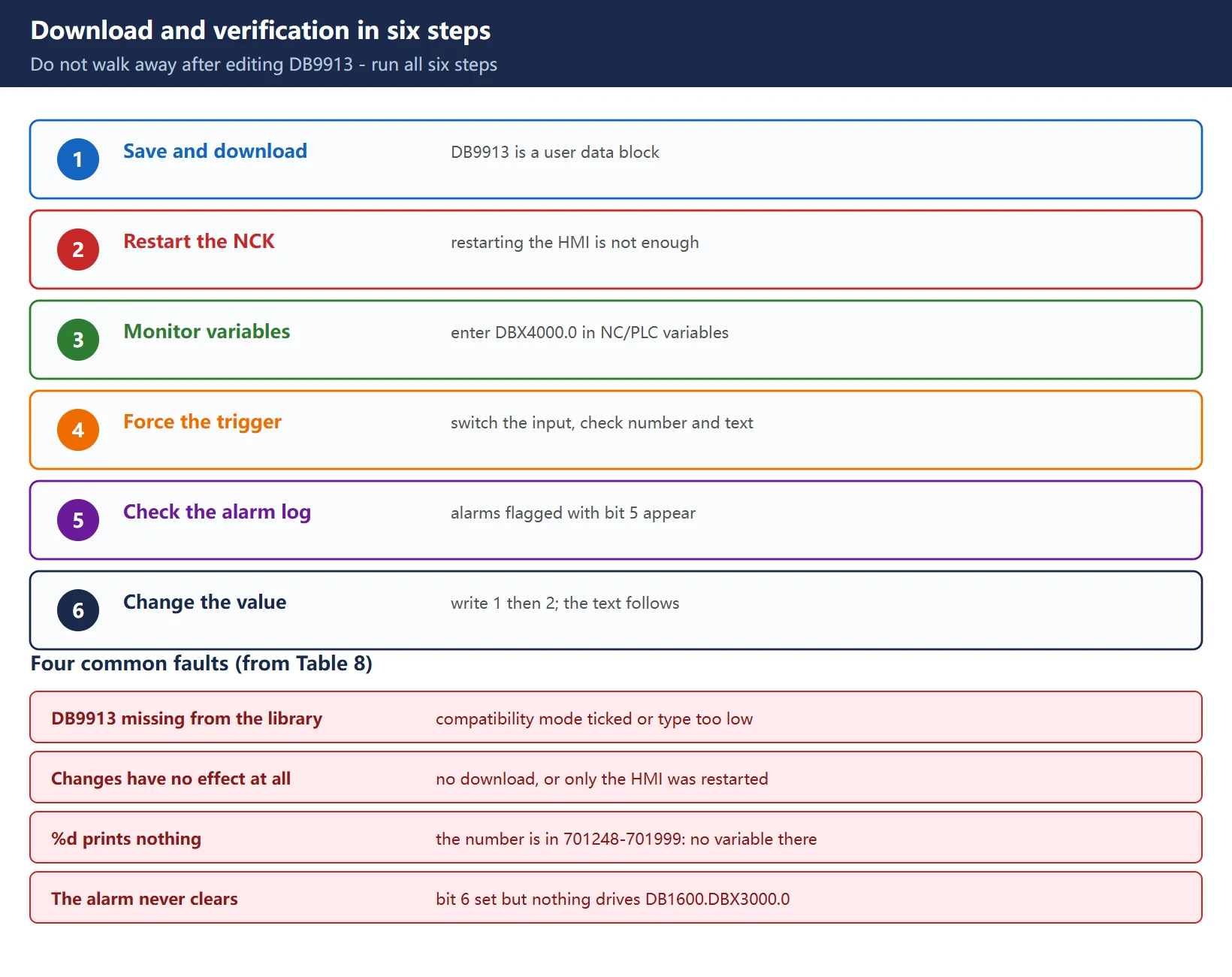
Table 8 — Extended alarm fault list
| Symptom | Most likely cause | What to do |
|---|---|---|
| DB9913 missing from the special data block library | compatibility mode is still ticked, or the type is below Step 2 07.01 | set the type to Step 2 07.01 or higher and untick compatibility mode, confirm, then reopen the library |
| DB9913 changes have no effect at all | only the HMI was restarted; no download or no NCK restart | download to the PLC → restart the NCK |
| Alarm number appears but there is no text | the number is not configured in oem_alarms_plc, or no restart afterwards | add the text → restart the system |
| %d shows no number | the alarm number is in 701248–701999, which has no variable | variables exist only for 701000–701247; otherwise use the DBD1000 series in the standard range |
| The variable shows the wrong value or is off by one slot | wrong interface index | interface = 5000 + (alarm number − 701000) × 4 |
| The alarm never clears | bit 6 acknowledgement is set but nothing drives DB1600.DBX3000.0 | add the reset logic in the PLC, or drop back to the self-clearing mode without bits 6 and 7 |
| On a twin-channel machine the alarm lands on the wrong channel | bits 8 / 9 not set | set Bit 8 / Bit 9 per channel, or use MD14518 |
| Alarm state looks right but the machine does not react | bits 0–4 not ticked | go back to the bit editor and tick the NC reaction bits you need |
| Permission denied when editing alarm texts | not at Manufacturer access level | enter the Manufacturer password |
Closing advice: save a copy of the PLC project before you start, screenshot the DB9913 bit combinations, and keep a table in the machine file showing which alarm number belongs to which station or assembly — nobody remembers a hundred-odd extended alarms six months later.
Frequently Asked Questions
How many PLC alarms can an 828D have in total?
Standard user alarms give 248 (700000–700247, trigger bits DB1600.DBX0.0–DBX30.7) and extended user alarms give 1000 (701000–701999, trigger bits DB1600.DBX4000.0–DBX4124.7), making 1248 in total. That is the documented upper limit on the 828D; there is no third tier. Enabling the extended range carries hard prerequisites: hardware must be PPU24x.3 / PPU28x.3 or PPU27x.4 / PPU29x.4, system software V4.7.4 or higher, PLC Programming Tool V3.3 or higher, the PLC project type must be 828D Step 2 07.01 or higher with “Activate compatibility mode” unticked, and Manufacturer access level is required. Note also that the 808D holds 128 standard alarms (that figure comes from third-party compilations rather than a manual we could verify), and Siemens documents nothing about an extended range on that control.
How do I configure DB9913 for extended user alarms?
In the PLC programming tool, right-click the project name and choose “Type…”, select a type of 828D Step 2 07.01 or higher and untick “Activate compatibility mode” (leave it ticked and DB9913 never appears), then confirm and press OK. Next go to “Library” → “Special data block” and double-click ALARM_INI(DB9913); confirm and it is added to the user data blocks automatically. Then double-click the “initial value” of the alarm you want and tick bits in the editor: bit 0 NC start disabled, bit 1 read-in disable, bit 2 feed disable, bit 3 emergency stop, bit 4 PLC stop, bit 5 alarm log, bit 6 acknowledge via DB1600.DBX3000.0, bit 7 acknowledge via power off/on, bits 8 and 9 for channel 1 and channel 2. The block index is the alarm number minus 701000 (701000 is DBB0, 701999 is DBB999). Finally save, download to the PLC and restart the NCK.
Why are there no numeric variables for alarms above 701000?
Because Siemens limits variable substitution to 701000–701247, those 248 numbers. Each of them has a companion double-word interface from DB1600.DBD5000 upwards, four bytes apart (701247 corresponds to DBD5988), so writing %d, %x, %b, %o, %u or %f into the alarm text prints the variable value. For 701248–701999 the documentation states explicitly that there is no corresponding numeric variable, so a %d written there simply will not print a number. Either move any alarm that needs substitution into 701000–701247, or fall back to the standard range and use the DB1600.DBD1000 series interface.
Last updated: 2026-10-25
The original Chinese version — same procedure, with the full field notes.





















暂无评论内容