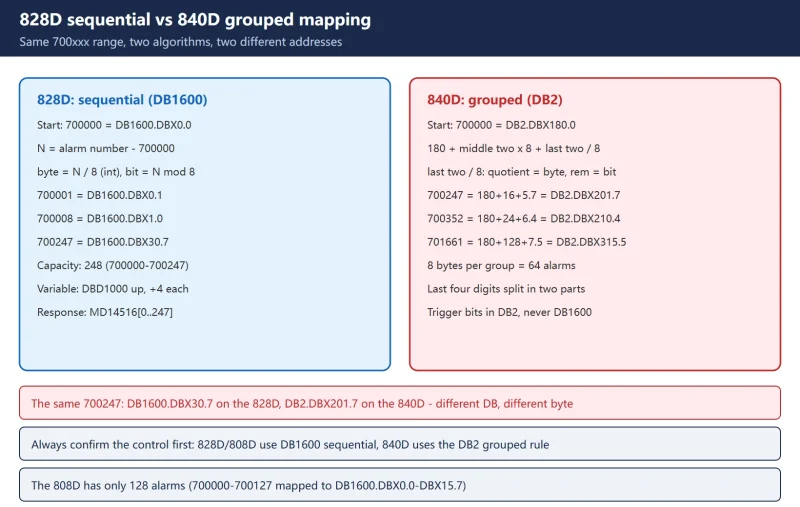



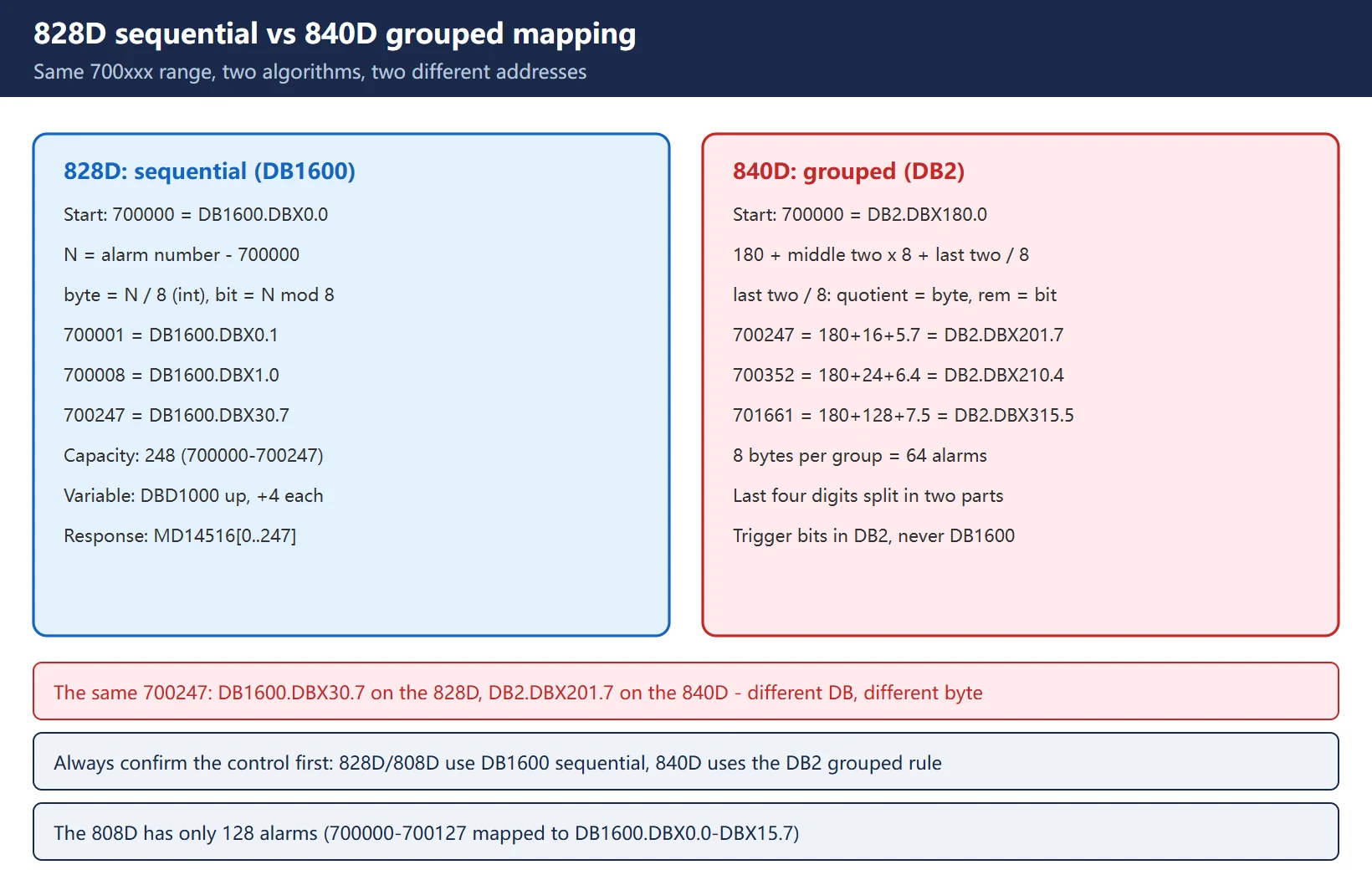
A 7000xx alarm pops up on the screen, you open the PLC program to find that one bit, and you cannot find it anywhere in DB2 — because you are looking in the wrong data block. On a SINUMERIK 828D the user alarm trigger bits live in DB1600; on an 840D they live in DB2. Worse, the two systems do not use the same arithmetic: the 828D maps alarms sequentially (248 alarms in a row), while the 840D maps them in groups (8 bytes per group = 64 alarms). Take the same 700xxx number, apply the wrong formula, and the address comes out tens of bytes off.
This article covers the 828D side end to end: the address formula, the extended alarm range, where the alarm text files actually live, and how to get PLC user alarms into the alarm log. Every figure comes from the Siemens commissioning manuals and the Siemens China CNC4YOU application notes. Where the manuals are ambiguous — MD14516 bit 5, for one — both versions of the story are laid out and flagged as needing verification on your own machine, rather than guessed at.
Related reading: for the 840D DB2 grouped algorithm and custom alarm texts, see SINUMERIK 840D PLC user alarms: 700000 range to DB2 bit addresses; for the overall 828D alarm number segmentation, see SINUMERIK 828D alarm number segmentation.
1. Two different algorithms: the 828D is sequential, the 840D is grouped
This is the most valuable point in the article. Both families start at 700000, but the alarm-number-to-address mapping is completely different. Mix them up and the address is guaranteed to be wrong.
Table 1 — 828D versus 840D user alarm address arithmetic
| Item | SINUMERIK 828D (sequential) | SINUMERIK 840D (grouped) |
|---|---|---|
| Data block holding the trigger bit | DB1600 | DB2 |
| Starting point | 700000 = DB1600.DBX0.0 | 700000 = DB2.DBX180.0 |
| Algorithm | Sequential: byte = index / 8 (integer), bit = index mod 8 | Grouped: 180 + (middle two digits × 8) + (last two digits / 8, quotient . remainder) |
| Example 700247 | 247 / 8 = 30 remainder 7 → DB1600.DBX30.7 | By the grouped formula: 180 + 02×8 + 47/8 (quotient 5, remainder 7) = DB2.DBX201.7 |
| Example 700352 | On the 828D the standard range ends at 700247, so this falls in the extended range | 180 + 03×8 + 52/8 (quotient 6, remainder 4) = DB2.DBX210.4 |
| Example 701661 | On the 828D this falls in the extended range (701000–701999) | 180 + 16×8 + 61/8 (quotient 7, remainder 5) = DB2.DBX315.5 |
| Standard alarm count | 248 (700000–700247) | Grouped, continuous |
The 828D sequential rule is three lines:
index N = alarm number - 700000
byte    = N / 8        (integer division)
bit     = N % 8        (remainder)
address = DB1600.DBX<byte>.<bit>
Check it with 700247: N = 247, so 247 / 8 = 30 and 247 % 8 = 7 → DB1600.DBX30.7, which matches the last row of the manual table.
The 840D grouped rule has to be worked out in three pieces: split the last four digits of 700000 into “middle two” and “last two”, multiply the middle two by 8 for the group offset, and divide the last two by 8 for the position inside the group. None of that has any meaning on an 828D — there, alarms simply march down the block one after another.
2. 828D standard user alarms: 248 alarms mapped to DB1600.DBX0.0 through DBX30.7
The manual states it directly: SINUMERIK 828D provides 248 user alarms (700000 – 700247), whose interface signals are DB1600.DBX0.0 – DB1600.DBX30.7. Besides the trigger bit, each alarm has a variable interface (used to feed values into the alarm text) and an alarm response byte.
Table 2 — 828D standard user alarm address lookup (extract from the official table)
| Alarm number | Trigger bit (PLC signal) | Variable interface | Alarm response |
|---|---|---|---|
| 700000 | DB1600.DBX0.0 | DB1600.DBD1000 | MD14516[0] (or DB4500.DBB3000) |
| 700001 | DB1600.DBX0.1 | DB1600.DBD1004 | MD14516[1] (or DB4500.DBB3001) |
| 700002 | DB1600.DBX0.2 | DB1600.DBD1008 | MD14516[2] (or DB4500.DBB3002) |
| 700003 | DB1600.DBX0.3 | DB1600.DBD1012 | MD14516[3] (or DB4500.DBB3003) |
| 700004 | DB1600.DBX0.4 | DB1600.DBD1016 | MD14516[4] (or DB4500.DBB3004) |
| 700005 | DB1600.DBX0.5 | DB1600.DBD1020 | MD14516[5] (or DB4500.DBB3005) |
| 700006 | DB1600.DBX0.6 | DB1600.DBD1024 | MD14516[6] (or DB4500.DBB3006) |
| 700007 | DB1600.DBX0.7 | DB1600.DBD1028 | MD14516[7] (or DB4500.DBB3007) |
| 700008 | DB1600.DBX1.0 | DB1600.DBD1032 | MD14516[8] (or DB4500.DBB3008) |
| … | … | … | … |
| 700246 | DB1600.DBX30.6 | DB1600.DBD1984 | MD14516[246] (or DB4500.DBB3246) |
| 700247 | DB1600.DBX30.7 | DB1600.DBD1988 | MD14516[247] (or DB4500.DBB3247) |
The variable interface follows one rule: start at 1000, add 4 bytes per alarm. Because the step really is 4 bytes, DBD (double word) is the correct typing — some manual printings say DBW, which is almost certainly a leftover from an earlier wording.
The alarm response is documented two ways. The commissioning manual (10/2015 edition) says DB4500.DBB3000 – DBB3247; other manual printings and virtually all Chinese material say MD14516 $MN_USER_DATA_PLC_ALARM. Both refer to the same thing (alarm reaction and clearing criteria); which one your control accepts is a matter for your own machine. This article uses MD14516 throughout.
3. 828D extended user alarms: 1000 alarms mapped to DB1600.DBX4000.0 through DBX4124.7
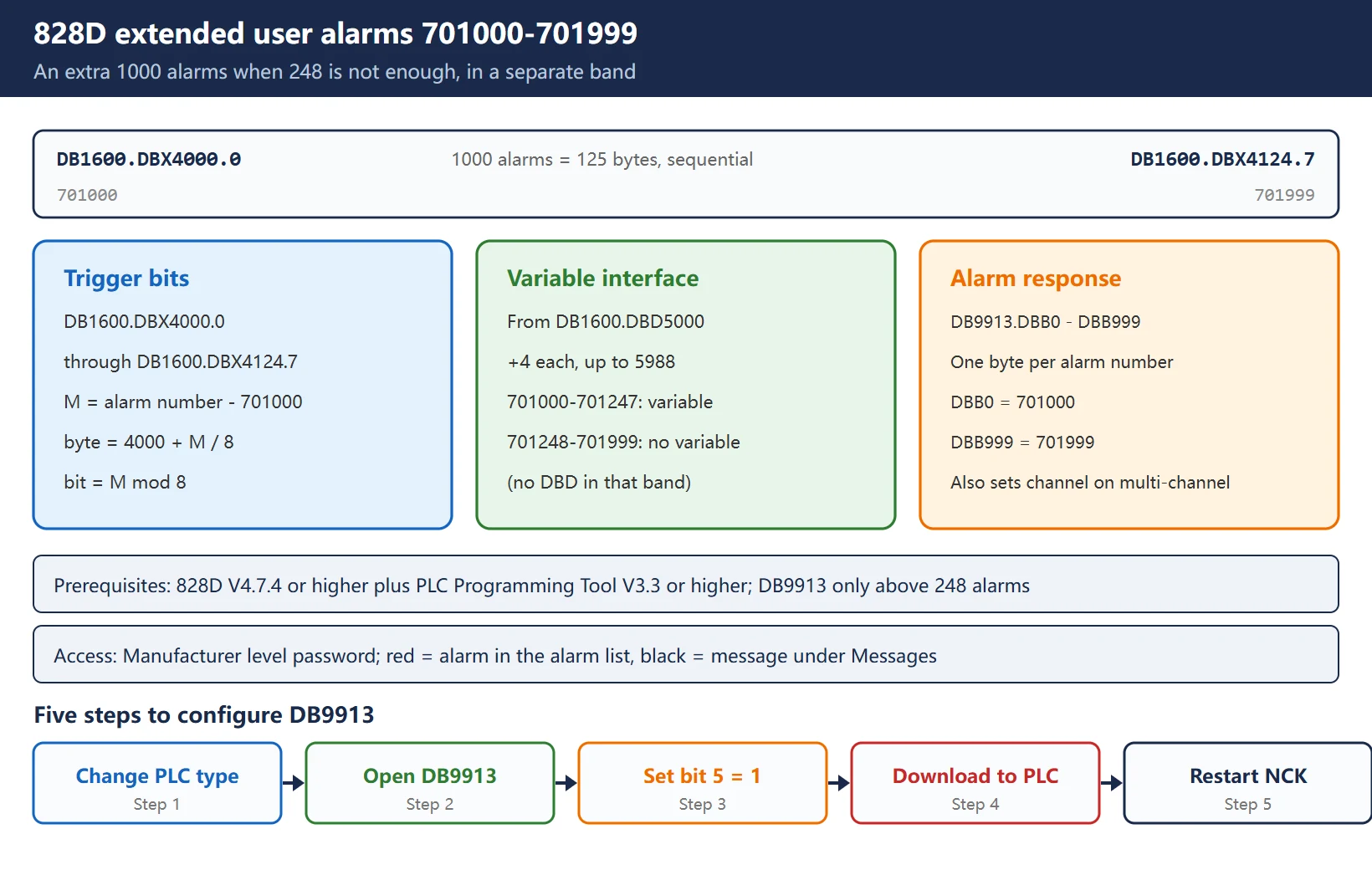
When 248 alarms are not enough, the 828D can activate extended PLC alarms: an extra 1000 alarms, numbered 701000 – 701999, whose trigger bits are DB1600.DBX4000.0 – DB1600.DBX4124.7 (1000 alarms = 125 bytes).
Table 3 — 828D extended user alarm reference
| Item | Value |
|---|---|
| Alarm number range | 701000 – 701999 (1000 alarms) |
| Trigger bits | DB1600.DBX4000.0 – DB1600.DBX4124.7 |
| Variable interface | from DB1600.DBD5000, plus 4 per alarm → 701247 = DB1600.DBD5988 |
| Alarms that support a numeric variable | only 701000 – 701247; 701248 – 701999 have no variable |
| Alarm response | DB9913.DBB0 – DB9913.DBB999 (one byte per alarm number) |
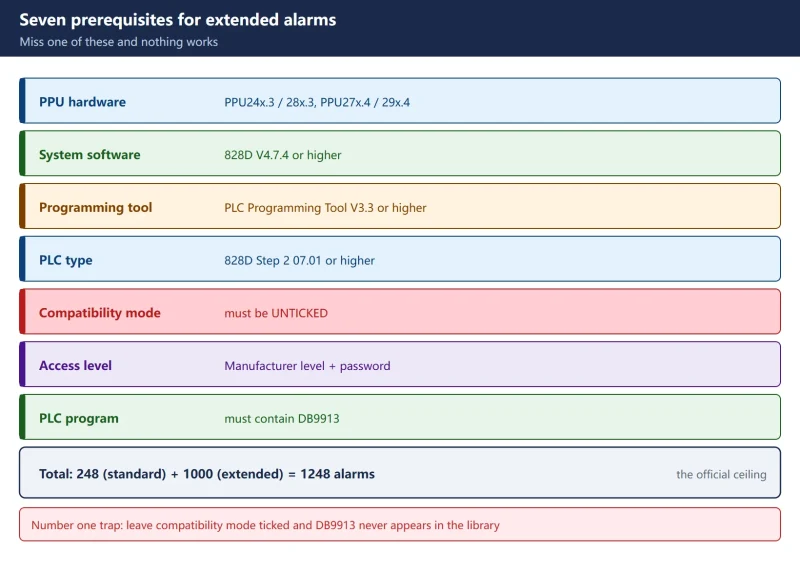
| Software requirement | 828D V4.7.4 or higher; PLC Programming Tool V3.3 or higher |
| Prerequisite | the PLC program must additionally contain DB9913 (when more than 248 alarms are used) |
| Access level | Manufacturer access level with the matching password |
| Display colour | red = alarm (shown in the alarm list); black = message (shown under Messages) |
The extended range uses the same sequential rule, only starting at 4000:
index M = alarm number - 701000
byte    = 4000 + M / 8
bit     = M % 8
address = DB1600.DBX<byte>.<bit>
Example: 701000 → M = 0 → DB1600.DBX4000.0; 701999 → M = 999, so 4000 + 124 = 4124 and 999 % 8 = 7 → DB1600.DBX4124.7.
701000 – 701247 is the “extended alarms with variables” band: one alarm number can display different text depending on the variable value (for example “Axis 3 overtravel” and “Axis 5 overtravel” from the same number). From 701248 upwards there is no variable — do not go looking for a DBD interface in that band.
4. Where the alarm text files live: oem_alarms_plc_xxx.ts, not alpu.txt
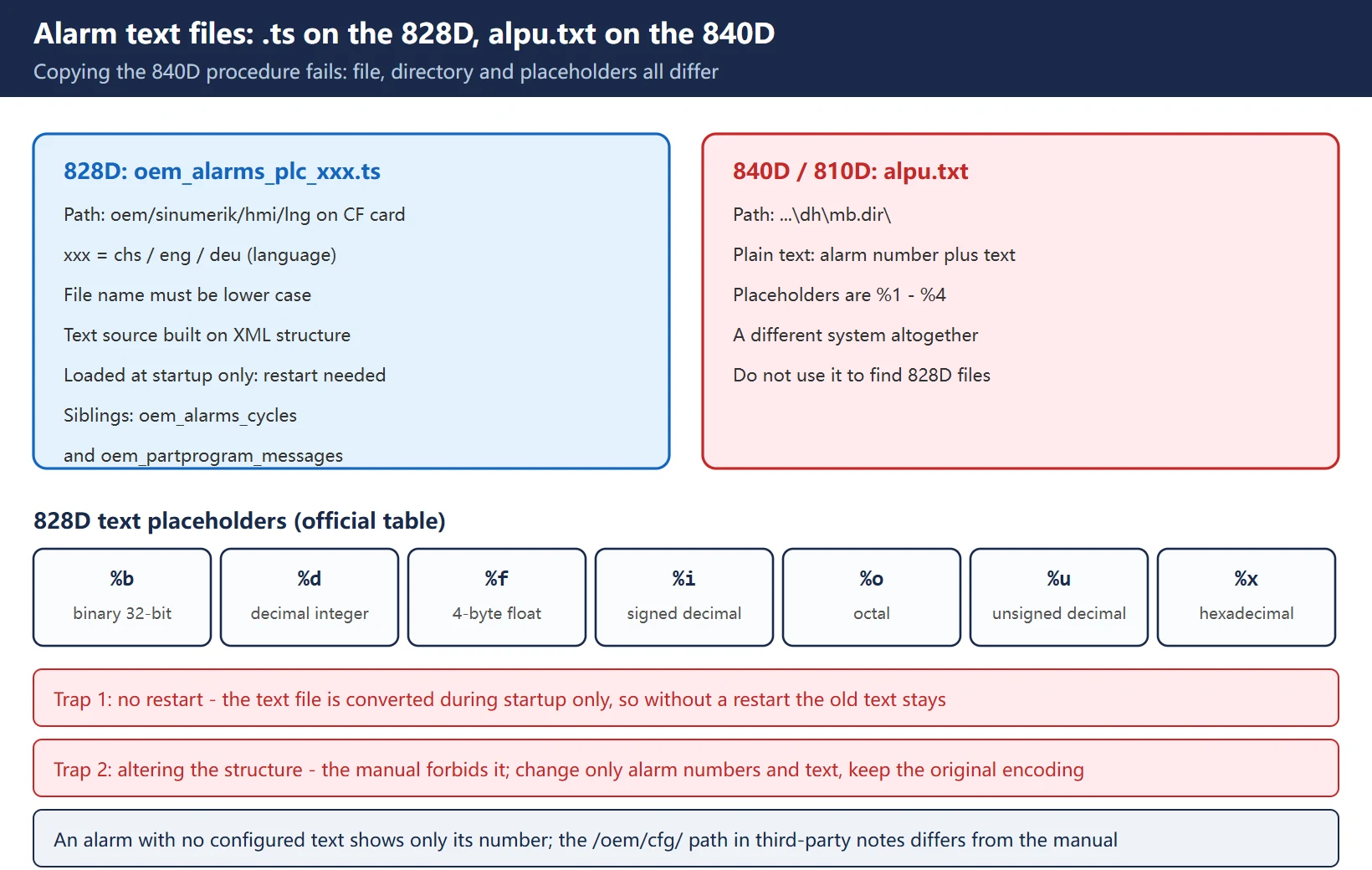
Discussions of “Siemens user alarm texts” in Chinese often open with alpu.txt — that is 840D / 810D kit. The 828D uses a different file and a different set of placeholders, so copying the 840D procedure gets you nowhere.
Table 4 — Alarm text files: the 828D and the 840D are not the same system
| Item | SINUMERIK 828D | SINUMERIK 840D / 810D |
|---|---|---|
| File name | oem_alarms_plc_xxx.ts (xxx = chs / eng / deu, i.e. the language) | alpu.txt (or alpu_xxx.txt) |
| Directory | oem/sinumerik/hmi/lng on the CF card | typically …\dh\mb.dir\ |
| File nature | text source file built on an XML structure | plain text, alarm number plus text |
| Placeholders in the text | %b %d %f %i %o %u %x | %1 – %4 |
| How it takes effect | loaded only during startup → a restart is mandatory | reload / restart required |
| File name casing | must be lower case, otherwise the system does not recognise it | — |
| Sibling files in the same directory | oem_alarms_cycles (cycle alarms), oem_partprogram_messages (part program messages) | — |
Placeholder meanings on the 828D (official table):
| Placeholder | Meaning |
|---|---|
| %b | binary representation of a 32-bit value |
| %d | integer, decimal |
| %f | 4-byte floating point number |
| %i | integer, decimal, with sign |
| %o | integer, octal |
| %u | unsigned decimal number |
| %x | integer, hexadecimal |
Two traps that catch almost everyone:
- Not restarting after editing. The manual says the alarm text file is converted during system startup and the system must be restarted to activate the alarms. Edit the file without restarting and the screen keeps showing the old text.
- Altering the file structure. The manual requires that the structure not be changed — edit text content and alarm numbers only, never the tags or hierarchy. Note also that third-party write-ups often quote
/oem/cfg/oem_alarms_plc_eng.ts, which does not match the manual’soem/sinumerik/hmi/lng; follow the directory that actually exists on your CF card.
On encoding: the manual gives no hard rule about BOM or ANSI, only that the structure must not change. When Chinese text comes out garbled, first confirm your editor did not rewrite the encoding (re-save with the same encoding as the original), then restart the HMI to verify; do not change the encoding and skip the restart — the restart is what makes it take effect.
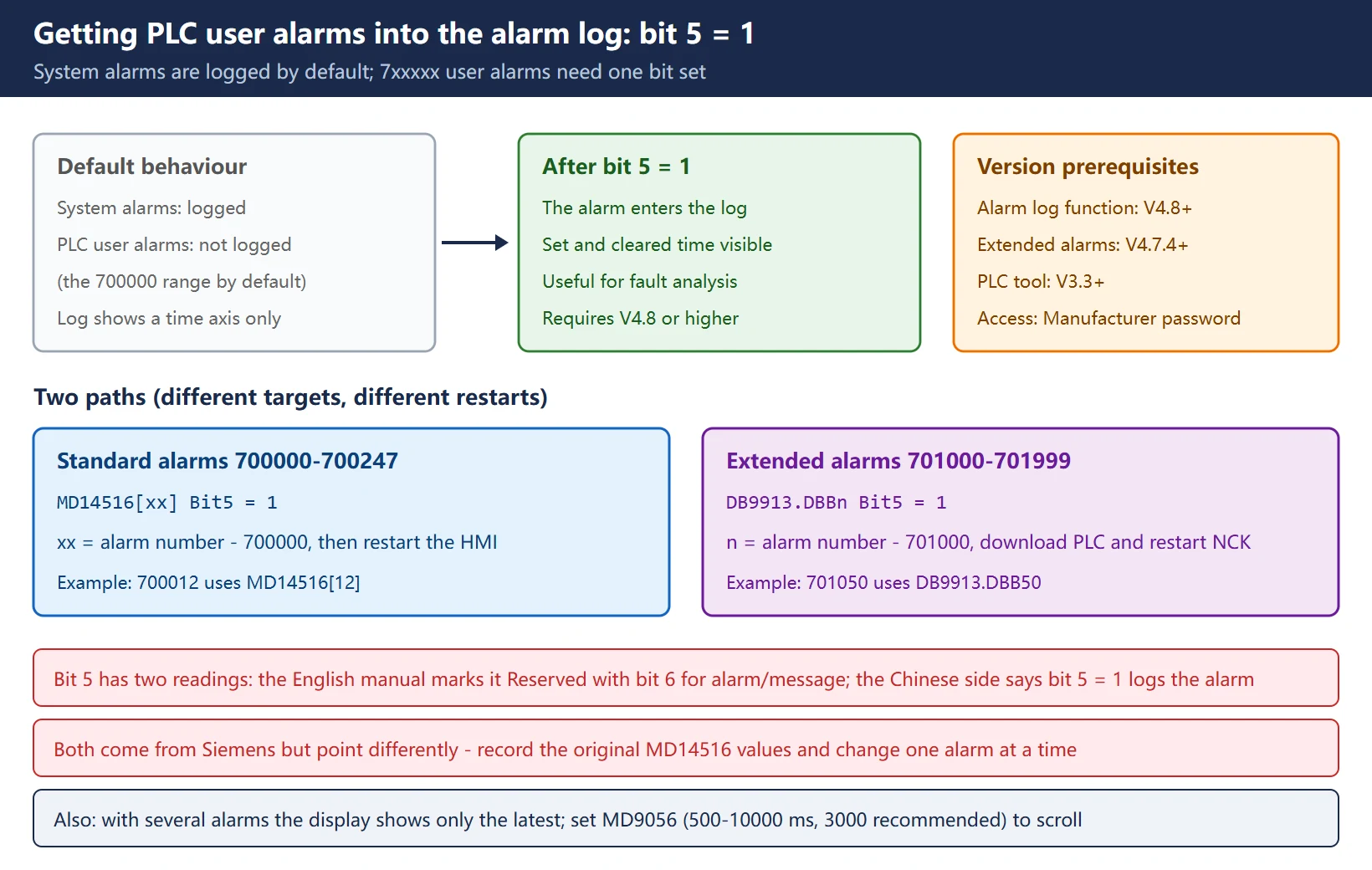
5. Getting PLC user alarms into the alarm log: MD14516[xx] bit 5 = 1
By default the 828D alarm log records system alarms but not PLC user alarms. Getting 7xxxxx user alarms into the log means setting one specific bit — a detail the official documentation scatters across several places and that is barely covered on the Chinese side.
Table 5 — Two procedures for getting PLC user alarms into the alarm log
| Alarm type | What to set | How it takes effect |
|---|---|---|
| Standard user alarms (700000–700247) | set bit 5 of MD14516[xx] for the corresponding alarm | restart the HMI |
| Extended user alarms (701000–701999) | set bit 5 in the configuration data of the corresponding alarm number inside DB9913 | download to the PLC → restart the NCK |
The Siemens China CNC4YOU application note (Bi Zhi Chao, July 2020) puts it plainly: set 14516[xx]_Bit5 = 1 and, after restarting the HMI, the user alarm appears in the alarm log. Extended alarms work the same way, except the setting lives in DB9913 and requires a PLC download plus an NCK restart.
Software requirement: V4.8 or higher.
6. What each bit of MD14516 means: alarm reaction versus alarm or message
MD14516 ($MN_USER_DATA_PLC_ALARM) is an array whose index maps one to one onto the alarm number: MD14516[0] corresponds to 700000 and MD14516[247] to 700247. Each bit governs one behaviour.
Table 6 — MD14516[xx] bit definitions (both versions of the story, side by side)
| Bit | English commissioning manual | Chinese material / concise commissioning manual |
|---|---|---|
| Bit 0 | NC start disabled | NC start disabled |
| Bit 1 | read-in disable | read-in disable |
| Bit 2 | feed hold for all axes | feed hold |
| Bit 3 | EMERGENCY STOP | EMERGENCY STOP |
| Bit 4 | PLC in stop | PLC in stop |
| Bit 5 | Reserved | = 1 puts the alarm into the alarm log |
| Bit 6 | alarm or message definition: 1 = alarm, 0 = message | cleared by resetting DB1600.DBX3000.0 |
| Bit 7 | POWER ON (cleared by power off) | cleared by power off |
Bit 5 and bit 6 conflict between the two versions and must be confirmed on the machine: the English commissioning manual marks bit 5 as Reserved and uses bit 6 to choose alarm versus message, while the Chinese side (including the Siemens China CNC4YOU note) says bit 5 = 1 puts the alarm in the log and bit 6 corresponds to the DB1600.DBX3000.0 reset. Both come out of the Siemens world but point in different directions — record the original value of MD14516 first and change one alarm at a time.
Alarm versus message is a simple distinction, but it changes how you troubleshoot:
- Alarm: red, shown in the alarm list, generally requires a stop or an acknowledgement (for example “motor overload”); per the Chinese description it must be cleared by programming a reset of DB1600.DBX3000.0 in the PLC.
- Message: black, shown under Messages, disappears automatically once the condition clears (for example “hydraulics not started”), with no operator acknowledgement.
As for “the alarm display only shows the latest one” — that is not a fault. The manual states that when more than one alarm is present, only the most recent is shown in the alarm display area, with a down arrow indicating that more exist in the alarm list. To make several alarms scroll, set MD9056 (range 500 – 10000, in ms; below 500 there is no scrolling) — the application note recommends 3000. The concise commissioning manual prints “300”, which contradicts its own “no scrolling below 500”; use 3000.
7. Configuring DB9913 for extended alarms: one block of data per alarm number
Extended alarms (701000–701999) do not use MD14516 for their alarm response; they use DB9913: one block of configuration data per alarm number, DB9913.DBB0 for 701000 through DB9913.DBB999 for 701999.
Configuration procedure (per the application note):
- Change the PLC type → press OK → press OK again to confirm;
- Double-click DB9913 in the program block library and confirm → one block of configuration data is generated per alarm number;
- Edit the configuration data for the alarm number you need, setting bit 5 = 1;
- Download to the PLC;
- Restart the NCK → extended user alarms start appearing in the alarm log.
DB9913 also has a second job: on a multi-channel control, which channel an alarm belongs to is defined either in DB9913 or through MD14518 $MN_USER_DATA_PLC_ALARM_ASSIGN. Single-channel machines can ignore this.
Do not forget the prerequisites: DB9913 is only needed above 248 alarms, and the software must be V4.7.4 or higher with PLC Programming Tool V3.3 or higher. On an older control you can search the block library all day and never find it.
8. Capacity differences across 808D, 828D and 840D
Same number range, three mappings — easy to confuse in the field.
Table 7 — User alarm capacity and addresses on the 808D, 828D and 840D
| Control | Standard user alarms | Trigger bit range | Extended range |
|---|---|---|---|
| 808D | 128 (700000 – 700127) | DB1600.DBX0.0 – DB1600.DBX15.7 | — |
| 828D | 248 (700000 – 700247) | DB1600.DBX0.0 – DB1600.DBX30.7 | 1000 (701000 – 701999) → DBX4000.0 – DBX4124.7 |
| 840D | grouped, continuous | from DB2.DBX180.0 (grouped algorithm) | — |
The 808D figures (128 alarms / DBX15.7) come from third-party compilations, not from a Siemens manual we could verify; check them on the machine with the formula before relying on them (127 / 8 = 15 remainder 7, which is at least self-consistent with DBX15.7). The 828D and 840D figures come from the official manuals and Siemens China CNC4YOU.
9. Troubleshooting: triggered but no text, garbled text, permission denied
Table 8 — 828D user alarm fault lookup
| Symptom | Most likely cause | What to do |
|---|---|---|
| Bit is set, the alarm number appears but there is no text | no text configured for that alarm number; or the text was changed without a restart | per the manual, an alarm without configured text shows only the alarm number; a restart is mandatory afterwards |
| Garbled Chinese text | the editor rewrote the file encoding or its structure | the manual requires that the structure not be changed; re-save with the original encoding and restart to verify |
| Permission denied when editing the file | access level too low; or the file is in use / read-only | the Manufacturer access level and password are required; when pulling files with Access MyMachine /P2P or WinSCP, watch for system services holding the file, and put it back in the original directory |
| Alarm triggers but the reaction is wrong (does not stop / goes straight to emergency stop) | bits 0 – 4 of MD14516[xx] | check the reaction bits one by one: bit 0 start disable, bit 3 emergency stop |
| Alarm display shows only the latest alarm | default behaviour when several alarms are active | set MD9056 (500 – 10000 ms) to scroll; 3000 is the recommended value |
| Alarm does not appear in the alarm log | PLC user alarms are not logged by default | standard range: MD14516[xx] bit 5 = 1 then restart the HMI; extended range: DB9913 bit 5 = 1, download to the PLC, restart the NCK |
| The computed address does not exist in the PLC | the 840D DB2 grouped algorithm was applied to an 828D | the 828D always uses the DB1600 sequential rule; the extended range starts again at 4000 |
| No DB9913 for extended alarms | software version too old | 828D V4.7.4 and PLC Programming Tool V3.3 or higher are required |
10. How to read this together with the 840D article
The two articles are halves of the same number range and do not replace each other:
- Control is an 828D or 808D → use this article: trigger bits are always in DB1600, sequential arithmetic, and the extended range is computed separately;
- Control is an 840D or 840D sl → use the 840D article: trigger bits are in DB2, grouped arithmetic (180 + middle two digits × 8 + last two digits / 8);
- Not sure which → look at the alarm number first: on the 828D the standard range ends at 700247, so anything from 7003xx upwards can only be in the extended range (701000 and up), whereas on the 840D the grouped mapping simply continues.
Related reading: the 840D DB2 grouped algorithm and custom alarm text creation are covered in SINUMERIK 840D PLC user alarms explained; the 828D alarm number segmentation and the “who handles this alarm” decision table are in SINUMERIK 828D alarm number segmentation.
Frequently Asked Questions
Which DB holds the 828D user alarm trigger bits, and is it the same as on the 840D?
No, they differ. The 828D uses DB1600 and the 840D uses DB2, and the arithmetic differs too. The 828D provides 248 standard user alarms (700000 – 700247) mapped to DB1600.DBX0.0 – DB1600.DBX30.7, sequentially: index N = alarm number minus 700000, byte = N divided by 8 (integer), bit = N mod 8, so 700247 = DB1600.DBX30.7. The 840D is grouped, starting at DB2.DBX180.0 and computed as 180 plus the middle two digits times 8 plus the quotient and remainder of the last two digits divided by 8. Both start at 700000, but the two algorithms must never be mixed. If the 828D uses extended alarms (701000 – 701999), the trigger bits start over in a separate band at DB1600.DBX4000.0 – DB1600.DBX4124.7.
How do I get PLC user alarms to show up in the alarm log on an 828D?
The alarm log records system alarms by default but not PLC user alarms, so one bit has to be set deliberately. For standard user alarms (700000 – 700247), set bit 5 of MD14516[xx] for the alarm in question and then restart the HMI. For extended user alarms (701000 – 701999), set bit 5 in the configuration data of the corresponding alarm number inside DB9913, download to the PLC, and restart the NCK. Software version V4.8 or higher is required. Note that the English commissioning manual marks bit 5 of MD14516 as Reserved and uses bit 6 for the alarm-versus-message choice, which conflicts with the Chinese description; record the original values and verify one alarm at a time.
Which interface bit corresponds to alarm number 700247, and why does applying the 840D formula to an 828D give the wrong answer?
On an 828D, 700247 maps to DB1600.DBX30.7: N = 247, so 247 / 8 = 30 with a remainder of 7. The 840D formula gives the wrong answer because the two controls use fundamentally different mappings — the 828D is sequential, laying 248 alarms out across 31 consecutive bytes of DB1600, while the 840D is grouped, with each 8-byte group covering 64 alarms and the last four digits of the alarm number split into a middle pair and a last pair, starting from DB2.DBX180.0. The same 700247 works out to DB2.DBX201.7 under the grouped rule: different data block and different byte. So the first step is always to confirm whether the control is an 828D/808D or an 840D, then pick the matching algorithm.
Last updated: 2026-10-25
Further reading: SINUMERIK 828D Extended User Alarms 701000-701999: DB9913 Configuration and High DB1600 Bits
The original Chinese version — same procedure, with the full field notes.





















暂无评论内容