


The servo amplifier is the most expensive — and least forgiving — component on a CNC machine: swap it right and the machine is back in an hour; swap it wrong and it greets you with a string of alarms, or worse, a crash. This article follows the official FANUC αi / βi parameter wording through a complete replacement: deciding whether to swap at all, power-off and discharge, teardown order, motor ID and parameter write-back, FSSB setup, and the three verification checks that decide whether the job is actually done. Two reference tables (alarms and key parameters) close the article.
Related reading: the repair-or-replace decision is in Should you repair or replace a FANUC servo amplifier?; the mandatory data backup is in FANUC Data Backup and Restore: ALL I/O and SRAM; the full servo alarm list is in FANUC Servo Alarm Code Reference SV0301-SV0441.
1. Before you start: should this be a swap at all?
“Amplifier alarming” and “the amplifier is broken” are two different findings. Spend ten minutes with the repair-or-replace decision table first: repair versus replace is decided by four cost items — part price and lead time, downtime cost, the repair shop’s test capability and warranty, and the history of the same fault recurring. A quotation only covers the first item, and signing off on a quotation alone is the most expensive habit in maintenance.
Once the decision is made, two things must happen before the power goes off:
- Back up the data. SRAM (including servo and spindle parameters), PMC program, ladder, macro variables and pitch error compensation — run the full ALL I/O backup procedure. Initialization after the swap can disturb the parameter area; without a backup you are betting the machine.
- Record the original parameters. Photograph or write down the key items for the axis: No.2020 (motor ID), No.2001 (AMR), No.1820 (CMR), No.2022 (direction), No.2023 / No.2024 (speed/position pulse numbers), No.1821 (reference counter capacity), No.2084 / No.2085 (FFG). These must be restored or verified after initialization; without the record you will be reverse-engineering at midnight.
Verify the replacement part three ways: model and rated current match (compare the amplifier nameplate motor type code A06B-XXXX against the motor manual), axis count matches (single- versus dual-axis modules assign axes differently), and interface version (FSSB fiber interface type). The wrong spare part makes everything after it wasted work.
🚨 One hard rule: every parameter number in this article follows the FANUC αi / βi parameter manuals and your own machine’s manual; numbers and writable ranges vary by series and version. Field measurement and the machine’s own manual are the final authority.
2. Power-off and discharge: five minutes is a step, not a suggestion
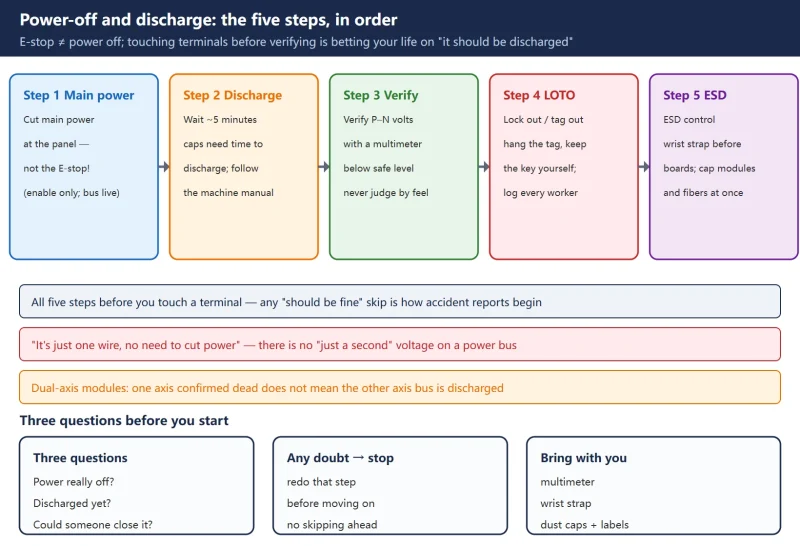
The first step of an amplifier swap is not unscrewing — it is making the power genuinely dead:
- Cut the machine’s main power (at the distribution panel), not the panel E-stop — the E-stop only drops servo enable; the main supply and the amplifier DC bus stay live.
- Wait about five minutes. The DC bus capacitors need time to discharge; the exact wait follows your machine’s manual, and most models specify five minutes or more.
- Verify with a meter. Measure the P–N bus voltage with a multimeter and confirm it has fallen below the safe level. Skipping this step is handing your life to “it should be discharged by now”.
- Lock out / tag out. Hang a “do not close” tag on the isolation point and keep the key yourself; with multiple workers, log each one. The isolation point must stay visible.
- ESD control. Wear an anti-static wrist strap (or touch grounded metal first) before touching amplifier boards; recap modules and fiber connectors the moment they come off.
3. Teardown order: mark first, pull lines second, screws last
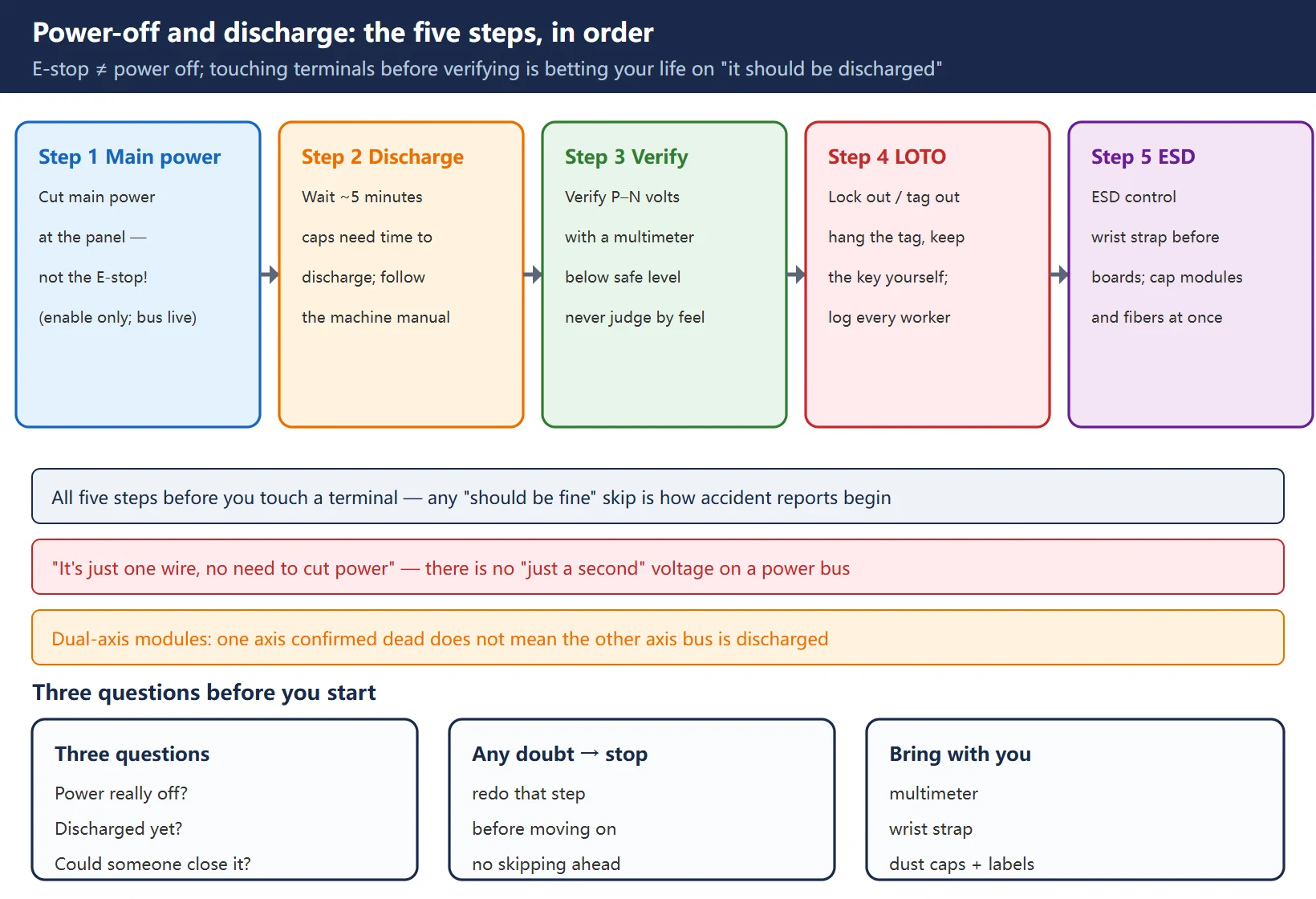
Reverse the order and you pay for it as guesswork during reassembly. The standard order:
- Photograph everything first. Wide shots of the terminal box, fiber routing and module positions before touching a single screw — this halves the recall cost at reassembly.
- Signal lines and fiber first. Pull FSSB fibers straight out by the connector root, never bend them (an over-tight bend radius damages the fiber and you inherit an intermittent comms fault), and cap them immediately.
- Power lines second. Mark every terminal: L1/L2/L3 incoming, U/V/W outgoing per motor; on dual-axis modules do not mix up the two motors’ outgoing lines.
- Mounting screws last. Support the module with both hands; mind the removal path where obstructions exist, and never let the module’s weight rest on its terminals.
- Keep the old module. Record its model, serial number and the alarm number at failure time — that is your evidence when you talk to the supplier.
4. Installing the new amplifier: mechanical fit and wiring checks
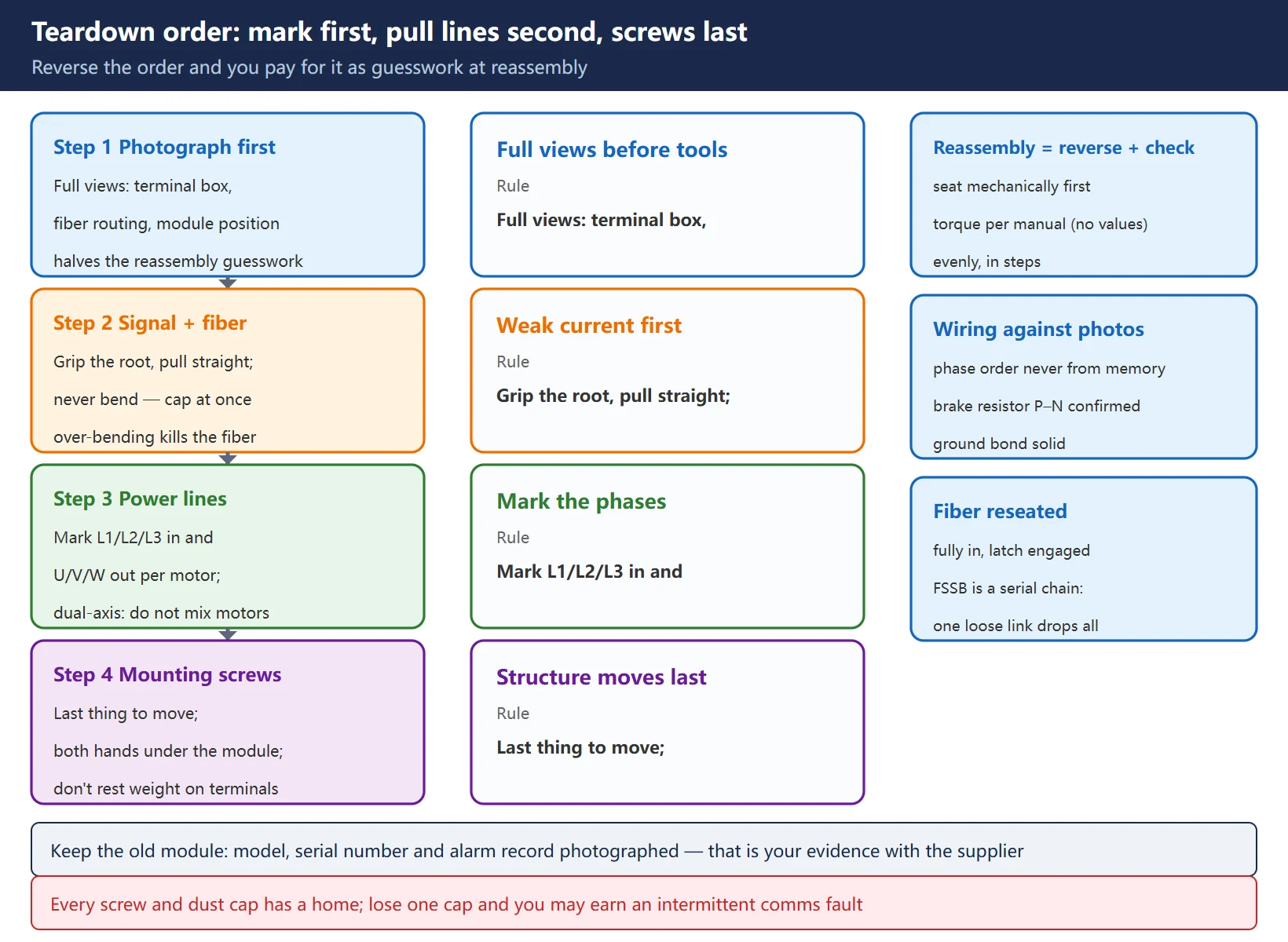
Reassembly is the reverse of teardown, but every step gains a check:
- Mechanical fit: align the mounting holes and tighten the fixing screws evenly in stages to the torque specified in your machine’s manual — no single torque number is given here; it differs per module.
- Wiring checks: go through the section-3 photographs item by item — L1/L2/L3, U/V/W (never from memory), P–N brake resistor wiring (where fitted, confirm wiring and jumpers), and a solid ground bond.
- Dual-axis modules: confirm which outgoing line belongs to which axis; mixing them guarantees a failure at direction verification.
- Fiber reinsertion: fully seated with the latch engaged. FSSB is a serial topology — one loose link in the chain takes out every axis behind it.
5. Parameter write-back: motor ID No.2020 and the init bit No.2000#1
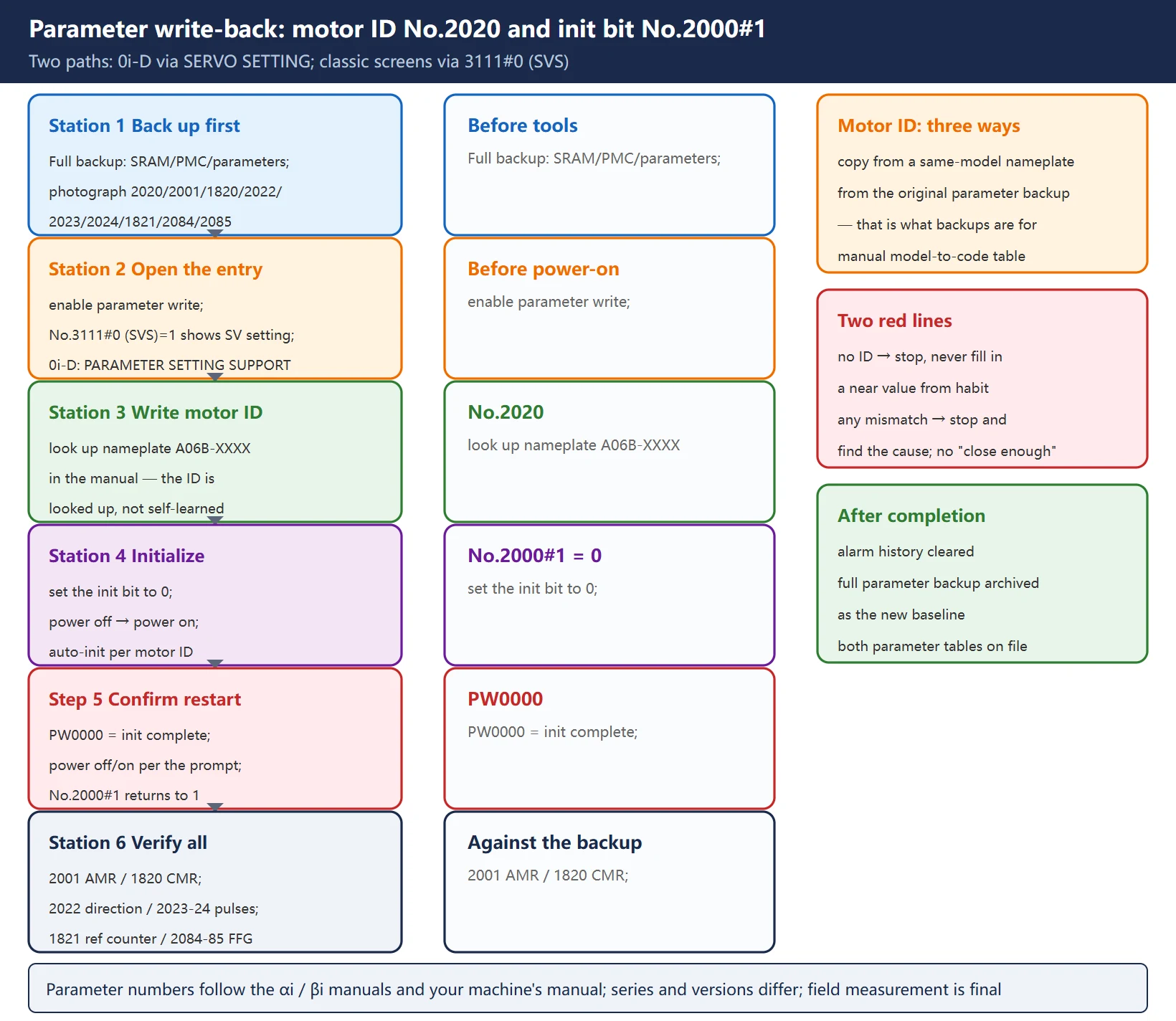
Wiring done, prepare the parameter path before power-on. Two routes by model:
- 0i-D / 30i-B and newer: PARAMETER SETTING SUPPORT → SERVO SETTING screen, following the guided setup of initialization items including the motor ID.
- Classic parameter screens: enable the parameter write switch first, then set No.3111#0 (SVS) to 1 so the servo setting (SV SET) screen appears.
Two actions carry the job:
- Write the motor ID: No.2020. The motor ID is the code for the motor model, obtained by looking up the motor nameplate type (A06B-XXXX format) in the motor parameter manual — the amplifier does not “know” it at power-up. A wrong motor ID gives mismatched characteristics at best and an immediate alarm at worst.
- Initialize: No.2000#1 to 0 → power off → power on. The system runs automatic initialization of amplifier and motor using the written motor ID; when it finishes, PW0000 “PLEASE TURN OFF POWER” appears. Power off and on as prompted; on success the bit returns to 1 by itself. Seeing PW0000 is not a fault — it means “I’m done, please restart”.
Verify or write back the remaining parameters against the section-1 record: No.2001 (AMR), No.1820 (CMR), No.2022 (direction), No.2023 / No.2024 (speed/position pulse numbers), No.1821 (reference counter capacity), No.2084 / No.2085 (FFG). Check item by item; if anything mismatches, stop and find the cause — never wave it through as “close enough”.
6. FSSB fiber and amplifier count setup
FSSB is the high-speed serial bus between the CNC and the axis amplifiers, and this is where module swaps most often go wrong:
- Amplifier count recognition: set No.1902#0 (FMD) to 1 to run FSSB automatic setup, letting the system re-recognize the connected amplifiers and axis assignment; it returns to 0 when done.
- What SV5136 means: it is reported when the connected amplifier count is lower than the CNC-side setting. Three field causes, in order of likelihood — fiber reversed (FSSB fibers are directional; swapping TX/RX breaks the link), fiber not fully seated or the latch not engaged, and a mid-chain module dropped out (in a serial topology, one loose link loses every axis behind it). Checking in this order beats rewiring the module.
- Treat fiber as a consumable: a kinked fiber or a connector with dust in it goes straight to the bin — do not wipe it and carry on. Intermittent comms faults can cost you an entire weekend.
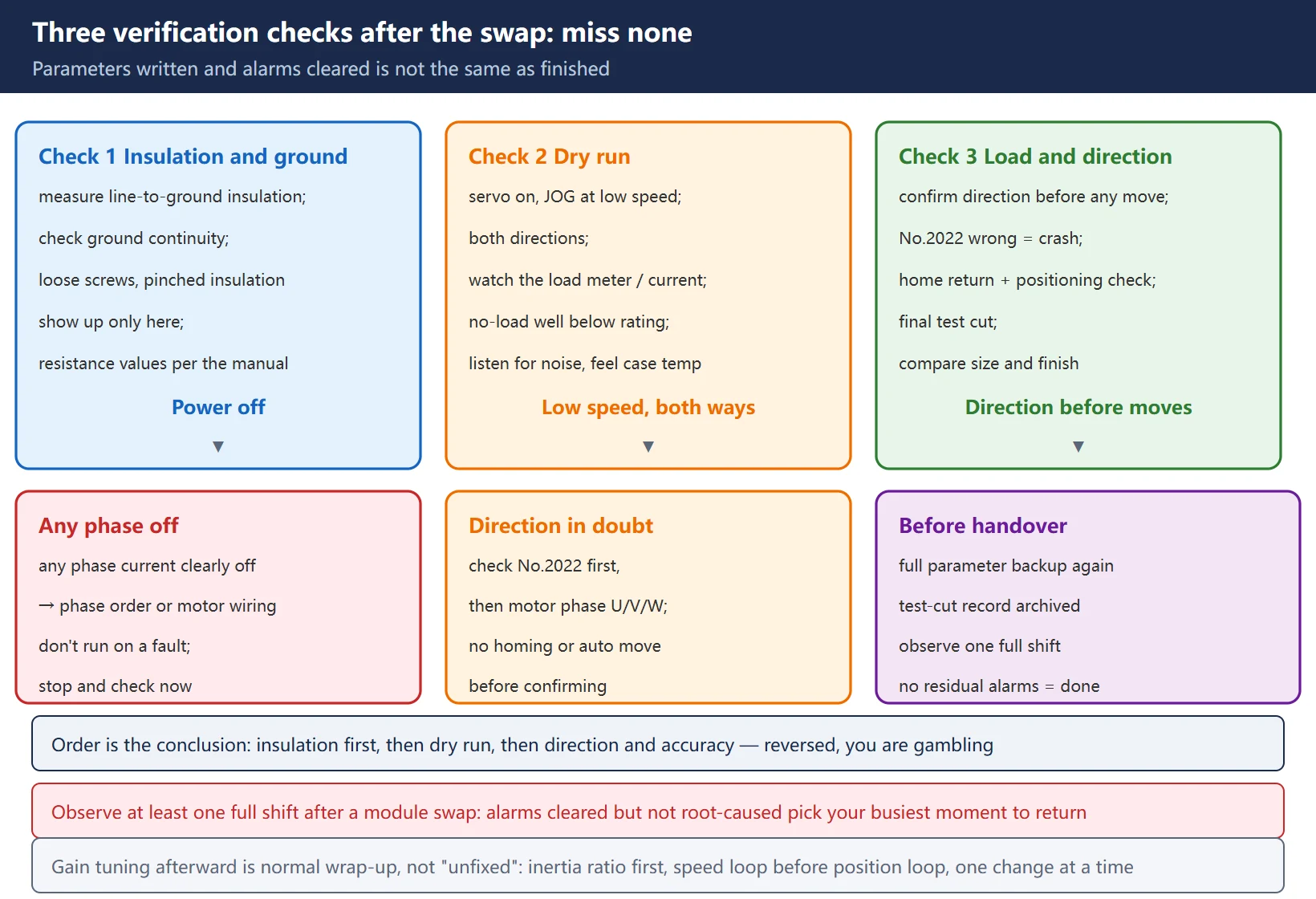
7. The three verification checks: miss none
Parameters written and alarms cleared is not the same as finished. Run the three checks in order; skip none:
- Insulation and grounding (power off). Measure insulation of the power lines to ground and check ground continuity against your machine’s manual — a screw not fully tightened or a pinched cable sheath is exactly what this step catches. Resistance values follow the manual; no single number is quoted here.
- Dry run. Power up the servo, jog at low speed in both directions; watch the load meter / current display (no-load should sit well below rating), listen for abnormal noise, feel the case temperature. If any phase’s current is clearly off, stop immediately — most likely a phase order or motor wiring problem.
- Load and direction test. Direction must be confirmed before any homing or move: a wrong No.2022 setting or wrong motor phase order means a crash, with no luck involved. With direction confirmed, do the reference point return, spot-check positioning accuracy, and finish with a test cut compared for size and surface finish.
After the test cut passes, review the alarm history: confirm no SV alarm was merely cleared while its root cause lives on — a machine that had a module swapped deserves observation for at least one full shift.
8. Alarm and key parameter reference tables
Table 1 — Alarms and prompts relevant to this procedure
| Alarm / prompt | Related to | Field direction |
|---|---|---|
| SV0417 | Illegal/abnormal initialization parameters (including motor ID No.2020) | Verify No.2020 motor ID and initialization parameters; look up the motor nameplate type in the manual |
| SV5136 | FSSB amplifier count lower than the setting | Check fiber direction / seating / mid-chain module |
| PW0000 “PLEASE TURN OFF POWER” | Initialization complete, restart required | Normal prompt: power off and on, confirm No.2000#1 returns to 1 |
Table 2 — Key parameters involved in this procedure
| Parameter | Name | Role in this procedure |
|---|---|---|
| No.2020 | Motor ID | Looked up from the motor nameplate type in the manual; a wrong value alarms |
| No.2000#1 | Initialization bit | Set to 0 → power cycle triggers initialization; returns to 1 on success |
| No.2001 | AMR | Amplifier/motor spec related; verify against the record |
| No.1820 | CMR (command multiplier) | Verify against the record; affects movement per pulse |
| No.2022 | Motor direction | When direction verification fails, check this and phase order first |
| No.2023 / No.2024 | Speed/position pulse numbers | Verify against the record; tied to the feedback type |
| No.1821 | Reference counter capacity | Verify against the record; affects home grid spacing |
| No.2084 / No.2085 | FFG (feed-forward gain) | Verify against the record; affects following error and contour accuracy |
| No.3111#0 | SVS (SV setting screen switch) | Set to 1 to display the servo setting screen |
| No.1902#0 | FMD (FSSB automatic setup) | Set to 1 to auto-recognize amplifier count and axis assignment |
The complete servo alarm list is in FANUC Servo Alarm Code Reference SV0301-SV0441; system-class PS/BG/SR alarms are in FANUC PS/BG/SR Alarm Code Reference.
9. Wrap-up: handover checklist and follow-up
Four items before you call it delivered:
- Back up parameters again. The post-initialization state differs from pre-swap; run the backup procedure once more and archive the result as the new baseline.
- Archive both parameter tables. The section-1 record and the post-initialization values together — next time this fault appears, that pair is the most valuable document you own.
- Keep the test-cut record. Size, surface finish, program and parameter version — the acceptance evidence.
- Set expectations on gain tuning. A new module’s current-loop characteristics may differ from the old one; if the test cut shows larger following error or light chatter, that is normal follow-up rather than “not fixed” — handle it per FANUC Servo Gain Parameter Tuning; vibration classification is in Servo Vibration, Overshoot and Noise Diagnosis; when the inertia ratio needs re-identification, see FANUC Servo Inertia Ratio: Measurement and Identification.
Related reading
- Should you repair or replace a FANUC servo amplifier?: the first decision before any tools
- FANUC Data Backup and Restore: ALL I/O and SRAM: the standard flow for pre- and post-swap backups
- FANUC Servo Alarm Code Reference SV0301-SV0441: servo alarm numbers at a glance
- FANUC Servo Gain Parameter Tuning: gain fine-tuning after a module swap
- Servo Vibration, Overshoot and Noise Diagnosis: symptom classification and waveform reading
- FANUC Servo Inertia Ratio: Measurement and Identification: manual calculation and auto-identification
- Also available in Chinese: FANUC 伺服放大器更换实操
Frequently Asked Questions
The new amplifier alarms SV5136 the moment it powers on — why?
SV5136 means the amplifier count recognized by the CNC is lower than the setting. Check three places in order: ① the FSSB fiber is reversed (the fiber is directional — swapping TX/RX breaks the link); ② the connector is not fully seated, the latch is not engaged, or dust is in the connector; ③ a mid-chain module’s fiber has come loose — in a serial topology one loose link loses every axis behind it. If all three are clean, run the FSSB automatic setup (No.1902#0 FMD = 1) to re-recognize. If it happens repeatedly with no physical fiber damage, replace the fiber.
I can’t find the motor ID (No.2020) — what now?
The motor ID is not something the amplifier learns at power-up: it must be looked up from the motor nameplate type (A06B-XXXX format) in the motor parameter manual. Three field moves: ① copy it from a same-model motor’s nameplate; ② take it from the machine’s archived parameter table — this is exactly why the pre-swap record matters; ③ use the model-to-code table in the motor manual. If you cannot confirm it, stop and verify rather than filling in a close value from experience — a wrong motor ID gives mismatched characteristics at best and a power-up alarm at worst.
Does servo gain need re-tuning after an amplifier swap?
Not necessarily. First complete the three verification checks in section 7: direction, no-load load meter, test cut. Only if the test cut shows larger following error or light chatter should you consider fine-tuning — the reason is that a new module’s current-loop characteristics may differ from the old one. Follow the standard flow: confirm whether the inertia ratio needs re-identification (see the inertia ratio article), then adjust gain and FFG in the order speed loop first, position loop second, one change at a time. “A bit different after the swap” and “not fixed” are two different claims — separate them with data first.
Last updated: 2026-10-25
The original Chinese version — same procedure, with the full field notes.





















暂无评论内容