


Custom Macro B is the FANUC feature most often “used but not understood”: no declarations, no types — but put a variable in the wrong partition, treat null as zero, or leave a DO without its END, and the failure either never alarms or alarms confusingly. This article follows the official manual wording through variable partitions, the null trap, call methods, nesting limits and the PS alarms, and closes with a bolt-circle drilling example you can run as-is.
Related reading: for a real production macro (tool-change O9001 and the 3202#4 NE9 unlock), see FANUC tool-change macro O9001; the overall alarm table is in FANUC PS/BG/SR alarm code reference.
1. Variable partitions: #1-#33 / #100-#199 / #500-#999 and how to choose
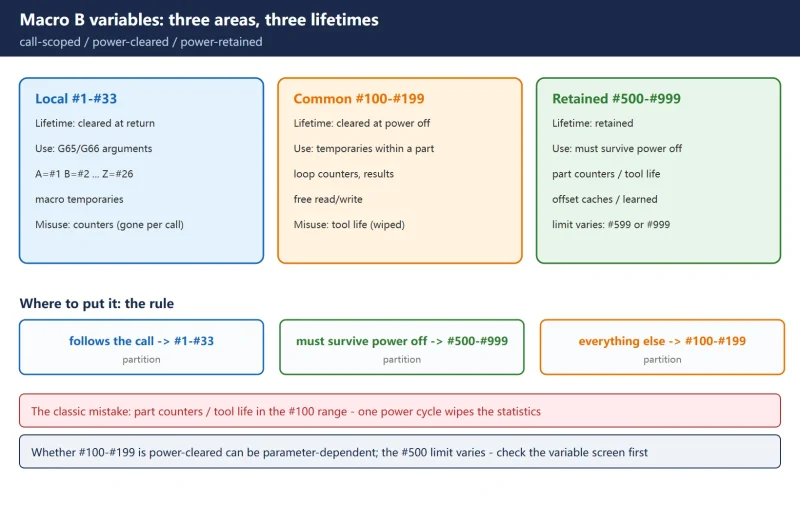
Choosing the wrong partition is macro mistake number one. The three areas have completely different lifetimes:
Table 1 — The three variable areas (Macro B, official wording)
| Area | Range | After power off | Typical use | Common misuse |
|---|---|---|---|---|
| Local | #1 – #33 | cleared at return | G65/G66 arguments (A=#1 … Z=#26), temporaries inside the macro | storing a part counter there — one call and it is gone |
| Common (volatile) | #100 – #199 | cleared | temporary calculations within one part | storing tool life there — power off wipes the statistics |
| Common (retained) | #500 – #999 | retained | part counters, tool life, offset caches, learned values | storing values recalculated every part — wasting retained slots |
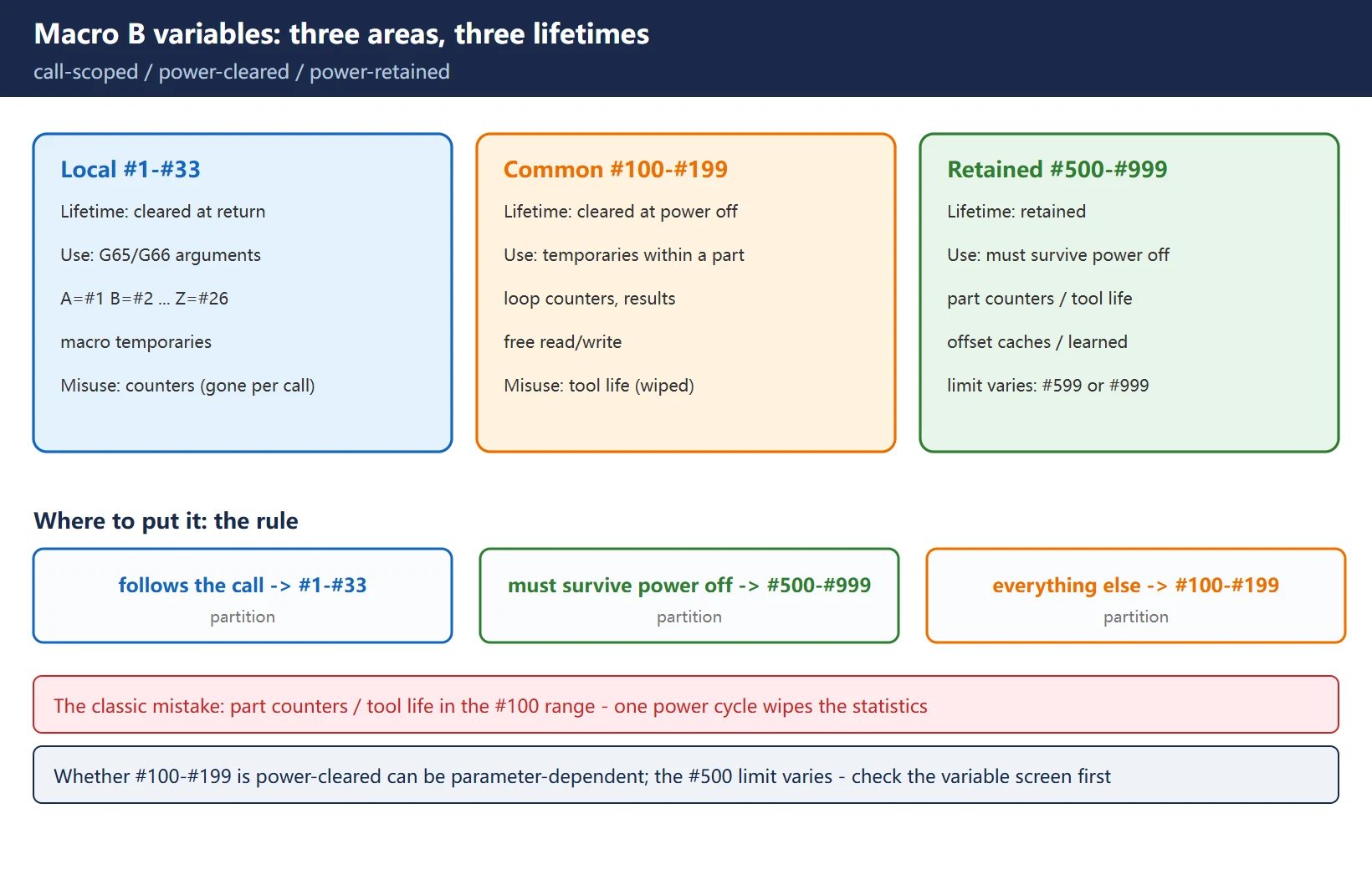
The rule of thumb: anything that must follow the call goes in #1–#33; anything that must survive power off goes in the #500 range; everything else goes in #100–#199. Part counters and tool life belong in #500–#999 — that is where beginners fail most often. A counter in the #100 range vanishes at the first power cycle.
🚨 The upper limit of the #500 range varies by model and parameter: some controls stop at #599, others reach #999 — check the variable screen on your machine before planning. Whether #100–#199 is power-cleared can also be parameter-dependent; follow your machine’s manual.
2. Null is not zero: an unset #1 is empty
An unassigned variable is null, not 0. This is the nastiest silent failure in macro work:
| Expression | #1 is null | #1 = 0 |
|---|---|---|
G01 X#1 F300 | empty reference: the address is ignored, the axis does not move, no alarm | moves to X0 normally |
#2 = #1 + 5 | the operation treats it as empty | #2 = 5 |
IF [#1 EQ 0] GOTO 10 | null compares as not equal to 0 | condition true |
G01 X#1 with an unset #1 does not alarm, does not stop, and simply does not move — the program looks fine while the part is already scrap. To diagnose: open the variable screen and check whether the value is blank (null) or 0.000 — blank means never assigned.
Two disciplines:
- Assign explicit initial values to the local variables you use at macro entry; never assume “it should have a value”;
- Test for emptiness with
[#1 NE #0](#0 is always null) and for zero with[#1 EQ 0]— do not mix the two tests.
3. Comparisons must use operators: EQ NE GT LT GE LE
Writing = or > inside a condition is an error (a format-class PS alarm). Only six comparison operators are legal:
| Operator | Meaning | Operator | Meaning |
|---|---|---|---|
| EQ | equal (=) | LT | less than (<) |
| NE | not equal (≠) | GE | greater or equal (≥) |
| GT | greater (>) | LE | less or equal (≤) |
Correct: IF [#101 GE 100] GOTO 20. Writing IF [#101 >= 100] raises an expression format error immediately.
4. Logic combinations: AND / OR / XOR with brackets
- Each condition gets its own brackets:
IF [[#1 GT 0] AND [#2 LT 10]] GOTO 30; - AND / OR / XOR are written between the bracketed conditions;
- Brackets themselves are limited: nesting (including function brackets) is capped at 5 levels — beyond that you get a too-many-nested-brackets alarm (PS0118 on the series that number it so).
5. IF-GOTO versus IF-THEN
Both forms work; the use cases differ:
IF [#101 GT 100] GOTO 20        (jump to N20 when true; in-macro jumps use GOTO)
IF [#101 GT 100] THEN #102 = 1 (execute one macro statement when true)- GOTO only jumps within the same program; a missing target N number raises PS0128 (illegal macro sequence number);
- IF-THEN accepts exactly one macro statement — an NC statement such as G01 is not allowed; for several statements, jump or call a subprogram;
- GOTO/WHILE cannot be used in the main program during DNC operation (PS0123 on the series that number it so).
6. WHILE / DO / END: maximum 3 levels, strictly paired
#101 = 1
WHILE [#101 LE 10] DO1
    ... (loop body)
    #101 = #101 + 1
END1
Table 2 — Hard rules for DO/END
| Rule | Content | Violation |
|---|---|---|
| Loop numbers | DO1/END1 through DO3/END3 only (1-3) | PS0126 ILLEGAL LOOP NUMBER |
| Pairing | every DO needs a same-numbered END | PS0124 MISSING END STATEMENT |
| Nesting | up to 3 levels, never crossed (DO1…DO2…END1…END2 is crossed) | alarm or wrong logic |
| Condition | WHILE [condition] DO n with the six comparison operators | format error |
Escape from infinite loops: a forgotten loop-variable increment is the classic hang. Either increment the loop variable as the first thing in the body, or add a counter cap that forces a GOTO out.
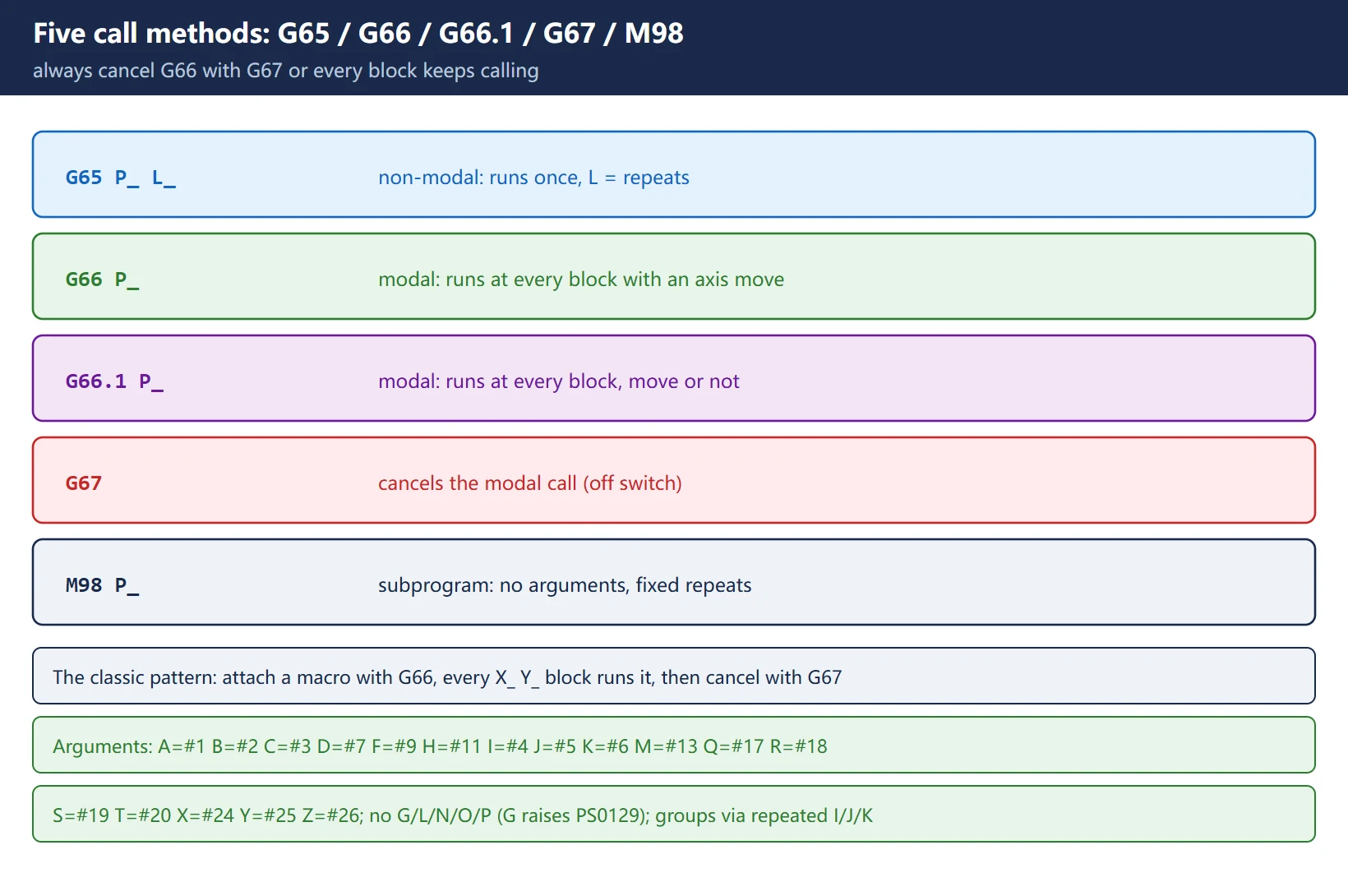
7. Call methods: G65 / G66 / G66.1 / G67 / M98
Table 3 — The five call methods
| Method | Nature | Behaviour | Typical use |
|---|---|---|---|
| G65 P_ L_ | non-modal macro call | runs once and returns; L = repeat count | compute one hole position, one value |
| G66 P_ | modal macro call | called at every block containing an axis move | per-hole macro under a drilling cycle |
| G66.1 P_ | modal call, every block | called at every block, move or not | high-response macros refreshed each block |
| G67 | cancel modal call | cancels G66/G66.1 | mandatory after use |
| M98 P_ | subprogram call | no argument passing, fixed repeats | actions that need no parameters |
The classic G66 pattern (a drilling macro): attach the macro with G66 under the drilling mode, and every X_ Y_ block afterwards automatically runs the macro — then cancel with G67. Forgetting G67 is the classic cause of “everything after behaves strangely”.
8. The argument alphabet: A=#1 through Z=#26, the full table
G65/G66 arguments map letter to local variable in a fixed assignment (I/J/K may repeat, entering groups in order):
Table 4 — Argument specification I: letter to local variable
| Letter | Variable | Letter | Variable | Letter | Variable |
|---|---|---|---|---|---|
| A | #1 | I | #4 | R | #18 |
| B | #2 | J | #5 | S | #19 |
| C | #3 | K | #6 | T | #20 |
| D | #7 | M | #13 | U | #21 |
| E | #8 | Q | #17 | V | #22 |
| F | #9 | — | — | W | #23 |
| H | #11 | X | #24 | Y | #25 |
| — | — | Z | #26 | — | — |
Addresses that cannot carry arguments: G, L, N, O, P (G is reserved by the system — using it raises PS0129 illegal argument address; L is the repeat count, O the program number, N the sequence number, P the program/repeat number).
One letter carries one value; to pass a set of similar values (say several hole coordinates), use repeated I/J/K (argument specification II, filling #4#5#6 group by group).
9. Nesting limits and their alarms: PS0121 / PS0122 / PS0126
Table 5 — Nesting-related alarms (official alarm text)
| Alarm | Message | Meaning | Fix |
|---|---|---|---|
| PS0121 | TOO MANY SUB, MACRO NESTING | the total of subprogram plus macro calls exceeds the limit (often a call issued during an external-memory subprogram call) | shorten the chain; check for a missing M99 |
| PS0122 | TOO MANY MACRO NESTING | macro call nesting exceeds the limit (the Series 15i manual states a limit of 5; the 0i series commonly documents 4 levels of macro calls) | reduce macro-in-macro depth |
| PS0124 | MISSING END STATEMENT | a DO without its END (DO-END must pair 1:1) | add the END — this is not the crossed-nesting case |
| PS0126 | ILLEGAL LOOP NUMBER | DO/END number outside 1-3 | use DO1-DO3 |
🚨 The limits differ slightly by series: the 15i manual says 5 macro nesting levels, 0i-series manuals commonly say 4 levels of macro calls, and the often-quoted “15 subprogram levels” did not appear in the manuals we could verify — go by the manual for your control.
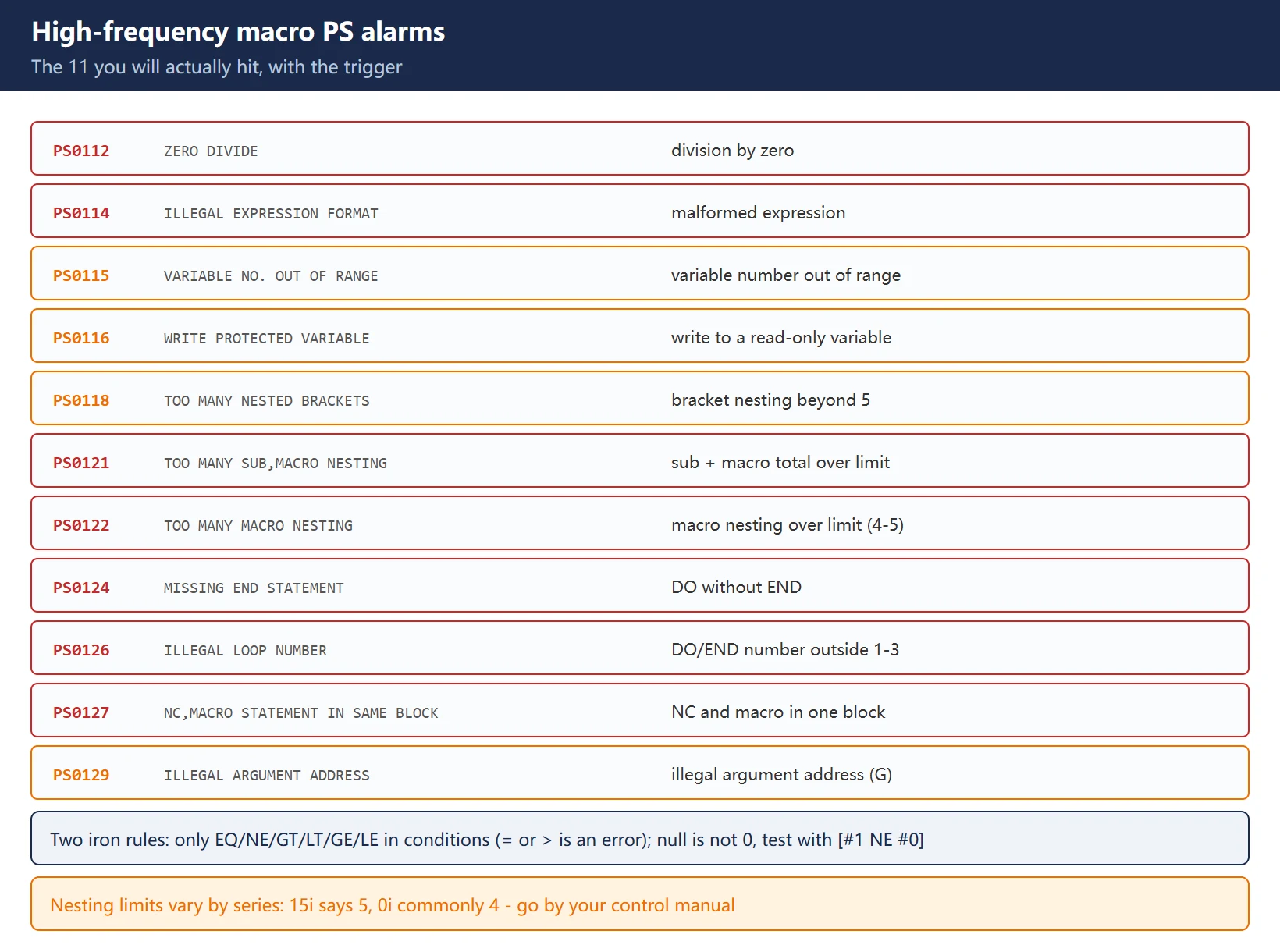
10. PS alarm quick reference: the macro alarms you will actually hit
Table 6 — High-frequency macro PS alarms
| Alarm | Message | Trigger | Fix |
|---|---|---|---|
| PS0112 | ZERO DIVIDE | division by zero (#1/#0 or a zero divisor) | test [#2 NE 0] before dividing |
| PS0114 | ILLEGAL EXPRESSION FORMAT | malformed expression (brackets/operators) | check bracket pairing and operator spelling |
| PS0115 | VARIABLE NO. OUT OF RANGE | variable number out of range (e.g. beyond your #500 limit) | confirm the machine's range first |
| PS0116 | WRITE PROTECTED VARIABLE | assigning to a read-only (system) variable | read-only means read-only |
| PS0118 | TOO MANY NESTED BRACKETS | bracket nesting beyond 5 levels (incl. function brackets) | split the expression |
| PS0122 | TOO MANY MACRO NESTING | macro call nesting over the limit | reduce depth |
| PS0124 | MISSING END STATEMENT | DO without a matching END | add the END |
| PS0126 | ILLEGAL LOOP NUMBER | DO/END number outside 1-3 | use DO1-DO3 |
| PS0127 | NC, MACRO STATEMENT IN SAME BLOCK | an NC command and a macro statement in one block (e.g. G01 X#1 #2=5) | put the macro statement on its own line |
| PS0128 | ILLEGAL MACRO SEQUENCE NUMBER | the target N of GOTO/M99P is not found | verify the N number and range |
| PS0129 | ILLEGAL ARGUMENT ADDRESS | a disallowed argument address (e.g. G) | use a legal letter |
11. Math and functions: FIX / FUP / ROUND, angles are always degrees
| Function | Meaning | Note |
|---|---|---|
| FIX[ ] | truncate toward the smaller absolute value | FIX[1.7]=1, FIX[-1.7]=-1 |
| FUP[ ] | round away from zero | FUP[1.3]=2, FUP[-1.3]=-2 |
| ROUND[ ] | round (in an expression: to an integer) | behaves differently on a motion address (rounds to the least input increment) — do not mix the two uses |
| SQRT / ABS | square root / absolute value | — |
| SIN / COS / TAN | trigonometric functions | angles are always degrees; there is no RAD keyword: SIN[30]=0.5 |
| ATAN | arctangent (written ATAN[y]/[x] on many series) | the result is degrees too |
| LN / EXP | natural logarithm / e to the power | — |
Two easy traps:
- Integer division truncates:
#1 = 7 / 2gives 3 (no rounding); for a decimal result write#1 = 7.0 / 2; - Trig uses degrees — pasting radian values from CAD into SIN/COS is the classic cause of “the macro computes coordinates that are all wrong”.
12. A runnable example: bolt-circle drilling on a flange
Requirements: flange centre at (X0 Y0), bolt-circle radius R (#18), hole count N (#20), start angle A (#1, degrees), depth Z (#26), feed F (#9). Macro O9010:
O9010 (BOLT CIRCLE DRILL)
#101 = 0                      (counter; temporary -> #100 range)
WHILE [#101 LT #20] DO1
  #102 = #1 + #101 * 360.0 / #20        (current angle, degrees)
  #103 = #18 * COS[#102]                (X = R*cos)
  #104 = #18 * SIN[#102]                (Y = R*sin)
  G00 X#103 Y#104
  G00 Z#105                             (clearance plane)
  G01 Z#26 F#9
  G00 Z5.0
  #101 = #101 + 1
END1
M99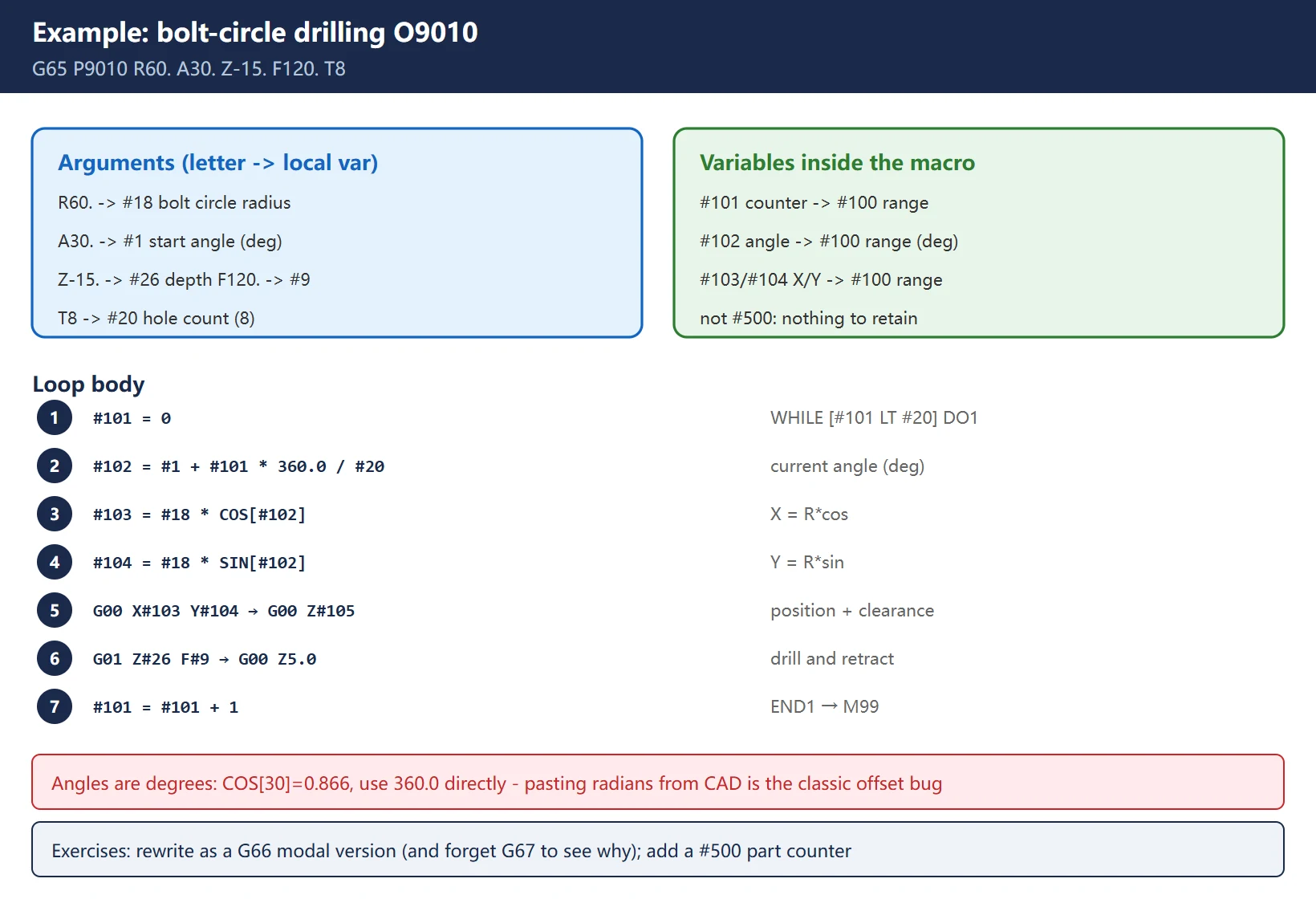
Call from the main program: G65 P9010 R60. A30. Z-15. F120. T8 (R = bolt circle 60, A = start angle 30°, 8 holes). Angles are degrees (COS[30]=0.866), the counter lives in the #100 range (nothing to retain), and the hole count and radius arrive through the alphabet into #20 and #18.
Exercises: rewrite it as a G66 modal version (macro at every block) and see what forgetting G67 does; then add a parts counter in the #500 range — that touches both key points from sections 1 and 7.
Frequently Asked Questions
What is the difference between #100 and #500 in a FANUC macro, and which one survives power off?
#500 survives power off. #1-#33 are local variables tied to the G65/G66 call — they are cleared when the call returns and exist only to carry arguments and macro temporaries. #100-#199 are volatile common variables, cleared at power off, suited to temporary calculations within one part. #500-#999 are retained common variables, and part counters, tool life and offset caches — anything that must span a power cycle — belong there. Putting a counter in the #100 range is the classic beginner mistake: one power cycle wipes the statistics. Note that the upper limit of the #500 range varies by model (some stop at #599); check the variable screen before planning.
What does macro alarm PS0124 mean?
PS0124 is MISSING END STATEMENT: the program contains a DO whose matching END cannot be found. Macro B requires DO/END to pair 1:1 with the same number (DO1 with END1), loop numbers are limited to 1-3 (out of range is a different alarm, PS0126), and nesting is capped at 3 levels with no crossing (DO1…DO2…END1…END2 is crossed). To fix it, count the DOs and ENDs from the top: for each DO, find the same-numbered END and add the missing one; annotate the END lines with their pairing when nesting several levels. If the counts look right but the alarm persists, check whether an END ended up inside an IF branch so that the scan path never closes.
Are angles in a FANUC macro radians or degrees, and how do I write the sine?
Always degrees — Macro B has no RAD keyword. SIN[30] is sin 30° = 0.5. Typical usage: #101 = #18 * COS[#102] and #102 = #1 + #101 * 360.0 / #20 (convert the hole index to an angle with 360.0 directly, no radian conversion). Watch out when copying formulas from other systems or CAM posts that may use different units. Two further arithmetic traps: integer division truncates (7/2 = 3; write 7.0/2 for a decimal), and ROUND rounds to an integer inside an expression but to the least input increment on a motion address — do not mix the two uses.
Last updated: 2026-10-25
The original Chinese version — same procedure, with the full field notes.





















暂无评论内容