


1. Debunking a widespread myth: swapping the battery on an iTNC530 does NOT erase your programs or parameters
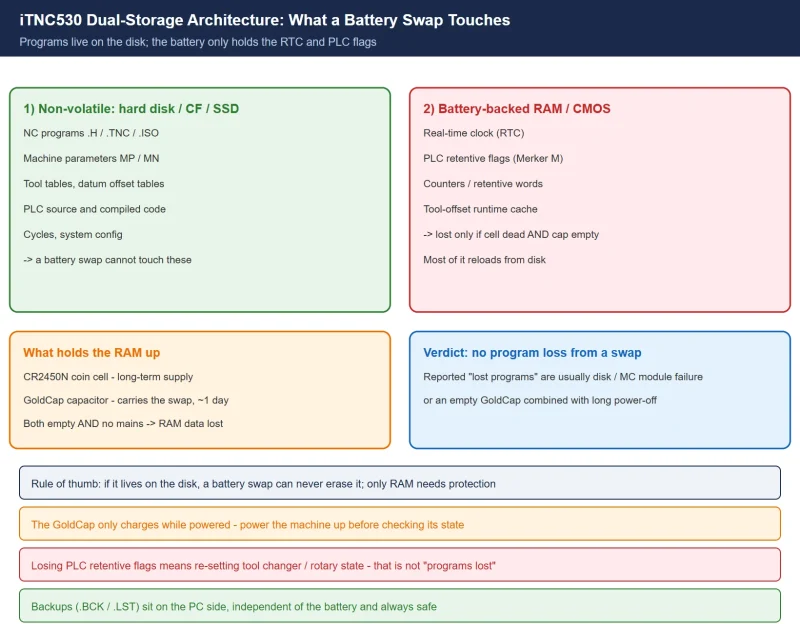
The most common fear on the shop floor is: “Will I lose my programs if I change the battery?” For HEIDENHAIN controls like the iTNC530, the answer is no. Your part programs, machine parameters, tool tables, and datum offsets all sit on the hard disk (or CF card) — completely independent of that coin cell.
What the battery actually protects is a small “battery-backed RAM / CMOS” area: the real-time clock (RTC), PLC retentive flags (Merker), and the tool-offset runtime cache. And none of that is lost as long as you don’t let the buffered RAM lose power during the swap.
Below: the architecture, the correct battery, the procedure, the model differences, and the backup methods. Related HEIDENHAIN topics: probe calibration at 1669, and the TCH PROBE tool-measurement cycle at 1818.
2. The iTNC530 dual-storage architecture: battery-backed RAM vs hard disk / CF
To understand “what’s lost,” you first have to see where data lives. The iTNC530 (and the TNC 640 generation) is a classic dual-storage design:
| Storage | Physical location | Lost on power loss? | What it holds |
|---|---|---|---|
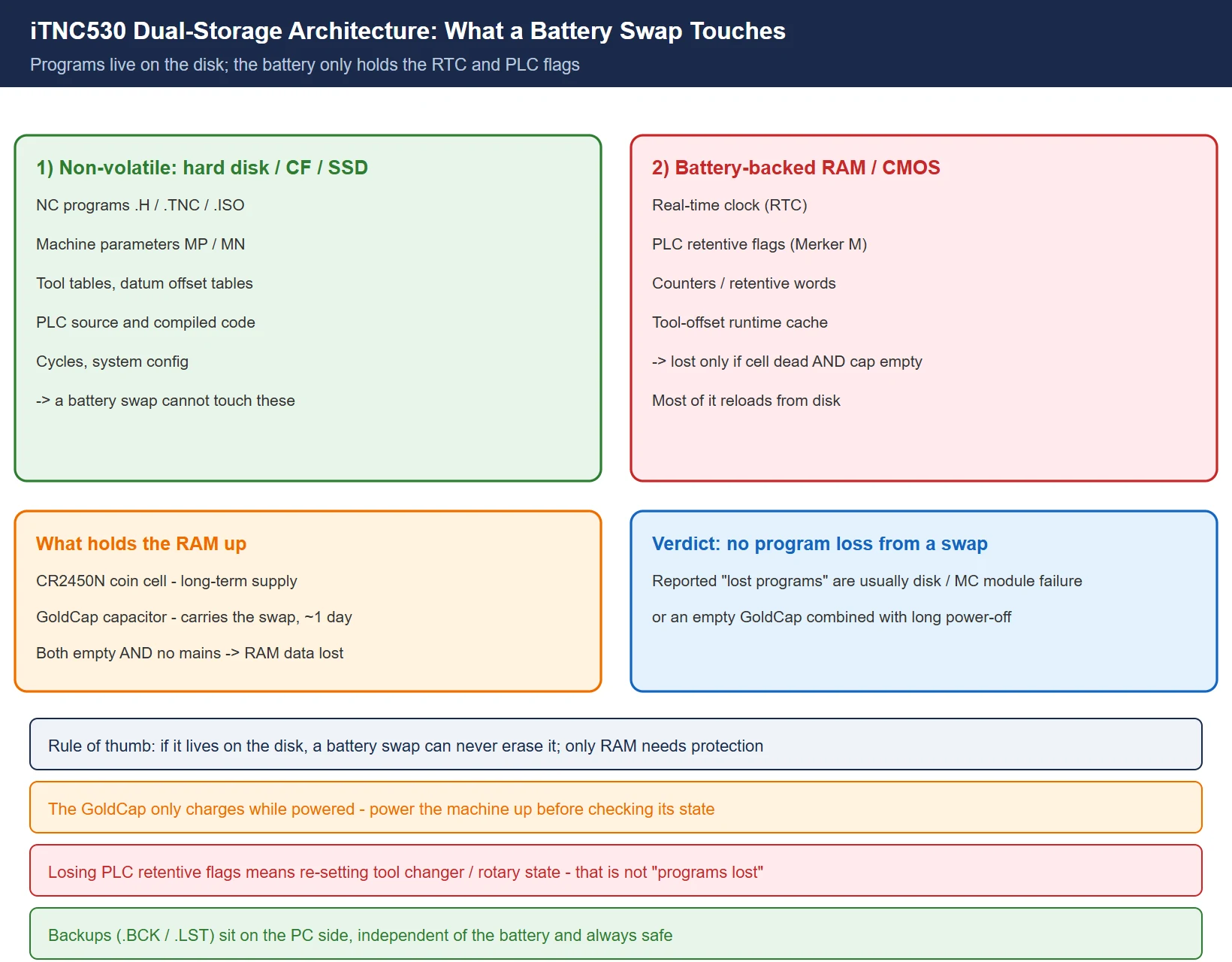
| Hard disk / CF / SSD (non-volatile) | Internal HDD on MC 422, or storage module | No | NC programs (.H / .TNC / .ISO), machine parameters MP / MN, tool tables, datum offset tables, PLC source & compiled code, cycles, system config |
| Battery-backed RAM / CMOS (volatile, held by cell + capacitor) | Mainboard, on the iTNC530 near the RTC circuit behind MC 422 (around U205), powered by the coin cell + GoldCap capacitor | Yes (if cell is dead and capacitor is empty) | Real-time clock (RTC), PLC retentive flags (Merker M), counters / retentive words, tool-offset runtime cache |
The key point: programs, parameters, and tool tables always live on the disk. Swapping the battery can’t touch them. The worst case from a dead battery is a zeroed clock, dropped PLC retentive bits, and a cleared offset cache — all of which reload or get re-entered after a restart. That is a very different thing from “the programs are gone.”
3. Battery type and selection: Renata CR2450N vs a standard CR2450
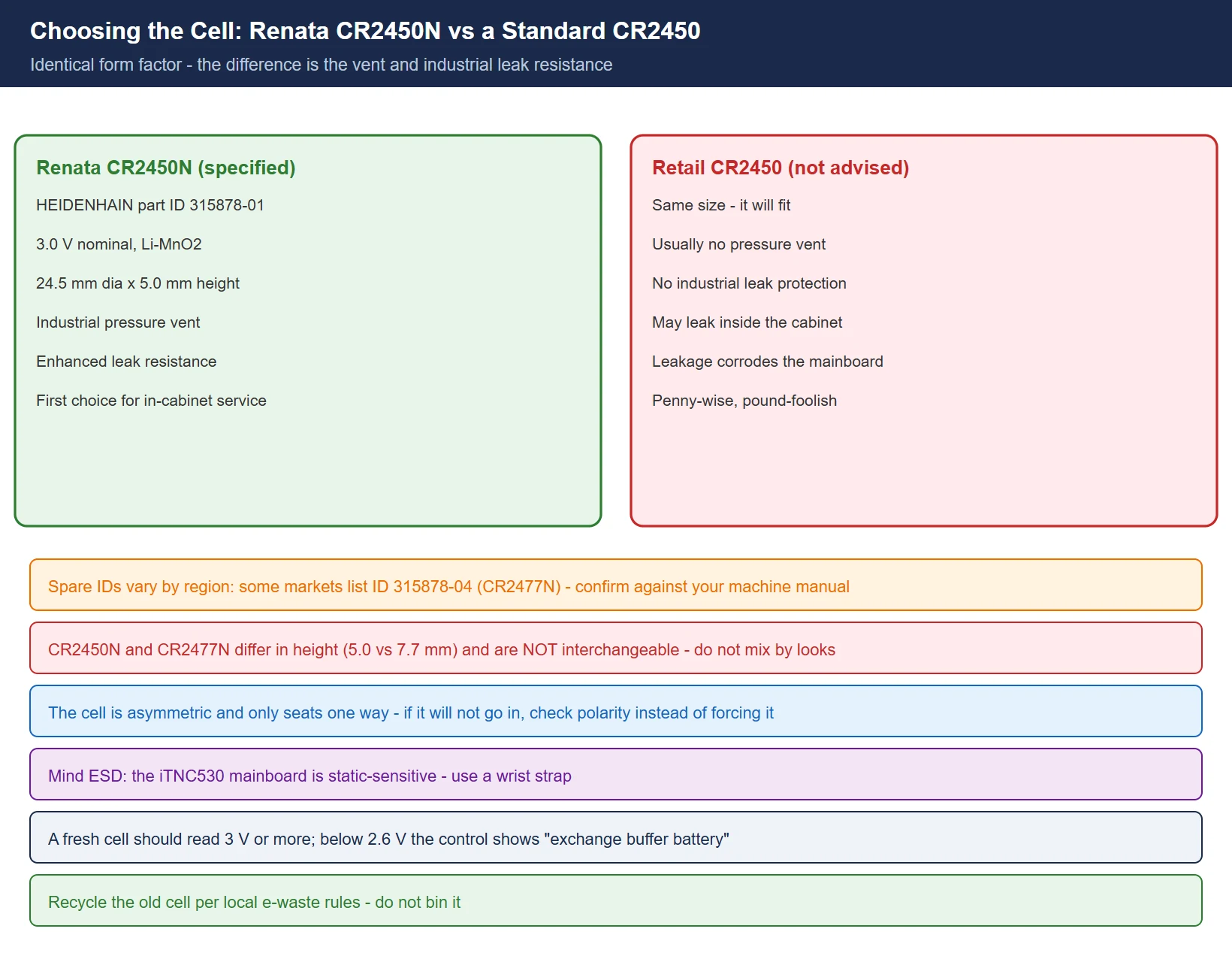
The HEIDENHAIN service manual specifies the buffer battery as Renata CR2450N (HEIDENHAIN part ID 315878-01). It is not a case of “any CR2450 will do.”
| Item | Specification |
|---|---|
| Type | Renata CR2450N (HEIDENHAIN ID 315878-01) |
| Nominal voltage | 3.0 V |
| Dimensions | 24.5 mm diameter × 5.0 mm height (same form factor as a standard CR2450) |
| Chemistry | Lithium manganese dioxide (Li-MnO₂) |
| Key difference | The CR2450N carries an industrial pressure vent and enhanced leak resistance; a retail CR2450 lacks this protection and may leak in-cabinet, corroding the mainboard |
| Spare-part note | Some regions/batches list ID 315878-04 (CR2477N) instead — different thickness, so confirm against your machine manual / HEIDENHAIN service and do not mix them |
Bottom line: use the original Renata CR2450N (ID 315878-01) if you can get it; at minimum choose an industrial CR2450 with a vent. Don’t drop in an unbranded retail CR2450.
4. The 5-step live-swap procedure (recommended: keep power on)
The safest field practice is to keep the machine powered on during the swap — external power holds the buffered RAM.
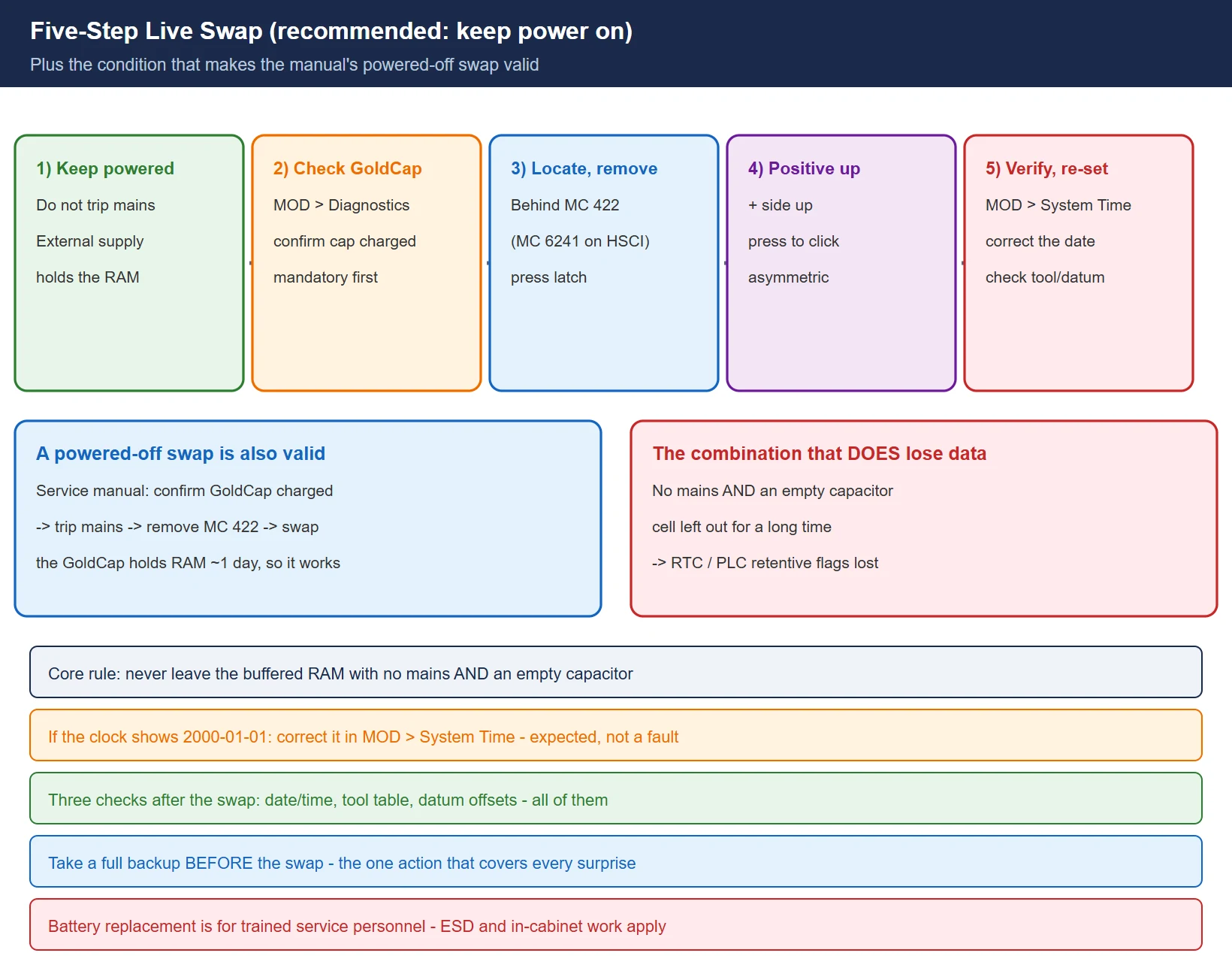
- Keep the machine powered on: don’t trip the main switch; the buffered RAM is maintained by external supply.
- Check the GoldCap: MOD → Diagnostics / Info menu, confirm the buffer capacitor (GoldCap) is fully charged. The service manual requires this check first — a charged GoldCap holds the RAM for about 1 day even when switched off.
- Locate and remove the old cell: on the iTNC530 the holder is behind MC 422 (MC 6241 on HSCI versions), near the RTC circuit; press the latch and the cell pops out.
- Insert the new cell: positive side up, press until the latch clicks (the cell is asymmetric — only one orientation fits).
- Verify RTC and re-enter time: if the clock shows the default
2000-01-01at boot, go to MOD → System Time and correct it; also re-check the tool table and datum offsets.
On “swapping with power off”: the HEIDENHAIN service manual procedure is “confirm GoldCap charged → trip main switch → remove MC 422 → swap battery.” Because the GoldCap holds the RAM ~1 day, a powered-off swap is also valid — provided you just confirmed the capacitor was full. Both are safe; the core rule is: don’t let the buffered RAM lose power while it has neither external supply nor a charged capacitor.
5. Three things to verify after the swap
Don’t walk away yet — check three items:
- Date and time: MOD → System Time; make sure it isn’t
2000-01-01. The RTC is the one thing most likely to drop with a dead battery/capacitor. - Tool table: verify tool lengths and radii. If the offset cache dropped, it reloads from the tool table, but eyeball the values.
- Datum offsets / reference points: if the battery died completely while powered off, PLC retentive flags (Merker) may be lost and some machines need the tool changer, rotary table, etc. re-set per the machine builder’s instructions. That’s not “programs lost” — it’s “machine state bits” that need re-setting.
6. iTNC530 / TNC640 / TNC7 comparison table
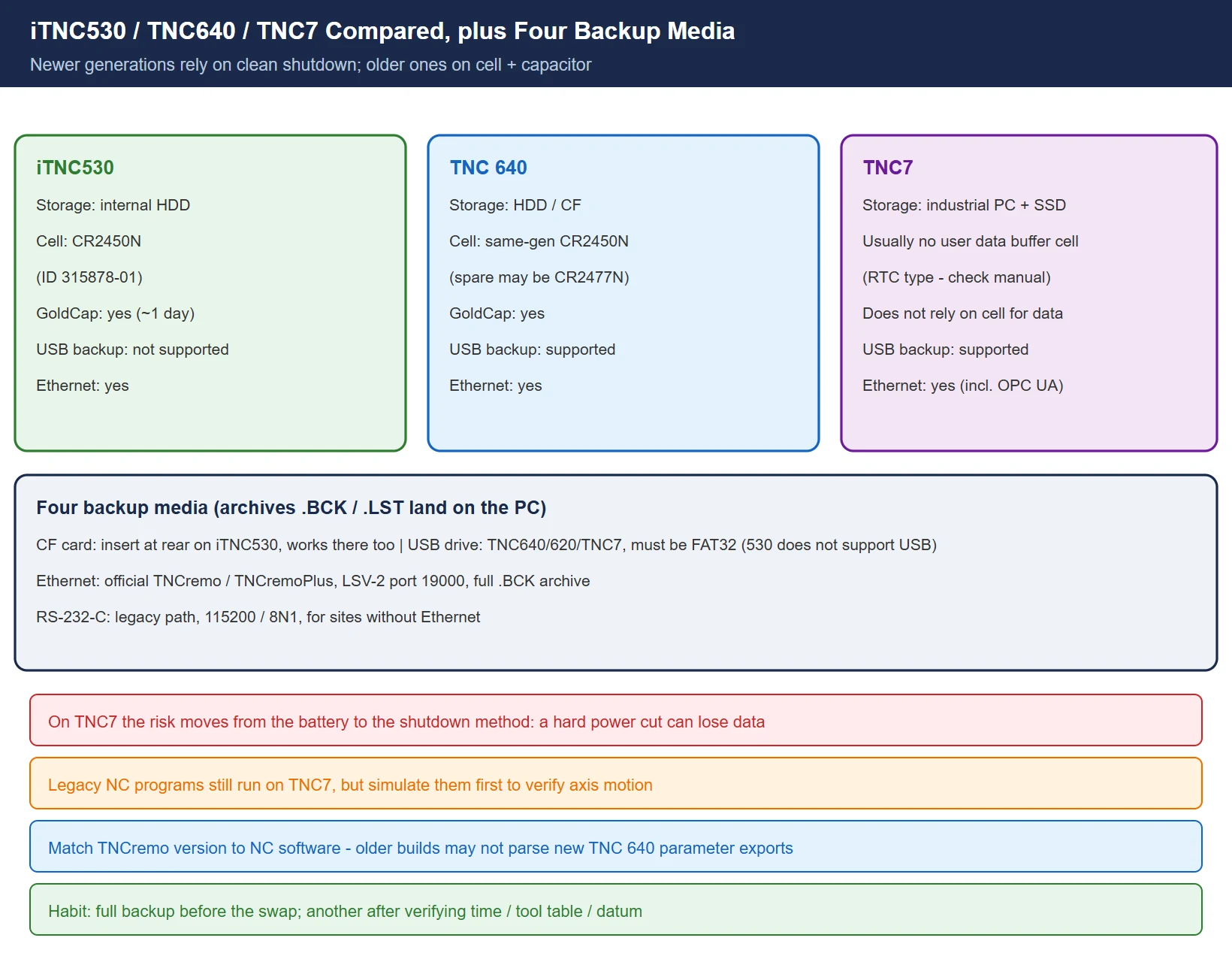
| Model | Program / parameter storage | Buffer battery | GoldCap | USB backup | Ethernet backup |
|---|---|---|---|---|---|
| iTNC530 | Internal HDD | CR2450N (ID 315878-01) | Yes (~1 day RAM hold) | Not supported (use CF) | Yes (TNCremo / TNCremoPlus, LSV-2 port 19000) |
| TNC 640 | HDD / CF | Same-gen CR2450N; spare may be CR2477N (ID 315878-04) — confirm manual | Yes | Supported | Yes (TNCremoPlus) |
| TNC7 | Industrial PC + SSD | Usually no user-level “data buffer battery” (RTC-type cell only — confirm manual) | Not applicable — relies on clean shutdown | Supported | Yes (TNCremoPlus, incl. OPC UA) |
The TNC7 is a new-generation industrial-PC architecture: data sits on an SSD and is saved by a clean shutdown; a hard power cut can actually cause loss (the manual is explicit: only trip the main switch after the screen prompts you). So it has no old-style “battery swap loses programs” problem — the risk shifts from the battery to an unclean shutdown.
7. Four backup media (building the HEIDENHAIN knowledge chain)
Whether or not you swap the battery, backing up regularly is the real fix. HEIDENHAIN gives four backup channels (the .BCK / .LST archives land on the PC side, so they’re always safe regardless of the battery):
- CF card: on the iTNC530 insert at the rear; MOD → Service → Data backup → Backup complete → CF card. Simplest; the 530 supports it.
- USB flash drive: TNC 640 / 620 / TNC7 support it; the drive must be FAT32; the 530 does not support USB backup, use CF.
- Ethernet: use the official TNCremo / TNCremoPlus software over LSV-2 (port 19000) for a full
.BCKarchive (includingMP/MN, tool tables, PLC, datum tables, etc.). - RS-232-C: the legacy path, 115200 / 8N1, for sites without Ethernet or CF.
Habit: take a full backup before the swap; after verifying time / tool table / datum, take another. Double insurance.
Frequently Asked Questions
Will changing the HEIDENHAIN TNC battery erase my part programs?
No. NC programs, machine parameters, and tool tables are stored on the hard disk or CF card and have nothing to do with the buffer battery. The battery only holds the RTC and PLC retentive flags.
What battery does the iTNC530 use? Can I substitute a standard CR2450?
The manual specifies Renata CR2450N (HEIDENHAIN ID 315878-01). A standard CR2450 shares the form factor but lacks the industrial pressure vent and leak resistance; leaking in-cabinet can corrode the mainboard, so don’t substitute it. Some regions list ID 315878-04 (CR2477N) instead — different thickness, confirm against your machine manual.
The clock shows 2000-01-01 after the battery change — what do I do?
Go to MOD → System Time and correct it manually. If the battery died completely while powered off, besides the clock, PLC retentive flags may also be lost and you may need to re-set the tool changer, rotary table, etc. per the machine builder’s instructions. That is not “programs lost.”
Last updated: 2026-10-26
Where to go next
- FANUC Troubleshooting — the full guide library: alarms, diagnosis numbers, servo, spindle, PMC and electrical faults, organised by symptom.
- CNC Repair Tools — which instrument measures what: multimeters, clamp meters, insulation testers and oscilloscopes, with the specification that actually matters.
- Remote Technical Support — have the readings reviewed with you: alarm reverse lookup, PMC ladder analysis and servo tuning advice by call. Repair companies and integrators welcome.
Read the guide, get the right instrument, or walk the diagnosis through with someone — pick whichever you need.
The original Chinese version — same procedure, with the full field notes.























暂无评论内容