


Nine out of ten Heidenhain tool-measurement problems on the shop floor are not a broken touch probe — they are the wrong cycle format for the control generation, a safety-zone parameter looked for in the wrong place, or an unfilled field in TOOL.T. The iTNC 530 works with MP machine parameters, while the TNC 640/620/TNC320/TNC7 work with structured configuration objects; the cycles themselves also come in two generations — the four-line legacy TCH PROBE 31.x and the single-line TCH PROBE 481 with Q parameters. This guide follows the official user manuals line by line: what actually differs between 31 and 481, what goes wrong when Q340 is set incorrectly, the automatic repositioning triggered by Q260, why the individual-tooth limit in Q341 differs by generation (99 versus 20), and a verified MP65xx versus Cfg cross-reference table.
Related reading: how to calibrate the probe before measuring tools, see Heidenhain Touch Probe Calibration and In-Machine Measurement Parameters; how to look up tool-measurement error codes, see Heidenhain TNC Error Code List.
1. Tell the two cycle formats apart: 31.x four lines vs 481 one line
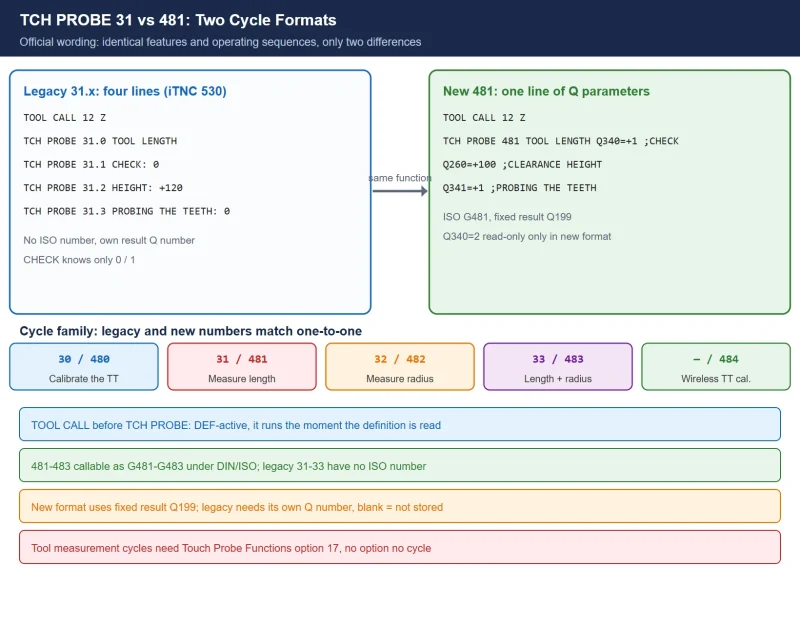
HEIDENHAIN ships automatic tool measurement as one family of cycles with a legacy number and a new number for each function, matched one-to-one. The manuals state it plainly: cycle 481 and cycle 31 have absolutely identical features and operating sequences — only two things differ.
Table 1 The tool-measurement cycle family (legacy / new / ISO)
| Function | Legacy | New | DIN/ISO | Notes |
|---|---|---|---|---|
| Calibrate the TT | 30 | 480 | G480 | Cylindrical calibration tool; center offset needs the 180° turn |
| Measure tool length | 31 | 481 | G481 | This guide: rotating, stationary, or per-tooth |
| Measure tool radius | 32 | 482 | G482 | Optionally per tooth with oriented spindle stops |
| Measure length + radius | 33 | 483 | G483 | One call returns both L and R |
| Calibrate a wireless TT | — | 484 | — | Infrared/radio TT calibration |
The legacy format (the most common style on the iTNC 530) is four lines, one parameter per line:
6  TOOL CALL 12 Z
7  TCH PROBE 31.0 TOOL LENGTH
8  TCH PROBE 31.1 CHECK: 0
9  TCH PROBE 31.2 HEIGHT: +120
10 TCH PROBE 31.3 PROBING THE TEETH: 0
The new format is one line of Q parameters (TNC 640/620/TNC320/TNC7, and later iTNC 530 software as well):
6  TOOL CALL 12 Z
7  TCH PROBE 481 TOOL LENGTH Q340=+1 ;CHECK
   Q260=+100 ;CLEARANCE HEIGHT
   Q341=+1 ;PROBING THE TEETH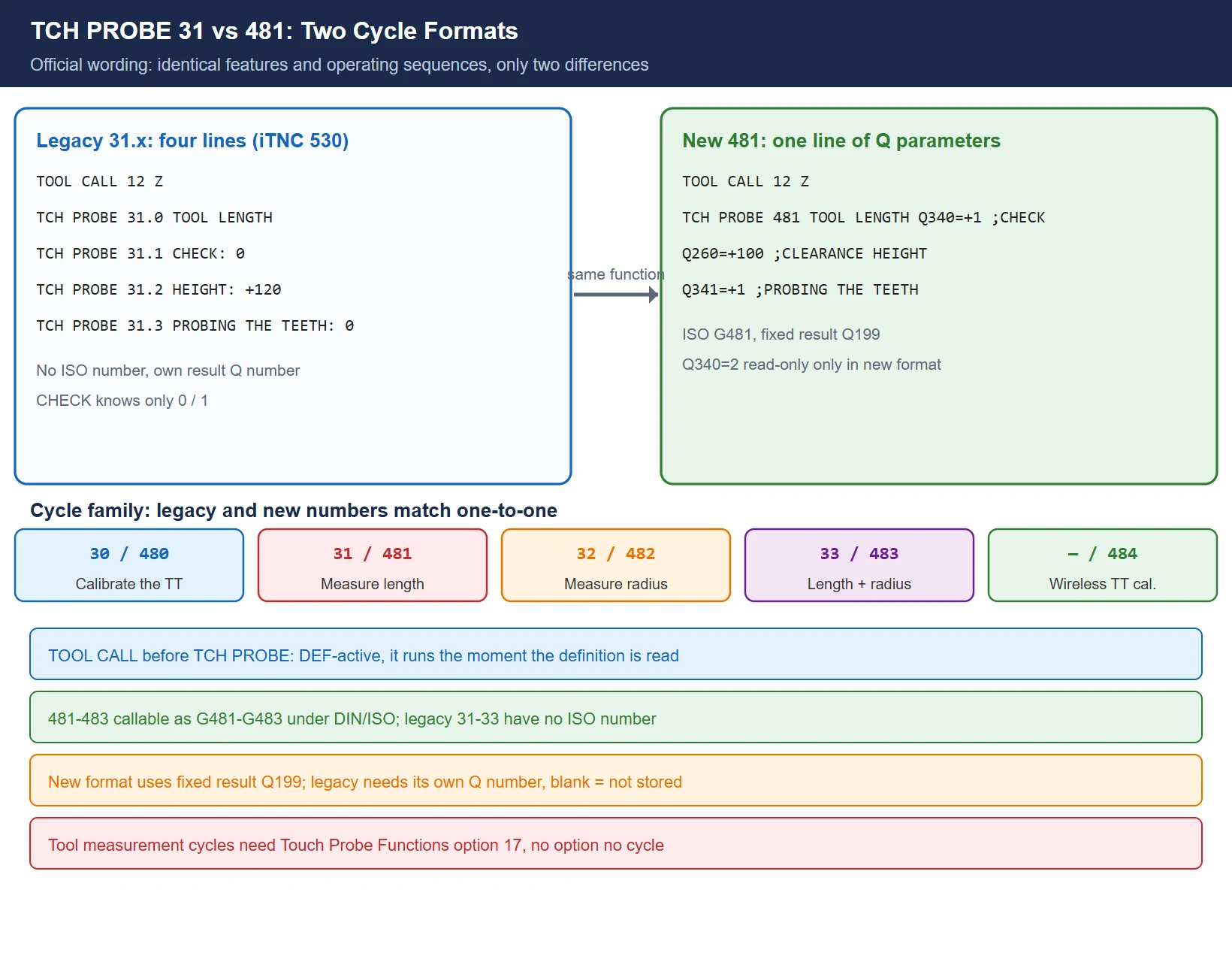
The official documentation names exactly two differences: ① cycles 481–483 can be called as G481–G483 under DIN/ISO programming, while 31–33 have no ISO numbers; ② the new cycles use the fixed result parameter Q199 in place of the legacy optional “parameter number for result.” In the legacy format you had to type in a Q number yourself to store the result — no entry meant no result.
🚨 Hard rule: TOOL CALL before TCH PROBE, on every generation. TCH PROBE is DEF-active — it executes the moment its definition is read, so the positioning block must come first, and TOOL CALL must set the tool axis. The tool-measurement cycles also belong to the Touch Probe Functions software option (option 17) — without it the cycles simply do not exist on the control.
2. Q340 three modes: overwrite, compare, report — set it wrong and you measure for nothing
Q340 (the legacy 31.1 CHECK:) decides what this measurement does to TOOL.T. It is the single most mis-programmed parameter in the whole cycle.
Table 2 The three Q340 modes (official wording)
| Mode | Legacy | First measurement | Re-inspection | Result stored in | If tolerance exceeded |
|---|---|---|---|---|---|
| 0 | CHECK: 0 | Overwrite the tool length L in TOOL.T with the measured value, DL = 0 | Same as first: overwrites again | L only | No locking |
| 1 | CHECK: 1 | — | Compare measured length with stored L, write the deviation to DL | DL + Q115 | Exceeds LTOL or LBREAK → tool locked with status L |
| 2 | not available | Measure only | Compare only, table untouched | Q115/Q116 only | No locking |
The official wording: on a first measurement the TNC overwrites the tool length L in TOOL.T with the measured value and sets DL = 0; on an inspection it compares the measured length with the stored L, enters the positive or negative deviation as DL, and makes the deviation available through Q115; if the deviation is greater than the permissible tool-length tolerance for wear or break detection, the TNC locks the tool (status L in TOOL.T). The radius side works the same way — DR / RTOL / RBREAK, with the deviation also in Q116 (only on 32/482 and 33/483).
Q340=2 exists only in the new-format generations after the TNC 640: read the result into Q parameters without touching a single byte of the tool table — for when you want a number but must not let the program alter production tool data. The legacy CHECK only knows 0 and 1; carrying a “2” over there is an immediate syntax error.
Field rule: if the machined dimension drifts slowly and you suspect tool wear, re-measure with Q340=1 and watch DL for a steady negative trend; if you only want to confirm the length without touching production data, use Q340=2. First measurement must be Q340=0, re-inspection Q340=1 — reverse them and you wipe the old tool offset to zero.
3. Q260 clearance height and the two-generation safety zone
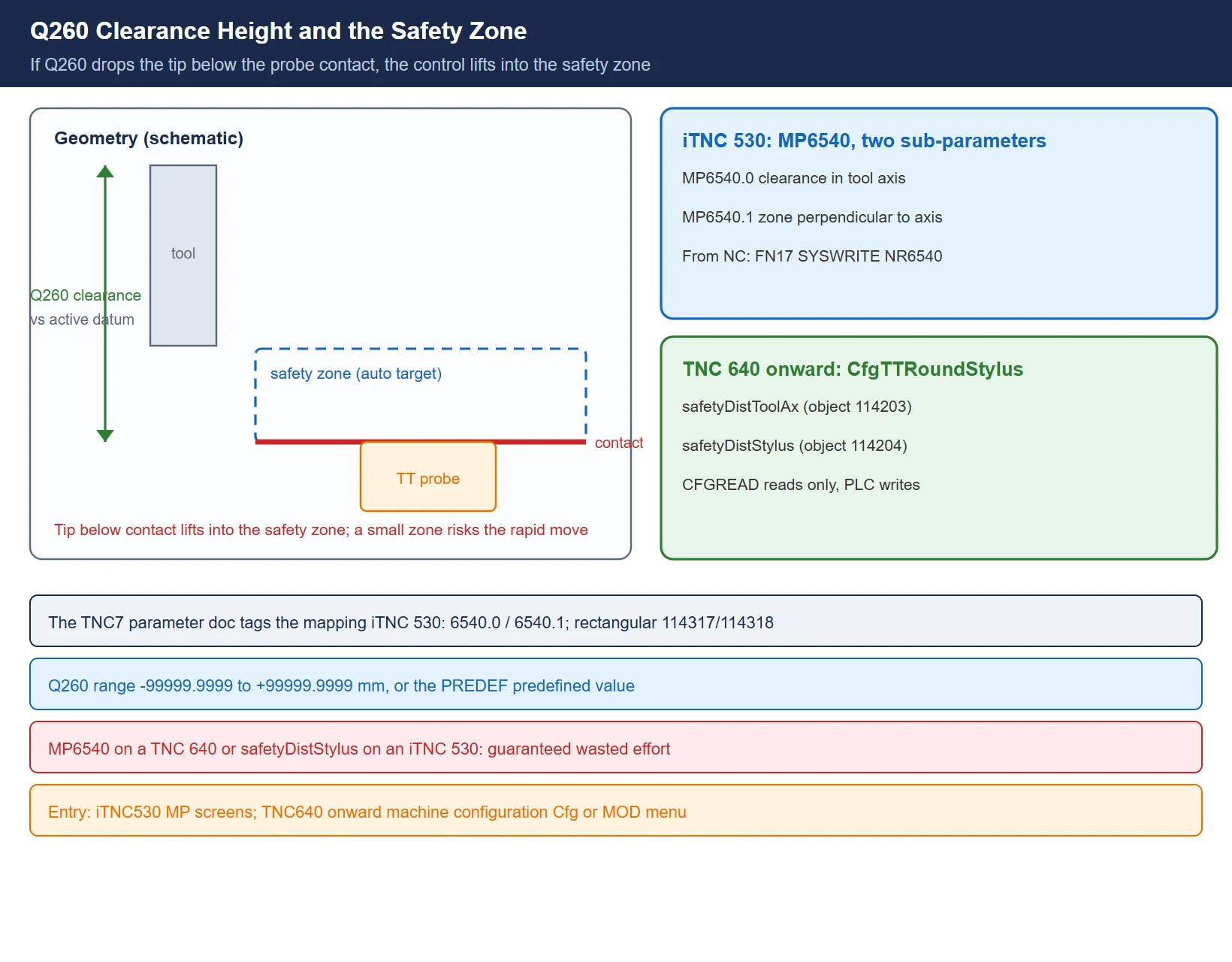
Q260 (legacy 31.2 HEIGHT:) is the clearance height with no danger of collision, referenced to the active workpiece datum. It carries an official fallback: if the entered clearance height is so small that the tool tip would lie below the level of the probe contact, the TNC automatically positions the tool above the level of the probe contact — that is exactly what the “safety zone” is for.
The safety zone itself lives in two different places across the generations:
Table 3 Safety-zone parameters across generations (verified)
| Item | iTNC 530 | TNC 640 / 620 / TNC320 / TNC7 |
|---|---|---|
| Parameter form | MP6540 (two sub-parameters) | CfgTTRoundStylus configuration object attributes |
| Safety clearance in the tool-axis direction | MP6540.0 | safetyDistToolAx (object 114203) |
| Safety zone in the plane perpendicular to the tool axis | MP6540.1 | safetyDistStylus (object 114204) |
| Input range | 0.001–30000.000 mm | 0.001–99999.9999 mm |
| Changing it from the NC program | FN 17: SYSWRITE ID 1000 NR6540 IDX0 =+5 | NC program can only read (CFGREAD); writing requires the PLC (modules 9430/9432/9433) |
The official TNC7 parameter documentation tags safetyDistToolAx / safetyDistStylus with the direct mapping “iTNC 530: 6540.0 / 6540.1”, so the cross-reference is safe to use. A rectangular stylus probe (CfgTTRectStylus) carries the same pair of attributes (objects 114317 / 114318, again mapped to MP6540.0 / 6540.1).
🚨 Field rule: looking for MP6540 on a TNC 640, or safetyDistStylus on an iTNC 530, is guaranteed wasted effort. The entry points differ too: the iTNC 530 uses the MP parameter setting screens; from the TNC 640 onward they are Cfg objects under “edit parameters → machine configuration” (probes additionally via MOD → Machine settings).
Q260 accepts −99999.9999 to +99999.9999 mm, or the PREDEF predefined value. Do not treat Q260 as a free “raise it as high as you like” parameter: below a certain point the safety zone takes over, and if the safety zone itself is set too small, the pre-positioning rapid traverse (MP6550 / its Cfg counterpart) puts the probe at risk.
4. Q341 individual tooth measurement: the 99 vs 20 boundary, rotating vs stationary
Q341 (legacy 31.3 PROBING THE TEETH:) is only 0 or 1 — whether to measure the individual teeth. But the per-tooth limit differs between generations, and that is a common reason a program moved from an iTNC 530 fails on a TNC 640.
Table 4 Individual-tooth limits (verified from the manuals)
| Control | Tooth limit | Status display |
|---|---|---|
| iTNC 530 | up to 99 teeth | shows measured values for up to 24 teeth |
| TNC 640 / TNC 320 / TNC 128 | up to 20 teeth | — |
The measuring method follows from the relation between tool diameter and the TT measuring-surface diameter, per the official rules:
- Tool diameter larger than the TT measuring surface → rotating measurement. The control positions the tool offset from the center of the touch probe by one radius (that offset is entered in the TOOL.T column R_OFFS, “Radius (TT: R_OFFS)”), pushes the rotating tool toward the measuring surface, and finds the longest tooth.
- Tool diameter smaller than the measuring surface, or a drill / spherical cutter → stationary measurement. The tool is positioned over the center of the measuring surface without rotation; R_OFFS = 0 activates this mode.
- Individual-tooth measurement: pre-position beside the touch probe head (the distance from tool tip to the upper edge of the probe head is defined by offsetToolAxis, iTNC 530 counterpart MP6530.x, with an additional offset in TOOL.T L_OFFS); the control then probes radially once during rotation to determine the starting angle, and measures each tooth length by changing the spindle orientation angle.
So R_OFFS governs two things at once — rotating versus stationary, and the offset amount. Getting it wrong does not just cost accuracy; it switches the entire measurement mode.
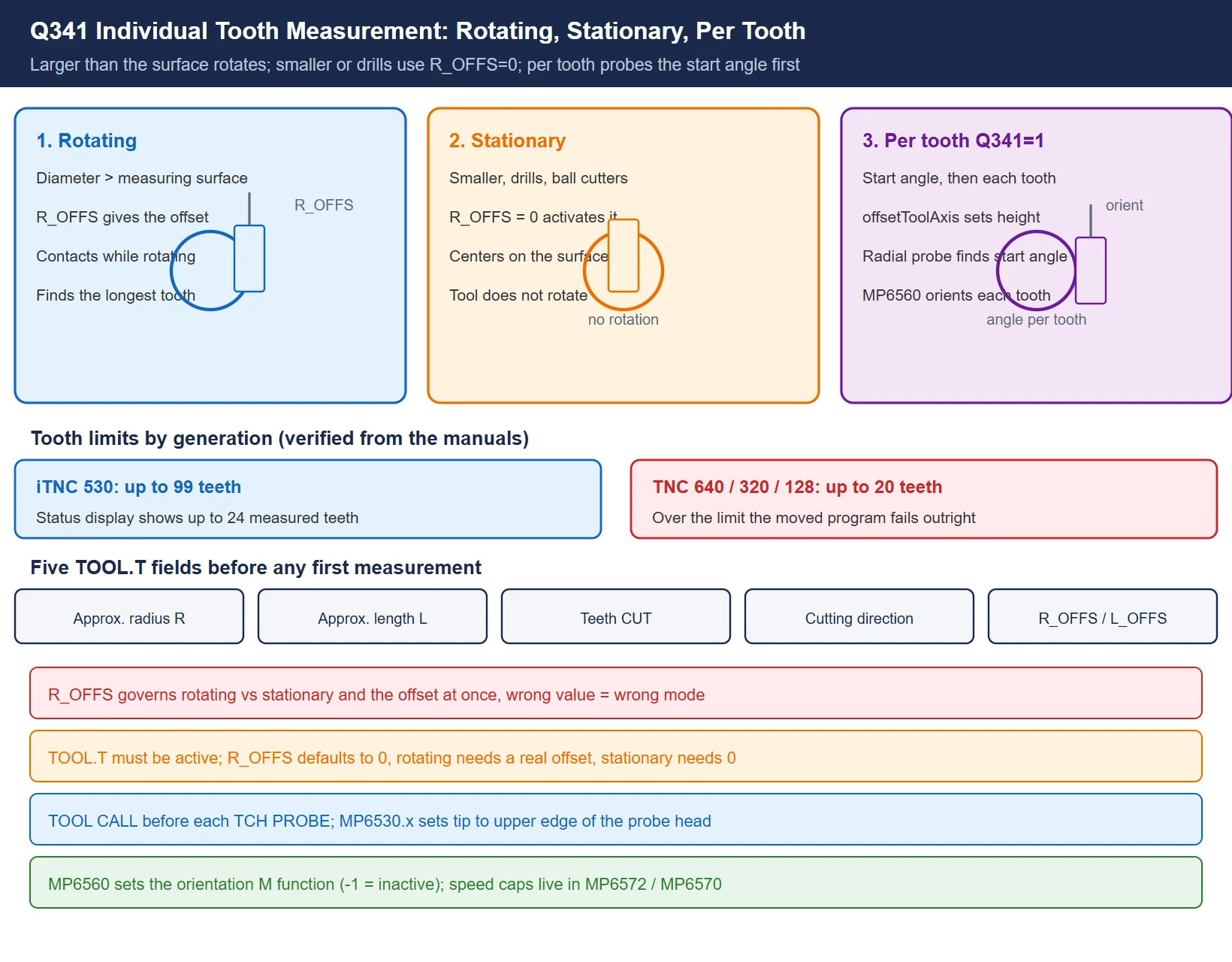
Spindle orientation for individual-tooth measurement is triggered by an M function set in MP6560 (iTNC 530, 0–999, −1 = function inactive); the permissible speed / cutting speed for rotating measurement comes from MP6572 / MP6570 — see the parameter table in section 6.
5. TOOL.T pre-fill fields: five items before any first measurement
The “please note while programming” block in the cycle documentation gives a hard list: before measuring a tool for the first time, five data items must already be entered in TOOL.T — miss one and the cycle cannot run correctly.
Table 5 Mandatory TOOL.T fields before a first measurement (official list)
| Field | What to enter | What happens without it |
|---|---|---|
| Approximate radius R | Nominal / approximate tool radius | No basis for the offset positioning in rotating measurement |
| Approximate length L | Approximate tool length | No reference for pre-positioning or comparison |
| Number of teeth CUT | Tooth count per the machine convention | Individual-tooth measurement (Q341=1) cannot step tooth by tooth |
| Cutting direction | Climb / conventional, etc. | Compensation direction judged wrongly |
| R_OFFS / L_OFFS | TT offsets where required | Default 0 — and R_OFFS = 0 means stationary measurement |
Two further prerequisites: TOOL.T must be active (on the iTNC 530, whether the tool table takes effect is governed by the MP7260 ≠ 0 style of setting, the same rule as in the probe-calibration guide), and TOOL CALL must precede every TCH PROBE.
Field rule: if the cycle stops in a strange position or throws a safety-zone-related error, go back to TOOL.T and check these five items first — especially R_OFFS being an unexpected 0 (you wanted rotating measurement) or an unexpected non-zero (a leftover milling-cutter offset while measuring a drill).
6. MP65xx versus Cfg: the verified cross-reference
Tool-setter parameters cluster in the iTNC 530 MP65xx group and scatter across CfgTT / CfgTTRoundStylus / CfgTTRectStylus configuration objects on the TNC7 series. The left column below lists iTNC 530 manual entries; the right column lists TNC7 official parameter-documentation entries that carry an explicit iTNC 530 mapping. Anything without an official mapping is deliberately left open — no guessing.
Table 6 iTNC 530 MP65xx versus TNC7 Cfg (verified from the manuals)
| Meaning | iTNC 530 | TNC 640 / 620 / TNC320 / TNC7 |
|---|---|---|
| Safety clearance in tool-axis direction | MP6540.0 | safetyDistToolAx (114203) |
| Safety zone perpendicular to the tool axis | MP6540.1 | safetyDistStylus (114204) |
| Stylus center coordinates | — (no MP65xx counterpart) | centerPos (round 114201 / rectangular 114313) |
| Tool tip to upper edge of probe head (3 traverse ranges) | MP6530.0–.2 (0.001–99.9999 mm) | offsetToolAxis (object number per machine) |
| Probing direction for radius measurement (3 traverse ranges) | MP6505.0–.2 (0–3) | per-machine Cfg |
| Probing feed for a stationary tool | MP6520 (1–3000 mm/min) | per-machine Cfg |
| Rapid traverse of the TT inside the cycle | MP6550 (from 10 mm/min) | per-machine Cfg |
| M function for spindle orientation in tooth measurement | MP6560 (0–999, −1 inactive) | per-machine Cfg |
| Permissible cutting speed at the circumference | MP6570 (1.000–120.000 m/min) | per-machine Cfg |
| Permissible rotational speed | MP6572 (0–1000 rpm, 0 = limited to 1000) | per-machine Cfg |
| Maximum permissible measuring error, rotating tool | MP6510.0/.1 (recommended 0.005 / 0.01 mm) | per-machine Cfg |
| Feed-rate rule for the second measurement | MP6507 (bit0: constant/variable tolerance; bit1: constant feed) | per-machine Cfg |
The official speed and feed formulas (iTNC 530 wording, paired with MP6570 / MP6507):
- Speed n = MP6570 ÷ (r × 0.0063), with r the tool radius in mm — MP6570 is the permissible speed at the circumference in m/min;
- Feed v = tolerance × n (MP6507 bit0 = 0, feed calculated from a constant tolerance).
The three sub-parameters of MP6530.x correspond to “traverse range 1/2/3” for machines that select different probe positions by tool diameter or length; a single-probe machine normally uses only the first entry.
7. Symptom → cause → check: the fault table
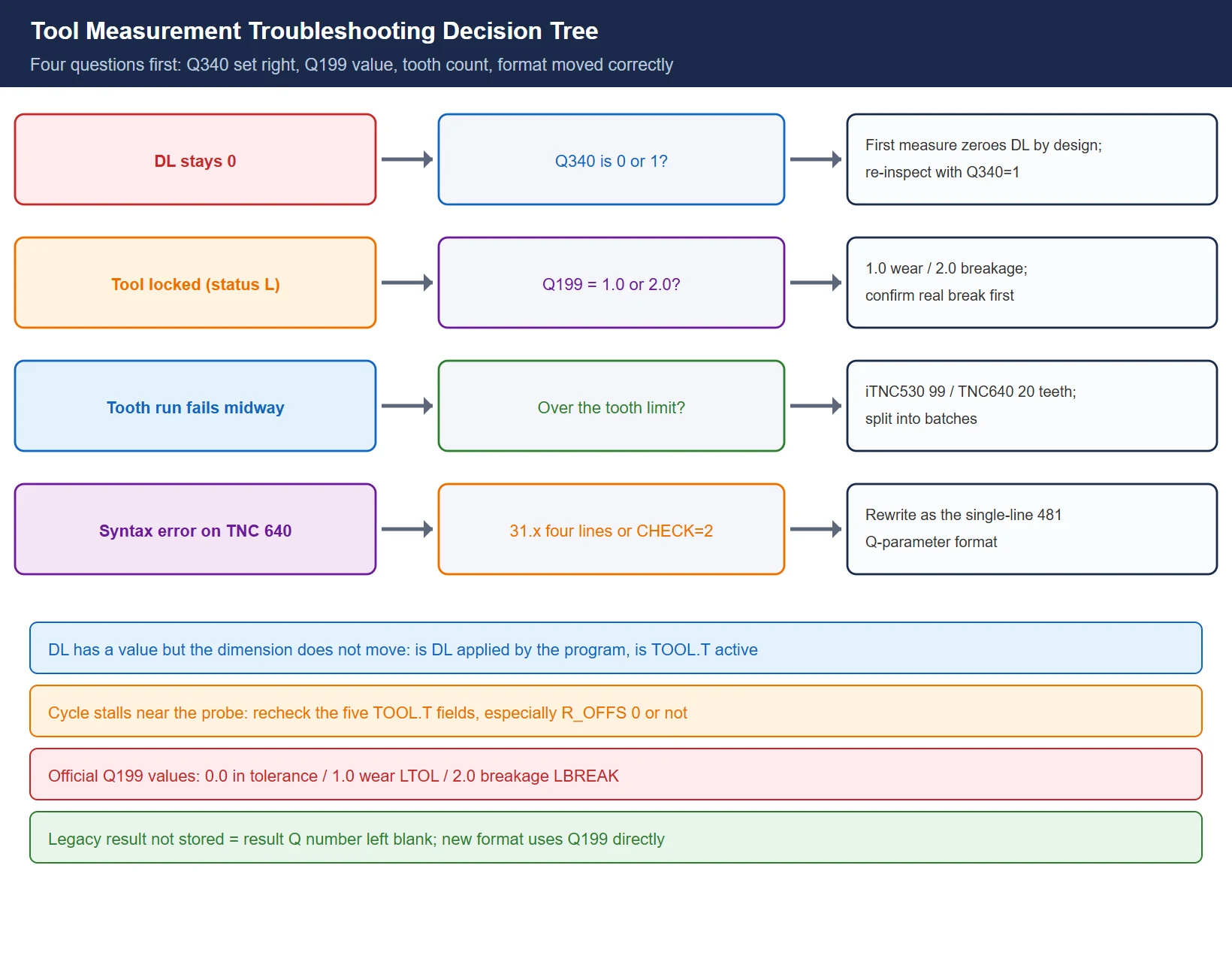
Table 7 Common tool-measurement symptoms, causes and first checks (official wording)
| Symptom | Cause | Check first |
|---|---|---|
| DL stays 0 after measuring | First-measurement behavior by design (Q340=0 overwrites L and zeroes DL); or Q340=0 used for an inspection | Q340 is 0 or 1 |
| DL has a value but the machined dimension does not move | The wear offset is never applied by the program (compensation axis / offset number), or TOOL.T is not active | Does the program apply DL; tool-table activation |
| Tool suddenly locked (status L) | Deviation exceeded LTOL (wear) or LBREAK (breakage) | Q199 = 1.0 means wear, 2.0 means breakage; confirm a real broken tool before loosening tolerances |
| Q199 unavailable / legacy result not stored | The legacy result parameter number was left blank (blank = not stored) | Add a Q number in the legacy format; new format uses Q199 directly |
| Tooth measurement fails halfway | Tooth count exceeds the generation limit (iTNC 530 99 / TNC 640 20) | TOOL.T tooth count; target control generation |
| Program fails with a syntax error on the TNC 640 | The four-line 31.x legacy format is not accepted, or CHECK was given a 2 | Rewrite as the single-line 481 Q-parameter format |
| Cycle stalls near the probe | The five TOOL.T fields are incomplete, or R_OFFS error switched the mode | R, L, CUT, direction, R_OFFS |
| Collision risk during pre-positioning | Q260 too low triggers automatic repositioning to the safety zone, while the safety zone itself is too small | MP6540.0/.1 or safetyDistToolAx / safetyDistStylus |
The official Q199 values (the fixed result parameter of the new format, replacing the legacy free Q number): 0.0 = within tolerance; 1.0 = worn (LTOL exceeded); 2.0 = broken (LBREAK exceeded). On the radius side the corresponding result for 32/482 and 33/483 is Q116; the Q115/Q116 deviation values and the lock decision run on the same tolerance set.
8. Shop-floor checklist: what a correct tool measurement looks like
Walk the list in order — it saves half a day of troubleshooting:
- Confirm the control model and software generation (HELM/about screen) to decide 31.x versus 481, and whether the tooth limit is 99 or 20;
- Confirm the Touch Probe Functions option is active and the TT has been calibrated with 30/480 (including the 180° center-offset measurement where required);
- TOOL.T active, with R, L, CUT and cutting direction entered for the target tool, and R_OFFS / L_OFFS matched to the measuring method;
- TOOL CALL before the TCH PROBE block, with the positioning block ahead of the cycle;
- First measurement Q340=0, inspection Q340=1, read-only Q340=2;
- Give Q260 enough room, and verify the safety zone (MP6540.0/.1 or safetyDistToolAx/Stylus) is not absurdly small;
- Before tooth measurement (Q341=1), confirm the tooth count is within the limit and the MP6560 orientation M function is effective;
- Take results from Q115 / Q116 / Q199 as needed; when status L appears, confirm a genuinely broken tool before tightening or loosening LTOL/LBREAK.
One-line takeaway: the measurement cycle itself is simple — what is complicated is the two formats, two parameter systems, and one tool table that must be filled in correctly. Right format for the generation, parameters in the right place, all five TOOL.T fields filled — that eliminates nine out of ten “the tool setter is inaccurate” calls before you leave the shop.
Frequently Asked Questions
What is the actual difference between TCH PROBE 481 and 31, and must old programs be rewritten?
Features and operating sequences are absolutely identical; the official documentation names only two differences — cycles 481–483 can be called as G481–G483 under DIN/ISO programming (31–33 have no ISO numbers), and the new format uses the fixed result parameter Q199 instead of the legacy free result-parameter number. Both styles run on an iTNC 530; when moving to a TNC 640/620/TNC320, rewrite to the single-line 481 Q-parameter format.
Why does DL not change after measuring, or why is the tool locked outright?
DL not changing is usually first-measurement behavior (Q340=0 overwrites L and zeroes DL) or Q340=0 mistakenly used for an inspection — accumulating wear requires Q340=1. A lock to status L means the deviation exceeded LTOL (wear) or LBREAK (breakage): read Q199 first — 1.0 is wear, 2.0 is breakage — then decide between replacing the tool and loosening the tolerance.
Why does a 99-tooth program that runs on an iTNC 530 fail on a TNC 640?
The individual-tooth limit is generation-dependent: the iTNC 530 official limit is 99 teeth (the status display shows up to 24), while the TNC 640 / TNC 320 / TNC 128 allow 20. A program exceeding the limit fails outright on a TNC 640, so split the measurement into batches or reduce the teeth per run — and rewrite the 31.x legacy format into 481 at the same time.
Last updated: 2026-10-26
The original Chinese version — same procedure, with the full field notes.























暂无评论内容