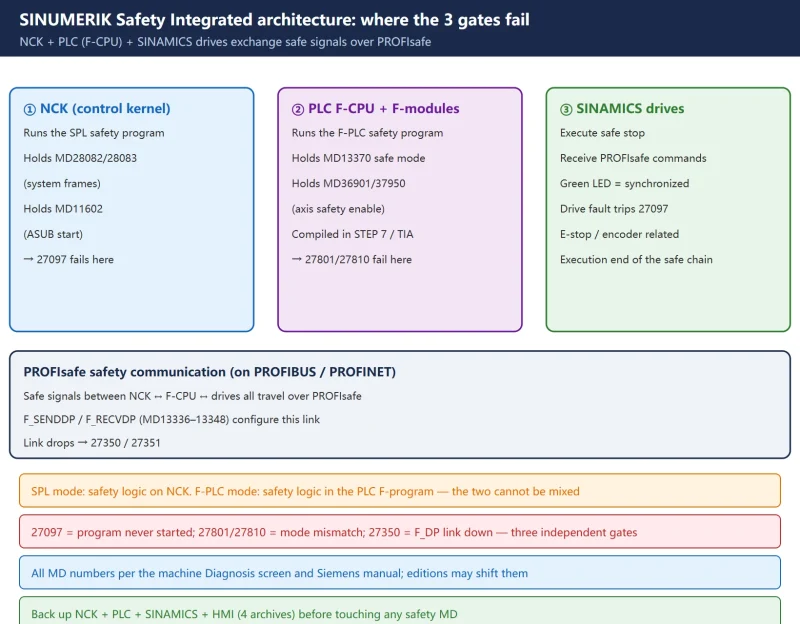



一、First, what these alarms have in common: SINUMERIK Safety Integrated
On the 840D sl, “safety” is not one card — it is a function spread across the NCK (numerical control kernel) + the PLC’s F-CPU + the SINAMICS drives, which Siemens calls SINUMERIK Safety Integrated (SI). It ships in two shapes:
- SPL (Safety Integrated via the PLC’s standard safety program): the safety logic lives in a safety program (SPL) on the NCK side and is executed by the NCK itself.
- F-PLC (SINUMERIK Safety Integrated plus): the safety logic lives in the PLC’s F-program (F-CPU + F-modules), compiled and downloaded from STEP 7 / TIA.
Both exchange safe signals with the drives and I/O over PROFIsafe (the safety protocol carried on PROFIBUS or PROFINET). The three alarm groups below fail at three different gates: “the safety program never started”, “the safe mode does not match”, and “the safe communication dropped”.
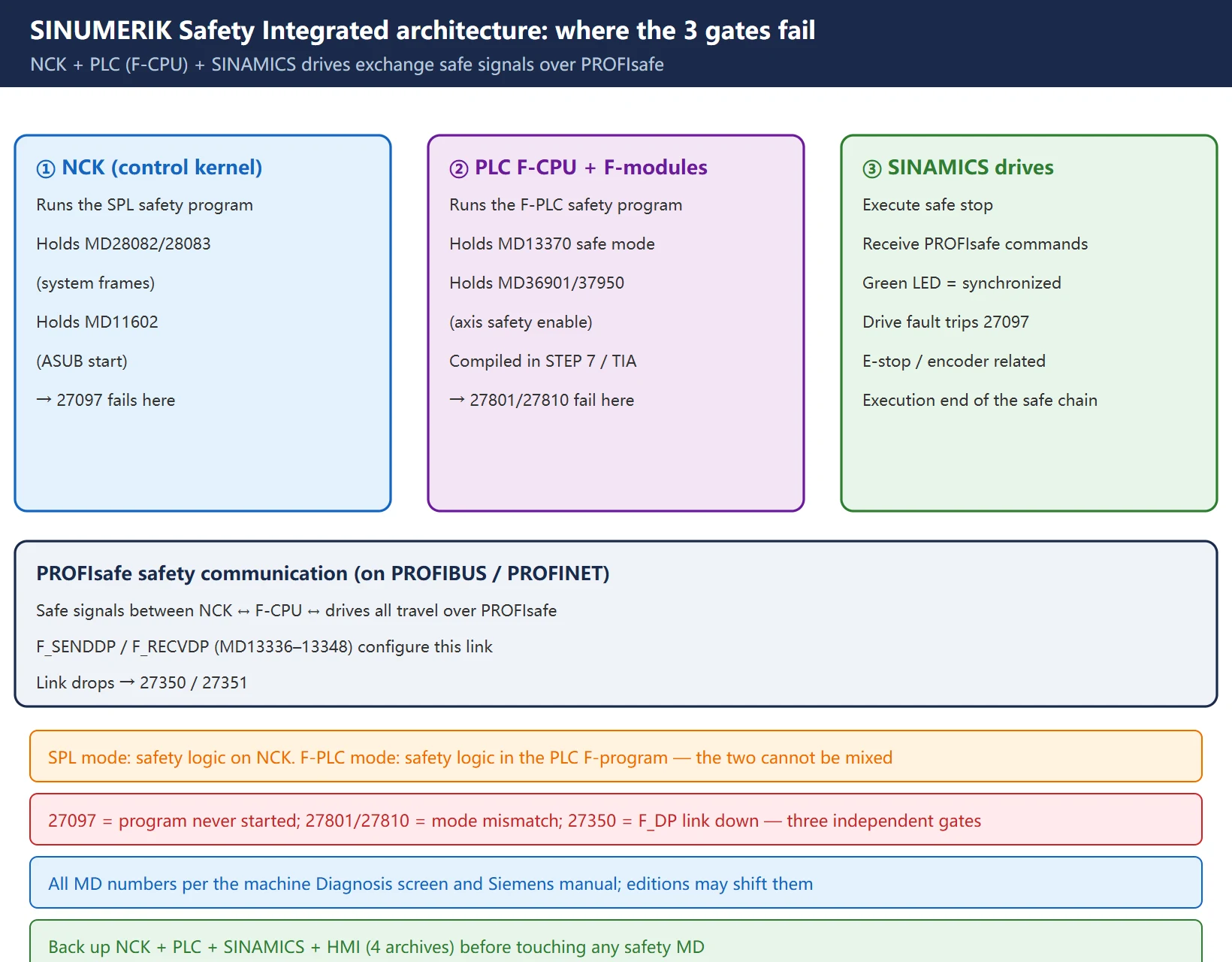
All machine-data (MD) numbers here come from the Siemens 840D sl Function Manual (12/2017). MD numbering can shift between software editions (Toolbox / firmware edition), so always read the actual value from Diagnosis → Machine Data on the machine before changing anything, and take a full backup first.
二、27097: SPL not started (the safety program never ran)
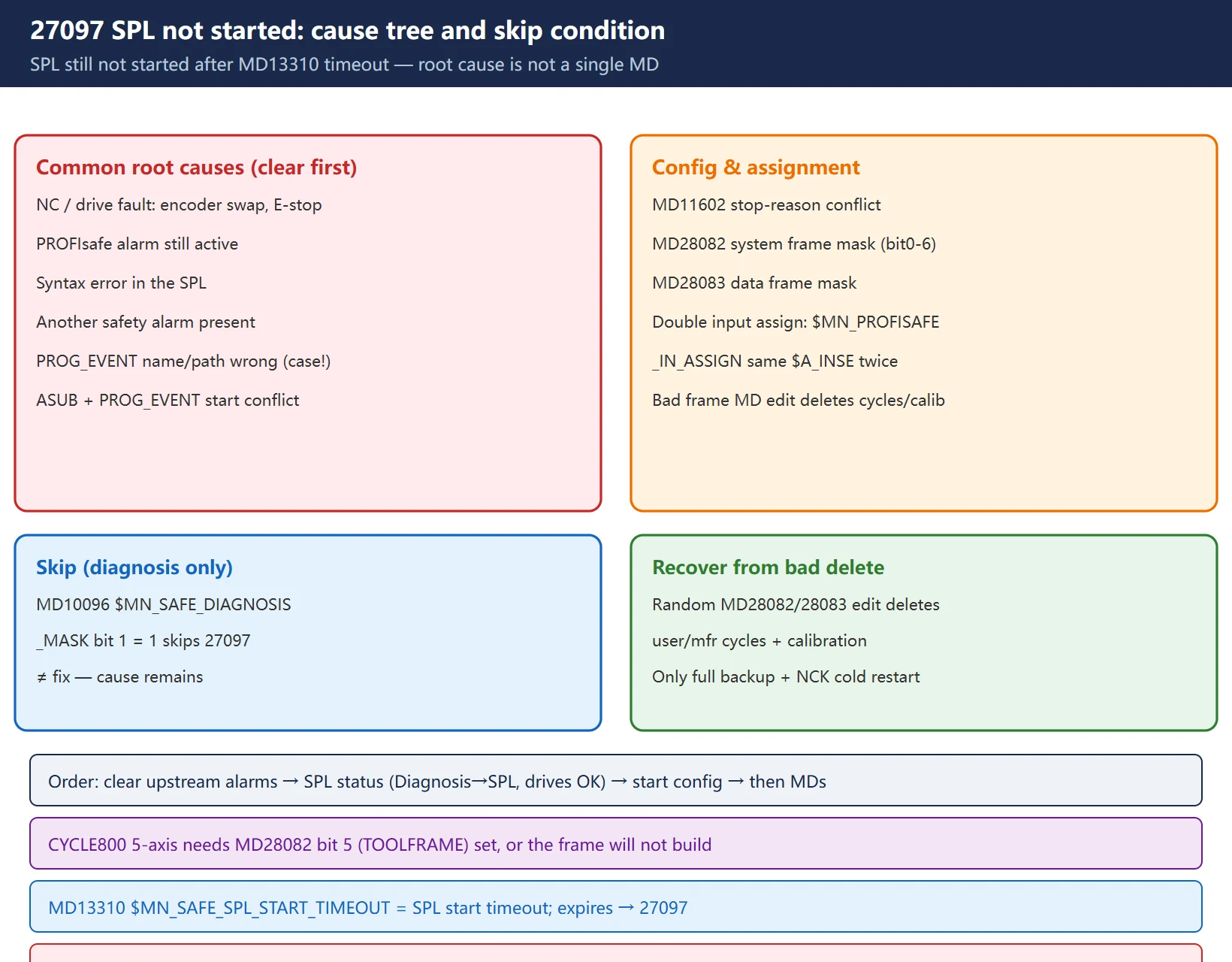
Alarm text: 27097 SPL not started (未进行 SPL 启动). Meaning — after the time defined in MD13310 $MN_SAFE_SPL_START_TIMEOUT expired, the SPL had still not started.
This alarm is not “one MD is wrong”; it means the conditions for starting the SPL were not met. The manual lists the usual causes:
- An NC or drive fault exists (e.g. an encoder was just replaced, E-stop not cleared, or a PROFIsafe alarm is still present);
- A syntax error in the SPL itself;
- Another safety alarm is present (e.g. “safe end position exceeded”);
- At
PROG_EVENTstart, the SPL name or path was written wrong (case-sensitive!); - An
ASUBandPROG_EVENTstarted at the same time, with conflicting stop reasons programmed inMD11602 $MN_ASUP_START_MASK(e.g. read-in inhibit); - A problem when calling
FB4 / FC9.
One more trap: double SPL input assignment — the same $A_INSE is assigned twice in $MN_PROFISAFE_IN_ASSIGN, which also trips 27097.
The machine data involved:
| Machine data | Name | Purpose |
|---|---|---|
MD28082 | $MC_MM_SYSTEM_FRAME_MASK | Which system frames to build: bit0=TPFRAME, 1=STFRAME, 2=MKSFRAME, 3=TFRAME, 4=WRFAME, 5=TOOLFRAME, 6=USERFRAME |
MD28083 | $MC_MM_SYSTEM_DATAFRAME_MASK | Which data frames may be used for coordinate transformation |
MD11602 | $MN_ASUP_START_MASK | Which ASUBs (asynchronous subprograms) are active at start |
MD13310 | $MN_SAFE_SPL_START_TIMEOUT | SPL start timeout |
MD10096 | $MN_SAFE_DIAGNOSIS_MASK | bit 1 = 1 can skip 27097 (diagnosis only, not a cure) |
Hard-won field lesson: randomly editing frame-class MDs like
MD28082 / MD28083makes the NCK re-initialize the frame storage according to the new values, which can delete user cycles, manufacturer cycles and calibration data. Once deleted, the only fix is to restore the full manufacturer backup (NCK + PLC + SINAMICS + HMI archives) and do an NCK cold restart. For CYCLE800 5-axis tilting, bit 5 (TOOLFRAME) ofMD28082must be set.
三、27801 / 27810: safe operating mode vs PLC configuration mismatch
These two are the same problem at two levels:
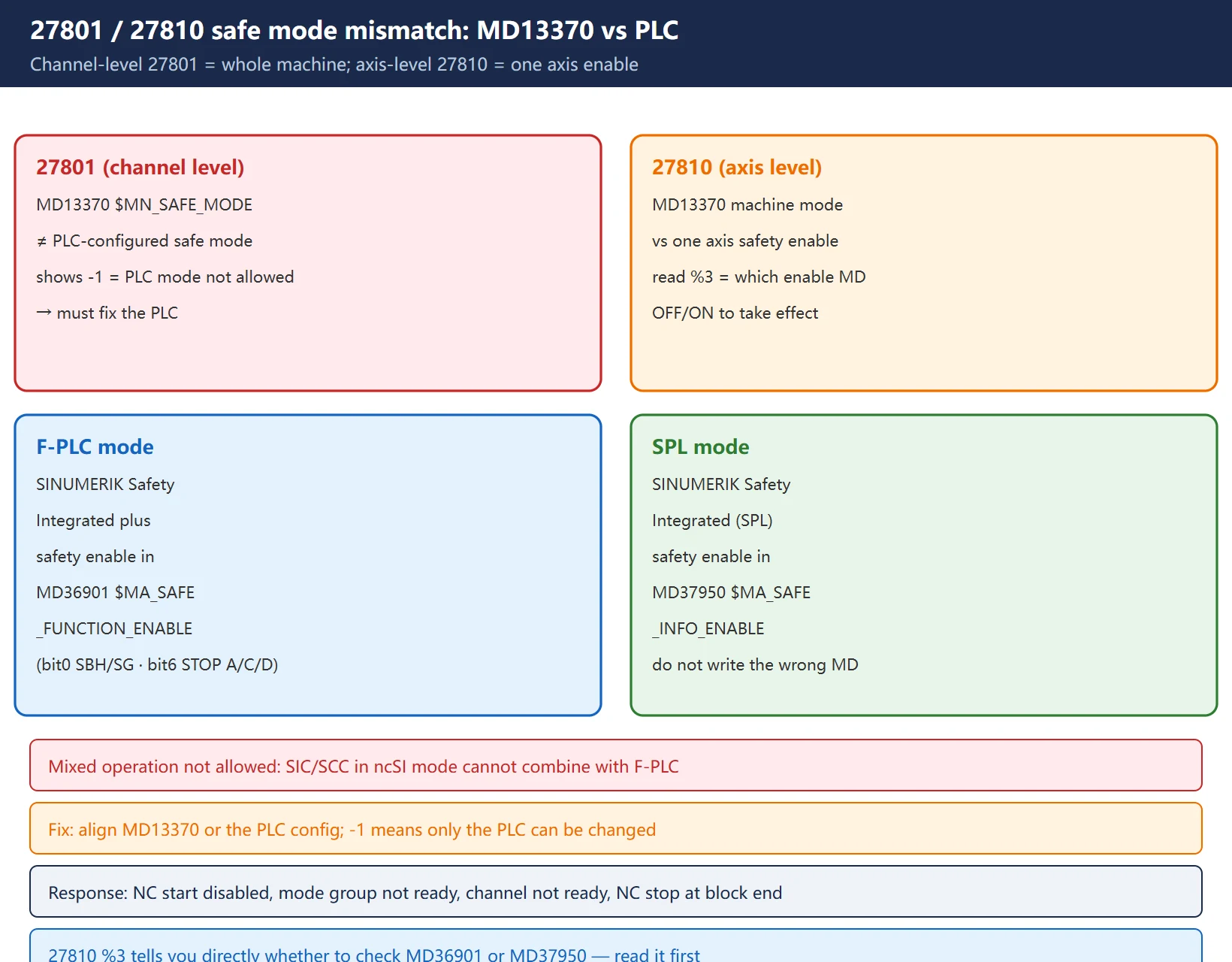
- 27801 (channel level):
Safety operating mode inconsistent: MD "%1" = %2 ; PLC configuration = %3. The whole-machine safe operating mode set inMD13370 $MN_SAFE_MODEdoes not match the PLC configuration. - 27810 (axis level):
Axis %1: Safety operating mode inconsistent: $MN_SAFE_MODE = %2; MD: "%3" = %4. One axis’s safety enable does not match the machine-level safe mode fromMD13370.
The key is which MD 27810 checks against:
| Safe operating mode | Safety enables are set in |
|---|---|
| SINUMERIK Safety Integrated plus (F-PLC) | MD36901 $MA_SAFE_FUNCTION_ENABLE (axis safety functions; bit0=SBH/SG, bit6=external safe stop STOP A/C/D, etc.) |
| SINUMERIK Safety Integrated (SPL) | MD37950 $MA_SAFE_INFO_ENABLE |
Remedy notes:
- Standardize the safe operating mode by adapting either
MD13370 $MN_SAFE_MODEor the PLC configuration. - If %3 (the PLC configuration value) shows -1, it means the safe mode defined in the PLC is not permitted — in that case the PLC must be changed, not the MD.
- Note: mixed operation is not allowed — SIC/SCC in ncSI mode cannot be combined with F-PLC.
- Response: NC start disabled in this channel, mode group not ready, channel not ready, NC Stop on alarm at end of block. After fixing, switch the control OFF and ON again.
四、27350 / 27351: F_DP communication error (the PROFIsafe link dropped)
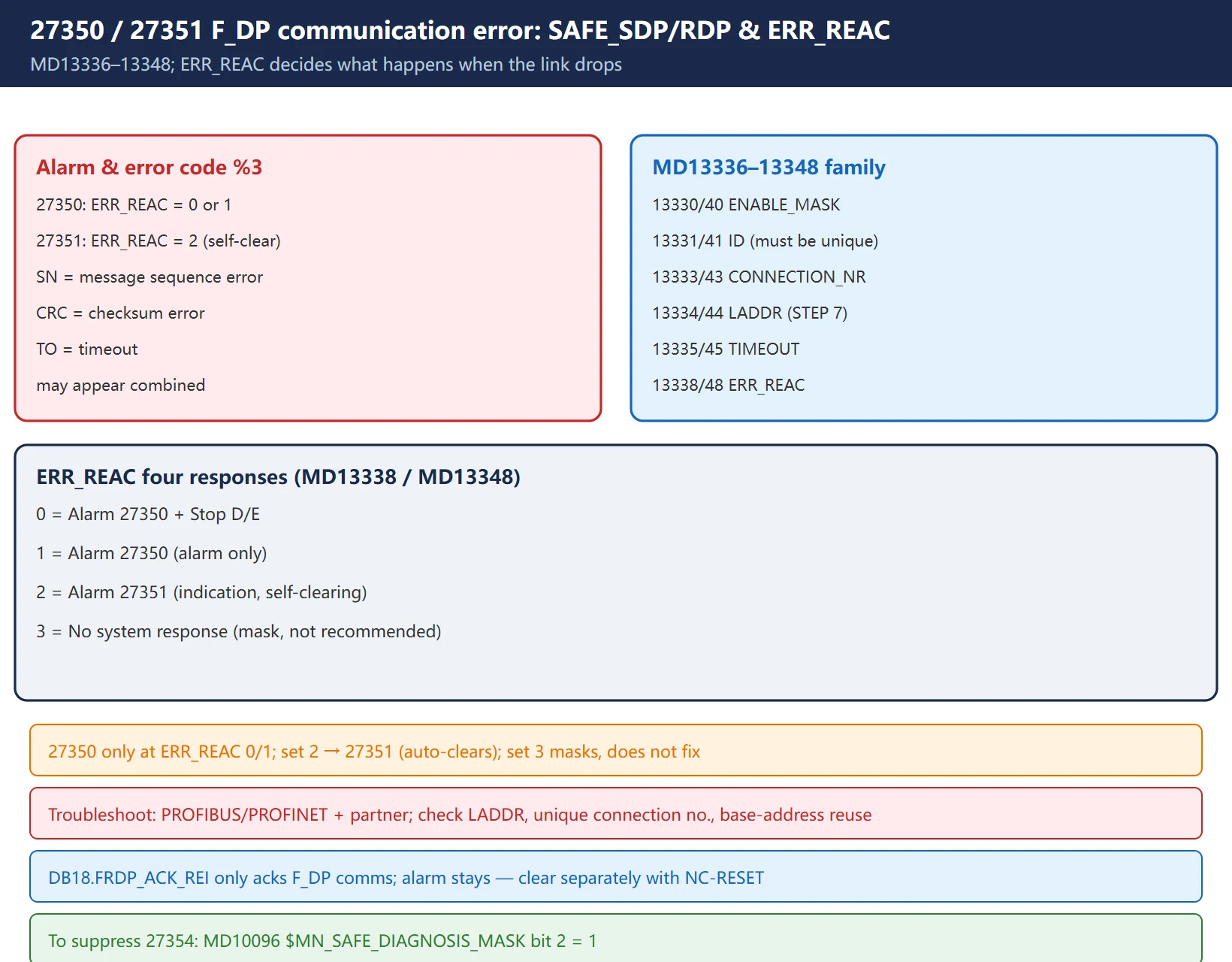
27350: F_DP: %1 communication, connection %2 reports error %3. The safe communication between the NCK and the external partner (typically F_SENDDP / F_RECVDP on the PLC side) is disturbed, and the programmed error response ERR_REAC = 0 or 1 (so it alarms).
%3 is the error type:
- SN: an error was detected in the message sequence;
- CRC: a CRC error was detected;
- TO: the parameterized communication timeout was exceeded.
These can also appear combined.
The machine data involved is a SAFE_SDP (send) / SAFE_RDP (receive) family, MD13336 – MD13348:
| Machine data | Name | Note |
|---|---|---|
MD13330/13340 | SAFE_SDP/RDP_ENABLE_MASK | Communication relation enable mask (up to 12 links) |
MD13331/13341 | SAFE_SDP/RDP_ID | Communication relation identifier (must be unique) |
MD13333/13343 | SAFE_SDP/RDP_CONNECTION_NR | SPL connection number (1–3) |
MD13334/13344 | SAFE_SDP/RDP_LADDR | F_SENDDP/RDP I/O data area base address (from STEP 7 HW config) |
MD13335/13345 | SAFE_SDP/RDP_TIMEOUT | Communication monitoring time |
MD13338/13348 | SAFE_SDP/RDP_ERR_REAC | Error response (see table below) |
The four ERR_REAC values decide “what happens when the link drops”:
ERR_REAC | Response |
|---|---|
| 0 | Alarm 27350 + Stop D/E |
| 1 | Alarm 27350 (alarm only, no stop) |
| 2 | Alarm 27351 (indication only, self-clearing) |
| 3 | No system response |
27350 only appears when
ERR_REAC = 0 or 1; setting it to 2 raises 27351 instead (self-clearing — the alarm vanishes when the cause is gone). Setting 3 silences it, but that masks, not fixes — if the safe link is truly down the machine is unsafe, so we do not recommend it on site.
Troubleshooting direction: check the PROFIBUS/PROFINET communication and the partner; verify the logical base addresses (watch direct vs indirect addressing) are not reused elsewhere in the PLC config; if needed, inhibit the user program and do a general PLC reset, then load the basic program from the Toolbox.
A user acknowledgment via
DB18.FRDP_ACK_REIonly acknowledges the F_DP communication — the alarm stays displayed and must be cleared separately with NC-RESET. Also, to suppress 27354, set bit 2 inMD10096 $MN_SAFE_DIAGNOSIS_MASK.
五、Quick machine-data reference for all four alarms
Pulling the scattered MDs into one table for the field:
| Alarm | Core machine data | One-line fix direction |
|---|---|---|
| 27097 | MD13310 $MN_SAFE_SPL_START_TIMEOUT, MD28082/28083, MD11602, MD10096 (bit1) | SPL did not start in time — check NC/drive fault, SPL syntax, start config, double input assignment |
| 27801 | MD13370 $MN_SAFE_MODE (channel level) | Whole-machine safe mode vs PLC config mismatch |
| 27810 | MD13370 + MD36901 (F-PLC) / MD37950 (SPL) (axis level) | One axis safety enable vs machine safe mode; -1 means fix the PLC |
| 27350/27351 | MD13336–13348 (SAFE_SDP/RDP_*), esp. MD13338/13348 ERR_REAC | PROFIsafe safe communication lost — read SN/CRC/TO and the response level |
六、Field troubleshooting order: from diagnosis to MD to PLC
Walk it in this order — do not start editing MDs on sight:
- Clear upstream alarms first: 27097 will never clear while E-stop, an encoder fault or a PROFIsafe alarm is still active. Open Diagnosis → Alarms and look for the earliest one.
- Check SPL status: Diagnosis area → SPL → SPL status; confirm every Safety Integrated drive shows “OK”, the SINAMICS drive LED is green and synchronized; also read the error code on the NCU blue LCD.
- Verify the start configuration: SPL name/path case, whether
PROG_EVENTandASUBconflict, and the stop reasons inMD11602. - Check safe-mode consistency: for 27801/27810, compare
MD13370with the PLC safe mode; if -1, fix the PLC; make sure the F-PLC/SPL enable bit points at the right MD (36901 vs 37950). - Check the communication link: for 27350, read whether %3 is SN/CRC/TO; check PROFIBUS/PROFINET wiring, LADDR, unique connection numbers, and base-address conflicts.
- Only then touch MDs: record the original value before any change (including
MD11602), and power-cycle as the manual requires afterward.
七、Safety reminder and backup (archive before you touch MD)
- Any change to a safety function must be done with the machine stopped, locked out and tagged (LOTO), per the machine builder’s safety rules. The safety program is protected by an F-password; do not try to bypass it.
- Before changing any safety-related MD, take a full manufacturer backup: the NCK, PLC, SINAMICS (drive) and HMI archives — all four, none optional. Frame-class MDs like
MD28082/28083can delete cycles and calibration data on a bad edit; only the backup recovers them. - After changing safe-mode / communication MDs, switch the control OFF / ON as the manual requires; do not assume a hot change took effect.
- Before downloading an F-program (F-PLC mode), confirm the hardware catalog and module addresses did not drift; after a zero-error compile, compare the safety program collective signature with the one stored in the CPU — a mismatch means an acceptance test is mandatory before production.
- When you cannot determine the machine’s MD numbers or safe-mode values, trust the machine’s Diagnosis screen and the Siemens manual / service — the data here is for locating the fault only.
Frequently Asked Questions
What is the difference between 27097 and 27801 — one checks SPL, the other checks the mode?
Correct. 27097 means “the safety program (SPL) did not start within the timeout” — the root cause is usually an NC/drive fault, a SPL syntax error, a start-config conflict, or a double input assignment. 27801 means “the whole-machine safe operating mode (MD13370 $MN_SAFE_MODE) does not match the PLC configuration” — a mismatch at the safe-mode setting level. Both relate to Safety Integrated, but they fail at completely different gates.
Can I just ignore 27350? What happens if I set ERR_REAC to 3?
Setting 3 (MD13338 / MD13348) means “no system response” — the alarm stops appearing, but that only masks it: if the PROFIsafe link is truly down, the machine’s safe chain has already failed, so we do not recommend it on site. Setting 2 raises 27351 instead (self-clearing — gone when the cause is removed); 0 is alarm + Stop D/E, 1 is alarm only. The right move is to fix the SN/CRC/TO communication fault.
Do I have to power-cycle after changing these safety MDs?
Yes. 27801/27810 explicitly require Switch control OFF / ON to take effect; frame-class and communication-class MDs mostly also need a power cycle (some take effect at POWER ON, but for safety follow the manual). And in F-PLC mode, after downloading the F-program you still need the collective-signature comparison and an acceptance test. Back up the four archives before you touch anything.
Last updated: 2026-10-26
Where to go next
- FANUC Troubleshooting — the full guide library: alarms, diagnosis numbers, servo, spindle, PMC and electrical faults, organised by symptom.
- CNC Repair Tools — which instrument measures what: multimeters, clamp meters, insulation testers and oscilloscopes, with the specification that actually matters.
- Remote Technical Support — have the readings reviewed with you: alarm reverse lookup, PMC ladder analysis and servo tuning advice by call. Repair companies and integrators welcome.
Read the guide, get the right instrument, or walk the diagnosis through with someone — pick whichever you need.
The original Chinese version — same procedure, with the full field notes.























暂无评论内容