


Backlash is the most expensive few microns on a CNC machine: bores that come out oversize in one direction, witness marks at every contour reversal, roundness that will not hold. FANUC controls it with parameter 1851 (cutting feed) and 1852 (rapid traverse) — but most guides on the web stop at the parameter number and never show the closed loop: measure → convert to detection units → write → verify.
This page walks the whole procedure in the FANUC manual’s own terms, and flags several widely repeated mistakes along the way — including the claim that “NE9#1 is the parameter-write permission bit” (it is not; NE9 belongs to program protection).
Before you start: FANUC Servo Gain 2021 / 1825 Adjustment Guide — set the position loop gain first. Measuring backlash with an unstable servo loop produces a number that means nothing.
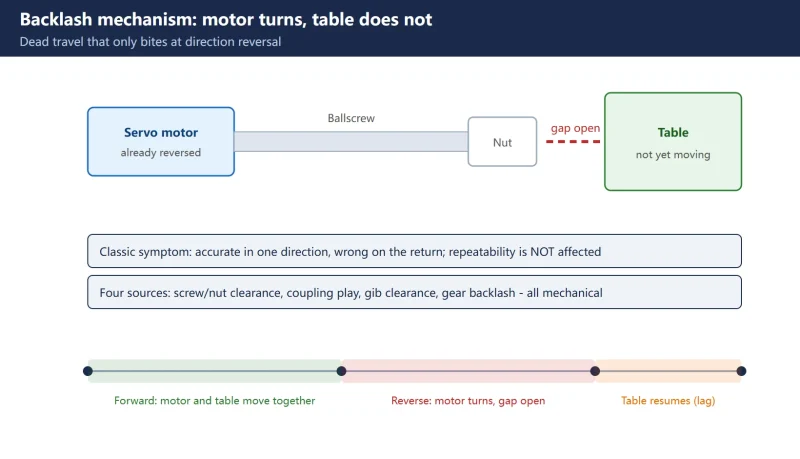
1. What backlash actually is: the dead travel when “the motor turned but the table did not”
At a direction reversal the servo motor rotates and the screw turns, but the ball-nut gap has to be taken up before the table moves. The command has been issued and no displacement has been produced — that lost motion is the backlash.
Its sources are purely mechanical: ball-screw/nut clearance, coupling play, gib (slideway strip) clearance, and gear backlash. One fact to keep straight: repeatability is not affected — that is screw accuracy and assembly, and it is fixed by pitch error compensation or mechanical work, never by parameter 1851. Backlash only bites at the moment you reverse, which is why the classic symptom is “perfect in one direction, wrong the moment I come back”.
2. First decide: mechanical gap, or something electrical compensation can solve
Four mechanical pre-checks come before any parameter. Compensation corrects the symptom; mechanical wear keeps growing, and if you skip this you will re-tune the same axis every quarter.
Table 1 Four mechanical pre-checks before any compensation
| Step | What to check | Warning sign | Action |
|---|---|---|---|
| 1. Screw preload | Preload on the double nut | Axial play felt by hand | Re-set preload |
| 2. Coupling | Loose bolts, fatigued diaphragm | A “click” felt at reversal | Re-torque or replace |
| 3. Gibs | Gib wear, slideway clearance | Measured backlash varies with position | Adjust or replace gibs |
| 4. Slideways | Scoring, poor lubrication | Stiction, unstable load current | Scrape/replace rails first |
Two preconditions before measuring: bring the machine to thermal equilibrium (roughly 30 minutes of continuous running) and confirm position loop gain 1825 is set correctly for the drive (βi series 3000–5000, αi series 3000–7000, identical on interpolated axes). With mismatched gains the measured “backlash” is a servo artifact, not a mechanical value.
3. Measuring with a dial indicator: zero going forward, come back and read the difference
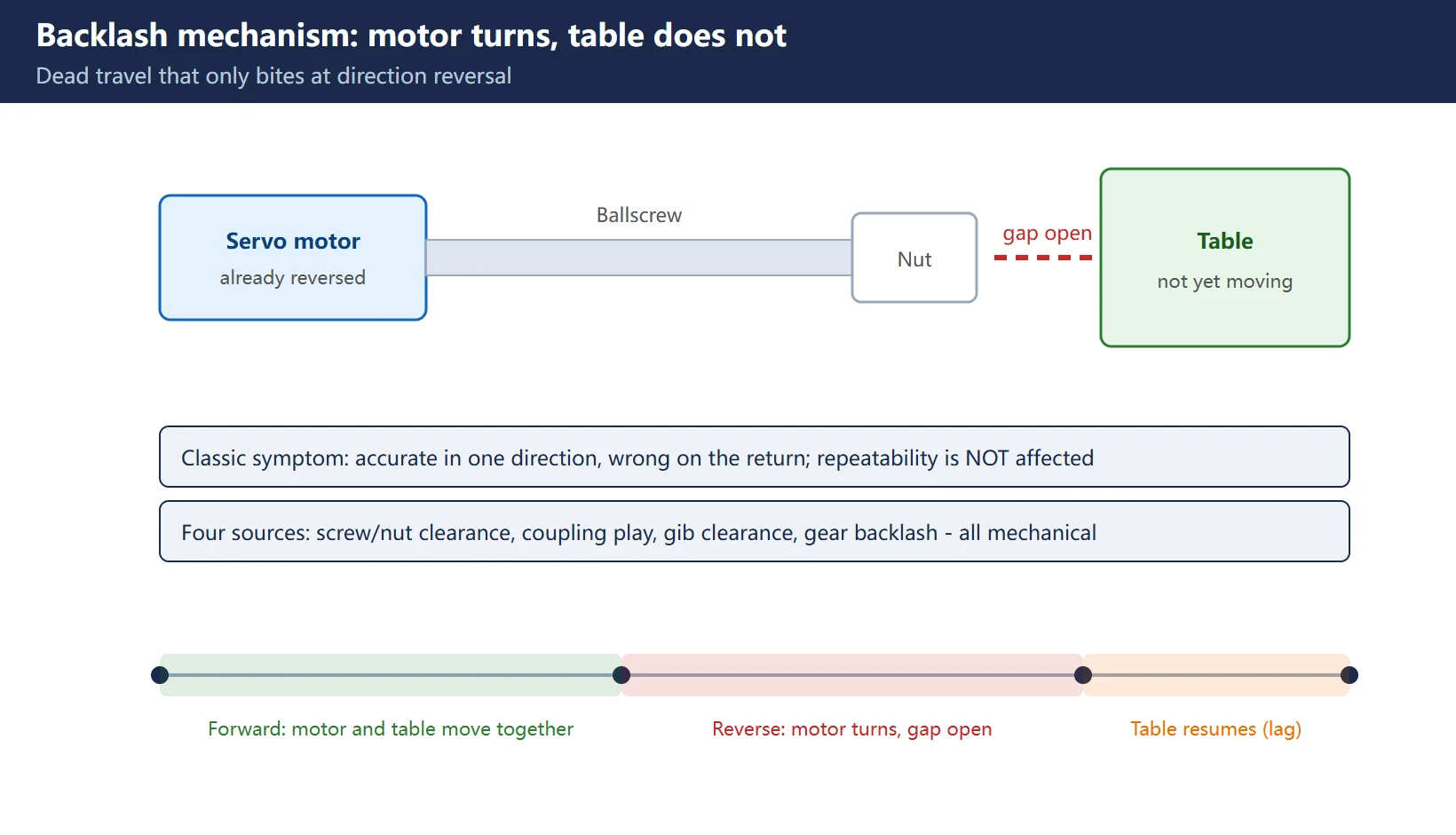
Tools: 0.001 mm dial indicator + magnetic base. Measure twice — once at cutting feed (for 1851) and once at rapid (for 1852) — following the FANUC manual sequence:
Table 2 FANUC manual measurement sequence (cutting feed / rapid traverse)
| Step | Cutting feed (feeds 1851) | Rapid traverse (feeds 1852) |
|---|---|---|
| 1 | Return to reference point | Return to reference point |
| 2 | Move to measurement point G01 X100.0 F300 | Move to measurement point G00 X100.0 |
| 3 | Mount indicator, zero the needle | Mount indicator, zero the needle |
| 4 | Continue same direction X200.0 | Continue same direction X200.0 |
| 5 | Come back to the point X100.0 | Come back to the point X100.0 |
| 6 | Read the scale A | Read the scale B |
| 7 | Convert A to detection units → 1851 | Convert B to detection units → 1852 |
Worked example: after zeroing, move forward 1 mm (indicator reads +1.000), then reverse back to the origin — the needle stops at +0.020. That 0.020 mm that never comes back is the axis backlash for that direction. Note that JOG/handle measurements read differently from programmed cutting moves; the official numbers must come from the program method above.
One more field habit: repeat at three positions along the stroke (near, middle, far). Similar readings mean uniform wear — one compensation value will do. A much larger reading in the middle means local screw wear or bend, which 1851 cannot fix (that job belongs to pitch error compensation, section 5).
4. The step everyone gets wrong: detection units, not millimetres
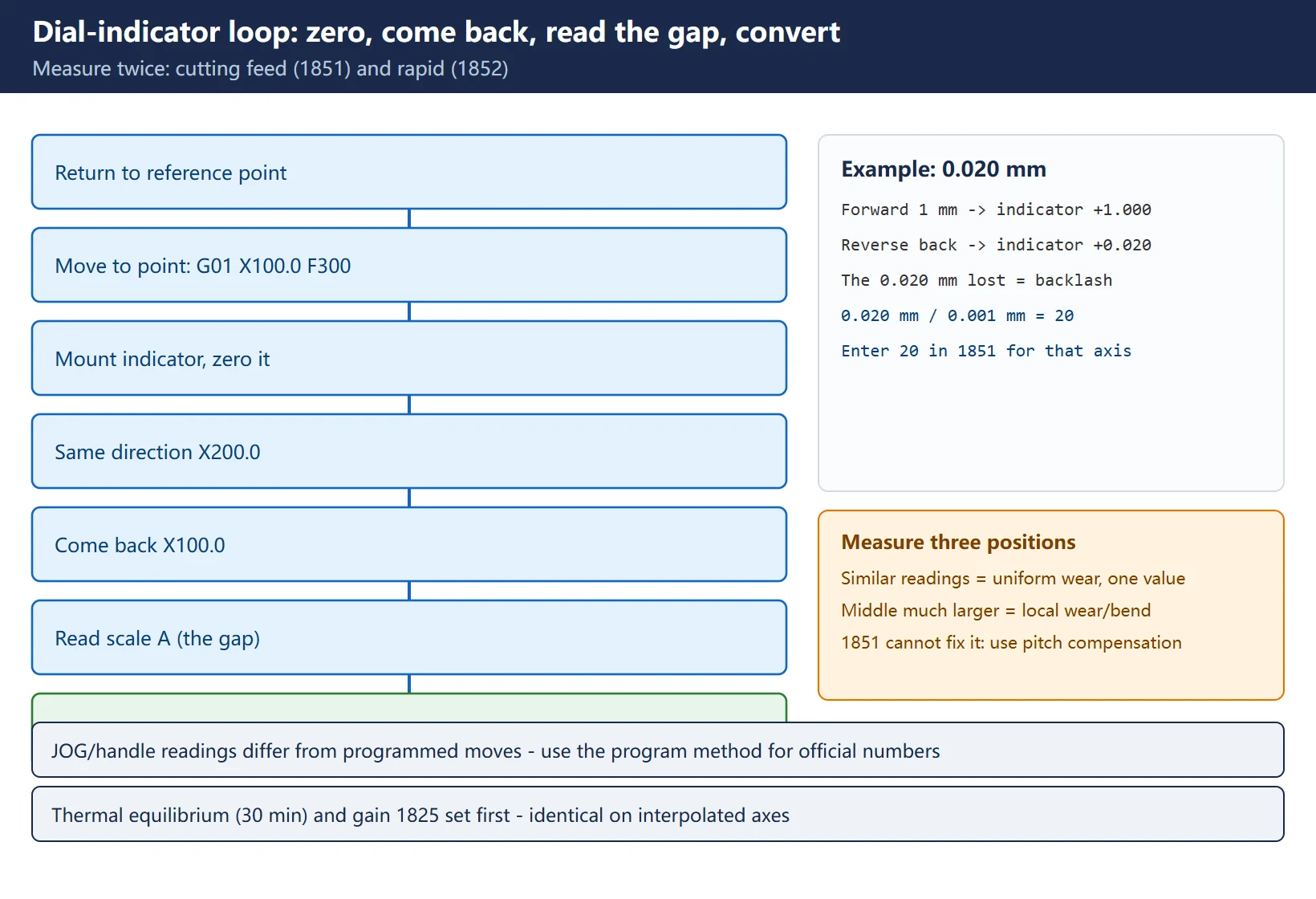
1851 and 1852 are entered in detection units, not in millimetres. On metric machines the detection unit is commonly 0.001 mm, so:
Table 3 Detection-unit conversion (0.001 mm detection unit, metric machines)
| Measured backlash | Value for 1851/1852 | Typical machine state |
|---|---|---|
| 0.001 mm | 1 | New machine / fresh mechanical setup |
| 0.005 mm | 5 | Well-maintained machine |
| 0.012 mm | 12 | Common on 2–3 year old machines |
| 0.020 mm | 20 | The example above — near the attention line |
| 0.050 mm | 50 | Stop here, do not go higher |
Three traps:
- Inch machines: the detection unit is 0.0001 inch, so 0.012 mm is not 12 — convert to inches first. Always confirm the unit shown in the parameter screen header.
- Lathe X axis needs ×2: on lathes the X axis is a diameter-specified axis with a different detection unit — multiply the converted value by 2 before entering 1851/1852 (explicitly stated in the FANUC manual).
- Do not type the millimetre value: entering “0.02” is processed as 0.002 mm (nothing compensated); entering 20 is 0.020 mm. Entering 200 is 0.2 mm and the servo will overshoot every reversal.
5. Where the values land: 1851 vs 1852
Table 4 Backlash-related parameter reference
| Parameter | Meaning | Range | Notes |
|---|---|---|---|
| 1851 | Backlash compensation per axis, cutting feed | −9999 to +9999 (detection units) | G01/G02/G03/JOG all use it |
| 1852 | Backlash compensation per axis, rapid traverse | Same as 1851 | Only active when 1800#4 = 1 |
| 1800#4 (RBK) | Separate cutting/rapid compensation | 0: no split (1851 for both); 1: split | See section 6 |
| 1817#2 | Smooth backlash compensation | 0: invalid; 1: valid | See section 7 |
| 2010#5 (HBBL) | Backlash value added to error counter | 0: standard semi-closed loop | Full-closed-loop machines only |
Rule per the manual: 1851 takes the value A measured at cutting feed (e.g. 500–1000 mm/min); 1852 takes the value B measured at rapid (e.g. 10000 mm/min). The rapid value is normally larger — at rapid rate the moving mass winds the nut through the gap and preload deflection adds to the dead zone — so the two numbers are usually different.
Sign convention: enter a positive magnitude. The controller applies the compensation in the correct direction automatically at each reversal. If your arithmetic produces a negative value, suspect the measurement or the diagnosis, not the parameter.
6. 1800#4: should cutting and rapid be split (and the cost of setting it to 1)
With 1800#4 (RBK) = 0, 1852 is ignored entirely and both speeds use 1851; with RBK = 1 the two values act independently.
Why splitting is worth it: at low cutting feed the lost motion is dominated by screw/nut clearance; at rapid the heavy table keeps the nut wound up and preload deflects, so the effective dead zone is larger. Factory setups commonly ship 1851 small (e.g. 0–20 µm) and 1852 large (e.g. 30–80 µm) — on a heavy machine 1852 can be 3–5× 1851.
The cost of setting it to 1: you must measure both speed regimes (double the work; entering the same number twice defeats the purpose), a wrong pair creates a visible “bulge” at every rapid reversal, and on some models the bit change needs a power cycle to take effect. On a light, well-preloaded machine leaving RBK = 0 is perfectly acceptable — read the factory setting before deciding.
7. 1817#2 smooth backlash compensation: when to enable it, and when it hides the fault
With 1817#2 = 1 the compensation is smoothed out instead of being injected as one step at the reversal: less shock, less noise, less current spike — a visible improvement on machines where the compensation is large and the axis clunks at reversal.
What it hides: smoothing removes the instantaneous signature of the real mechanical gap, so your dial indicator / DGN360-363 re-measurement reads system behaviour instead of mechanical truth, making it harder to track whether the gap is growing. Practical rule: enable it when the mechanics are sound and you only want a quieter axis; turn it off before diagnostic measurements, otherwise your numbers are not comparable across visits. (Exact behaviour varies by software version — confirm against your machine’s manual.)
8. Writing and activation: MDI path, PWE permission, power cycle
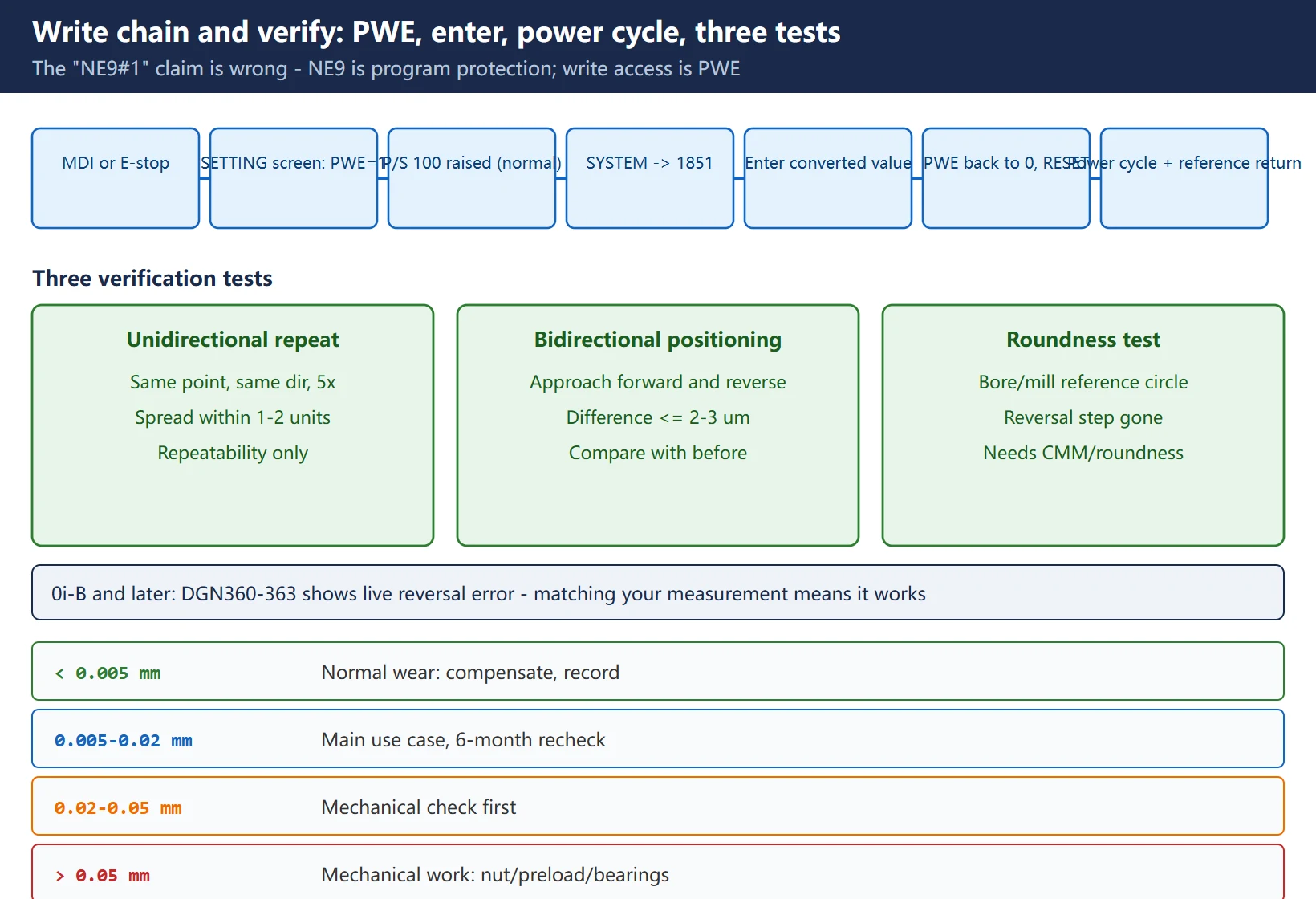
- Select MDI mode or emergency stop — parameters cannot be written in other modes;
OFFSET/SETTING→ soft keySETTING→ move the cursor to PARAMETER WRITE → enter 1 →INPUT. The CNC raises P/S alarm 100 (parameters can be written) — this is normal;SYSTEM→PARAM→ type 1851 →NO.SRH, move the cursor to the row for your axis, enter the converted value →INPUT;- Write 1852 the same way if needed. For bit parameters (1800#4, 1817#2), photograph the original value first and edit by bit — never re-enter the whole word from memory;
- Set PARAMETER WRITE back to 0 and press RESET to clear P/S 100.
Correction: the widely repeated “NE9#1 permission” is wrong. NE9 is bit 9 of parameter 3202 and it protects editing of programs whose number starts with 9 (the O9000-series macro programs). It has nothing to do with parameter write permission. The write permission is the SETTING screen’s PWE (PARAMETER WRITE) — on older controls, a physical PWE switch on the main board. Searching for “NE9” to find the write switch leads you to program protection, not parameter write.
Activation: the safe practice is to cycle the power once after writing, so the servo parameters are fully re-read, then re-do reference point return. Some 0i-B and later models take effect on reset alone, but a power cycle costs nothing and doubles as a check that nothing was lost — this is also standard practice at any FANUC service centre.
9. Verification: unidirectional repeat + bidirectional positioning + roundness
Compensation you did not verify is compensation you did not do. Three tests, cheapest first:
Table 5 Three verification tests, cheapest first
| Method | How | Pass criterion | Limitation |
|---|---|---|---|
| 1. Unidirectional repeat | Same point, same direction, 5 cycles, dial indicator | Spread stable within 1–2 detection units | Shows repeatability only |
| 2. Bidirectional positioning | Approach from forward, then from reverse, read the difference | Difference ≤ 2–3 µm; clearly smaller than before | Single point |
| 3. Roundness test | Bore/mill a reference circle (e.g. Ø50), measure roundness | Roundness error shrinks; reversal step disappears | Needs CMM/roundness machine |
There is also a shortcut on 0i-B and later: diagnostic numbers DGN360–363 (first to fourth axis) display the position error at each reversal, live. While the axis reciprocates, watch this number: if it equals your measured backlash, compensation is working; if it stays zero, 1851 is being ignored or not active — go back to the 1800-series bits and the activation step. 0i-A does not have DGN360-363; on that platform you are back to the dial indicator at several points.
10. When NOT to use electrical compensation: above 0.05 mm the ballscrew is the problem
Table 6 Backlash magnitude vs action (practical bands for ballscrew machines)
| Measured backlash | Verdict | Action |
|---|---|---|
| < 0.005 mm | Normal wear | Compensate and record in the machine's accuracy file |
| 0.005–0.02 mm | The main use case for compensation | Follow this procedure, re-check every 6 months |
| 0.02–0.05 mm | Large — mechanical first | Run the four pre-checks, then compensate, shorten re-check interval |
| > 0.05 mm | Electrical compensation ends here | Mechanical work: replace the ball nut, re-set preload, change bearings; forcing 1851 trips SV0411/SV0413 following-error alarms at reversal and the current spikes overload the amplifier |
Three boundaries worth memorising: ① above roughly 0.05–0.06 mm, every G02/G03 reversal becomes a large step command and SV0411 (excess error at stop) / SV0413 (excess error in motion) start appearing; ② position-dependent backlash cannot be compensated by 1851 — that needs pitch error compensation (3620-series) plus mechanical work; ③ compensation never improves repeatability; it only removes reversal lag.
Frequently Asked Questions
What unit should I enter in FANUC parameter 1851?
Detection units, not millimetres. On metric machines with a 0.001 mm detection unit, 0.020 mm becomes 20 and 0.001 mm becomes 1; on inch machines (0.0001 inch unit) convert to inches before counting units. Two traps: on lathes the X axis is diameter-specified, so multiply the converted value by 2; and never type “0.02” directly — the system treats it as 0.002 mm, compensating nothing.
Is the machine accurate once backlash compensation is done?
Not necessarily. Backlash compensation only removes reversal lag. It does nothing for the other three sources of positioning error: screw pitch error (needs 3620-series pitch compensation), repeatability (screw accuracy and assembly — mechanical only), and thermal growth (measure after thermal equilibrium). If the bidirectional difference does not shrink after compensation, your problem is elsewhere — start with the four mechanical pre-checks, then use the diagnostic-number approach in FANUC No-Alarm Fault Diagnosis.
When do 1851 and 1852 act, and why do some machines need two different values?
1851 serves cutting feed (G01/G02/G03/JOG) and 1852 serves rapid traverse (G00) — but 1852 only acts when 1800#4 (RBK) = 1; with RBK = 0 the 1852 entry is ignored and both speeds use 1851. Two values are needed because at rapid rate the moving mass keeps the nut wound up and preload deflects, making the effective dead zone larger than at cutting feed (3–5× on heavy machines). A light, well-preloaded machine is fine with the single 1851 value — check the factory configuration first.
Last updated: 2026-10-24
Further reading: Fanuc Pitch Error Compensation 3620-3624: Laser Measurement, Point Numbering and Parameter Entry
The original Chinese version — same procedure, with the full field notes.






















暂无评论内容