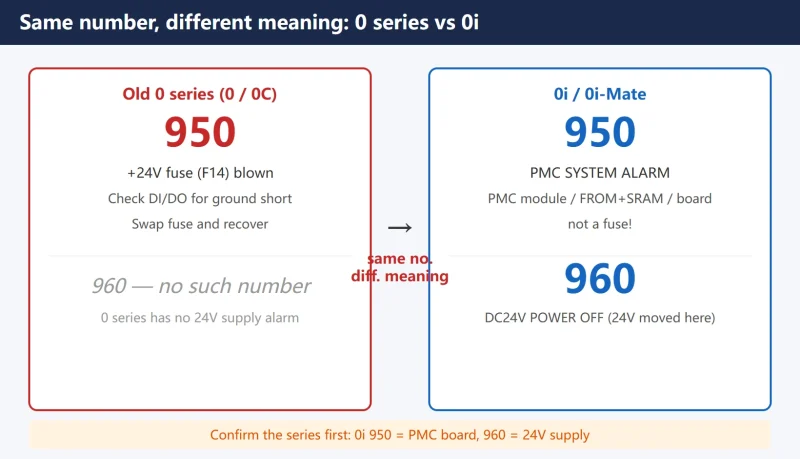



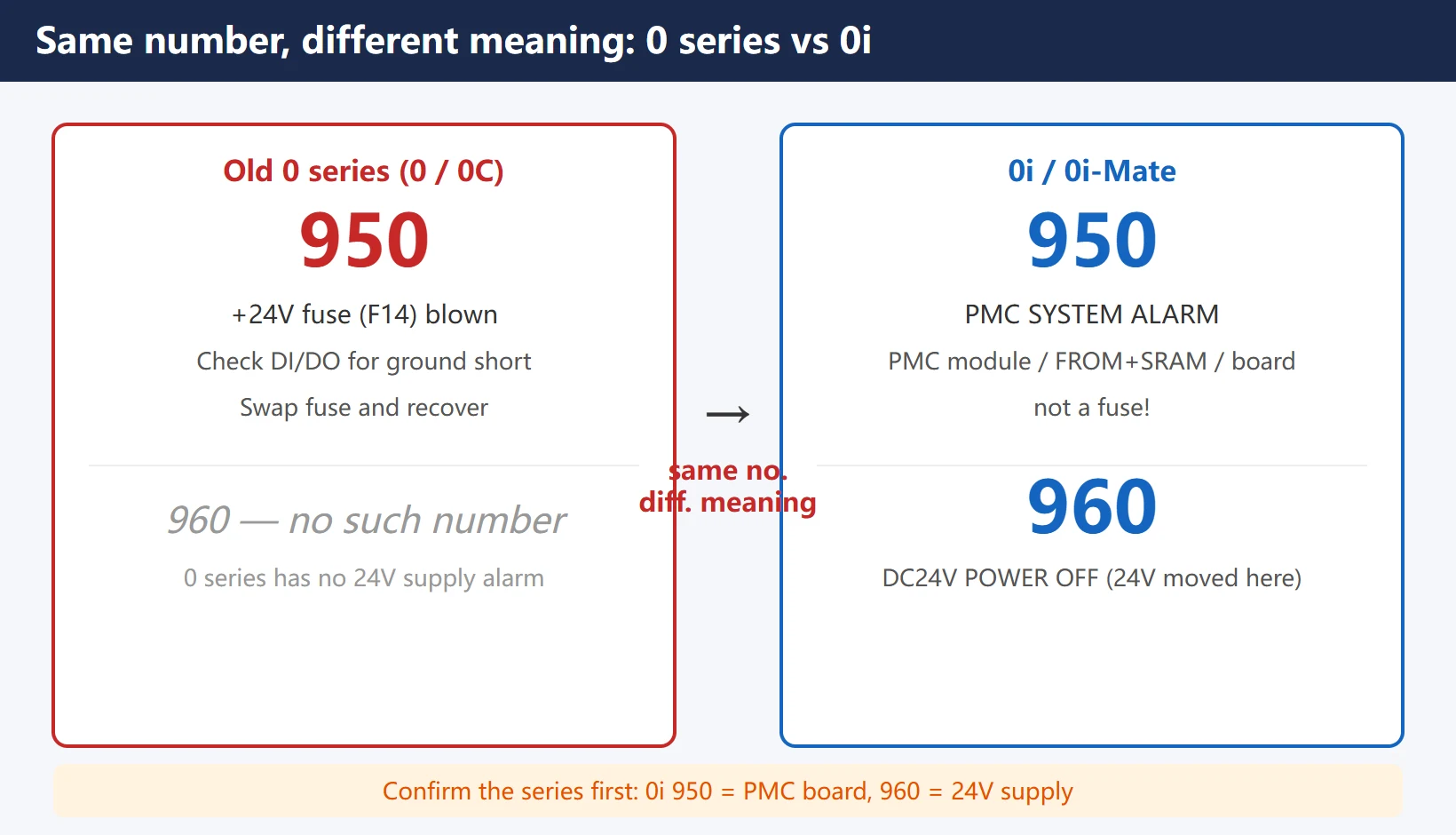
Before you reach for an alarm list on a FANUC 0i or 0i-Mate, do one thing first: confirm the control series, because the same alarm number can mean completely different things. The classic trap is 950 — on the older 0 series (0 / 0C) it is a blown +24V fuse, fix it and you are done; on the 0i it is a PMC system alarm pointing at a bad PMC module or FROM&SRAM module. Read the wrong series and you chase the wrong fault.
This page covers only alarms specific to 0i / 0i-Mate, or whose meaning changed from the old 0 series. The order is: confirm series → architecture alarms → quick-reference table → system alarm history → troubleshooting chain → used-machine checklist. Generic alarm groups (P/S, OT, SV, SP) are not repeated here — see the internal links at the end.
1. Why You Must Confirm the Series First: Same Number, Different Meaning
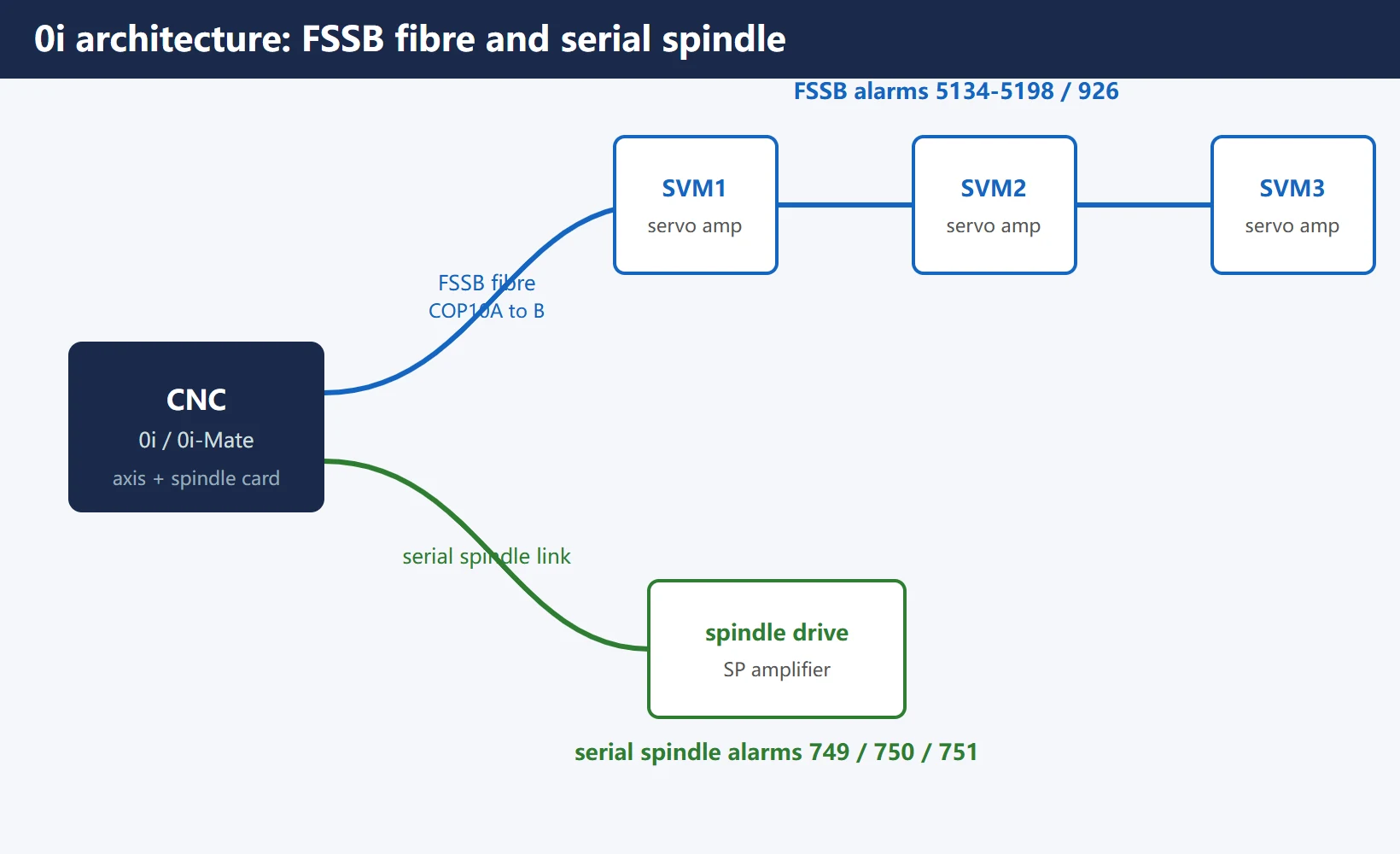
The 0i architecture connects servos over a FSSB (Fibre Servo Serial Bus, optical) and the spindle over a serial link, so its alarm numbering was reworked versus the old 0 series. Read the series string on the BOOT or SYSTEM screen first: Series 0i-Mate-TC, Series 0i-MC, etc.
The two numbers most often misread:
Table 1 | 0 series vs 0i — same (or adjacent) number, different meaning
| Alarm | Old 0 series (0 / 0C) | 0i / 0i-Mate | What changed |
|---|---|---|---|
| 950 | +24V fuse (F14) blown; check machine-side DI/DO for ground short | PMC SYSTEM ALARM: PMC control module / FROM&SRAM module / main board fault | From “external power short” to “PMC software RAM error” |
| 960 | (no such number on 0 series) | DC24V POWER OFF: external 24VDC input abnormal | 0i moved the “24V power” fault to 960, freeing 950 for PMC |
One sentence to remember: on 0i, 950 means the PMC board, not the fuse; 960 is the one that points at the 24V supply. That is exactly where 0-series and 0i diagnoses get swapped.
2. What the 0i Architecture Added: FSSB and Serial Spindle
Compared with the old 0 series, 0i introduced two serial buses, which is why it has two families of alarms the 0 series never had:
Table 2 | Alarm families new to the 0i architecture
| Family | Range | Source | One-line location |
|---|---|---|---|
| FSSB optical bus | 5134 – 5198 | CNC axis card ↔ servo amplifiers over fibre | Servo not seen / fibre cut / amplifier not powered |
| Serial spindle link | 749 / 750 / 751 | CNC ↔ spindle drive handshake | Spindle drive not ready or link dropped |
| FSSB system-level | 926 | Bus-level severe comms fault | Fibre line or drive board needs service after power cycle |
- FSSB (Fibre Servo Serial Bus): servo amplifiers hang off the CNC axis card on one optical cable (COP10A → COP10B daisy chain). Any broken fibre or unpowered amplifier takes the whole chain down.
- Serial spindle: the spindle drive no longer runs on analog signals — it handshakes with the CNC. A failed handshake raises 749/750.
3. 0i / 0i-Mate Specific or Changed Alarm Quick Reference
This table is the core of the page. It lists alarm numbers that are either new on 0i or mean something different from the old 0 series, in the order you are most likely to meet them.
Table 3 | 0i / 0i-Mate specific or changed alarms (first action)
The 900–976 system alarms were also renumbered on 0i (ROM/DRAM/SRAM parity, PMC, NMI, bus errors). For board-level diagnosis see Fanuc System Alarm 950 / 971 / 974. This page only flags the 950/960 mix-up that trips people up most.
4. The 0i System Alarm History Screen: Readable After Power Loss
The 0i has a gift the old 0 series lacks — the System Alarm History screen. Normal alarm history can clear on power loss, but system alarms (930 / 950 / 974 and the like) keep their detail (which board, which address) even after a reboot.
Standard move before handing over a shift or calling service:
- Open SYSTEM → System Alarm History (the “system” page of alarm history)
- Note the recent 900–976 numbers and timestamps
- Watch especially for 935 (SRAM ECC error) — a bad memory cell, which means your parameter/program backup must be current (see data backup tutorial)
- If 930/950 recur, they point at the main board or PMC module; the history shortens the repair path
This history screen is the 0i’s biggest gift to the floor: many board-level alarms vanish from the screen on reboot, but the evidence stays in history.
5. 400-Series V-READY Chain (E-stop / MCC / Drive Power / FSSB)
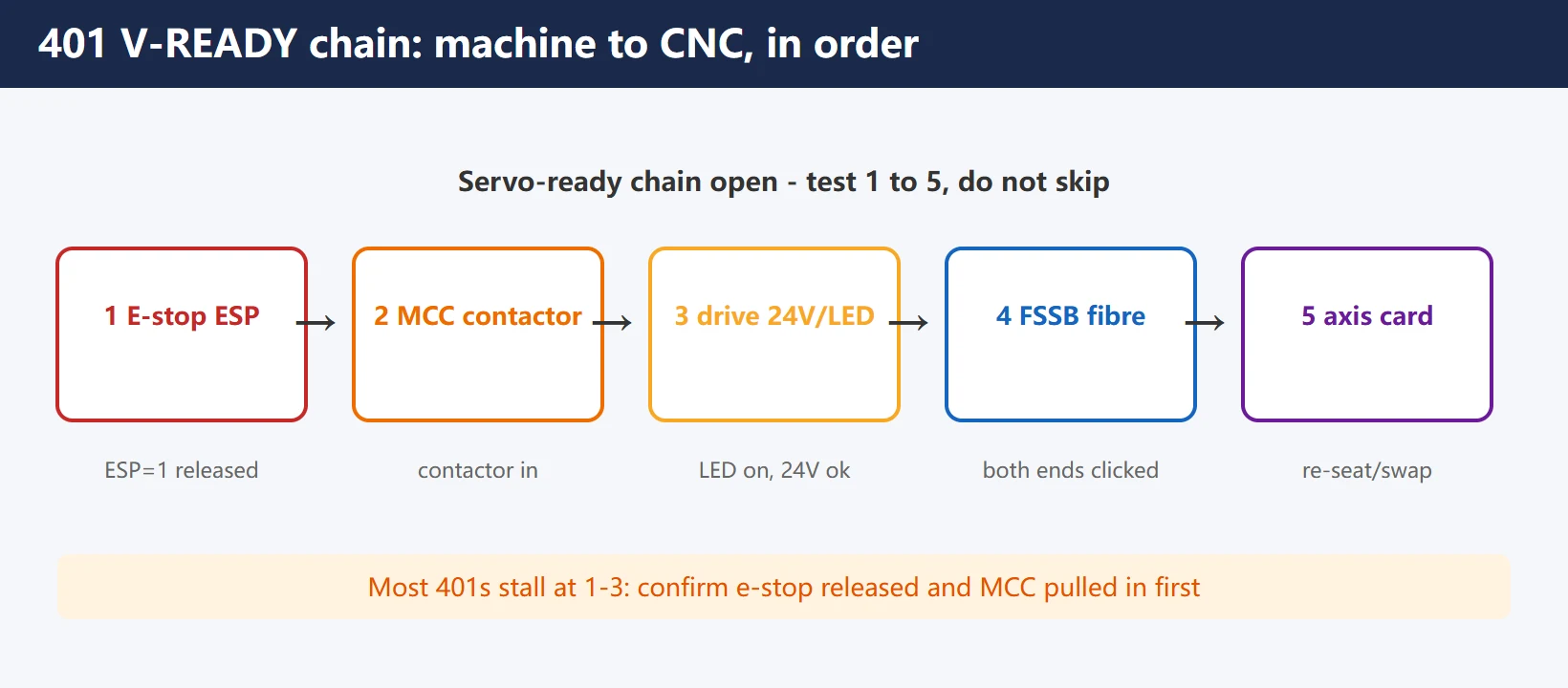
401 (V-READY OFF) is the most common “will not start” alarm on 0i. It is a servo-ready chain that did not close, running from the machine side all the way to the CNC. Test in order, do not skip:
Table 4 | 401 V-READY chain (machine to CNC)
| Step | Section | Check | Healthy criterion |
|---|---|---|---|
| 1 | E-stop loop | E-stop button, external e-stop, *ESP signal | ESP = 1 (released) |
| 2 | MCC / servo contactor | Amplifier main contactor pulled in | Contactor in, amplifier main power present |
| 3 | Drive control power | Each SVM amplifier 24V control power, LED lit | LED on, 24V present |
| 4 | FSSB fibre | COP10A/B clicked home, not broken | Fibre good, screen sees all amplifiers |
| 5 | Axis card | CNC-side axis card loose / faulty | Re-seat or swap card; 401 clears |
The e-stop principle and signal chain (including G8.4 in the PMC ladder) pair well with no-alarm fault diagnosis. Most 401s stall at steps 1–3 — confirm e-stop is truly released and MCC truly pulled in before blaming fibre or cards.
6. 700 / 701 Overheat: Highest in Summer, Cabinet Fan and Filter
700 (control unit overheat) and 701 (fan motor overheat) show up far more in summer, and the root cause is almost always cabinet cooling:
Table 5 | 700 / 701 overheat handling
| Alarm | Root cause | Action |
|---|---|---|
| 700 control unit overheat | Cabinet ambient above 55–58℃ (by model) | Clean air filter, confirm cabinet fan runs, check cabinet A/C or heat exchanger; if ambient is clearly fine yet it alarms, the main-board temp circuit is suspect |
| 701 fan motor overheat | CNC top fan stopped | Replace fan unit per manual; meanwhile add temporary external ventilation |
Prevention beats repair: clean the filter monthly and listen for fan noise each quarter, and you keep 700/701 out before summer.
7. 0i-Mate Submodel Notes (TA / TB / TC / MC / MD)
“0i-Mate” is the economy version of 0i — fewer axes, fewer options, often integrated amplifiers — but the alarm structure is identical. Submodels differ only in hardware configuration, not in alarm meaning:
- T series (turning): 0i Mate-TA / TB / TC
- M series (milling / machining centre): 0i Mate-MA / MB / MC / MD (MD = 0i Mate-MODEL D, latest generation)
- Letters A→B→C→D are generations; D-model maintenance manual is B-64305EN, more integrated hardware
To confirm the model: the first line of the BOOT or SYSTEM screen is the series string (e.g. Series 0i Mate-TC). The only alarm difference between submodels is axis count / options — a TC with no 4th axis will never raise a 4th-axis 401/404; the alarm number meaning itself does not change.
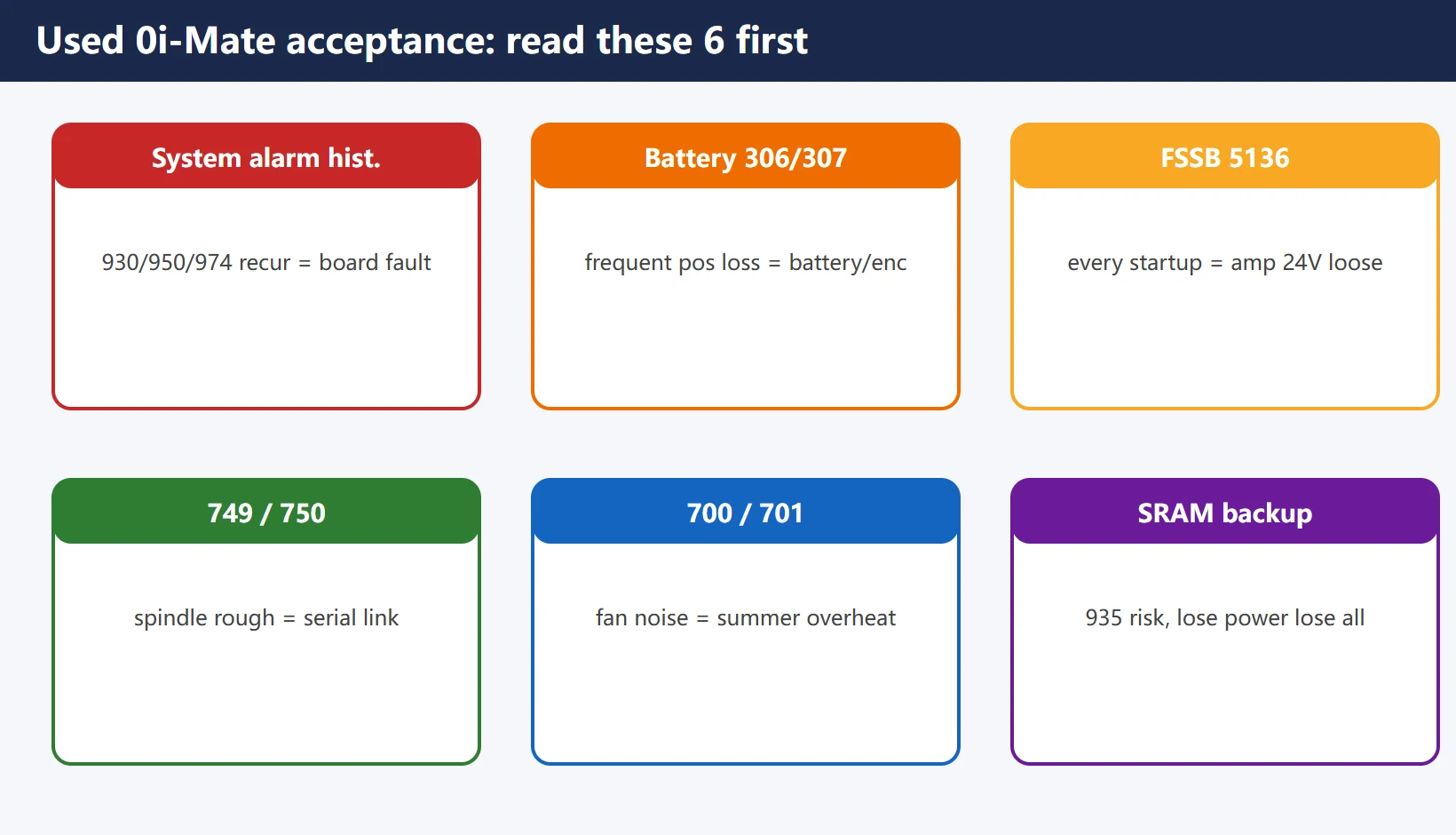
8. Used-Machine Checklist: What to Read First on a 0i-Mate
When you buy or take over a used 0i-Mate, do not just check that it cuts one part. Scan this list first — it avoids most “bought it, now I am repairing boards” traps:
Table 6 | Used 0i-Mate acceptance alarm checklist
| Check | How | Abnormal means |
|---|---|---|
| System alarm history | SYSTEM → system alarm history | Recurring 930/950/974 = board-level hidden fault |
| Battery / absolute position | Any 300 / 306 / 307 | Frequent absolute-position loss = battery or encoder circuit issue |
| FSSB 5136 | Does it alarm every startup? | Every startup = one amplifier 24V loose or fibre loose |
| 749 / 750 | Does spindle start cleanly? | Serial spindle link contact / noise, returns in summer |
| 700 / 701 | Any fan noise? | Fan aged, will alarm overheat in summer |
| SRAM backup | Parameters / programs complete? | 935 (SRAM ECC) is a hidden risk; lose power, lose everything |
Write the acceptance verdict into the handover: any board-level alarm in history, can the battery hold absolute position, does FSSB start clean. These three matter more than “it cut a part today.”
Frequently Asked Questions
What does FANUC 0i-Mate alarm 950 mean?
On 0i / 0i-Mate 950 = PMC SYSTEM ALARM — the PMC control module, FROM&SRAM module, or the PMC software RAM on the main board has faulted. It is NOT the +24V fuse of the old 0 series. The fix direction is the PMC module / main board, not a fuse swap. The old 0-series 950 is the fuse — so confirm your series before you act.
How do I troubleshoot FSSB alarm 5134?
5134 = FSSB: OPEN READY TIME OUT — the optical bus never reached open ready at init, which points at the CNC axis card or the fibre. First read the FSSB setting screen: if one amplifier is missing, follow the 5136 path — check that amplifier’s 24V, its LED, and click both fibre ends home; if all are seen yet 5134 persists, the axis card is suspect. Note 5136 (too few amplifiers) is most often caused by one amplifier not being powered.
How do I tell if a used FANUC 0i-Mate has been repaired?
Read the System Alarm History screen: recurring 930/950/974 means the main board or PMC module has a hidden fault. Then confirm three things — can the battery hold absolute position (frequent 300?), does FSSB start clean (frequent 5136?), and is the fan noisy (summer 700/701?). These three tell you more about the machine’s condition than “it cut a part today.”
Last updated: 2026-10-23


















暂无评论内容