


Note: This article does not replace the official FANUC parameter manual. Parameter numbers follow common 0i/16i/18i/21i/30i-series manuals; confirm options and exact numbers against your machine’s manual, as they vary by software series.
What the inertia ratio is: JL / JM and the physical limit it puts on gain
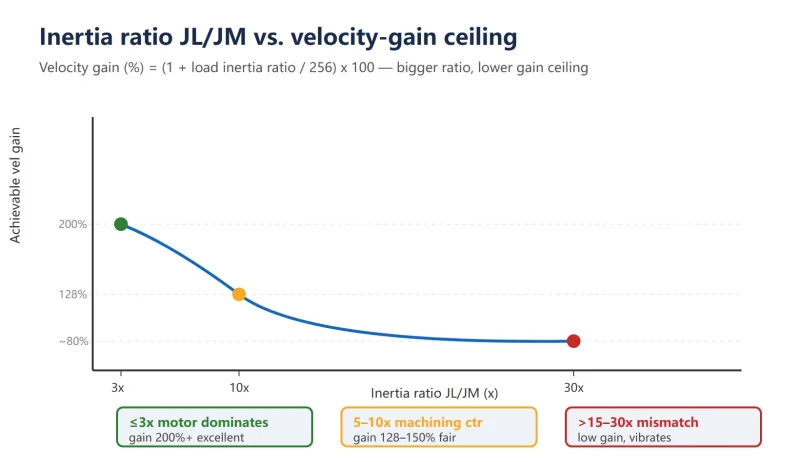
The inertia ratio is the ratio of load inertia JL to motor rotor inertia JM (JL/JM). It decides how heavy a load a servo can drive while staying stable — the larger the ratio, the heavier the “outer” mass the motor must push, so the velocity loop must run at lower gain to stay stable, otherwise it oscillates on acceleration and overshoots on reversal.
FANUC implements the load inertia ratio directly as parameter 2021, with a hard conversion to velocity loop gain:
Velocity loop gain (%) = (1 + load inertia ratio / 256) × 100
The larger the value written in 2021, the higher the velocity loop gain the system computes automatically — faster response, but more likely to excite mechanical resonance. Tuning is finding the balance on this rope: high gain = fast and accurate but prone to vibration; low gain = stable but larger following error and poorer contouring.
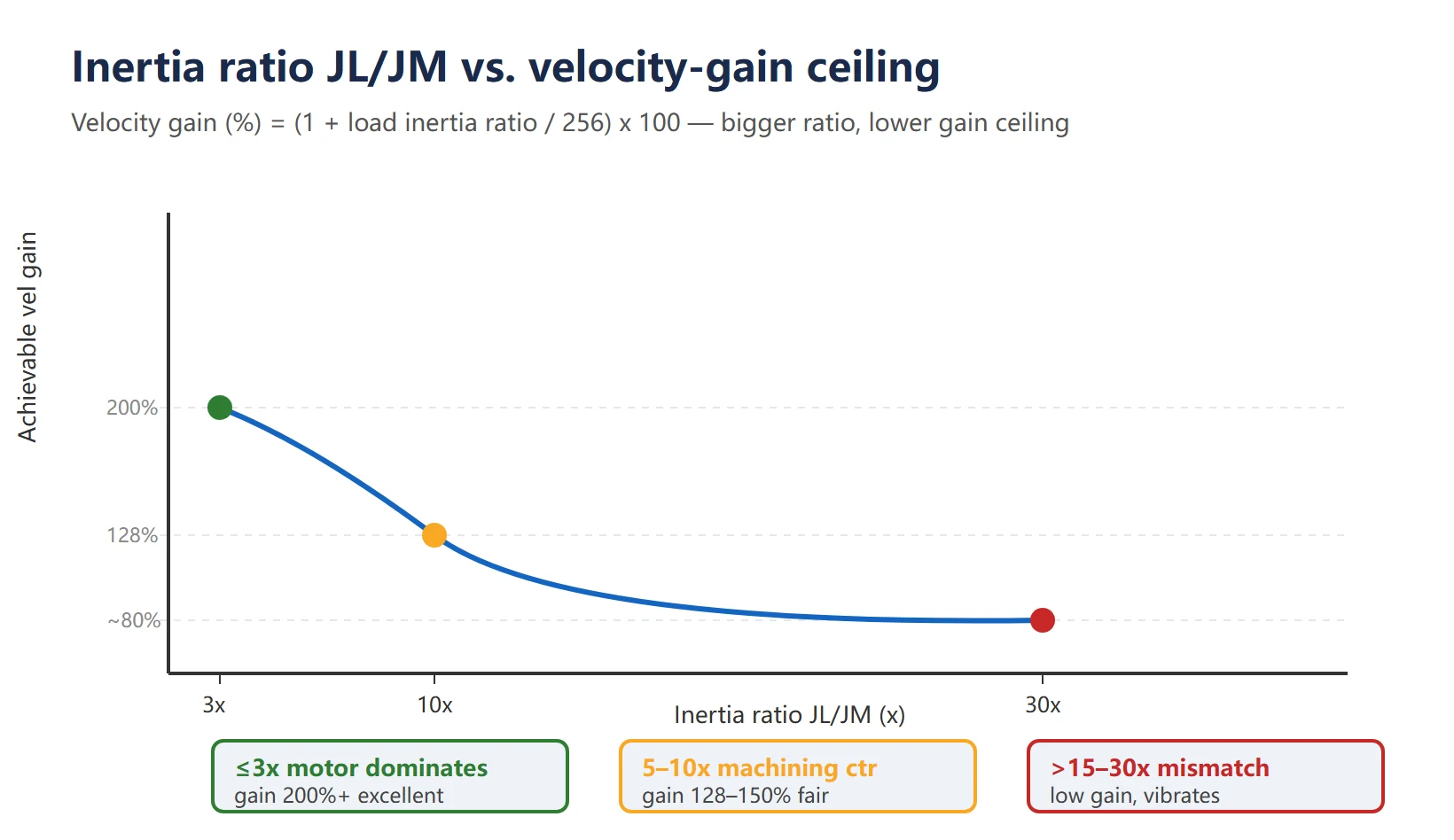
Table 1 Inertia ratio band vs. achievable gain ceiling / stability
| Inertia ratio JL/JM | Meaning | Achievable velocity gain | Stability | Field advice |
|---|---|---|---|---|
| ≤ 3× | Motor inertia dominates | Higher (200%+) | Excellent | High-speed light axes, raise gain freely |
| 3–5× | Good match | 150–200% | Good | Typical for grinding feed axes |
| 5–10× | Acceptable | 128–150% (2021 default zone) | Fair | Common on machining centers; watch vibration |
| 10–15× | On the large side | Reduce gain | Marginal | Optimize mechanics or use a bigger-rotor motor |
| > 15–30× | Severe mismatch | Very low | Oscillates / alarms | Must reduce load or reselect motor |
When the ratio is severely mismatched the system often does not just “lose a bit of accuracy” — it trips SV0401-class servo alarms. So “is the inertia ratio reasonable” is the first gate in servo commissioning.
Hand calculation: rotary load J=M·r², linear load J=M·(P/2π)², with examples
The hand calculation gives you the theoretical inertia ratio — the baseline you later compare against system identification to judge “is the measured value sane”. Two basic formulas:
- Rotary load (rotary table, chuck, flywheel):
J = M · r², where M is mass (kg) and r is rotation radius (m). - Linear load (ball-screw axis, rack & pinion):
J = M · (P / 2π)², where P is the lead (m/rev — distance moved per revolution).
Keep units consistent in kg·m²: use P in meters, not millimeters.
Table 2 Worked examples (one rotary, one linear)
| Type | Known | Formula | Load inertia JL | Motor inertia JM | Ratio JL/JM |
|---|---|---|---|---|---|
| Rotary load (rotary table) | M=20 kg, r=0.1 m | J = M·r² | 0.20 kg·m² | 0.0008 kg·m² | ~250× |
| Linear load (ball-screw axis) | M=5 kg, lead P=10 mm | J = M·(P/2π)² | 1.27×10⁻⁵ kg·m² | 0.0005 kg·m² | ~0.025× |
The contrast is clear: thanks to the radius squared, a rotary table easily reaches tens or hundreds of times, while a 5 kg light load on a 10 mm-lead screw has a load inertia only 2.5% of the motor (ratio 0.025) — the motor dominates and it is very stable. A common online claim “5 kg load, 10 mm screw, 0.0005 motor → about 25×” is calculated backwards — the correct result is only 0.025×. To see a high-ratio case, use a rotary table or a heavy table.
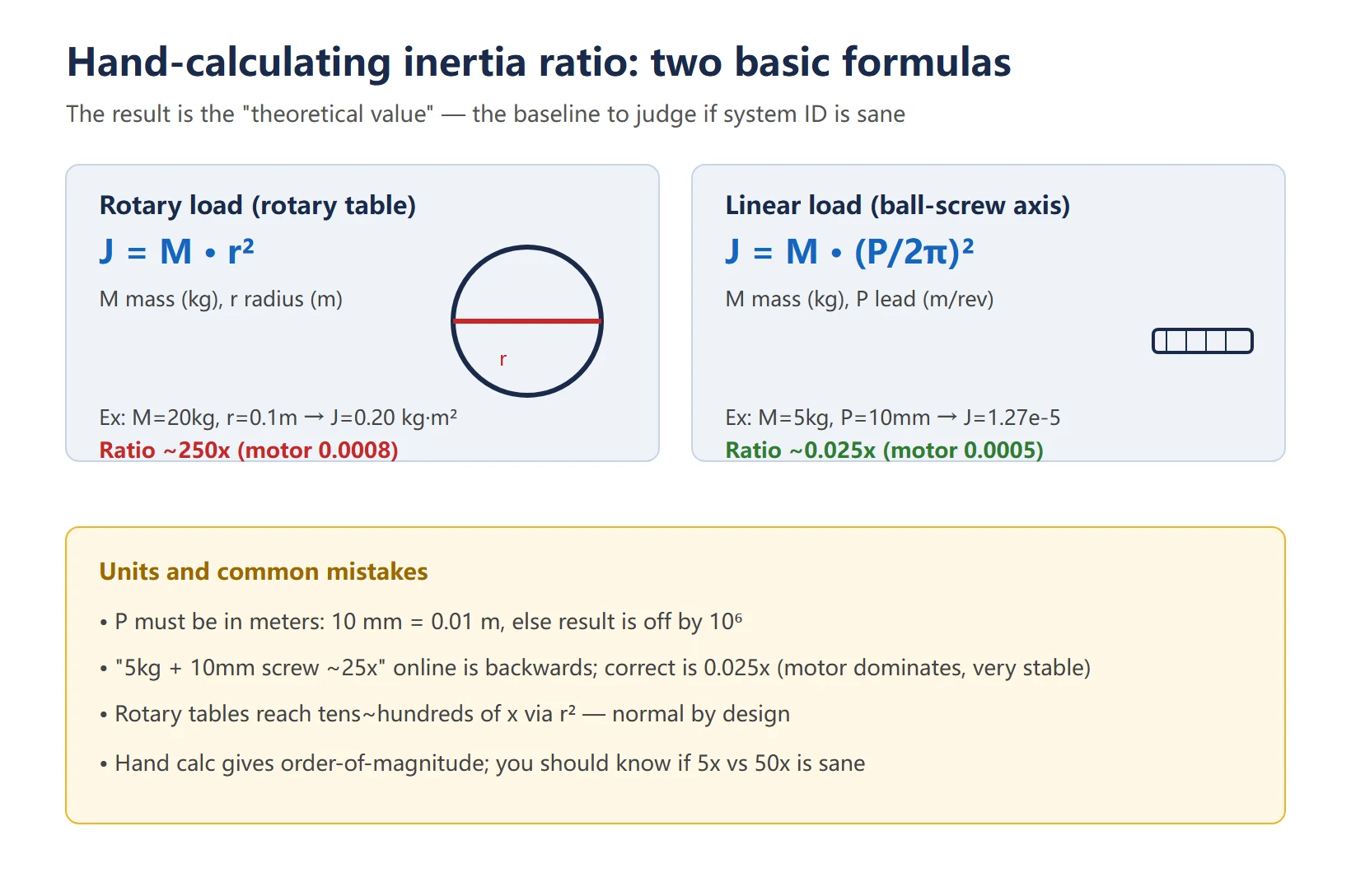
The value of this step is not a precise number — it gives you an order-of-magnitude expectation so that later, when the system reports 5× or 50×, you can tell whether it is reasonable.
Typical machine values: grinding feed axes 2–5×, machining centers 5–10×
“Normal” varies a lot by machine and axis — here is the order of magnitude:
- Grinding feed axes: usually 2–5×. Grinders pursue smoothness and ultra-finish; light load and good rigidity keep the ratio naturally low.
- Machining center feed axes: commonly 5–10×. Table + saddle + workpiece mass is significant and leads are often 10–16 mm, landing in this band at the motor shaft.
- Rotary tables / large chucks: often 30× or even 100×+. This is normal by design; what matters is whether the system can drive it stably, not “bigger is wrong”.
Rule of thumb: ≤ 10× is good, ≤ 5× is excellent; above 15–30× be alert — either the mechanics can be optimized (hollow shaft instead of solid, aluminum instead of steel, lighter fixture) or a bigger-rotor motor is called for.
System identification: parameter 2021 (and clearing up the confused parameter numbers online)
The official FANUC Start-up Manual (B-64304EN, 0i-C/D etc.) states clearly:
- Parameter 2021 = Load inertia ratio (LDINT), factory default 128;
- “If vibration occurs during axis movement, reduce the setting 128 → 64 → 0 in that order”;
- Conversion examples: velocity gain 150%↔2021=128, 200%↔256, 250%↔384, 300%↔512.
So 2021 is the one standard load-inertia-ratio parameter — only one across the whole system. But online claims about “the inertia-ratio parameter number” are a mess; here is the clarification:
Table 3 Clarifying the “inertia-ratio parameter numbers” found online
| Number cited online | What it actually is | Verdict |
|---|---|---|
| 2021 | Load inertia ratio (LDINT), the official standard parameter | ✅ Use it |
| 2020 | Motor type code (selects motor model from amplifier table) | ❌ Not inertia ratio |
| 1913 | FSSB slave address conversion table (ATR) / 15i sync-error limit | ❌ Unrelated to inertia |
| 384 | A “value” of load inertia ratio (corresponds to 250% velocity gain) | ❌ It is a value, not a parameter |
So the “P2021 / 1913 / 384 all say different things” confusion boils down to one sentence: the correct parameter is 2021 only; the others are either different parameters or someone mistook a value for a number.
Besides setting 2021 manually, let the system measure it: through the servo setting screen / Servo Guide “automatic inertia measurement”, the system makes the axis move slightly back and forth, identifies the mechanical characteristic, and writes the result straight into 2021. The trigger parameter varies by series (e.g. 8601#0 = 1 then jog the axis on 0i-MC) — check your manual. Measure with the axis unloaded, the table at stroke center, at standard speed.
Automatic inertia estimation & gain recommendation with Servo Guide / AI Servo Tuning
Two levels of tools — don’t confuse them:
- SERVO GUIDE (PC servo-adjustment software, Ethernet to CNC): view current/velocity waveforms and Bode plots, manually measure mechanical resonance frequency, and tune gain and filters guided by the graphs. Best for experienced hands who “tune by looking at the waveform” — far more reliable than guessing.
- AI Servo Tuning / SERVO GUIDE PLUS (requires the option + software V11.90+ / PLUS V1.0+): an AI engine collects data repeatedly and auto-commissions. One run does three things at once — AI gain/filter adjustment, AI feedforward, and AICC acceleration/deceleration adjustment. Least effort for those without servo experience or for replicating parameters across new machines in batch.
Typical workflow: set adjustment conditions (Standard / Emphasize Responsiveness / Emphasize Stability / Custom) → generate an excitation test program (measure at upper/middle/lower or left/middle/right stroke positions, up to 50 points) → dry-run to confirm no machine interference → start auto-adjustment → output a “before / after” parameter comparison.
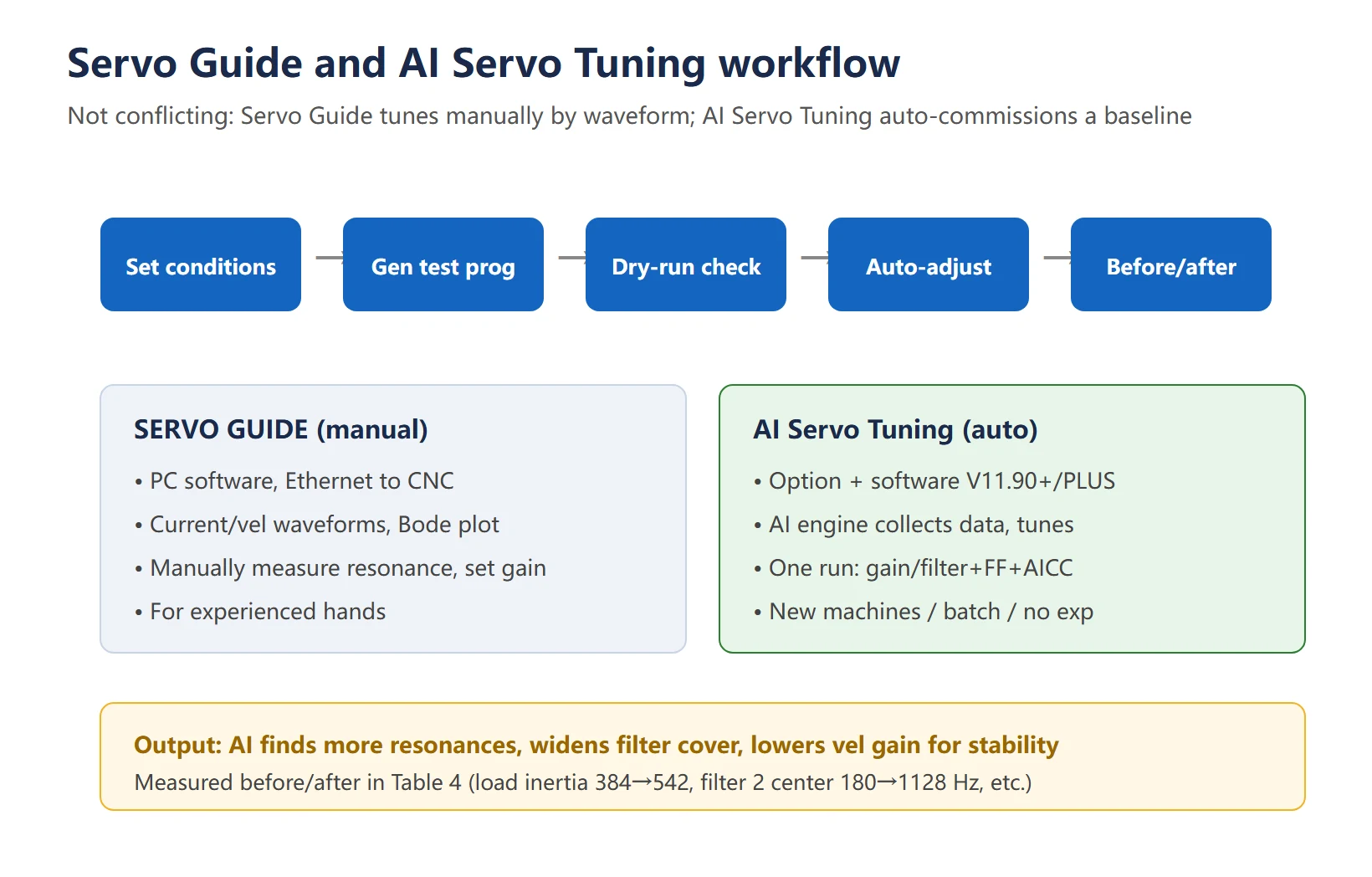
AI Servo Tuning before/after parameter comparison
The table below is a single-axis AI Servo Tuning measured before/after comparison published in Victor Taichung’s technical column — very useful as a reference (“—” means the filter was not enabled before adjustment):
Table 4 AI Servo Tuning measured before/after (source: Victor Taichung technical column, single-axis)
| Parameter | Before | After | Change note |
|---|---|---|---|
| Load inertia ratio | 384 | 542 | Measured and written to 2021; ratio grows |
| Filter 1 center freq (Hz) | 400 | 369 | Resonance re-identified, shifted down |
| Filter 1 bandwidth (Hz) | 200 | 365 | Bandwidth widened |
| Filter 1 attenuation (%) | 15 | 2 | Attenuation shallowed |
| Filter 2 center freq (Hz) | 180 | 1128 | High-frequency resonance identified |
| Filter 2 bandwidth (Hz) | 30 | 949 | Greatly widened |
| Filter 2 attenuation (%) | 60 | 21 | Attenuation shallowed |
| Filter 3 center freq (Hz) | — | 2689 | Third filter added |
| Filter 3 bandwidth (Hz) | — | 702 | Added |
| Filter 3 attenuation (%) | — | 10 | Added |
| HRV speed gain rate (%) | 350 | 138 | Gain reduced for stability |
| Speed gain rate during cutting (%) | 150 | 100 | Gain reduced |
The logic is clear: AI adjustment identifies more resonance points, widens filter coverage, and reduces the velocity-loop gain rate to buy stability. It is not “blindly raising gain” — in many cases it is lower gain + wider filters to kill vibration.
Measured value deviating >30% from theory means a mechanical problem
The hand-calculated theoretical value and the measured value from Servo Guide / auto-measurement: if the deviation exceeds 30%, it is almost never a tuning problem — the mechanics are signaling. This rule is extremely handy on site:
![图片[4]-FANUC Inertia Ratio: Hand Calculation, Parameter 2021, Servo Guide and AI Servo Tuning-CNCShare | 数控电气技术中心](https://www.cncshare.com/wp-content/uploads/2026/10/fanuc-inertia-deviation-mechanical-fault-en.webp) Table 5 Deviation pattern → mechanical fault map
Table 5 Deviation pattern → mechanical fault map
| Deviation pattern | Possible mechanical cause | What to check |
|---|---|---|
| Large deviation, fluctuating often | Coupling loose / ball-screw nut backlash excessive | Re-tighten coupling, check preload |
| Large at low speed, normal at high speed | Uneven rail friction coefficient | Check grease type (NLGI 2 lithium recommended), clean rails |
| Large and stable overall | Actual load heavier than estimated (fixture/workpiece) or undersized motor | Re-estimate load, consider bigger-rotor motor |
| Measured with brake not fully released | Brake release current insufficient, motor runs dragging brake | Measure brake supply voltage within spec |
| Measured not unloaded | Workpiece / fixture included in measurement | Re-measure unloaded, table at center, standard speed |
One line: rule out mechanics before tuning (coupling / rails / backlash / clamping) — “servo won’t tune” is eighty percent a mechanical problem, not a parameter problem.
How to set the notch filter manually (first correcting a common misconception)
Online, 2040 / 2041 are often called the servo notch filter, but in the 16i parameter manual 2040 / 2041 are actually “current-loop gain when the motor is stopped” items (to kill idle noise) — not a notch filter. The servo vibration-suppression filter (also called notch / resonance filter) is a separate parameter group in FANUC, and the numbers vary by series:
- 0i / 16i / 18i / 21i: commonly 2113 (center frequency) / 2117 (bandwidth) / 2359–2368 (attenuation etc., HRV-related);
- 0i-F / 30i: another suppression-filter group (check the manual);
- Spindle notch is the 4048–4055 block (torque-command path), not the same as the feed axis.
Manual setup steps:
- Measure the mechanical resonance frequency with Servo Guide (FFT, look at the TCMD torque-command peak);
- Set center frequency = resonance frequency; note that if resonance < 200 Hz, the suppression filter is generally not used (per manual);
- Set bandwidth (40 if center frequency ≥ 600 Hz, else 30) and attenuation depth;
- Re-trace and confirm the peak is suppressed by ≥ 20 dB; if a second resonance appears, add the second filter group.
Table 6 Servo vibration-suppression filter parameter map (numbers vary by series; check your manual)
| Series | Center-freq param | Bandwidth param | Attenuation / damping | Note |
|---|---|---|---|---|
| 0i / 16i / 18i / 21i | 2113 | 2117 | 2359–2368 (HRV) | Classic servo suppression filter |
| 0i-F / 30i | Suppression filter group (check manual) | same group | same group | HRV5 / servo HRV |
| Spindle (30i / 31i) | 4048 | 4052 (Q/bandwidth) | 4048–4055 block | Torque-command path, differs from feed axis |
Remember: 2040 / 2041 are current-loop “motor idle noise” parameters, not notch filters — don’t copy web posts. For how to measure resonance and coordinate gain, see CNC servo vibration, overshoot and noise.
FAQ
What is a normal FANUC inertia ratio?
Generally JL/JM ≤ 10× is considered good and ≤ 5× excellent; above 15–30× the load inertia far exceeds the motor, giving sluggish response, easy vibration or servo alarms — reduce the load, optimize mechanics, or use a bigger-rotor motor. Axes differ greatly: rotary tables and large chucks easily reach tens or hundreds of times, which is normal by design; what matters is whether the system can drive it stably, not chasing a small number.
Why is my inertia ratio measurement inaccurate?
Mostly not a parameter issue but a mechanical or measurement-condition issue: ① coupling loose / ball-screw nut backlash excessive → large and fluctuating deviation; ② uneven rail friction → large at low speed, normal at high; ③ brake not fully released, motor running dragging the brake → uneven at low speed; ④ workpiece / fixture included in the measurement, not unloaded; ⑤ wrong trigger parameter for auto-measurement (varies by series). Rule out mechanics before tuning.
Is AI Servo Tuning better than manual gain tuning?
They are not in conflict. AI Servo Tuning (requires option + SERVO GUIDE PLUS / AI Servo Tuning software) suits new-machine commissioning, batch replication, and quickly getting a usable parameter set without experience, and auto-handles filters and AICC; manual fine-tuning (FANUC servo gain 2021 / 1825 adjustment) suits veterans squeezing accuracy for specific jobs. Recommended: let AI produce a baseline, then fine-tune 2021 / 1825 by actual machining feel. For vibration/overshoot, also see CNC servo vibration diagnosis.
Last updated: 2026-10-23























暂无评论内容