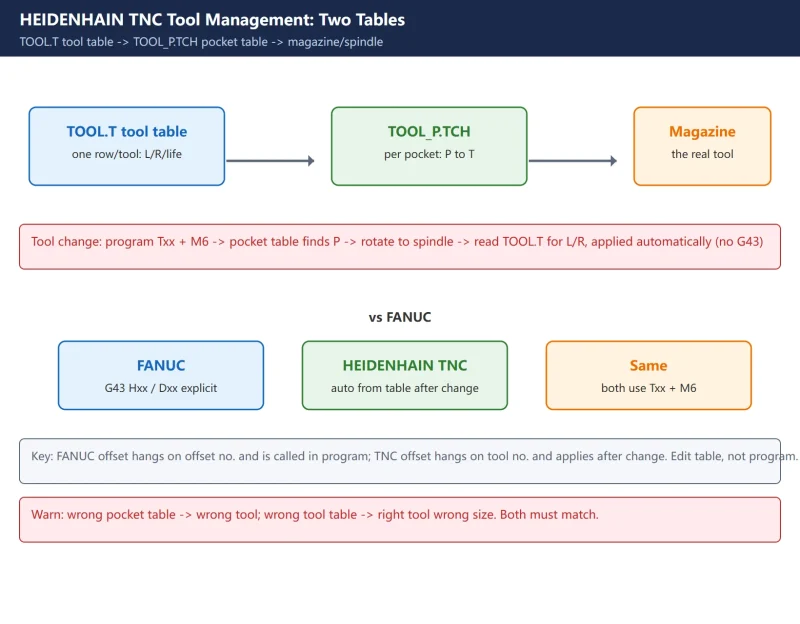



Many engineers moving from FANUC to HEIDENHAIN (TNC) get stuck at the very first hurdle: “where do I set the tool offset?” On FANUC you write G43 Hxx for length and Dxx with G41/G42 for radius. TNC is different – it keeps every tool’s geometry (length L, radius R, type, life) in a tool table TOOL.T, and “which tool sits in which magazine pocket” in a separate pocket table TOOL_P.TCH. The control applies the offsets automatically; in the program you only write Txx + M6 to change the tool.
This article follows the two-table mechanism shared across TNC 320 / 620 / 640 / iTNC 530 / TNC7. Exact soft-key names and how tool-life monitoring is triggered vary slightly by version – those points are flagged, so check your machine’s manual before acting.
One line: tool geometry lives in TOOL.T (one row per tool); magazine positions live in TOOL_P.TCH (one row per pocket, P0 is always the spindle); the program calls
T number + M6, and length/radius compensation is taken automatically from TOOL.T – no G43 needed.
1. What TNC Tool Management Is (vs the FANUC approach)
TNC’s tool management is “data-driven”: all tool info lives in two tables, and both the program and the PLC read those tables, instead of hard-coding offset values into every block.
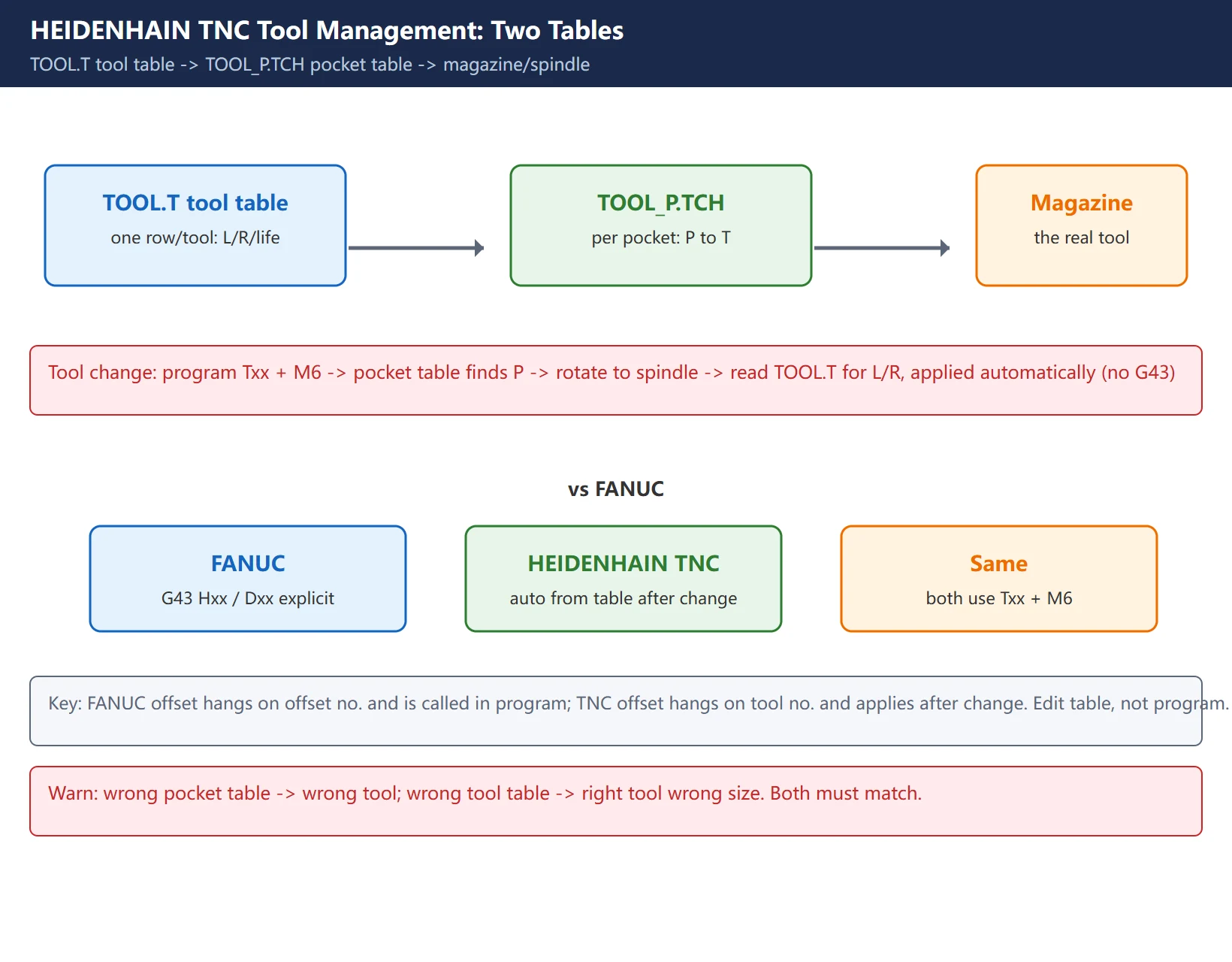
| Item | FANUC | HEIDENHAIN TNC |
|---|---|---|
| Length comp | G43 Hxx + offset no. | control reads L from TOOL.T automatically |
| Radius comp | Dxx + G41/G42 | control reads R from TOOL.T automatically |
| Magazine position | parameters / PLC | TOOL_P.TCH pocket table (P to T) |
| Tool change | Txx M6 | Txx M6 (same) |
The key difference: on FANUC the offset hangs on an offset number and is called explicitly in the program; on TNC the offset hangs on the tool number and takes effect automatically after the tool is changed. So if you edit a tool’s L in TOOL.T, the next time that tool is mounted the new value is used.
2. The Two Core Tables: TOOL.T and TOOL_P.TCH
Both tables normally live in the TNC:\TABLE\ directory (the path can vary slightly by version; older controls name the tool table TOOL.T and the pocket table TOOL_P.TCH; TNC7 keeps the manual name tool_p.tch).
- TOOL.T (tool table): one row per tool, holding that tool’s geometry and life data. Row 0 is usually a placeholder (do not delete row 0, or the table structure breaks).
- TOOL_P.TCH (pocket / magazine table): one row per pocket, holding “which tool (T) is in which pocket (P)” plus whether the pocket is disabled, fixed, or reserved.
How they relate: on a tool change the control first looks up in TOOL_P.TCH “which pocket P holds target tool T”, rotates the magazine to bring that tool to the spindle, then reads L/R for that tool from TOOL.T. A wrong pocket table means the wrong tool is fetched; a wrong tool table means the right tool but with wrong dimensions.
3. What to Fill in TOOL.T (L / R / Type / Life)
In TOOL.T, at minimum fill these kinds of data per tool (column names vary slightly by version, meaning is the same):
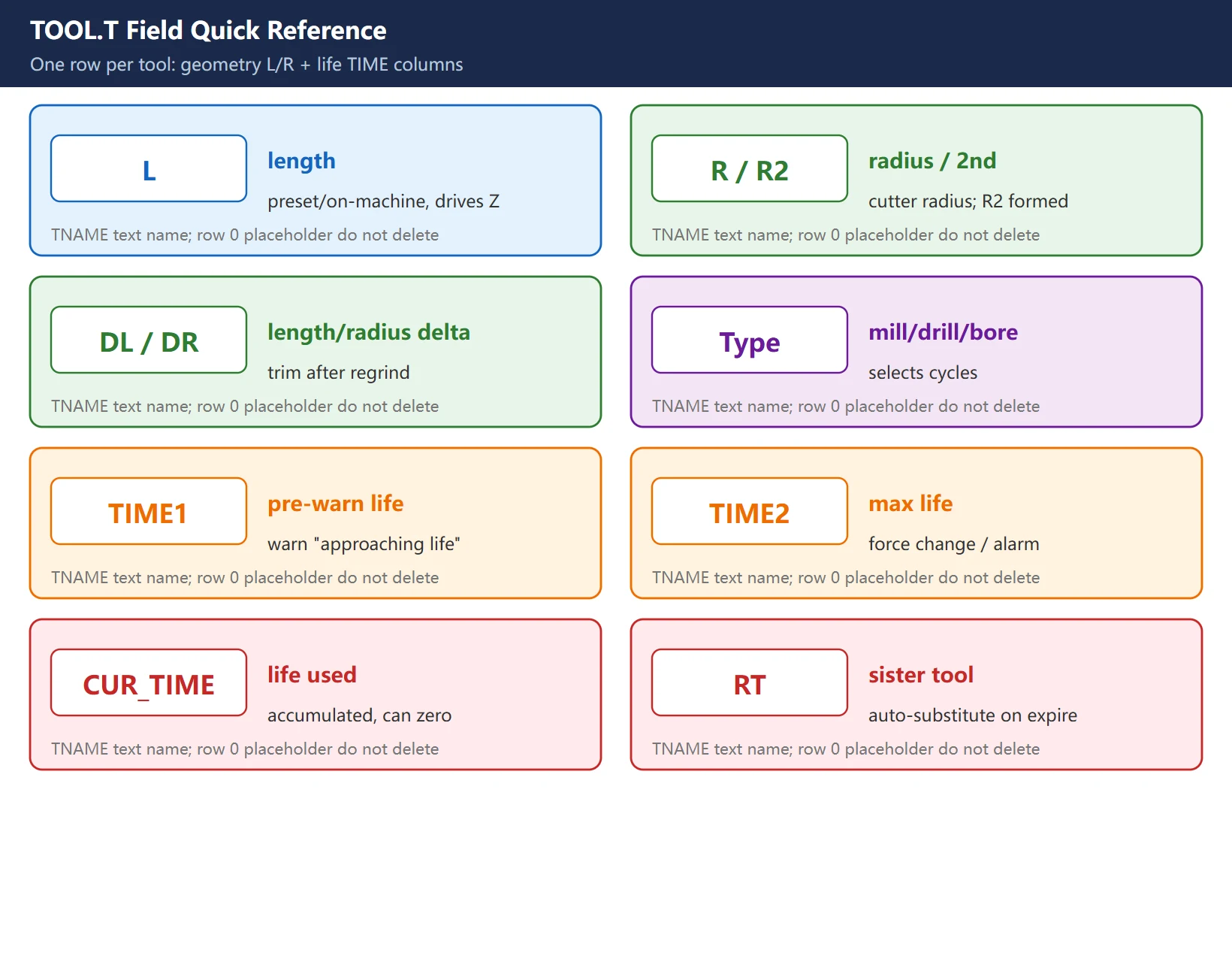
Table 1: Common TOOL.T fields
| Field | Meaning | Shop-floor note |
|---|---|---|
| T / row | tool number | what Txx in the program calls |
| TNAME | tool name | text, for identification |
| L | length | measured by presetter or on-machine; drives Z comp |
| R / R2 | radius / 2nd radius | cutter radius; R2 for formed tools (e.g. lollipop) |
| DL / DR | length / radius delta | trim after regrind, added onto L/R |
| Type | mill / drill / bore… | selects available cycles |
| TIME1 | pre-warn life | “approaching life” at this value |
| TIME2 | max life | force change / alarm at this value |
| CUR_TIME | life used | accumulated by control, can be zeroed |
| RT | replacement (sister) | tool auto-substituted when this one expires |
Filling tips: L and R must match the real tool (a presetter is most reliable); step/formed tools use R2, DL/DR; for life management fill TIME1/TIME2 and set RT to a backup tool.
4. How Length L and Radius R Compensation Take Effect (no G43)
This is the biggest difference from FANUC and must be clear:
- TNC has no
G43. After a tool change (Txx M6), the control automatically applies that tool’s L as length compensation and R as radius compensation to the current machining. - Just program the contour and depth normally; tool-length and tool-radius correction come from the tool table – to change an offset you edit the table, not the program.
- The side of radius compensation (left/right) is still set in the program by
RL(left, like G41) /RR(right, like G42), but the amount comes from R.
Experience: if “the whole size is off by one tool length” or “the side leaves wrong stock”, first check whether L/R for that tool in TOOL.T is wrong or overwritten with 0 – not the Z value in the program. On TNC, ~90% of “wrong offset” cases are a wrong table entry, not a wrong program.
5. Editing the Pocket Table TOOL_P.TCH (P↔T, P0 = spindle)
TOOL_P.TCH decides “which tool is in which magazine pocket”. Core columns per row: P (pocket no.), T (tool no.), TNAME (tool name), plus status bits: RSV (reserved pocket), ST (special/oversize tool), F (fixed pocket).
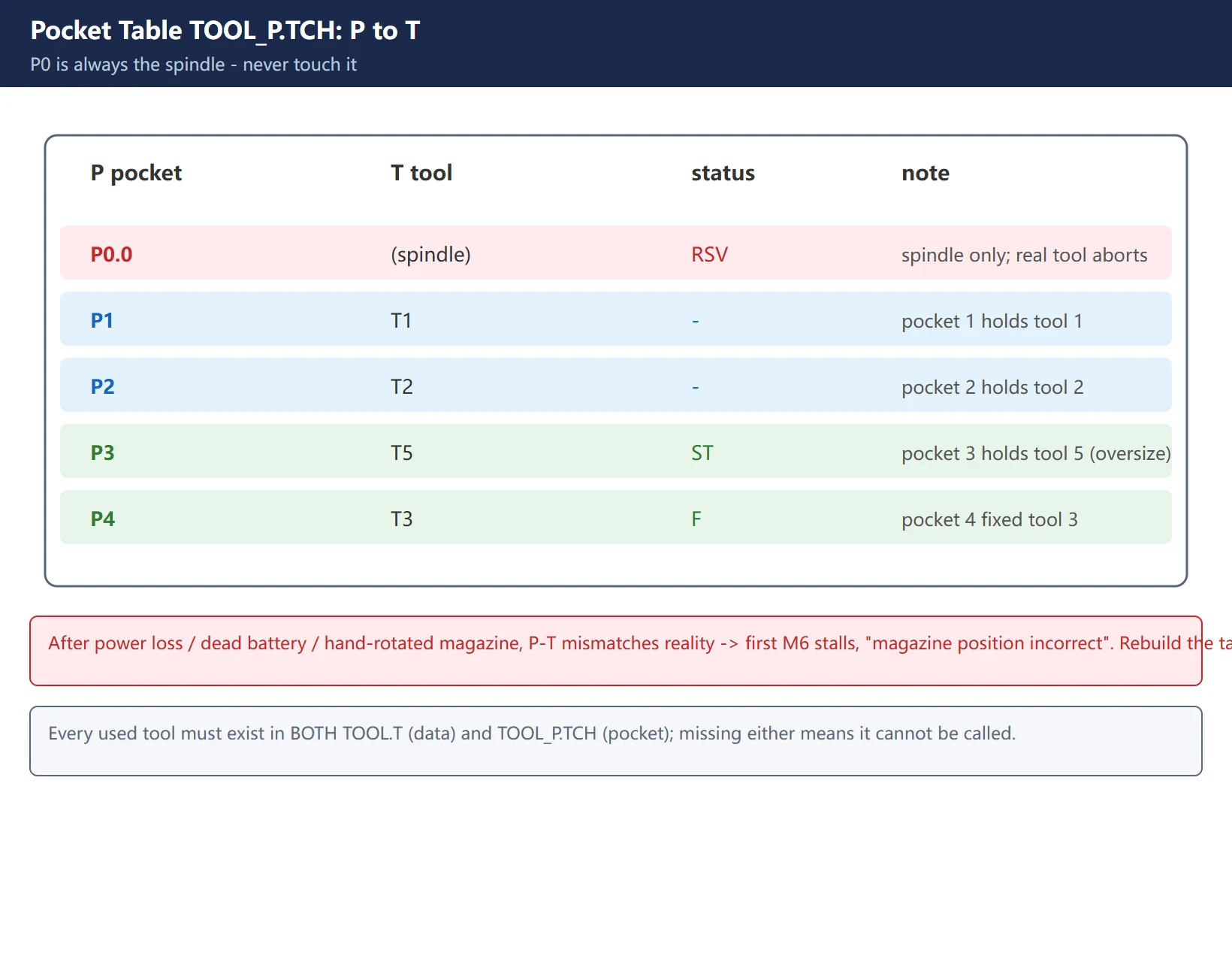
Key rules:
- P0.0 is always the spindle position, not a magazine pocket. Writing a real magazine tool into P0 breaks the “spindle-clear” logic and aborts the next tool change immediately – never touch P0.
- Every tool you want to use must exist in BOTH TOOL.T (its data) and TOOL_P.TCH (its pocket); missing either means it cannot be called.
- If the machine lost power, the buffer battery died, or the magazine was rotated by hand, the P↔T in the pocket table no longer matches physical reality, and the first
M6stalls mid-rotation with “magazine position incorrect / tool change impossible”.
6. Tool Life Management (TIME1 / TIME2 / CUR_TIME, warn & force change)
TNC reserves life columns right inside TOOL.T – no extra option needed:
- TIME1 (pre-warn life): when used life
CUR_TIMEreaches it, the control warns “tool approaching life” so you can plan a change, but it is not forced. - TIME2 (max life): when reached, the control forces a tool change (or alarms) to avoid using a dull tool.
- CUR_TIME (used): accumulated by the control by machining time/count, can be zeroed on the table to restart.
- RT (replacement): when this tool expires, the control can auto-substitute this backup tool to cut downtime.
Exactly “how to start life monitoring and make it warn/force” differs by TNC version (some use a “tool life” soft key, some use Q parameters or a dedicated cycle). Follow your machine’s TNC-version tool-life manual for that part – this article only explains the field meanings and does not invent specific cycle numbers.
7. Calling a Tool in the Program + Field: tool_p.tch unreadable / not taking effect
To call a tool in the program, write Txx (select tool, xx = the tool number in TOOL.T) together with M6 (execute the change, bringing the tool to the spindle). After the change L/R apply automatically; just run the contour.
![图片[4]-How HEIDENHAIN TNC Tool Management Works - tool_p.tch Pocket Table + TOOL.T Tool Table + L/R Compensation + Tool Life-CNCShare | 数控电气技术中心](https://www.cncshare.com/wp-content/uploads/2026/10/HT-en-04.webp)
TNC:\TABLE\ with the correct name; on some versions you must “save / exit” for changes to take effect, and ending with END mid-edit loses them. Also the PLC has a “tool ready” flag – if the table changed but the PLC has not re-synced, the first M6 can also be rejected.Frequently Asked Questions
What is the difference between tool_p.tch and TOOL.T?
TOOL.T is the tool table, one row per tool, holding that tool’s own geometry and life data (L length, R radius, type, TIME1/TIME2 life, etc.). TOOL_P.TCH is the pocket table (magazine table), one row per pocket, holding “which tool is in which pocket” (P to T mapping) and pocket status. Simply: TOOL.T answers “what does this tool look like”, TOOL_P.TCH answers “where in the magazine is this tool”. On a tool change the control first looks up the pocket in the pocket table, then reads the dimensions from the tool table.
How do I set tool length and radius compensation on TNC (do I write G43)?
No G43. TNC has no G43/H scheme – after a tool change (Txx M6) the control automatically applies that tool’s L as length compensation and R as radius compensation to machining; just program the contour and depth normally. The left/right side of radius compensation is set by RL (left) / RR (right), and the amount comes from R. So to change an offset you edit the value in TOOL.T, not the program. If the whole size is off by one tool length, first check whether L/R for that tool in TOOL.T is wrong.
Pocket table edited but machine won’t accept it / tool_p.tch unreadable?
Unreadable usually means the NCK buffer battery failed or power was lost, the pocket table’s volatile mirror is gone, and the magazine initialized empty – replace the buffer battery with the control powered on, then rebuild TOOL_P.TCH in edit mode so P↔T matches the physical magazine. If edits don’t take: check you edited in the correct mode (EDITING soft key ON) and saved/exited properly, the file is in TNC:\TABLE\ with the right name, and the PLC “tool ready” flag re-synced (a table change can make the first M6 reject until the PLC re-syncs). P0 is always the spindle – never write a real tool into P0.
Last updated: 2026-10-29
Where to go next
- FANUC Troubleshooting — the full guide library: alarms, diagnosis numbers, servo, spindle, PMC and electrical faults, organised by symptom.
- CNC Repair Tools — which instrument measures what: multimeters, clamp meters, insulation testers and oscilloscopes, with the specification that actually matters.
- Remote Technical Support — have the readings reviewed with you: alarm reverse lookup, PMC ladder analysis and servo tuning advice by call. Repair companies and integrators welcome.
Read the guide, get the right instrument, or walk the diagnosis through with someone — pick whichever you need.
The original Chinese version — same procedure, with the full field notes.























暂无评论内容