


The worst moment in Fanuc PMC programming is not the moment you make a mistake. It is the moment you discover, three weeks later, that the backup you carefully made does not contain the thing you need to restore the machine.
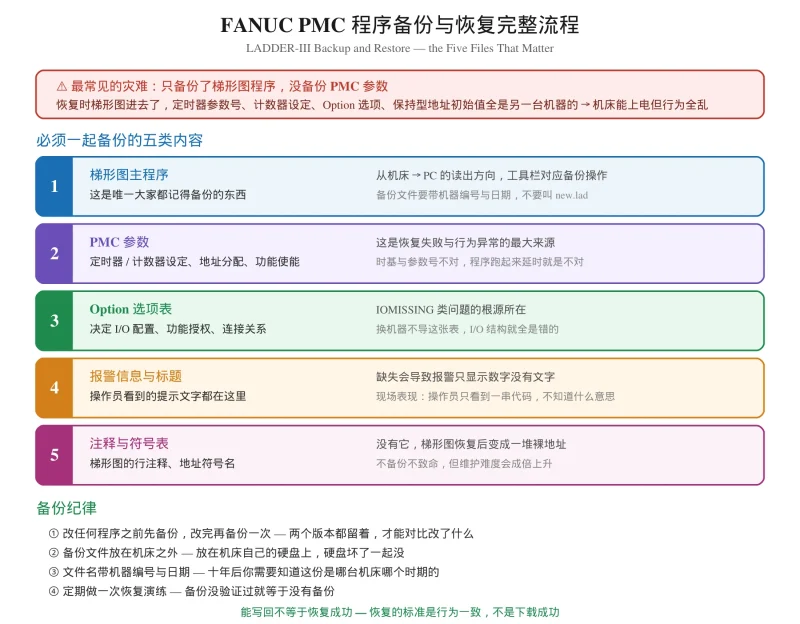
Most engineers working in Fanuc Ladder III back up only the ladder diagram. The ladder diagram is not the program. It is one part of it, and on a machine with customised timers, alarms or I/O configuration, restoring the ladder alone can leave you with a control that powers up, accepts every command, and behaves completely differently from the one you left.
There is one specific failure in this area that almost nobody writes about online. Engineers hit an IOMISSING message when writing a program back to a machine, and there is very little practical guidance available. FANUC PMC programming 里最容易出事的就是这一段。This article covers both the routine you should be following anyway, and what to do when the write fails.
用 FANUC Ladder III 做发那科梯形图 的备份,不是”把梯形图存一下”这么简单。本文讲清 PMC 程序到底由哪几部分组成、备份要导哪些文件、恢复的完整步骤,以及 IOMISSING 这类写入失败该怎么查。
What a PMC Program Actually Consists Of
This is the concept that makes the rest of this article obvious, and it is where most backup routines go wrong.
A PMC program is not a single file. It is a set of interlocking parts, and each one has to come from the same machine to make sense:
| Component | What it holds | Consequence if missing |
|---|---|---|
| Ladder program | The logic itself — rungs, coils, instructions | The obvious one |
| PMC parameters | Timer and counter settings, address allocation, function enables | Timers run at the wrong speed, counters start from the wrong place |
| Option table | I/O configuration, function authorisation, connection relationships | I/O structure is wrong; writes may be refused |
| Alarm messages | The text an operator sees on screen | Alarms display a number with no explanation |
| Comments and symbol table | Rung comments, address names | The program becomes an unreadable wall of raw addresses |
Two of these deserve particular attention.
PMC parameters are not optional. In a TMR instruction the preset value in the ladder is not a time — real delay equals preset value multiplied by the time base, and the time base lives in the parameters. Restore the ladder onto a machine whose parameters are at default and every timer in that program now runs differently. The ladder looks perfect and behaves wrong, which is the hardest kind of fault to diagnose.
The Option table defines the I/O structure. This is the part most often forgotten, and it is the direct cause of the IOMISSING problem described later in this article.
Backup Routine: What to Do Before You Change Anything
The sequence
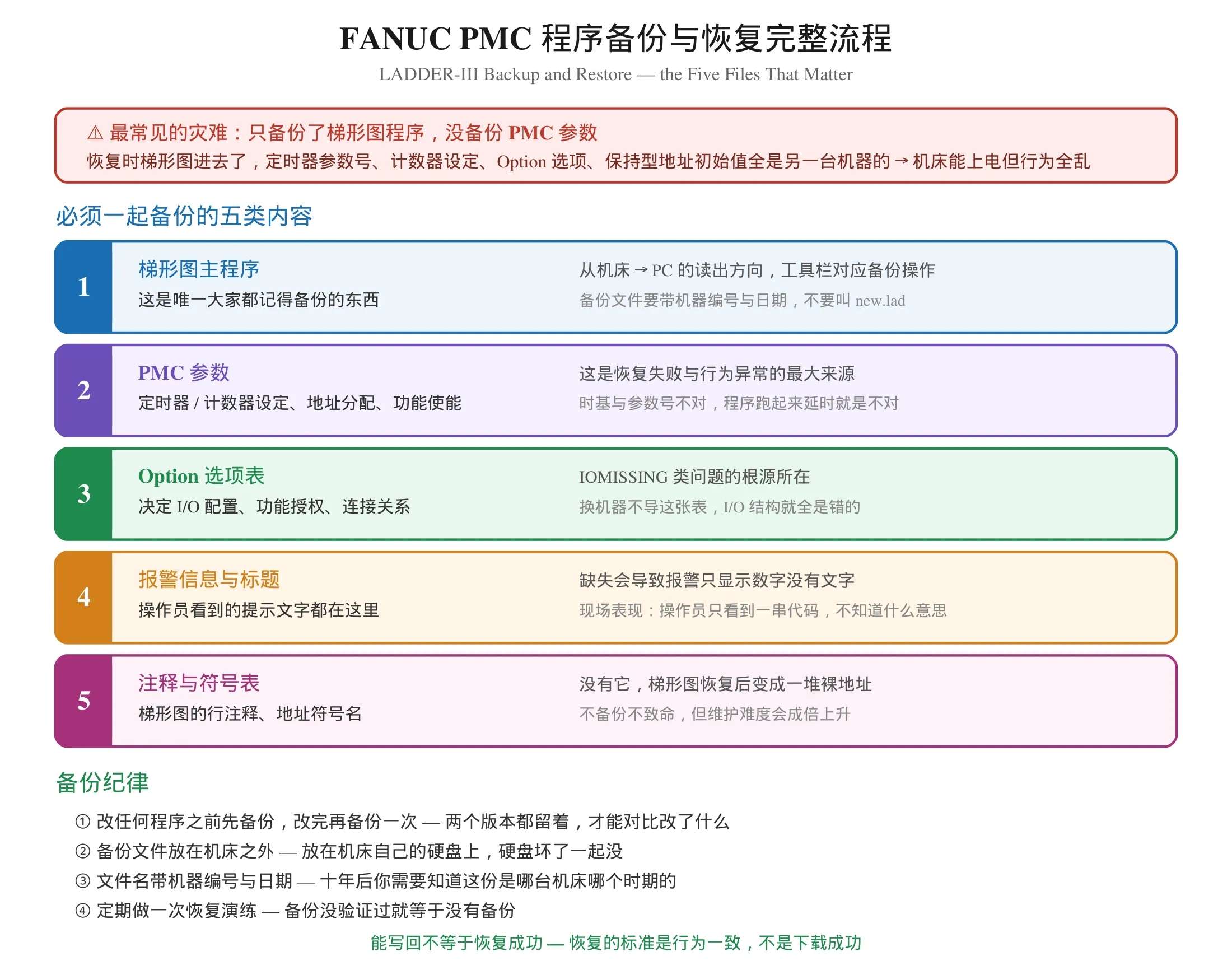
用 FANUC Ladder III 从机床读出的内容,才是真正的备份。Before any edit — back up everything. Not just the ladder. All five components listed above.
After a successful edit and verification — back up again. Keep both versions. Being able to diff the before and after is the fastest way to understand what your change actually did, and it is the only reliable record of what the machine was doing before you touched it.
Where the files go
Store backups outside the machine. A backup on the same drive that failed is not a backup. External media, a network share, or a version-controlled repository — anything that survives the loss of the control.
发那科 PMC 调试 的现场记录里,Name files with the machine identifier and the date. In ten years you will need to know which machine this came from and what period it reflects. A file called new.lad tells you nothing.
这套流程对 PMC 梯形图编程 的日常维护同样适用。Do a restore drill periodically. A backup you have never restored from is a hypothesis, not a safety net. Once or twice a year, restore one into Ladder-III and confirm it opens and reads correctly.
One rule that covers most situations
If someone hands you a ladder file and says “put this on the machine”, the correct first question is: which machine did this come from, and does the target have the same PMC model? Fanuc ladder diagram 逻辑可以移植,资源不能假定一致 — timer counts, address ranges and function availability all depend on the PMC model rather than the CNC model. Our article on cross-model migration covers this in detail.
Restore: The Correct Order
Restoring is not the reverse of backing up, and the order matters.
Step 1 — confirm the machine model matches
这一步决定后面所有操作成不成立。
Compare the source and target PMC models before doing anything. If they differ, stop and read the cross-model migration guidance first. Forcing a program across incompatible PMC models can produce exactly the I/O mismatch failure described below.
Step 2 — read the Option table from the target machine first
This is the step people skip, and skipping it is what causes IOMISSING.
When you restore a ladder program onto a machine, the software reads the target’s I/O configuration. If the structure in the incoming file does not match what the target reports, the write is refused. The message you will see in this situation is commonly reported as IOMISSING, or an I/O structure mismatch error.
The correct sequence:
- Read the Option table from the target machine and save it separately
- Read the ladder program from the target machine so the software is working with the target’s own I/O structure
- Now open the file you want to restore
- Write it back
Step 3 — write the ladder, then the parameters
Downloading the ladder is only half the job. The PMC parameters need to be written separately, and they need to come from the same backup set. A machine running a restored ladder with default parameters will work and will not behave like the original.
Step 4 — write the alarm messages
Without these, operators see bare numbers. This does not affect machine behaviour, but it destroys the machine’s usability: an operator who cannot read the alarm cannot respond to it correctly.
Step 5 — power cycle
Some content only takes effect on the next power-up. Do not judge the restore until the machine has been restarted.
IOMISSING and Other Write Failures
Four failure modes account for most failed restores. Each has a distinct cause and a distinct fix.
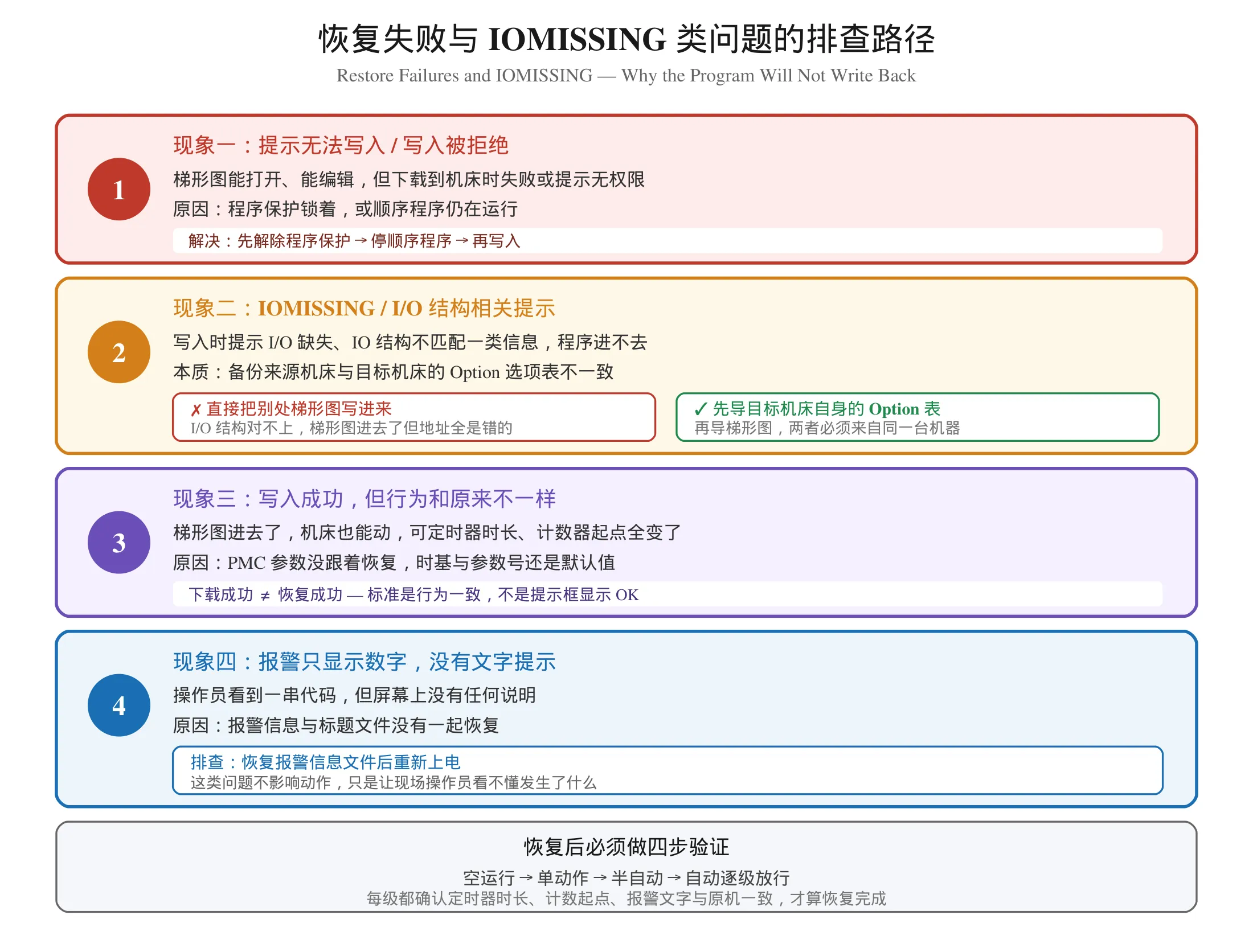
Failure 1 — the write is refused outright
Symptom: the ladder opens and edits fine, but downloading fails, or reports insufficient permission.
Cause: program protection, or the sequential program is still running.
Fix: release the program protection, stop the sequential program, then write. Note the distinction that trips people up: program protection controls your right to edit the source, while the PMC stop permit controls whether the running program will accept a write. A machine that lets you see the program but not save it is protected, not faulty. We covered the four ways to release this in detail.
Failure 2 — IOMISSING and I/O structure mismatches
Symptom: a message referring to missing or mismatched I/O during the write; the program will not go in.
Cause: the Option table in the file you are restoring does not match the target machine’s actual I/O configuration.
Why it happens in practice: the backup was taken from a different machine, or from the same machine before an I/O configuration change. It also occurs when someone edits the Option table by hand — it looks like a normal table and nobody realises it is authoritative.
Fix: read the target’s current Option table, read the target’s current ladder, then re-open the restore file and write it. If the backup is genuinely from a different machine, the Option table must be reconciled first — this is a configuration task, not a file-copy task, and it must be checked against the machine’s actual wiring.
Failure 3 — the write succeeds but behaviour differs
Symptom: the program is in, the machine runs, but timer durations and counter starting values are different from before.
Cause: PMC parameters were not restored. Time bases and parameter numbers are still at defaults.
Fix: restore the parameter set from the same backup, then power cycle and verify timing against the original machine’s values.
This is the failure mode most likely to be missed, because download success is not restore success. The standard for a completed restore is identical behaviour, not a success message.
Failure 4 — alarms show numbers with no text
Symptom: the operator sees a code and no explanation.
Cause: the alarm message file was not part of the restore.
Fix: restore the alarm message content and power cycle. Behaviour is unaffected; only the operator’s ability to respond is.
Verification After Any Restore
Do not release the machine on the strength of a successful download.
Work through the levels in order, and at each one confirm the machine behaves like the original:
- Dry run — all axes through full travel
- Single block — step the sequence that matters
- Semi-automatic — one monitored cycle
- Automatic — several consecutive cycles
Specifically compare against the backup: timer durations, counter starting values, alarm text, interlock behaviour, and any address that carries a retentive value. If the machine has retentive addresses in the logic you restored, verify again after a power cycle, since those addresses carry their pre-shutdown state through startup.
A restored program on a different machine is a port, not a restore
One last distinction worth stating plainly. Restoring the same program back to the same machine is safe and predictable. Writing a program from machine A onto machine B is a port, and it carries all the risks we listed: resource differences, I/O structure differences, timer parameter differences. 对做 FANUC CNC 梯形图 维护的人来说,这一步是整个流程里最需要谨慎的。Treat it with the same care as writing any new program, and build an address cross-reference table before you start.
关于跨机型时哪些资源能假定一致、哪些不能,见 FANUC 0i-MD / 0i-MF PMC 差异对比。
Where to Learn More
If you are building your 发那科梯形图 skills:
- What the PMC is and how the scan cycle works — the foundation
- The address groups — X / Y / F / G / R and what breaks when you mix them up
- FANUC Ladder III operation — compile, decompile, protection and the common pitfalls
- Backup and restore — this article
- Writing — interlock logic and custom alarms
Video walkthroughs start here: 零基础学习发那科 PMC 视频教程全攻略。
Systematic reference material: FANUC PMC 维修学习资料。
For the related protection and editing topics, see our guide to 在线编辑失效与程序保护解除, the walkthrough of LADDER-III 编译、反编译与程序保护, and the list of LADDER-III 编程必踩的坑。
Summary
Backing up a Fanuc PMC program means backing up five components, not one. The ladder is the part everyone remembers; the parameters, the Option table, the alarm messages and the comments are the parts that decide whether a restore actually restores anything.
Two rules carry most of the weight. Read the target’s Option table before restoring a ladder — skipping that is what produces IOMISSING. And judge the restore by behaviour, not by the download message — a program can write successfully and still be wrong.
For 发那科 PMC 调试 而言,养成”改前备份、改后再备份、恢复后四步验证”的习惯,比任何一次具体的修复技巧都更能保护你。
Safety note: restoring a program into a control that is running production equipment is a machine control program change. Stop the machine, verify the backup source matches the target, and confirm every restored parameter against the official manual for that machine. Never restore during a running cycle. After any restore, verify through dry run, single block, semi-automatic and automatic before releasing the machine to production, and never bypass a safety interlock to make a restored program work.
Disclaimer: file names, menu paths and the exact wording of I/O mismatch messages differ between Ladder-III versions and between PMC models. The IOMISSING message discussed here is the form most commonly reported by maintenance engineers; the precise text you will see depends on your software version. Similarly, the set of parameters and Option items varies by PMC model — confirm every value against the official manual for your specific control. This article describes general procedure and does not specify parameter numbers or Option item values.



















暂无评论内容