


一句话答案:LADDER III lets you turn a PMC ladder into executable machine code and back again, but many engineers stall on site with “cannot download” or “cannot edit” because they never separated compile (source → target code) from decompile; this guide explains both processes, why each is required, and how program protection locks your ladder so you can handle the PMC workflow confidently.
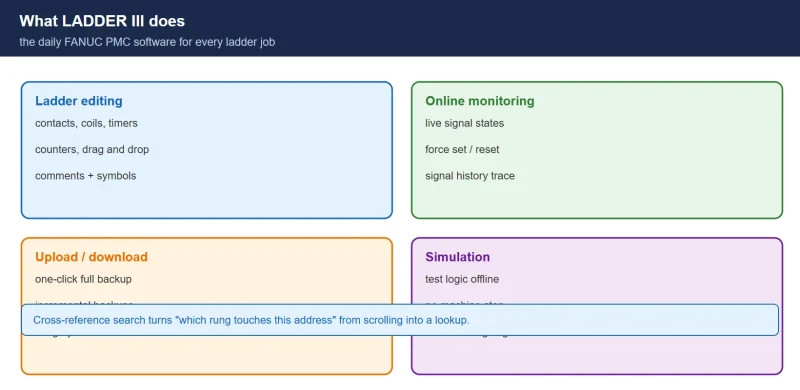
In FANUC CNC maintenance and development, LADDER III is one of the tools engineers use most. Yet many beginners — and even some experienced engineers — never fully grasp the two core concepts of compile and decompile. When they hit a “cannot download” or “cannot edit” error on site, they are at a loss.
This article breaks down the difference between the two processes, why each is necessary, and the basics of program protection, so you can handle the PMC programming workflow with confidence.
1. What Is Compile, and Why Must You Compile?
Simply put, compiling is the process of converting the ladder program you wrote into machine code that the PMC can recognize and execute.
Core definition: compiling converts a source program into target code.
- Source program: the ladder program you see on the computer screen, written in ladder language. It is easy for humans to read, understand and modify.
- Target code: binary machine code made of 0s and 1s — the only instructions the PMC hardware can directly understand and execute.
Why compiling is necessary:
- Prerequisite for execution: the machine’s PMC controller cannot directly run the source program you wrote. Only the target code produced by compiling can be loaded and executed by the PMC to control machine actions.
- Basis of online functions: if you want to use the software’s “online” features (monitoring PMC signal states, modifying timer/counter values, etc.), you must compile first. Without compiling, the software cannot establish a valid communication link with the PMC.
- Required step for program transfer: to download a program you wrote or modified from the computer into the PMC’s RAM, you must complete compiling first. An uncompiled source program cannot be transferred.
In one sentence: compiling is the bridge from “programmer” to “executor” — the key step that turns your design intent into real machine motion.
2. What Is Decompile, and Why Do You Need It?
Decompiling is the reverse process of compiling: it restores machine code back into a human-readable ladder program.
Core definition: decompiling converts target code into a source program.
Why decompiling is necessary: the program files you obtain from these sources are usually in target code format:
- A program uploaded from the machine’s PMC.
- A backup program read from the machine’s ROM (read-only memory).
- A program file copied from a memory card.
These target code files contain the complete control logic, but they are machine code and cannot be edited or printed directly in LADDER III. If you need to modify, analyze, or print/archive them, you must first decompile them back into an editable source program.
In one sentence: decompiling is the bridge from “executor” to “analyzer/modifier” — the necessary path to obtain and modify existing program logic.
3. Program Protection: Put a Lock on Your Work
On the factory floor, the ladder program is the core of machine control and embodies a great deal of engineering effort. To prevent accidental or malicious modification, LADDER III provides a strong program protection function.
- By setting a password, you can encrypt the ladder program.
- Once encrypted, any attempt to open, edit, or upload that program requires the correct password.
- This effectively protects your intellectual property and the stability of machine operation, and prevents production accidents caused by misoperation.
The encrypted program can still be run in the PMC; only the ability to read and edit it in the software is restricted. Keep the password safe — if it is lost, the program cannot be decompiled or edited.
Conclusion
Understanding the principles of compile and decompile is a required course for every FANUC PMC engineer. In short:
- To download or monitor online → compile first.
- To modify or analyze an uploaded program → decompile first.
Master these two core concepts and you will handle programming and maintenance tasks far more calmly, making LADDER III a reliable tool in your hands.
New to PMC? Start with FANUC PMC Ladder Diagram Beginner Tutorial. For on-site fault tracing see FANUC PMC Troubleshooting: 5 Real Cases.
Disclaimer: This article is a personal compilation based on FANUC technical documentation and field experience. Menu names, file formats, and encryption behavior vary by LADDER III version and system model; follow your installed version’s manual. Encryption passwords cannot be recovered if lost — record them securely.
Frequently Asked Questions (FAQ)
1. What is the difference between compile and decompile in FANUC LADDER III?
Compile converts your editable ladder source program into binary target code that the PMC can execute; it is what you do before downloading a program to the machine or using online monitoring. Decompile is the reverse: it converts target code back into an editable ladder source program, which is what you need when you have uploaded a program from the PMC or read it from ROM or a memory card and want to modify, analyze, or print it.
2. Why does LADDER III say “cannot download” or “cannot edit” my program?
Both errors usually come down to compile/decompile state. “Cannot download” typically means the program has not been compiled yet — only target code produced by compiling can be transferred to the PMC’s RAM. “Cannot edit” typically means the program you opened is target code (for example, uploaded from the PMC or read from ROM or a memory card), which must be decompiled into a source program before it can be edited or printed.
3. Where do the target-code program files normally come from?
Three common sources: a program uploaded from the machine’s PMC, a backup program read from the machine’s ROM (read-only memory), and a program file copied from a memory card. All three are typically in binary target code format and must be decompiled before they can be edited or printed in LADDER III.
4. How does LADDER III program protection work?
You can set a password to encrypt the ladder program. Once encrypted, any attempt to open, edit, or upload that program requires the correct password, which protects your intellectual property and machine stability and prevents accidents caused by misoperation. The encrypted program can still run in the PMC; only reading and editing in the software are restricted. Keep the password safe, because a lost password cannot be recovered and the program cannot then be decompiled or edited.
Where to go next
- FANUC Troubleshooting — the full guide library: alarms, diagnosis numbers, servo, spindle, PMC and electrical faults, organised by symptom.
- CNC Repair Tools — which instrument measures what: multimeters, clamp meters, insulation testers and oscilloscopes, with the specification that actually matters.
- Remote Technical Support — have the readings reviewed with you: alarm reverse lookup, PMC ladder analysis and servo tuning advice by call. Repair companies and integrators welcome.
Read the guide, get the right instrument, or walk the diagnosis through with someone — pick whichever you need.
The original Chinese version — same procedure, with the full field notes.




















暂无评论内容